seats Ram 1500 2014 Service Manual
[x] Cancel search | Manufacturer: RAM, Model Year: 2014, Model line: 1500, Model: Ram 1500 2014Pages: 806, PDF Size: 5.78 MB
Page 241 of 806

Center Storage Compartment — If Equipped
The center storage compartment is located between the
driver and passenger seats. The storage compartment
provides an armrest and contains both and upper and
lower storage area.
WARNING!
•This armrest is not a seat. Anyone seated on the
armrest could be seriously injured during vehicle
operation, or a collision. Only use the center seat-
ing position when the armrest is fully upright.
• In a collision, the latch may open if the total weight
of the items stored exceeds about 10 lbs (4.5 kg).
These items could be thrown about endangering
occupants of the vehicle. Items stored should not
exceed a total of 10 lbs (4.5 kg).
Pull on the upper handle on the front of the armrest to
raise the cover. The upper storage area contains a 12 Volt
power outlet that can be used to power small electrical
devices, refer to “Electrical Power Outlets” for further
information.
Center Storage Compartment
3
UNDERSTANDING THE FEATURES OF YOUR VEHICLE 239
Page 243 of 806

Second Row In-Floor Storage Bin — If Equipped
In-floor storage bins are located in front of the second
row seats and can be used for extra storage. The storage
bins have removable liners that can be easily removed for
cleaning.To open in-floor storage bin, lift upward on the handle of
the latch and open the lid.
NOTE:
The front seat may have to be moved forward to
fully open the lid.
In-Floor Storage Bin And LatchOpened Storage Bin
3
UNDERSTANDING THE FEATURES OF YOUR VEHICLE 241
Page 244 of 806
Seatback Storage
Located in the back of both the driver and passenger
front seats are pockets that can be used for storage.
Storage (Regular Cab)
The storage bin is located behind the front seats and runs
the length of the cab.
Drivers Side Seatback StorageStorage Bin
242 UNDERSTANDING THE FEATURES OF YOUR VEHICLE
Page 245 of 806

Storage and Seats (Crew Cab)
The Crew Cab models provide additional storage under
the rear seats. Lift the seats to access the storage com-
partment.
To open the storage compartments, lift upward on the
handle of the latch and open the lid.
CAUTION!
Always lift the storage compartment lids by using
the handle. Failure to lift the lids by using the handle
can result in damage to the lids.
Crew Cab Storage
3
UNDERSTANDING THE FEATURES OF YOUR VEHICLE 243
Page 251 of 806
NOTE:If you are installing a Toolbox, Ladder Rack or
Headache Rack at the front of the Pickup Box, you must
use Mopar Box Reinforcement Brackets that are available
from your authorized dealer.
You can carry wide building materials (sheets of ply-
wood, etc.) by building a raised load floor. Place lumber
across the box in the indentations provided above the
wheel housings and in the bulkhead dividers to form the
floor.
WARNING!
• The pickup box is intended for load carrying pur-
poses only, not for passengers, who should sit in
seats and use seat belts.
(Continued)
WARNING! (Continued)
•Care should always be exercised when operating a
vehicle with unrestrained cargo. Vehicle speeds
may need to be reduced. Severe turns or rough
roads may cause shifting or bouncing of the cargo
that may result in vehicle damage. If wide building
materials are to be frequently carried, the installa-
tion of a support is recommended. This will re-
strain the cargo and transfer the load to the pickup
box floor.
• If you wish to carry more than 600 lbs (272 kg) of
material suspended above the wheelhouse, sup-
ports must be installed to transfer the weight of the
load to the pickup box floor or vehicle damage may
result. The use of proper supports will permit
loading up to the rated payload.
• Unrestrained cargo may be thrown forward in an
accident causing serious or fatal injury.
3
UNDERSTANDING THE FEATURES OF YOUR VEHICLE 249
Page 353 of 806

temperatures are below 40° F (4.4° C). When tempera-
tures are above 80° F (26.7° C), the driver vented seat will
turn on. To make your selection, press the “Auto Heated
Seats” button on the touchscreen, until a check-mark
appears next to the setting, showing that the setting has
been selected. Press the back arrow button on the touch-
screen to return to the previous menu.
Engine Off Options
After pressing the Engine Off Options soft-key the fol-
lowing settings will be available.
•Easy Exit Seats
When this feature is selected, the Driver ’s seat will
automatically move rearward once the engine is shut off.
To make your selection, touch the Easy Exit Seats soft-
key, until a check-mark appears next to setting, showing
that setting has been selected. Touch the back arrow
soft-key to return to the previous menu. •
Engine Off Power Delay
When this feature is selected, the power window
switches, radio, Uconnect® phone system (if equipped),
DVD video system (if equipped), power sunroof (if
equipped), and power outlets will remain active for up to
10 minutes after the ignition is cycled to OFF. Opening
either front door will cancel this feature. To change the
Engine Off Power Delay status touch the 0 seconds, 45
seconds, 5 minutes or 10 minutes soft-key. Then touch the
arrow back soft-key.
• Headlight Off Delay
When this feature is selected, the driver can choose to
have the headlights remain on for 0, 30, 60, or 90 seconds
when exiting the vehicle. To change the Headlight Off
Delay status touch the + or - soft-key to select your
desired time interval. Touch the back arrow soft-key to
return to the previous menu.
4
UNDERSTANDING YOUR INSTRUMENT PANEL 351
Page 730 of 806
CAUTION!
Do not use scouring pads, steel wool, a bristle brush,
or metal polishes. Do not use oven cleaner. These
products may damage the wheel’s protective finish.
Avoid automatic car washes that use acidic solutions
or harsh brushes that may damage the wheel’s pro-
tective finish. Only MOPAR® Wheel Cleaner or
equivalent is recommended.
Stain Repel Fabric Cleaning Procedure — If
Equipped
Stain Repel seats may be cleaned in the following man-
ner:
•Remove as much of the stain as possible by blotting
with a clean, dry towel.
• Blot any remaining stain with a clean, damp towel. •
For tough stains, apply MOPAR® Total Clean, or a
mild soap solution to a clean, damp cloth and remove
stain. Use a fresh, damp towel to remove soap residue.
• For grease stains, apply MOPAR® Multi-Purpose
Cleaner to a clean, damp cloth and remove stain. Use
a fresh, damp towel to remove soap residue.
• Do not use any harsh solvents or any other form of
protectants on Stain Repel products.
Interior Care
Use MOPAR® Total Clean to clean fabric upholstery and
carpeting.
Use MOPAR® Total Clean to clean vinyl upholstery.
MOPAR® Total Clean is specifically recommended for
leather upholstery.
Your leather upholstery can be best preserved by regular
cleaning with a damp soft cloth. Small particles of dirt
728 MAINTAINING YOUR VEHICLE
Page 731 of 806
can act as an abrasive and damage the leather upholstery
and should be removed promptly with a damp cloth.
Stubborn soils can be removed easily with a soft cloth
and MOPAR® Total Clean. Care should be taken to avoid
soaking your leather upholstery with any liquid. Please
do not use polishes, oils, cleaning fluids, solvents, deter-
gents, or ammonia-based cleaners to clean your leather
upholstery. Application of a leather conditioner is not
required to maintain the original condition.
WARNING!
Do not use volatile solvents for cleaning purposes.
Many are potentially flammable, and if used in
closed areas they may cause respiratory harm.
CAUTION!
Do not use Alcohol and Alcohol-based and/or Keton
based cleaning products to clean leather seats, as
damage to the seat may result.
Cleaning Headlights
Your vehicle is equipped with plastic headlights and fog
lights that are lighter and less susceptible to stone break-
age than glass headlights.
Plastic is not as scratch resistant as glass and therefore
different lens cleaning procedures must be followed.
To minimize the possibility of scratching the lenses and
reducing light output, avoid wiping with a dry cloth. To
remove road dirt, wash with a mild soap solution fol-
lowed by rinsing.
Do not use abrasive cleaning components, solvents, steel
wool or other aggressive material to clean the lenses.
7
MAINTAINING YOUR VEHICLE 729
Page 743 of 806
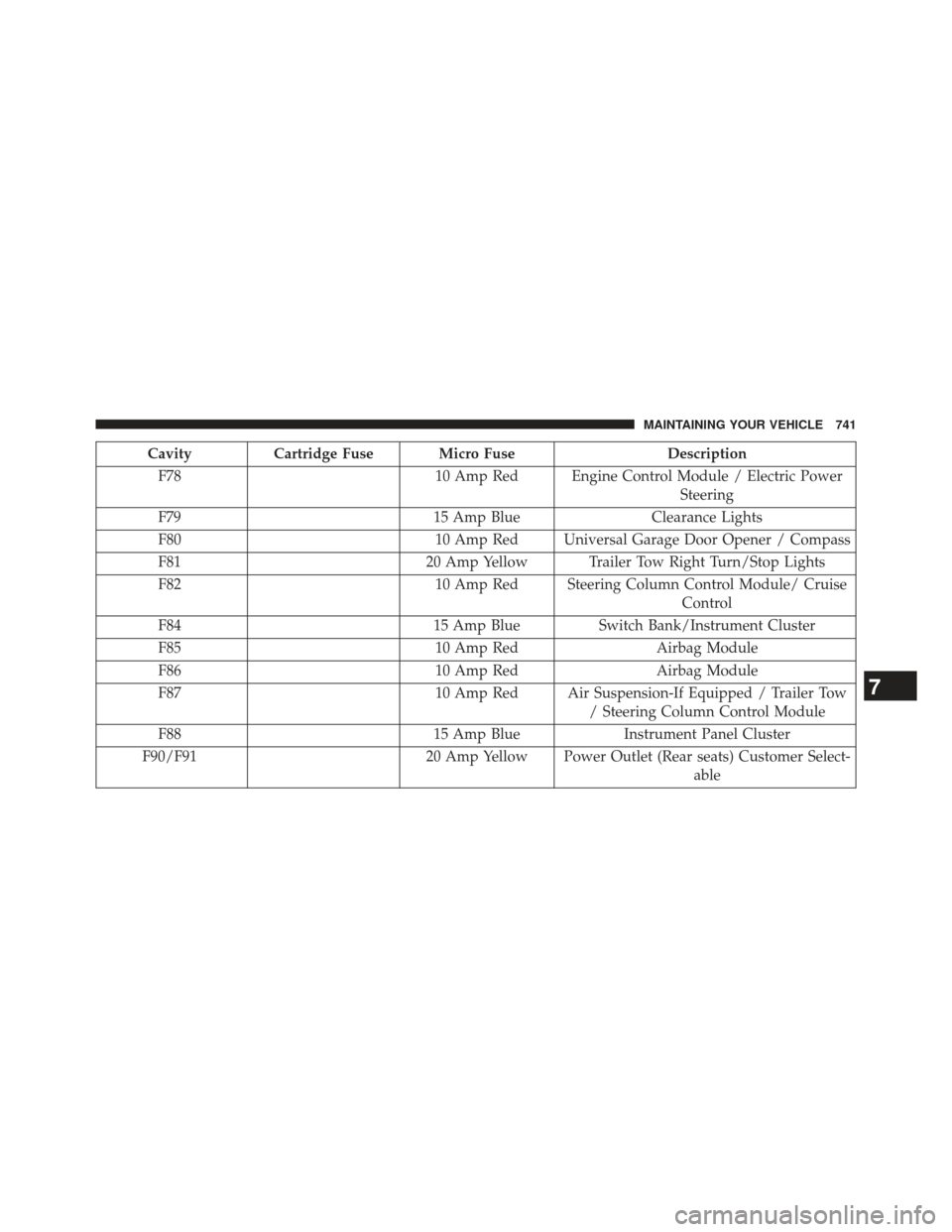
CavityCartridge Fuse Micro Fuse Description
F78 10 Amp Red Engine Control Module / Electric Power
Steering
F79 15 Amp BlueClearance Lights
F80 10 Amp Red Universal Garage Door Opener / Compass
F81 20 Amp Yellow Trailer Tow Right Turn/Stop Lights
F82 10 Amp Red Steering Column Control Module/ Cruise
Control
F84 15 Amp BlueSwitch Bank/Instrument Cluster
F85 10 Amp RedAirbag Module
F86 10 Amp RedAirbag Module
F87 10 Amp Red Air Suspension-If Equipped / Trailer Tow
/ Steering Column Control Module
F88 15 Amp BlueInstrument Panel Cluster
F90/F91 20 Amp Yellow Power Outlet (Rear seats) Customer Select-
able
7
MAINTAINING YOUR VEHICLE 741
Page 744 of 806
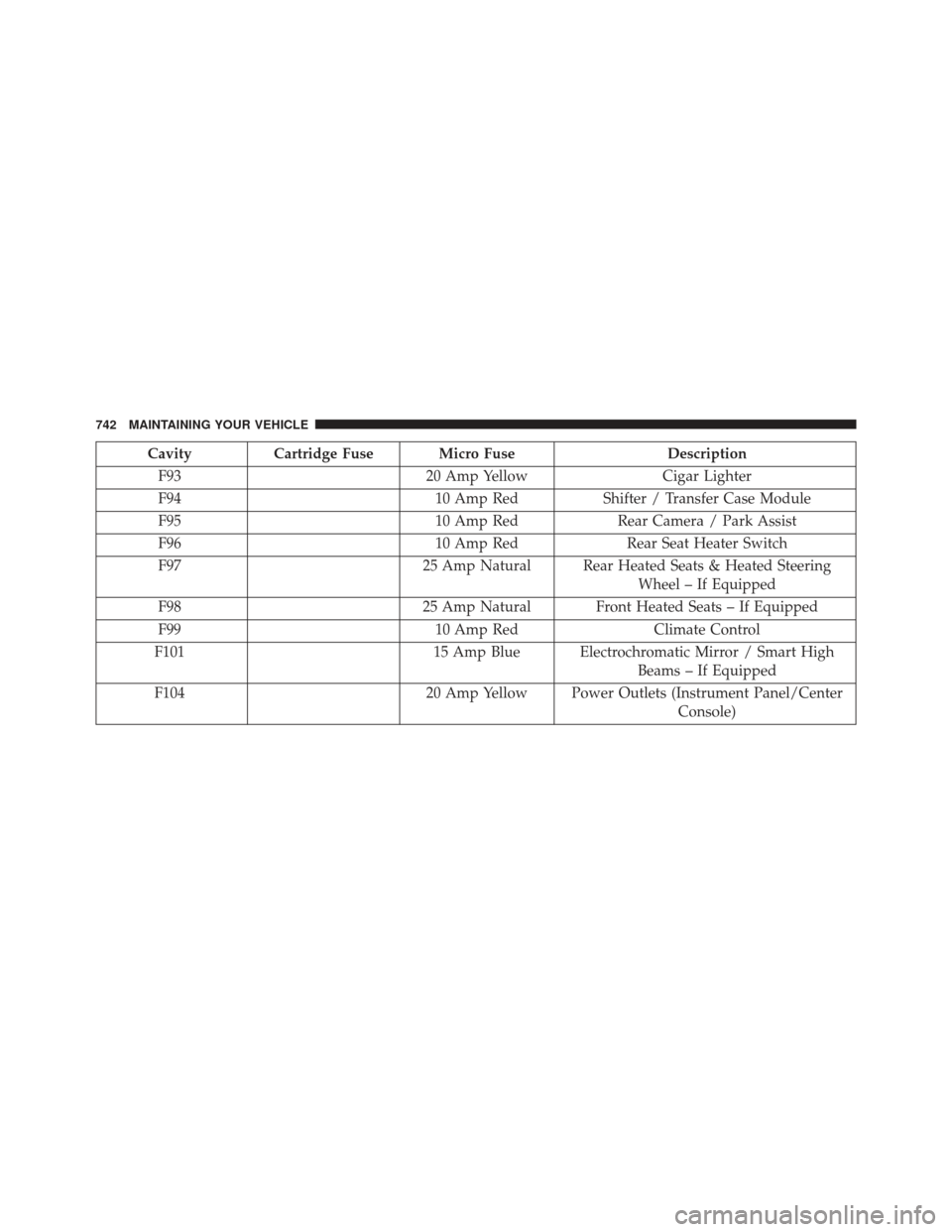
CavityCartridge Fuse Micro Fuse Description
F93 20 Amp YellowCigar Lighter
F94 10 Amp RedShifter / Transfer Case Module
F95 10 Amp RedRear Camera / Park Assist
F96 10 Amp RedRear Seat Heater Switch
F97 25 Amp Natural Rear Heated Seats & Heated Steering
Wheel – If Equipped
F98 25 Amp Natural Front Heated Seats – If Equipped
F99 10 Amp RedClimate Control
F101 15 Amp Blue Electrochromatic Mirror / Smart High
Beams – If Equipped
F104 20 Amp Yellow Power Outlets (Instrument Panel/Center
Console)
742 MAINTAINING YOUR VEHICLE