lock Ram 1500 2015 Owner's Manual
[x] Cancel search | Manufacturer: RAM, Model Year: 2015, Model line: 1500, Model: Ram 1500 2015Pages: 871, PDF Size: 24.83 MB
Page 476 of 871
CAUTION!
•Before moving the shift lever out of PARK, you
must turn the ignition switch from the LOCK/OFF
position to the ON/RUN position, and also press
the brake pedal. Otherwise, damage to the shift
lever could result.
•DO NOT race the engine when shifting from
PARK or NEUTRAL into another gear range, as this
can damage the drivetrain.
The following indicators should be used to ensure that
you have engaged the transmission into the PARK posi-
tion:
•When shifting into PARK, pull the column-mounted
shift lever toward you and move it all the way
counterclockwise until it stops. For console-mounted
shifter, firmly move the shift lever all the way forward
and to the left until it stops.
•Release the shift lever and make sure it is fully seated
in the PARK gate.
•Look at the transmission gear position display and
verify that it indicates the PARK position.
•With brake pedal released, verify that the shift lever
will not move out of PARK.
REVERSE (R)
This range is for moving the vehicle backward. Shift into
Reverse only after the vehicle has come to a complete
stop.
NEUTRAL (N)
Use this range when the vehicle is standing for prolonged
periods with the engine running. The engine may be
started in this range. Apply the parking brake and shift
the transmission into PARK if you must leave the vehicle.
474 STARTING AND OPERATING
Page 485 of 871
cause damage to the transmission. The torque con-
verter will refill within five seconds after starting the
engine.
Six-Speed Automatic Transmission — 2500/3500
Models Only
The transmission gear position display (located in the
instrument cluster) indicates the transmission gear range.
The shift lever is mounted on the right side of the steering
column. You must press the brake pedal to move the shift
lever out of PARK (refer to “Brake/Transmission Shift
Interlock System” in this section for further information).
To drive, move the shift lever from PARK or NEUTRAL
to the DRIVE position. Pull the shift lever toward you
when shifting into REVERSE or PARK, or when shifting
out of PARK.
The electronically-controlled transmission provides a
precise shift schedule. The transmission electronics are
self-calibrating; therefore, the first few shifts on a new
vehicle may be somewhat abrupt. This is a normal
condition, and precision shifts will develop within a few
hundred miles (kilometers).
Only shift from DRIVE to PARK or REVERSE when the
accelerator pedal is released and the vehicle is stopped.
Be sure to keep your foot on the brake pedal when
shifting between these gears.
The transmission shift lever has only PARK, REVERSE,
NEUTRAL, and DRIVE shift positions. Manual down-
shifts can be made using the Electronic Range Select
(ERS) shift control (refer to “Electronic Range Select (ERS)
Operation” in this section for further information). Press-
ing the ERS (-/+) switches (on the shift lever) while in the
DRIVE position will select the highest available transmis-
sion gear, and will display that gear in the instrument
cluster as 1, 2, 3, etc.
5
STARTING AND OPERATING 483
Page 486 of 871
Gear Ranges
DO NOT race the engine when shifting from PARK or
NEUTRAL into another gear range.
NOTE:After selecting any gear range, wait a moment to
allow the selected gear to engage before accelerating.
This is especially important when the engine is cold.
PARK (P)
This range supplements the parking brake by locking the
transmission. The engine can be started in this range.
Never attempt to use PARK while the vehicle is in
motion. Apply the parking brake when leaving the
vehicle in this range.
When parking on a level surface, you may shift the
transmission into PARK first, and then apply the parking
brake.
When parking on a hill, apply the parking brake before
shifting the transmission to PARK, otherwise the load on
the transmission locking mechanism may make it diffi-
cult to move the shift lever out of PARK. As an added
precaution, turn the front wheels toward the curb on a
downhill grade and away from the curb on an uphill
grade.
On four-wheel drive vehicles be sure that the transfer
case is in a drive position.
WARNING!
•Never use the PARK position as a substitute for the
parking brake. Always apply the parking brake
fully when parked to guard against vehicle move-
ment and possible injury or damage.
(Continued)
484 STARTING AND OPERATING
Page 487 of 871

WARNING!(Continued)
•Your vehicle could move and injure you and others
if it is not completely in PARK. Check by trying to
move the shift lever out of PARK with the brake
pedal released. Make sure the transmission is in
PARK before leaving the vehicle.
•It is dangerous to shift out of PARK or NEUTRAL
if the engine speed is higher than idle speed. If
your foot is not firmly pressing the brake pedal, the
vehicle could accelerate quickly forward or in re-
verse. You could lose control of the vehicle and hit
someone or something. Only shift into gear when
the engine is idling normally and your foot is
firmly pressing the brake pedal.
(Continued)
WARNING!(Continued)
•Unintended movement of a vehicle could injure
those in or near the vehicle. As with all vehicles,
you should never exit a vehicle while the engine is
running. Before exiting a vehicle, always apply the
parking brake, shift the transmission into PARK,
turn the engine OFF, and remove the key fob. When
the ignition is in the LOCK/OFF (key removal)
position, the transmission is locked in PARK, se-
curing the vehicle against unwanted movement.
•When leaving the vehicle, always make sure the
ignition is in the OFF position, remove the key fob
from the vehicle, and lock the vehicle.
(Continued)
5
STARTING AND OPERATING 485
Page 488 of 871
WARNING!(Continued)
•Never leave children alone in a vehicle, or with
access to an unlocked vehicle. Allowing children to
be in a vehicle unattended is dangerous for a
number of reasons. A child or others could be
seriously or fatally injured. Children should be
warned not to touch the parking brake, brake pedal
or the shift lever.
•Do not leave the key fob in or near the vehicle (or
in a location accessible to children), and do not
leave the ignition (in a vehicle equipped with
Keyless Enter-N-Go™) in the ACC or ON/RUN
position. A child could operate power windows,
other controls, or move the vehicle.
CAUTION!
•Before moving the shift lever out of PARK, you
must turn the ignition switch from the LOCK/OFF
position to the ON/RUN position, and also press
the brake pedal. Otherwise, damage to the shift
lever could result.
•DO NOT race the engine when shifting from
PARK or NEUTRAL into another gear range, as this
can damage the drivetrain.
The following indicators should be used to ensure that
you have engaged the transmission into the PARK posi-
tion:
•When shifting into PARK, pull the shift lever toward
you and move it all the way counterclockwise until it
stops.
486 STARTING AND OPERATING
Page 496 of 871
FOUR-WHEEL DRIVE OPERATION — IF
EQUIPPED
Four-wheel drive trucks are equipped with either a
manually shifted transfer case or an electronically shifted
transfer case. Refer to the operating instructions for your
transfer case, located in this section for further informa-
tion.
Manually Shifted Transfer Case — If Equipped
The transfer case provides four mode positions.
•Two-wheel drive high range (2H)
•Four-wheel drive high range (4H)
•Neutral (N)
•Four-wheel drive low range (4L)
This transfer case is intended to be driven in the 2H
position for normal street and highway conditions such
as dry, hard surfaced roads.
When additional traction is required, the 4H and 4L
positions can be used to lock the front and rear drive-
shafts together and force the front and rear wheels to
rotate at the same speed. This is accomplished by simply
moving the shift lever to the desired positions once the
appropriate speed and gear requirements are met refer to
“Shifting Procedure – Manually Shifted Transfer Case” in
this section for further information. The 4H and 4L
positions are intended for loose, slippery road surfaces
only. Driving in the 4H and 4L positions on dry, hard
surfaced roads may cause increased tire wear and dam-
age to the driveline components.
The “Transfer Case Position Indicator Light” in the
instrument cluster will alert the driver that the vehicle is
in four-wheel drive and that the front and rear drive-
shafts are locked together. This light will illuminate when
the transfer case is shifted into either the 4H or 4L
position. There is no light for the 2H or NEUTRAL
positions on some models.
494 STARTING AND OPERATING
Page 498 of 871
For additional information on the appropriate use of each
transfer case mode position, see the information below:
2H
Rear-Wheel Drive High Range — This range is for
normal street and highway driving on dry hard surfaced
roads.
4H
Four-Wheel Drive High Range — This range locks the
front and rear driveshafts together forcing the front and
rear wheels to rotate at the same speed. Additional
traction for loose, slippery road surfaces only.
Neutral (N)
Neutral — This range disengages the front and rear drive-
shafts from the powertrain. To be used for flat towing
behind another vehicle. Refer to “Recreational Towing” in
“Starting and Operating” for further information.
4L
Four-Wheel Drive Low Range — This range locks the
front and rear driveshafts together forcing the front and
rear wheels to rotate at the same speed. Additional
traction and maximum pulling power for loose, slippery
road surfaces only. Do not exceed 25 mph (40 km/h).
CAUTION!
Do not use 4L (Low) range when operating the
vehicle on dry pavement. Driveline hardware dam-
age can result.
Shifting Procedure — Manually Shifted Transfer
Case
2H To 4H
Shifting between 2H and 4H can be made with the
vehicle stopped or in motion. If the vehicle is in motion,
shifts can be made up to 55 mph (88 km/h). With the
496 STARTING AND OPERATING
Page 500 of 871
Electronically Shifted Transfer Case
(Four-Position Switch) — If Equipped
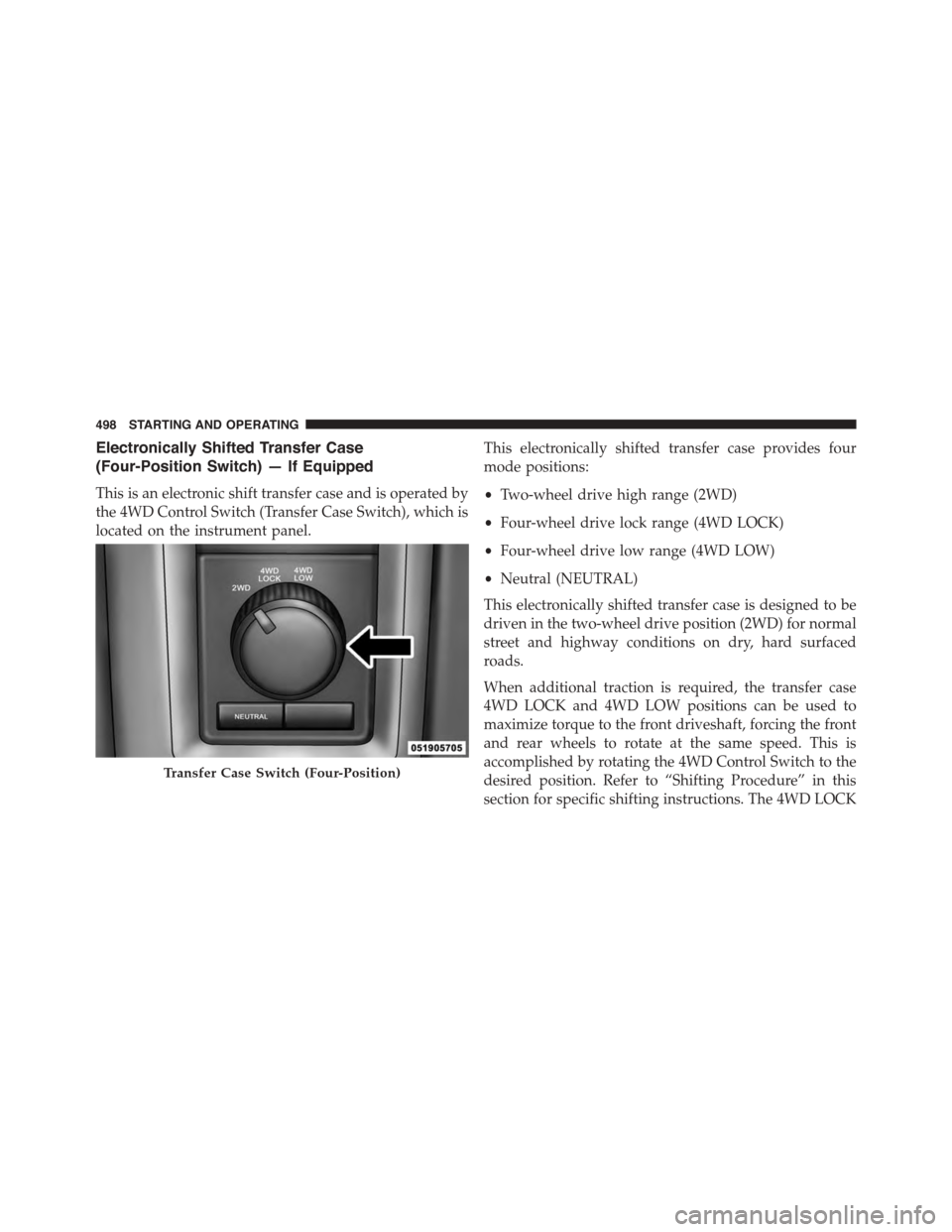
This is an electronic shift transfer case and is operated by
the 4WD Control Switch (Transfer Case Switch), which is
located on the instrument panel.
This electronically shifted transfer case provides four
mode positions:
•Two-wheel drive high range (2WD)
•Four-wheel drive lock range (4WD LOCK)
•Four-wheel drive low range (4WD LOW)
•Neutral (NEUTRAL)
This electronically shifted transfer case is designed to be
driven in the two-wheel drive position (2WD) for normal
street and highway conditions on dry, hard surfaced
roads.
When additional traction is required, the transfer case
4WD LOCK and 4WD LOW positions can be used to
maximize torque to the front driveshaft, forcing the front
and rear wheels to rotate at the same speed. This is
accomplished by rotating the 4WD Control Switch to the
desired position. Refer to “Shifting Procedure” in this
section for specific shifting instructions. The 4WD LOCK
Transfer Case Switch (Four-Position)
498 STARTING AND OPERATING
Page 501 of 871
and 4WD LOW positions are designed for loose, slippery
road surfaces only. Driving in the 4WD LOCK and 4WD
LOW positions on dry hard surfaced roads may cause
increased tire wear and damage to the driveline compo-
nents.
NOTE:The transfer case NEUTRAL position is selected
by pressing the button located on the lower left hand
corner of the 4WD Control Switch. The transfer case
NEUTRAL position is to be used for recreational towing
only. Refer to “Recreational Towing” in “Starting and
Operating” for further information.
Transfer Case Position Indicator Lights
The Transfer Case Position Indicator Lights (4WD and
4LOW) are located in the instrument cluster and indicate
the current and desired transfer case selection. When you
select a different transfer case position, the indicator
lights will do the following:
If All Shift Conditions Are Met:
1. The current position indicator light will turn OFF.
2. The selected position indicator light will flash until the
transfer case completes the shift.
3. When the shift is complete, the indicator light for the
selected position will stop flashing and remain ON.
If One Or More Shift Conditions Are Not Met:
1. The indicator light for the current position will remain
ON.
2. The newly selected position indicator light will con-
tinue to flash.
3. The transfer casewill notshift.
5
STARTING AND OPERATING 499
Page 502 of 871
NOTE:Before retrying a selection, make certain that all
the necessary requirements for selecting a new transfer
case position have been met. To retry the selection, turn
the control knob back to the current position, wait five
seconds, and retry selection. To find the shift require-
ments, refer to the#Shifting Procedure#for your transfer
case, located in this section.
The “SVC 4WD Warning Light” monitors the electronic
shift four-wheel drive system. If this light remains on
after engine start up or illuminates during driving, it
means that the four-wheel drive system is not function-
ing properly and that service is required.
WARNING!
Always engage the parking brake when powering down
the vehicle if the “SVC 4WD Warning Light” is illumi-
nated. Not engaging the parking brake may allow the
vehicle to roll, which may cause personal injury.
NOTE:Do not attempt to make a shift while only the
front or rear wheels are spinning, as this can cause
damage to driveline components.
When operating your vehicle in 4WD LOW, the engine
speed is approximately three times that of the 2WD or
4WD LOCK positions at a given road speed. Take care
not to overspeed the engine and do not exceed 25 mph
(40 km/h).
Proper operation of four-wheel drive vehicles depends
on tires of equal size, type and circumference on each
wheel. Any difference in tire size can cause damage to the
drivetrain.
Because four-wheel drive provides improved traction,
there is a tendency to exceed safe turning and stopping
speeds. Do not go faster than road conditions permit.
500 STARTING AND OPERATING