camera Ram 1500 2015 User Guide
[x] Cancel search | Manufacturer: RAM, Model Year: 2015, Model line: 1500, Model: Ram 1500 2015Pages: 871, PDF Size: 24.83 MB
Page 255 of 871
There are stampings in the sheet metal on the inner side
bulkheads of the box in front of and behind both wheel
housings. Place wooden boards across the box from side
to side to create separate load compartments in the
pickup box.
There are four tie-down cleats bolted to the lower sides of
the pickup box that can sustain loads up to 1000 lbs
(450 kg) total.
Cargo Camera — If Equipped
Your vehicle may be equipped with the Cargo Camera
that allows you to see an image of the inside of the
pickup box. The image will be displayed in the
Uconnect® screen.
A display timer is initiated when the cargo camera image
is displayed. The image will continue to be displayed
until the display timer exceeds 10 seconds and the vehicle
speed is above 8 mph (13 km/h) or the image is deacti-
vated by touching the Uconnect® display.
NOTE:If the vehicle speed remains below 8 mph
(13 km/h), the cargo camera image will be displayed
continuously until deactivated by touching the
Uconnect® display.
The Cargo Camera is located in the bottom center area of
the center high-mounted stoplamp (CHMSL).
NOTE:If snow, ice, mud, or any foreign substance builds
up on the camera lens, clean the lens, rinse with water,
and dry with a soft cloth. Do not cover the lens.
Turning Cargo Camera On Or Off — With
Uconnect® 8.4A/8.4AN
1. Press the “Controls” button located on the bottom of
the Uconnect® display.
2. Press the “Cargo Camera” buttonto turn the
Cargo Camera system ON.
3
UNDERSTANDING THE FEATURES OF YOUR VEHICLE 253
Page 256 of 871
NOTE:The Cargo Camera image may be deactivated by
pressing the Uconnect® display. The previous selected
screen will appear.
RAMBOX® — IF EQUIPPED
The RamBox® system is an integrated pickup box stor-
age and cargo management system consisting of three
features:
•Integrated box side storage bins
•Cargo extender/divider
•Bed rail tie-down system
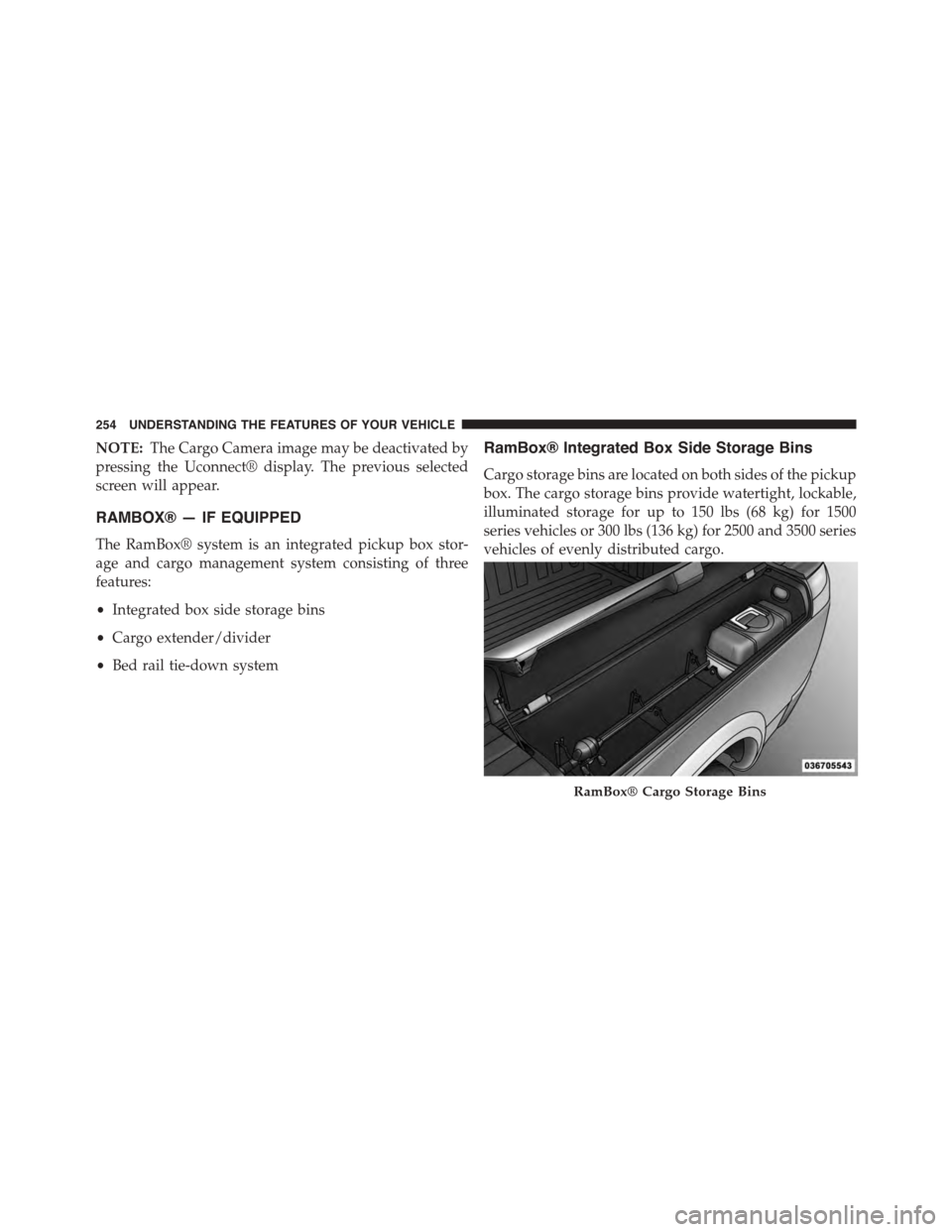
RamBox® Integrated Box Side Storage Bins
Cargo storage bins are located on both sides of the pickup
box. The cargo storage bins provide watertight, lockable,
illuminated storage for up to 150 lbs (68 kg) for 1500
series vehicles or 300 lbs (136 kg) for 2500 and 3500 series
vehicles of evenly distributed cargo.
RamBox® Cargo Storage Bins
254 UNDERSTANDING THE FEATURES OF YOUR VEHICLE
Page 270 of 871
SLIDE-IN CAMPERS
Camper Applications
Certain truck models are not recommended for slide-in
campers. To determine if your vehicle is excluded, please
refer to the “Consumer Information Truck-Camper Load-
ing” document available from your authorized dealer.
For safety reasons, follow all instructions in this impor-
tant document.
NOTE:When a cap or pickup camper is installed on a
vehicle, an alternate Center High-Mounted Stop Light
(CHMSL) must be provided.
EASY-OFF TAILGATE
To simplify mounting of a camper unit with an overhang,
the tailgate can be removed.
NOTE:If your vehicle is equipped with a rear camera or
RKE the electrical connector must be disconnected prior
to removing the tailgate.
268 UNDERSTANDING THE FEATURES OF YOUR VEHICLE
Page 271 of 871
Disconnecting the Rear Camera or Remote
Keyless Entry — If Equipped
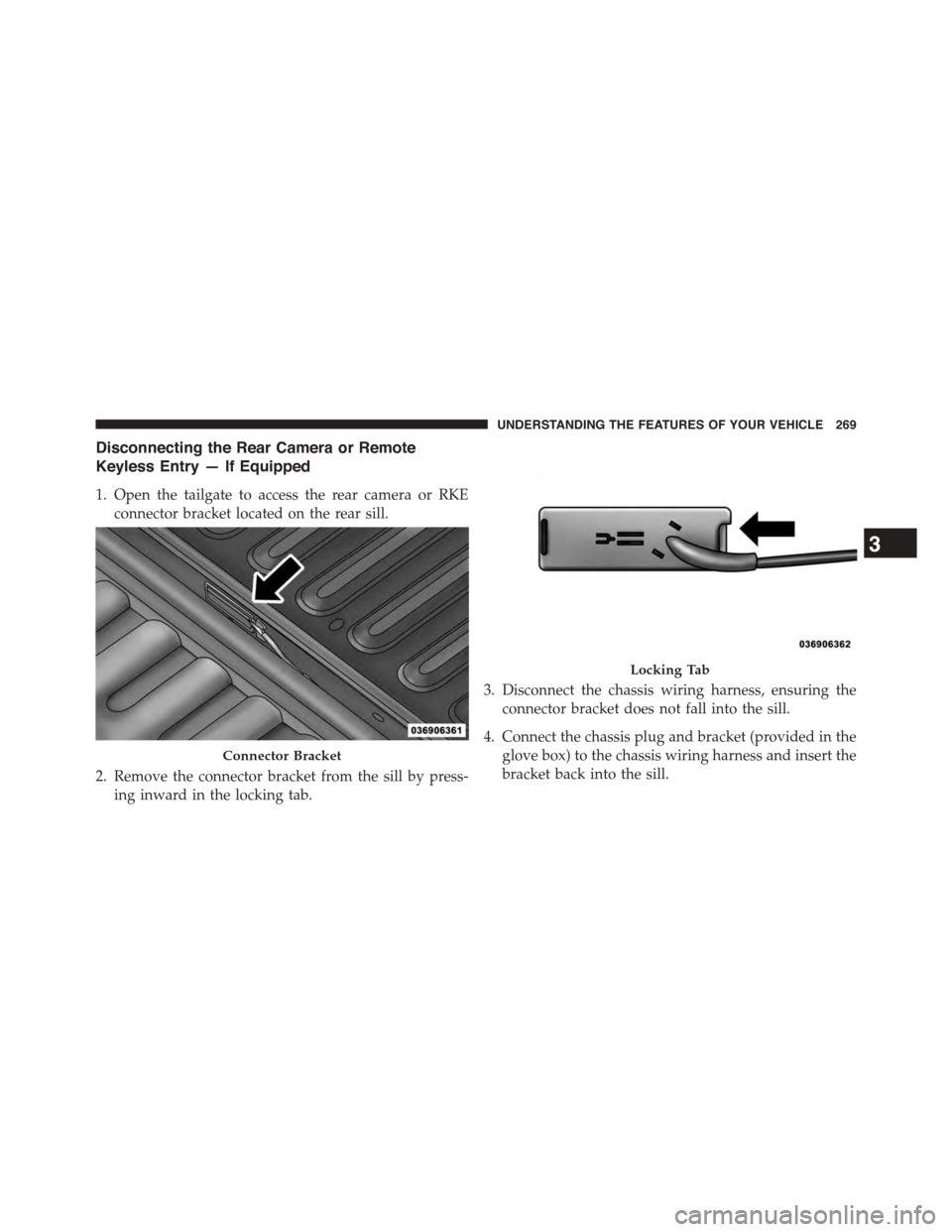
1. Open the tailgate to access the rear camera or RKE
connector bracket located on the rear sill.
2. Remove the connector bracket from the sill by press-
ing inward in the locking tab.
3. Disconnect the chassis wiring harness, ensuring the
connector bracket does not fall into the sill.
4. Connect the chassis plug and bracket (provided in the
glove box) to the chassis wiring harness and insert the
bracket back into the sill.
Connector Bracket
Locking Tab
3
UNDERSTANDING THE FEATURES OF YOUR VEHICLE 269
Page 272 of 871
5. Connect the tailgate plug (provided in the glove box)
to the tailgate wiring harness to ensure that the
terminals do not corrode.
6. Tape the tailgate harness and bracket against the
forward-facing surface of the tailgate. This will pre-
vent damaging the connector and bracket when stor-
ing or reinstalling the tailgate.
Removing The Tailgate
1. Disconnect the wiring harness for the rear camera and
or power locks (if equipped), refer to “Disconnecting
the Rear Camera — If Equipped” in this section.
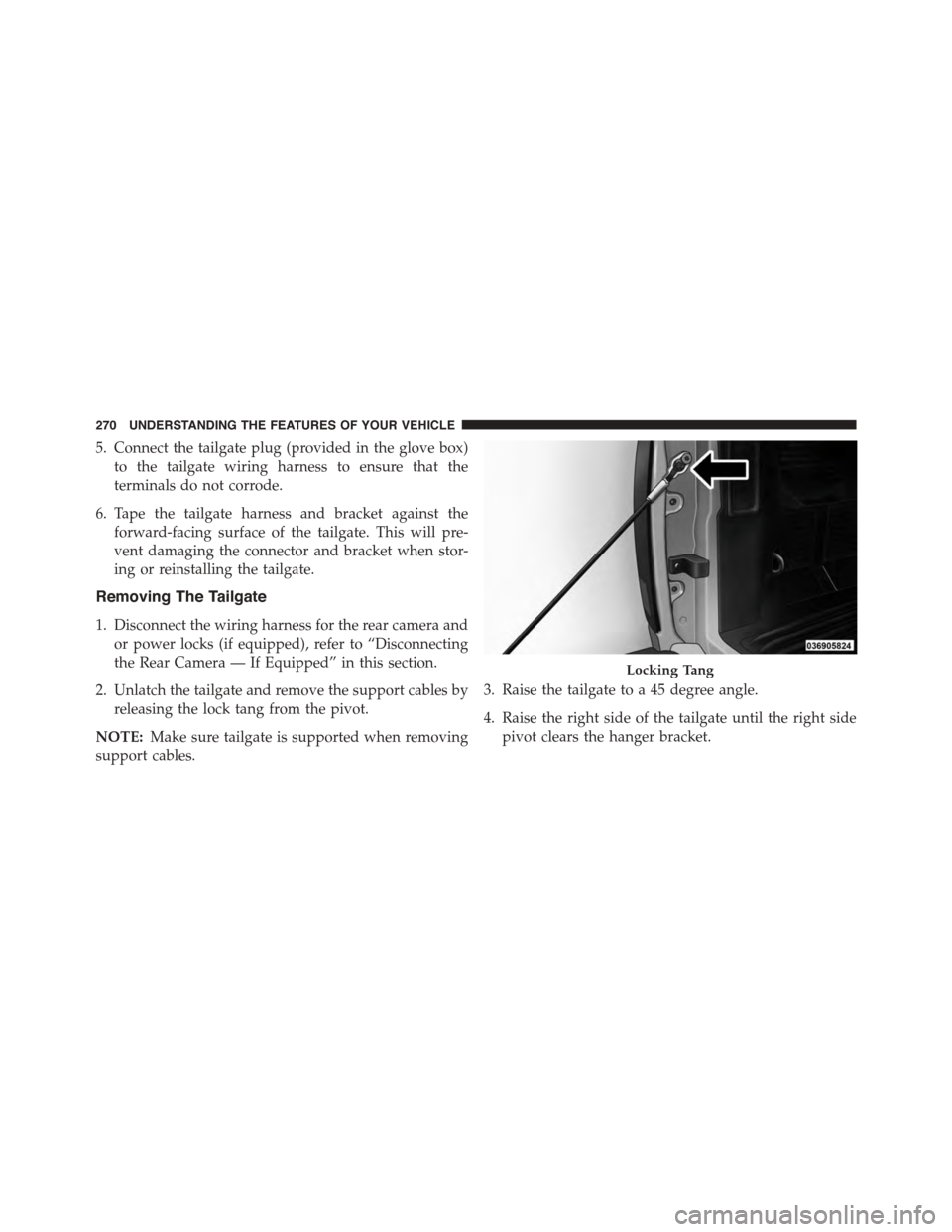
2. Unlatch the tailgate and remove the support cables by
releasing the lock tang from the pivot.
NOTE:Make sure tailgate is supported when removing
support cables.
3. Raise the tailgate to a 45 degree angle.
4. Raise the right side of the tailgate until the right side
pivot clears the hanger bracket.
Locking Tang
270 UNDERSTANDING THE FEATURES OF YOUR VEHICLE
Page 363 of 871

arrows above and below the current date to adjust. Press
the back arrow/Done button on the touchscreen to return
to the previous menu.
Safety/Assistance
After pressing the “Safety/Assistance” button on the
touchscreen the following settings will be available:
•ParkSense®
The ParkSense® system will scan for objects behind the
vehicle when the transmission shift lever/gear selector is
in REVERSE and the vehicle speed is less than 11 mph
(18 km/h). It will provide an alert (audible and/or visual)
to indicate the proximity to other objects. The system can
be enabled with Sound Only, or Sound and Display. To
change the ParkSense® status, press and release the
“Sound Only” or “Sounds and Display” button. Then press
the back arrow/Done button on the touchscreen. Refer to
“ParkSense®” in “Understanding The Features Of Your
Vehicle” for system function and operating information.
•Tilt Mirrors In Reverse — If Equipped
When this feature is selected, the exterior sideview
mirrors will tilt downward when the ignition is in the
RUN position and the transmission shift lever/gear
selector is in the REVERSE position. The mirrors will
move back to their previous position when the transmis-
sion is shifted out of REVERSE. To make your selection,
press the “Tilt Mirrors In Reverse” button on the touch-
screen and make your selection. Press the back arrow/
Done button on the touchscreen to return to the previous
menu.
•ParkView® Backup Camera Active Guidelines
Your vehicle may be equipped with the ParkView® Rear
Back Up Camera Active Guidelines that allows you to see
active guidelines over the ParkView Back up camera
display whenever the shift lever/gear selector is put into
REVERSE. The image will be displayed on the radio
touchscreen display along with a caution note to “check
4
UNDERSTANDING YOUR INSTRUMENT PANEL 361
Page 364 of 871

entire surroundings” across the top of the screen. After
five seconds, this note will disappear. To make your
selection, press the “ParkView® Backup Camera Active
Guidelines” button on the touchscreen and make your
selection. Press arrow button on the touchscreen to return
to the previous menu.
•ParkView® Backup Camera Delay
When the vehicle is shifted out of REVERSE (with camera
delay turned OFF), the rear camera mode is exited and
the navigation or audio screen appears again. When the
vehicle is shifted out of REVERSE (with camera delay
turned ON), the rear view image with dynamic grid lines
will be displayed for up to 10 seconds after shifting out of
“REVERSE” unless the forward vehicle speed exceeds
8 mph (12 km/h), the transmission is shifted into PARK
or the ignition is switched to the OFF position. To set the
ParkView® Backup Camera Delay push the SETTINGS
button on the faceplate, then the “Safety & Driving
Assistance” button on the touchscreen. Press the
“Parkview Backup camera Delay” button on the touch-
screen to turn the ParkView® Delay ON or OFF.
•Rain Sensing Auto Wipers
When this feature is selected, the system will automati-
cally activate the windshield wipers if it senses moisture
on the windshield. To make your selection, press the
“Rain Sensing” button on the touchscreen and make your
selection. Press the back arrow/Done button on the
touchscreen to return to the previous menu.
•Hill Start Assist — If Equipped
When this feature is selected, the Hill Start Assist (HSA)
system is active. Refer to “Electronic Brake Control
System” in “Starting And Operating” for system function
and operating information. To make your selection, press
the “Hill Start Assist” button on the touchscreen and
make your selection. Press the back arrow/Done button
on the touchscreen to return to the previous menu.
362 UNDERSTANDING YOUR INSTRUMENT PANEL
Page 383 of 871
or “High” buttons on the touchscreen. Press the back
arrow button on the touchscreen to return to the previous
menu. ParkSense® will retain its last known configura-
tion state through ignition cycles.
•Rear ParkSense® Chime Volume
The Rear ParkSense® Chime Volume settings can be
selected from the EVIC/DID or Uconnect® System — if
equipped. The chime volume settings include LOW,
MEDIUM, and HIGH. The factory default volume setting
is MEDIUM. To change the mode status, press the “Rear
ParkSense® Volume” button and select the “Low” “Med”
or “High” buttons on the touchscreen. Press the back
arrow button on the touchscreen to return to the previous
menu. ParkSense® will retain its last known configura-
tion state through ignition cycles.
•Tilt Side Mirrors In Reverse
When this feature is selected, the outside sideview mir-
rors will tilt downward when the ignition is in the RUN
position and the transmission shift lever is in the RE-
VERSE position. The mirrors will move back to their
previous position when the transmission is shifted out of
REVERSE. To make your selection, press the “Tilt Side
Mirrors In Reverse” button on the touchscreen to select
from on or off. Press the back arrow button on the
touchscreen to return to the previous menu.
•ParkView® Backup Camera
Your vehicle may be equipped with the ParkView® Rear
Back Up Camera that allows you to see an on-screen
image of the rear surroundings of your vehicle whenever
the shift lever is put into REVERSE. The image will be
displayed on the radio touchscreen display along with a
caution note to “check entire surroundings” across the
top of the screen. After five seconds, this note will
disappear. The ParkView® camera is located on the rear
of the vehicle above the rear License plate. To make your
selection, press the “ParkView® Backup Camera” button
4
UNDERSTANDING YOUR INSTRUMENT PANEL 381
Page 384 of 871
on the touchscreen, until a check-mark appears next to
the setting, indicating that the setting had been selected.
Press the back arrow button on the touchscreen to return
to the previous menu.
•ParkView® Backup Camera Active Guidelines
Your vehicle may be equipped with the ParkView® Rear
Back Up Camera Active Guidelines that allows you to see
Active (Dynamic) Guidelines which deflect with steering
wheel angle over the ParkView Back up Camera display
whenever the shift lever is put into REVERSE. The image
will be displayed on the radio touchscreen display along
with a caution note to “check entire surroundings” across
the top of the screen. After five seconds, this note will
disappear. To make your selection, press the “ParkView®
Backup Camera Active Guidelines” and select from on or
off. Press the back arrow button on the touchscreen to
return to the previous menu.
•ParkView® Backup Camera Delay
When this feature is enabled, it will allow the ParkView
Backup Camera display to remain on while in drive for
up to 10 seconds, or 8 mph. To make your selection, press
the “ParkView® Backup Camera Delay” button on the
touchscreen to select from on or off. Press the back arrow
button on the touchscreen to return to the previous
menu.
•Rain Sensing Auto Wipers
When this feature is selected, the system will automati-
cally activate the windshield wipers if it senses moisture
on the windshield. To make your selection, press the
“Rain Sensing” button on the touchscreen to select from
on or off. Press the back arrow button on the touchscreen
to return to the previous menu.
382 UNDERSTANDING YOUR INSTRUMENT PANEL
Page 808 of 871
Cavity Cartridge Fuse Micro FuseDescription
F8815 Amp BlueInstrument Panel Cluster
F90/F9120 Amp Yellow Power Outlet (Rear seats) Customer Selectable
F9320 Amp YellowCigar Lighter
F9410 Amp RedShifter / Transfer Case Module
F9510 Amp RedRear Camera / Park Assist
F9610 Amp RedRear Seat Heater Switch
F9725 Amp Clear Rear Heated Seats & Heated Steering Wheel – If
Equipped
F9825 Amp ClearFront Heated Seats – If Equipped
F9910 Amp RedClimate Control
F10010 Amp RedUpfitters – If Equipped
F10115 Amp Blue Electrochromatic Mirror / Smart High Beams –
If Equipped
F10420 Amp Yellow Power Outlets (Instrument Panel/Center
Console)
806 MAINTAINING YOUR VEHICLE