key fob entry Ram 1500 2015 User Guide
[x] Cancel search | Manufacturer: RAM, Model Year: 2015, Model line: 1500, Model: Ram 1500 2015Pages: 871, PDF Size: 24.83 MB
Page 26 of 871
NOTE:
•The front courtesy overhead console and door cour-
tesy lights will not turn off if the dimmer control is in
the “Dome ON” position (rotate horizontal thumb
wheel on the bottom of the switch to the far right
detent position).
•The illuminated entry system will not operate if the
dimmer control is in the “Dome OFF” position (rotate
horizontal thumb wheel on the bottom of the switch to
the far left detent position).
REMOTE KEYLESS ENTRY (RKE)
The RKE system allows you to lock or unlock all doors,
tailgate, and the RamBox® (if equipped) as well as
activate the Panic Alarm from distances up to approxi-
mately 66 ft (20 m) using a hand-held radio transmitter
with integrated key. The transmitter does not need to be
pointed at the vehicle to activate the system. Push and
release the LOCK button on the RKE transmitter to lock
all doors, the tailgate and the RamBox® (if equipped).
The turn signal lights will flash and the horn will chirp to
acknowledge the signal.
NOTE:Inserting the Key Fob with RKE transmitter into
the ignition switch disables the system from responding
to any button pushes from that RKE transmitter. Driving
at speeds 5 mph (8 km/h) and above disables the system
from responding to all RKE transmitter buttons for all
RKE transmitters.
24 THINGS TO KNOW BEFORE STARTING YOUR VEHICLE
Page 27 of 871
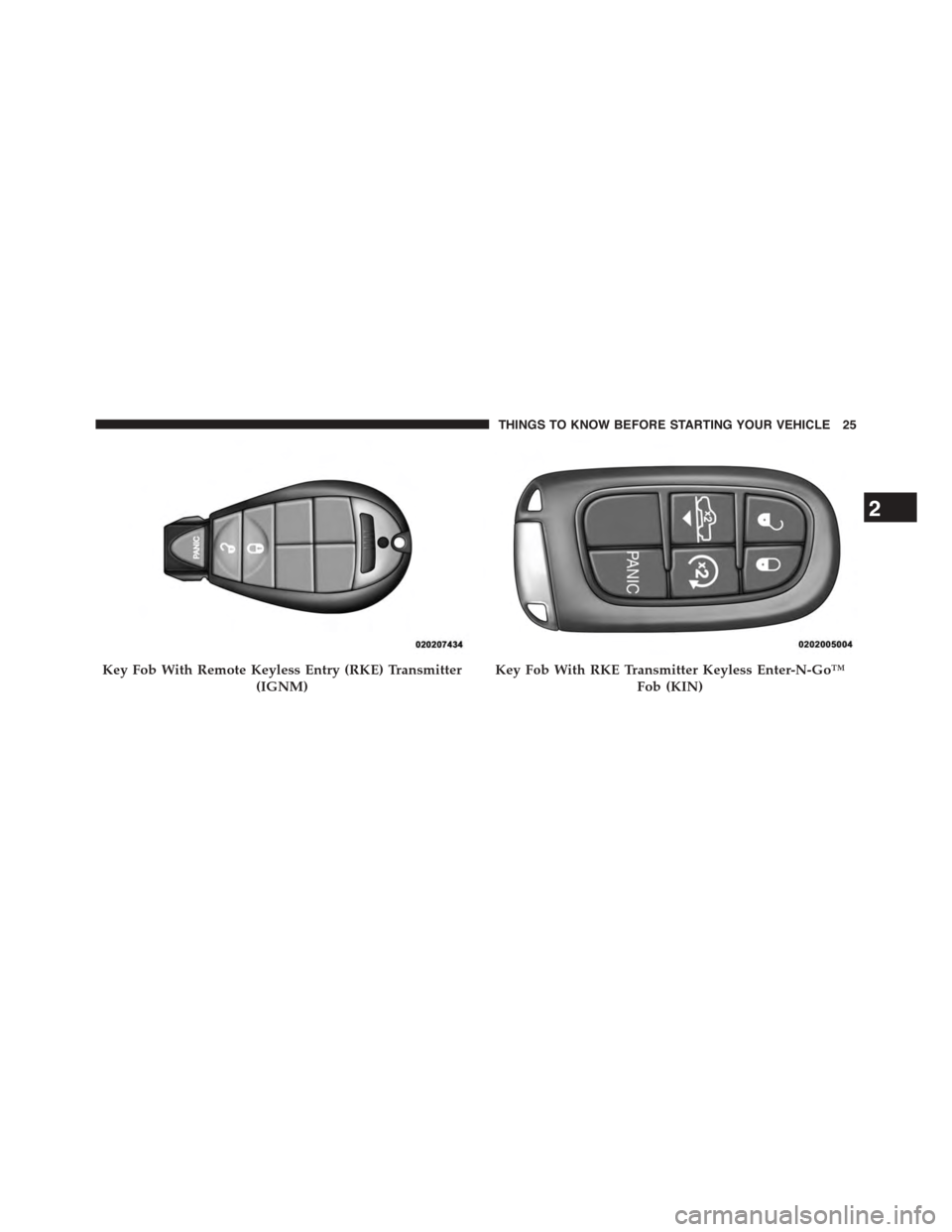
Key Fob With Remote Keyless Entry (RKE) Transmitter
(IGNM)
Key Fob With RKE Transmitter Keyless Enter-N-Go™
Fob (KIN)
2
THINGS TO KNOW BEFORE STARTING YOUR VEHICLE 25
Page 31 of 871
RKE Air Suspension (Remote Lowering Of The
Vehicle) — If Equipped
For easy entry and loading, your vehicle can be
lowered by pushing the Key Fob air suspension
lowering button two times. When Remote key
FOB lowering is requested, the vehicle will
send a series of chirps and flashes to alert the customer
that the operation has begun and will continue these
alerts until it successfully lowers.
The following conditions must be met for the vehicle to
lower remotely:
•The vehicle must not already be in Entry/Exit (Park)
ride height.
•The vehicle battery must be fully charged.
•All doors must be closed.
•The ignition key must be out of the vehicle.
Cancelling Remote Lowering
Vehicle lowering can be cancelled at anytime. When
vehicle lowering is cancelled, the vehicle will raise up to
the next defined level and lock out the remote lowering
feature until the ignition has been cycled ON/OFF.
To cancel vehicle lowering, push the Key Fob air suspen-
sion lowering button one time during the lowering
process. When vehicle lowering is cancelled the horn will
chirp two times and the hazard lights will flash four
times. Once raising is completed, the horn will chirp one
time.
NOTE:For further information, refer to “Air Suspension
System” in “Starting And Operating”.
2
THINGS TO KNOW BEFORE STARTING YOUR VEHICLE 29
Page 45 of 871
•If the vehicle is unlocked by the Passive Entry Door
Handle, and no door goes ajar within 60 seconds, the
vehicle will re-lock and if equipped will arm the
security alarm.
•The vehicles security alarm can be armed/disarmed
by pushing the passive entry key fob lock/unlock
buttons (if equipped).
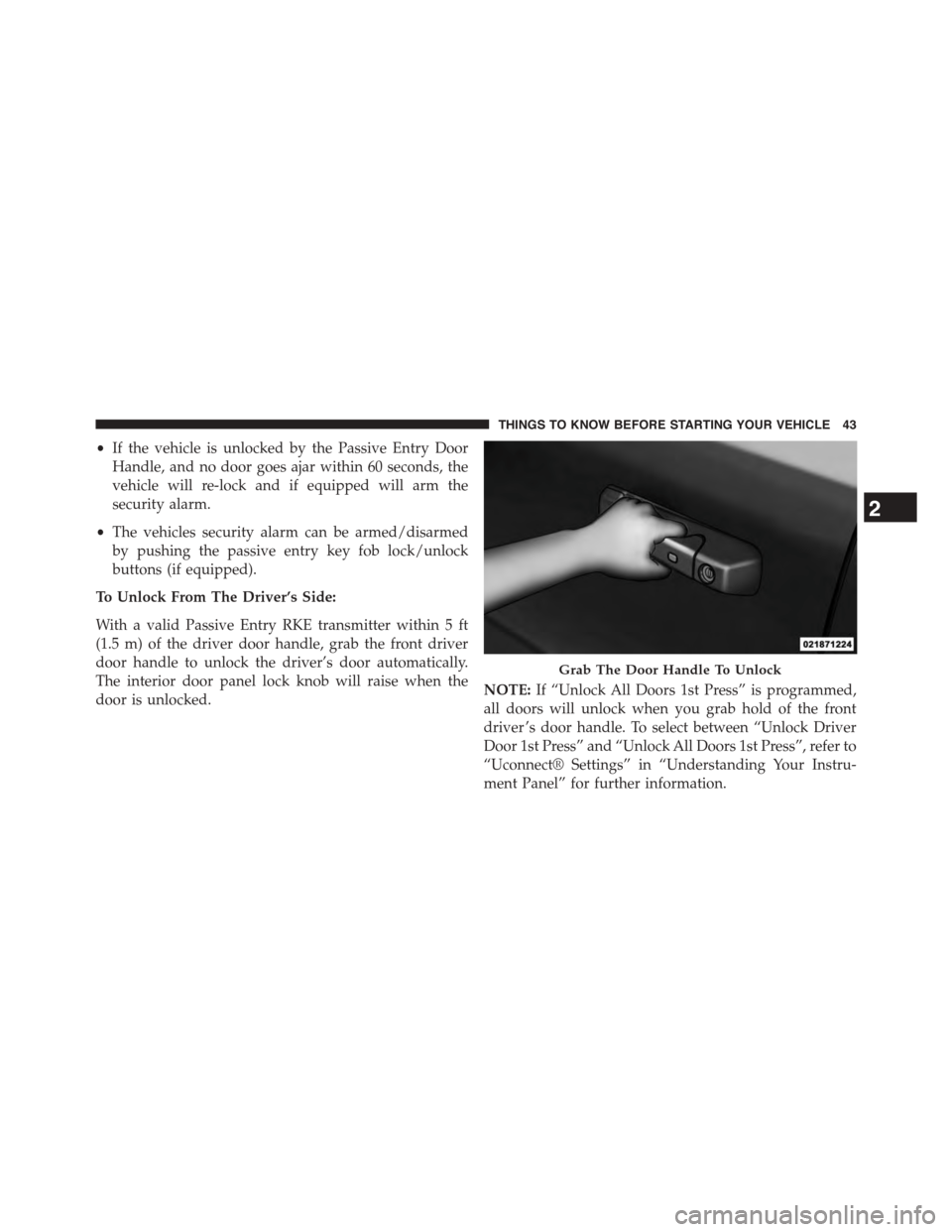
To Unlock From The Driver’s Side:
With a valid Passive Entry RKE transmitter within 5 ft
(1.5 m) of the driver door handle, grab the front driver
door handle to unlock the driver’s door automatically.
The interior door panel lock knob will raise when the
door is unlocked.NOTE:If “Unlock All Doors 1st Press” is programmed,
all doors will unlock when you grab hold of the front
driver ’s door handle. To select between “Unlock Driver
Door 1st Press” and “Unlock All Doors 1st Press”, refer to
“Uconnect® Settings” in “Understanding Your Instru-
ment Panel” for further information.
Grab The Door Handle To Unlock
2
THINGS TO KNOW BEFORE STARTING YOUR VEHICLE 43
Page 162 of 871
Programming The Memory Feature
NOTE:To create a new memory profile, perform the
following:
1. Cycle the vehicles ignition to the ON/RUN position
(do not start the engine).
2. Adjust all memory profile settings to desired prefer-
ences (seat, side mirrors, adjustable pedals and radio
station presets).
3. Press and release the S (Set) button on the memory
switch.
4. Within five seconds, press and release either of the
memory buttons (1) or (2). The Electronic Vehicle
Information Center (EVIC) or Driver Information Dis-
play (DID) will display which memory position has
been set.
NOTE:
•Memory profiles can be set without the vehicle in
PARK, but the vehicle must be in PARK to recall a
memory profile.
•To set a memory profile to your RKE transmitter, refer
to “Linking And Unlinking The Remote Keyless Entry
Transmitter To Memory” in this section.
Linking And Unlinking The Remote Keyless Entry
Transmitter To Memory
Your RKE transmitters can be programmed to recall one
of two pre-programmed memory profiles by pressing the
UNLOCK button on the RKE transmitter.
NOTE:Before programming your RKE transmitters to
memory the feature has to be selected.
•If your vehicle is equipped with a touchscreen, you
must select the “Memory To FOB” feature through the
160 UNDERSTANDING THE FEATURES OF YOUR VEHICLE
Page 165 of 871

Easy Entry/Exit Seat
This feature provides automatic driver seat positioning to
enhance driver mobility when entering and exiting the
vehicle.
The distance the driver seat moves depends on where
you have the driver seat positioned when you remove the
Key Fob from the ignition (or change the ignition to OFF,
for vehicles equipped with Keyless Enter-N-Go™).
•When you remove the Key Fob from the ignition (or
change the ignition to OFF, for vehicles equipped with
Keyless Enter-N-Go™), the driver seat will move
about 2.4 in (60 mm) rearward if the driver seat
position is greater than or equal to 2.7 in (67.7 mm)
forward of the rear stop. The seat will return to its
previously set position when you place the ignition
into the ACC or RUN position.
•When you remove the Key Fob from the ignition (or
change the ignition to OFF, for vehicles equipped with
Keyless Enter-N-Go™), the driver seat will move to a
position 0.3 in (7.7 mm) forward of the rear stop if the
driver seat position is between 0.9 in and 2.7 in
(22.7 mm and 67.7 mm) forward of the rear stop. The
seat will return to its previously set position when you
place the ignition to the ACC or RUN position.
•The Easy Entry/Easy Exit feature is disabled when the
driver seat position is less than 0.9 in (22.7 mm)
forward of the rear stop. At this position, there is no
benefit to the driver by moving the seat for Easy Exit
or Easy Entry.
Each stored memory setting will have an associated Easy
Entry and Easy Exit position.
3
UNDERSTANDING THE FEATURES OF YOUR VEHICLE 163
Page 273 of 871
5. Slide the entire tailgate to the right to free the left side
pivot.
6. Remove the tailgate from the vehicle.
NOTE:Do not carry the tailgate loose in the truck
pickup box.
WARNING!
To avoid inhaling carbon monoxide, which is deadly,
the exhaust system on vehicles equipped with “Cap or
Slide-In Campers” should extend beyond the over-
hanging camper compartment and be free of leaks.
Locking Tailgate
The lock is located next to the tailgate handle. The
tailgate can be locked using the vehicle key or by locking
the truck with the key-fob if equipped with remote
keyless entry.
TRI-FOLD TONNEAU COVER — IF EQUIPPED
Your vehicle may be equipped with a Tri-Fold Tonneau
Cover which consists of different features:
•Easy Tri-Fold cover
•Tonneau fore aft locator
•Crosscar inside bed locator
•Front and rear clamps
•Stowage strap
•Locking Capability
NOTE:The Tonneau Cover can be folded up and secured
at the front of the box without removing completely.
3
UNDERSTANDING THE FEATURES OF YOUR VEHICLE 271
Page 354 of 871
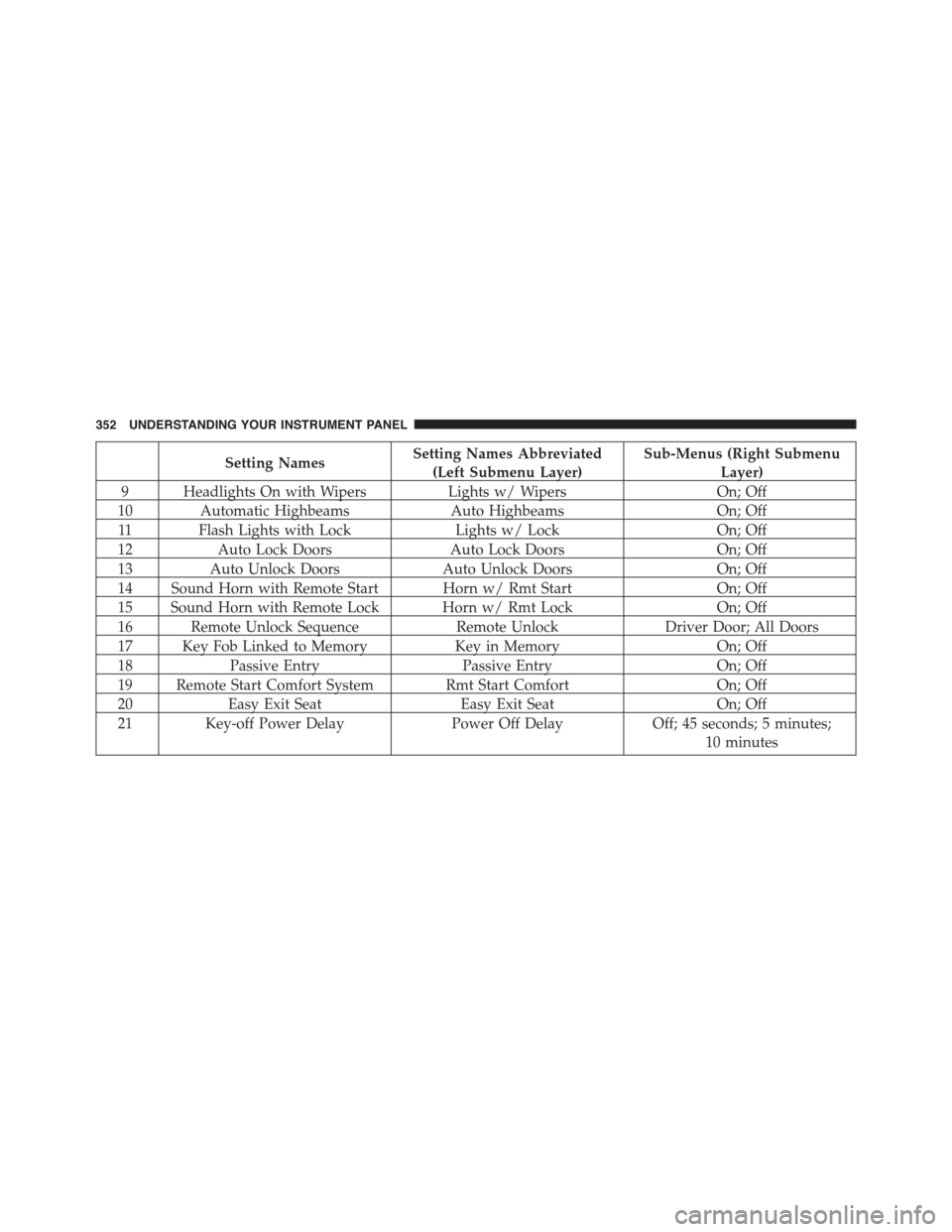
Setting NamesSetting Names Abbreviated
(Left Submenu Layer)
Sub-Menus (Right Submenu
Layer)
9 Headlights On with WipersLights w/ WipersOn; Off
10 Automatic HighbeamsAuto HighbeamsOn; Off
11 Flash Lights with LockLights w/ LockOn; Off
12Auto Lock DoorsAuto Lock DoorsOn; Off
13Auto Unlock DoorsAuto Unlock DoorsOn; Off
14 Sound Horn with Remote Start Horn w/ Rmt StartOn; Off
15 Sound Horn with Remote Lock Horn w/ Rmt LockOn; Off
16 Remote Unlock SequenceRemote UnlockDriver Door; All Doors
17 Key Fob Linked to MemoryKey in MemoryOn; Off
18Passive EntryPassive EntryOn; Off
19 Remote Start Comfort System Rmt Start ComfortOn; Off
20Easy Exit SeatEasy Exit SeatOn; Off
21 Key-off Power DelayPower Off DelayOff; 45 seconds; 5 minutes;
10 minutes
352 UNDERSTANDING YOUR INSTRUMENT PANEL
Page 368 of 871

•Memory Linked to Fob — If Equipped
This feature provides automatic driver seat positioning to
enhance driver mobility when entering and exiting the
vehicle. To make your selection, press the “Memory
Linked to Fob” button on the touchscreen and select from
“On” or “Off.” Press the back arrow/Done button on the
touchscreen to return to the previous menu.
NOTE:The seat will return to the memorized seat
location if “Memory Linked to Fob” is set to (ON) when
the Remote Keyless Entry (RKE) transmitter is used to
unlock the door. Refer to “Driver Memory Seat” in
“Understanding The Features Of Your Vehicle” for fur-
ther information.
•Passive Entry
This feature allows you to lock and unlock the vehicle’s
door(s) without having to push the Remote Keyless Entry
(RKE) transmitter lock or unlock buttons. It automatically
unlocks the doors when the outside door handle is
grabbed. To make your selection, press the “Passive
Entry” button on the touchscreen and select from “On” or
“Off.” Press the back arrow/Done button on the touch-
screen to return to the previous menu. Refer to “Keyless
Enter-N-Go™” in “Things To Know Before Starting Your
Vehicle” for further information.
•Flash Lights With Lock
When this feature is selected, the exterior lights will flash
when the doors are locked or unlocked with the Remote
Keyless Entry (RKE) transmitter. This feature may be
selected with or without the sound horn on lock feature
selected. To make your selection, press the “Flash Lights
w/Lock” button on the touchscreen, and select from
“On” or “Off.” Press the back arrow/Done button on the
touchscreen to return to the previous menu.
366 UNDERSTANDING YOUR INSTRUMENT PANEL
Page 388 of 871
press the “Sound Horn With Lock” button on the touch-
screen and select from “Off”, “1st Press” or “2nd Press”.
Press the back arrow button on the touchscreen to return
to the previous menu.
•Sound Horn With Remote Start
When this feature is selected, the horn will sound when the
remote start is activated. To make your selection, press the
“Sound Horn With Remote Start” button on the touch-
screen until a check-mark appears next to setting, showing
that setting has been selected. Press the back arrow button
on the touchscreen to return to the previous menu.
•1st Press Of Key Fob Unlocks
When 1st Press Of Key Fob Unlocks “Driver Door” is
selected, only the driver’s door will unlock on the first
press of the Remote Keyless Entry (RKE) transmitter
UNLOCK button you must push the RKE transmitter
UNLOCK button twice to unlock the passenger’s doors.
When Unlock “All Doors” On 1st Press is selected, all of
the doors will unlock on the first push of the RKE
transmitter UNLOCK button.
NOTE:If the vehicle is programmed 1st Press Of Key Fob
Unlocks “All Doors”, all doors will unlock no matter
which Passive Entry equipped door handle is grasped. If
1st Press Of Key Fob Unlocks “Driver Door” is pro-
grammed, only the driver ’s door will unlock when the
driver ’s door is grasped. With Passive Entry, if 1st Press
Of Key Fob Unlocks “Driver Door” is programmed
pushing the handle more than once will only result in the
driver ’s door opening. If driver door is selected, once the
driver door is opened, the interior door lock/unlock
switch can be used to unlock all doors (or use RKE
transmitter).
386 UNDERSTANDING YOUR INSTRUMENT PANEL