lights Ram 1500 2015 User Guide
[x] Cancel search | Manufacturer: RAM, Model Year: 2015, Model line: 1500, Model: Ram 1500 2015Pages: 871, PDF Size: 24.83 MB
Page 120 of 871
Periodic Safety Checks You Should Make Outside
The Vehicle
Tires
Examine tires for excessive tread wear and uneven wear
patterns. Check for stones, nails, glass, or other objects
lodged in the tread or sidewall. Inspect the tread for cuts
and cracks. Inspect sidewalls for cuts, cracks and bulges.
Check the wheel bolts for tightness. Check the tires
(including spare) for proper cold inflation pressure.
Lights
Have someone observe the operation of brake lights and
exterior lights while you work the controls. Check turn
signal and high beam indicator lights on the instrument
panel.
Door Latches
Check for positive closing, latching, and locking.
Fluid Leaks
Check area under vehicle after overnight parking for fuel,
engine coolant, oil, or other fluid leaks. Also, if gasoline
fumes are detected or if fuel, power steering fluid (if
equipped), or brake fluid leaks are suspected, the cause
should be located and corrected immediately.
11 8 T H I N G S TO K N O W B E F O R E S TA R T I N G Y O U R V E H I C L E
Page 122 of 871
▫Passenger ’s Power Seat — If Equipped......145
▫Power Lumbar — If Equipped............145
▫Heated Seats — If Equipped..............146
▫Ventilated Seats — If Equipped............149
▫Manual Seat Adjuster — If Equipped........150
▫40-20-40 Front Bench Seat — If Equipped . . . .152
▫Mega Cab® Rear Seat Features............152
▫Head Restraints......................156
!DRIVER MEMORY SEAT — IF EQUIPPED . . . .158
▫Programming The Memory Feature.........160
▫Linking And Unlinking The Remote Keyless Entry
Transmitter To Memory.................160
▫Memory Position Recall.................162
▫Easy Entry/Exit Seat...................163
!TO OPEN AND CLOSE THE HOOD.........164
!LIGHTS.............................165
▫Headlights..........................166
▫Automatic Headlights — If Equipped.......167
▫Headlights On With Wipers (Available With
Automatic Headlights Only)..............167
▫Daytime Running Lights (DRL) —
If Equipped.........................168
▫Headlight Delay......................168
▫Automatic High Beam Headlamp Control —
If Equipped.........................169
▫Parking Lights And Panel Lights...........171
▫Fog Lights — If Equipped...............171
120 UNDERSTANDING THE FEATURES OF YOUR VEHICLE
Page 123 of 871
▫Lights-On Reminder...................172
▫Battery Saver.........................172
▫Interior Lights.......................172
▫Cargo Light.........................176
▫Multifunction Lever...................176
▫Turn Signals.........................176
▫Lane Change Assist...................177
▫Flash-To-Pass........................177
▫High/Low Beam Switch................178
!WINDSHIELD WIPERS AND WASHERS......178
▫Windshield Wipers....................178
▫Windshield Wiper Operation.............179
▫Intermittent Wiper System...............179
▫Windshield Washers...................179
▫Mist Feature.........................180
▫Rain Sensing Wipers — If Equipped........180
!TILT STEERING COLUMN...............182
!HEATED STEERING WHEEL —
IF EQUIPPED.........................183
!DRIVER ADJUSTABLE PEDALS —
IF EQUIPPED.........................185
!ELECTRONIC SPEED CONTROL...........186
▫To Activate..........................187
▫To Set A Desired Speed.................188
▫To Deactivate........................188
▫To Resume Speed.....................188
▫To Vary The Speed Setting...............188
3
UNDERSTANDING THE FEATURES OF YOUR VEHICLE 121
Page 124 of 871
▫To Accelerate For Passing................191
!PARKSENSE® REAR PARK ASSIST — IF
EQUIPPED...........................191
▫ParkSense® Sensors....................192
▫ParkSense® Warning Display.............192
▫ParkSense® Display....................193
▫Enabling And Disabling ParkSense®.......197
▫Service The ParkSense® Rear Park Assist
System.............................198
▫Cleaning The ParkSense® System..........199
▫ParkSense® System Usage Precautions.......199
!PARKSENSE® FRONT AND REAR PARK
ASSIST — IF EQUIPPED.................201
▫ParkSense® Sensors....................202
▫ParkSense® Warning Display.............202
▫ParkSense® Display....................203
▫Enabling And Disabling Front And/Or Rear
ParkSense®..........................205
▫Service The ParkSense® Park Assist System . . .206
▫Cleaning The ParkSense® System..........207
▫ParkSense® System Usage Precautions.......207
!PARKVIEW® REAR BACK UP CAMERA — IF
EQUIPPED...........................210
!OVERHEAD CONSOLE — IF EQUIPPED.....212
▫Courtesy/Reading Lights...............213
!GARAGE DOOR OPENER — IF EQUIPPED . . .214
▫Before You Begin Programming HomeLink® . .215
▫Programming A Rolling Code............216
122 UNDERSTANDING THE FEATURES OF YOUR VEHICLE
Page 143 of 871
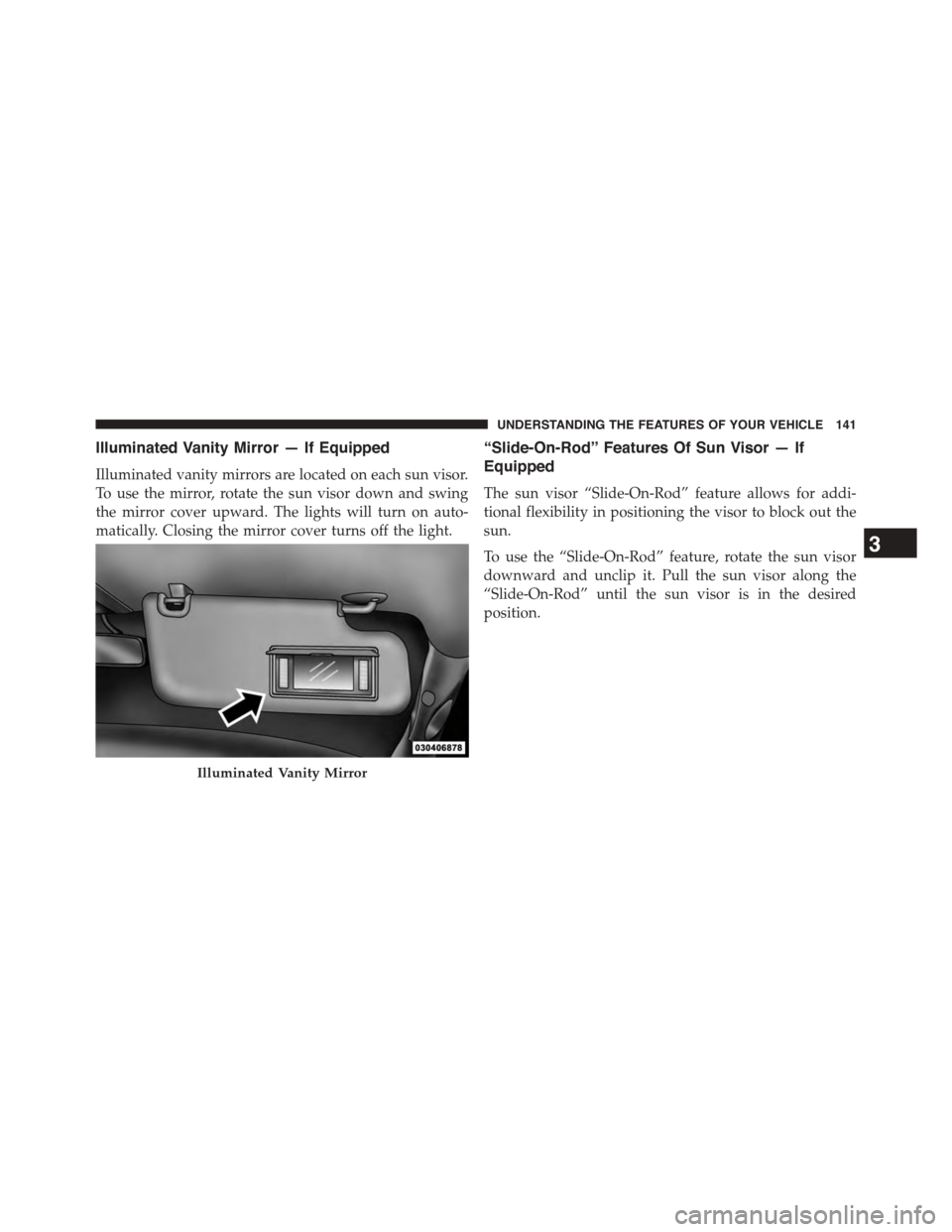
Illuminated Vanity Mirror — If Equipped
Illuminated vanity mirrors are located on each sun visor.
To use the mirror, rotate the sun visor down and swing
the mirror cover upward. The lights will turn on auto-
matically. Closing the mirror cover turns off the light.
“Slide-On-Rod” Features Of Sun Visor — If
Equipped
The sun visor “Slide-On-Rod” feature allows for addi-
tional flexibility in positioning the visor to block out the
sun.
To use the “Slide-On-Rod” feature, rotate the sun visor
downward and unclip it. Pull the sun visor along the
“Slide-On-Rod” until the sun visor is in the desired
position.
Illuminated Vanity Mirror
3
UNDERSTANDING THE FEATURES OF YOUR VEHICLE 141
Page 150 of 871
Vehicles Equipped With Remote Start
On models that are equipped with remote start, the
heated seats can be programed to come on during a
remote start.
If your vehicle is equipped with a touchscreen, this
feature can be programmed through the Uconnect®
system. Refer to “Uconnect® Settings” in “Understand-
ing Your Instrument Panel” for further information.
If your vehicle is not equipped with a touchscreen, this
feature can be programmed through the Electronic Ve-
hicle Information Center (EVIC) or Driver Information
Display (DID). Refer to “Electronic Vehicle Information
Center (EVIC)” or “Driver Information Display (DID)” in
“Understanding Your Instrument Panel” for further in-
formation.
Rear Heated Seats
On some models, the two outboard seats are equipped
with heated seats. The heated seat switches for these
seats are located on the rear of the center console.
There are two heated seat switches that allow the rear
passengers to operate the seats independently. You can
choose from HIGH, LOW or OFF heat settings. Amber
indicator lights in each switch indicate the level of heat in
use. Two indicator lights will illuminate for HIGH, one
for LOW and none for OFF.
Press the switch once to select HIGH-level
heating. Press the switch a second time to select
LOW-level heating. Press the switch a third
time to shut the heating elements OFF.
NOTE:
•Once a heat setting is selected, heat will be felt within
two to five minutes.
148 UNDERSTANDING THE FEATURES OF YOUR VEHICLE
Page 167 of 871
CAUTION!
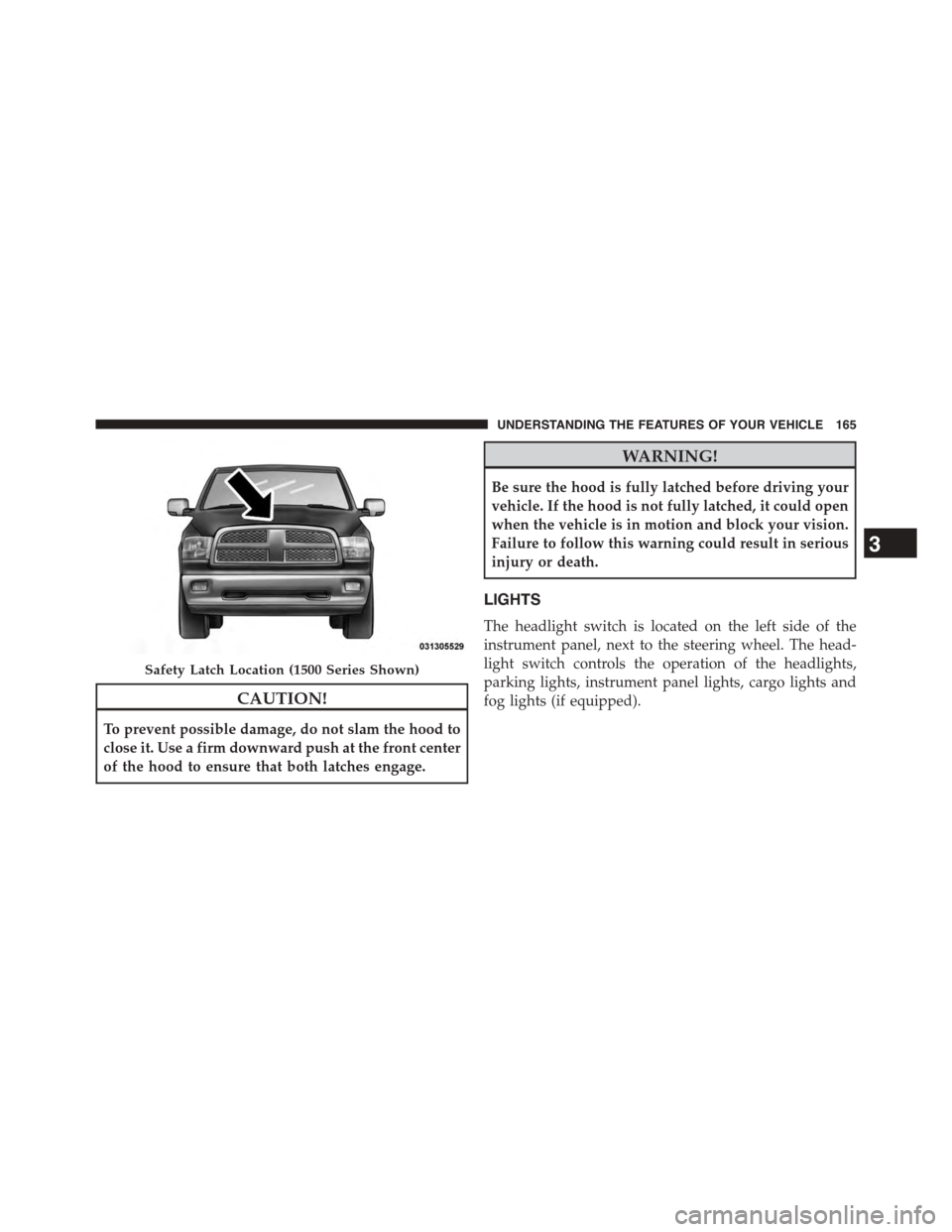
To prevent possible damage, do not slam the hood to
close it. Use a firm downward push at the front center
of the hood to ensure that both latches engage.
WARNING!
Be sure the hood is fully latched before driving your
vehicle. If the hood is not fully latched, it could open
when the vehicle is in motion and block your vision.
Failure to follow this warning could result in serious
injury or death.
LIGHTS
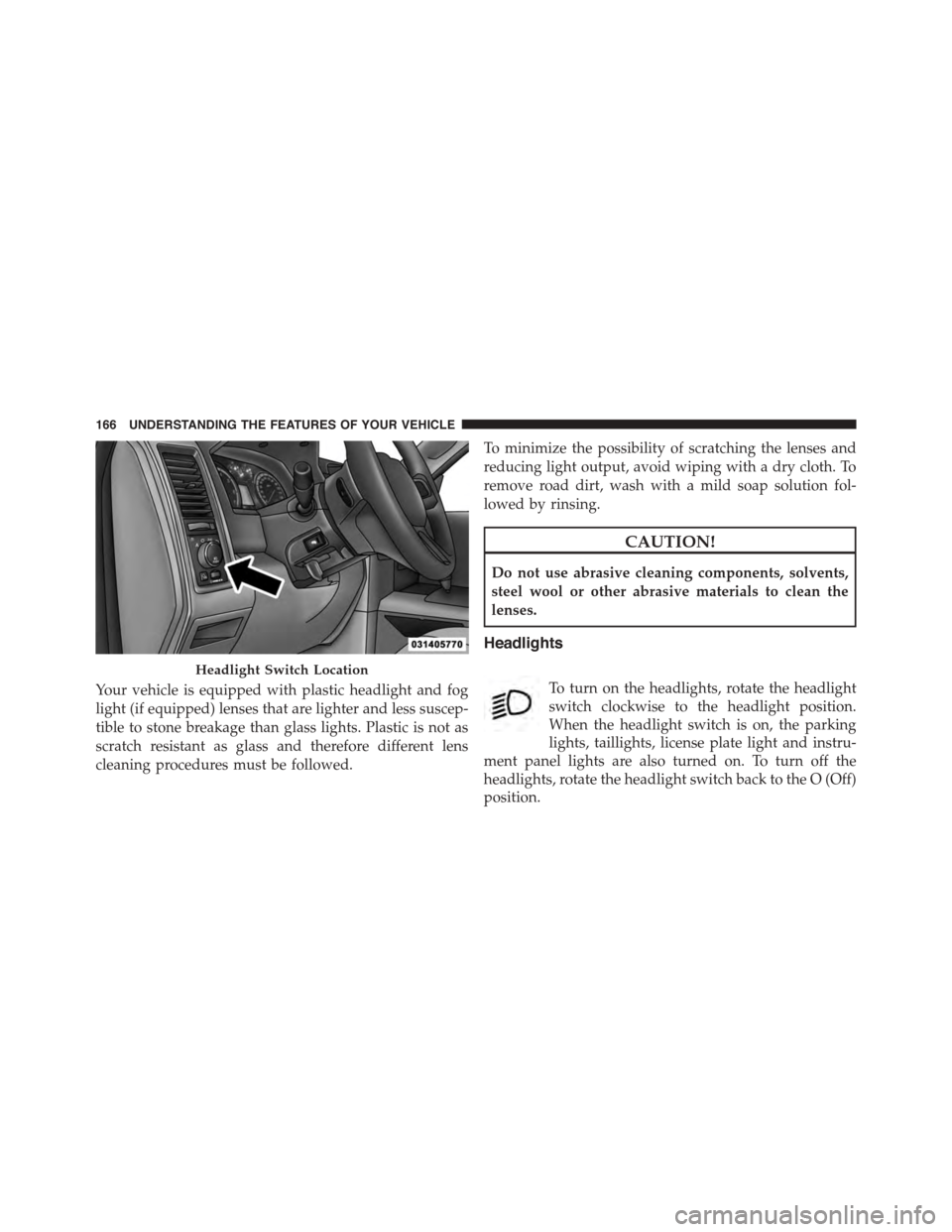
The headlight switch is located on the left side of the
instrument panel, next to the steering wheel. The head-
light switch controls the operation of the headlights,
parking lights, instrument panel lights, cargo lights and
fog lights (if equipped).
Safety Latch Location (1500 Series Shown)
3
UNDERSTANDING THE FEATURES OF YOUR VEHICLE 165
Page 168 of 871
Your vehicle is equipped with plastic headlight and fog
light (if equipped) lenses that are lighter and less suscep-
tible to stone breakage than glass lights. Plastic is not as
scratch resistant as glass and therefore different lens
cleaning procedures must be followed.
To minimize the possibility of scratching the lenses and
reducing light output, avoid wiping with a dry cloth. To
remove road dirt, wash with a mild soap solution fol-
lowed by rinsing.
CAUTION!
Do not use abrasive cleaning components, solvents,
steel wool or other abrasive materials to clean the
lenses.
Headlights
To turn on the headlights, rotate the headlight
switch clockwise to the headlight position.
When the headlight switch is on, the parking
lights, taillights, license plate light and instru-
ment panel lights are also turned on. To turn off the
headlights, rotate the headlight switch back to the O (Off)
position.
Headlight Switch Location
166 UNDERSTANDING THE FEATURES OF YOUR VEHICLE
Page 169 of 871

Automatic Headlights — If Equipped
This system automatically turns the headlights on or off
according to ambient light levels. To turn the system on,
rotate the headlight switch to the AUTO position.
When the system is on, the Headlight Delay feature is
also on. This means the headlights will stay on for up to
90 seconds after you turn the ignition switch to the OFF
position. To turn the automatic headlights off, turn the
headlight switch out of the AUTO position.
NOTE:The engine must be running before the head-
lights will turn on in the Automatic Mode.
Headlights On With Wipers (Available With
Automatic Headlights Only)
When this feature is active, the headlights will turn on
approximately 10 seconds after the wipers are turned on
if the headlight switch is placed in the AUTO position. In
addition, the headlights will turn off when the wipers are
turned off, if they were turned on by this feature.
NOTE:If your vehicle is equipped with a touchscreen,
this feature can be programmed through the Uconnect®
system. Refer to “Uconnect® Settings” in “Understand-
ing Your Instrument Panel” for further information.Automatic Headlight Position
3
UNDERSTANDING THE FEATURES OF YOUR VEHICLE 167
Page 170 of 871
If your vehicle is not equipped with a touchscreen, this
feature can be programmed through the Electronic Ve-
hicle Information Center (EVIC) or Driver Information
Display (DID). Refer to “Electronic Vehicle Information
Center (EVIC)” or “Driver Information Display (DID)” in
“Understanding Your Instrument Panel” for further in-
formation.
Daytime Running Lights (DRL) — If Equipped
The headlights on your vehicle will illuminate when the
engine is started and the transmission is in any gear
except PARK. This provides a constant#Lights ON#
condition until the ignition is turned OFF. The lights
illuminate at less than 50% of normal intensity. If the
parking brake is applied, the Daytime Running Lights
(DRL) will turn OFF. Also, if a turn signal is activated, the
DRL lamp on the same side of the vehicle may turn off for
the duration of the turn signal activation. Once the turn
signal is no longer active, the DRL lamp will illuminate.
Headlight Delay
To aid in your exit, your vehicle is equipped with a
headlight delay that will leave the headlights on for
approximately up to 90 seconds. This delay is initiated
when the ignition is turned OFF while the headlight
switch is on, and then the headlight switch is cycled off.
Headlight delay can be cancelled by either turning the
headlight switch on then off, or by turning the ignition
ON.
NOTE:If your vehicle is equipped with a touchscreen,
this feature can be programmed through the Uconnect®
system. Refer to “Uconnect® Settings” in “Understand-
ing Your Instrument Panel” for further information.
If your vehicle is not equipped with a touchscreen, this
feature can be programmed through the Electronic Ve-
hicle Information Center (EVIC) or Driver Information
Display (DID). Refer to “Electronic Vehicle Information
168 UNDERSTANDING THE FEATURES OF YOUR VEHICLE