panel Ram 1500 2015 Owner's Manual
[x] Cancel search | Manufacturer: RAM, Model Year: 2015, Model line: 1500, Model: Ram 1500 2015Pages: 871, PDF Size: 24.83 MB
Page 691 of 871
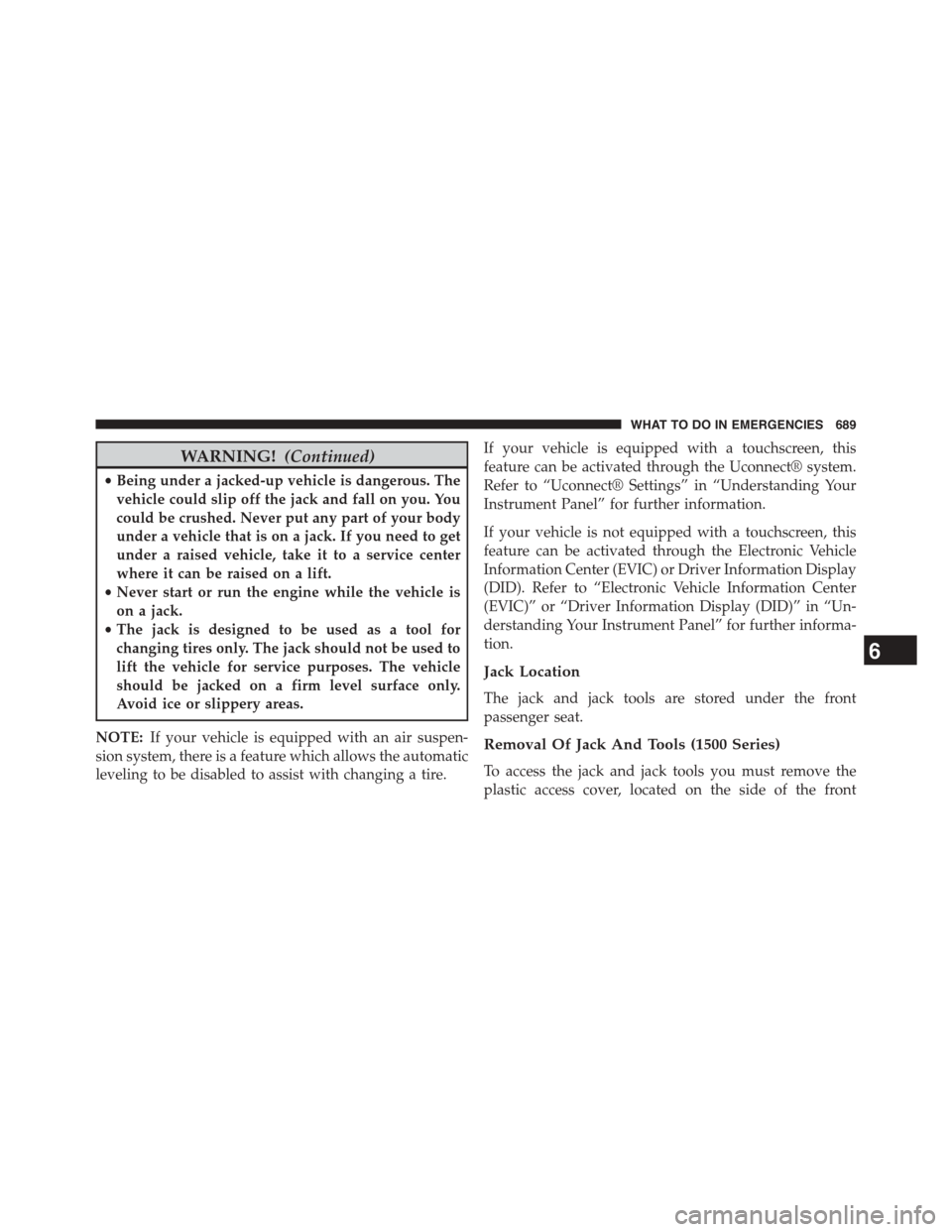
WARNING!(Continued)
•Being under a jacked-up vehicle is dangerous. The
vehicle could slip off the jack and fall on you. You
could be crushed. Never put any part of your body
under a vehicle that is on a jack. If you need to get
under a raised vehicle, take it to a service center
where it can be raised on a lift.
•Never start or run the engine while the vehicle is
on a jack.
•The jack is designed to be used as a tool for
changing tires only. The jack should not be used to
lift the vehicle for service purposes. The vehicle
should be jacked on a firm level surface only.
Avoid ice or slippery areas.
NOTE:If your vehicle is equipped with an air suspen-
sion system, there is a feature which allows the automatic
leveling to be disabled to assist with changing a tire.
If your vehicle is equipped with a touchscreen, this
feature can be activated through the Uconnect® system.
Refer to “Uconnect® Settings” in “Understanding Your
Instrument Panel” for further information.
If your vehicle is not equipped with a touchscreen, this
feature can be activated through the Electronic Vehicle
Information Center (EVIC) or Driver Information Display
(DID). Refer to “Electronic Vehicle Information Center
(EVIC)” or “Driver Information Display (DID)” in “Un-
derstanding Your Instrument Panel” for further informa-
tion.
Jack Location
The jack and jack tools are stored under the front
passenger seat.
Removal Of Jack And Tools (1500 Series)
To access the jack and jack tools you must remove the
plastic access cover, located on the side of the front
6
WHAT TO DO IN EMERGENCIES 689
Page 754 of 871

(EVIC)” or “Driver Information Display (DID)” in “Un-
derstanding Your Instrument Panel” for further informa-
tion. Tighten the fuel filler cap properly and press the
SELECT button to turn off the message. If the problem
continues, the message will appear the next time the
vehicle is started.
A loose, improperly installed, or damaged fuel filler cap
may also turn on the Malfunction Indicator Light (MIL).
EMISSIONS INSPECTION AND MAINTENANCE
PROGRAMS
In some localities, it may be a legal requirement to pass
an inspection of your vehicle’s emissions control system.
Failure to pass could prevent vehicle registration.
For states that require an Inspection and Mainte-
nance (I/M), this check verifies the “Malfunction
Indicator Light (MIL)” is functioning and is not
on when the engine is running, and that the OBD II
system is ready for testing.
Normally, the OBD II system will be ready. The OBD II
system maynotbe ready if your vehicle was recently
serviced, recently had a dead battery or a battery replace-
ment. If the OBD II system should be determined not
ready for the I/M test, your vehicle may fail the test.
Your vehicle has a simple ignition actuated test, which
you can use prior to going to the test station. To check if
your vehicle’s OBD II system is ready, you must do the
following:
1. Cycle the ignition switch to the ON position, but do
not crank or start the engine.
NOTE:If you crank or start the engine, you will have to
start this test over.
2. As soon as you cycle the ignition switch to the ON
position, you will see the MIL symbol come on as part
of a normal bulb check.
752 MAINTAINING YOUR VEHICLE
Page 793 of 871
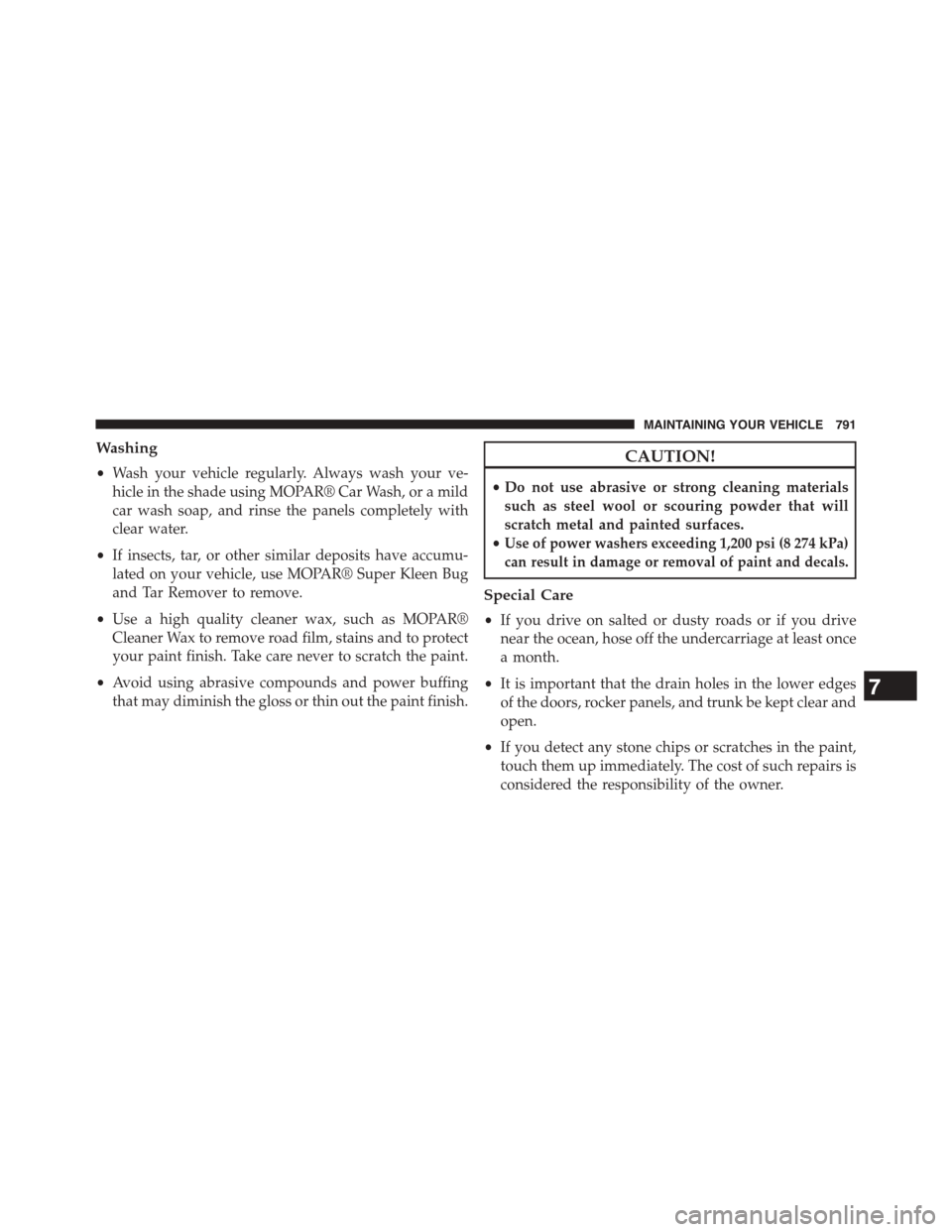
Washing
•Wash your vehicle regularly. Always wash your ve-
hicle in the shade using MOPAR® Car Wash, or a mild
car wash soap, and rinse the panels completely with
clear water.
•If insects, tar, or other similar deposits have accumu-
lated on your vehicle, use MOPAR® Super Kleen Bug
and Tar Remover to remove.
•Use a high quality cleaner wax, such as MOPAR®
Cleaner Wax to remove road film, stains and to protect
your paint finish. Take care never to scratch the paint.
•Avoid using abrasive compounds and power buffing
that may diminish the gloss or thin out the paint finish.
CAUTION!
•Do not use abrasive or strong cleaning materials
such as steel wool or scouring powder that will
scratch metal and painted surfaces.
•Use of power washers exceeding 1,200 psi (8 274 kPa)
can result in damage or removal of paint and decals.
Special Care
•If you drive on salted or dusty roads or if you drive
near the ocean, hose off the undercarriage at least once
a month.
•It is important that the drain holes in the lower edges
of the doors, rocker panels, and trunk be kept clear and
open.
•If you detect any stone chips or scratches in the paint,
touch them up immediately. The cost of such repairs is
considered the responsibility of the owner.
7
MAINTAINING YOUR VEHICLE 791
Page 804 of 871
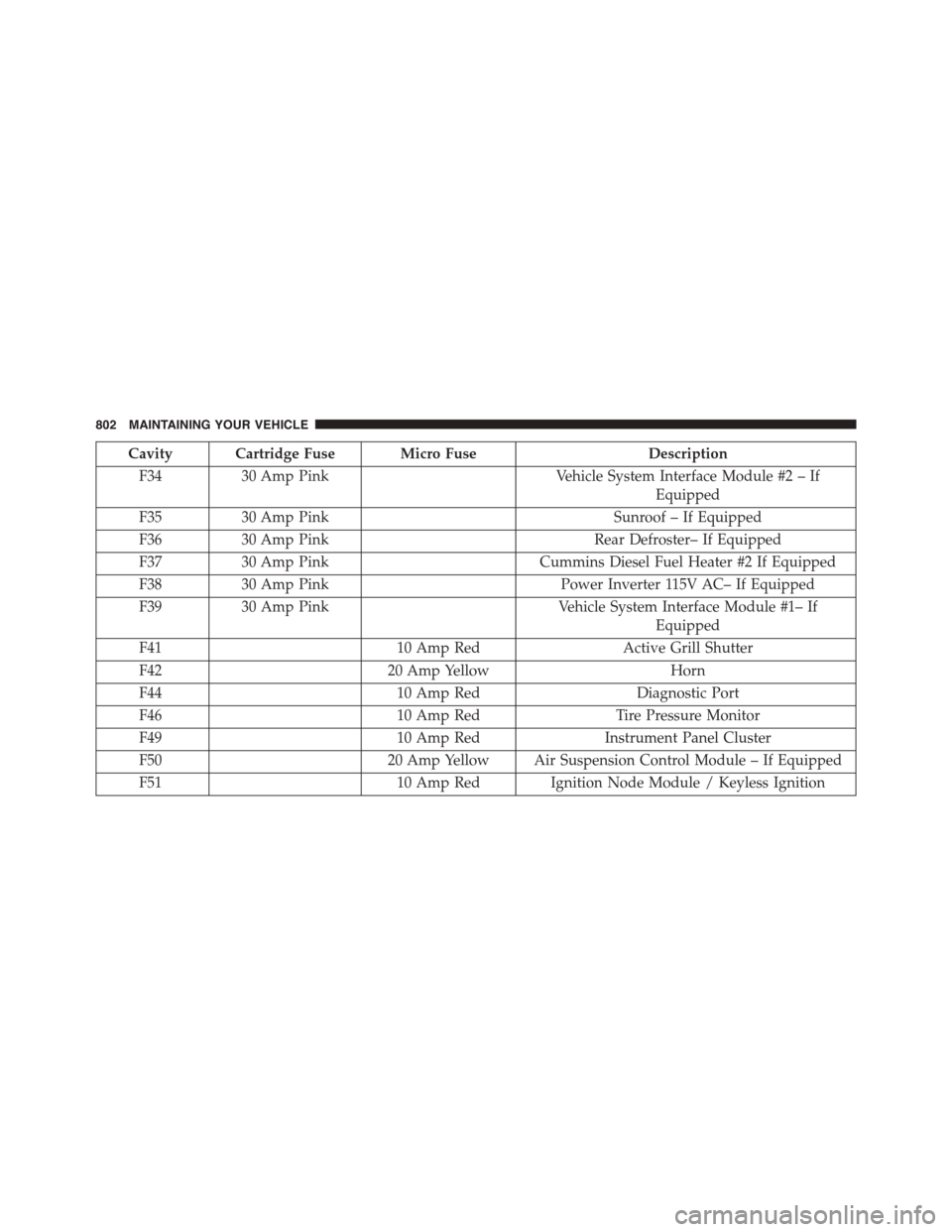
Cavity Cartridge Fuse Micro FuseDescription
F3430 Amp PinkVehicle System Interface Module #2 – If
Equipped
F3530 Amp PinkSunroof – If Equipped
F3630 Amp PinkRear Defroster– If Equipped
F3730 Amp PinkCummins Diesel Fuel Heater #2 If Equipped
F3830 Amp PinkPower Inverter 115V AC– If Equipped
F3930 Amp PinkVehicle System Interface Module #1– If
Equipped
F4110 Amp RedActive Grill Shutter
F4220 Amp YellowHorn
F4410 Amp RedDiagnostic Port
F4610 Amp RedTire Pressure Monitor
F4910 Amp RedInstrument Panel Cluster
F5020 Amp Yellow Air Suspension Control Module – If Equipped
F5110 Amp Red Ignition Node Module / Keyless Ignition
802 MAINTAINING YOUR VEHICLE
Page 808 of 871
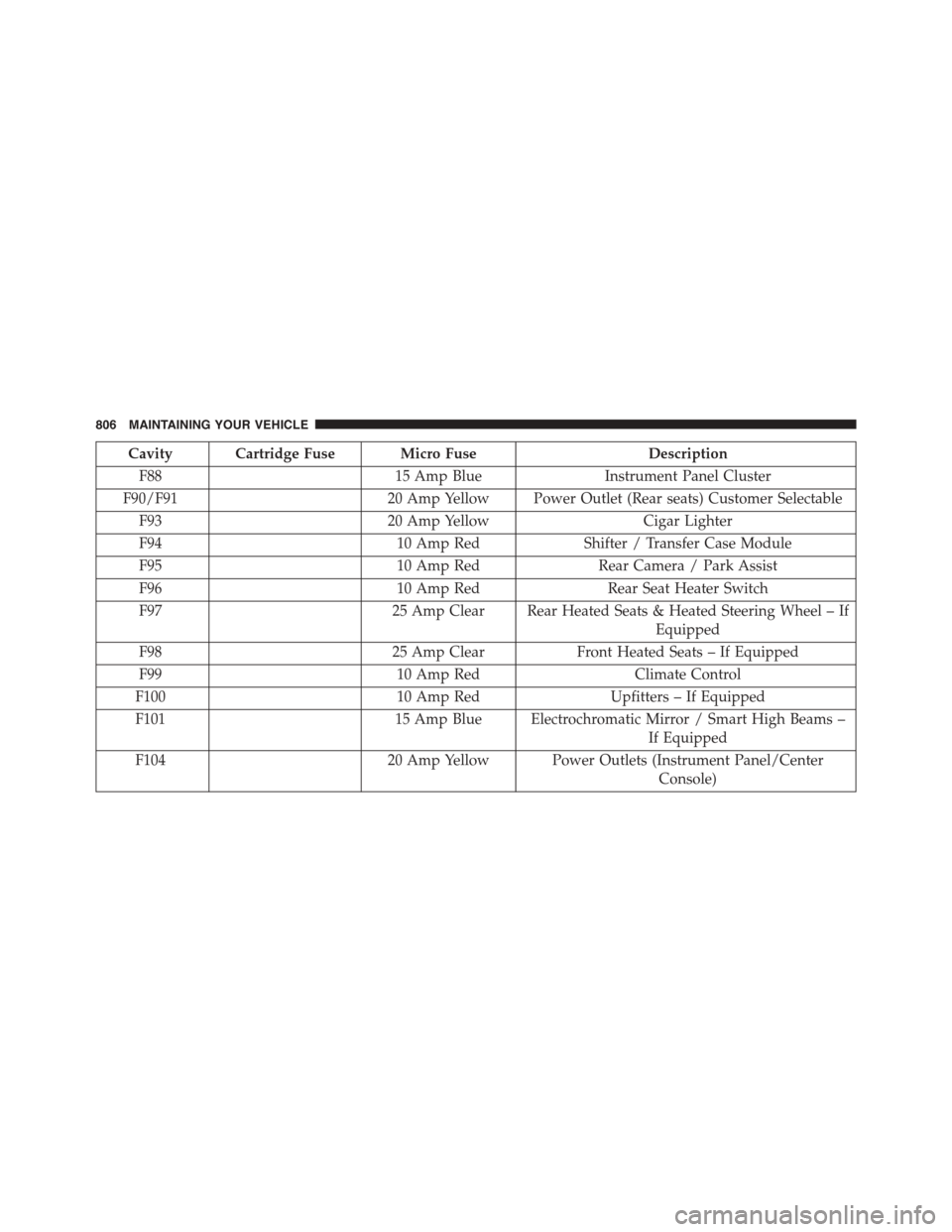
Cavity Cartridge Fuse Micro FuseDescription
F8815 Amp BlueInstrument Panel Cluster
F90/F9120 Amp Yellow Power Outlet (Rear seats) Customer Selectable
F9320 Amp YellowCigar Lighter
F9410 Amp RedShifter / Transfer Case Module
F9510 Amp RedRear Camera / Park Assist
F9610 Amp RedRear Seat Heater Switch
F9725 Amp Clear Rear Heated Seats & Heated Steering Wheel – If
Equipped
F9825 Amp ClearFront Heated Seats – If Equipped
F9910 Amp RedClimate Control
F10010 Amp RedUpfitters – If Equipped
F10115 Amp Blue Electrochromatic Mirror / Smart High Beams –
If Equipped
F10420 Amp Yellow Power Outlets (Instrument Panel/Center
Console)
806 MAINTAINING YOUR VEHICLE
Page 815 of 871
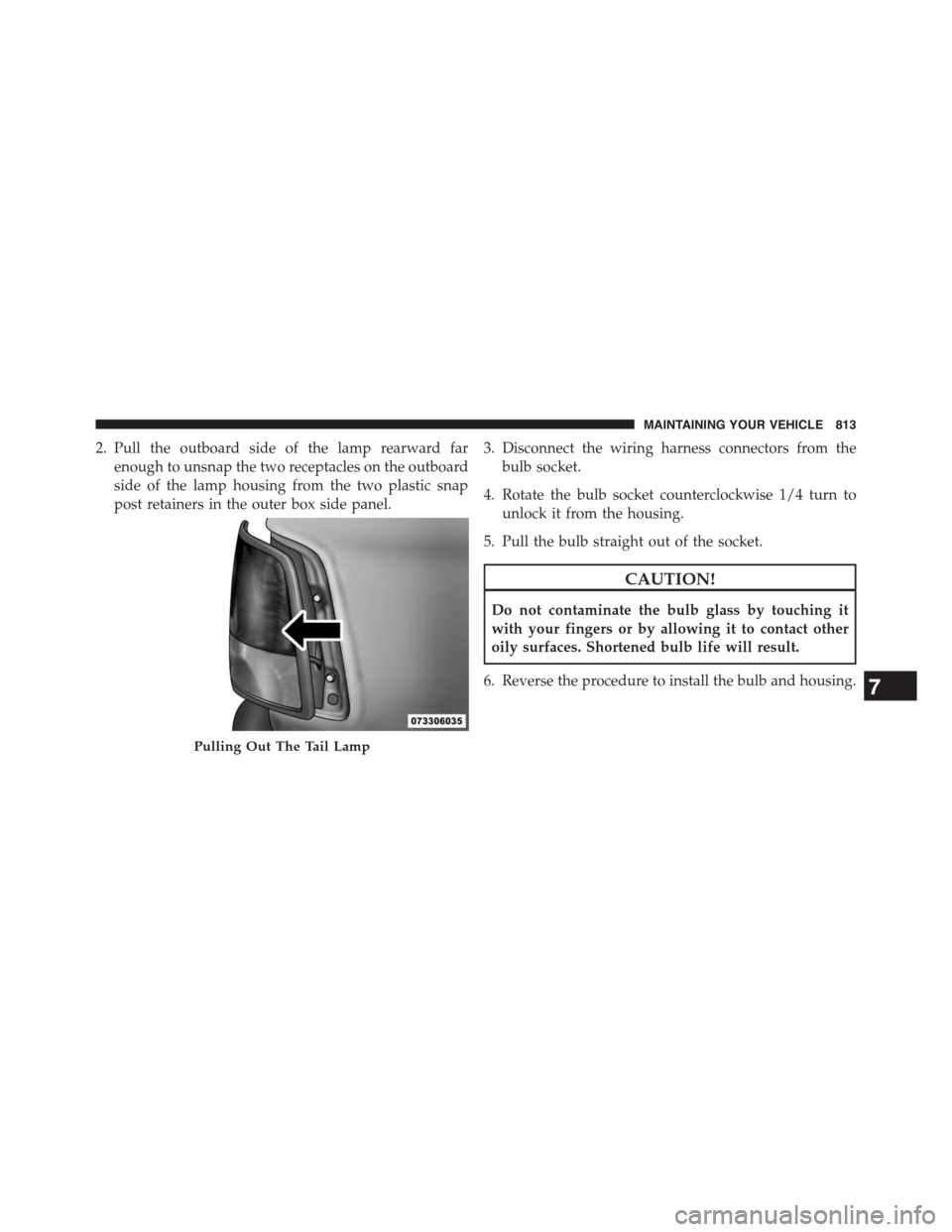
2. Pull the outboard side of the lamp rearward far
enough to unsnap the two receptacles on the outboard
side of the lamp housing from the two plastic snap
post retainers in the outer box side panel.
3. Disconnect the wiring harness connectors from the
bulb socket.
4. Rotate the bulb socket counterclockwise 1/4 turn to
unlock it from the housing.
5. Pull the bulb straight out of the socket.
CAUTION!
Do not contaminate the bulb glass by touching it
with your fingers or by allowing it to contact other
oily surfaces. Shortened bulb life will result.
6. Reverse the procedure to install the bulb and housing.
Pulling Out The Tail Lamp
7
MAINTAINING YOUR VEHICLE 813
Page 830 of 871
MAINTENANCE SCHEDULE
Your vehicle is equipped with an automatic oil change
indicator system. The oil change indicator system will
remind you that it is time to take your vehicle in for
scheduled maintenance.
Based on engine operation conditions, the oil change
indicator message will illuminate. This means that ser-
vice is required for your vehicle. Operating conditions
such as frequent short-trips, trailer tow, extremely hot or
cold ambient temperatures, and E85 fuel usage will
influence when the “Oil Change Required” message is
displayed. Severe Operating Conditions can cause the
change oil message to illuminate as early as 3,500 miles
(5,600 km) since last reset. Have your vehicle serviced as
soon as possible, within the next 500 miles (805 km).
Your authorized dealer will reset the oil change indicator
message after completing the scheduled oil change. If a
scheduled oil change is performed by someone other
than your authorized dealer, the message can be reset by
referring to the steps described under “Electronic Vehicle
Information Center (EVIC)” or “Driver Information Dis-
play (DID)” in “Understanding Your Instrument Panel”
for further information.
8
MAINTENANCE
SCHEDULES
828 MAINTENANCE SCHEDULES
Page 858 of 871
Illuminated Entry..........................23
Immobilizer (Sentry Key)....................18
Inflation Pressure Tires.....................620
Information Center, Vehicle..................302
Inside Rearview Mirror.....................126
Instrument Cluster........................289
Instrument Panel and Controls................286
Instrument Panel Lens Cleaning...............795
Integrated Trailer Brake Controls..............661
Interior Appearance Care....................793
Interior Lights...........................172
Intermittent Wipers (Delay Wipers).............179
Introduction..............................4
Inverter Outlet (115V)......................233
Jack Location............................688
Jump Starting............................729
Key Fob
Programming Additional Key Fobs...........20
Programming Additional Transmitters.........20
Key-In Reminder..........................18
Keyless Enter-N-Go........................42
Keyless Enter-N-Go™
Keyless Enter-N-Go™.....................42
Lock The Vehicle’s Doors..................364
Passive Entry...........................42
Passive Entry Programming.................42
Keyless Entry System.......................24
Key, Replacement..........................19
Keys...................................12
Key, Sentry (Immobilizer)....................18
Lane Change and Turn Signals................176
Lane Change Assist........................177
Lap/Shoulder Belts.........................53
Latches................................118
856 INDEX