horn Ram 1500 2015 Owner's Guide
[x] Cancel search | Manufacturer: RAM, Model Year: 2015, Model line: 1500, Model: Ram 1500 2015Pages: 871, PDF Size: 24.83 MB
Page 386 of 871
•Headlights With Wipers — If Equipped
When this feature is selected, and the headlight switch is
in the AUTO position, the headlights will turn on ap-
proximately 10 seconds after the wipers are turned on.
The headlights will also turn off when the wipers are
turned off if they were turned on by this feature. To make
your selection, press the “Headlights With Wipers” but-
ton on the touchscreen, until a check-mark appears next
to setting, showing that setting has been selected. Press
the back arrow button on the touchscreen to return to the
previous menu.
•Auto Dim High Beams — If Equipped
When this feature is selected, the high beam headlights
will deactivate automatically under certain conditions. To
make your selection, press the “Auto Dim High Beams”
button on the touchscreen, until a check-mark appears
next to setting, showing that setting has been selected.
Press the back arrow button on the touchscreen to return
to the previous menu. Refer to “Lights/ Automatic High
Beam — If Equipped” in “Understanding The Features
Of Your Vehicle” for further information.
•Flash Lights With Lock
When this feature is selected, the exterior lamps will flash
when the doors are locked or unlocked with the Remote
Keyless Entry (RKE) transmitter. This feature may be
selected with or without the sound horn on lock feature
selected. To make your selection, press the “Flash Lights
with Lock” button on the touchscreen, until a check-mark
appears next to setting, showing that setting has been
selected. Press the back arrow button on the touchscreen
to return to the previous menu.
384 UNDERSTANDING YOUR INSTRUMENT PANEL
Page 387 of 871
Doors & Locks
After pressing the “Doors & Locks” button on the touch-
screen the following settings will be available:
•Auto Door Locks
When this feature is selected, all doors will lock auto-
matically when the vehicle reaches a speed of 15 mph
(24 km/h). To make your selection, press the “Auto Door
Lock” button on the touchscreen until a check-mark
appears next to setting, showing that setting has been
selected. Press the back arrow button on the touchscreen
to return to the previous menu.
•Auto Unlock On Exit
When this feature is selected, all doors will unlock when
the vehicle is stopped and the transmission is in the
PARK or NEUTRAL position and the driver’s door is
opened. To make your selection, press the “Auto Unlock
On Exit” button on the touchscreen until a check-mark
appears next to setting, showing that setting has been
selected. Press the back arrow button on the touchscreen
to return to the previous menu.
•Flash Lights With Lock
When this feature is selected, the front and rear turn
signals will flash when the doors are locked or unlocked
with the RKE transmitter. This feature may be selected
with or without the sound horn on lock feature selected.
To make your selection, press the “Flash Lights With
Lock” button on the touchscreen until a check-mark
appears next to setting, showing that setting has been
selected. Press the back arrow on the touchscreen to
return to the previous menu.
•Sound Horn With Lock
When this feature is selected, the horn will sound when
the door locks are activated. To make your selection,
4
UNDERSTANDING YOUR INSTRUMENT PANEL 385
Page 388 of 871
press the “Sound Horn With Lock” button on the touch-
screen and select from “Off”, “1st Press” or “2nd Press”.
Press the back arrow button on the touchscreen to return
to the previous menu.
•Sound Horn With Remote Start
When this feature is selected, the horn will sound when the
remote start is activated. To make your selection, press the
“Sound Horn With Remote Start” button on the touch-
screen until a check-mark appears next to setting, showing
that setting has been selected. Press the back arrow button
on the touchscreen to return to the previous menu.
•1st Press Of Key Fob Unlocks
When 1st Press Of Key Fob Unlocks “Driver Door” is
selected, only the driver’s door will unlock on the first
press of the Remote Keyless Entry (RKE) transmitter
UNLOCK button you must push the RKE transmitter
UNLOCK button twice to unlock the passenger’s doors.
When Unlock “All Doors” On 1st Press is selected, all of
the doors will unlock on the first push of the RKE
transmitter UNLOCK button.
NOTE:If the vehicle is programmed 1st Press Of Key Fob
Unlocks “All Doors”, all doors will unlock no matter
which Passive Entry equipped door handle is grasped. If
1st Press Of Key Fob Unlocks “Driver Door” is pro-
grammed, only the driver ’s door will unlock when the
driver ’s door is grasped. With Passive Entry, if 1st Press
Of Key Fob Unlocks “Driver Door” is programmed
pushing the handle more than once will only result in the
driver ’s door opening. If driver door is selected, once the
driver door is opened, the interior door lock/unlock
switch can be used to unlock all doors (or use RKE
transmitter).
386 UNDERSTANDING YOUR INSTRUMENT PANEL
Page 391 of 871
Air Suspension — If Equipped
After pressing the “Suspension” button on the touch-
screen the following settings will be available.
•Sound Horn With Lower
When this feature is selected, a short horn sound will
occur when the RKE transmitter REMOTE LOWER but-
ton is pressed. Press the box next to your selection and a
check-mark appears next to the feature showing the
system has been activated or the check-mark is removed
showing the system has been deactivated.
•Flash Lights With Lower
When this feature is selected, the front and rear turn
signals will flash when the RKE transmitter REMOTE
LOWER button is pressed twice. This feature may be
selected with or without the Sound Horn on Lower
feature selected. Press the box next to your selection and
a check-mark appears next to the feature showing the
system has been activated or the check-mark is removed
showing the system has been deactivated.
•Suspension Display Messages
When “All” is selected, all the Air Suspension Alerts will
be displayed. When “Warning” is selected only the Air
Suspension Warnings will be displayed.
•Automatic Aero Mode (1500 Model Only)
When this feature is selected the Ride Height will auto-
matically be adjusted depending on the vehicle speed.
Press the box next to your selection and a check-mark
appears next to the feature showing the system has been
activated or the check-mark is removed showing the
system has been deactivated.
•Tire Jack Mode
When this feature is selected the air suspension system is
disabled to assist with changing a spare tire. Press the box
next to your selection and a check-mark appears next to
4
UNDERSTANDING YOUR INSTRUMENT PANEL 389
Page 435 of 871

TIP:Your mobile phone must have the full implementa-
tion of theMessage Access Profile (MAP)to take advan-
tage of this feature. For details about MAP, visit
UconnectPhone.com. Apple iPhone® iOS6 or later
supports readingincomingtext messages only.
Uconnect® Access* (8.4A/8.4AN)
An included trial and/or subscription is required to take
advantage of the Uconnect® Access services in the next
section of this guide. To register with Uconnect® Access,
press the Apps button on the 8.4-inch touchscreen to get
started. Detailed registration instructions can be found
on the next page.
*Uconnect® Access is available only on equipped ve-
hicles purchased within the continental United States and
Alaska. Services can only be used where coverage is
available; see coverage map for details.
9-1-1 Call
Theft Alarm Notification
Remote Door Lock/Unlock
Stolen Vehicle Assistance
Remote Vehicle Start**
Remote Horn and Lights
Yelp® Search
Voice Texting
Roadside Assistance Call
Wi-Fi Hotspot***
**If vehicle is equipped.
***Extra charges apply.
4
UNDERSTANDING YOUR INSTRUMENT PANEL 433
Page 804 of 871
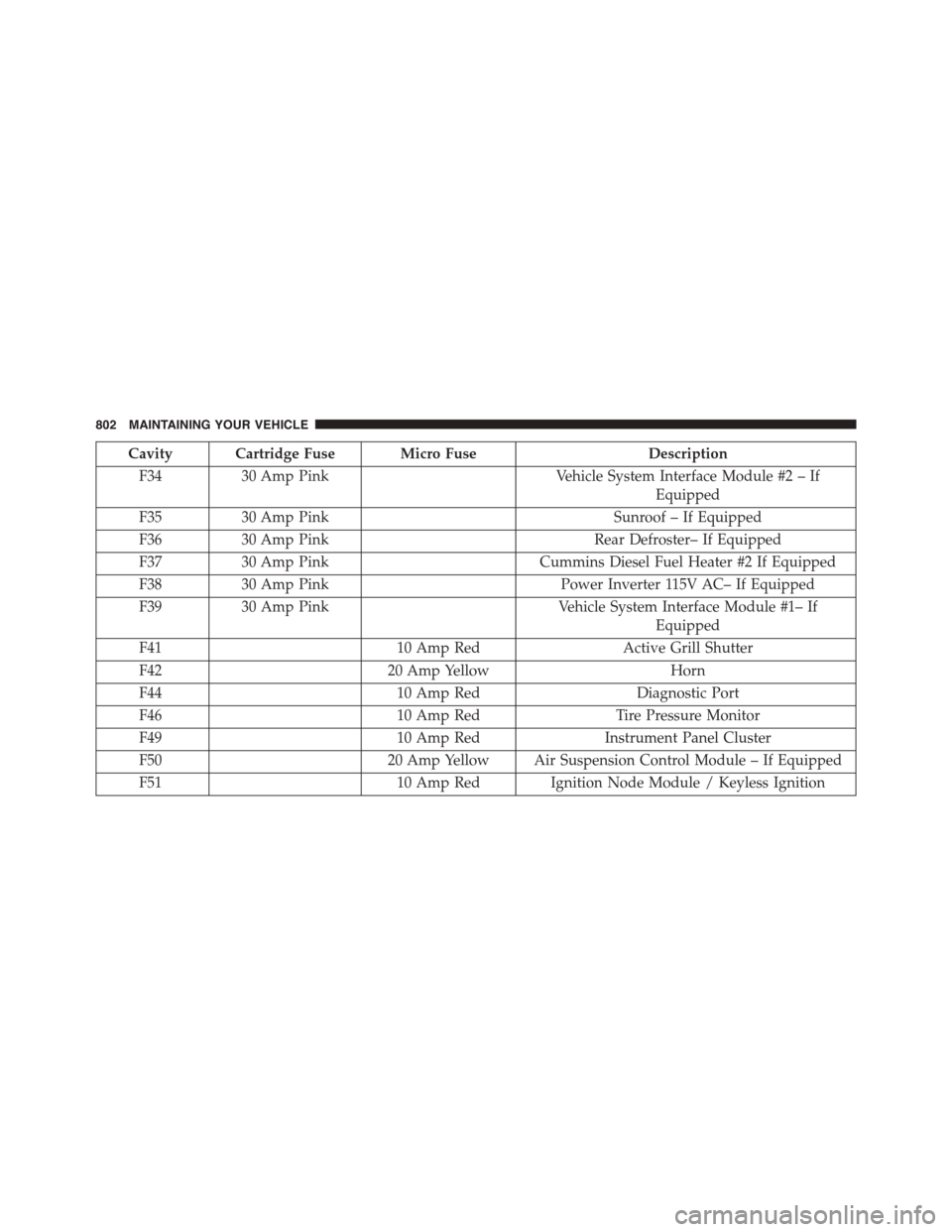
Cavity Cartridge Fuse Micro FuseDescription
F3430 Amp PinkVehicle System Interface Module #2 – If
Equipped
F3530 Amp PinkSunroof – If Equipped
F3630 Amp PinkRear Defroster– If Equipped
F3730 Amp PinkCummins Diesel Fuel Heater #2 If Equipped
F3830 Amp PinkPower Inverter 115V AC– If Equipped
F3930 Amp PinkVehicle System Interface Module #1– If
Equipped
F4110 Amp RedActive Grill Shutter
F4220 Amp YellowHorn
F4410 Amp RedDiagnostic Port
F4610 Amp RedTire Pressure Monitor
F4910 Amp RedInstrument Panel Cluster
F5020 Amp Yellow Air Suspension Control Module – If Equipped
F5110 Amp Red Ignition Node Module / Keyless Ignition
802 MAINTAINING YOUR VEHICLE