turn signal Ram 1500 2015 Owner's Guide
[x] Cancel search | Manufacturer: RAM, Model Year: 2015, Model line: 1500, Model: Ram 1500 2015Pages: 871, PDF Size: 24.83 MB
Page 339 of 871
•Traction Control Off
•Washer Fluid Low
•Oil Pressure Low
•Oil Change Due
•Fuel Low
•Service Antilock Brake System
•Service Electronic Throttle Control
•Service Power Steering
•Cruise Off
•Cruise Ready
•Cruise Set To XXX MPH
•Tire Pressure Screen With Low Tire(s) “Inflate Tire to
XX”
•Tire Pressure Information System (TPIS)
•Service Tire Pressure System
•Parking Brake Engaged
•Brake Fluid Low
•Service Electronic Braking System
•Engine Temperature Hot
•Battery Voltage Low
•Service Electronic Throttle Control
•Lights On
•Right Turn Signal Light Out
•Left Turn Signal Light Out
•Turn Signal On
4
UNDERSTANDING YOUR INSTRUMENT PANEL 337
Page 370 of 871

•Engine Off Power Delay
When this feature is selected, the power window
switches, radio, Uconnect® phone system (if equipped),
DVD video system (if equipped), power sunroof (if
equipped), and power outlets will remain active for up to
10 minutes after the ignition is cycled to OFF. Opening
either front door will cancel this feature. Press the “En-
gine Off Power Delay” button on the touchscreen and
choose from “0 sec,” “45 sec,” “5 min” or “10 min” to
select your desired time interval. Then press the back
arrow/Done button on the touchscreen to return to the
previous menu.
•Auto Entry/Exit — If Equipped
When this feature is selected, it automatically lowers the
vehicle ride height position when shifted into park. Press
the “Auto Entry/Exit” button on the touchscreen and
choose from “On” or “Off.” Press the back arrow/Done
button on the touchscreen to return to the previous menu.
Suspension — If Equipped
After pressing the “Suspension” button on the touch-
screen the following settings will be available:
•Sound Horn With Lower
When this feature is selected, a short horn sound will
occur when the RKE transmitter REMOTE LOWER but-
ton is pressed. To make your selection, press the “Horn
w/lower” button on the touchscreen, select “On” or
“Off” followed by pressing the back arrow/Done button
on the touchscreen.
•Flash Lights With Lower
When this feature is selected, the front and rear turn
signals will flash when the RKE transmitter REMOTE
LOWER button is pressed twice. To make your selection,
press the “Light w/Lower” button on the touchscreen,
select “On” or “Off” followed by pressing the back
arrow/Done button on the touchscreen.
368 UNDERSTANDING YOUR INSTRUMENT PANEL
Page 387 of 871
Doors & Locks
After pressing the “Doors & Locks” button on the touch-
screen the following settings will be available:
•Auto Door Locks
When this feature is selected, all doors will lock auto-
matically when the vehicle reaches a speed of 15 mph
(24 km/h). To make your selection, press the “Auto Door
Lock” button on the touchscreen until a check-mark
appears next to setting, showing that setting has been
selected. Press the back arrow button on the touchscreen
to return to the previous menu.
•Auto Unlock On Exit
When this feature is selected, all doors will unlock when
the vehicle is stopped and the transmission is in the
PARK or NEUTRAL position and the driver’s door is
opened. To make your selection, press the “Auto Unlock
On Exit” button on the touchscreen until a check-mark
appears next to setting, showing that setting has been
selected. Press the back arrow button on the touchscreen
to return to the previous menu.
•Flash Lights With Lock
When this feature is selected, the front and rear turn
signals will flash when the doors are locked or unlocked
with the RKE transmitter. This feature may be selected
with or without the sound horn on lock feature selected.
To make your selection, press the “Flash Lights With
Lock” button on the touchscreen until a check-mark
appears next to setting, showing that setting has been
selected. Press the back arrow on the touchscreen to
return to the previous menu.
•Sound Horn With Lock
When this feature is selected, the horn will sound when
the door locks are activated. To make your selection,
4
UNDERSTANDING YOUR INSTRUMENT PANEL 385
Page 391 of 871
Air Suspension — If Equipped
After pressing the “Suspension” button on the touch-
screen the following settings will be available.
•Sound Horn With Lower
When this feature is selected, a short horn sound will
occur when the RKE transmitter REMOTE LOWER but-
ton is pressed. Press the box next to your selection and a
check-mark appears next to the feature showing the
system has been activated or the check-mark is removed
showing the system has been deactivated.
•Flash Lights With Lower
When this feature is selected, the front and rear turn
signals will flash when the RKE transmitter REMOTE
LOWER button is pressed twice. This feature may be
selected with or without the Sound Horn on Lower
feature selected. Press the box next to your selection and
a check-mark appears next to the feature showing the
system has been activated or the check-mark is removed
showing the system has been deactivated.
•Suspension Display Messages
When “All” is selected, all the Air Suspension Alerts will
be displayed. When “Warning” is selected only the Air
Suspension Warnings will be displayed.
•Automatic Aero Mode (1500 Model Only)
When this feature is selected the Ride Height will auto-
matically be adjusted depending on the vehicle speed.
Press the box next to your selection and a check-mark
appears next to the feature showing the system has been
activated or the check-mark is removed showing the
system has been deactivated.
•Tire Jack Mode
When this feature is selected the air suspension system is
disabled to assist with changing a spare tire. Press the box
next to your selection and a check-mark appears next to
4
UNDERSTANDING YOUR INSTRUMENT PANEL 389
Page 537 of 871
accelerations, turns or braking. In most cases there are no
road signs, posted speed limits or signal lights. Therefore
you will need to use your own good judgment on what is
safe and what isn’t. When on a trail you should always be
looking ahead for surface obstacles and changes in
terrain. The key is to plan your future driving route while
remembering what you are currently driving over.
CAUTION!
Never park your vehicle over dry grass or other
combustible materials. The heat from your vehicle
exhaust system could cause a fire.
WARNING!
Always wear your seat belt and firmly tie down
cargo. Unsecured cargo can become projectiles in an
off-road situation.
When To Use Low Range
When driving off-road, shift into 4L (Low Range) for
additional traction or to improve handling and control on
slippery or difficult terrain. Due to the lower gearing, low
range will allow the engine to operate in a higher power
range. This will allow you to idle over obstacles and
down hills, with improved control and less effort. Also,
use 4L (Low Range) in rain, ice, snow, mud, sand, to get
heavy loads rolling, improve traction, or whenever 4H
(High Range) traction will not do the job.
Driving In Snow, Mud And Sand
There is a drastic reduction in traction when driving in
snow, mud or sand. The vehicle will be less responsive to
steering, acceleration and braking inputs. Therefore you
should accelerate slowly, leave greater stopping distances
and avoid abrupt vehicle maneuvers. You want to keep a
slow constant steady pace. The key is to maintain the
vehicle’s momentum.
5
STARTING AND OPERATING 535
Page 668 of 871
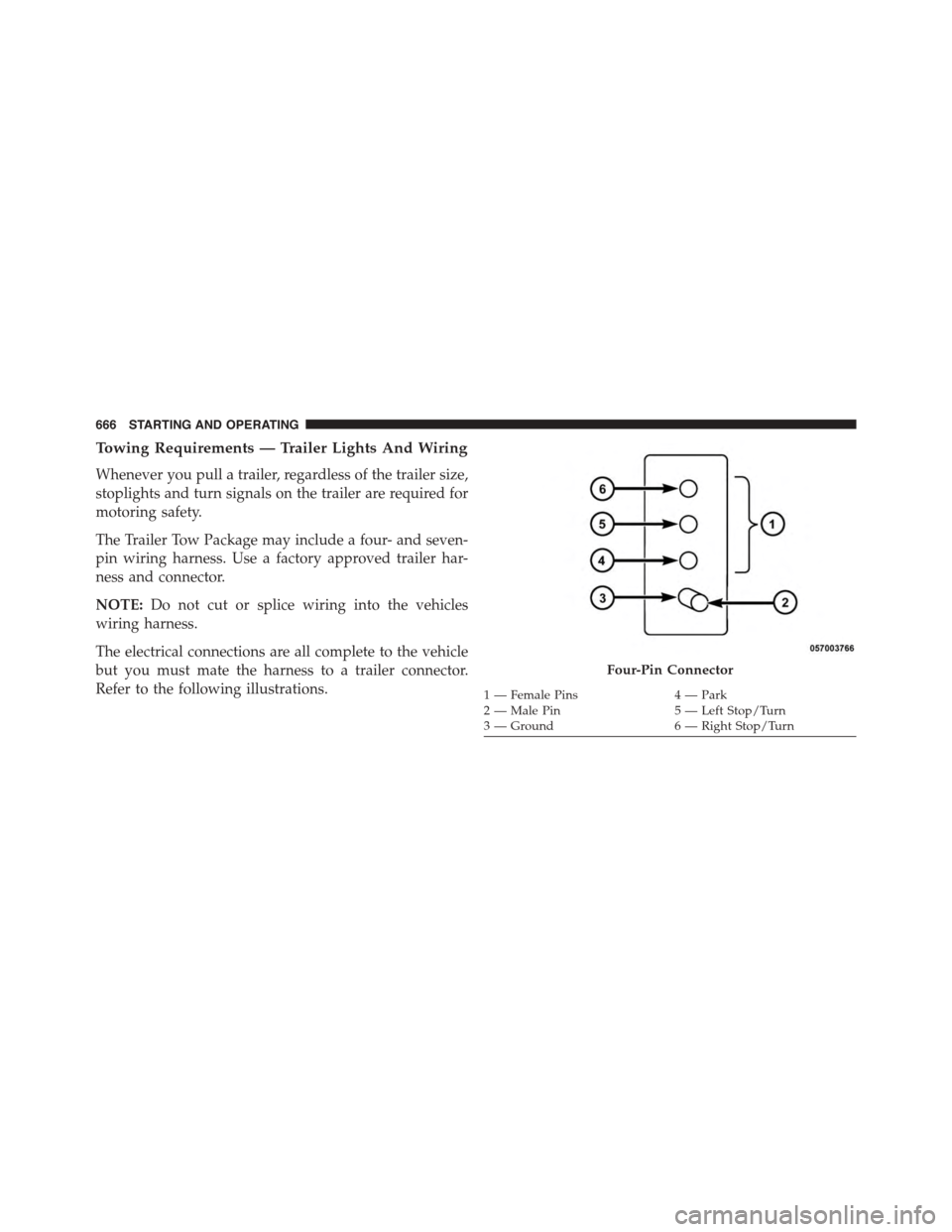
Towing Requirements — Trailer Lights And Wiring
Whenever you pull a trailer, regardless of the trailer size,
stoplights and turn signals on the trailer are required for
motoring safety.
The Trailer Tow Package may include a four- and seven-
pin wiring harness. Use a factory approved trailer har-
ness and connector.
NOTE:Do not cut or splice wiring into the vehicles
wiring harness.
The electrical connections are all complete to the vehicle
but you must mate the harness to a trailer connector.
Refer to the following illustrations.
Four-Pin Connector
1 — Female Pins4 — Park2 — Male Pin5 — Left Stop/Turn3—Ground6—RightStop/Turn
666 STARTING AND OPERATING
Page 687 of 871
HAZARD WARNING FLASHERS
The Hazard Warning flasher switch is located on the
upper switch bank just below the radio.
Press the switch to turn on the Hazard Warning
flasher. When the switch is activated, all direc-
tional turn signals will flash on and off to warn oncoming
traffic of an emergency. Press the switch a second time to
turn off the Hazard Warning flashers.
This is an emergency warning system and it should not
be used when the vehicle is in motion. Use it when your
vehicle is disabled and it is creating a safety hazard for
other motorists.
When you must leave the vehicle to seek assistance, the
Hazard Warning flashers will continue to operate even
though the ignition is placed in the OFF position.
NOTE:With extended use the Hazard Warning flashers
may wear down your battery.
IF YOUR ENGINE OVERHEATS
In any of the following situations, you can reduce the
potential for overheating by taking the appropriate action.
•On the highways — slow down.
•In city traffic — while stopped, place the transmission
in NEUTRAL, but do not increase the engine idle
speed.
NOTE:There are steps that you can take to slow down
an impending overheat condition:
•If your air conditioner (A/C) is on, turn it off. The A/C
system adds heat to the engine cooling system and
turning the A/C off can help remove this heat.
•You can also turn the temperature control to maximum
heat, the mode control to floor and the blower control to
high. This allows the heater core to act as a supplement
to the radiator and aids in removing heat from the
engine cooling system.
6
WHAT TO DO IN EMERGENCIES 685
Page 748 of 871
▫Adding Washer Fluid..................771
▫Exhaust System......................772
▫Cooling System......................774
▫Brake System........................782
▫Rear Axle And 4x4 Front Driving Axle Fluid
Level..............................784
▫Transfer Case........................785
▫Automatic Transmission................786
▫Appearance Care And Protection From
Corrosion...........................790
!FUSES..............................797
▫Power Distribution Center...............798
!VEHICLE STORAGE....................807
!REPLACEMENT BULBS.................808
!BULB REPLACEMENT..................809
▫Base Quad / Premium Bi-Halogen: Low Beam
Headlamp, High Beam Headlamp, Front Park
And Turn — If Equipped...............810
▫Fog Lamps — If Equipped..............812
▫Rear Tail/Stop, Turn Signal And Backup Lamps
..................................812
▫Center High-Mounted Stoplamp (CHMSL) With
Cargo Lamp.........................814
▫Cab Top Clearance Lamps — If Equipped . . . .816
▫Rear Lamp Bar ID Marker (Dual Rear Wheels) —
If Equipped..........................817
▫Side Marker Lamps (Dual Rear Wheels) —
If Equipped.........................818
746 MAINTAINING YOUR VEHICLE
Page 810 of 871

REPLACEMENT BULBS
All of the inside bulbs are brass or glass-wedge base.
Aluminum base bulbs are not approved.
Interior Bulbs
Bulb Number
Overhead Console
Lamps
TS 212–9
Dome Lamp 7679
For lighted switches, see your authorized dealer for
replacement instructions.
Exterior Bulbs
Bulb Number
Base Quad Headlamp –
Low Beam
H11LL
Base Quad Headlamp –
High Beam
9005LL
Front Turn Signal Lamp
(Base Quad Headlamp)
3157NA
Premium Bi Halogen
Projector Headlamp -
Low Beam
HIR2LL
Premium Bi Halogen
Projector Headlamp -
High Beam
9005LL
Front Turn Signal Lamp
(Premium Headlamp)
LED (Serviced at
Authorized Dealer)
808 MAINTAINING YOUR VEHICLE
Page 814 of 871
Fog Lamps — If Equipped
1. Reach under and behind the front bumper to access
the back of the front fog lamp housing.
2. Disconnect the fog lamp wiring harness connector
from the fog lamp bulb.
3. Rotate the bulb counterclockwise¼turn to unlock the
bulb from the housing.
4. Pull the bulb straight out from the housing.
CAUTION!
Do not contaminate the bulb glass by touching it
with your fingers or by allowing it to contact other
oily surfaces. Shortened bulb life will result.
Rear Tail/Stop, Turn Signal And Backup Lamps
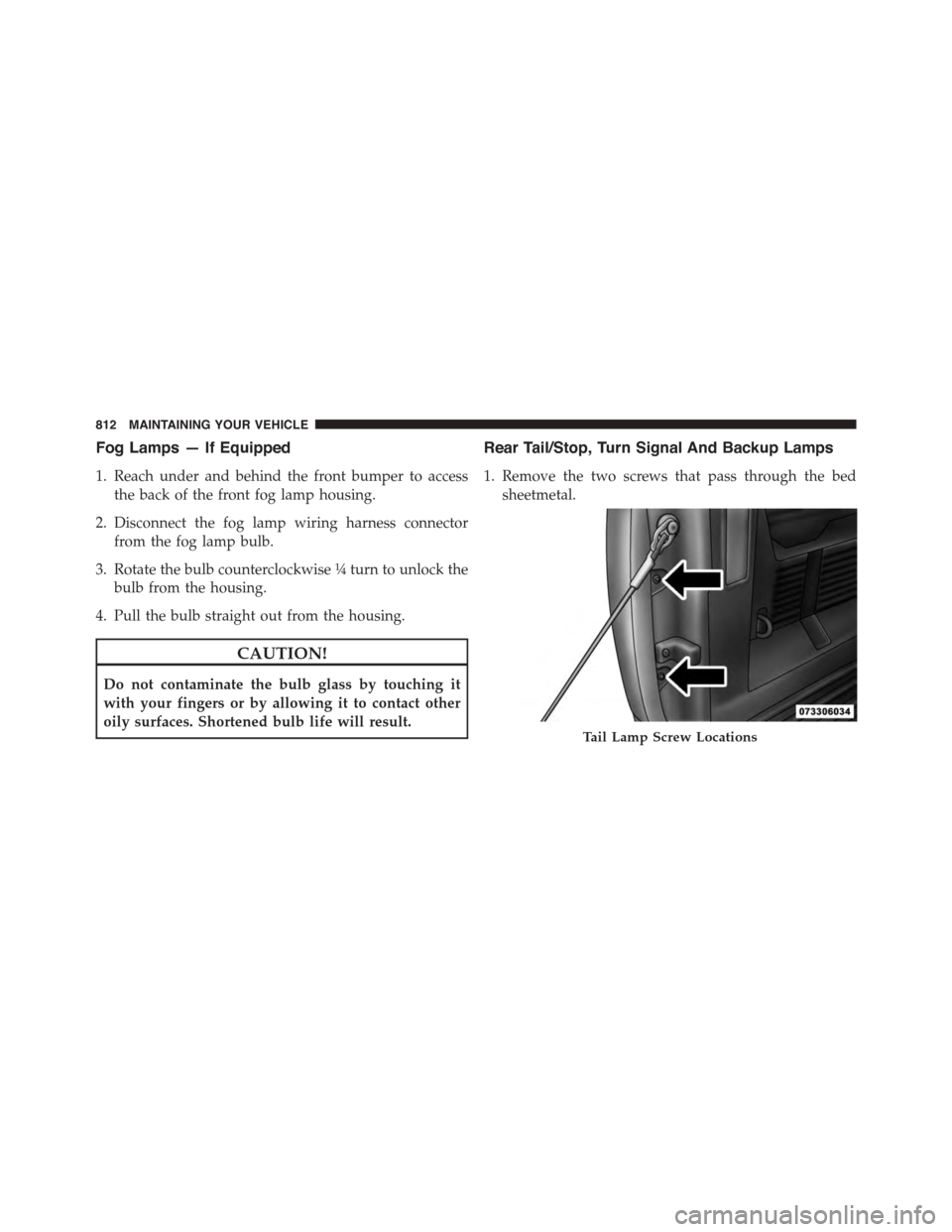
1. Remove the two screws that pass through the bed
sheetmetal.
Tail Lamp Screw Locations
812 MAINTAINING YOUR VEHICLE