Door lock Ram 1500 2015 Workshop Manual
[x] Cancel search | Manufacturer: RAM, Model Year: 2015, Model line: 1500, Model: Ram 1500 2015Pages: 871, PDF Size: 24.83 MB
Page 387 of 871
Doors & Locks
After pressing the “Doors & Locks” button on the touch-
screen the following settings will be available:
•Auto Door Locks
When this feature is selected, all doors will lock auto-
matically when the vehicle reaches a speed of 15 mph
(24 km/h). To make your selection, press the “Auto Door
Lock” button on the touchscreen until a check-mark
appears next to setting, showing that setting has been
selected. Press the back arrow button on the touchscreen
to return to the previous menu.
•Auto Unlock On Exit
When this feature is selected, all doors will unlock when
the vehicle is stopped and the transmission is in the
PARK or NEUTRAL position and the driver’s door is
opened. To make your selection, press the “Auto Unlock
On Exit” button on the touchscreen until a check-mark
appears next to setting, showing that setting has been
selected. Press the back arrow button on the touchscreen
to return to the previous menu.
•Flash Lights With Lock
When this feature is selected, the front and rear turn
signals will flash when the doors are locked or unlocked
with the RKE transmitter. This feature may be selected
with or without the sound horn on lock feature selected.
To make your selection, press the “Flash Lights With
Lock” button on the touchscreen until a check-mark
appears next to setting, showing that setting has been
selected. Press the back arrow on the touchscreen to
return to the previous menu.
•Sound Horn With Lock
When this feature is selected, the horn will sound when
the door locks are activated. To make your selection,
4
UNDERSTANDING YOUR INSTRUMENT PANEL 385
Page 388 of 871
press the “Sound Horn With Lock” button on the touch-
screen and select from “Off”, “1st Press” or “2nd Press”.
Press the back arrow button on the touchscreen to return
to the previous menu.
•Sound Horn With Remote Start
When this feature is selected, the horn will sound when the
remote start is activated. To make your selection, press the
“Sound Horn With Remote Start” button on the touch-
screen until a check-mark appears next to setting, showing
that setting has been selected. Press the back arrow button
on the touchscreen to return to the previous menu.
•1st Press Of Key Fob Unlocks
When 1st Press Of Key Fob Unlocks “Driver Door” is
selected, only the driver’s door will unlock on the first
press of the Remote Keyless Entry (RKE) transmitter
UNLOCK button you must push the RKE transmitter
UNLOCK button twice to unlock the passenger’s doors.
When Unlock “All Doors” On 1st Press is selected, all of
the doors will unlock on the first push of the RKE
transmitter UNLOCK button.
NOTE:If the vehicle is programmed 1st Press Of Key Fob
Unlocks “All Doors”, all doors will unlock no matter
which Passive Entry equipped door handle is grasped. If
1st Press Of Key Fob Unlocks “Driver Door” is pro-
grammed, only the driver ’s door will unlock when the
driver ’s door is grasped. With Passive Entry, if 1st Press
Of Key Fob Unlocks “Driver Door” is programmed
pushing the handle more than once will only result in the
driver ’s door opening. If driver door is selected, once the
driver door is opened, the interior door lock/unlock
switch can be used to unlock all doors (or use RKE
transmitter).
386 UNDERSTANDING YOUR INSTRUMENT PANEL
Page 389 of 871
•Passive Entry
This feature allows you to lock and unlock the vehicles
door(s) without having to push the Remote Keyless Entry
(RKE) transmitter lock or unlock buttons. To make your
selection, press the “Passive Entry” button on the touch-
screen until a check-mark appears next to setting, show-
ing that setting has been selected. Press the back arrow
button on the touchscreen to return to the previous
menu. Refer to “Keyless Enter-N-Go™” in “Things To
Know Before Starting Your Vehicle”.
•Personal Settings Linked To Key Fob — If Equipped
This feature provides automatic driver seat positioning to
enhance driver mobility when entering and exiting the
vehicle. To make your selection, press the “Personal
Settings Linked To Key Fob” button on the touchscreen
until a check-mark appears next to setting, showing that
setting has been selected. Press the back arrow button on
the touchscreen to return to the previous menu.
NOTE:The seat will return to the memorized seat
location (if Personal Settings Linked To Key Fob is set to
ON) when the Remote Keyless Entry (RKE) transmitter is
used to unlock the door. Refer to “Driver Memory Seat”
in “Understanding The Features Of Your Vehicle” for
further information.
Auto Comfort Systems — If Equipped
After pressing the “Auto-On Comfort” button on the
touchscreen the following settings will be available:
•Auto-On Driver Heated/Ventilated Seat & Steering
Wheel With Vehicle Start — If Equipped
When this feature is selected the driver’s heated seat and
heated steering wheel will automatically turn ON when
temperatures are below 40° F (4.4° C). When temperatures
are above 80° F (26.7° C) the driver vented seat will turn
ON. To make your selection, press the “Auto Heated Seats”
4
UNDERSTANDING YOUR INSTRUMENT PANEL 387
Page 435 of 871

TIP:Your mobile phone must have the full implementa-
tion of theMessage Access Profile (MAP)to take advan-
tage of this feature. For details about MAP, visit
UconnectPhone.com. Apple iPhone® iOS6 or later
supports readingincomingtext messages only.
Uconnect® Access* (8.4A/8.4AN)
An included trial and/or subscription is required to take
advantage of the Uconnect® Access services in the next
section of this guide. To register with Uconnect® Access,
press the Apps button on the 8.4-inch touchscreen to get
started. Detailed registration instructions can be found
on the next page.
*Uconnect® Access is available only on equipped ve-
hicles purchased within the continental United States and
Alaska. Services can only be used where coverage is
available; see coverage map for details.
9-1-1 Call
Theft Alarm Notification
Remote Door Lock/Unlock
Stolen Vehicle Assistance
Remote Vehicle Start**
Remote Horn and Lights
Yelp® Search
Voice Texting
Roadside Assistance Call
Wi-Fi Hotspot***
**If vehicle is equipped.
***Extra charges apply.
4
UNDERSTANDING YOUR INSTRUMENT PANEL 433
Page 569 of 871
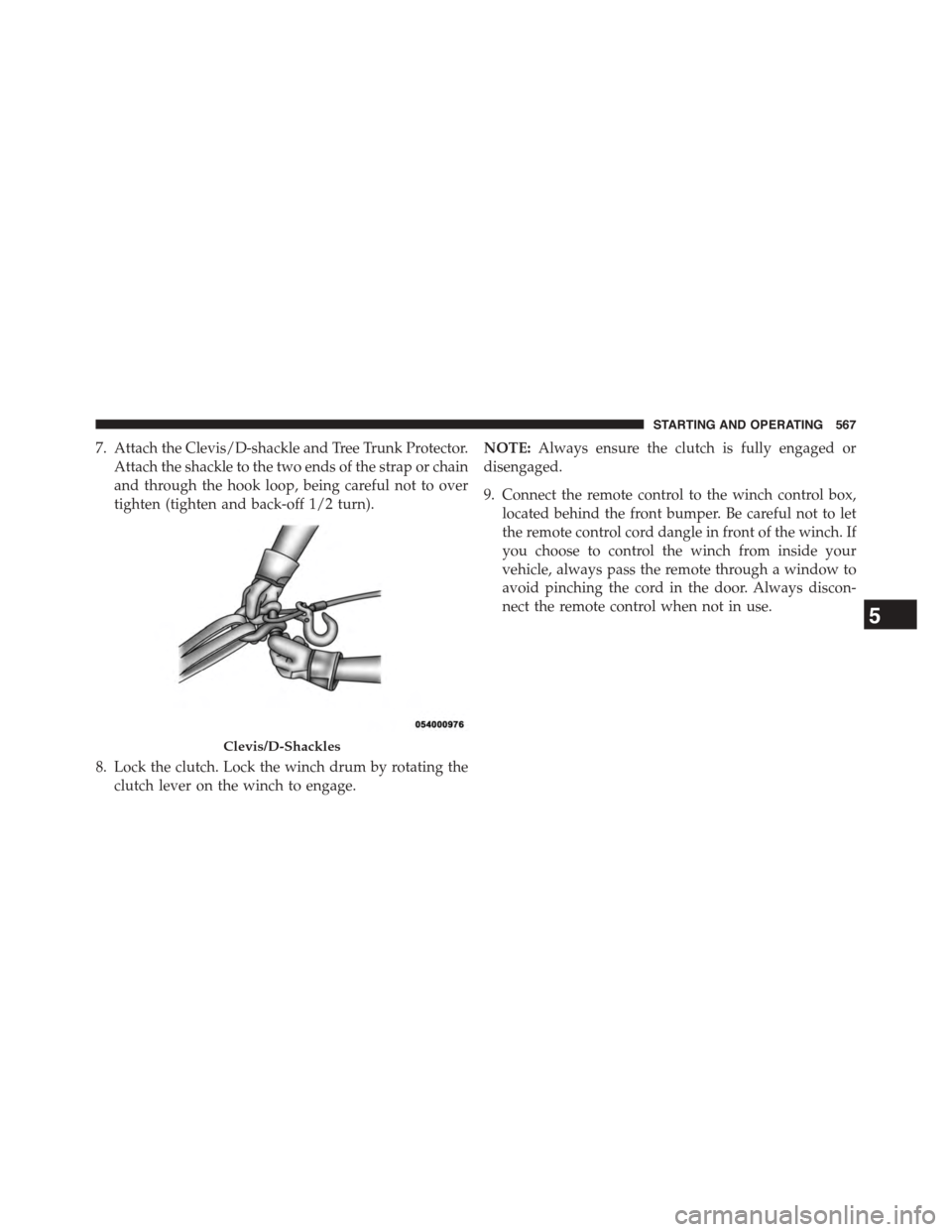
7. Attach the Clevis/D-shackle and Tree Trunk Protector.
Attach the shackle to the two ends of the strap or chain
and through the hook loop, being careful not to over
tighten (tighten and back-off 1/2 turn).
8. Lock the clutch. Lock the winch drum by rotating the
clutch lever on the winch to engage.
NOTE:Always ensure the clutch is fully engaged or
disengaged.
9. Connect the remote control to the winch control box,
located behind the front bumper. Be careful not to let
the remote control cord dangle in front of the winch. If
you choose to control the winch from inside your
vehicle, always pass the remote through a window to
avoid pinching the cord in the door. Always discon-
nect the remote control when not in use.
Clevis/D-Shackles
5
STARTING AND OPERATING 567
Page 645 of 871
Maintenance
CAUTION!
Do not use ethanol mixture greater than 85% in your
vehicle. It will cause difficulty in cold starting and
may affect drivability.
ADDING FUEL
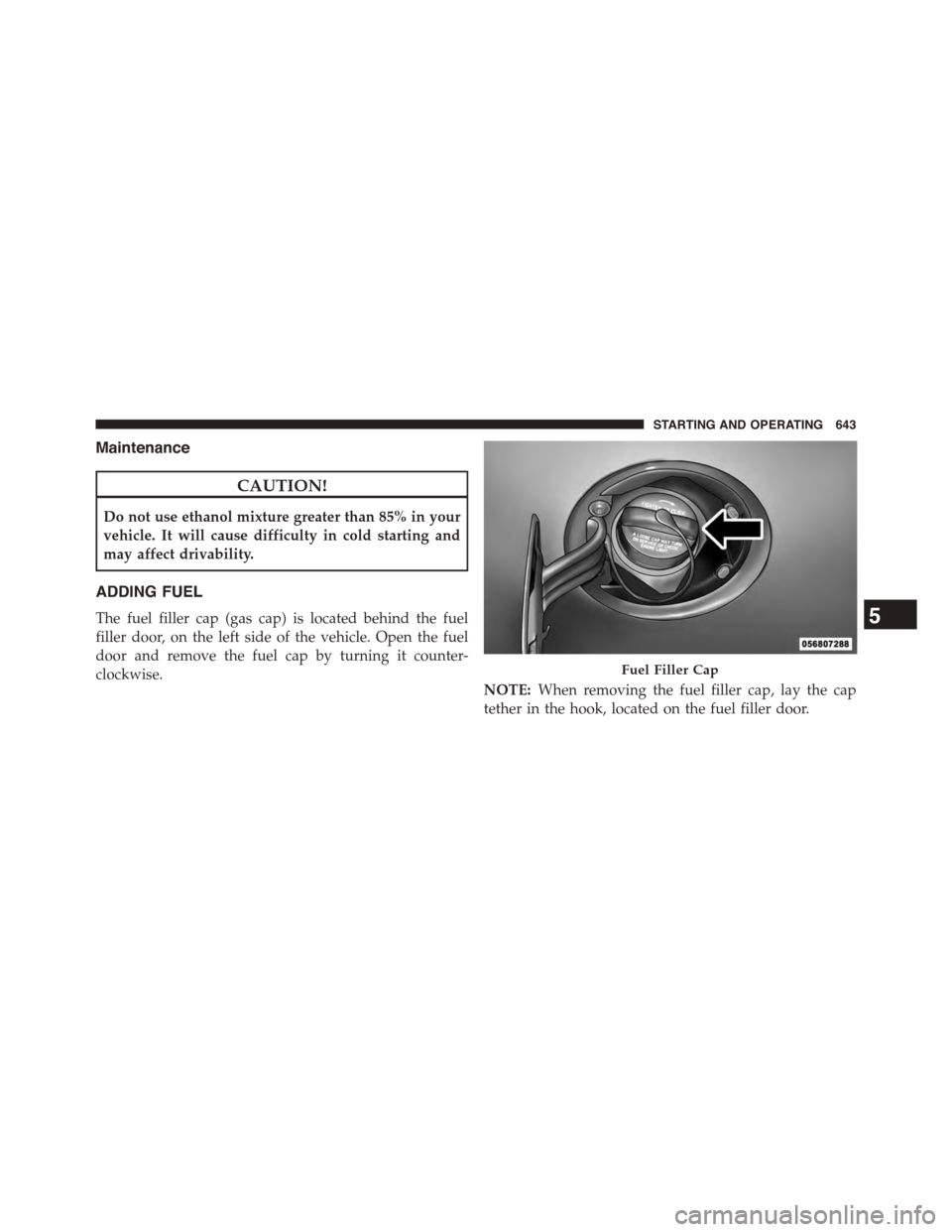
The fuel filler cap (gas cap) is located behind the fuel
filler door, on the left side of the vehicle. Open the fuel
door and remove the fuel cap by turning it counter-
clockwise.
NOTE:When removing the fuel filler cap, lay the cap
tether in the hook, located on the fuel filler door.
Fuel Filler Cap
5
STARTING AND OPERATING 643
Page 769 of 871
Body Lubrication
Locks and all body pivot points, including such items as
seat tracks, door hinge pivot points and rollers, liftgate,
tailgate, decklid, sliding doors and hood hinges, should
be lubricated periodically with a lithium based grease,
such as MOPAR® Spray White Lube to assure quiet, easy
operation and to protect against rust and wear. Prior to
the application of any lubricant, the parts concerned
should be wiped clean to remove dust and grit; after
lubricating excess oil and grease should be removed.
Particular attention should also be given to hood latching
components to ensure proper function. When performing
other underhood services, the hood latch, release mecha-
nism and safety catch should be cleaned and lubricated.
The external lock cylinders should be lubricated twice a
year, preferably in the Fall and Spring. Apply a small
amount of a high quality lubricant, such as MOPAR®
Lock Cylinder Lubricant directly into the lock cylinder.
Windshield Wiper Blades
Clean the rubber edges of the wiper blades and the
windshield periodically with a sponge or soft cloth and a
mild nonabrasive cleaner. This will remove accumula-
tions of salt or road film.
Operation of the wipers on dry glass for long periods
may cause deterioration of the wiper blades. Always use
washer fluid when using the wipers to remove salt or dirt
from a dry windshield.
Avoid using the wiper blades to remove frost or ice from
the windshield. Keep the blade rubber out of contact with
petroleum products such as engine oil, gasoline, etc.
NOTE:Life expectancy of wiper blades varies depend-
ing on geographical area and frequency of use. Poor
performance of blades may be present with chattering,
marks, water lines or wet spots. If any of these conditions
are present, clean the wiper blades or replace as neces-
sary.
7
MAINTAINING YOUR VEHICLE 767
Page 802 of 871
Cavity Cartridge Fuse Micro FuseDescription
F1040 Amp GreenBody Controller / Exterior Lighting #2
F1050 Amp RedBody Controller / Exterior Lighting #2 – If
Equipped with Stop/Start
F1130 Amp PinkIntegrated Trailer Brake Module – If Equipped
F1240 Amp GreenBody Controller #3 / Interior Lights
F1340 Amp GreenBlower Motor
F1440 Amp GreenBody Controller #4 / Power Locks
F1530 Amp PinkElectric Park Brake Right Side – If Equipped
F1630 Amp PinkSmart Bar – If Equipped
F19 20 Amp Blue (1500
LD Diesel)
30 Amp Pink
(Cummins Diesel)
SCR – If Equipped
F2030 Amp PinkPassenger Door Module
F2130 Amp PinkDrive Train Control Module
800 MAINTAINING YOUR VEHICLE
Page 803 of 871
Cavity Cartridge Fuse Micro FuseDescription
F2220 Amp Blue
30 Amp Pink
(Cummins Diesel)
Engine Control Module
F2330 Amp PinkBody Controller #1
F2430 Amp PinkDriver Door Module
F2530 Amp PinkFront Wiper
F2630 Amp PinkAntilock Brakes/Stability Control Module/
Valves
F2820 Amp BlueTrailer Tow Backup Lights – If Equipped
F2920 Amp BlueTrailer Tow Parking Lights – If Equipped
F3030 Amp PinkTrailer Tow Receptacle
F31 30 Amp Pink (1500
LD Diesel)
Urea Heater Control – If Equipped
F3230 Amp PinkDrive Train Control Module – If Equipped
F3320 Amp BlueSpecial Services Vehicle Only
7
MAINTAINING YOUR VEHICLE 801
Page 807 of 871
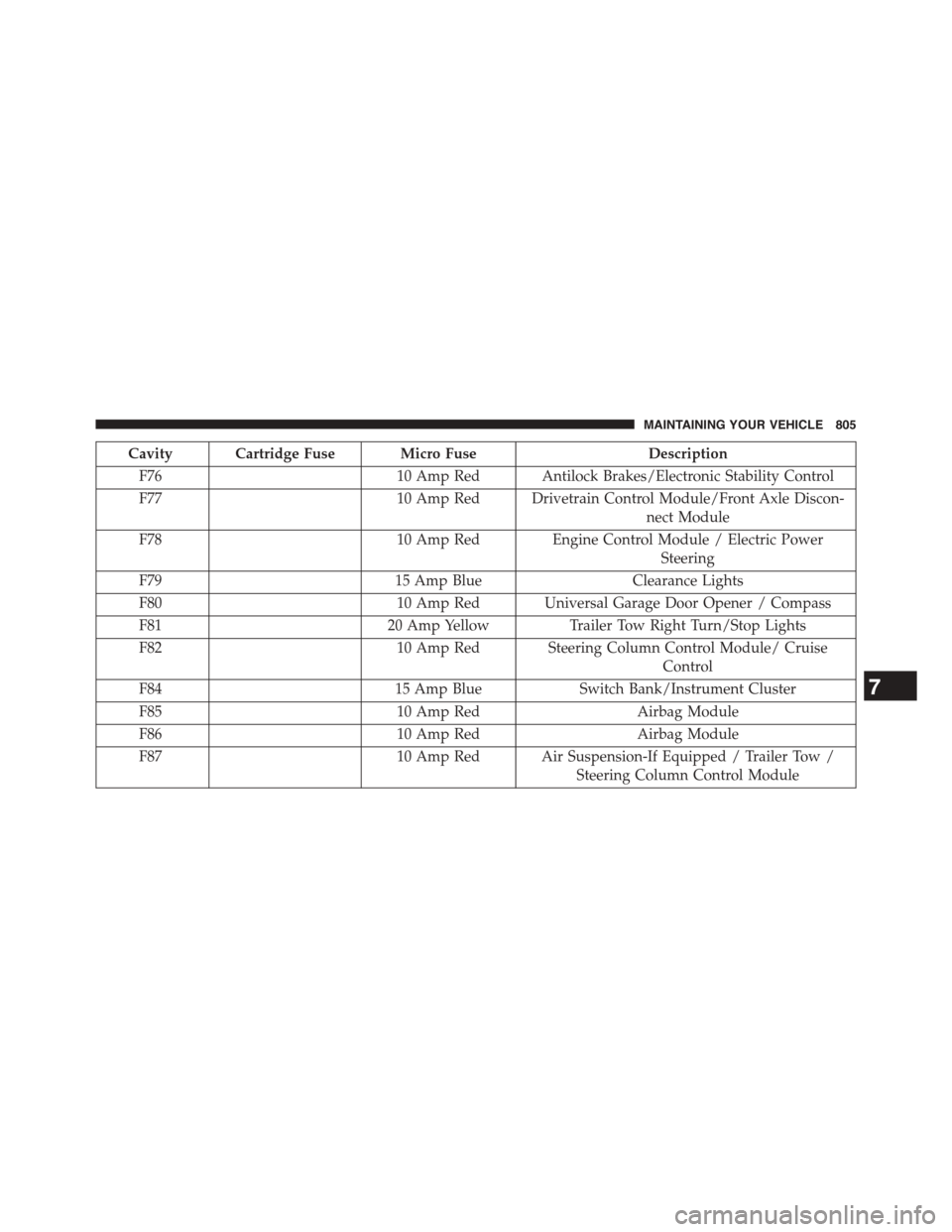
Cavity Cartridge Fuse Micro FuseDescription
F7610 Amp Red Antilock Brakes/Electronic Stability Control
F7710 Amp Red Drivetrain Control Module/Front Axle Discon-
nect Module
F7810 Amp Red Engine Control Module / Electric Power
Steering
F7915 Amp BlueClearance Lights
F8010 Amp Red Universal Garage Door Opener / Compass
F8120 Amp YellowTrailer Tow Right Turn/Stop Lights
F8210 Amp Red Steering Column Control Module/ Cruise
Control
F8415 Amp BlueSwitch Bank/Instrument Cluster
F8510 Amp RedAirbag Module
F8610 Amp RedAirbag Module
F8710 Amp Red Air Suspension-If Equipped / Trailer Tow /
Steering Column Control Module
7
MAINTAINING YOUR VEHICLE 805