Heated seat Ram 1500 2015 Owner's Manual
[x] Cancel search | Manufacturer: RAM, Model Year: 2015, Model line: 1500, Model: Ram 1500 2015Pages: 871, PDF Size: 24.83 MB
Page 39 of 871
Remote Start Comfort Systems — If Equipped
When remote start is activated, the heated steering wheel
and driver heated seat features will automatically turn on
in cold weather. In warm weather, the driver vented seat
feature will automatically turn on when the remote start
is activated. These features will stay on through the
duration of remote start or until the ignition switch is
turned to the ON/RUN position.
The Remote Start Comfort System can be activated and
deactivated through the Uconnect® System. For more
information on Remote Start Comfort System operation
refer to ”Customer Programmable Features” in
“Uconnect® Settings” in “Understanding Your Instru-
ment Panel”.
DOOR LOCKS
Manual Door Locks
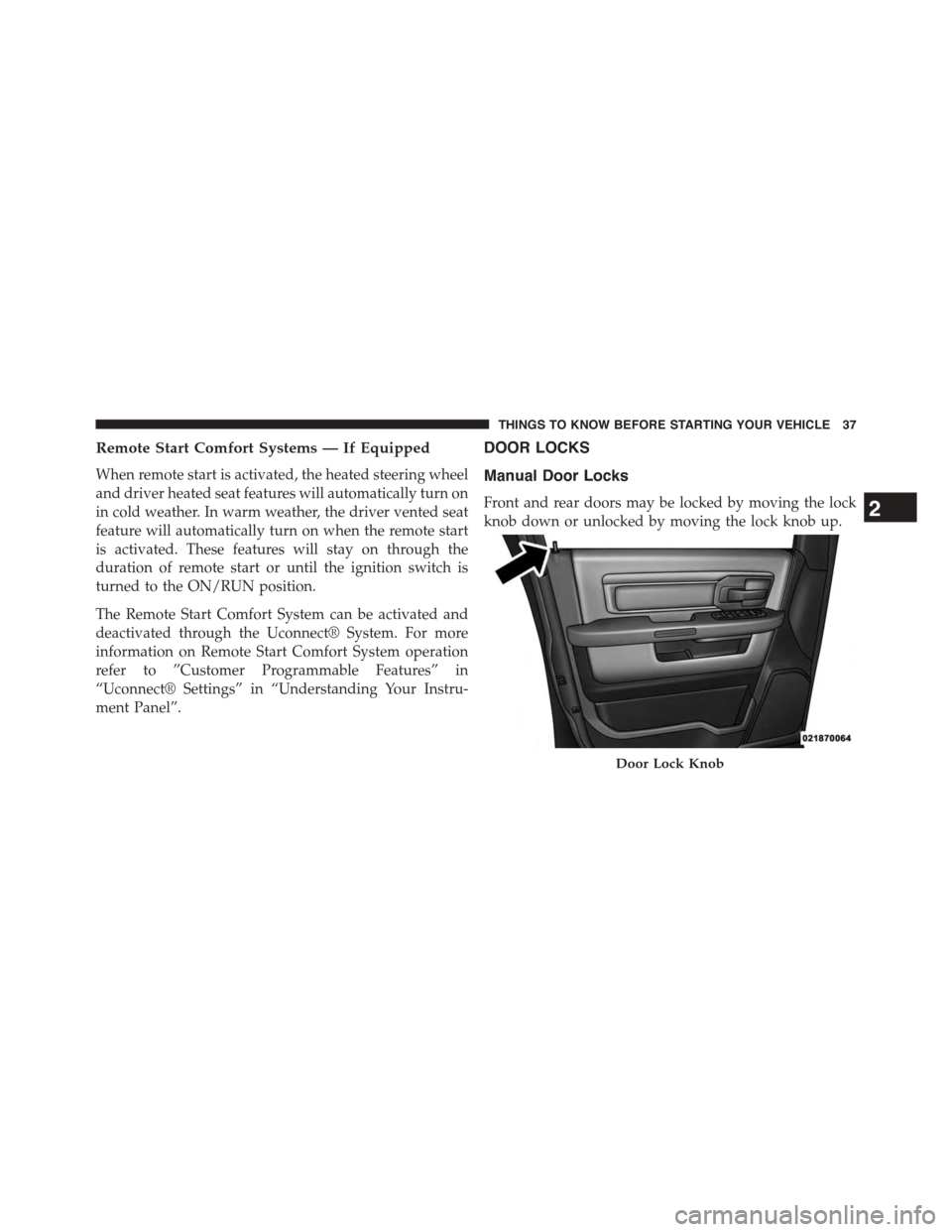
Front and rear doors may be locked by moving the lock
knob down or unlocked by moving the lock knob up.
Door Lock Knob
2
THINGS TO KNOW BEFORE STARTING YOUR VEHICLE 37
Page 121 of 871
UNDERSTANDING THE FEATURES OF YOUR VEHICLE
CONTENTS
!MIRRORS............................126
▫Inside Day/Night Mirror — If Equipped . . . .126
▫Automatic Dimming Mirror — If Equipped . . .127
▫Automatic Dimming Mirror With Rear View
Camera Display — If Equipped...........133
▫Outside Mirrors......................134
▫Outside Mirrors Folding Feature...........135
▫Tilt Mirrors In Reverse — If Equipped.......135
▫Power Folding Outside Mirrors For Standard
And Trailer Tow — If Equipped...........136
▫Power Mirrors — If Equipped............138
▫Heated Mirrors — If Equipped...........139
▫Driver’s Outside Automatic Dimming Mirror —
If Equipped..........................139
▫Trailer Towing Mirrors — If Equipped......140
▫Illuminated Vanity Mirror — If Equipped . . . .141
▫“Slide-On-Rod” Features Of Sun Visor —
If Equipped..........................141
!SEATS . . . . . . . . . . . . . . . . . . . . . . . . . . . . ..142
▫Driver’s Power Seat — If Equipped........143
3
Page 122 of 871
▫Passenger ’s Power Seat — If Equipped......145
▫Power Lumbar — If Equipped............145
▫Heated Seats — If Equipped..............146
▫Ventilated Seats — If Equipped............149
▫Manual Seat Adjuster — If Equipped........150
▫40-20-40 Front Bench Seat — If Equipped . . . .152
▫Mega Cab® Rear Seat Features............152
▫Head Restraints......................156
!DRIVER MEMORY SEAT — IF EQUIPPED . . . .158
▫Programming The Memory Feature.........160
▫Linking And Unlinking The Remote Keyless Entry
Transmitter To Memory.................160
▫Memory Position Recall.................162
▫Easy Entry/Exit Seat...................163
!TO OPEN AND CLOSE THE HOOD.........164
!LIGHTS.............................165
▫Headlights..........................166
▫Automatic Headlights — If Equipped.......167
▫Headlights On With Wipers (Available With
Automatic Headlights Only)..............167
▫Daytime Running Lights (DRL) —
If Equipped.........................168
▫Headlight Delay......................168
▫Automatic High Beam Headlamp Control —
If Equipped.........................169
▫Parking Lights And Panel Lights...........171
▫Fog Lights — If Equipped...............171
120 UNDERSTANDING THE FEATURES OF YOUR VEHICLE
Page 148 of 871
Heated Seats — If Equipped
On some models, the front and rear seats may be
equipped with heaters located in the seat cushions and
seat backs.
WARNING!
•Persons who are unable to feel pain to the skin
because of advanced age, chronic illness, diabetes,
spinal cord injury, medication, alcohol use, exhaus-
tion or other physical condition must exercise care
when using the seat heater. It may cause burns
even at low temperatures, especially if used for
long periods of time.
(Continued)
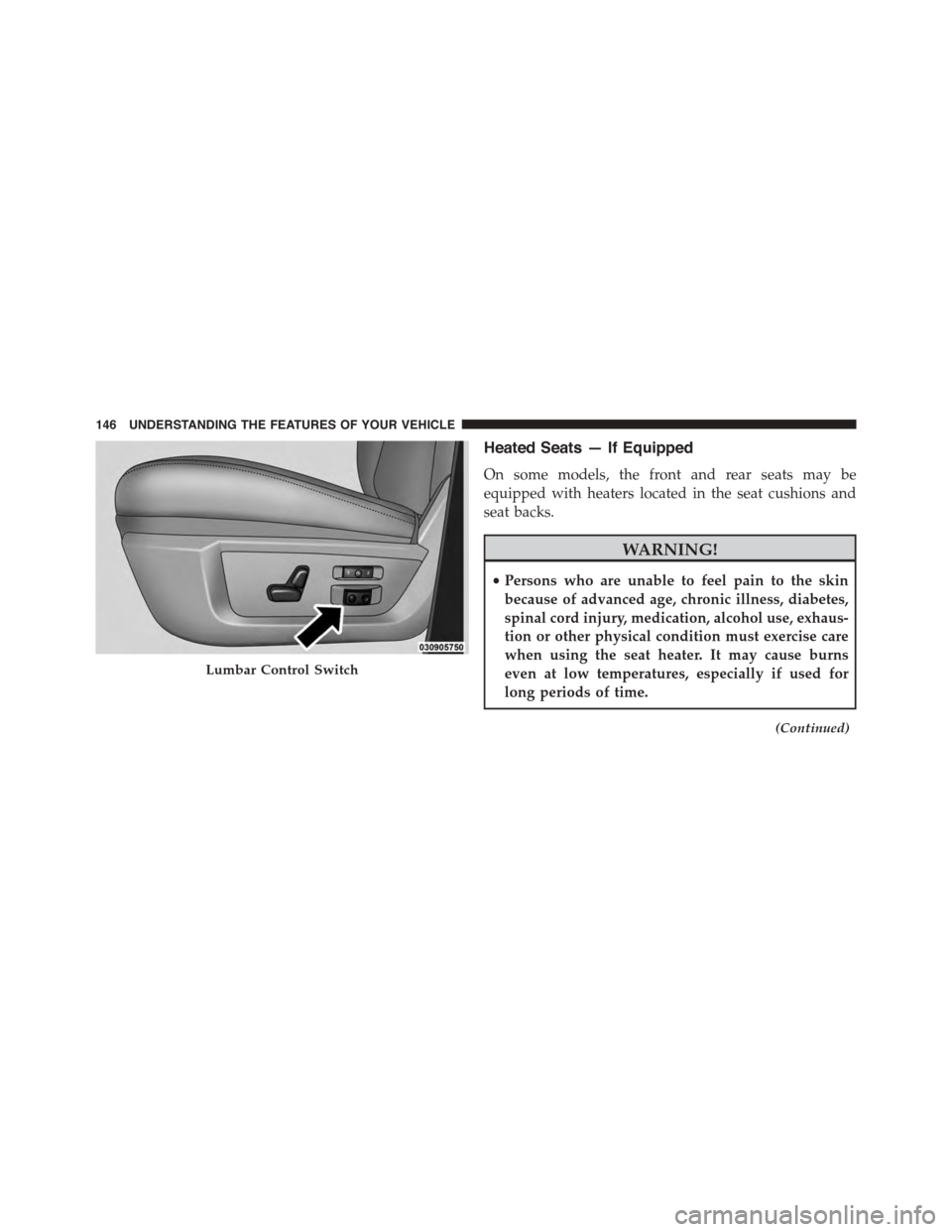
Lumbar Control Switch
146 UNDERSTANDING THE FEATURES OF YOUR VEHICLE
Page 149 of 871
WARNING!(Continued)
•Do not place anything on the seat or seatback that
insulates against heat, such as a blanket or cushion.
This may cause the seat heater to overheat. Sitting
in a seat that has been overheated could cause
serious burns due to the increased surface tempera-
ture of the seat.
Front Heated Seats
The front heated seats control buttons are located on the
center instrument panel below the climate controls.
If your vehicle is equipped with a touchscreen, the front
heated seats control buttons are also located within the
climate or controls screen of the touchscreen.
•Press the heated seat buttononce to turn the High
setting On.
•Press the heated seat buttona second time to turn
the Low setting On.
•Press the heated seat buttona third time to turn
the heating elements Off.
When the HI-level setting is selected, the heater will
provide a boosted heat level during the first four minutes
of operation. Then, the heat output will drop to the
normal HI-level. If the HI-level setting is selected, the
system will automatically switch to LO-level after ap-
proximately 60 minutes of continuous operation. At that
time, the display will change from HI to LO, indicating
the change. The LO-level setting will turn OFF automati-
cally after approximately 45 minutes.
NOTE:The engine must be running for the heated seats
to operate.
3
UNDERSTANDING THE FEATURES OF YOUR VEHICLE 147
Page 150 of 871
Vehicles Equipped With Remote Start
On models that are equipped with remote start, the
heated seats can be programed to come on during a
remote start.
If your vehicle is equipped with a touchscreen, this
feature can be programmed through the Uconnect®
system. Refer to “Uconnect® Settings” in “Understand-
ing Your Instrument Panel” for further information.
If your vehicle is not equipped with a touchscreen, this
feature can be programmed through the Electronic Ve-
hicle Information Center (EVIC) or Driver Information
Display (DID). Refer to “Electronic Vehicle Information
Center (EVIC)” or “Driver Information Display (DID)” in
“Understanding Your Instrument Panel” for further in-
formation.
Rear Heated Seats
On some models, the two outboard seats are equipped
with heated seats. The heated seat switches for these
seats are located on the rear of the center console.
There are two heated seat switches that allow the rear
passengers to operate the seats independently. You can
choose from HIGH, LOW or OFF heat settings. Amber
indicator lights in each switch indicate the level of heat in
use. Two indicator lights will illuminate for HIGH, one
for LOW and none for OFF.
Press the switch once to select HIGH-level
heating. Press the switch a second time to select
LOW-level heating. Press the switch a third
time to shut the heating elements OFF.
NOTE:
•Once a heat setting is selected, heat will be felt within
two to five minutes.
148 UNDERSTANDING THE FEATURES OF YOUR VEHICLE
Page 151 of 871
•The engine must be running for the heated seats to
operate.
When the HIGH-level setting is selected, the heater will
provide a boosted heat level during the first four minutes
of operation. Then, the heat output will drop to the
normal HIGH-level. If the HIGH-level setting is selected,
the system will automatically switch to LOW-level after
approximately 60 minutes of continuous operation. At
that time, the number of illuminated LEDs changes from
two to one, indicating the change. The LOW-level setting
will turn OFF automatically after approximately 45 min-
utes.
Ventilated Seats — If Equipped
Located in the seat cushion are small fans that draw the
air from the passenger compartment and pull air through
fine perforations in the seat cover to help keep the driver
and front passenger cooler in higher ambient tempera-
tures. The fans operate at two speeds, HIGH and LOW.
The front ventilated seats control buttons are located on
the center instrument panel below the climate controls.
If your vehicle is equipped with a touchscreen, the front
ventilated seats control buttons are also located within
the climate or controls screen of the touchscreen.
•Press the ventilated seat buttononce to choose
HIGH.
•Press the ventilated seat buttona second time to
choose LOW.
•Press the ventilated seat buttona third time to
turn the ventilated seat OFF.
NOTE:The engine must be running for the ventilated
seats to operate.
3
UNDERSTANDING THE FEATURES OF YOUR VEHICLE 149
Page 247 of 871
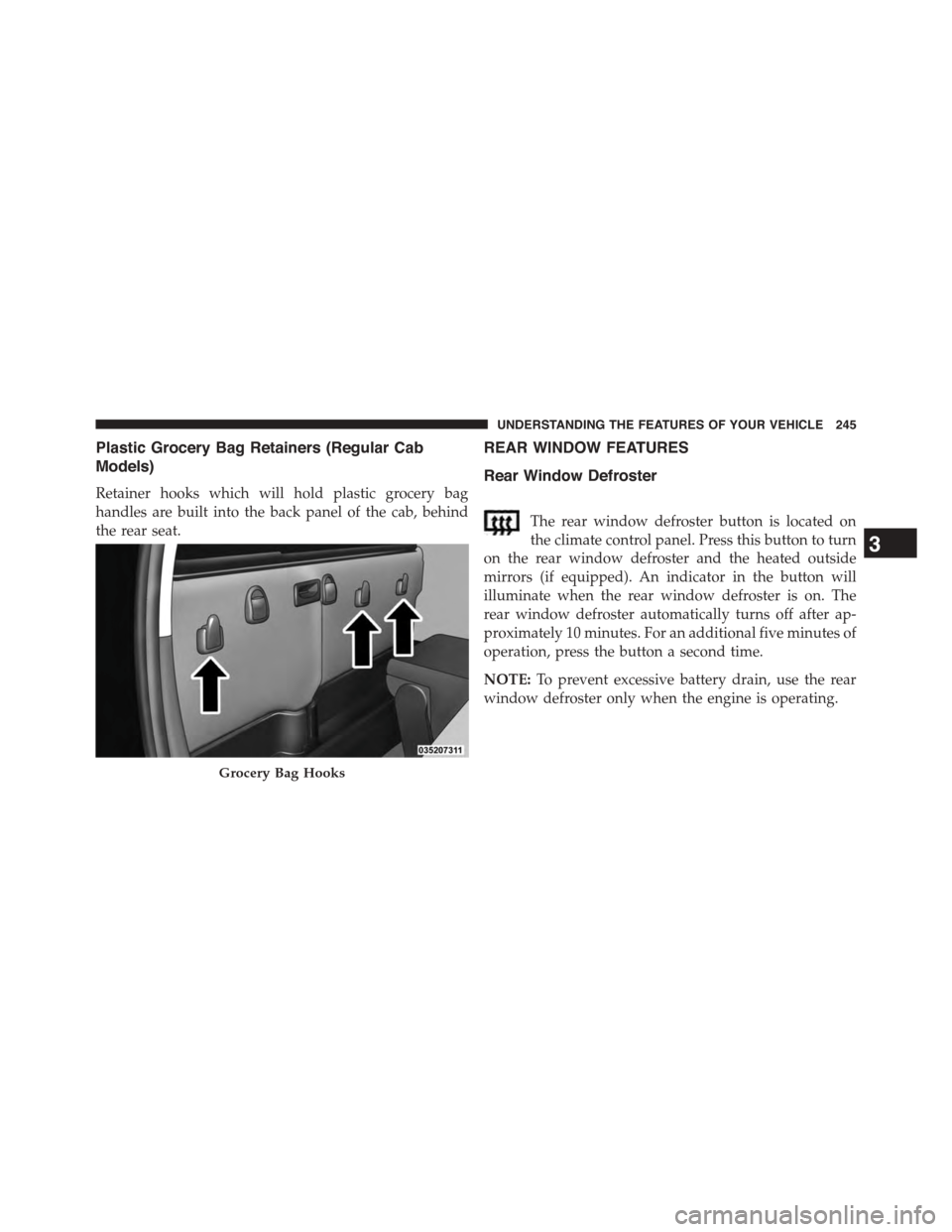
Plastic Grocery Bag Retainers (Regular Cab
Models)
Retainer hooks which will hold plastic grocery bag
handles are built into the back panel of the cab, behind
the rear seat.
REAR WINDOW FEATURES
Rear Window Defroster
The rear window defroster button is located on
the climate control panel. Press this button to turn
on the rear window defroster and the heated outside
mirrors (if equipped). An indicator in the button will
illuminate when the rear window defroster is on. The
rear window defroster automatically turns off after ap-
proximately 10 minutes. For an additional five minutes of
operation, press the button a second time.
NOTE:To prevent excessive battery drain, use the rear
window defroster only when the engine is operating.
Grocery Bag Hooks
3
UNDERSTANDING THE FEATURES OF YOUR VEHICLE 245
Page 369 of 871
Auto Comfort Systems — If Equipped
After pressing the “Auto-On Comfort” button on the
touchscreen the following settings will be available:
•Auto-On Driver Heated/Ventilated Seat & Steering
Wheel With Vehicle Start — If Equipped
When this feature is selected the driver’s heated seat and
heated steering wheel will automatically turn ON when
temperatures are below 40° F (4.4° C). When tempera-
tures are above 80° F (26.7° C) the driver vented seat will
turn ON. To make your selection, press the “Auto Heated
Seats” button on the touchscreen, then select either “On”
or “Off.” Press the back arrow/Done button on the
touchscreen to return to the previous menu.
Engine Off Options
After pressing the “Engine Off Options” button on the
touchscreen the following settings will be available.
•Easy Exit Seats — If Equipped
When this feature is selected, the Driver ’s seat will
automatically move rearward once the engine is shut off.
To make your selection, press the “Easy Exit Seats”
button on the touchscreen and make your selection. Press
the back arrow/Done button on the touchscreen to return
to the previous menu.
•Headlight Off Delay
When this feature is selected, the driver can choose to
have the headlights remain on for 0, 30, 60, or 90 seconds
when exiting the vehicle. Press the “Headlight Off Delay”
button on the touchscreen and choose from “0,” “30,”
“60,” or “90” seconds to select your desired time interval.
Press the back arrow/Done button on the touchscreen to
return to the previous menu.
4
UNDERSTANDING YOUR INSTRUMENT PANEL 367
Page 389 of 871
•Passive Entry
This feature allows you to lock and unlock the vehicles
door(s) without having to push the Remote Keyless Entry
(RKE) transmitter lock or unlock buttons. To make your
selection, press the “Passive Entry” button on the touch-
screen until a check-mark appears next to setting, show-
ing that setting has been selected. Press the back arrow
button on the touchscreen to return to the previous
menu. Refer to “Keyless Enter-N-Go™” in “Things To
Know Before Starting Your Vehicle”.
•Personal Settings Linked To Key Fob — If Equipped
This feature provides automatic driver seat positioning to
enhance driver mobility when entering and exiting the
vehicle. To make your selection, press the “Personal
Settings Linked To Key Fob” button on the touchscreen
until a check-mark appears next to setting, showing that
setting has been selected. Press the back arrow button on
the touchscreen to return to the previous menu.
NOTE:The seat will return to the memorized seat
location (if Personal Settings Linked To Key Fob is set to
ON) when the Remote Keyless Entry (RKE) transmitter is
used to unlock the door. Refer to “Driver Memory Seat”
in “Understanding The Features Of Your Vehicle” for
further information.
Auto Comfort Systems — If Equipped
After pressing the “Auto-On Comfort” button on the
touchscreen the following settings will be available:
•Auto-On Driver Heated/Ventilated Seat & Steering
Wheel With Vehicle Start — If Equipped
When this feature is selected the driver’s heated seat and
heated steering wheel will automatically turn ON when
temperatures are below 40° F (4.4° C). When temperatures
are above 80° F (26.7° C) the driver vented seat will turn
ON. To make your selection, press the “Auto Heated Seats”
4
UNDERSTANDING YOUR INSTRUMENT PANEL 387