Shifter Ram 1500 2015 Owner's Manual
[x] Cancel search | Manufacturer: RAM, Model Year: 2015, Model line: 1500, Model: Ram 1500 2015Pages: 871, PDF Size: 24.83 MB
Page 125 of 871
▫Programming A Non-Rolling Code.........218
▫Canadian/Gate Operator Programming.....220
▫Using HomeLink®....................221
▫Security............................221
▫Troubleshooting Tips...................222
▫General Information....................223
!POWER SUNROOF — IF EQUIPPED........224
▫Opening Sunroof — Manual Mode.........225
▫Closing Sunroof — Manual Mode..........225
▫Opening Sunroof — Express..............225
▫Closing Sunroof — Express...............225
▫Pinch Protect Feature...................226
▫Venting Sunroof — Express..............226
▫Sunshade Operation....................226
▫Wind Buffeting.......................226
▫Sunroof Maintenance...................227
▫Ignition Off Operation..................227
!ELECTRICAL POWER OUTLETS...........227
!CIGAR LIGHTER AND ASH RECEIVER — IF
EQUIPPED...........................232
!POWER INVERTER — IF EQUIPPED........233
!CUPHOLDERS........................234
▫Front Seat Cupholders (40–20–40 Seats)......234
▫Front Instrument Panel Cupholders — Floor
Mounted Shifter......................235
▫Rear Cupholder — Quad Cab®............235
▫Rear Cupholder — Crew Cab.............236
3
UNDERSTANDING THE FEATURES OF YOUR VEHICLE 123
Page 235 of 871
POWER INVERTER — IF EQUIPPED
A 115 Volt (150 Watts Maximum) outlet is located on the
center stack of the instrument panel, to the right of the
radio. This outlet can power cellular phones, electronics
and other low power devices requiring power up to 150
Watts. Certain high-end video games, such as Playsta-
tion3 and XBox360 will exceed this power limit, as will
most power tools.
The power inverter is designed with built-in overload
protection. If the power rating of 150 Watts is exceeded,
the power inverter will automatically shut down. Once
the electrical device has been removed from the outlet the
inverter should automatically reset.
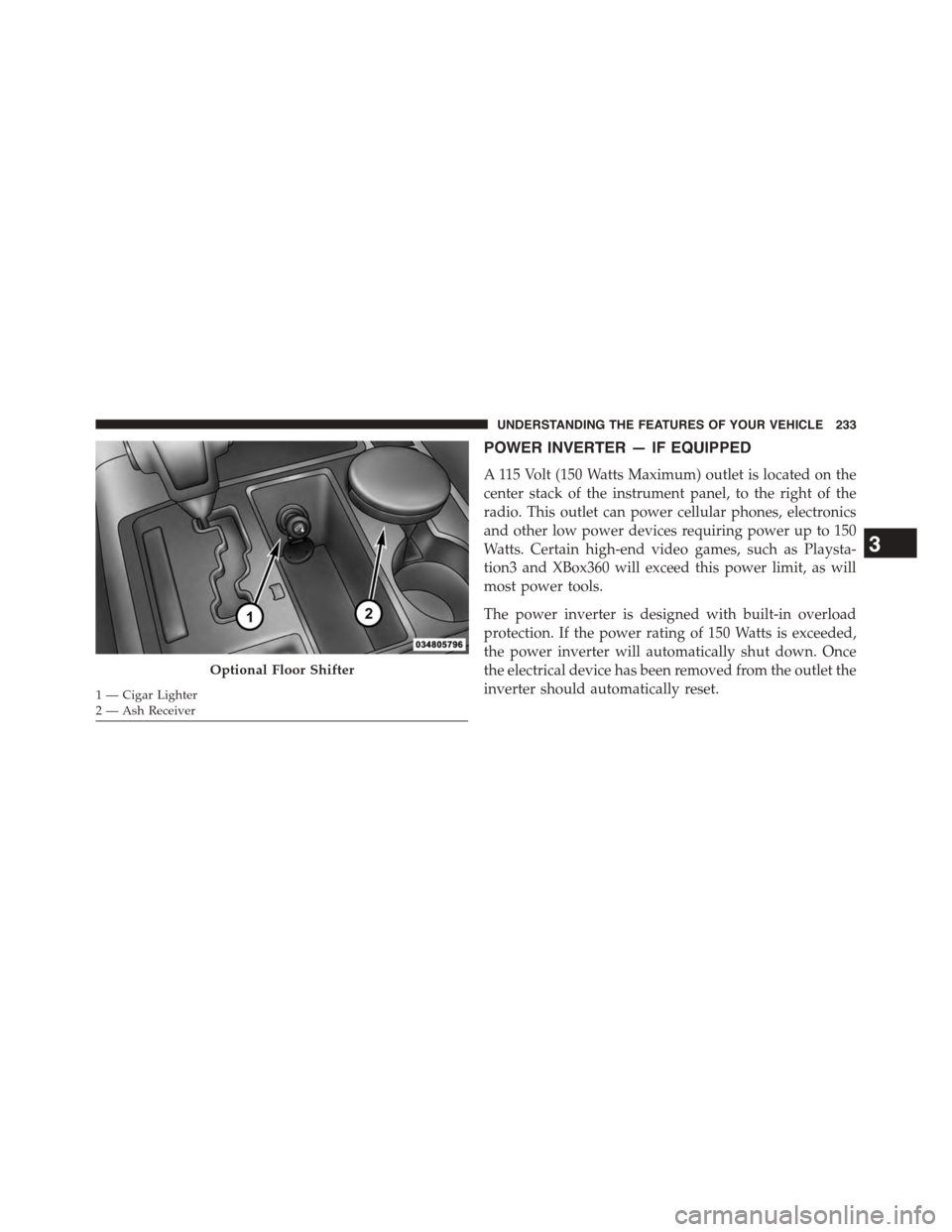
Optional Floor Shifter
1 — Cigar Lighter2 — Ash Receiver
3
UNDERSTANDING THE FEATURES OF YOUR VEHICLE 233
Page 237 of 871

Front Instrument Panel Cupholders — Floor
Mounted Shifter
For vehicles equipped with bucket seats there are two
cupholders located in the floor console.
Rear Cupholder — Quad Cab®
Quad Cab® vehicles may be equipped with a rear
cupholder that consists of two cup wells for rear passen-
ger convenience.
CupholdersRear Cup Wells
3
UNDERSTANDING THE FEATURES OF YOUR VEHICLE 235
Page 312 of 871
•Automatic Unavailable Use Autostick Service Req.
•Transmission Getting Hot Press Brake
•Trans. Hot Stop Safely Shift to Park Wait to Cool
•Transmission Cool Ready to Drive
•Trailer Brake Disconnected
•Service Transmission
•Service Shifter
•Engage Park Brake to Prevent Rolling
•Transmission Too cold Idle with Engine On
•Washer Fluid Low
•Service Air Suspension System
•Heavy Duty Air Suspension System Disable
•Normal Ride Height Achieved
•Aerodynamic Ride Height Achieved
•Off Road 1 Ride Height Achieved
•Off Road 2 Ride Height Achieved
•Entry/Exit Ride Height Achieved
•Selected Ride Height Not Permitted
•Service Air Suspension System Immediately
•Reduce Speed To Maintain Selected Ride Height
•Air Suspension System Cooling Down Please Wait
•Vehicle Cannot Be Lowered Door Open
•Off Road 2 Watch For Clearance
•Entry/Exit Watch For Clearance
•Air Suspension Temporarily Disabled For Jacking And
Tire Change
310 UNDERSTANDING YOUR INSTRUMENT PANEL
Page 323 of 871
•Remote Start Aborted Fuel Low
•Remote Start Aborted Too Cold
•Remote Start Aborted Door Open
•Remote Start Aborted Hood Open
•Remote Start Aborted Trunk Open
•Remote Start Aborted Time Expired
•Remote Start Disabled Start to Reset
•Service Airbag System
•Service Airbag Warning Light
•Driver Seatbelt Unbuckled
•Passenger Seatbelt Unbuckled
•Front Seatbelts Unbuckled
•Door Open
•Doors Open
•Gear Not Available
•Shift Not Allowed
•Shift to Neutral then Drive or Reverse
•Autostick Unavailable Service Required
•Automatic Unavailable Use Autostick Service Req.
•Transmission Getting Hot Press Brake
•Trans. Hot Stop Safely Shift to Park Wait to Cool
•Transmission Cool Ready to Drive
•Trailer Brake Disconnected
•Service Transmission
•Service Shifter
•Engage Park Brake to Prevent Rolling
4
UNDERSTANDING YOUR INSTRUMENT PANEL 321
Page 341 of 871
•Transmission Getting Hot Press Brake
•Trans. Hot Stop Safely Shift to Park Wait to Cool
•Transmission Cool Ready to Drive
•Trailer Brake Disconnected
•Service Transmission
•Service Shifter
•Engage Park Brake to Prevent Rolling
•Transmission Too cold Idle with Engine On
•Washer Fluid Low
•Service Air Suspension System
•Normal Ride Height Achieved
•Aerodynamic Ride Height Achieved
•Off Road 1 Ride Height Achieved
•Off Road 2 Ride Height Achieved
•Entry/Exit Ride Height Achieved
•Selected Ride Height Not Permitted
•Service Air Suspension System Immediately
•Reduce Speed To Maintain Selected Ride Height
•Air Suspension System Cooling Down Please Wait
•Vehicle Cannot Be Lowered Door Open
•Off Road 2 Watch For Clearance
•Entry/Exit Watch For Clearance
•Air Suspension Temporarily Disabled For Jacking And
Tire Change
•Battery Low Start Engine To Change Ride Height
•Stop/Start Ready – If Equipped
4
UNDERSTANDING YOUR INSTRUMENT PANEL 339
Page 476 of 871
CAUTION!
•Before moving the shift lever out of PARK, you
must turn the ignition switch from the LOCK/OFF
position to the ON/RUN position, and also press
the brake pedal. Otherwise, damage to the shift
lever could result.
•DO NOT race the engine when shifting from
PARK or NEUTRAL into another gear range, as this
can damage the drivetrain.
The following indicators should be used to ensure that
you have engaged the transmission into the PARK posi-
tion:
•When shifting into PARK, pull the column-mounted
shift lever toward you and move it all the way
counterclockwise until it stops. For console-mounted
shifter, firmly move the shift lever all the way forward
and to the left until it stops.
•Release the shift lever and make sure it is fully seated
in the PARK gate.
•Look at the transmission gear position display and
verify that it indicates the PARK position.
•With brake pedal released, verify that the shift lever
will not move out of PARK.
REVERSE (R)
This range is for moving the vehicle backward. Shift into
Reverse only after the vehicle has come to a complete
stop.
NEUTRAL (N)
Use this range when the vehicle is standing for prolonged
periods with the engine running. The engine may be
started in this range. Apply the parking brake and shift
the transmission into PARK if you must leave the vehicle.
474 STARTING AND OPERATING
Page 596 of 871
Activating HDC
Once HDC is enabled it will activate automatically if
driven down a grade of sufficient magnitude (greater
than approximately 8%). The set speed for HDC is
selectable by the driver, and can be adjusted by using the
Electronic range switches located on steering column
shifter. The following summarizes the HDC set speed:
GearApproximate HDC Set Speed
PNo set speed. HDC may be en-
abled but will not activate
R0.6 mph (1 km/h)
N1.2 mph (2 km/h)
1st0.6 mph (1 km/h)
2nd1.2 mph (2 km/h)
GearApproximate HDC Set Speed
3rd1.8 mph (3 km/h)
4th2.5 mph (4 km/h)
5th3.1 mph (5 km/h)
6th3.7 mph (6 km/h)
7th4.3 mph (7 km/h)
8th5.0 mph (8 km/h)
9th5.6 mph (9 km/h)
NOTE:During HDC the ERS +/- shifter input is used for
HDC target speed selection but will not affect the gear
chosen by the transmission. During HDC the transmis-
sion will shift appropriately for the driver-selected set
speed and corresponding driving conditions.
594 STARTING AND OPERATING
Page 680 of 871
5. Release the parking brake.
6. Shift the transmission into REVERSE.
7. Release the brake pedal (and clutch pedal on manual
transmissions) for five seconds and ensure that there is
no vehicle movement.
8. Repeat steps 7 and 8 with automatic transmission in
DRIVE or manual transmission in first gear.
9. Shift the transmission to NEUTRAL. Firmly apply the
parking brake. Turn OFF the engine. For vehicles with
Keyless Enter-N-Go™, press and hold the ENGINE
START/STOP button until the engine shuts off.
10. Shift the transmission into PARK or place manual
transmission in gear (NOT in Neutral). On 8-speed
transmissions the shifter will automatically select
PARK when the engine is turned off.
11. Turn the ignition switch to the OFF position, then
cycle the key or the Keyless Enter-N-Go™ button to
the RUN position and back to the OFF position.
12. Attach the vehicle to the tow vehicle using a suitable
tow bar.
13. Release the parking brake.
NOTE:With electronic shift transfer case:
•Steps 2 through 4 are requirements that must be met
before pressing the NEUTRAL (N) button, and must
continue to be met until the shift has been completed.
If any of these requirements are not met before press-
ing the NEUTRAL (N) button or are no longer met
during the shift, the NEUTRAL (N) indicator light will
flash continuously until all requirements are met or
until the NEUTRAL (N) button is released.
678 STARTING AND OPERATING
Page 682 of 871

(N) button has been released, the transfer case will
shift to the position indicated by the selector switch.
•With electronic shift transfer case with pushbutton
selector switch, press and hold the switch for the
desired transfer case position, until the NEUTRAL
(N) indicator light turns off and the desired position
indicator light turns on.
NOTE:When shifting out of transfer case NEUTRAL (N),
turning the engine OFF is not required, but may be
helpful to avoid gear clash. With the 8-speed automatic
transmission, the engine must remain running, since
turning the engine OFF will shift the transmission to
PARK (and the transmission must be in NEUTRAL for
the transfer case to shift out of NEUTRAL).
5. Turn the engine OFF. Shift automatic transmission into
PARK. On 8-speed transmissions the shifter will auto-
matically select PARK when the engine is turned off.
6. Release the brake pedal (and clutch pedal on a manual
transmission).
7. Disconnect vehicle from the tow vehicle.
8. Start the engine.
9. Press and hold the brake pedal.
10. Release the parking brake.
11. Shift the transmission into gear, release the brake
pedal (and clutch pedal on manual transmissions),
and check that the vehicle operates normally.
NOTE:With electronic shift transfer case:
•Steps 3 and 4 are requirements that must be met before
pressing the button to shift out of NEUTRAL (N), and
must continue to be met until the shift has been
completed. If any of these requirements are not met
before pressing the button or are no longer met during
680 STARTING AND OPERATING