ECO Ram 1500 2016 Owner's Manual
[x] Cancel search | Manufacturer: RAM, Model Year: 2016, Model line: 1500, Model: Ram 1500 2016Pages: 916, PDF Size: 7.55 MB
Page 377 of 916
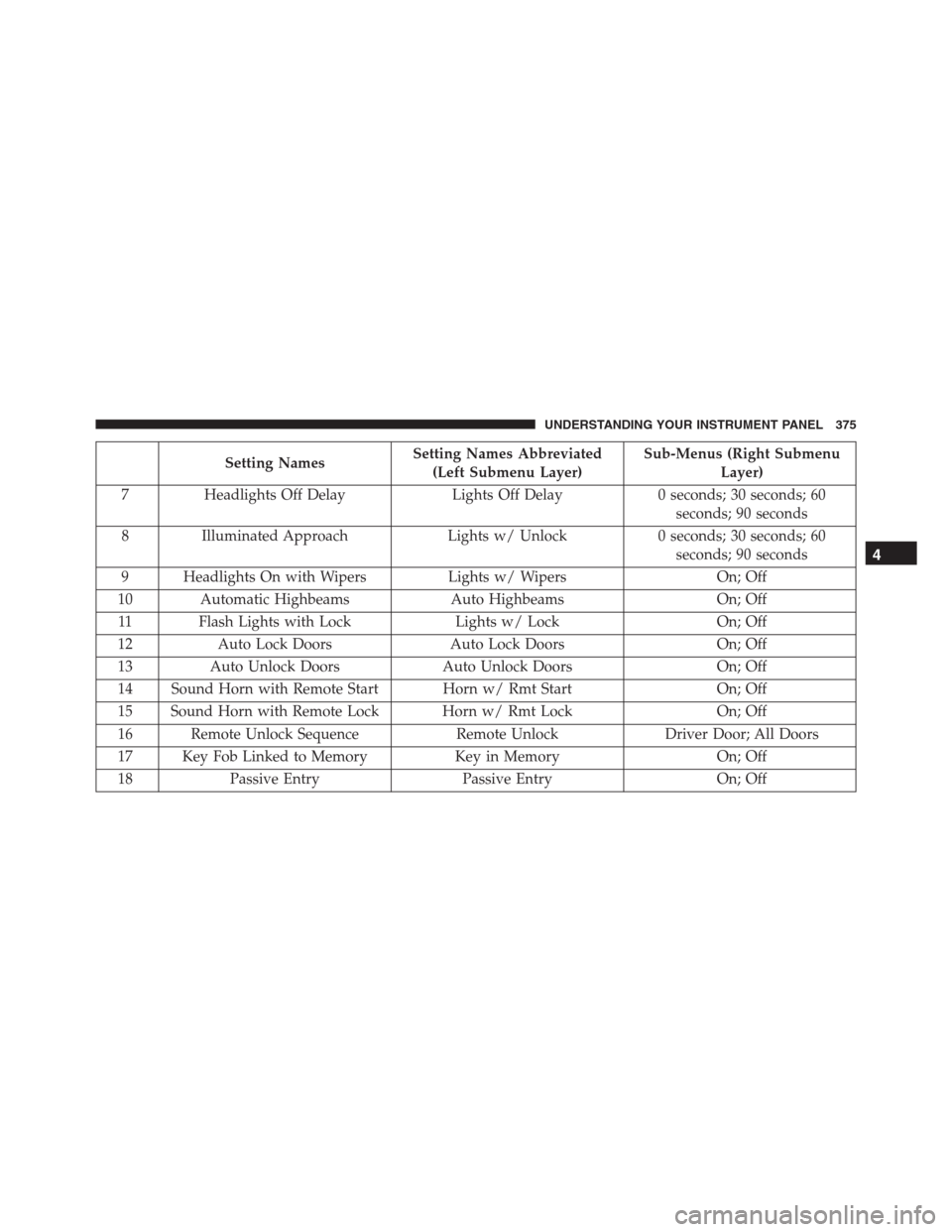
Setting NamesSetting Names Abbreviated
(Left Submenu Layer)Sub-Menus (Right Submenu
Layer)
7 Headlights Off Delay Lights Off Delay 0 seconds; 30 seconds; 60
seconds; 90 seconds
8 Illuminated Approach Lights w/ Unlock 0 seconds; 30 seconds; 60
seconds; 90 seconds
9 Headlights On with Wipers Lights w/ Wipers On; Off
10 Automatic Highbeams Auto Highbeams On; Off
11 Flash Lights with Lock Lights w/ Lock On; Off
12 Auto Lock Doors Auto Lock Doors On; Off
13 Auto Unlock Doors Auto Unlock Doors On; Off
14 Sound Horn with Remote Start Horn w/ Rmt Start On; Off
15 Sound Horn with Remote Lock Horn w/ Rmt Lock On; Off
16 Remote Unlock Sequence Remote Unlock Driver Door; All Doors
17 Key Fob Linked to Memory Key in Memory On; Off
18 Passive Entry Passive Entry On; Off
4
UNDERSTANDING YOUR INSTRUMENT PANEL 375
Page 378 of 916
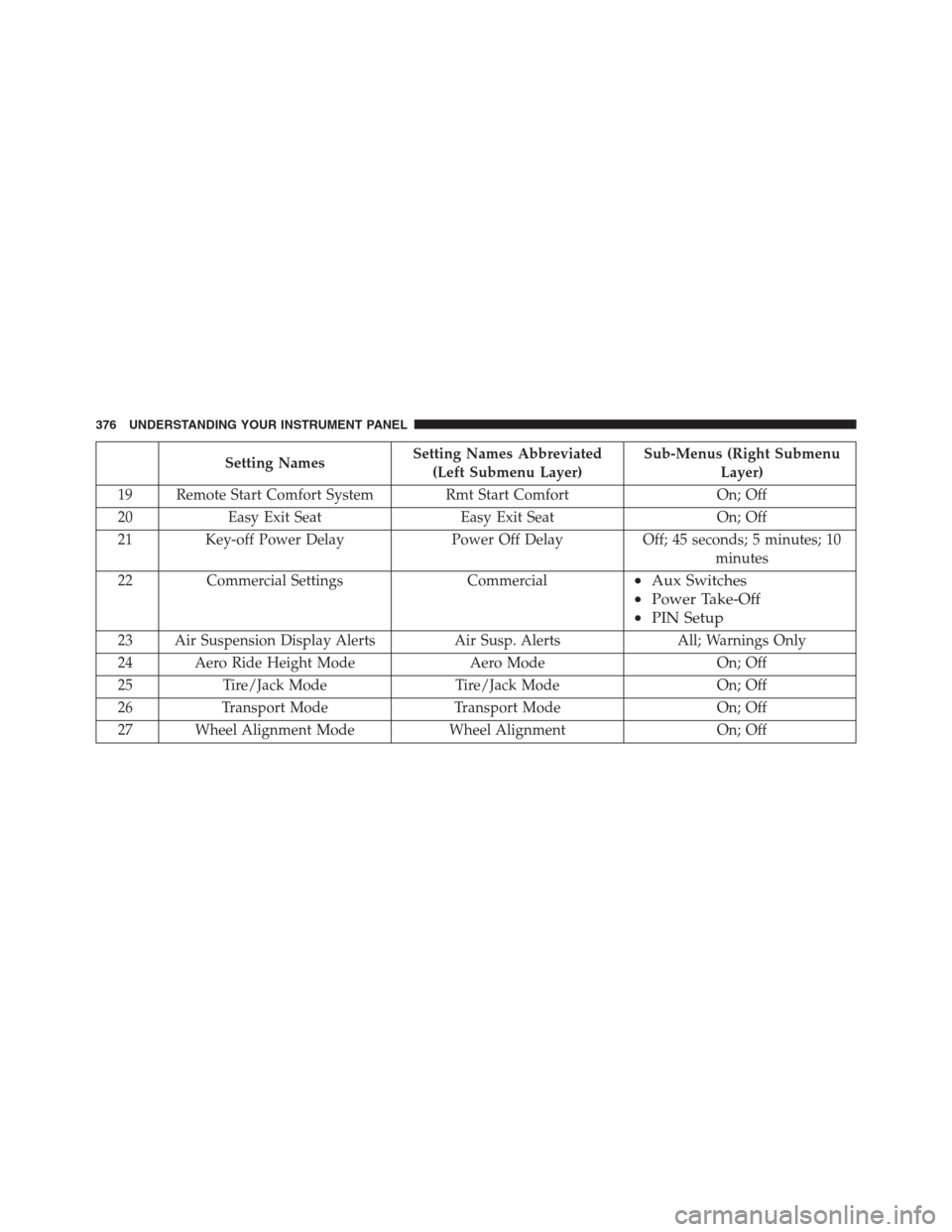
Setting NamesSetting Names Abbreviated
(Left Submenu Layer)Sub-Menus (Right Submenu
Layer)
19 Remote Start Comfort System Rmt Start Comfort On; Off
20 Easy Exit Seat Easy Exit Seat On; Off
21 Key-off Power Delay Power Off Delay Off; 45 seconds; 5 minutes; 10
minutes
22 Commercial Settings Commercial
•Aux Switches
•Power Take-Off
•PIN Setup
23 Air Suspension Display Alerts Air Susp. Alerts All; Warnings Only
24 Aero Ride Height Mode Aero Mode On; Off
25 Tire/Jack Mode Tire/Jack Mode On; Off
26 Transport Mode Transport Mode On; Off
27 Wheel Alignment Mode Wheel Alignment On; Off
376 UNDERSTANDING YOUR INSTRUMENT PANEL
Page 383 of 916
Buttons On The Faceplate
Buttons on the faceplate are located below the Uconnect
system in the center of the instrument panel. In addition,
there is a Scroll/Enter control knob located on the right
side of the Climate Controls in the center of the instru-
ment panel. Turn the control knob to scroll through
menus and change settings (i.e., 30, 60, 90), push the
center of the control knob one or more times to select or
change a setting (i.e., ON, OFF).
Your Uconnect system may also have Screen Off and
Back buttons located below the Uconnect system.
Push the Screen Off button to turn off the Uconnect
touchscreen. Push the Screen Off button a second time to
turn the touchscreen on.
Push the Back button to exit out of a Menu or certain
option on the Uconnect system.
Buttons On The Touchscreen
Buttons on the touchscreen are accessible on the
Uconnect display.
Customer Programmable Features — Uconnect
5.0 Personal Settings
Push the MORE or SETTINGS button on the faceplate,
then press the “Settings” button on the touchscreen (if
equipped) to display the settings menu screen. In this
mode the Uconnect system allows you to access pro-
grammable features that may be equipped such as Dis-
play, Units, Voice, Clock, Safety & Driving Assistance,
Lights, Doors & Locks, Auto-On Comfort (if equipped),
Engine Off Options, Suspension, Trailer Brake, Audio,
Compass Settings, Phone/Bluetooth, SiriusXM Setup (if
equipped), Restore Settings, Clear Personal Data and
System Information.
NOTE:Only one category may be selected at a time.4
UNDERSTANDING YOUR INSTRUMENT PANEL 381
Page 388 of 916
or “High” buttons on the touchscreen. ParkSense will
retain its last known configuration state through ignition
cycles.
•Tilt Mirrors In Reverse — If Equipped
When this feature is selected, the exterior sideview
mirrors will tilt downward when the ignition is in the
RUN position and the transmission shift lever/gear
selector is in the REVERSE position. The mirrors will
move back to their previous position when the transmis-
sion is shifted out of REVERSE. To make your selection,
press the “Tilt Mirrors In Reverse” button on the touch-
screen and make your selection.
•ParkView Backup Camera Active Guidelines
Your vehicle may be equipped with the ParkView Rear
Back Up Camera Active Guidelines that allows you to see
active guidelines over the ParkView Back up camera
display whenever the shift lever/gear selector is put into
REVERSE. The image will be displayed on the radiotouchscreen display along with a caution note to “check
entire surroundings” across the top of the screen. After
five seconds, this note will disappear. To make your
selection, press the “ParkView Backup Camera Active
Guidelines” button on the touchscreen and make your
selection. Press arrow button on the touchscreen to return
to the previous menu.
•ParkView Backup Camera Delay
When the vehicle is shifted out of REVERSE (with camera
delay turned OFF), the rear camera mode is exited and
the navigation or audio screen appears again. When the
vehicle is shifted out of REVERSE (with camera delay
turned ON), the rear view image with dynamic grid lines
will be displayed for up to 10 seconds after shifting out of
“REVERSE” unless the forward vehicle speed exceeds
8 mph (12 km/h), the transmission is shifted into PARK
or the ignition is switched to the OFF position. To set the
ParkView Backup Camera Delay push the SETTINGS
386 UNDERSTANDING YOUR INSTRUMENT PANEL
Page 390 of 916
press the “Illuminated Approach” button on the touch-
screen and choose either “0,” “30,” “60,” or “90” buttons
on the touchscreen to select your desired time interval.
•Headlights With Wipers — If Equipped
When this feature is selected, and the headlight switch is
in the AUTO position, the headlights will turn on ap-
proximately 10 seconds after the wipers are turned on.
The headlights will also turn off when the wipers are
turned off, if they were turned on by this feature. To
make your selection, press the “Lights w/Wipers” button
and select from “On” or “Off.”
•Auto Dim High Beams — If Equipped
When this feature is selected, the high beam headlights
will activate/deactivate automatically under certain con-
ditions. To make your selection, press the “Auto High
Beams” button on the touchscreen, and select from “On”or “Off.” Refer to ”Automatic High Beam — If
Equipped” in “Understanding The Features Of Your
Vehicle” for further information.
•Flash Lights With Lock
When this feature is selected, the exterior lights will flash
when the doors are locked or unlocked with the Remote
Keyless Entry (RKE) transmitter. This feature may be
selected with or without the sound horn on lock feature
selected. To make your selection, press the “Flash Lights
w/Lock” button on the touchscreen, and select from
“On” or “Off.”
Doors & Locks
After pressing the “Doors & Locks” button on the touch-
screen, the following settings will be available:
•Auto Door Locks
When this feature is selected, all doors will lock auto-
matically when the vehicle reaches a speed of 15 mph
388 UNDERSTANDING YOUR INSTRUMENT PANEL
Page 393 of 916
Auto Comfort Systems — If Equipped
After pressing the “Auto-On Comfort” button on the
touchscreen the following settings will be available:
•Auto-On Driver Heated/Ventilated Seat & Steering
Wheel With Vehicle Start — If Equipped
When this feature is selected the driver’s heated seat and
heated steering wheel will automatically turn ON when
temperatures are below 40° F (4.4° C). When tempera-
tures are above 80° F (26.7° C) the driver vented seat will
turn ON. To make your selection, press the “Auto Heated
Seats” button on the touchscreen, then select either “On”
or “Off.”
Engine Off Options
After pressing the “Engine Off Options” button on the
touchscreen the following settings will be available.•Easy Exit Seats — If Equipped
When this feature is selected, the Driver ’s seat will
automatically move rearward once the engine is shut off.
To make your selection, press the “Easy Exit Seats”
button on the touchscreen and make your selection.
•Headlight Off Delay
When this feature is selected, the driver can choose to
have the headlights remain on for 0, 30, 60, or 90 seconds
when exiting the vehicle. Press the “Headlight Off Delay”
button on the touchscreen and choose from “0,” “30,”
“60,” or “90” seconds to select your desired time interval.
•Engine Off Power Delay
When this feature is selected, the power window
switches, radio, Uconnect phone system (if equipped),
DVD video system (if equipped), power sunroof (if
equipped), and power outlets will remain active for up to
10 minutes after the ignition is cycled to OFF. Opening
4
UNDERSTANDING YOUR INSTRUMENT PANEL 391
Page 403 of 916
•Controls Screen Time-Out — If Equipped
When this feature is selected, the Controls Screen will
stay open for five seconds before the screen times out.
With the feature deselected, the screen will stay open
until it is manually closed. Press the “Controls Screen
Time-Out” button on the touchscreen, until a check-mark
appears next to the setting, showing that setting has been
selected.
•Fuel Saver Display — If Equipped
This feature will allow you to enable fuel saver mode and
will be displayed in the DID. Press the “Fuel Saver
Display” button on the touchscreen, until a check-mark
appears next to the setting, showing that setting has been
selected.
Units
After pressing the “Units” button on the touchscreen you
may select each unit of measure independently displayedin the Driver Information Display (DID), and navigation
system (if equipped). The following selectable units of
measure are listed below:
•Speed
Select from: “MPH” or “km/h.”
•Distance
Select from: “mi” or “km.”
•Fuel Consumption
Select from: “MPG” (US), “MPG” (UK), “L/100 km” or
“km/L.”
•Capacity
Select from: “gal” (US), “gal” (UK), “L/100 km” or “L.”
•Pressure
Select from: “psi,” “kPa,” or “bar.”
4
UNDERSTANDING YOUR INSTRUMENT PANEL 401
Page 407 of 916
•Tilt Side Mirrors In Reverse — If Equipped
When this feature is selected, the outside sideview mir-
rors will tilt downward when the ignition is in the RUN
position and the transmission shift lever is in the RE-
VERSE position. The mirrors will move back to their
previous position when the transmission is shifted out of
REVERSE. To make your selection, press the “Tilt Side
Mirrors In Reverse” button on the touchscreen to select
from on or off.
•ParkView Backup Camera
Your vehicle may be equipped with the ParkView Rear
Back Up Camera that allows you to see an on-screen
image of the rear surroundings of your vehicle whenever
the shift lever is put into REVERSE. The image will be
displayed on the radio touchscreen display along with a
caution note to “check entire surroundings” across the
top of the screen. After five seconds, this note will
disappear. The ParkView camera is located on the rear ofthe vehicle above the rear License plate. To make your
selection, press the “ParkView Backup Camera” button
on the touchscreen, until a check-mark appears next to
the setting, indicating that the setting had been selected.
•ParkView Backup Camera Active Guidelines
Your vehicle may be equipped with the ParkView Rear
Back Up Camera Active Guidelines that allows you to see
Active (Dynamic) Guidelines which deflect with steering
wheel angle over the ParkView Back up Camera display
whenever the shift lever is put into REVERSE. The image
will be displayed on the radio touchscreen display along
with a caution note to “check entire surroundings” across
the top of the screen. After five seconds, this note will
disappear. To make your selection, press the “ParkView
Backup Camera Active Guidelines” and select from on or
off.
4
UNDERSTANDING YOUR INSTRUMENT PANEL 405
Page 408 of 916
•ParkView Backup Camera Delay
When this feature is enabled, it will allow the ParkView
Backup Camera display to remain on while in drive for
up to 10 seconds, or 8 mph. To make your selection, press
the “ParkView Backup Camera Delay” button on the
touchscreen to select from on or off.
•Rain Sensing Auto Wipers — If Equipped
When this feature is selected, the system will automati-
cally activate the windshield wipers if it senses moisture
on the windshield. To make your selection, press the
“Rain Sensing” button on the touchscreen to select from
on or off.
•Hill Start Assist — If Equipped
When this feature is selected, the Hill Start Assist (HSA)
system is active. Refer to “Electronic Brake Control
System” in “Starting And Operating” for system functionand operating information. To make your selection, press
the “Hill Start Assist” button on the touchscreen to select
from on or off.
•Two Or Four Corner Air Suspension Modes — If
Equipped
There are four air suspension modes designed to protect
the system in unique situations. Tire Jack Mode is se-
lected to assist in changing a spare tire. Transport Mode
is selected to assist when the vehicle is being flat bed
towed. Wheel Alignment Mode is selected before per-
forming a wheel alignment, refer to your authorized
dealer for information. Protection Mode will automati-
cally be selected to “protect” the air suspension system
when the payload has been exceeded or load leveling
cannot be achieved.
Lights
After pressing the “Lights” button on the touchscreen the
following settings will be available.
406 UNDERSTANDING YOUR INSTRUMENT PANEL
Page 409 of 916
•Headlight Off Delay
When this feature is selected, the driver can choose to
have the headlights remain on for 0, 30, 60, or 90 seconds
when exiting the vehicle. To make your selection, press
the “+” or “–” buttons on the touchscreen to adjust the
seconds up or down.
•Headlight Illumination On Approach
When this feature is selected, the headlights will activate
and remain on for 0, 30, 60, or 90 seconds when the doors
are unlocked with the Remote Keyless Entry (RKE)
transmitter. To make your selection, press the “+” or “–”
buttons on the touchscreen to adjust the seconds up or
down.
•Headlights With Wipers — If Equipped
When this feature is selected, and the headlight switch is
in the AUTO position, the headlights will turn on ap-
proximately 10 seconds after the wipers are turned on.The headlights will also turn off when the wipers are
turned off if they were turned on by this feature. To make
your selection, press the “Headlights With Wipers” but-
ton on the touchscreen, until a check-mark appears next
to setting, showing that setting has been selected.
•Auto Dim High Beams — If Equipped
When this feature is selected, the high beam headlights
will deactivate automatically under certain conditions. To
make your selection, press the “Auto Dim High Beams”
button on the touchscreen, until a check-mark appears
next to setting, showing that setting has been selected.
Refer to “Lights/ Automatic High Beam — If Equipped”
in “Understanding The Features Of Your Vehicle” for
further information.
•Flash Lights With Lock
When this feature is selected, the exterior lamps will flash
when the doors are locked or unlocked with the Remote
Keyless Entry (RKE) transmitter. This feature may be
4
UNDERSTANDING YOUR INSTRUMENT PANEL 407