Panel Ram 1500 2016 User Guide
[x] Cancel search | Manufacturer: RAM, Model Year: 2016, Model line: 1500, Model: Ram 1500 2016Pages: 916, PDF Size: 7.55 MB
Page 39 of 916
To Exit Remote Start Mode Without Driving The
Vehicle
Push and release the REMOTE START button one time or
allow the engine to run for the entire 15-minute cycle.
NOTE:To avoid unintentional shut downs, the system
will disable the one time push of the REMOTE START
button for two seconds after receiving a valid Remote
Start request.
To Exit Remote Start Mode And Drive The Vehicle
Before the end of the 15-minute cycle, push and release
the UNLOCK button on the RKE transmitter to unlock
the doors and disarm the Vehicle Security Alarm System
(if equipped). Then, prior to the end of the 15-minute
cycle, cycle the ignition to the ON/RUN position.
Remote Start Comfort Systems — If Equipped
When Remote Start is activated, the heated steering
wheel and driver heated seat features will automatically
turn on in cold weather. In warm weather, the driver
vented seat feature will automatically turn on when the
remote start is activated. These features will stay on
through the duration of Remote Start or until the ignition
switch is turned to the ON/RUN position.
The Remote Start Comfort System can be activated and
deactivated through the Uconnect System. Refer to ”Cus-
tomer Programmable Features” in “Uconnect Settings” in
“Understanding Your Instrument Panel” for further in-
formation on Remote Start Comfort System operation.
2
THINGS TO KNOW BEFORE STARTING YOUR VEHICLE 37
Page 42 of 916
WARNING!(Continued)
•Do not leave the Key Fob in or near the vehicle, or
in a location accessible to children, and do not
leave the ignition of a vehicle equipped with
Keyless Enter-N-Go in the ACC or ON/RUN mode.
A child could operate power windows, other con-
trols, or move the vehicle.
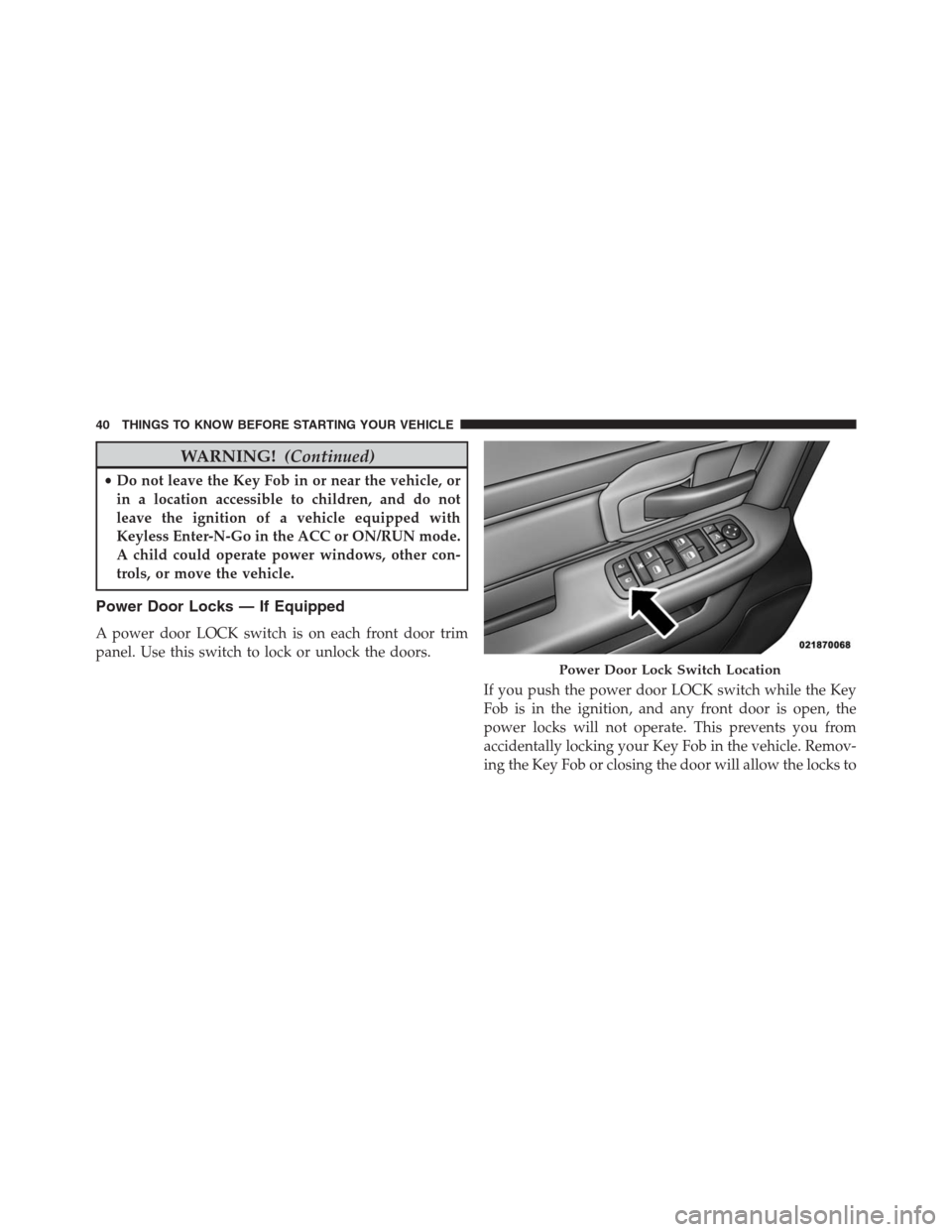
Power Door Locks — If Equipped
A power door LOCK switch is on each front door trim
panel. Use this switch to lock or unlock the doors.
If you push the power door LOCK switch while the Key
Fob is in the ignition, and any front door is open, the
power locks will not operate. This prevents you from
accidentally locking your Key Fob in the vehicle. Remov-
ing the Key Fob or closing the door will allow the locks to
Power Door Lock Switch Location
40 THINGS TO KNOW BEFORE STARTING YOUR VEHICLE
Page 43 of 916
operate. A chime will sound if the Key Fob is in the
ignition switch and a door is open, as a reminder to
remove the Key Fob.
Automatic Door Locks — If Equipped
The auto door lock feature default condition is enabled.
When enabled, the door locks will lock automatically
when the vehicle’s speed exceeds 15 mph (24 km/h). The
auto door lock feature can be enabled or disabled by your
authorized dealer or through the Uconnect Settings in
your radio.
Automatic Doors Unlock — If Equipped
This feature unlocks all of the doors of the vehicle when
either front door is opened. This will occur only after the
vehicle has been shifted into the PARK position after the
vehicle has been driven (shifted out of PARK and all
doors closed).
Automatic Doors Unlock Programming — If
Equipped
The Automatic Doors Unlock feature can be enabled or
disabled as follows:
•For vehicles not equipped with a touchscreen radio,
refer to “Electronic Vehicle Information Center
(EVIC)/Settings (Customer-Programmable Features)”
in “Understanding Your Instrument Panel” for further
information.
•For vehicles equipped with a touchscreen radio, refer
to “Uconnect Settings” in “Understanding Your Instru-
ment Panel” for further information.
NOTE:Use the Auto Unlock Doors feature in accordance
with local laws.2
THINGS TO KNOW BEFORE STARTING YOUR VEHICLE 41
Page 45 of 916
WARNING!
Avoid trapping anyone in a vehicle in a collision.
Remember that the rear doors can only be opened
from the outside when the Child-Protection locks are
engaged.
NOTE:
•After setting the Child-Protection Door Lock system,
always test the door from the inside to make certain it
is in the desired position.
•For emergency exit with the system engaged, move the
door lock switch to the UNLOCK position, roll down
the window and open the door with the outside door
handle.
KEYLESS ENTER-N-GO
The Passive Entry system is an enhancement to the
vehicle’s Remote Keyless Entry (RKE) system and a
feature of Keyless Enter-N-Go. Refer to “Keyless Enter-
N-Go” in “Starting And Operating” for further informa-
tion. This feature allows you to lock and unlock the
vehicle’s door(s) without having to push the RKE trans-
mitter lock or unlock buttons.
NOTE:
•Passive Entry may be programmed ON/OFF. Refer to
“Uconnect Settings” in “Understanding Your Instru-
ment Panel” for further information.
•If wearing gloves on your hands, or if it has been
raining on the Passive Entry door handle, the unlock
sensitivity can be affected, resulting in a slower re-
sponse time.
2
THINGS TO KNOW BEFORE STARTING YOUR VEHICLE 43
Page 46 of 916
•If the vehicle is unlocked by Passive Entry and no door
is opened within 60 seconds, the vehicle will re-lock
and if equipped will arm the security alarm.
•The vehicles security alarm can be armed/disarmed
by pushing the passive entry key fob lock/unlock
buttons (if equipped).
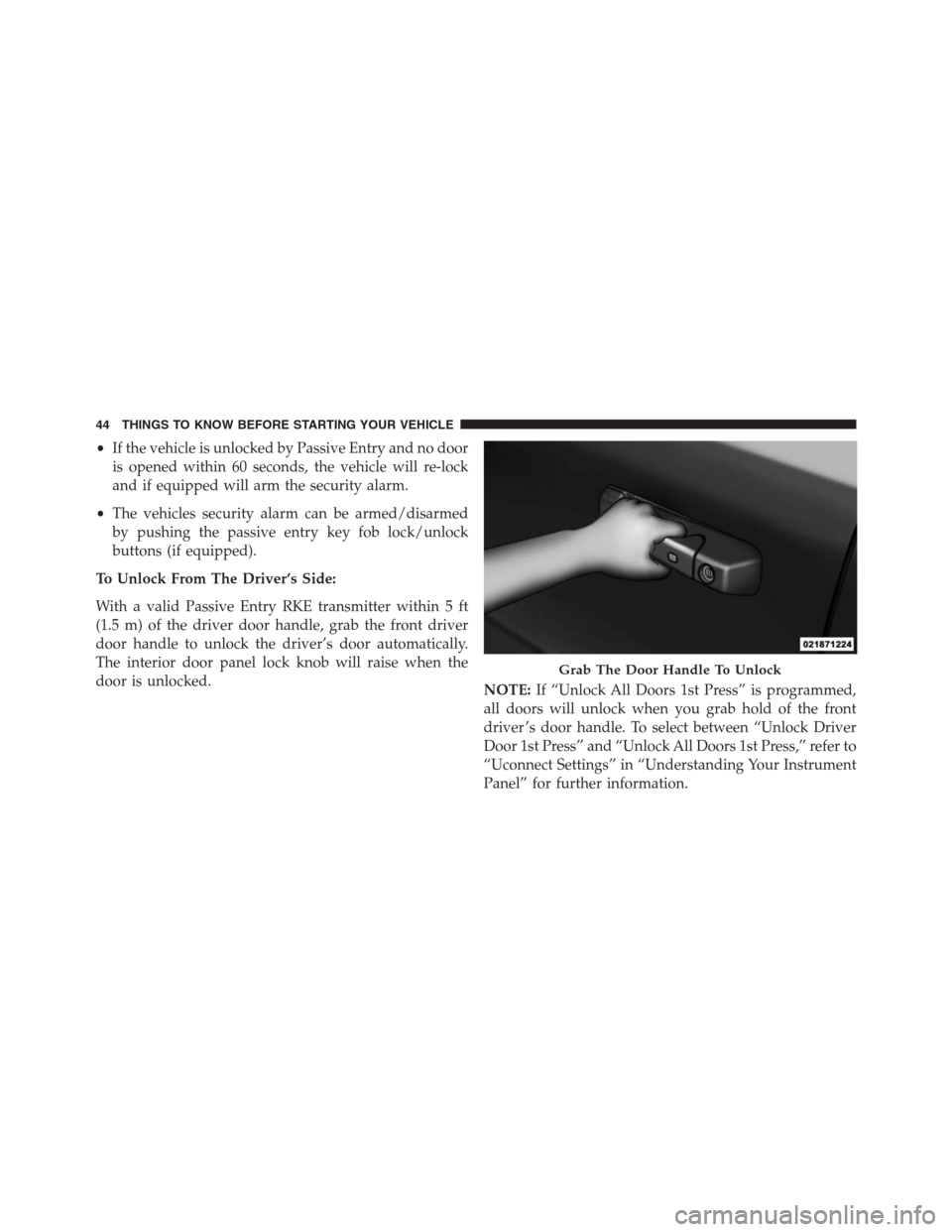
To Unlock From The Driver’s Side:
With a valid Passive Entry RKE transmitter within 5 ft
(1.5 m) of the driver door handle, grab the front driver
door handle to unlock the driver’s door automatically.
The interior door panel lock knob will raise when the
door is unlocked.
NOTE:If “Unlock All Doors 1st Press” is programmed,
all doors will unlock when you grab hold of the front
driver ’s door handle. To select between “Unlock Driver
Door 1st Press” and “Unlock All Doors 1st Press,” refer to
“Uconnect Settings” in “Understanding Your Instrument
Panel” for further information.
Grab The Door Handle To Unlock
44 THINGS TO KNOW BEFORE STARTING YOUR VEHICLE
Page 47 of 916
To Unlock From The Passenger Side:
With a valid Passive Entry RKE transmitter within 5 ft
(1.5 m) of the passenger door handle, grab the front
passenger door handle to unlock all doors automatically.
The interior door panel lock knob will raise when the
door is unlocked.
NOTE:All doors will unlock when the front passenger
door handle is grabbed regardless of the driver ’s door
unlock preference setting (“Unlock Driver Door 1st
Press” or “Unlock All Doors 1st Press”).
Preventing Inadvertent Locking Of Passive Entry RKE
Transmitter In Vehicle:
To minimize the possibility of unintentionally locking a
Passive Entry RKE transmitter inside your vehicle, the
Passive Entry system is equipped with an automatic door
unlock feature which will function if the ignition switch
is in the OFF position.If one of the vehicle doors is open and the door panel
switch is used to lock the vehicle, once all open doors
have been closed the vehicle checks the inside and
outside of the vehicle for any valid Passive Entry RKE
transmitters. If one of the vehicle’s Passive Entry RKE
transmitters is detected inside the vehicle, and no other
valid Passive Entry RKE transmitters are detected out-
side the vehicle, the Passive Entry System automatically
unlocks all vehicle doors and chirps the horn three times
(on the third attempt ALL doors will lock and the Passive
Entry RKE transmitter can be locked in the vehicle).
2
THINGS TO KNOW BEFORE STARTING YOUR VEHICLE 45
Page 49 of 916
NOTE:
•After pushing the door handle LOCK button, you
must wait two seconds before you can lock or unlock
the doors, using either Passive Entry door handle. This
is done to allow you to check if the vehicle is locked by
pulling the door handle, without the vehicle reacting
and unlocking.
•The Passive Entry system will not operate if the RKE
transmitter battery is dead.
The vehicle doors can also be locked by using the RKE
transmitter lock button or the lock button located on the
vehicle’s interior door panel.General Information
The following regulatory statement applies to all radio
frequency (RF) devices equipped in this vehicle:
This device complies with Part 15 of the FCC Rules and
with Industry Canada licence-exempt RSS standard(s).
Operation is subject to the following two conditions:
1. This device may not cause harmful interference, and
2. This device must accept any interference received,
including interference that may cause undesired op-
eration.
NOTE:Changes or modifications not expressly approved
by the party responsible for compliance could void the
user ’s authority to operate the equipment.
2
THINGS TO KNOW BEFORE STARTING YOUR VEHICLE 47
Page 50 of 916
WINDOWS
Power Windows — If Equipped
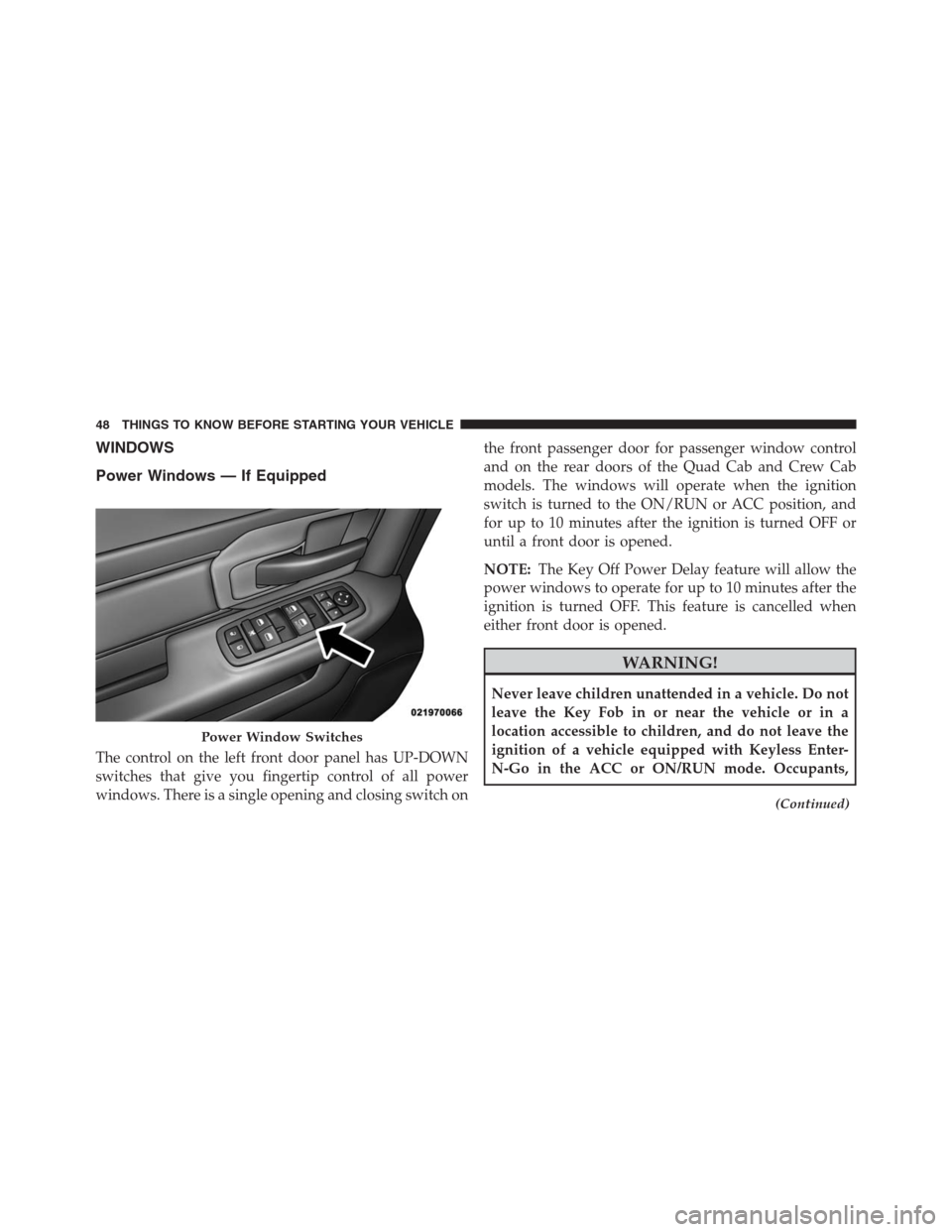
The control on the left front door panel has UP-DOWN
switches that give you fingertip control of all power
windows. There is a single opening and closing switch onthe front passenger door for passenger window control
and on the rear doors of the Quad Cab and Crew Cab
models. The windows will operate when the ignition
switch is turned to the ON/RUN or ACC position, and
for up to 10 minutes after the ignition is turned OFF or
until a front door is opened.
NOTE:The Key Off Power Delay feature will allow the
power windows to operate for up to 10 minutes after the
ignition is turned OFF. This feature is cancelled when
either front door is opened.
WARNING!
Never leave children unattended in a vehicle. Do not
leave the Key Fob in or near the vehicle or in a
location accessible to children, and do not leave the
ignition of a vehicle equipped with Keyless Enter-
N-Go in the ACC or ON/RUN mode. Occupants,
(Continued)
Power Window Switches
48 THINGS TO KNOW BEFORE STARTING YOUR VEHICLE
Page 71 of 916
Mode and activate the vehicle sensitive (emergency)
locking mode.
WARNING!
•The seat belt assembly must be replaced if the
switchable Automatic Locking Retractor (ALR) fea-
ture or any other seat belt function is not working
properly when checked according to the proce-
dures in the Service Manual.
•Failure to replace the seat belt assembly could
increase the risk of injury in collisions.
•Do not use the Automatic Locking Mode to restrain
occupants who are wearing the seat belt or children
who are using booster seats. The locked mode is
only used to install rear-facing or forward-facing
child restraints that have a harness for restraining
the child.
Supplemental Restraint System (SRS)
Air Bag System Components
Your vehicle may be equipped with the following air bag
system components:
•Occupant Restraint Controller (ORC)
•Air Bag Warning Light
•Steering Wheel and Column
•Instrument Panel
•Knee Impact Bolsters
•Advanced Front Air Bags
•Supplemental Side Air Bags
•Front and Side Impact Sensors — If Equipped
2
THINGS TO KNOW BEFORE STARTING YOUR VEHICLE 69
Page 72 of 916
•Seat Belt Pretensioners
•Seat Belt Buckle Switch
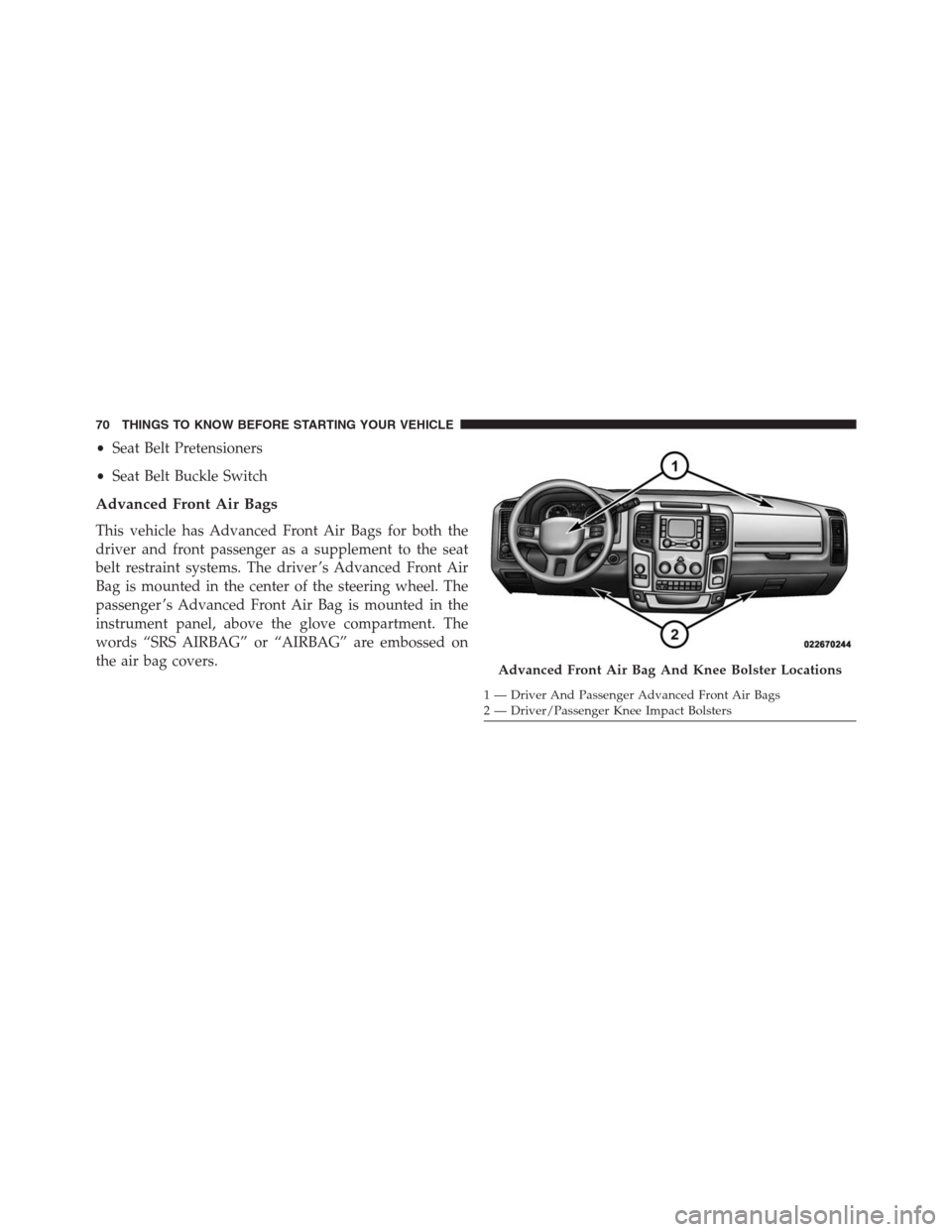
Advanced Front Air Bags
This vehicle has Advanced Front Air Bags for both the
driver and front passenger as a supplement to the seat
belt restraint systems. The driver ’s Advanced Front Air
Bag is mounted in the center of the steering wheel. The
passenger ’s Advanced Front Air Bag is mounted in the
instrument panel, above the glove compartment. The
words “SRS AIRBAG” or “AIRBAG” are embossed on
the air bag covers.
Advanced Front Air Bag And Knee Bolster Locations
1 — Driver And Passenger Advanced Front Air Bags
2 — Driver/Passenger Knee Impact Bolsters 70 THINGS TO KNOW BEFORE STARTING YOUR VEHICLE