reset Ram 1500 2016 User Guide
[x] Cancel search | Manufacturer: RAM, Model Year: 2016, Model line: 1500, Model: Ram 1500 2016Pages: 916, PDF Size: 7.55 MB
Page 340 of 916
the EVIC’s compass/outside temp line. Examples of this
message type are “Right Front Turn Signal Lamp Out”
and “Low Tire Pressure.”
•Unstored Messages
This message type is displayed indefinitely or until the
condition that activated the message is cleared. Examples
of this message type are “Turn Signal On” (if a turn signal
is left on) and “Lights On” (if driver leaves the vehicle).
•Unstored Messages Until RUN
These messages deal primarily with the Remote Start
feature. This message type is displayed until the ignition
is in the RUN state. Examples of this message type are
“Remote Start Aborted - Door Ajar” and “Press Brake
Pedal and Push Button to Start.”
•Five Second Unstored Messages
When the appropriate conditions occur, this type of
message takes control of the main display area for fiveseconds and then returns to the previous screen. An
example of this message type is “Automatic High Beams
On.”
Oil Life Reset
Your vehicle is equipped with an engine oil change
indicator system. The “Oil Change Required” message
will display in the EVIC after a single chime has sounded,
to indicate the next scheduled oil change interval. The
engine oil change indicator system is duty cycle based,
which means the engine oil change interval may fluctu-
ate, dependent upon your personal driving style.
NOTE:Use the steering wheel EVIC controls for the
following procedure(s).
Vehicles Equipped With Passive Entry
1. Without pressing the brake pedal, push the ENGINE
START/STOP button and place the ignition to the
ON/RUN position (do not start the engine).
338 UNDERSTANDING YOUR INSTRUMENT PANEL
Page 341 of 916
2. Push and release theDOWNarrow button to scroll
downward through the main menu to “Vehicle Info.”
3. Push and release theRIGHTarrow button to access
the ”Vehicle Info” screen, then scroll UP or DOWN to
select “Oil Life.”
4. Push and hold theRIGHTarrow button to select
“Reset,” then push and release theRightarrow button
to select“NO”or“YES”to reset the Oil Life to 100%.
5. Push and release theUParrow button to exit the EVIC
screen.
Vehicles Not Equipped With Passive Entry
1. Without depressing the brake pedal, cycle the ignition
to the ON/RUN position (do not start the engine).
2. Push and release theDOWNarrow button to scroll
downward through the main menu to “Vehicle Info.”3. Push and release theRIGHTarrow button to access
the “Vehicle Info” screen then scrollUPorDOWNto
select “Oil Life.”
4. Push and hold theRIGHTarrow button to select
“Reset,” then select “NO” or “YES” by pushing the
RIGHTarrow then push theRIGHTarrow button to
select reset of the Oil Life to 100%.
5. Push and release theUParrow button to exit the EVIC
screen.
NOTE:If the indicator message illuminates when you
start the vehicle, the Oil Life indicator system did not
reset. If necessary, repeat this procedure.
EVIC Selectable Menu Items
Push and release theUPorDOWNarrow buttons until
the desired Selectable Menu item is highlighted in the
EVIC.
4
UNDERSTANDING YOUR INSTRUMENT PANEL 339
Page 342 of 916
Speedometer Menu Item
Push and release theUPorDOWNarrow button until
the speedometer menu item is highlighted in the EVIC.
Push and release theRIGHTarrow button to cycle the
display between MPH and km/h.
Vehicle Info Menu Item
Push and release theUPorDOWNarrow button(s) until
the Vehicle Info menu item is highlighted in the EVIC.
Push and release theRIGHTarrow button to enter the
submenus items of Vehicle Info. follow the directional
prompts to access or reset any of the following Vehicle
Info submenu items:
•Tire Pressure
•Coolant Temp
•Transmission Temp (Automatic only)
•Oil Temp•Oil Pressure
•Oil Life
•Battery Voltage
•Gauge Summary
•Engine HoursFuel Economy Menu Item
Push and release theUPorDOWNarrow button until
the Fuel Economy menu item is highlighted. Push and
Hold theRIGHTarrow button to reset Average Fuel
Economy.
•Current Fuel Economy Gauge
•Average Fuel Economy value
•Range to Empty
340 UNDERSTANDING YOUR INSTRUMENT PANEL
Page 343 of 916
Trip Menu Item
Trip A
Push and release theUPorDOWNarrow button until
the Trip A menu item is highlighted in the EVIC. The Trip
A information will display the following:
•Distance
•Average MPG
•Elapsed Time
Push and holdRIGHTarrow button to reset all informa-
tion.Trip B
Push and releaseUPorDOWNarrow button until the
Trip B menu item is highlighted in the EVIC. The Trip B
information will display the following:
•Distance
•Average MPG
•Elapsed Time
Push and hold theRIGHTarrow button to reset all the
information.
Stop/Start Menu Item – If Equipped
Push and release theUPorDOWNarrow button until
the Stop/Start menu item is highlighted in the EVIC.
Push and release theRIGHTarrow button to display the
Stop/Start status.
4
UNDERSTANDING YOUR INSTRUMENT PANEL 341
Page 344 of 916
Air Suspension Menu Item — If Equipped
Push and release theUPorDOWNarrow button until
the Air Suspension menu item is highlighted in the EVIC.
Push and release theRIGHTarrow button to display the
Air Suspension status.
Trailer Tow Menu Item
Push and release theUPorDOWNarrow button until
the Trailer Tow menu item is highlighted. Push and
release theRIGHTarrow button and the next screen will
display the following trailer trip information:
•Trip (trailer specific) Distance: Push and hold the
RIGHTarrow button to reset the distance.
•Trailer Brake
•Output
•Type
•Gain
EVIC Messages (Stored)
Number of messages stored will be indicated on the
highlighted Messages Menu bar.
When no message(s) have been stored, the right arrow
will not be present in the highlighted Messages bar.
Message(s) remain stored until condition has been
cleared by your authorized service provider.
Sample of stored EVIC Messages
•Front Seat Belts Unbuckled
•Driver Seat Belt Unbuckled
•Passenger Seat Belt Unbuckled
•Service Air Bag System
•Traction Control Off
•Washer Fluid Low
342 UNDERSTANDING YOUR INSTRUMENT PANEL
Page 346 of 916
•Key in Ignition
•Key in Ignition Lights On
•Remote Start Active Key To Run
•Remote Start Active Push Start Button
•Remote Start Aborted Fuel Low
•Remote Start Aborted Too Cold
•Remote Start Aborted Door Open
•Remote Start Aborted Hood Open
•Remote Start Aborted Trunk Open
•Remote Start Aborted Time Expired
•Remote Start Disabled Start To Reset
•Service Airbag System
•Service Airbag Warning Light•Driver Seatbelt Unbuckled
•Passenger Seatbelt Unbuckled
•Front Seatbelts Unbuckled
•Door Open
•Doors Open
•Gear Not Available
•Shift Not Allowed
•Shift To Neutral Then Drive Or Reverse
•Autostick Unavailable Service Required
•Automatic Unavailable Use Autostick Service Req.
•Transmission Getting Hot Push Brake
•Trans. Hot Stop Safely Shift To Park Wait To Cool
•Transmission Cool Ready To Drive
344 UNDERSTANDING YOUR INSTRUMENT PANEL
Page 358 of 916
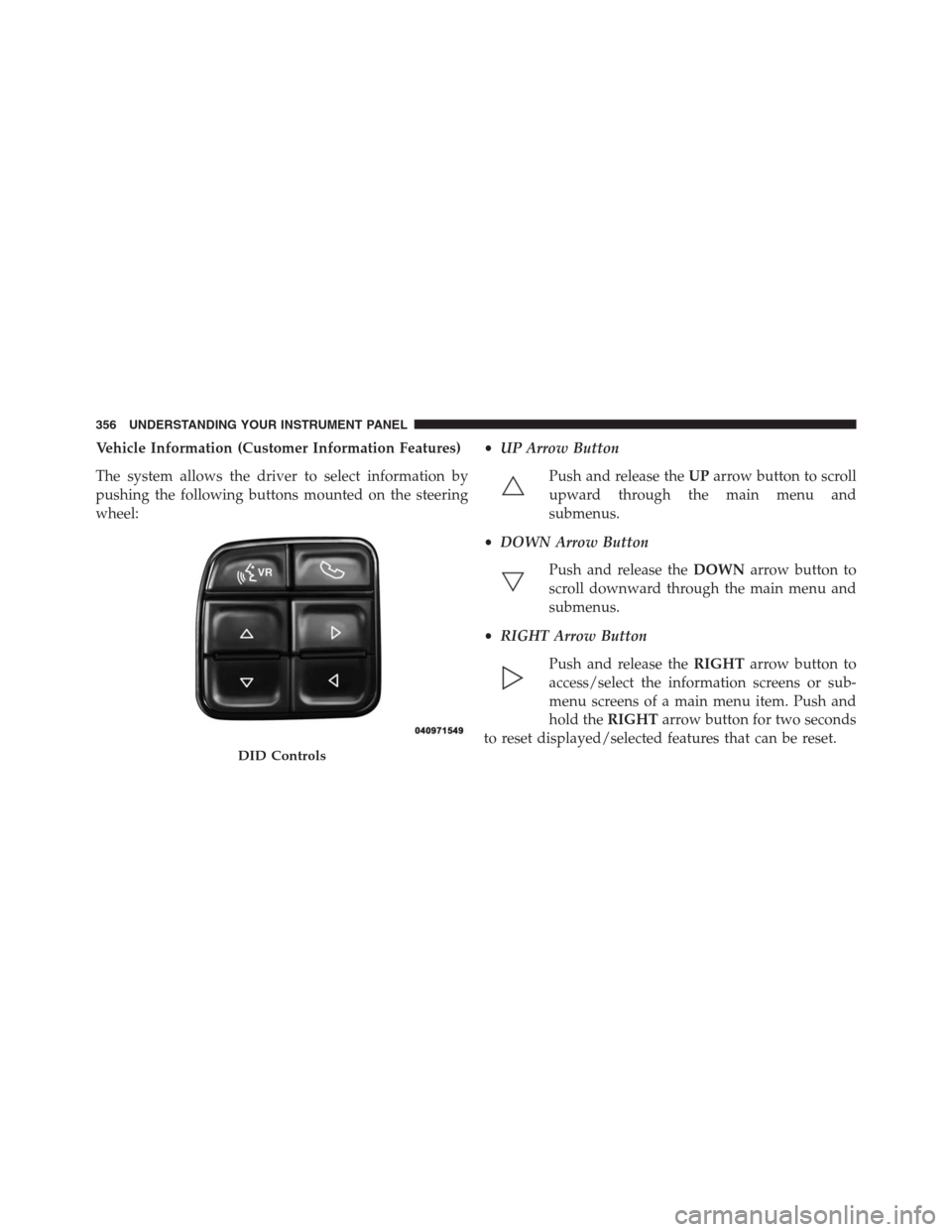
Vehicle Information (Customer Information Features)
The system allows the driver to select information by
pushing the following buttons mounted on the steering
wheel:•UP Arrow Button
Push and release theUParrow button to scroll
upward through the main menu and
submenus.
•DOWN Arrow Button
Push and release theDOWNarrow button to
scroll downward through the main menu and
submenus.
•RIGHT Arrow Button
Push and release theRIGHTarrow button to
access/select the information screens or sub-
menu screens of a main menu item. Push and
hold theRIGHTarrow button for two seconds
to reset displayed/selected features that can be reset.
DID Controls
356 UNDERSTANDING YOUR INSTRUMENT PANEL
Page 361 of 916
•Five Second Unstored Messages
When the appropriate conditions occur, this type of
message takes control of the main display area for five
seconds and then returns to the previous screen. An
example of this message type is “Automatic High Beams
On.”
Oil Life Reset
Your vehicle is equipped with an engine oil change
indicator system. The “Oil Change Required” message
will flash in the DID display for approximately 10
seconds after a single chime has sounded, to indicate the
next scheduled oil change interval. The engine oil change
indicator system is duty cycle based, which means the
engine oil change interval may fluctuate, dependent
upon your personal driving style.
NOTE:Use the steering wheel DID controls for the
following procedure(s).Vehicles Equipped With Passive Entry
1. Without pushing the brake pedal, push the ENGINE
START/STOP button and cycle the ignition to the
ON/RUN position (do not start the engine).
2. Push and release theDOWNarrow button to scroll
downward through the main menu to “Vehicle Info.”
3. Push and release theRIGHTarrow button to access
the “Oil Life” screen.
4. Push and hold the RIGHT arrow button for one
second to access the “Oil Life Reset” screen.
5. Push and release theDOWNarrow button to select
“Yes,” then push and release the RIGHT arrow button
to select reset of the Oil Life.
6. Push and release theUParrow button to exit the DID
screen.
4
UNDERSTANDING YOUR INSTRUMENT PANEL 359
Page 362 of 916
Vehicles Not Equipped With Passive Entry
1. Without pushing the brake pedal, cycle the ignition to
the ON/RUN position (do not start the engine).
2. Push and release theDOWNarrow button to scroll
downward through the main menu to “Vehicle Info.”
3. Push and release theRIGHTarrow button to access
the “Oil Life” screen.
4. Push and hold theRIGHTarrow button for one
second to access the “Oil Life Reset” screen.
5. Push and release theDOWNarrow button to select
“Yes,” then push and release theRIGHTarrow button
to select reset of the Oil Life.
6. Push and release theUParrow button to exit the DID
screen.NOTE:If the indicator message illuminates when you
start the vehicle, the oil change indicator system did not
reset. If necessary, repeat this procedure.
DID Messages
•Front Seatbelts Unbuckled
•Driver Seatbelt Unbuckled
•Passenger Seatbelt Unbuckled
•Service Airbag System
•Traction Control Off
•Washer Fluid Low
•Oil Pressure Low
•Oil Change Due
•Fuel Low
•Service Antilock Brake System
360 UNDERSTANDING YOUR INSTRUMENT PANEL
Page 364 of 916
•Remote Start Aborted Fuel Low
•Remote Start Aborted Too Cold
•Remote Start Aborted Door Open
•Remote Start Aborted Hood Open
•Remote Start Aborted Trunk Open
•Remote Start Aborted Time Expired
•Remote Start Disabled Start to Reset
•Service Airbag System
•Service Airbag Warning Light
•Driver Seatbelt Unbuckled
•Passenger Seatbelt Unbuckled
•Front Seatbelts Unbuckled
•Door Open•Doors Open
•Gear Not Available
•Shift Not Allowed
•Shift to Neutral then Drive or Reverse
•Autostick Unavailable Service Required
•Automatic Unavailable Use Autostick Service Req.
•Transmission Getting Hot Push Brake
•Trans. Hot Stop Safely Shift to Park Wait to Cool
•Transmission Cool Ready to Drive
•Trailer Brake Disconnected
•Service Transmission
•Service Shifter
•Engage Park Brake to Prevent Rolling
362 UNDERSTANDING YOUR INSTRUMENT PANEL