instrument panel Ram 1500 2016 Owner's Manual
[x] Cancel search | Manufacturer: RAM, Model Year: 2016, Model line: 1500, Model: Ram 1500 2016Pages: 916, PDF Size: 7.55 MB
Page 687 of 916
WARNING!
Static electricity can cause an ignition of flammable
liquid, vapor or gas in any vehicle or trailer. To
reduce risk of serious injury or death when filling
containers:
•Always place container on the ground before fill-
ing.
•Keep the pump nozzle in contact with the container
when you are filling it.
•Use only approved containers for flammable liq-
uid.
•Do not leave container unattended while filling.
•A static electric charge could cause a spark and fire
hazard.
Loose Fuel Filler Cap Message
If the vehicle diagnostic system determines
that the fuel filler cap is loose, improperly
installed, or damaged, a loose gascap indicator
will display in the EVIC/DID telltale display
area. Refer to “Electronic Vehicle Information Center
(EVIC)/Driver Information Display (DID) in “Under-
standing Your Instrument Panel” for further information.
Tighten the fuel filler cap properly and push the RIGHT
button to turn off the message. If the problem continues,
the message will appear the next time the vehicle is
started.
5
STARTING AND OPERATING 685
Page 707 of 916
Repeat steps 8 and 9 until the GAIN setting is at a point
just below trailer wheel lockup. If towing a heavier
trailer, trailer wheel lockup may not be attainable even
with the maximum GAIN setting of 10.
Light Electric Heavy Electric Light EOH Heavy EOH
Type of Trailer
BrakesElectric Trailer
BrakesElectric Trailer
BrakesElectric over Hy-
draulic Trailer
BrakesElectric over Hy-
draulic Trailer
Brakes
Load *Under 10,000 lbs *Above 10,000 lbs *Under 10,000 lbs *Above 10,000 lbs
* The suggested selection depends and may change
depending on the customer preferences for braking per-
formance. Condition of the trailer brakes, driving and
road state may also affect the selection.
Display Messages
The trailer brake control interacts with the Electronic
Vehicle Information Center (EVIC) or Driver InformationDisplay (DID). Display messages, along with a single
chime, will be displayed when a malfunction is deter-
mined in the trailer connection, trailer brake control, or
on the trailer. Refer to “Electronic Vehicle Information
Center” or “Driver Information Display” in “Under-
standing Your Instrument Panel” for further information.
5
STARTING AND OPERATING 705
Page 731 of 916
JACKING AND TIRE CHANGING
Jacking And Tire Changing 1500 Series Trucks
WARNING!
•Do not attempt to change a tire on the side of the
vehicle close to moving traffic. Pull far enough off
the road to avoid the danger of being hit when
operating the jack or changing the wheel.
•Being under a jacked-up vehicle is dangerous. The
vehicle could slip off the jack and fall on you. You
could be crushed. Never put any part of your body
under a vehicle that is on a jack. If you need to get
under a raised vehicle, take it to a service center
where it can be raised on a lift.
•Never start or run the engine while the vehicle is
on a jack.
(Continued)
WARNING!(Continued)
•The jack is designed to be used as a tool for
changing tires only. The jack should not be used to
lift the vehicle for service purposes. The vehicle
should be jacked on a firm level surface only.
Avoid ice or slippery areas.
NOTE:If your vehicle is equipped with an air suspen-
sion system, there is a feature which allows the automatic
leveling to be disabled to assist with changing a tire.
If your vehicle is equipped with a touchscreen, this
feature can be activated through the Uconnect system.
Refer to “Uconnect Settings” in “Understanding Your
Instrument Panel” for further information.
If your vehicle is not equipped with a touchscreen, this
feature can be activated through the Electronic Vehicle
Information Center (EVIC) or Driver Information Display
(DID). Refer to “Electronic Vehicle Information Center
6
WHAT TO DO IN EMERGENCIES 729
Page 732 of 916
(EVIC)” or “Driver Information Display (DID)” in “Un-
derstanding Your Instrument Panel” for further informa-
tion.
Jack Location
The jack and jack tools are stored under the front
passenger seat.
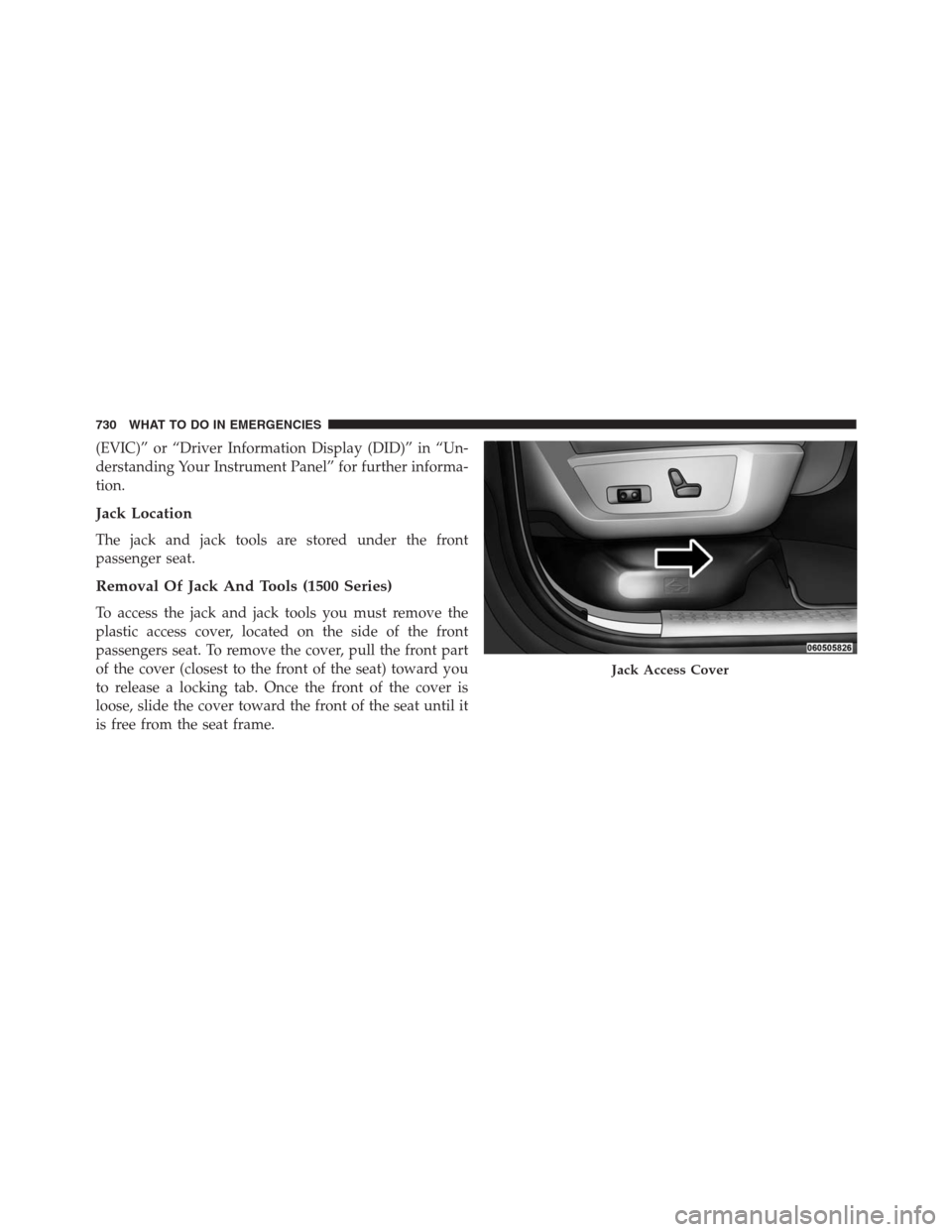
Removal Of Jack And Tools (1500 Series)
To access the jack and jack tools you must remove the
plastic access cover, located on the side of the front
passengers seat. To remove the cover, pull the front part
of the cover (closest to the front of the seat) toward you
to release a locking tab. Once the front of the cover is
loose, slide the cover toward the front of the seat until it
is free from the seat frame.
Jack Access Cover
730 WHAT TO DO IN EMERGENCIES
Page 794 of 916
(EVIC)” or “Driver Information Display (DID)” in “Un-
derstanding Your Instrument Panel” for further informa-
tion. Tighten the fuel filler cap properly and push the
SELECT button to turn off the message. If the problem
continues, the message will appear the next time the
vehicle is started.
A loose, improperly installed, or damaged fuel filler cap
may also turn on the Malfunction Indicator Light (MIL).
EMISSIONS INSPECTION AND MAINTENANCE
PROGRAMS
In some localities, it may be a legal requirement to pass
an inspection of your vehicle’s emissions control system.
Failure to pass could prevent vehicle registration.
For states that require an Inspection and Mainte-
nance (I/M), this check verifies the “MalfunctionIndicator Light (MIL)” is functioning and is not on when
the engine is running, and that the OBD II system is
ready for testing.
Normally, the OBD II system will be ready. The OBD II
system maynotbe ready if your vehicle was recently
serviced, recently had a dead battery or a battery replace-
ment. If the OBD II system should be determined not
ready for the I/M test, your vehicle may fail the test.
Your vehicle has a simple ignition actuated test, which
you can use prior to going to the test station. To check if
your vehicle’s OBD II system is ready, you must do the
following:
1. Cycle the ignition switch to the ON position, but do
not crank or start the engine.
NOTE:If you crank or start the engine, you will have to
start this test over.
792 MAINTAINING YOUR VEHICLE
Page 845 of 916
Cavity Cartridge Fuse Micro Fuse Description
F37 30 Amp Pink – Cummins Diesel Fuel Heater #2 – If Equipped
F38 30 Amp Pink – Power Inverter 115V AC – If Equipped
F39 20 Amp Blue – Power Outlet – Special Services Only
F41 – 10 Amp Red Active Grill Shutter – If Equipped
F42 – 20 Amp Yellow Horn
F44 – 10 Amp Red Diagnostic Port
F46 – 10 Amp Red Upfitter – If Equipped
F49 – 10 Amp Red Instrument Panel Cluster
F50 – 20 Amp Yellow Air Suspension Control Module – If Equipped
F51 – 10 Amp Red Ignition Node Module / Keyless Ignition
F52 – 5 Amp Tan Battery Sensor
F53 – 20 Amp Yellow Trailer Tow – Left Turn/Stop Lights
F54 – 20 Amp Yellow Adjustable Pedals
F56 – 15 Amp Blue Additional Diesel Content – If Equipped
F57 – 20 Amp Yellow Transmission
7
MAINTAINING YOUR VEHICLE 843
Page 848 of 916
Cavity Cartridge Fuse Micro Fuse Description
F80 – 10 Amp Red Universal Garage Door Opener / Compass
F81 – 20 Amp Yellow Trailer Tow Right Turn / Stop Lights
F82 – 10 Amp Red Steering Column Control Module / Cruise Con-
trol
F84 – 15 Amp Blue Switch Bank / Instrument Cluster
F85 – 10 Amp Red Airbag Module
F86 – 10 Amp Red Airbag Module
F87 – 10 Amp Red Air Suspension – If Equipped / Trailer Tow /
Steering Column Control Module
F88 – 15 Amp Blue Instrument Panel Cluster
F90/F91 – 20 Amp Yellow Power Outlet (rear seats) Customer Selectable
F93 – 20 Amp Yellow Cigar Lighter
F94 – 10 Amp Red Shifter / Transfer Case Module
F95 – 10 Amp Red Rear Camera / Park Assist
F96 – 10 Amp Red Rear Seat Heater Switch
846 MAINTAINING YOUR VEHICLE
Page 849 of 916
Cavity Cartridge Fuse Micro Fuse Description
F97 – 25 Amp Clear Rear Heated Seats & Heated Steering Wheel –
If Equipped
F98 – 25 Amp Clear Front Heated Seats – If Equipped
F99 – 10 Amp Red Climate Control
F100 – 10 Amp Red Upfitters – If Equipped
F101 – 15 Amp Blue Electrochromatic Mirror / Smart High Beams –
If Equipped
F104 – 20 Amp Yellow Power Outlets (Instrument Panel / Center Con-
sole)
7
MAINTAINING YOUR VEHICLE 847
Page 872 of 916
MAINTENANCE SCHEDULE
Your vehicle is equipped with an automatic oil change
indicator system. The oil change indicator system will
remind you that it is time to take your vehicle in for
scheduled maintenance.
Based on engine operation conditions, the oil change
indicator message will illuminate. This means that ser-
vice is required for your vehicle. Operating conditions
such as frequent short-trips, trailer tow, extremely hot or
cold ambient temperatures, and E85 fuel usage will
influence when the “Oil Change Required” message is
displayed. Severe Operating Conditions can cause the
change oil message to illuminate as early as 3,500 miles
(5,600 km) since last reset. Have your vehicle serviced as
soon as possible, within the next 500 miles (805 km).
Your authorized dealer will reset the oil change indicator
message after completing the scheduled oil change. If a
scheduled oil change is performed by someone otherthan your authorized dealer, the message can be reset by
referring to the steps described under “Electronic Vehicle
Information Center (EVIC)” or “Driver Information Dis-
play (DID)” in “Understanding Your Instrument Panel”
for further information.
1500 Models Only
NOTE:Under no circumstances should oil change inter-
vals exceed 10,000 miles (16,000 km), twelve months or
350 hours of engine run time, whichever comes first. The
350 hours of engine run or idle time is generally only a
concern for fleet customers.
2500 – 3500 Models Only
NOTE:Under no circumstances should oil change inter-
vals exceed 8,000 miles (13,000 km), twelve months or 350
hours of engine run time, whichever comes first. The 350
hours of engine run or idle time is generally only a
concern for fleet customers.
870 MAINTENANCE SCHEDULES
Page 902 of 916
Hitches
Trailer Towing.........................696
Hoisting................................769
HomeLink (Garage Door Opener)..............219
Hood Release............................170
Hub Caps...............................768
Ignition.................................16
Key ...............................12, 16
Ignition Key Removal.......................16
Illuminated Entry..........................24
Immobilizer (Sentry Key)....................19
Inflation Pressure Tires.....................659
Information Center, Vehicle...............334, 355
Inside Rearview Mirror..............130, 131, 138
Instrument Cluster..................291, 303, 329
Instrument Panel And Controls...............290
Instrument Panel Lens Cleaning...............836
Integrated Trailer Brake Controls..............702Interior Appearance Care....................834
Interior Lights...........................179
Intermittent Wipers (Delay Wipers).............185
Introduction..............................4
Inverter Outlet (115V)......................237
Jack Location.........................729, 749
Jump Starting............................770
Key Fob
Programming Additional Key Fobs...........21
Programming Additional Transmitters.........21
Key-In Reminder..........................18
Keyless Enter-N-Go.....................43, 478
Lock The Vehicle’s Doors..............388, 408
Passive Entry...........................43
Passive Entry Programming..........43, 388, 408
Keyless Entry System.......................25
Key, Replacement..........................20
900 INDEX