Sound system Ram 1500 2016 Owner's Guide
[x] Cancel search | Manufacturer: RAM, Model Year: 2016, Model line: 1500, Model: Ram 1500 2016Pages: 916, PDF Size: 7.55 MB
Page 345 of 916
•Oil Pressure Low
•Oil Change Due
•Fuel Low
•Service Anti-lock Brake System
•Service Electronic Throttle Control
•Service Power Steering
•Cruise Off
•Cruise Ready
•Cruise Set To XXX MPH
•Tire Pressure Screen With Low Tire(s) “Inflate Tire to
XX”
•Tire Pressure Information System (TPIS)
•Service Tire Pressure System•Parking Brake Engaged
•Brake Fluid Low
•Service Electronic Braking System
•Engine Temperature Hot
•Battery Voltage Low
•Service Electronic Throttle Control
•Lights On
•Right Turn Signal Light Out
•Left Turn Signal Light Out
•Turn Signal On
•Sound Horn with Remote Lock: Off; 1st Push; 2nd
Push
•Vehicle Not In Park
4
UNDERSTANDING YOUR INSTRUMENT PANEL 343
Page 361 of 916
•Five Second Unstored Messages
When the appropriate conditions occur, this type of
message takes control of the main display area for five
seconds and then returns to the previous screen. An
example of this message type is “Automatic High Beams
On.”
Oil Life Reset
Your vehicle is equipped with an engine oil change
indicator system. The “Oil Change Required” message
will flash in the DID display for approximately 10
seconds after a single chime has sounded, to indicate the
next scheduled oil change interval. The engine oil change
indicator system is duty cycle based, which means the
engine oil change interval may fluctuate, dependent
upon your personal driving style.
NOTE:Use the steering wheel DID controls for the
following procedure(s).Vehicles Equipped With Passive Entry
1. Without pushing the brake pedal, push the ENGINE
START/STOP button and cycle the ignition to the
ON/RUN position (do not start the engine).
2. Push and release theDOWNarrow button to scroll
downward through the main menu to “Vehicle Info.”
3. Push and release theRIGHTarrow button to access
the “Oil Life” screen.
4. Push and hold the RIGHT arrow button for one
second to access the “Oil Life Reset” screen.
5. Push and release theDOWNarrow button to select
“Yes,” then push and release the RIGHT arrow button
to select reset of the Oil Life.
6. Push and release theUParrow button to exit the DID
screen.
4
UNDERSTANDING YOUR INSTRUMENT PANEL 359
Page 363 of 916
•Service Electronic Throttle Control
•Service Power Steering
•Cruise Off
•Cruise Ready
•Cruise Set To XXX MPH
•Tire Pressure Screen With Low Tire(s) “Inflate Tire to
XX”
•Tire Pressure Information System (TPIS)
•Service Tire Pressure System
•Parking Brake Engaged
•Brake Fluid Low
•Service Electronic Braking System
•Engine Temperature Hot•Battery Voltage Low
•Service Electronic Throttle Control
•Lights On
•Right Turn Signal Light Out
•Left Turn Signal Light Out
•Turn Signal On
•Sound Horn with Remote Lock: Off; 1st Push; 2nd
Push
•Vehicle Not in Park
•Key in Ignition
•Key in Ignition Lights On
•Remote Start Active Key to Run
•Remote Start Active Push Start Button
4
UNDERSTANDING YOUR INSTRUMENT PANEL 361
Page 384 of 916
When making a selection, press the button on the touch-
screen to enter the desired mode. Once in the desired
mode, press and release the preferred setting until the
button is highlighted. Once the setting is complete, either
press the back arrow or Done button on the touchscreen
or the Back button on the faceplate to return to the
previous menu. Pressing the Up or Down Arrow buttons
on the touchscreen on the right side of the screen will
allow you to toggle up or down through the list of
available settings.
NOTE:All settings should be changed with the ignition
in the “Run” position.
Display
After pressing the “Display” button on the touchscreen
the following settings will be available.•Display Mode
When in this display you may select the Auto or Manual
display settings. To change Mode status, press and re-
lease the “Auto” or “Manual” button on the touchscreen.
•Set Language
When in this display, you may select one of multiple
languages (English/Français/Español) for all display no-
menclature, including the trip functions and the naviga-
tion system (if equipped). Press the “Language” button
on the touchscreen and select from “English,” “Français,”
or “Español.”
•Touchscreen Beep
When in this display, you may turn on or shut off the
sound heard when a touchscreen button is pressed. To
change the Mode status, press and release the “On” or
“Off” button on the touchscreen.
382 UNDERSTANDING YOUR INSTRUMENT PANEL
Page 387 of 916
Safety/Assistance
After pressing the “Safety/Assistance” button on the
touchscreen the following settings will be available:
•ParkSense — If Equipped
The ParkSense system will scan for objects behind the
vehicle when the transmission shift lever/gear selector is
in REVERSE and the vehicle speed is less than 11 mph
(18 km/h). It will provide an alert (audible and/or
visual) to indicate the proximity to other objects. The
system can be enabled with Sound Only, or Sound and
Display. To change the ParkSense status, press and re-
lease the “Sound Only” or “Sounds and Display” button.
Refer to “ParkSense” in “Understanding The Features Of
Your Vehicle” for system function and operating infor-
mation.•Front ParkSense Chime Volume
The Front ParkSense Chime Volume settings can be
selected from the EVIC/DID or Uconnect System — if
equipped. The chime volume settings include LOW,
MEDIUM, and HIGH. The factory default volume setting
is MEDIUM. To change the mode status, press the “Front
ParkSense Volume” button and select the “Low” “Med”
or “High” buttons on the touchscreen. ParkSense will
retain its last known configuration state through ignition
cycles.
•Rear ParkSense Chime Volume — If Equipped
The Rear ParkSense Chime Volume settings can be se-
lected from the EVIC/DID or Uconnect System — if
equipped. The chime volume settings include LOW,
MEDIUM, and HIGH. The factory default volume setting
is MEDIUM. To change the mode status, press the “Rear
ParkSense Volume” button and select the “Low” “Med”
4
UNDERSTANDING YOUR INSTRUMENT PANEL 385
Page 402 of 916
•Set Theme
This feature will allow you to choose a background
theme for the display screen. The theme will change the
background color, highlight color, and button color of the
display screen. Press the “Set Theme” button on the
touchscreen and select one of the pre-configured themes
available.
•Set Language
When in this display, you may select one of multiple
languages (English / Français / Español) for all display
nomenclature, including the trip functions and the navi-
gation system (if equipped). Press the Set Language
button on the touchscreen, then press the desired lan-
guage button on the touchscreen until a check-mark
appears next to the language, showing that setting has
been selected.•Touchscreen Beep
When in this display, you may turn on or shut off the
sound heard when a touchscreen button (button on the
touchscreen) is pressed. Press the “Touchscreen Beep”
button on the touchscreen until a check-mark appears
next to the setting, showing that setting has been se-
lected.
•Navigation Turn-By-Turn In Cluster — If Equipped
When this feature is selected, the turn-by-turn directions
will appear in the display as the vehicle approaches a
designated turn within a programmed route. To make
your selection, press the “Navigation Turn-By-Turn In
Cluster” button on the touchscreen, until a check-mark
appears next to the setting, showing that setting has been
selected.
400 UNDERSTANDING YOUR INSTRUMENT PANEL
Page 406 of 916
Safety & Driving Assistance
After pressing the “Safety & Driving Assistance” button
on the touchscreen the following settings will be avail-
able.
•ParkSense
The Rear Park Assist system will scan for objects behind
the vehicle when the transmission shift lever is in RE-
VERSE and the vehicle speed is less than 11 mph
(18 km/h). The system can be enabled with Sound Only
or Sound and Display. To change the Park Assist status,
select the “Sound Only” or the “Sound and Display”
button on the touchscreen. Refer to “ParkSense Rear Park
Assist” in “Understanding The Features Of Your Vehicle”
for system function and operating information.
•Front ParkSense Chime Volume
The Front ParkSense Chime Volume settings can be
selected from the EVIC/DID or Uconnect System — ifequipped. The chime volume settings include LOW,
MEDIUM, and HIGH. The factory default volume setting
is MEDIUM. To change the mode status, press the “Front
ParkSense Volume” button and select the “Low” “Med”
or “High” buttons on the touchscreen. ParkSense will
retain its last known configuration state through ignition
cycles.
•Rear ParkSense Chime Volume
The Rear ParkSense Chime Volume settings can be se-
lected from the EVIC/DID or Uconnect System — if
equipped. The chime volume settings include LOW,
MEDIUM, and HIGH. The factory default volume setting
is MEDIUM. To change the mode status, press the “Rear
ParkSense Volume” button and select the “Low” “Med”
or “High” buttons on the touchscreen. ParkSense will
retain its last known configuration state through ignition
cycles.
404 UNDERSTANDING YOUR INSTRUMENT PANEL
Page 414 of 916
Air Suspension — If Equipped
After pressing the “Suspension” button on the touch-
screen the following settings will be available.
•Sound Horn With Lower
When this feature is selected, a short horn sound will
occur when the RKE transmitter REMOTE LOWER but-
ton is pressed. Press the box next to your selection and a
check-mark appears next to the feature showing the
system has been activated or the check-mark is removed
showing the system has been deactivated.
•Flash Lights With Lower
When this feature is selected, the front and rear turn
signals will flash when the RKE transmitter REMOTE
LOWER button is pressed twice. This feature may be
selected with or without the Sound Horn on Lower
feature selected. Press the box next to your selection and
a check-mark appears next to the feature showing thesystem has been activated or the check-mark is removed
showing the system has been deactivated.
•Suspension Display Messages
When “All” is selected, all the Air Suspension Alerts will
be displayed. When “Warning” is selected only the Air
Suspension Warnings will be displayed.
•Automatic Aero Mode (1500 Model Only)
When this feature is selected the Ride Height will auto-
matically be adjusted depending on the vehicle speed.
Press the box next to your selection and a check-mark
appears next to the feature showing the system has been
activated or the check-mark is removed showing the
system has been deactivated.
•Tire Jack Mode
When this feature is selected the air suspension system is
disabled to assist with changing a spare tire. Press the box
next to your selection and a check-mark appears next to
412 UNDERSTANDING YOUR INSTRUMENT PANEL
Page 420 of 916
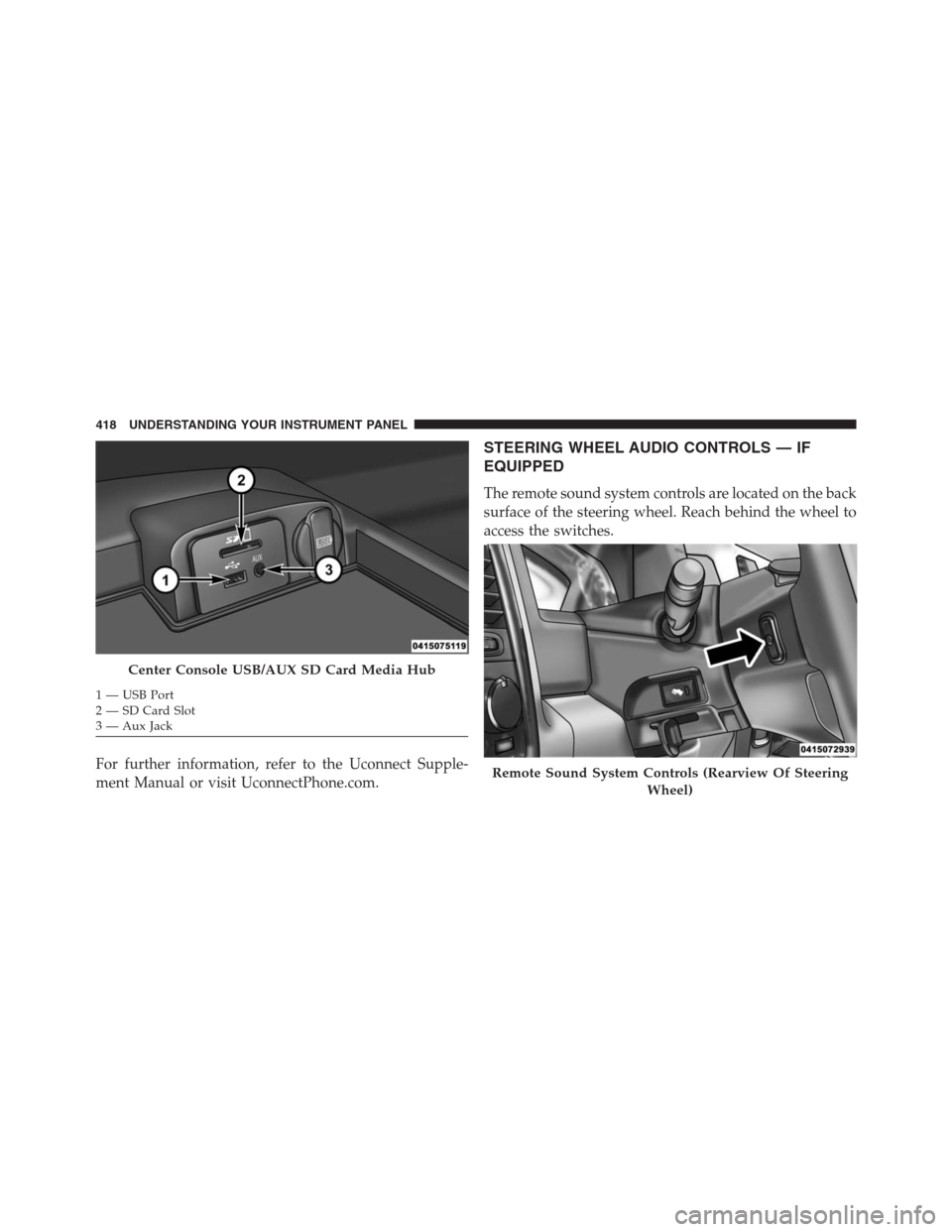
For further information, refer to the Uconnect Supple-
ment Manual or visit UconnectPhone.com.
STEERING WHEEL AUDIO CONTROLS — IF
EQUIPPED
The remote sound system controls are located on the back
surface of the steering wheel. Reach behind the wheel to
access the switches.
Center Console USB/AUX SD Card Media Hub
1 — USB Port
2 — SD Card Slot
3 — Aux Jack
Remote Sound System Controls (Rearview Of Steering
Wheel)
418 UNDERSTANDING YOUR INSTRUMENT PANEL
Page 622 of 916
come on when the ignition switch is turned to the ON
position, have the light repaired as soon as possible.
Anti-Lock Brake System (ABS)
The Anti-Lock Brake System (ABS) provides increased
vehicle stability and brake performance under most
braking conditions. The system automatically prevents
wheel lock, and enhances vehicle control during braking.
The ABS performs a self-check cycle to ensure that the
ABS is working properly each time the vehicle is started
and driven. During this self-check you may hear a slight
clicking sound as well as some related motor noises.
ABS is activated during braking when the system detects
one or more wheels begins to lock. Road conditions such
as ice, snow, gravel, bumps, railroad tracks, loose debris,
or panic stops may increase the likelihood of ABS activa-
tion(s).You also may experience the following when ABS acti-
vates:
•The ABS motor noise (it may continue to run for a
short time after the stop).
•The clicking sound of solenoid valves.
•Brake pedal pulsations.
•A slight drop of the brake pedal at the end of the stop.
These are all normal characteristics of ABS.
WARNING!
•The ABS contains sophisticated electronic equip-
ment that may be susceptible to interference
caused by improperly installed or high output
radio transmitting equipment. This interference
(Continued)
620 STARTING AND OPERATING