Voice Ram 1500 2016 Owner's Guide
[x] Cancel search | Manufacturer: RAM, Model Year: 2016, Model line: 1500, Model: Ram 1500 2016Pages: 916, PDF Size: 7.55 MB
Page 464 of 916
NOTE:
•You can also complete this process on the web. Simply
visit moparownerconnect.com log in and click Set Up
Via Mobile Profile (under Quick Links).
•Once you download the app to your compatible
mobile device, you will also be able to start your
vehicle and lock/unlock its doors from virtually any-
where.
Voice Texting (8.4A/8.4AN)
1. To send a message, push the Phone button. After
the beep, say the following command:“Send mes-
sageto John Smith.”
2. Listen to the prompt. After the beep, dictate the
message you would like to send. Wait for Uconnect to
process your message.
3. The Uconnect system will repeat your message and
provide a variety of options to add to, delete, send or
hear the message again. After the beep, tell Uconnect
what you’d like to do. For instance, if you’re happy
with your message, after the beep, say:“Send.”
You must be registered with Uconnect Access and have a
compatible MAP – enabled smartphone to use your voice
to send a personalized text message. For details about
MAP, visit UconnectPhone.com.
462 UNDERSTANDING YOUR INSTRUMENT PANEL
Page 465 of 916
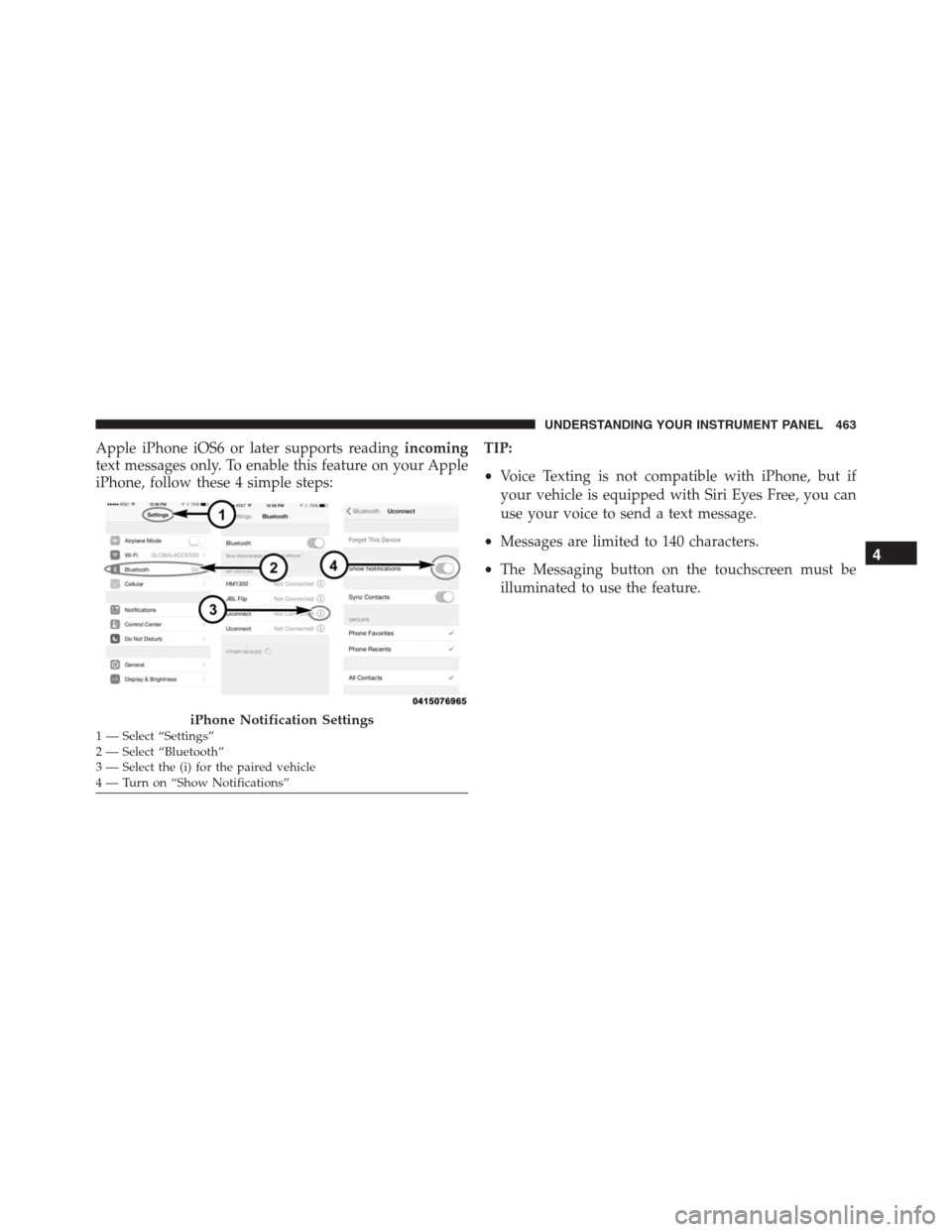
Apple iPhone iOS6 or later supports readingincoming
text messages only. To enable this feature on your Apple
iPhone, follow these 4 simple steps:TIP:
•Voice Texting is not compatible with iPhone, but if
your vehicle is equipped with Siri Eyes Free, you can
use your voice to send a text message.
•Messages are limited to 140 characters.
•The Messaging button on the touchscreen must be
illuminated to use the feature.
iPhone Notification Settings1 — Select “Settings”
2 — Select “Bluetooth”
3 — Select the (i) for the paired vehicle
4 — Turn on “Show Notifications”
4
UNDERSTANDING YOUR INSTRUMENT PANEL 463
Page 466 of 916
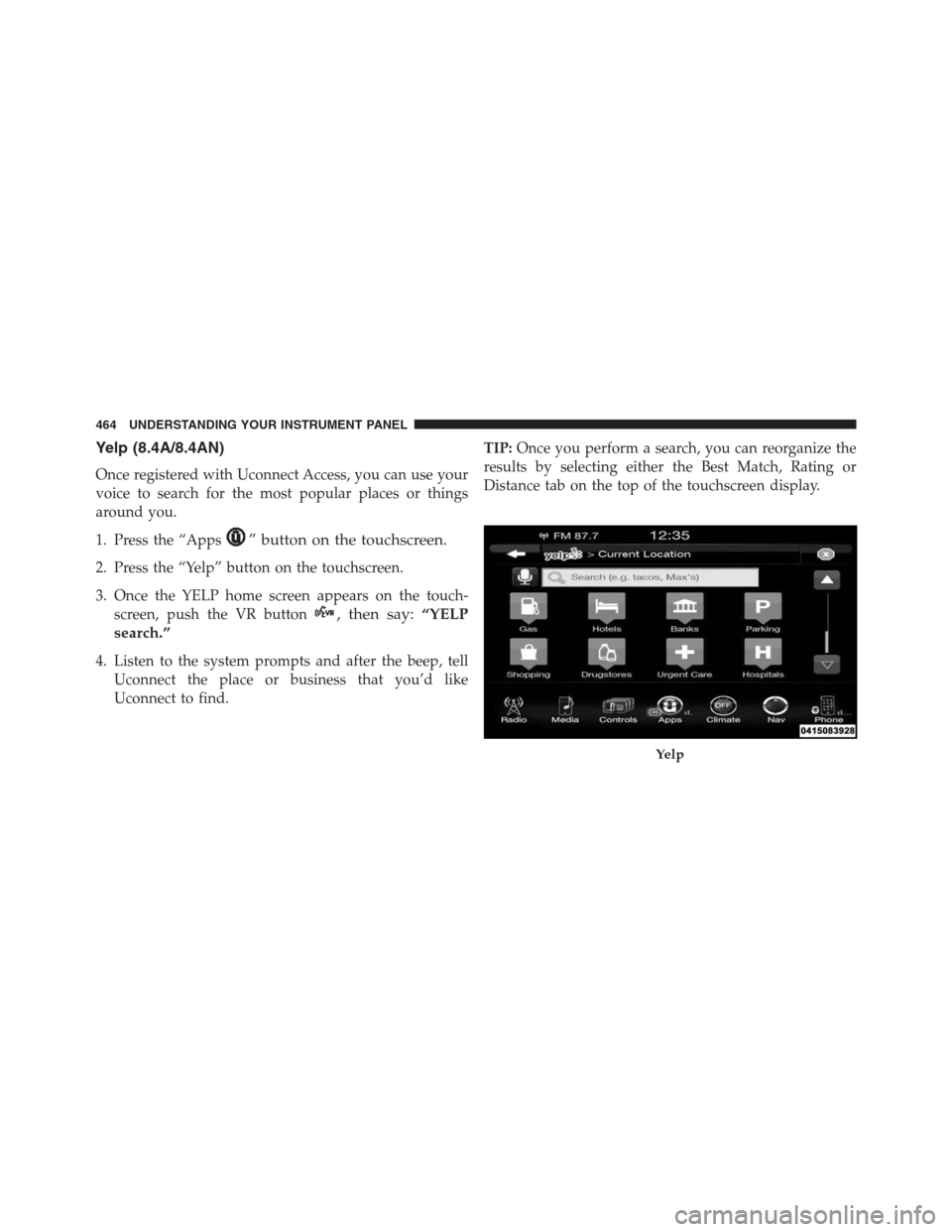
Yelp (8.4A/8.4AN)
Once registered with Uconnect Access, you can use your
voice to search for the most popular places or things
around you.
1. Press the “Apps
” button on the touchscreen.
2. Press the “Yelp” button on the touchscreen.
3. Once the YELP home screen appears on the touch-
screen, push the VR button
, then say:“YELP
search.”
4. Listen to the system prompts and after the beep, tell
Uconnect the place or business that you’d like
Uconnect to find.TIP:Once you perform a search, you can reorganize the
results by selecting either the Best Match, Rating or
Distance tab on the top of the touchscreen display.
Yelp
464 UNDERSTANDING YOUR INSTRUMENT PANEL
Page 467 of 916
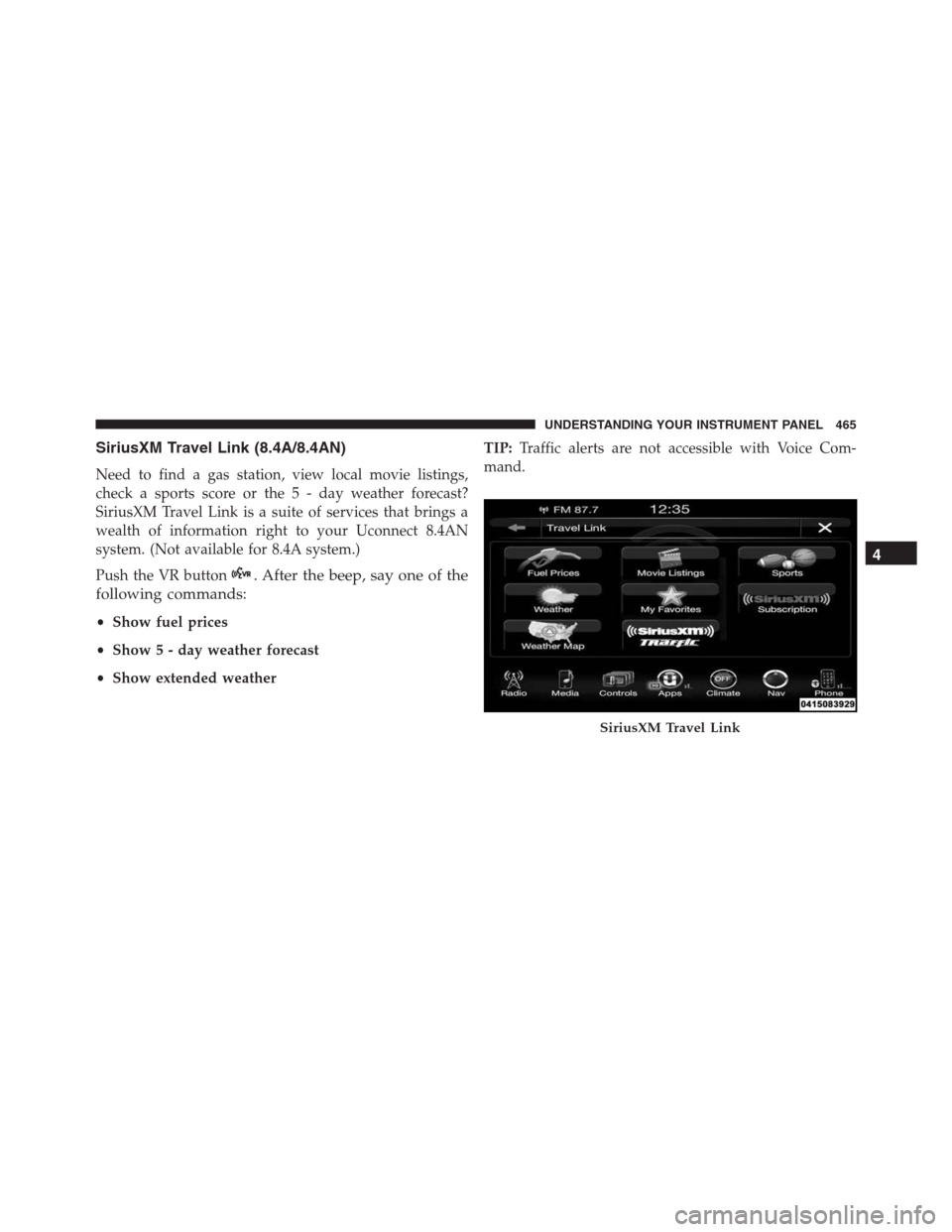
SiriusXM Travel Link (8.4A/8.4AN)
Need to find a gas station, view local movie listings,
check a sports score or the 5 - day weather forecast?
SiriusXM Travel Link is a suite of services that brings a
wealth of information right to your Uconnect 8.4AN
system. (Not available for 8.4A system.)
Push the VR button
. After the beep, say one of the
following commands:
•Show fuel prices
•Show 5 - day weather forecast
•Show extended weatherTIP:Traffic alerts are not accessible with Voice Com-
mand.
SiriusXM Travel Link
4
UNDERSTANDING YOUR INSTRUMENT PANEL 465
Page 468 of 916
Siri Eyes Free — If Equipped
If your vehicle is equipped with Siri Eyes Free, you can
use your voice to send text messages, schedule meetings,
set reminders, and more. For further information go to
the Mopar Owner Connect website
moparownerconnect.com.
Do Not Disturb
With Do Not Disturb, you can disable notifications from
incoming calls and texts, allowing you to keep your eyes
on the road and hands on the wheel. For your conve-
nience there is a counter display to keep track of your
missed calls and text messages while you were using Do
Not Disturb.
Do Not Disturb can automatically reply with a text
message, a call or both, when declining an incoming call
and send it to voicemail.Automatic reply messages can be:
•“I am driving right now, I will get back to you shortly.”
•Create a custom auto reply message up to 160 charac-
ters.
NOTE:Only the first 25 characters can been seen on the
touchscreen while typing a custom message.
While in Do Not Disturb, Conference Call can be selected
so you can still place a second call without being inter-
rupted by incoming calls.
NOTE:
•Reply with text message is not compatible with iP-
hones.
•Auto reply with text message is only available on
phones that supporting Bluetooth MAP.
466 UNDERSTANDING YOUR INSTRUMENT PANEL
Page 885 of 916
In Mexico Contact
Av. Prolongacion Paseo de la Reforma, 1240
Sante Fe C.P. 05109
Mexico, D. F.
In Mexico City: 5081-7568
Outside Mexico City: 1-800-505-1300
Puerto Rico And U.S. Virgin Islands
Customer Service Chrysler International Services LLC
P.O. Box 191857
San Juan 00919-1857
Tel.: (787) 782-5757
Fax: (787) 782-3345
Customer Assistance For The Hearing Or Speech
Impaired (TDD/TTY)
To assist customers who have hearing difficulties, the
manufacturer has installed special TDD (Telecommuni-
cation Devices for the Deaf) equipment at its customer
center. Any hearing or speech impaired customer, who
has access to a TDD or a conventional teletypewriter
(TTY) in the United States, can communicate with the
manufacturer by dialing 1-800-380-CHRY.
Canadian residents with hearing difficulties that require
assistance can use the special needs relay service offered
by Bell Canada. For TTY teletypewriter users, dial 711
and for Voice callers, dial 1-800-855-0511 to connect with
a Bell Relay Service operator.
Service Contract
You may have purchased a service contract for a vehicle
to help protect you from the high cost of unexpected
repairs after the manufacturer’s New Vehicle Limited
9
IF YOU NEED CONSUMER ASSISTANCE 883
Page 912 of 916

Trailer And Tongue Weight................697
Wiring...............................707
Trailer Towing Guide.......................697
Trailer Weight............................697
Transfer Case............................826
Electronically Shifted..............526, 533, 538
Fluid................................867
Transmission............................490
Automatic..................490, 499, 511, 826
Fluid................................867
Maintenance...........................826
Shifting..............................487
Transmitter Battery Service (Remote Keyless Entry) . .31
Transmitter Programming (Remote Keyless Entry) . . .25
Transmitter, Remote Keyless Entry (RKE).........25
Transporting Pets.........................116
Tread Wear Indicators......................656
Turn Signals...................183, 329, 851, 853Uconnect
Customer Programmable Features........391, 410
Operation.............................417
Uconnect Settings.......................379
Uconnect Settings....................391, 410
Uconnect 8.4A/8.4AN Voice Recognition
Additional Information...................467
Do Not Disturb........................466
General Information.....................467
Siri Eyes Free..........................466
Uconnect 8.4 Settings
Customer Programmable Features — Units.....401
Uconnect Settings
Customer Programmable Features......43, 388, 408
Passive Entry Programming..........43, 388, 408
Uconnect Settings....................388, 408
Uconnect Voice Command...................445
Uniform Tire Quality Grades.................887
910 INDEX
Page 913 of 916
Universal Garage Door Opener (HomeLink)
Programming HomeLink........220, 221, 223, 225
Unleaded Gasoline........................674
Untwisting Procedure, Seat Belt................60
Utility Rails, Rear Cargo Area................270
Vehicle Identification Number (VIN).............6
Vehicle Loading.......................643, 686
Vehicle Modifications/Alterations...............7
Vehicle Storage........................442, 848
Viscosity, Engine Oil....................797, 798
Voice Recognition System (VR)................445
Warnings And Cautions......................6
Warranty Information......................885
Washers, Windshield....................186, 811
Washing Vehicle..........................831
Water
Driving Through........................589Wheel And Wheel Trim.....................833
Wheel And Wheel Trim Care.................833
Wheel Cover............................768
Winch.................................593
Accessories............................597
Operation.............................598
Rigging Techniques......................611
Usage...............................593
Wind Buffeting........................51, 231
Window Fogging.........................442
Windows................................48
Power................................48
Rear Sliding...........................251
Reset Auto-Up..........................50
Wind Buffeting..........................51
Windshield Defroster.......................119
Windshield Washers.................185, 186, 811
Fluid.............................185, 811
Windshield Wiper Blades....................808
10
INDEX 911