electronic ignition Ram 1500 2016 Owner's Guide
[x] Cancel search | Manufacturer: RAM, Model Year: 2016, Model line: 1500, Model: Ram 1500 2016Pages: 916, PDF Size: 7.55 MB
Page 228 of 916
5. Push and hold the programmed HomeLink button.
The EVIC/DID will display “CHANNEL # TRANS-
MIT.” If the device is plugged in and activates, pro-
gramming is complete.
If you unplugged the garage door opener/device for
programming, plug it back in at this time.
Reprogramming A Single HomeLink Button
(Canadian/Gate Operator)
To reprogram a channel that has been previously trained,
follow these steps:
1. Turn the ignition switch to the ON/RUN position.
For vehicle’s equipped with Keyless Enter-N-Go, place
the ignition in the RUN position with the Engine ON.
2. Push and hold the desired HomeLink button until the
EVIC/DID displays “CHANNEL # TRAINING”Do
not release the button.3.Without releasing the buttonproceed with
“Canadian/Gate Operator Programming” Step 2 and
follow all remaining steps.
Using HomeLink
To operate, push and release the programmed HomeLink
button. Activation will now occur for the programmed
device (i.e. garage door opener, gate operator, security
system, entry door lock, home/office lighting, etc.) The
hand-held transmitter of the device may also be used at
any time.
Security
It is advised to erase all channels before you sell or turn
in your vehicle.
To erase the channels press and hold the two outside
HomeLink buttons (I and III) for up 20 seconds. The
Electronic Vehicle Information Center (EVIC) or Driver
226 UNDERSTANDING THE FEATURES OF YOUR VEHICLE
Page 241 of 916
AUXILIARY SWITCHES — IF EQUIPPED
There can be up to five auxiliary switches located in the
lower switch bank of the instrument panel which can be
used to power various electronic devices and PTO
(Power Take Off) – If Equipped. If Power Take Off is
equipped, it will take the place of the fifth Auxiliary
switch. Connections to the switches are found under the
hood in the connectors attached to the auxiliary Power
Distribution Center.
You have the ability to configure the functionality of the
auxiliary switches via the Electronic Vehicle Information
Center (EVIC) or Driver Information Display (DID). All
switches can now be configured for setting the switch
type operation to latching or momentary, power source of
either battery or ignition, and ability to hold last state
across key cycles.NOTE:Holding last state conditions are met when
switch type is set to latching and power source is set to
ignition.
For further information on using the auxiliary switches,
please refer to the Ram Body Builders Guide by accessing
www.rambodybuilder.com and choosing the appropriate
links.
CUPHOLDERS
Front Seat Cupholders (40–20–40 Seats)
The cupholders are located on the backside of the center
portion of the front seat (20). Fold down the center
section of the front seat to gain access to the cupholders.
3
UNDERSTANDING THE FEATURES OF YOUR VEHICLE 239
Page 294 of 916
1. Tachometer
•Indicates the engine speed in revolutions per minute
(RPM x 1000).
2. Electronic Vehicle Information Center (EVIC) Display
•When the appropriate conditions exist, this display
shows the Electronic Vehicle Information Center
(EVIC) messages. Refer to “Electronic Vehicle Infor-
mation Center” in “Understanding Your Instrument
Panel” for further information.
3. Speedometer
•Indicates vehicle speed.4. Fuel Gauge
•The pointer shows the level of fuel in the fuel tank
when the ignition switch is in the ON/RUN position.
5. Temperature Gauge
•The temperature gauge shows engine coolant tem-
perature. Any reading within the normal range indi-
cates that the engine cooling system is operating
satisfactorily.
•The gauge pointer will likely indicate a higher tem-
perature when driving in hot weather, up mountain
grades, or when towing a trailer. It should not be
allowed to exceed the upper limits of the normal
operating range.
292 UNDERSTANDING YOUR INSTRUMENT PANEL
Page 303 of 916
The light will remain on until the cause is corrected.
NOTE:The light may flash momentarily during sharp
cornering maneuvers, which change fluid level condi-
tions. The vehicle should have service performed, and
the brake fluid level checked.
If brake failure is indicated, immediate repair is neces-
sary.
WARNING!
Driving a vehicle with the red brake light on is
dangerous. Part of the brake system may have failed.
It will take longer to stop the vehicle. You could have
a collision. Have the vehicle checked immediately.
Vehicles equipped with the Anti-Lock Brake System
(ABS) are also equipped with Electronic Brake Force
Distribution (EBD). In the event of an EBD failure, theBrake Warning Light will turn on along with the ABS
Light. Immediate repair to the ABS system is required.
Operation of the Brake Warning Light can be checked by
turning the ignition switch from the OFF position to the
ON/RUN position. The light should illuminate for ap-
proximately two seconds. The light should then turn off
unless the parking brake is applied or a brake fault is
detected. If the light does not illuminate, have the light
inspected by an authorized dealer.
The light also will turn on when the parking brake is
applied with the ignition switch in the ON/RUN posi-
tion.
NOTE:This light shows only that the parking brake is
applied. It does not show the degree of brake application.
4
UNDERSTANDING YOUR INSTRUMENT PANEL 301
Page 308 of 916
Electronic Throttle Control (ETC) Warning Light
Red Telltale
LightWhat It Means
Electronic Throttle Control (ETC) Warning Light
This light informs you of a problem with the Electronic Throttle Control (ETC) system. If a
problem is detected while the engine is running, the light will either stay on or flash de-
pending on the nature of the problem. Cycle the ignition key when the vehicle is safely and
completely stopped and the shift lever is placed in the PARK position. The light should turn
off. If the light remains on with the engine running, your vehicle will usually be drivable;
however, see an authorized dealer for service as soon as possible.
If the light continues to flash when the engine is running, immediate service is required and
you may experience reduced performance, an elevated/rough idle, or engine stall and your
vehicle may require towing. The light will come on when the ignition is first turned to ON/
RUN and remain on briefly as a bulb check. If the light does not come on during starting,
have the system checked by an authorized dealer.
306 UNDERSTANDING YOUR INSTRUMENT PANEL
Page 314 of 916
Electronic Stability Control (ESC) Indicator Light — If Equipped
Yellow Telltale
LightWhat It Means
Electronic Stability Control (ESC) Indicator Light
The “ESC Indicator Light” in the instrument cluster will come on when the ignition switch
is turned to the ON/RUN position. It should go out with the engine running. If the “ESC
Indicator Light” comes on continuously with the engine running, a malfunction has been
detected in the ESC system. If this light remains on after several ignition cycles, and the ve-
hicle has been driven several miles (kilometers) at speeds greater than 30 mph (48 km/h),
see your authorized dealer as soon as possible to have the problem diagnosed and corrected.
•The “ESC Off Indicator Light” and the “ESC Indicator Light” come on momentarily each
time the ignition switch is turned to ON/RUN.
•Each time the ignition is turned to ON/RUN, the ESC system will be ON, even if it was
turned off previously.
•The ESC system will make buzzing or clicking sounds when it is active. This is normal;
the sounds will stop when ESC becomes inactive following the maneuver that caused
the ESC activation.
312 UNDERSTANDING YOUR INSTRUMENT PANEL
Page 363 of 916
•Service Electronic Throttle Control
•Service Power Steering
•Cruise Off
•Cruise Ready
•Cruise Set To XXX MPH
•Tire Pressure Screen With Low Tire(s) “Inflate Tire to
XX”
•Tire Pressure Information System (TPIS)
•Service Tire Pressure System
•Parking Brake Engaged
•Brake Fluid Low
•Service Electronic Braking System
•Engine Temperature Hot•Battery Voltage Low
•Service Electronic Throttle Control
•Lights On
•Right Turn Signal Light Out
•Left Turn Signal Light Out
•Turn Signal On
•Sound Horn with Remote Lock: Off; 1st Push; 2nd
Push
•Vehicle Not in Park
•Key in Ignition
•Key in Ignition Lights On
•Remote Start Active Key to Run
•Remote Start Active Push Start Button
4
UNDERSTANDING YOUR INSTRUMENT PANEL 361
Page 487 of 916
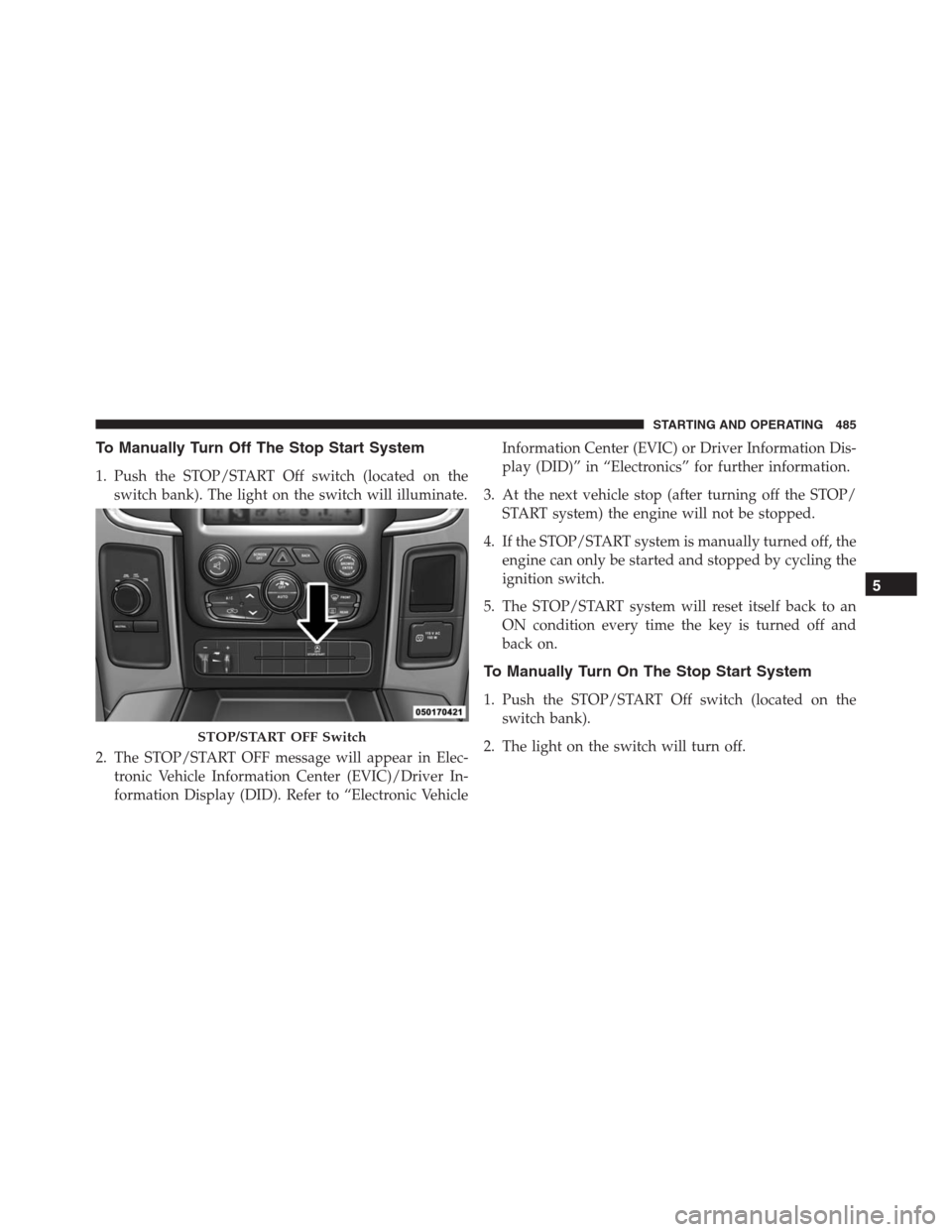
To Manually Turn Off The Stop Start System
1. Push the STOP/START Off switch (located on the
switch bank). The light on the switch will illuminate.
2. The STOP/START OFF message will appear in Elec-
tronic Vehicle Information Center (EVIC)/Driver In-
formation Display (DID). Refer to “Electronic VehicleInformation Center (EVIC) or Driver Information Dis-
play (DID)” in “Electronics” for further information.
3. At the next vehicle stop (after turning off the STOP/
START system) the engine will not be stopped.
4. If the STOP/START system is manually turned off, the
engine can only be started and stopped by cycling the
ignition switch.
5. The STOP/START system will reset itself back to an
ON condition every time the key is turned off and
back on.
To Manually Turn On The Stop Start System
1. Push the STOP/START Off switch (located on the
switch bank).
2. The light on the switch will turn off.
STOP/START OFF Switch
5
STARTING AND OPERATING 485
Page 498 of 916
In the event of a momentary problem, the transmission
can be reset to regain all forward gears by performing the
following steps:
NOTE:In cases where the instrument cluster message
indicates the transmission may not re-engage after en-
gine shutdown, perform this procedure only in a desired
location (preferably, at your authorized dealer).
1. Stop the vehicle.
2. Shift the transmission into PARK, if possible. If not,
shift the transmission to NEUTRAL.
3. Turn the ignition switch to the OFF position. On
vehicles with Keyless Enter-N-Go, push and hold the
ignition switch until the engine turns OFF.
4. Wait approximately 30 seconds.
5. Restart the engine.6. Shift into the desired gear range. If the problem is no
longer detected, the transmission will return to normal
operation.
NOTE:Even if the transmission can be reset, we recom-
mend that you visit your authorized dealer at your
earliest possible convenience. Your authorized dealer has
diagnostic equipment to determine if the problem could
recur.
If the transmission cannot be reset, authorized dealer
service is required.
Electronic Range Select (ERS) Operation —
Eight-Speed Transmission
The Electronic Range Select (ERS) shift control allows the
driver to limit the highest available gear when the
transmission is in DRIVE. For example, if you set the
496 STARTING AND OPERATING
Page 508 of 916
In the event of a momentary problem, the transmission
can be reset to regain all forward gears by performing the
following steps:
1. Stop the vehicle.
2. Shift the transmission into PARK.
3. Turn the ignition switch to the OFF position.
4. Wait approximately 10 seconds.
5. Restart the engine.
6. Shift into the desired gear range. If the problem is no
longer detected, the transmission will return to normal
operation.
NOTE:Even if the transmission can be reset, we recom-
mend that you visit your authorized dealer at your
earliest possible convenience. Your authorized dealer has
diagnostic equipment to determine if the problem could
recur.If the transmission cannot be reset, authorized dealer
service is required.
Electronic Range Select (ERS) Operation —
Six-Speed Transmission (1500 Models Only)
The Electronic Range Select (ERS) shift control allows the
driver to limit the highest available gear when the
transmission is in DRIVE. For example, if you set the
transmission gear limit to 4 (fourth gear), the transmis-
sion will not shift above fourth gear, but will shift
through the lower gears normally.
Use of ERS (or TOW/HAUL mode) also enables an
additional underdrive gear which is not normally used
during through-gear accelerations. This additional gear
can improve vehicle performance and cooling capability
when towing a trailer on certain grades. In ERS mode,
gears 1 though 3 are underdrive gears, and ERS 4 is direct
drive. ERS 5 and 6 (Overdrive gears) are the same as the
normal fourth and fifth gears.
506 STARTING AND OPERATING