Understanding Ram 1500 2016 Owner's Manual
[x] Cancel search | Manufacturer: RAM, Model Year: 2016, Model line: 1500, Model: Ram 1500 2016Pages: 916, PDF Size: 7.55 MB
Page 561 of 916
speed remains between 30 mph (48 km/h) and 35 mph
(56 km/h) for greater than 20 seconds or if the vehicle
speed falls below 30 mph (48 km/h).
NOTE:Speed thresholds for raising the vehicle only
apply if Automatic Aero Mode is enabled.
•To enter Aero Mode manually push the down button
once from NRH at any vehicle speed. To return to
NRH push the up button once while vehicle speed is
less than 56 mph (90 km/h).
NOTE:Automatic Aero Mode may be disabled through
vehicle settings on your Uconnect Radio when equipped
with UConnect 5.0, 8.4A, or 8.4AN. Refer to “Uconnect
Settings” in “Understanding Your Instrument Panel” for
further information.
•Entry/Exit Mode (Lowers the vehicle approximately 3
in [73 mm])– This position lowers the vehicle for
easier passenger entry and exit as well as lowering therear of the vehicle for easier loading and unloading of
cargo. To enter Entry/Exit Mode, push the “Down”
button twice from the NRH while the vehicle speed is
below 33 mph (53 km/h). Once the vehicle speed goes
below 15 mph (24 km/h) the vehicle height will begin
to lower. If the vehicle speed remains between 15 mph
(24 km/h) and 25 mph (40 km/h) for greater than 60
seconds, or the vehicle speed exceeds 25 mph
(40 km/h) the Entry/Exit change will be cancelled. To
return to Normal Height Mode, push the “Up” button
twice while in Entry/Exit or drive the vehicle over
15 mph (24 km/h). Entry/Exit mode may not be
available due to vehicle payload, an EVIC/DID mes-
sage will be displayed when this occurs. Refer to
“Electronic Vehicle Information Center (EVIC) or
Driver Information Display (DID)” in “Understanding
Your Instrument Panel” for further information.
5
STARTING AND OPERATING 559
Page 562 of 916
CAUTION!
When in ENTRY/EXIT setting, be aware of your
surroundings, you may not have the clearance re-
quired for certain areas and vehicle damage may
occur.
The system requires that the ignition be in ON/RUN
position or the engine running for all user requested
changes. When lowering the vehicle all of the doors,
must be closed. If a door is opened at any time while the
vehicle is lowering the change will not be completed
until the open door(s) is closed.
This system uses a lifting and lowering pattern which
keeps the headlights from incorrectly shining into on-
coming traffic. When raising the vehicle, the rear of thevehicle will move up first and then the front. When
lowering the vehicle, the front will move down first and
then the rear.
After the engine is turned off, it may be noticed that the
air suspension system operates briefly, this is normal. The
system is correcting the position of the vehicle to ensure
a proper appearance.
To assist with changing a spare tire, the air suspension
system has a feature which allows the automatic leveling
to be disabled. Refer to “Electronic Vehicle Information
Center (EVIC) or Driver Information Display (DID)” in
“Understanding Your Instrument Panel” for further in-
formation.
560 STARTING AND OPERATING
Page 563 of 916
NOTE:If equipped with a touch screen radio all
enabling/disabling of air suspension features must be
done through the radio. Refer to “Uconnect Settings” in
“Understanding Your Instrument Panel” for further in-
formation.
WARNING!
The air suspension system uses a high pressure
volume of air to operate the system. To avoid per-
sonal injury or damage to the system, see your
authorized dealer for service.
Air Suspension Modes
The Air Suspension system has multiple modes to protect
the system in unique situations:
Tire/Jack Mode
To assist with changing a spare tire, the air suspension
system has a feature which allows the automatic levelingto be disabled. Refer to “Electronic Vehicle Information
Center (EVIC) or Driver Information Display (DID)” in
“Understanding Your Instrument Panel” for further in-
formation.
NOTE:This mode is intended to be enabled with engine
running.
Transport Mode
To assist with flat bed towing, the air suspension system
has a feature which will put the vehicle into Entry/Exit
height and disable the automatic load leveling system.
Refer to “Electronic Vehicle Information Center (EVIC) or
Driver Information Display (DID)” in “Understanding
Your Instrument Panel” for further information.
NOTE:This mode is intended to be enabled with engine
running and all doors closed.
5
STARTING AND OPERATING 561
Page 564 of 916
Wheel Alignment Mode
Before performing a wheel alignment this mode must be
enabled. Refer to “Electronic Vehicle Information Center
(EVIC) or Driver Information Display (DID)” in “Under-
standing Your Instrument Panel” for further information.
NOTE:This mode is intended to be enabled with engine
running and all doors closed.
Protection Mode
In order to “protect” the air suspension system, the
vehicle will enter Protection Mode when load leveling
cannot be achieved. Some driving may be required to
clear the protection mode telltale in the EVIC/DID. Refer
to “Electronic Vehicle Information Center (EVIC) or
Driver Information Display (DID)” in “Understanding
Your Instrument Panel” for further information.NOTE:If equipped with a touch screen radio all
enabling/disabling of air suspension features must be
done through the radio. Refer to “Uconnect Settings” in
“Understanding Your Instrument Panel” for further in-
formation.
Electronic Vehicle Information Center
(EVIC)/Driver Infromation Display (DID) Display
Messages
When the appropriate conditions exist, a message will
appear in the EVIC/DID display. Refer to “Electronic
Vehicle Information Center (EVIC) or Driver Information
Display (DID)” in “Understanding Your Instrument
Panel” for further information.
An audible chime will be heard whenever a system error
has been detected.
562 STARTING AND OPERATING
Page 595 of 916
WINCH USAGE — POWER WAGON ONLY — (IF
EQUIPPED)
Things To Know Before Using Your Winch
General Winch Information
Your vehicle is equipped with an electric vehicle recovery
winch. This winch uses the electrical power from the
vehicle charging system to power a motor that winds
wire rope into the winch drum via planetary gear reduc-
tion. By nature, a winch is capable of generating very
high forces and should be used with care. Do not operate
the winch without reading and understanding the com-
plete winch owner’s manual.
Tensioning The Wire Rope
The winch rope must be properly tensioned before use.
Follow the instructions below to tension the rope:
1. Un-spool the wire rope leaving five wraps of rope on
the winch drum.
2. Attach the hook to a suitable anchor point.
CAUTION!
Be certain the anchor will withstand the load re-
quired to tension the wire rope.
5
STARTING AND OPERATING 593
Page 597 of 916
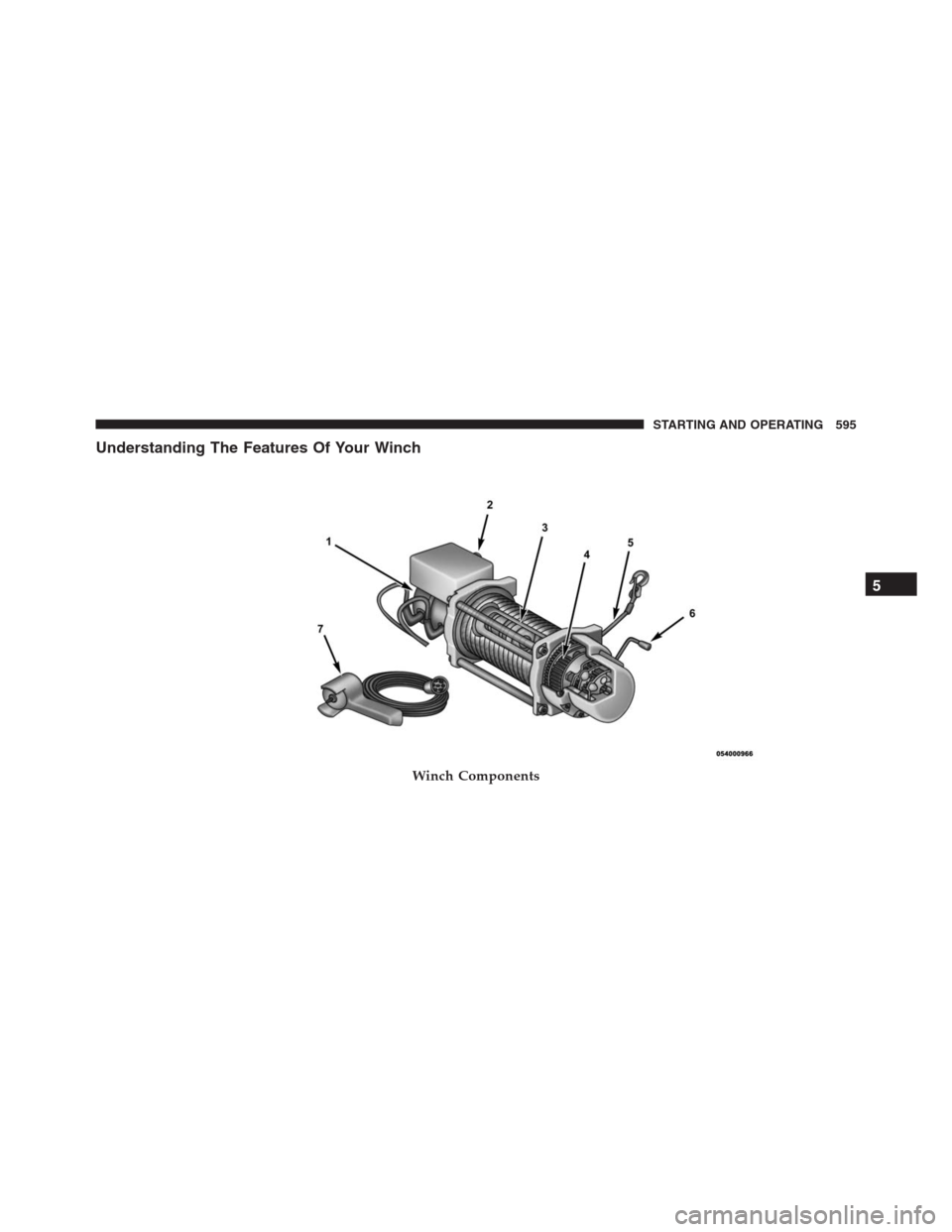
Understanding The Features Of Your Winch
Winch Components
5
STARTING AND OPERATING 595
Page 615 of 916
and increases pulling power. Start by feeding out enough
wire rope to free the winch hook. Attach the hook to your
vehicle’s frame/tow hook and run the wire rope through
a snatch block. Disengage the clutch and, using the
snatch block, pull out enough wire to reach your anchor
point. Do not attach the hook to the mounting kit. Secure
to the anchor point with a tree trunk protector or choker
chain. Attach the clevis/shackle. Attach the shackle to the
two ends of the strap/chain, being careful not to over
tighten (tighten and back-off 1/2 turn).
POWER STEERING
Electric Power Steering — 1500 Models
The electric power steering system will give you good
vehicle response and increased ease of maneuverability
in tight spaces. The system will vary its assist to provide
light efforts while parking and good feel while driving. Ifthe electric steering system experiences a fault that
prevents it from providing assist, you will still have the
ability to steer the vehicle manually.
If the Steering icon is flashing, it indicates that the vehicle
needs to be taken to the dealer for service. It is likely the
vehicle has lost power steering assistance.
If the Steering icon is displayed and the “POWER STEER-
ING SYSTEM OVER TEMP” message is displayed on the
EVIC/DID screen, they indicate that extreme steering
maneuvers may have occurred which caused an over
temperature condition in the power steering system.
Once driving conditions are safe, pull over and let the
vehicle idle for a few moments until the icon and
message turn off. Refer to “Electronic Vehicle Information
Center (EVIC) or Driver Information Display (DID)” in
“Understanding Your Instrument Panel” for further in-
formation.
5
STARTING AND OPERATING 613
Page 616 of 916
If the Steering icon is displayed and the “SERVICE
POWER STEERING – ASSIST OFF” message is displayed
the EVIC/DID screen, they indicate the vehicle needs to
be taken to the dealer for service. Refer to “Electronic
Vehicle Information Center (EVIC) or Driver Information
Display (DID)” in “Understanding Your Instrument
Panel” for further information.
NOTE:
•Even if the power steering assistance is no longer
operational, it is still possible to steer the vehicle.
Under these conditions there will be a substantial
increase in steering effort, especially at low speeds and
during parking maneuvers.
•If the condition persists, see your authorized dealer for
service.Hydraulic Power Steering — 2500/3500 Models
The standard power steering system will give you good
vehicle response and increased ease of maneuverability
in tight spaces. The system will provide mechanical
steering capability if power assist is lost.
If for some reason the power assist is interrupted, it will
still be possible to steer your vehicle. Under these condi-
tions, you will observe a substantial increase in steering
effort, especially at very low vehicle speeds and during
parking maneuvers.
NOTE:
•Increased noise levels at the end of the steering wheel
travel are considered normal and do not indicate that
there is a problem with the power steering system.
•Upon initial start-up in cold weather, the power steer-
ing pump may make noise for a short amount of time.
This is due to the cold, thick fluid in the steering
614 STARTING AND OPERATING
Page 627 of 916
Center (EVIC)” or “Driver Information Display (DID)”
in “Understanding Your Instrument Panel” for further
information.
•If disabling HSA using Uconnect Settings, refer to
“Uconnect Settings” in “Understanding Your Instru-
ment Panel” for further information.
For vehicles not equipped with the EVIC/DID, perform
the following steps:
1. Center the steering wheel (front wheels pointing
straight forward).
2. Shift the transmission into PARK.
3. Apply the parking brake.
4. Start the engine.
5. Rotate the steering wheel slightly more than one-half
turn to the left.6. Push the “ESC Off” button located in the lower switch
bank below the climate control four times within
twenty seconds. The “ESC Off Indicator Light” should
turn on and turn off two times.
7. Rotate the steering wheel back to center and then an
additional slighty more than one-half turn to the right.
8. Turn the ignition switch to the OFF position and then
back to the ON position. If the sequence was com-
pleted properly, the “ESC Off Indicator Light” will
blink several times to confirm HSA is disabled.
9. Repeat these steps if you want to return this feature to
its previous setting.
Traction Control System (TCS)
This system monitors the amount of wheel spin of each of
the driven wheels. If wheel spin is detected, the TCS may
apply brake pressure to the spinning wheel(s) and/or
reduce engine power to provide enhanced acceleration
5
STARTING AND OPERATING 625
Page 690 of 916
items down low and be sure that the weight is distributed
equally. Stow all loose items securely before driving.
Improper weight distributions can have an adverse effect
on the way your vehicle steers and handles and the way
the brakes operate.
CAUTION!
Do not load your vehicle any heavier than the GVWR
or the maximum front and rear GAWR. If you do,
parts on your vehicle can break, or it can change the
way your vehicle handles. This could cause you to
lose control. Also overloading can shorten the life of
your vehicle.
TRAILER TOWING
In this section you will find safety tips and information
on limits to the type of towing you can reasonably do
with your vehicle. Before towing a trailer, carefully
review this information to tow your load as efficiently
and safely as possible.
To maintain the New Vehicle Limited Warranty coverage,
follow the requirements and recommendations in this
manual concerning vehicles used for trailer towing.
Common Towing Definitions
The following trailer towing related definitions will assist
you in understanding the following information:
Gross Vehicle Weight Rating (GVWR)
The GVWR is the total allowable weight of your vehicle.
This includes driver, passengers, cargo and tongue
weight. The total load must be limited so that you do not
688 STARTING AND OPERATING