ECU Ram 1500 2016 Workshop Manual
[x] Cancel search | Manufacturer: RAM, Model Year: 2016, Model line: 1500, Model: Ram 1500 2016Pages: 916, PDF Size: 7.55 MB
Page 494 of 916
NOTE:On four-wheel drive vehicles be sure that the
transfer case is in a drive position.
WARNING!
•Never use the PARK position as a substitute for the
parking brake. Always apply the parking brake
fully when parked to guard against vehicle move-
ment and possible injury or damage.
•Your vehicle could move and injure you and others
if it is not in PARK. Make sure the transmission is
in PARK before leaving the vehicle.
•It is dangerous to shift out of PARK or NEUTRAL
if the engine speed is higher than idle speed. If
your foot is not firmly pressing the brake pedal, the
vehicle could accelerate quickly forward or in re-
verse. You could lose control of the vehicle and hit
someone or something. Only shift into gear when
(Continued)
WARNING!(Continued)
the engine is idling normally and your foot is
firmly pressing the brake pedal.
•Unintended movement of a vehicle could injure
those in or near the vehicle. As with all vehicles,
you should never exit a vehicle while the engine is
running. When the ignition is in the LOCK/OFF
(key removal) position, the transmission is locked
in PARK, securing the vehicle against unwanted
movement.
•Before exiting a vehicle, always apply the parking
brake, shift the automatic transmission into PARK
or the manual transmission into REVERSE, turn
the vehicle OFF, remove the key fob from the
ignition and lock your vehicle. If equipped with
Keyless Enter-N-Go, always make sure the keyless
ignition node is in “OFF” mode, remove the Key
Fob from the vehicle and lock the vehicle.
(Continued)
492 STARTING AND OPERATING
Page 498 of 916
In the event of a momentary problem, the transmission
can be reset to regain all forward gears by performing the
following steps:
NOTE:In cases where the instrument cluster message
indicates the transmission may not re-engage after en-
gine shutdown, perform this procedure only in a desired
location (preferably, at your authorized dealer).
1. Stop the vehicle.
2. Shift the transmission into PARK, if possible. If not,
shift the transmission to NEUTRAL.
3. Turn the ignition switch to the OFF position. On
vehicles with Keyless Enter-N-Go, push and hold the
ignition switch until the engine turns OFF.
4. Wait approximately 30 seconds.
5. Restart the engine.6. Shift into the desired gear range. If the problem is no
longer detected, the transmission will return to normal
operation.
NOTE:Even if the transmission can be reset, we recom-
mend that you visit your authorized dealer at your
earliest possible convenience. Your authorized dealer has
diagnostic equipment to determine if the problem could
recur.
If the transmission cannot be reset, authorized dealer
service is required.
Electronic Range Select (ERS) Operation —
Eight-Speed Transmission
The Electronic Range Select (ERS) shift control allows the
driver to limit the highest available gear when the
transmission is in DRIVE. For example, if you set the
496 STARTING AND OPERATING
Page 503 of 916

WARNING!(Continued)
•Your vehicle could move and injure you and others
if it is not in PARK. Check by trying to move the
shift lever out of PARK with the brake pedal
released. Make sure the transmission is in PARK
before leaving the vehicle.
•It is dangerous to shift out of PARK or NEUTRAL
if the engine speed is higher than idle speed. If
your foot is not firmly pressing the brake pedal, the
vehicle could accelerate quickly forward or in re-
verse. You could lose control of the vehicle and hit
someone or something. Only shift into gear when
the engine is idling normally and your foot is
firmly pressing the brake pedal.
•Unintended movement of a vehicle could injure
those in or near the vehicle. As with all vehicles,
you should never exit a vehicle while the engine is
(Continued)
WARNING!(Continued)
running. When the ignition is in the LOCK/OFF
(key removal) position, the transmission is locked
in PARK, securing the vehicle against unwanted
movement.
•Before exiting a vehicle, always apply the parking
brake, shift the automatic transmission into PARK
or the manual transmission into REVERSE, turn
the vehicle OFF, remove the key fob from the
ignition and lock your vehicle. If equipped with
Keyless Enter-N-Go, always make sure the keyless
ignition node is in “OFF” mode, remove the Key
Fob from the vehicle and lock the vehicle.
•When leaving the vehicle, always make sure the
ignition is in the OFF position, remove the Key Fob
from the vehicle, and lock the vehicle.
•Never leave children alone in a vehicle, or with
(Continued)
5
STARTING AND OPERATING 501
Page 508 of 916
In the event of a momentary problem, the transmission
can be reset to regain all forward gears by performing the
following steps:
1. Stop the vehicle.
2. Shift the transmission into PARK.
3. Turn the ignition switch to the OFF position.
4. Wait approximately 10 seconds.
5. Restart the engine.
6. Shift into the desired gear range. If the problem is no
longer detected, the transmission will return to normal
operation.
NOTE:Even if the transmission can be reset, we recom-
mend that you visit your authorized dealer at your
earliest possible convenience. Your authorized dealer has
diagnostic equipment to determine if the problem could
recur.If the transmission cannot be reset, authorized dealer
service is required.
Electronic Range Select (ERS) Operation —
Six-Speed Transmission (1500 Models Only)
The Electronic Range Select (ERS) shift control allows the
driver to limit the highest available gear when the
transmission is in DRIVE. For example, if you set the
transmission gear limit to 4 (fourth gear), the transmis-
sion will not shift above fourth gear, but will shift
through the lower gears normally.
Use of ERS (or TOW/HAUL mode) also enables an
additional underdrive gear which is not normally used
during through-gear accelerations. This additional gear
can improve vehicle performance and cooling capability
when towing a trailer on certain grades. In ERS mode,
gears 1 though 3 are underdrive gears, and ERS 4 is direct
drive. ERS 5 and 6 (Overdrive gears) are the same as the
normal fourth and fifth gears.
506 STARTING AND OPERATING
Page 516 of 916
WARNING!(Continued)
•Unintended movement of a vehicle could injure
those in or near the vehicle. As with all vehicles,
you should never exit a vehicle while the engine is
running. When the ignition is in the LOCK/OFF
(key removal) position, the transmission is locked
in PARK, securing the vehicle against unwanted
movement.
•Before exiting a vehicle, always apply the parking
brake, shift the automatic transmission into PARK
or the manual transmission into REVERSE, turn
the vehicle OFF, remove the key fob from the
ignition and lock your vehicle. If equipped with
Keyless Enter-N-Go, always make sure the keyless
ignition node is in “OFF” mode, remove the Key
Fob from the vehicle and lock the vehicle.
(Continued)
WARNING!(Continued)
•When leaving the vehicle, always make sure the
ignition is in the OFF position, remove the Key Fob
from the vehicle, and lock the vehicle.
•Never leave children alone in a vehicle, or with
access to an unlocked vehicle. Allowing children to
be in a vehicle unattended is dangerous for a
number of reasons. A child or others could be
seriously or fatally injured. Children should be
warned not to touch the parking brake, brake pedal
or the gear selector.
•Do not leave the Key Fob in or near the vehicle (or
in a location accessible to children), and do not
leave the ignition (in a vehicle equipped with
Keyless Enter-N-Go) in the ACC or ON/RUN
mode. A child could operate power windows, other
controls, or move the vehicle.
514 STARTING AND OPERATING
Page 520 of 916
selected. PARK, REVERSE, and NEUTRAL will continue
to operate. The Malfunction Indicator Light (MIL) may be
illuminated. Limp Home Mode allows the vehicle to be
driven to an authorized dealer for service without dam-
aging the transmission.
In the event of a momentary problem, the transmission
can be reset to regain all forward gears by performing the
following steps:
1. Stop the vehicle.
2. Shift the transmission into PARK.
3. Turn the ignition switch to the OFF position.
4. Wait approximately 10 seconds.
5. Restart the engine.
6. Shift into the desired gear range. If the problem is no
longer detected, the transmission will return to normal
operation.NOTE:Even if the transmission can be reset, we recom-
mend that you visit your authorized dealer at your
earliest possible convenience. Your authorized dealer has
diagnostic equipment to determine if the problem could
recur.
If the transmission cannot be reset, authorized dealer
service is required.
Electronic Range Select (ERS) Operation
The Electronic Range Select (ERS) shift control allows the
driver to limit the highest available gear when the
transmission is in DRIVE. For example, if you set the
transmission gear limit to 4 (fourth gear), the transmis-
sion will not shift above fourth gear, but will shift
through the lower gears normally.
You can switch between DRIVE and ERS mode at any
vehicle speed. When the shift lever is in the DRIVE
position, the transmission will operate automatically,
518 STARTING AND OPERATING
Page 567 of 916
CAUTION!(Continued)
and damage to the drivetrain may occur when the
axles are locked on hard surfaced roads.
•Do not try to lock the rear axle if the vehicle is
stuck and the tires are spinning. You can damage
drivetrain components. Lock the rear axle before
attempting situations or navigating terrain, which
could possibly cause the vehicle to become stuck.
The locking axles are controlled by the axle locker switch.
The switch has three positions, AXLE UNLOCK, REAR
LOCK, and FRONT/REAR LOCK. Under normal driv-
ing conditions, the switch should be left in the AXLE
UNLOCK position. In the AXLE UNLOCK position, the
front and rear axles are unlocked. In the REAR LOCK
position, the rear axle is locked. In the FRONT/REAR
LOCK position, the front and rear axles are locked.NOTE:Even when the axles are in the AXLE UNLOCK
position, the limited slip differential in the rear axle still
provides torque biasing capability for moderate low
traction environments.
During the command to lock the axle, the indicator light
will flash until the axle is locked. After the lock command
has been successfully executed, the light will remain on
solid.
To lock the rear axle, place the vehicle in 4LO. Refer to
“Four Wheel Drive Operation” in “Starting And Operat-
ing” for further information. Move the axle locker switch
position to REAR LOCK while traveling less than 3 mph
(5 km/h). The RR indicator light will remain on when the
rear axle is locked.
5
STARTING AND OPERATING 565
Page 573 of 916
conditions: hard packed dirt, gravel, rocks, grass, sand,
mud, snow and ice. Every surface has a different effect on
your vehicle’s steering, handling and traction. Control-
ling your vehicle is one of the keys to successful off-road
driving, so always keep a firm grip on the steering wheel
and maintain a good driving posture. Avoid sudden
accelerations, turns or braking. In most cases there are no
road signs, posted speed limits or signal lights. Therefore
you will need to use your own good judgment on what is
safe and what isn’t. When on a trail you should always be
looking ahead for surface obstacles and changes in
terrain. The key is to plan your future driving route while
remembering what you are currently driving over.
CAUTION!
Never park your vehicle over dry grass or other
combustible materials. The heat from your vehicle
exhaust system could cause a fire.
WARNING!
Always wear your seat belt and firmly tie down
cargo. Unsecured cargo can become projectiles in an
off-road situation.
When To Use Low Range
When driving off-road, shift into 4L (Low Range) for
additional traction or to improve handling and control on
slippery or difficult terrain. Due to the lower gearing, low
range will allow the engine to operate in a higher power
range. This will allow you to idle over obstacles and
down hills, with improved control and less effort. Also,
use 4L (Low Range) in rain, ice, snow, mud, sand, to get
heavy loads rolling, improve traction, or whenever 4H
(High Range) traction will not do the job.5
STARTING AND OPERATING 571
Page 604 of 916
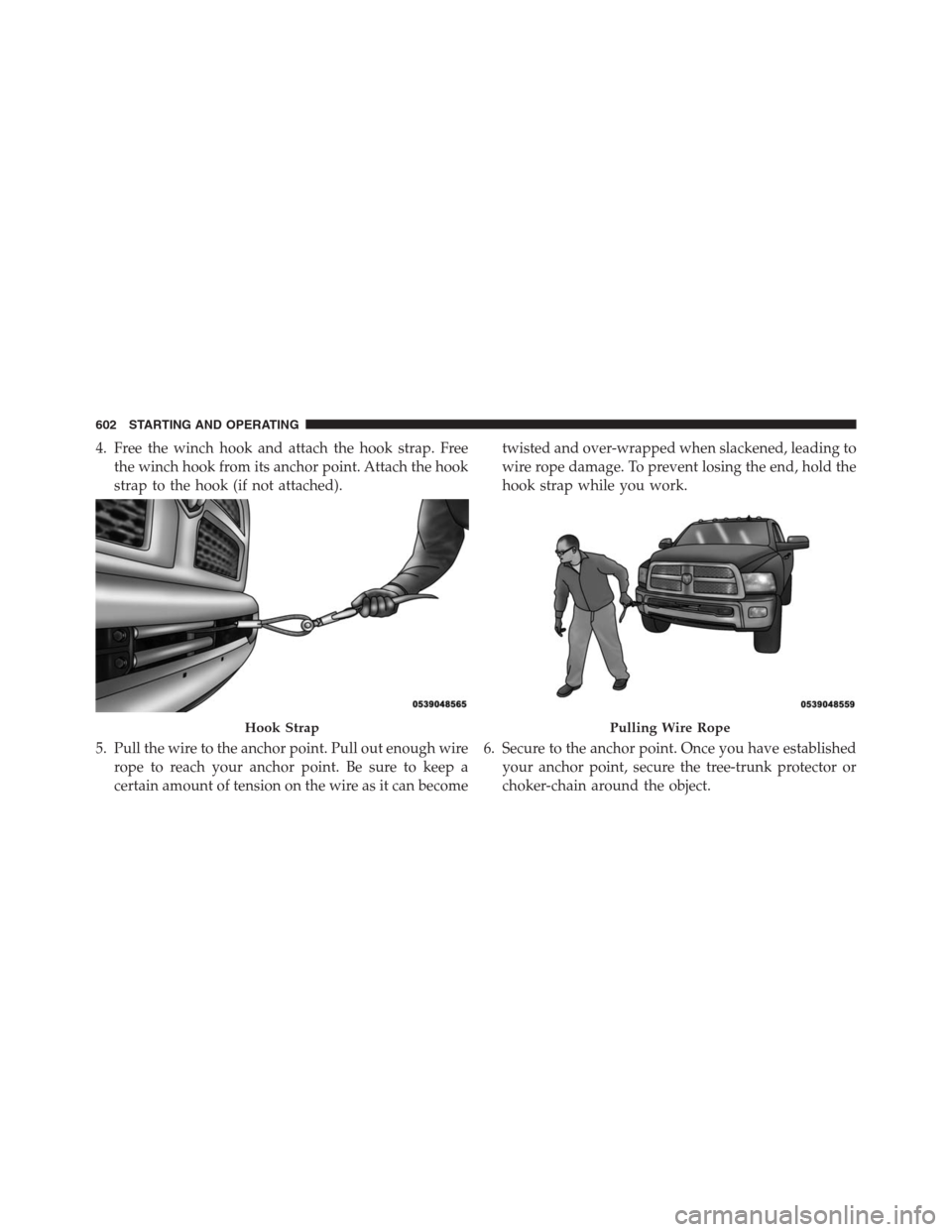
4. Free the winch hook and attach the hook strap. Free
the winch hook from its anchor point. Attach the hook
strap to the hook (if not attached).
5. Pull the wire to the anchor point. Pull out enough wire
rope to reach your anchor point. Be sure to keep a
certain amount of tension on the wire as it can becometwisted and over-wrapped when slackened, leading to
wire rope damage. To prevent losing the end, hold the
hook strap while you work.
6. Secure to the anchor point. Once you have established
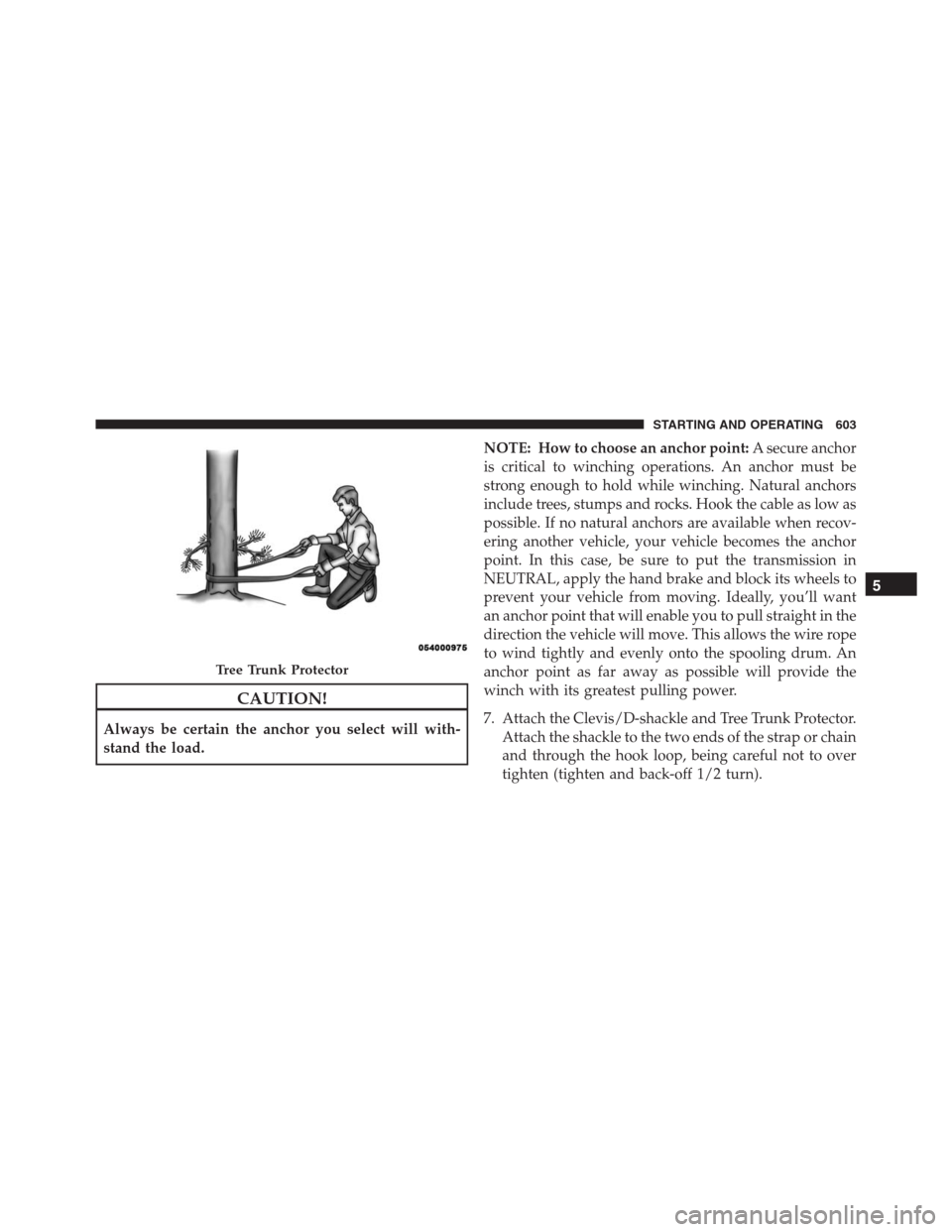
your anchor point, secure the tree-trunk protector or
choker-chain around the object.
Hook StrapPulling Wire Rope
602 STARTING AND OPERATING
Page 605 of 916
CAUTION!
Always be certain the anchor you select will with-
stand the load.NOTE: How to choose an anchor point:A secure anchor
is critical to winching operations. An anchor must be
strong enough to hold while winching. Natural anchors
include trees, stumps and rocks. Hook the cable as low as
possible. If no natural anchors are available when recov-
ering another vehicle, your vehicle becomes the anchor
point. In this case, be sure to put the transmission in
NEUTRAL, apply the hand brake and block its wheels to
prevent your vehicle from moving. Ideally, you’ll want
an anchor point that will enable you to pull straight in the
direction the vehicle will move. This allows the wire rope
to wind tightly and evenly onto the spooling drum. An
anchor point as far away as possible will provide the
winch with its greatest pulling power.
7. Attach the Clevis/D-shackle and Tree Trunk Protector.
Attach the shackle to the two ends of the strap or chain
and through the hook loop, being careful not to over
tighten (tighten and back-off 1/2 turn).
Tree Trunk Protector
5
STARTING AND OPERATING 603