door lock Ram 1500 2016 Workshop Manual
[x] Cancel search | Manufacturer: RAM, Model Year: 2016, Model line: 1500, Model: Ram 1500 2016Pages: 916, PDF Size: 7.55 MB
Page 411 of 916
•Sound Horn With Lock
When this feature is selected, the horn will sound when
the door locks are activated. To make your selection,
press the “Sound Horn With Lock” button on the touch-
screen and select from “Off”, “1st Press” or “2nd Press”.
•Sound Horn With Remote Start
When this feature is selected, the horn will sound when
the remote start is activated. To make your selection,
press the “Sound Horn With Remote Start” button on the
touchscreen until a check-mark appears next to setting,
showing that setting has been selected.
•1st Press Of Key Fob Unlocks
When 1st Press Of Key Fob Unlocks “Driver Door” is
selected, only the driver’s door will unlock on the first
press of the Remote Keyless Entry (RKE) transmitter
UNLOCK button you must push the RKE transmitter
UNLOCK button twice to unlock the passenger’s doors.When Unlock “All Doors” On 1st Press is selected, all of
the doors will unlock on the first push of the RKE
transmitter UNLOCK button.
NOTE:If the vehicle is programmed 1st Press Of Key Fob
Unlocks “All Doors”, all doors will unlock no matter
which Passive Entry equipped door handle is grasped. If
1st Press Of Key Fob Unlocks “Driver Door” is pro-
grammed, only the driver ’s door will unlock when the
driver ’s door is grasped. With Passive Entry, if 1st Press
Of Key Fob Unlocks “Driver Door” is programmed
pushing the handle more than once will only result in the
driver ’s door opening. If driver door is selected, once the
driver door is opened, the interior door lock/unlock
switch can be used to unlock all doors (or use RKE
transmitter).
•Passive Entry — If Equipped
This feature allows you to lock and unlock the vehicles
door(s) without having to push the Remote Keyless Entry
4
UNDERSTANDING YOUR INSTRUMENT PANEL 409
Page 412 of 916
(RKE) transmitter lock or unlock buttons. To make your
selection, press the “Passive Entry” button on the touch-
screen until a check-mark appears next to setting, show-
ing that setting has been selected. Refer to “Keyless
Enter-N-Go” in “Things To Know Before Starting Your
Vehicle”.
•Personal Settings Linked To Key Fob — If Equipped
This feature provides automatic driver seat positioning to
enhance driver mobility when entering and exiting the
vehicle. To make your selection, press the “Personal
Settings Linked To Key Fob” button on the touchscreen
until a check-mark appears next to setting, showing that
setting has been selected.NOTE:The seat will return to the memorized seat
location (if Personal Settings Linked To Key Fob is set to
ON) when the Remote Keyless Entry (RKE) transmitter is
used to unlock the door. Refer to “Driver Memory Seat”
in “Understanding The Features Of Your Vehicle” for
further information.
Auto Comfort Systems — If Equipped
After pressing the “Auto-On Comfort” button on the
touchscreen the following settings will be available:
•Auto-On Driver Heated/Ventilated Seat & Steering
Wheel With Vehicle Start — If Equipped
When this feature is selected the driver’s heated seat and
heated steering wheel will automatically turn ON when
temperatures are below 40° F (4.4° C). When tempera-
tures are above 80° F (26.7° C) the driver vented seat will
410 UNDERSTANDING YOUR INSTRUMENT PANEL
Page 461 of 916
Uconnect Access (8.4A/8.4AN)
WARNING!
ALWAYS obey traffic laws and pay attention to the
road. Some Uconnect Access services, including 9-1-1
and Assist, will NOT work without an operable 1X
(voice/data) or 3G (data) network connection.
NOTE:Your vehicle may be transmitting data as autho-
rized by the subscriber.
An included trial and/or subscription is required to take
advantage of the Uconnect Access services in the next
section of this guide. To register with Uconnect Access,
press the Apps button on the 8.4-inch touchscreen to get
started. Detailed registration instructions can be found
on the next page.
NOTE:Uconnect Access is available only on equipped
vehicles purchased within the continental United States,Alaska and Hawaii. Services can only be used where
coverage is available; see coverage map for details.
9-1-1 Call
Security Alarm Notification
Remote Door Lock/Unlock
Stolen Vehicle Assistance
Remote Vehicle Start**
Remote Horn and Lights
Yelp Search
Voice Texting
Roadside Assistance Call
WiFi Hotspot***
**If vehicle is equipped.
***Extra charges apply.
4
UNDERSTANDING YOUR INSTRUMENT PANEL 459
Page 464 of 916
NOTE:
•You can also complete this process on the web. Simply
visit moparownerconnect.com log in and click Set Up
Via Mobile Profile (under Quick Links).
•Once you download the app to your compatible
mobile device, you will also be able to start your
vehicle and lock/unlock its doors from virtually any-
where.
Voice Texting (8.4A/8.4AN)
1. To send a message, push the Phone button. After
the beep, say the following command:“Send mes-
sageto John Smith.”
2. Listen to the prompt. After the beep, dictate the
message you would like to send. Wait for Uconnect to
process your message.
3. The Uconnect system will repeat your message and
provide a variety of options to add to, delete, send or
hear the message again. After the beep, tell Uconnect
what you’d like to do. For instance, if you’re happy
with your message, after the beep, say:“Send.”
You must be registered with Uconnect Access and have a
compatible MAP – enabled smartphone to use your voice
to send a personalized text message. For details about
MAP, visit UconnectPhone.com.
462 UNDERSTANDING YOUR INSTRUMENT PANEL
Page 606 of 916
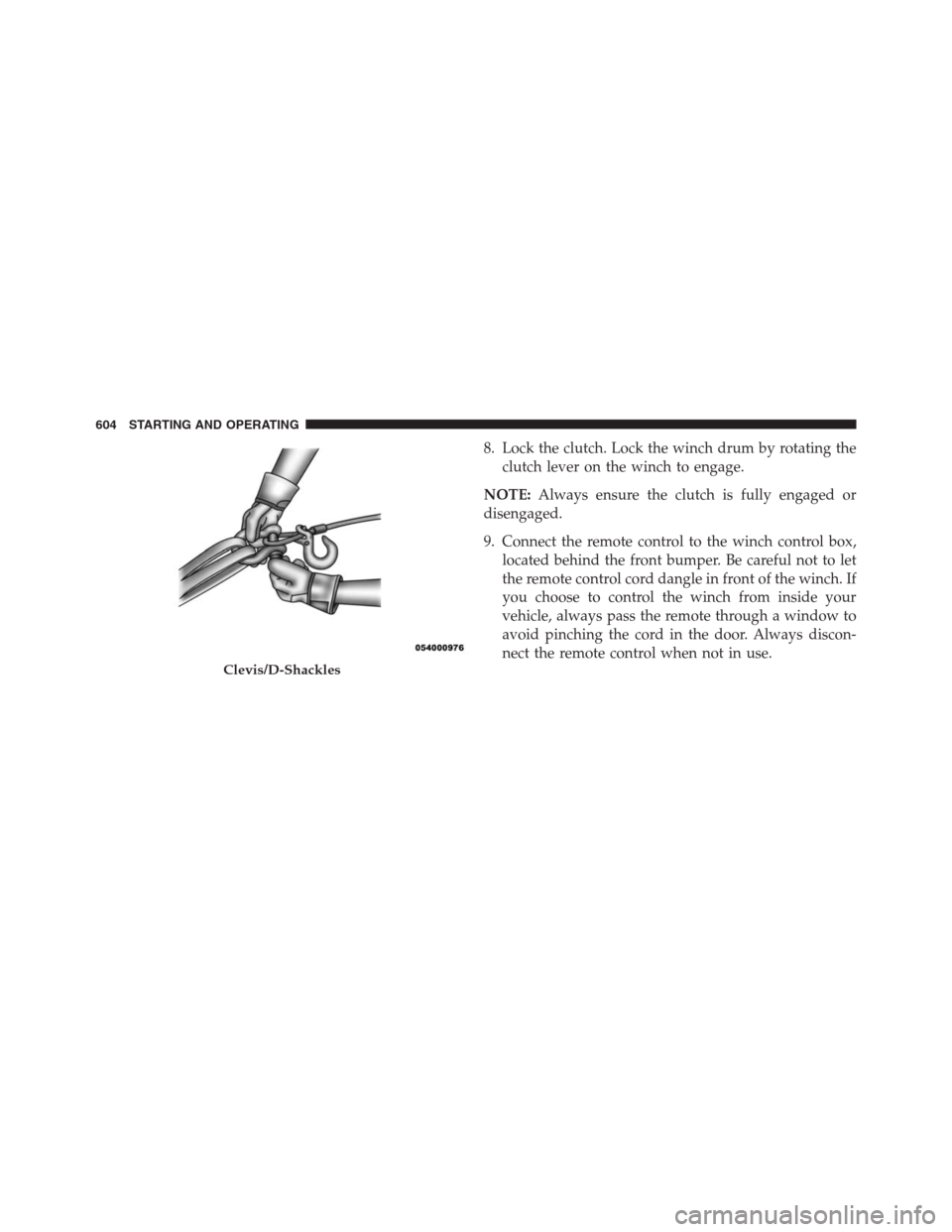
8. Lock the clutch. Lock the winch drum by rotating the
clutch lever on the winch to engage.
NOTE:Always ensure the clutch is fully engaged or
disengaged.
9. Connect the remote control to the winch control box,
located behind the front bumper. Be careful not to let
the remote control cord dangle in front of the winch. If
you choose to control the winch from inside your
vehicle, always pass the remote through a window to
avoid pinching the cord in the door. Always discon-
nect the remote control when not in use.
Clevis/D-Shackles
604 STARTING AND OPERATING
Page 685 of 916
Maintenance
CAUTION!
Do not use ethanol mixture greater than 85% in your
vehicle. It will cause difficulty in cold starting and
may affect drivability.
ADDING FUEL
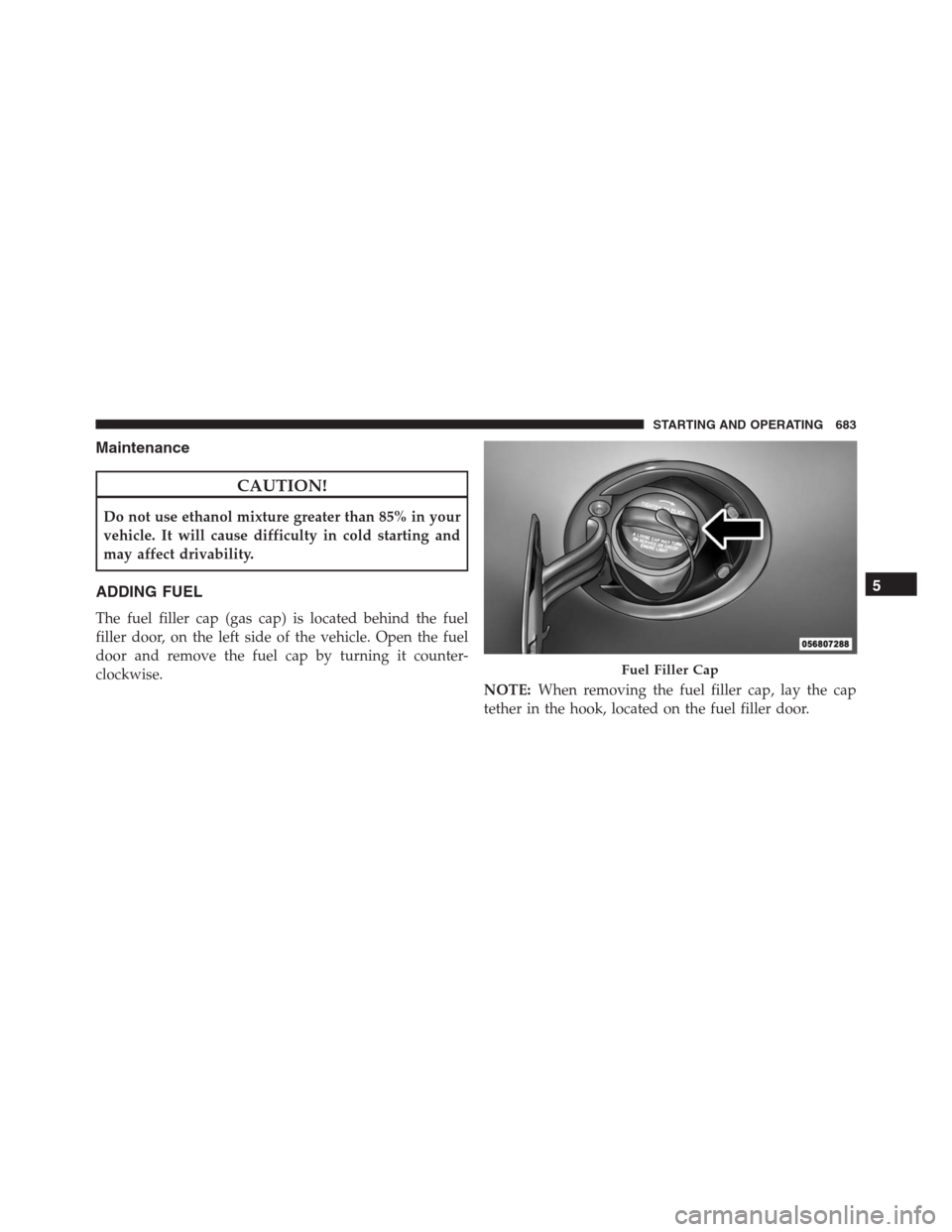
The fuel filler cap (gas cap) is located behind the fuel
filler door, on the left side of the vehicle. Open the fuel
door and remove the fuel cap by turning it counter-
clockwise.
NOTE:When removing the fuel filler cap, lay the cap
tether in the hook, located on the fuel filler door.
Fuel Filler Cap
5
STARTING AND OPERATING 683
Page 809 of 916
Refrigerant Recovery And Recycling HFO 1234yf
— If Equipped
HFO 1234yf Air Conditioning Refrigerant is a hydro-
fluoolefine HFO that is endorsed by the Environmental
Protection Agency and is an ozone-saving product with a
low GWP (Global Warming Potential). However, the
manufacturer recommends that air conditioning service
be performed by authorized dealer or other service
facilities using recovery and recycling equipment.
NOTE:Use only manufacturer approved A/C system
PAG compressor oil and refrigerants.
Front Driveshaft Lubrication — 2500/3500
(Four-Wheel Drive Models Only)
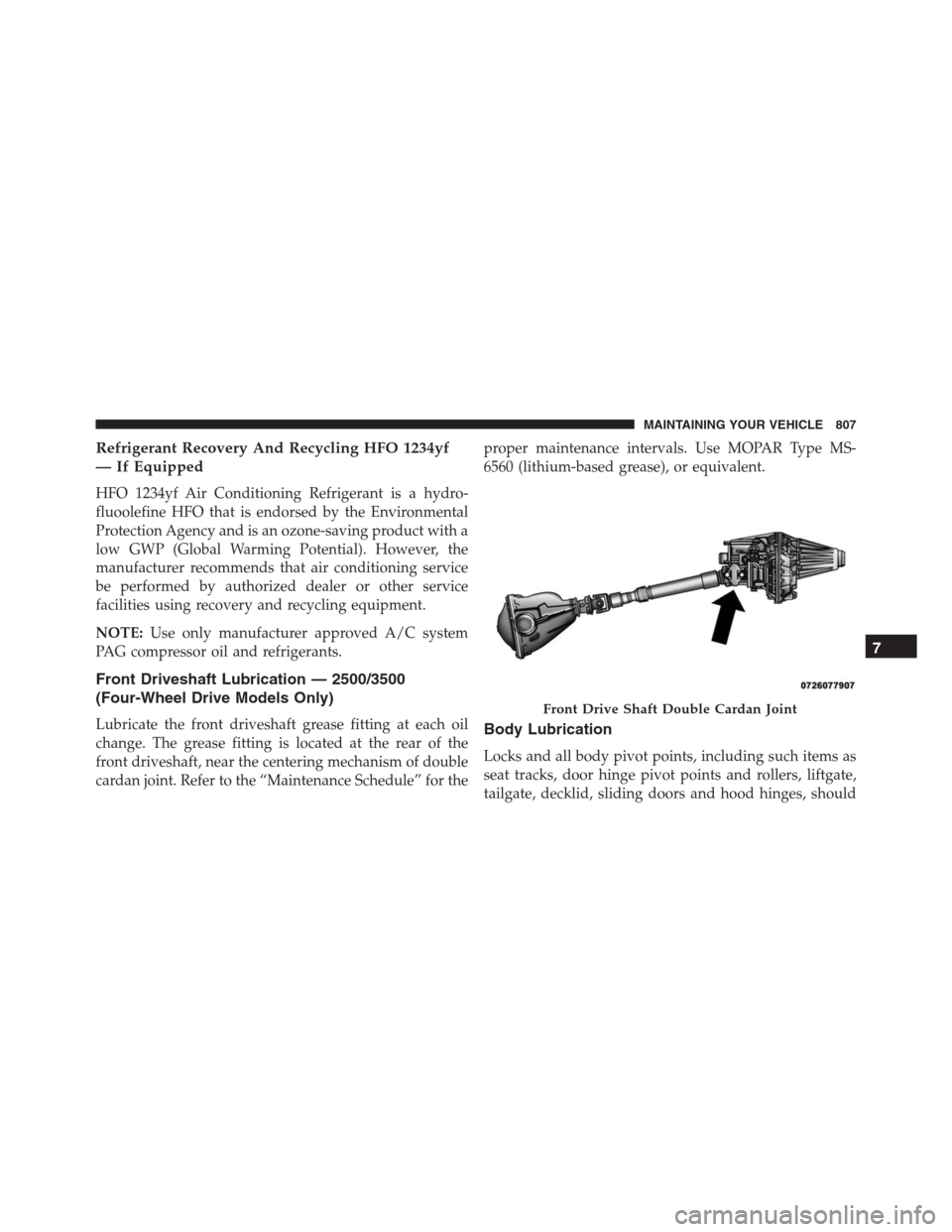
Lubricate the front driveshaft grease fitting at each oil
change. The grease fitting is located at the rear of the
front driveshaft, near the centering mechanism of double
cardan joint. Refer to the “Maintenance Schedule” for theproper maintenance intervals. Use MOPAR Type MS-
6560 (lithium-based grease), or equivalent.Body Lubrication
Locks and all body pivot points, including such items as
seat tracks, door hinge pivot points and rollers, liftgate,
tailgate, decklid, sliding doors and hood hinges, should
Front Drive Shaft Double Cardan Joint
7
MAINTAINING YOUR VEHICLE 807
Page 843 of 916
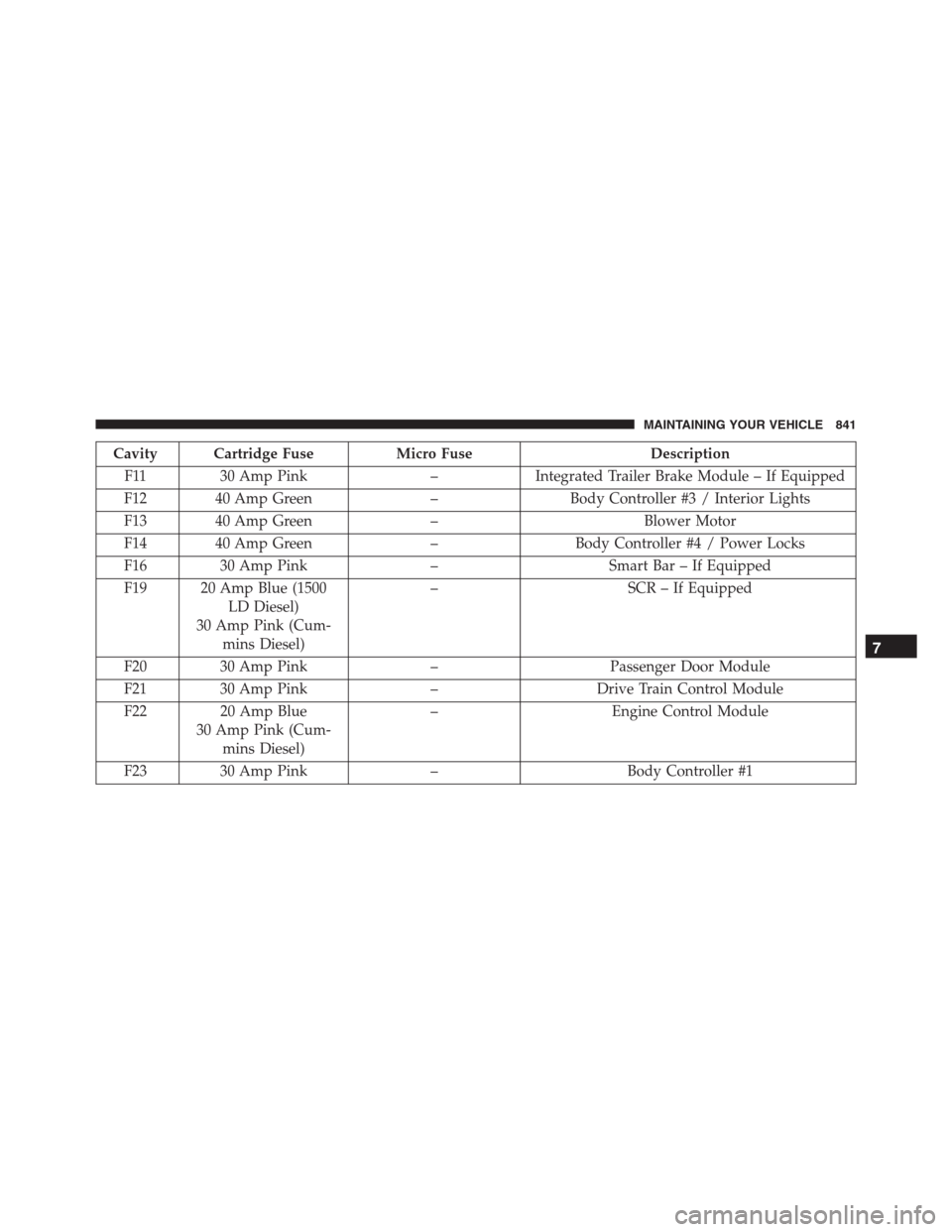
Cavity Cartridge Fuse Micro Fuse Description
F11 30 Amp Pink – Integrated Trailer Brake Module – If Equipped
F12 40 Amp Green – Body Controller #3 / Interior Lights
F13 40 Amp Green – Blower Motor
F14 40 Amp Green – Body Controller #4 / Power Locks
F16 30 Amp Pink – Smart Bar – If Equipped
F19 20 Amp Blue (1500
LD Diesel)
30 Amp Pink (Cum-
mins Diesel)– SCR – If Equipped
F20 30 Amp Pink – Passenger Door Module
F21 30 Amp Pink – Drive Train Control Module
F22 20 Amp Blue
30 Amp Pink (Cum-
mins Diesel)– Engine Control Module
F23 30 Amp Pink – Body Controller #1
7
MAINTAINING YOUR VEHICLE 841
Page 844 of 916
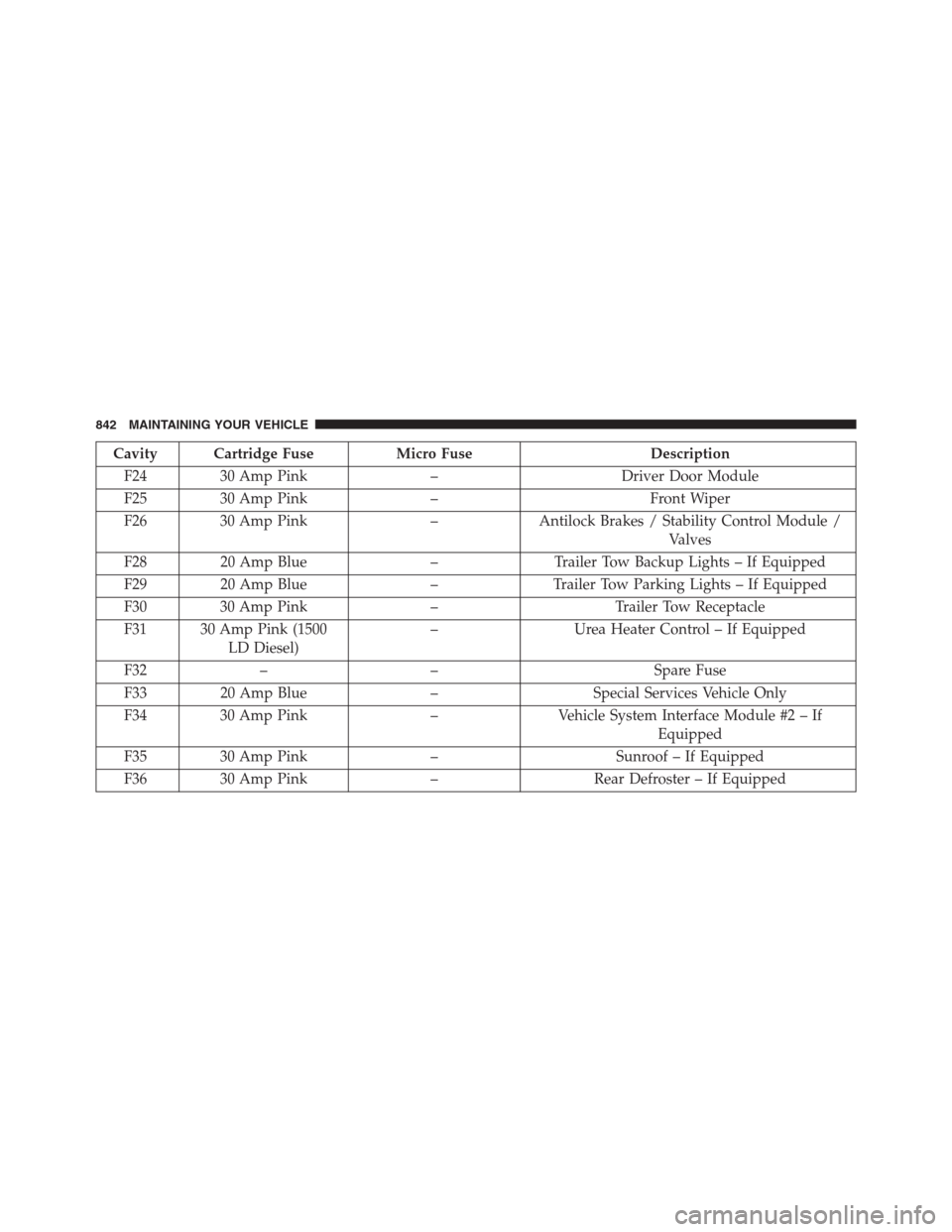
Cavity Cartridge Fuse Micro Fuse Description
F24 30 Amp Pink – Driver Door Module
F25 30 Amp Pink – Front Wiper
F26 30 Amp Pink – Antilock Brakes / Stability Control Module /
Valves
F28 20 Amp Blue – Trailer Tow Backup Lights – If Equipped
F29 20 Amp Blue – Trailer Tow Parking Lights – If Equipped
F30 30 Amp Pink – Trailer Tow Receptacle
F31 30 Amp Pink (1500
LD Diesel)– Urea Heater Control – If Equipped
F32 – – Spare Fuse
F33 20 Amp Blue – Special Services Vehicle Only
F34 30 Amp Pink – Vehicle System Interface Module #2 – If
Equipped
F35 30 Amp Pink – Sunroof – If Equipped
F36 30 Amp Pink – Rear Defroster – If Equipped
842 MAINTAINING YOUR VEHICLE
Page 895 of 916
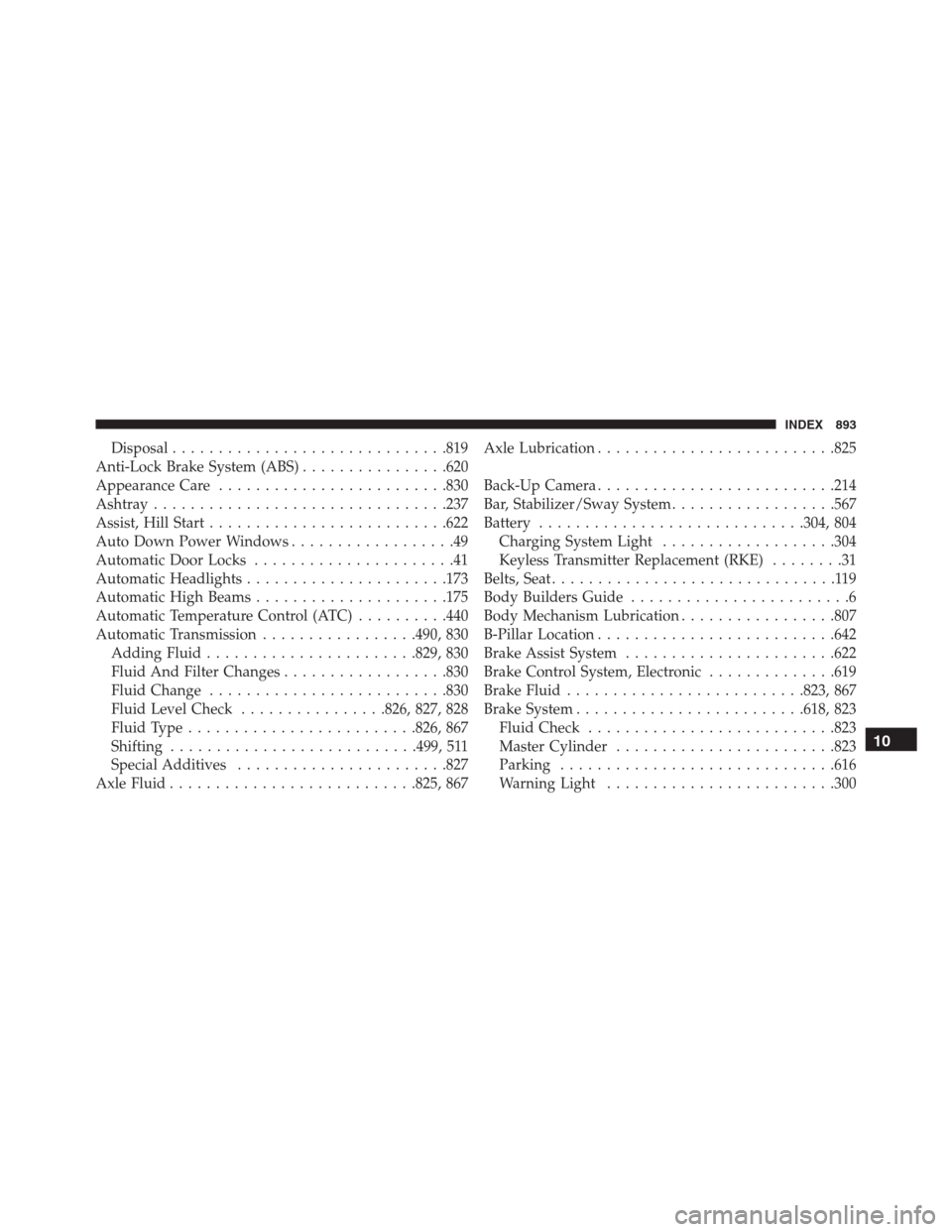
Disposal..............................819
Anti-Lock Brake System (ABS)................620
Appearance Care.........................830
Ashtray................................237
Assist, Hill Start..........................622
Auto Down Power Windows..................49
Automatic Door Locks......................41
Automatic Headlights......................173
Automatic High Beams.....................175
Automatic Temperature Control (ATC)..........440
Automatic Transmission.................490, 830
Adding Fluid.......................829, 830
Fluid And Filter Changes..................830
Fluid Change..........................830
Fluid Level Check................826, 827, 828
Fluid Type.........................826, 867
Shifting...........................499, 511
Special Additives.......................827
Axle Fluid...........................825, 867Axle Lubrication..........................825
Back-Up Camera..........................214
Bar, Stabilizer/Sway System..................567
Battery.............................304, 804
Charging System Light...................304
Keyless Transmitter Replacement (RKE)........31
Belts, Seat...............................119
Body Builders Guide........................6
Body Mechanism Lubrication.................807
B-Pillar Location..........................642
Brake Assist System.......................622
Brake Control System, Electronic..............619
Brake Fluid..........................823, 867
Brake System.........................618, 823
Fluid Check...........................823
Master Cylinder........................823
Parking
..............................616
Warning Light.........................300
10
INDEX 893