wheel Ram 1500 2016 Manual Online
[x] Cancel search | Manufacturer: RAM, Model Year: 2016, Model line: 1500, Model: Ram 1500 2016Pages: 916, PDF Size: 7.55 MB
Page 544 of 916
WARNING!(Continued)
disengages both the front and rear drive shafts from
the powertrain and will allow the vehicle to roll,
even if the transmission is in PARK. The parking
brake should always be applied when the driver is
not in the vehicle.
For additional information on the appropriate use of each
transfer case mode position, see the information below:
2WD
Rear-Wheel Drive High Range - This range is for normal
street and highway driving on dry hard surfaced roads.
4WD AUTO
Four-Wheel Drive Auto Range - This range sends power
to the rear wheels. The four–wheel drive system will be
automatically engaged when the vehicle senses a loss of
traction. Additional traction for varying road conditions.4WD LOCK
Four-Wheel Drive Lock Range - This range maximizes
torque to the front driveshaft, forcing the front and rear
wheels to rotate at the same speed. Additional traction
for loose, slippery road surfaces only.
4WD LOW
Four-Wheel Drive Low Range - This range provides low
speed four-wheel drive. It maximizes torque to the front
driveshaft, forcing the front and rear wheels to rotate at
the same speed. This range provides additional traction
and maximum pulling power for loose, slippery road
surfaces only. Do not exceed 25 mph (40 km/h).
NEUTRAL (N)
Neutral - This range disengages both the front and rear
driveshafts from the powertrain. To be used for flat
542 STARTING AND OPERATING
Page 552 of 916
Settings” in “Understanding Your Instrument Panel” if
equipped with a touch screen radio for further informa-
tion.
NOTE:This mode is intended to be enabled with engine
running.
Transport Mode
To assist with flat bed towing, the air suspension system
has a feature which will put the vehicle into Entry/Exit
height and disable the automatic load leveling system.
Refer to “Electronic Vehicle Information Center (EVIC) or
Driver Information Display (DID)” in “Understanding
Your Instrument Panel” or “Uconnect Settings” in “Un-
derstanding Your Instrument Panel” if equipped with a
touch screen radio for further information.
NOTE:This mode is intended to be enabled with engine
running.Wheel Alignment Mode
Before performing a wheel alignment this mode must be
enabled. Refer to “Electronic Vehicle Information Center
(EVIC) or Driver Information Display (DID)” in “Under-
standing Your Instrument Panel” or “Uconnect Settings”
in “Understanding Your Instrument Panel” if equipped
with a touch screen radio for further information.
NOTE:This mode is intended to be enabled with engine
running.
Protection Mode
In order to “protect” the air suspension system, the
vehicle will enter Protection Mode when load leveling
cannot be achieved. Some driving may be required to
clear the protection mode telltale in the EVIC/DID. Refer
to “Electronic Vehicle Information Center (EVIC) or
Driver Information Display (DID)” in “Understanding
550 STARTING AND OPERATING
Page 555 of 916
•Entry/Exit Mode – Indicator lamp 3 will be illumi-
nated when the vehicle is in Entry Exit Mode. Entry/
Exit mode can be requested up to 33 mph (53 km/h).
If vehicle speed is reduced to, and kept below, 15 mph
(24 km/h) indicator lamp 4 will flash and indicator
lamp 3 will remain solid until Entry/Exit Mode is
achieved at which point indicator lamp 4 will turn off.
•Transport Mode – No indicator lamps will be illumi-
nated. Transport Mode is disabled by driving the
vehicle.
•Tire/Jack Mode – Indicator lamps 3 and 6 will be
illuminated. Tire/Jack Mode is disabled by driving the
vehicle.
•Wheel Alignment Mode – Indicator lamps 3 and 4 will
be illuminated. Wheel Alignment Mode is disabled by
driving the vehicle.AIR SUSPENSION SYSTEM (2500/3500 MODELS)
— IF EQUIPPED
Description
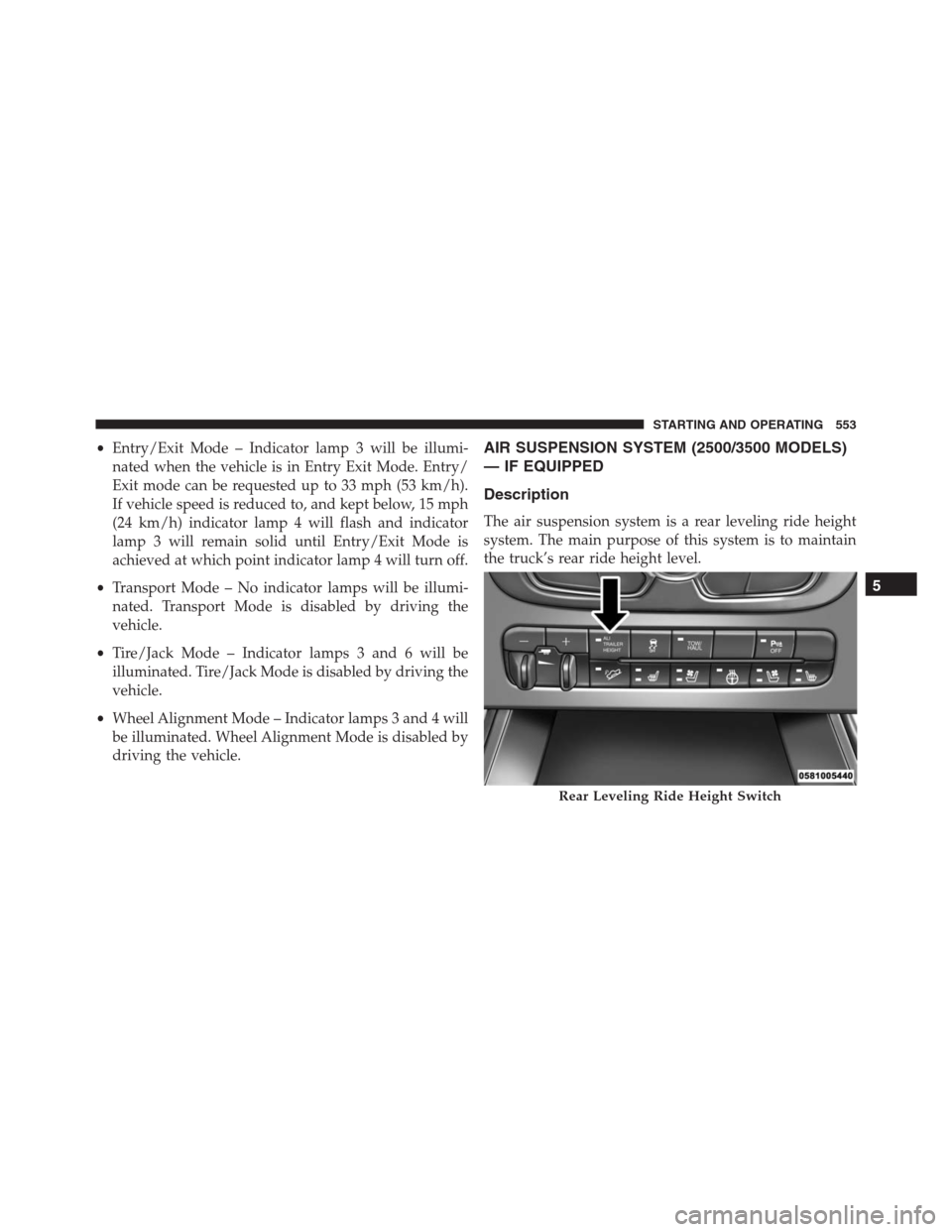
The air suspension system is a rear leveling ride height
system. The main purpose of this system is to maintain
the truck’s rear ride height level.
Rear Leveling Ride Height Switch
5
STARTING AND OPERATING 553
Page 557 of 916
to be disabled. This mode is intended to be used with
engine running. Refer to “Electronic Vehicle Information
Center (EVIC) or Driver Information Display (DID)” in
“Understanding Your Instrument Panel” or “Uconnect
Settings” in “Understanding Your Instrument Panel” if
equipped with a touch screen radio for further informa-
tion.
NOTE:This mode is intended to be enabled with engine
running.
Transport Mode
To assist with flat bed towing, the air suspension system
has a feature which will put the vehicle below Normal
Ride Height (NRH) and disable the automatic load
leveling system. This mode is intended to be used with
engine running. Refer to “Electronic Vehicle Information
Center (EVIC) or Driver Information Display (DID)” in
“Understanding Your Instrument Panel” or “UconnectSettings” in “Understanding Your Instrument Panel” if
equipped with a touch screen radio for further informa-
tion.
NOTE:This mode is intended to be enabled with engine
running.
Wheel Alignment Mode
Before performing a wheel alignment this mode must be
enabled. Refer to “Electronic Vehicle Information Center
(EVIC) or Driver Information Display (DID)” in “Under-
standing Your Instrument Panel” or “Uconnect Settings”
in “Understanding Your Instrument Panel” if equipped
with a touch screen radio for further information.
NOTE:This mode is intended to be enabled with engine
running.
Protection Mode
In order to “protect” the air suspension system, the
vehicle will enter Protection Mode when load leveling
5
STARTING AND OPERATING 555
Page 559 of 916
•Transport Mode – No indicator lamps will be illumi-
nated. Transport Mode is disabled by driving the
vehicle.
•Tire/Jack Mode – No indicator lamps will be illumi-
nated. Tire/Jack Mode is disabled by driving the
vehicle.
•Wheel Alignment Mode – No indicator lamps will be
illuminated. Wheel Alignment Mode is disabled by
driving the vehicle.
AIR SUSPENSION SYSTEM (REBEL MODELS
ONLY) — IF EQUIPPED
Description
The air suspension system provides full time load level-
ing capability along with the benefit of being able to
adjust vehicle height by the push of a button.
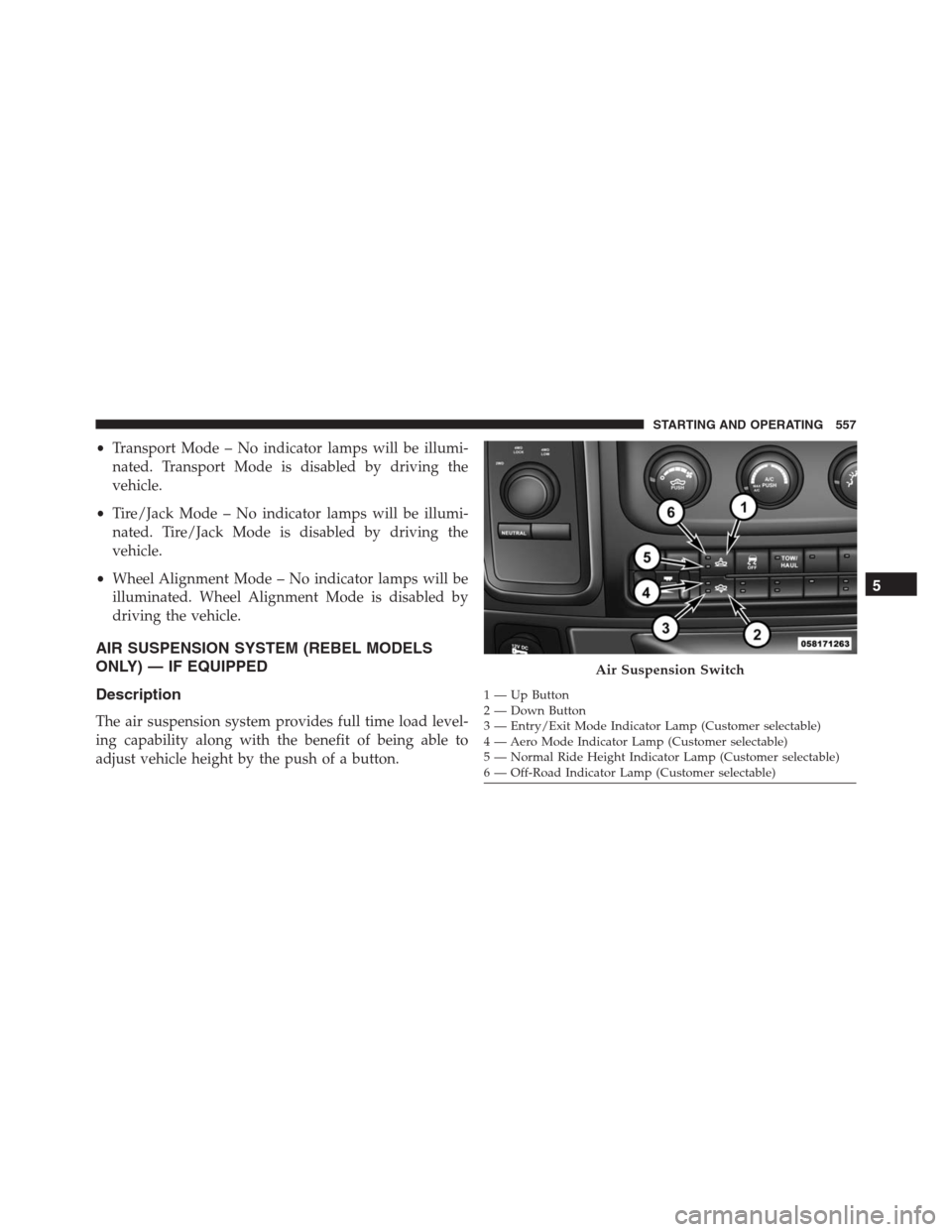
Air Suspension Switch
1 — Up Button
2 — Down Button
3 — Entry/Exit Mode Indicator Lamp (Customer selectable)
4 — Aero Mode Indicator Lamp (Customer selectable)
5 — Normal Ride Height Indicator Lamp (Customer selectable)
6 — Off-Road Indicator Lamp (Customer selectable)
5
STARTING AND OPERATING 557
Page 564 of 916
Wheel Alignment Mode
Before performing a wheel alignment this mode must be
enabled. Refer to “Electronic Vehicle Information Center
(EVIC) or Driver Information Display (DID)” in “Under-
standing Your Instrument Panel” for further information.
NOTE:This mode is intended to be enabled with engine
running and all doors closed.
Protection Mode
In order to “protect” the air suspension system, the
vehicle will enter Protection Mode when load leveling
cannot be achieved. Some driving may be required to
clear the protection mode telltale in the EVIC/DID. Refer
to “Electronic Vehicle Information Center (EVIC) or
Driver Information Display (DID)” in “Understanding
Your Instrument Panel” for further information.NOTE:If equipped with a touch screen radio all
enabling/disabling of air suspension features must be
done through the radio. Refer to “Uconnect Settings” in
“Understanding Your Instrument Panel” for further in-
formation.
Electronic Vehicle Information Center
(EVIC)/Driver Infromation Display (DID) Display
Messages
When the appropriate conditions exist, a message will
appear in the EVIC/DID display. Refer to “Electronic
Vehicle Information Center (EVIC) or Driver Information
Display (DID)” in “Understanding Your Instrument
Panel” for further information.
An audible chime will be heard whenever a system error
has been detected.
562 STARTING AND OPERATING
Page 566 of 916
•Entry/Exit Mode – Indicator lamp 3 will be illumi-
nated when the vehicle is in Entry Exit Mode. Entry/
Exit mode can be requested up to 33 mph (53 km/h).
If vehicle speed is reduced to, and kept below, 15 mph
(24 km/h) indicator lamp 3 will flash and indicator
lamp 4 will remain solid until Entry/Exit Mode is
achieved at which point indicator lamp 4 will turn off.
•Transport Mode – No indicator lamps will be illumi-
nated. Transport Mode is disabled by driving the
vehicle.
•Tire/Jack Mode – indicator lamps 3 and 6 will be
illuminated. Tire/Jack Mode is disabled by driving the
vehicle.
•Wheel Alignment Mode – indicator lamps 3, 4 and 5
will be illuminated. Wheel Alignment Mode is dis-
abled by driving the vehicle.AXLE LOCKER SYSTEM — POWER WAGON
MODELS ONLY (IF EQUIPPED)
This vehicle is equipped with electronically locking front
and rear differentials. These differentials, when engaged,
mechanically lock together the axle shafts forcing the
wheels to spin at an equal rate. This allows the vehicle to
maintain its momentum and prevents it from becoming
stuck. The locking front and rear differentials should only
be engaged during low-speed, extreme off-road situa-
tions where one wheel is likely to not be in contact with
the ground. It is not recommended to drive the vehicle
with the differentials locked on pavement due to the
reduced ability to turn and speed limitations.
CAUTION!
•Do not lock the front or rear axle on hard surfaced
roads. The ability to steer the vehicle is reduced
(Continued)
564 STARTING AND OPERATING
Page 567 of 916
CAUTION!(Continued)
and damage to the drivetrain may occur when the
axles are locked on hard surfaced roads.
•Do not try to lock the rear axle if the vehicle is
stuck and the tires are spinning. You can damage
drivetrain components. Lock the rear axle before
attempting situations or navigating terrain, which
could possibly cause the vehicle to become stuck.
The locking axles are controlled by the axle locker switch.
The switch has three positions, AXLE UNLOCK, REAR
LOCK, and FRONT/REAR LOCK. Under normal driv-
ing conditions, the switch should be left in the AXLE
UNLOCK position. In the AXLE UNLOCK position, the
front and rear axles are unlocked. In the REAR LOCK
position, the rear axle is locked. In the FRONT/REAR
LOCK position, the front and rear axles are locked.NOTE:Even when the axles are in the AXLE UNLOCK
position, the limited slip differential in the rear axle still
provides torque biasing capability for moderate low
traction environments.
During the command to lock the axle, the indicator light
will flash until the axle is locked. After the lock command
has been successfully executed, the light will remain on
solid.
To lock the rear axle, place the vehicle in 4LO. Refer to
“Four Wheel Drive Operation” in “Starting And Operat-
ing” for further information. Move the axle locker switch
position to REAR LOCK while traveling less than 3 mph
(5 km/h). The RR indicator light will remain on when the
rear axle is locked.
5
STARTING AND OPERATING 565
Page 568 of 916
NOTE:Left to right wheel speed difference may be
necessary to allow the axle to fully lock. If the indicator
light is flashing after placing the switch in the REAR
LOCK or FRONT/REAR LOCK position, drive the ve-
hicle in a turn or on loose gravel to expedite the locking
action.
WARNING!
Do not use the locked axle position for normal
driving. A locked front axle is intended for off-road
driving only. Locking the front axle during on-road
driving will reduce the steering ability. This could
cause a collision and you may be seriously injured.
To lock the front axle; move the axle locker switch to
FRONT/REAR LOCK while traveling less than 3 mph
(5 km/h). The indicator light will be solid when the front
axle is locked.NOTE:The rear axle must be locked before the front axle
will lock.
To unlock the front axle; move the axle locker switch to
REAR LOCK. The FRONT/REAR LOCK indicator light
will go out when the axle is unlocked.
NOTE:The axle lockers could be torque locked due to
side to side loads on the axle. Driving slowly while
turning the steering wheel from a left hand turn to a right
hand turn or driving in REVERSE for a short distance
may be required to release the torque lock and unlock the
axles.
To unlock the rear axle; move the axle locker switch to
AXLE UNLOCK. The REAR LOCK indicator light will go
out when the rear axle is unlocked.
566 STARTING AND OPERATING
Page 570 of 916
The switch has two positions; On-Road and Off-Road. The
system is normally in the On-Road mode, indicated by a
solid green light. The stabilizer/sway bar should remain in
the On-Road mode during normal driving conditions.
WARNING!
Do not disconnect the stabilizer bar and drive on
hard surfaced roads or at speeds above 18 mph
(29 km/h), you may lose control of the vehicle, which
could result in serious injury or death. The front
stabilizer bar enhances vehicle stability and assists in
maintaining control of the vehicle. The system moni-
tors vehicle speed and will attempt to reconnect the
stabilizer bar at speeds over 18 mph (29 km/h). This is
indicated by a flashing off road light and solid on
road light. Once vehicle speed is reduced below
14 mph (22 km/h), the system will attempt to return to
the Off-Road mode.To disconnect the stabilizer/sway bar, shift to either 4HI
or 4LO as shown in “Four Wheel Drive Operation” and
press the right hand Off Road stabilizer/sway bar button
to obtain the Off-Road position. The amber indicator
light will flash until the stabilizer/sway bar has been
fully disconnected.
NOTE:The stabilizer/sway bar may be torque locked
due to left and right suspension height differences. This
condition is due to driving surface differences or vehicle
loading. In order for the stabilizer/sway bar to
disconnect/reconnect, the right and left halves of the bar
must be aligned. This alignment may require that the
vehicle be driven onto level ground or rocked from side
to side.
To return to the On-Road mode; press the left hand On
Road stabilizer/sway bar button.
568 STARTING AND OPERATING