brake Ram 1500 2017 Diesel Supplement
[x] Cancel search | Manufacturer: RAM, Model Year: 2017, Model line: 1500, Model: Ram 1500 2017Pages: 228, PDF Size: 1.35 MB
Page 71 of 228
Charge Air Cooler — Inter-Cooler
The charge air cooler is positioned in front of the radiator
and the air conditioner condenser. Air enters the engine
through the air cleaner and passes through the turbo-
charger, where it is pressurized. This pressurized air rap-
idly reaches high temperature. The air is then directed
through a hose to the charge air cooler and through another
hose to the intake manifold of the engine. This cooling
process enables more efficient burning of fuel resulting in
fewer emissions.
To guarantee optimum performance of the system, keep
the surfaces of the charge air cooler, condenser and radiator
clean and free of debris. Periodically check the hoses
leading to and from the charge air cooler for cracks or loose
clamps resulting in loss of pressure and reduced engine
performance.
Brake System
Brake Master Cylinder — Brake Fluid Level Check
The fluid level of the master cylinder should be checked
when performing under the hood service, or immediately
if the “Brake System Warning Light” indicates system
failure.The brake master cylinder has a translucent plastic reser-
voir. On the outboard side of the reservoir, there is a
“MAX” mark and a “MIN” mark. The fluid level must be
kept within these two marks. Do not add fluid above the
full mark because leakage may occur at the cap.
With disc brakes, the fluid level can be expected to fall as
the brake linings wear. However, an unexpected drop in
fluid level may be caused by a leak and a system check
should be conducted.
Refer to “Fluids, Lubricants, And Genuine Parts” in “Main-
taining Your Vehicle” for further information.
WARNING!
•
Use only manufacturer’s recommended brake fluid.
Refer to “Fluids, Lubricants, and Genuine Parts” in
“Maintaining Your Vehicle” for further information.
Using the wrong type of brake fluid can severely
damage your brake system and/or impair its perfor-
mance. The proper type of brake fluid for your
vehicle is also identified on the original factory
installed hydraulic master cylinder reservoir.
(Continued)
5
MAINTAINING YOUR VEHICLE 69
Page 72 of 228
WARNING!(Continued)
•To avoid contamination from foreign matter or mois-
ture, use only new brake fluid or fluid that has been
in a tightly closed container. Keep the master cylin-
der reservoir cap secured at all times. Brake fluid in
a open container absorbs moisture from the air
resulting in a lower boiling point. This may cause it
to boil unexpectedly during hard or prolonged brak-
ing, resulting in sudden brake failure. This could
result in a accident.
(Continued)
WARNING! (Continued)
•Overfilling the brake fluid reservoir can result in
spilling brake fluid on hot engine parts, causing the
brake fluid to catch fire. Brake fluid can also damage
painted and vinyl surfaces, care should be taken to
avoid its contact with these surfaces.
• Do not allow petroleum based fluid to contaminate
the brake fluid. Brake seal components could be
damaged, causing partial or complete brake failure.
This could result in an accident.
70 MAINTAINING YOUR VEHICLE
Page 77 of 228
Chassis
ComponentFluid, Lubricant, or Genuine Part
Automatic Transmission (3.0L Diesel,
8-Speed Transmission) Only use MOPAR ZF 8&9 Speed ATF Automatic Transmis-
sion Fluid or equivalent. Failure to use the correct fluid
may affect the function or performance of your transmis-
sion.
Transfer Case We recommend you use MOPAR BW44–44 Transfer Case
Fluid.
Front Axle – 1500 Four-Wheel Drive Models We recommend you use MOPAR GL-5 Synthetic Axle
Lubricant SAE 75W-85.
Rear Axle We recommend you use MOPAR Synthetic Gear Lubricant
SAE 75W-140 (MS-8985). Limited-Slip Rear Axles require
the addition of 5 oz. (148 ml) MOPAR Limited Slip Addi-
tive (MS-10111).
Brake Master Cylinder We recommend you use MOPAR DOT 3 Brake Fluid,
SAE J1703 should be used. If DOT 3, SAE J1703 brake fluid
is not available, then DOT 4 is acceptable.
5
MAINTAINING YOUR VEHICLE 75
Page 80 of 228
MAINTENANCE SCHEDULE
Your vehicle is equipped with an automatic oil change
indicator system. The oil change indicator system will
remind you that it is time to take your vehicle in for
scheduled maintenance.
Based on engine operation conditions, the oil change
indicator message will illuminate. This means that service
is required for your vehicle. Operating conditions such as
frequent short-trips, trailer tow, extremely hot or cold
ambient temperatures will influence when the “Oil Change
Required” message is displayed. Severe Operating Condi-
tions can cause the change oil message to illuminate as
early as 3,500 miles (5,600 km) since last reset. Have your
vehicle serviced as soon as possible, within the next
500 miles (805 km).
Your authorized dealer will reset the oil change indicator
message after completing the scheduled oil change. If a
scheduled oil change is performed by someone other thanyour authorized dealer, the message can be reset by
referring to the steps described under “Instrument Cluster
Display” in “Understanding Your Instrument Panel” for
further information.
NOTE:
Under no circumstances should oil change inter-
vals exceed 10,000 miles (16,000 km) or twelve months,
whichever comes first.
Once A Month Or Before A Long Trip:
• Check engine oil level
• Check windshield washer fluid level
• Check the tire inflation pressures and look for unusual
wear or damage
• Check the fluid levels of the coolant reservoir, brake
master cylinder, and power steering, and fill as needed
• Check function of all interior and exterior lights
78 MAINTENANCE SCHEDULE
Page 81 of 228
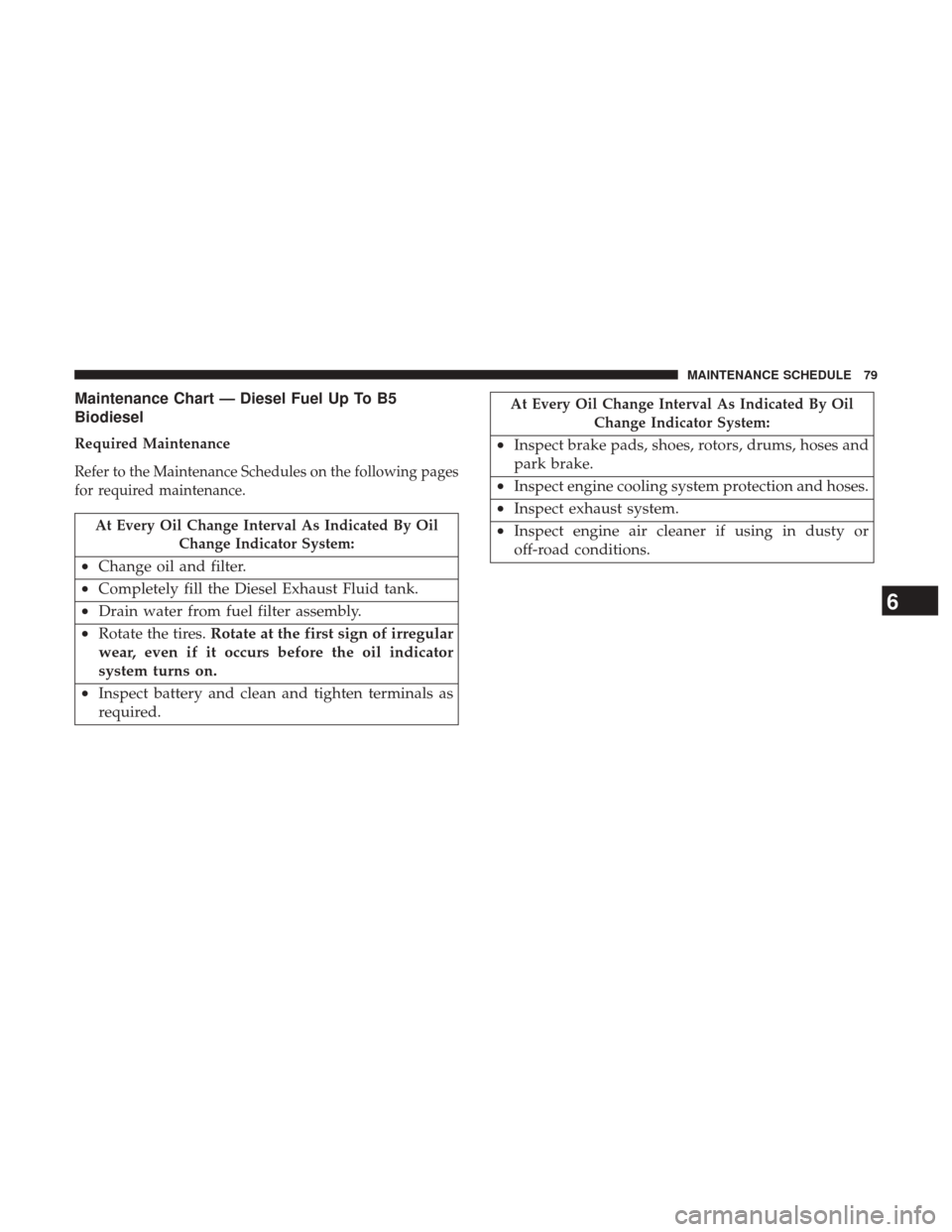
Maintenance Chart — Diesel Fuel Up To B5
Biodiesel
Required Maintenance
Refer to the Maintenance Schedules on the following pages
for required maintenance.
At Every Oil Change Interval As Indicated By OilChange Indicator System:
•Change oil and filter.
• Completely fill the Diesel Exhaust Fluid tank.
• Drain water from fuel filter assembly.
• Rotate the tires. Rotate at the first sign of irregular
wear, even if it occurs before the oil indicator
system turns on.
• Inspect battery and clean and tighten terminals as
required.
At Every Oil Change Interval As Indicated By Oil
Change Indicator System:
•Inspect brake pads, shoes, rotors, drums, hoses and
park brake.
• Inspect engine cooling system protection and hoses.
• Inspect exhaust system.
• Inspect engine air cleaner if using in dusty or
off-road conditions.
6
MAINTENANCE SCHEDULE 79
Page 82 of 228
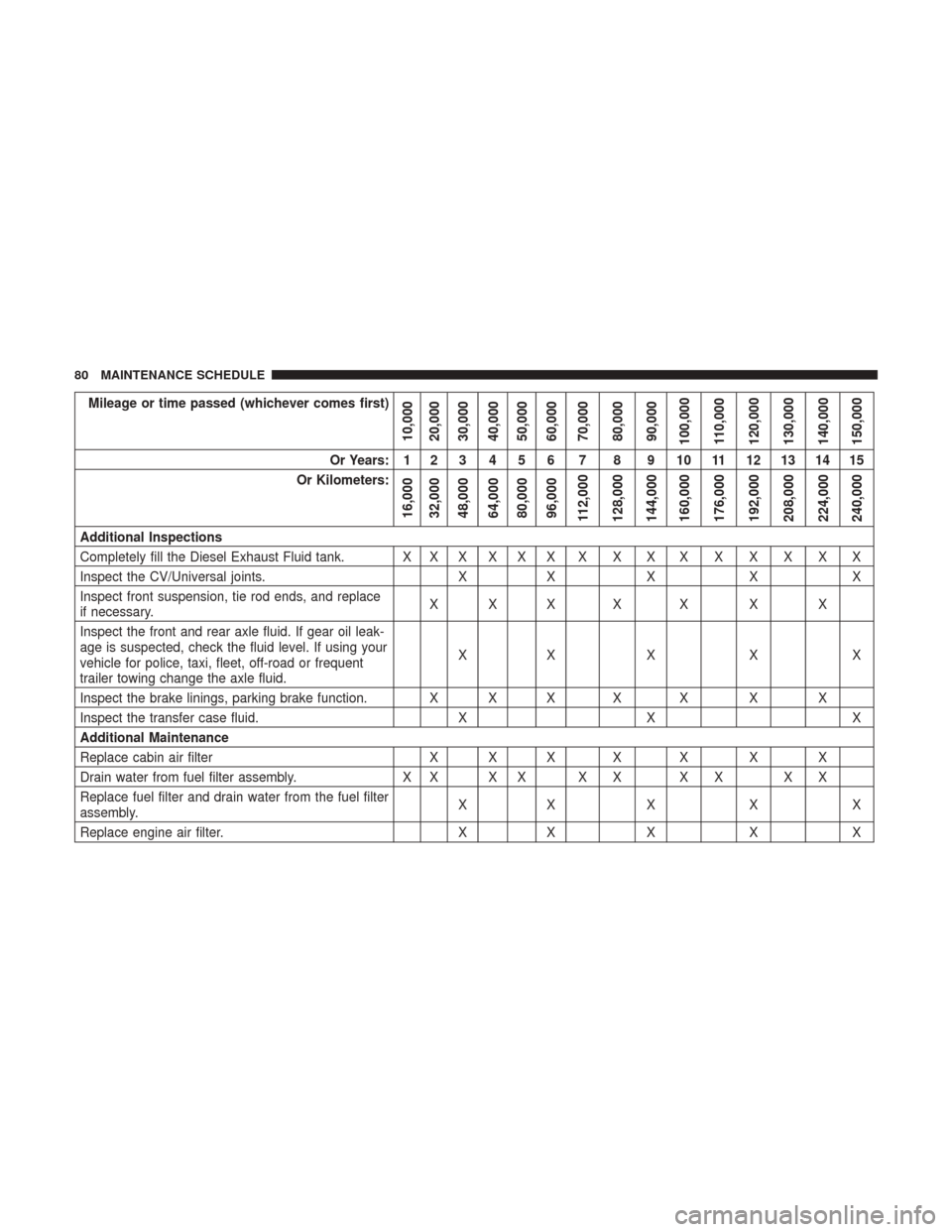
Mileage or time passed (whichever comes first)
10,000
20,000
30,000
40,000
50,000
60,000
70,000
80,000
90,000
100,000
110,000
120,000
130,000
140,000
150,000
Or Years: 1 2 3 4 5 6 7 8 9 10 11 12 13 14 15
Or Kilometers:
16,000
32,000
48,000
64,000
80,000
96,000
112,000
128,000
144,000
160,000
176,000
192,000
208,000
224,000
240,000
Additional Inspections
Completely fill the Diesel Exhaust Fluid tank. X X X X X X X X X X X X X X X
Inspect the CV/Universal joints. XX X X X
Inspect front suspension, tie rod ends, and replace
if necessary. XXX X X X X
Inspect the front and rear axle fluid. If gear oil leak-
age is suspected, check the fluid level. If using your
vehicle for police, taxi, fleet, off-road or frequent
trailer towing change the axle fluid. XX X X X
Inspect the brake linings, parking brake function. X X X X X X X
Inspect the transfer case fluid. XX X
Additional Maintenance
Replace cabin air filter X X X X X X X
Drain water from fuel filter assembly. X X X X X X X X X X
Replace fuel filter and drain water from the fuel filter
assembly. XX X X X
Replace engine air filter. XX X X X
80 MAINTENANCE SCHEDULE
Page 94 of 228
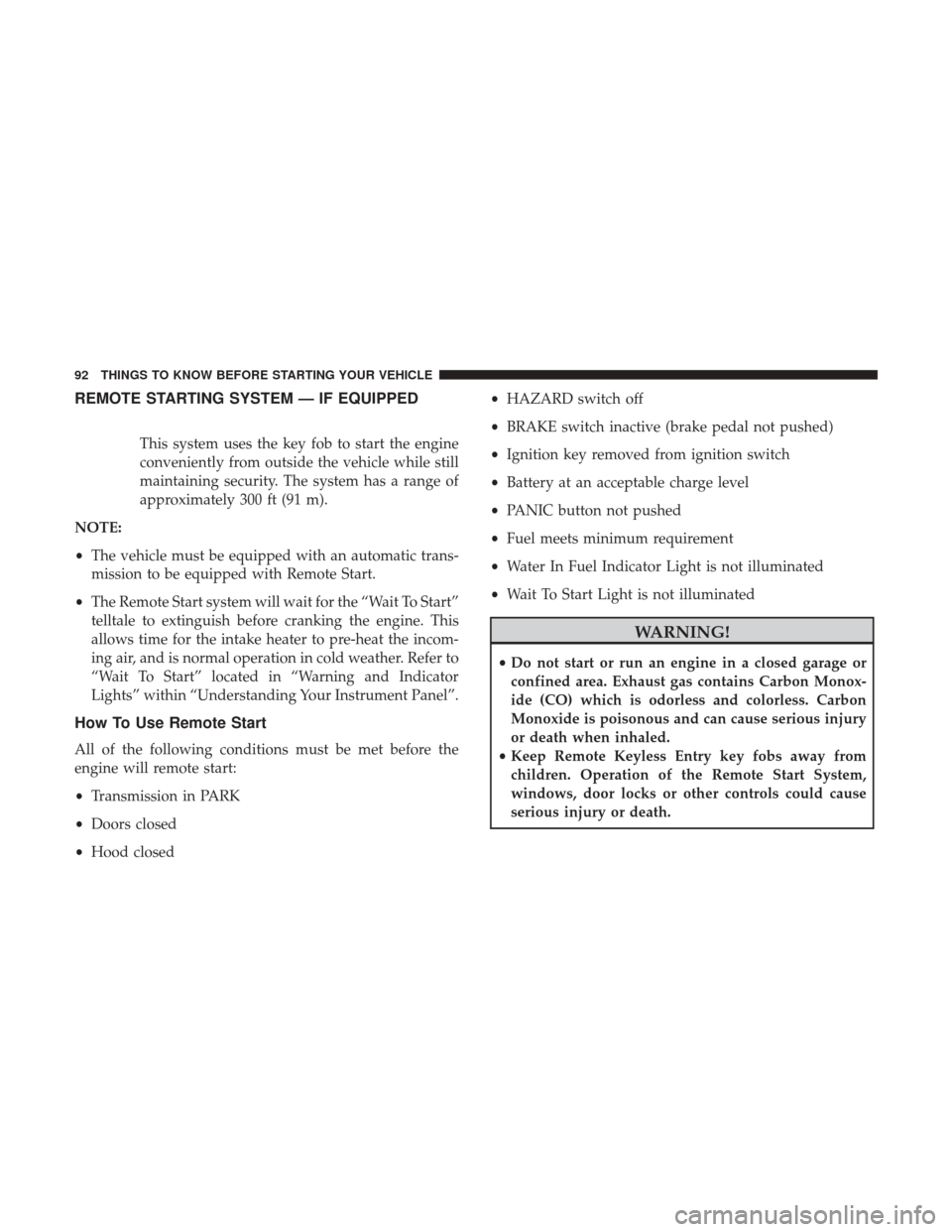
REMOTE STARTING SYSTEM — IF EQUIPPED
This system uses the key fob to start the engine
conveniently from outside the vehicle while still
maintaining security. The system has a range of
approximately 300 ft (91 m).
NOTE:
• The vehicle must be equipped with an automatic trans-
mission to be equipped with Remote Start.
• The Remote Start system will wait for the “Wait To Start”
telltale to extinguish before cranking the engine. This
allows time for the intake heater to pre-heat the incom-
ing air, and is normal operation in cold weather. Refer to
“Wait To Start” located in “Warning and Indicator
Lights” within “Understanding Your Instrument Panel”.
How To Use Remote Start
All of the following conditions must be met before the
engine will remote start:
• Transmission in PARK
• Doors closed
• Hood closed •
HAZARD switch off
• BRAKE switch inactive (brake pedal not pushed)
• Ignition key removed from ignition switch
• Battery at an acceptable charge level
• PANIC button not pushed
• Fuel meets minimum requirement
• Water In Fuel Indicator Light is not illuminated
• Wait To Start Light is not illuminated
WARNING!
•Do not start or run an engine in a closed garage or
confined area. Exhaust gas contains Carbon Monox-
ide (CO) which is odorless and colorless. Carbon
Monoxide is poisonous and can cause serious injury
or death when inhaled.
• Keep Remote Keyless Entry key fobs away from
children. Operation of the Remote Start System,
windows, door locks or other controls could cause
serious injury or death.
92 THINGS TO KNOW BEFORE STARTING YOUR VEHICLE
Page 99 of 228
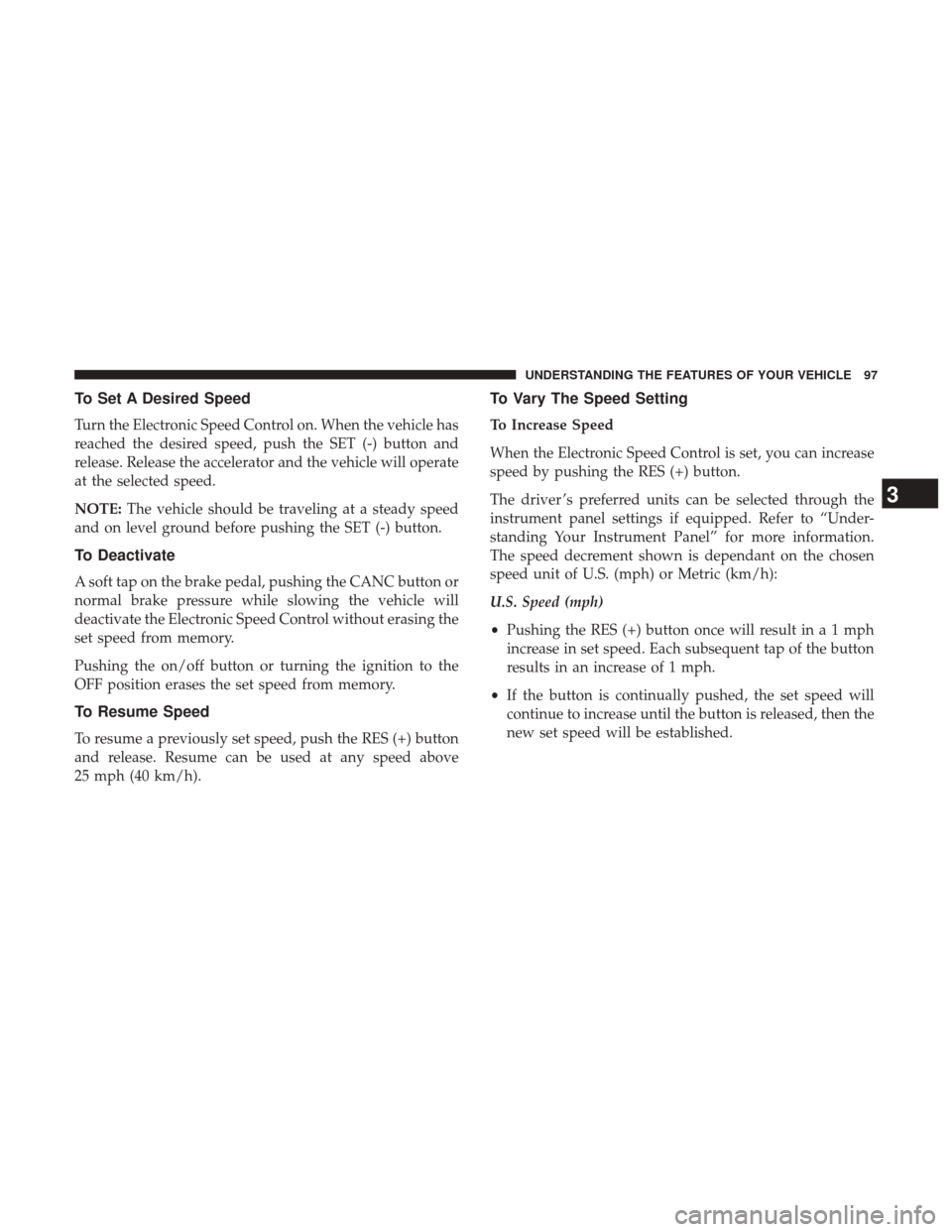
To Set A Desired Speed
Turn the Electronic Speed Control on. When the vehicle has
reached the desired speed, push the SET (-) button and
release. Release the accelerator and the vehicle will operate
at the selected speed.
NOTE:The vehicle should be traveling at a steady speed
and on level ground before pushing the SET (-) button.
To Deactivate
A soft tap on the brake pedal, pushing the CANC button or
normal brake pressure while slowing the vehicle will
deactivate the Electronic Speed Control without erasing the
set speed from memory.
Pushing the on/off button or turning the ignition to the
OFF position erases the set speed from memory.
To Resume Speed
To resume a previously set speed, push the RES (+) button
and release. Resume can be used at any speed above
25 mph (40 km/h).
To Vary The Speed Setting
To Increase Speed
When the Electronic Speed Control is set, you can increase
speed by pushing the RES (+) button.
The driver ’s preferred units can be selected through the
instrument panel settings if equipped. Refer to “Under-
standing Your Instrument Panel” for more information.
The speed decrement shown is dependant on the chosen
speed unit of U.S. (mph) or Metric (km/h):
U.S. Speed (mph)
• Pushing the RES (+) button once will result in a 1 mph
increase in set speed. Each subsequent tap of the button
results in an increase of 1 mph.
• If the button is continually pushed, the set speed will
continue to increase until the button is released, then the
new set speed will be established.
3
UNDERSTANDING THE FEATURES OF YOUR VEHICLE 97
Page 113 of 228
•RIGHT Arrow Button
Push and release the RIGHTarrow button to
access/select the information screens or sub-
menu screens of a main menu item. Push and
hold the RIGHTarrow button for two seconds to
reset displayed/selected features that can be reset.
• LEFT Arrow Button
Push the LEFTarrow button to access/select the
information screens or submenu screens of a
main menu item or to return to the main menu
from an info screen or submenu item.
Oil Life Reset
Your vehicle is equipped with an engine oil change indi-
cator system. The “Oil Change Required” message will
display in the instrument cluster display after a single
chime has sounded, to indicate the next scheduled oil
change interval. The engine oil change indicator system is
duty cycle based, which means the engine oil change
interval may fluctuate, dependent upon your personal
driving style.
NOTE: Use the steering wheel instrument cluster display
controls for the following procedure(s). Vehicles Equipped With Passive Entry
1. Without pushing the brake pedal, push the ENGINE
START/STOP button and place the ignition to the
ON/RUN position (do not start the engine).
2. Push and release the down
arrow button to scroll
downward through the main menu to “Vehicle Info.”
3. Push and release the right
arrow button to access the
”Oil Life” screen.
4. Push and hold the right
arrow button to select
“Reset”.
5. Push and release the appropriate arrow button to select “YES” to reset the Oil Life.
6. Push and release the up
arrow button to exit the
instrument cluster display screen.
Vehicles Not Equipped With Passive Entry
1. Without pushing the brake pedal, cycle the ignition to the ON/RUN position (do not start the engine).
2. Push and release the down
arrow button to scroll
downward through the main menu to “Vehicle Info.”
4
UNDERSTANDING YOUR INSTRUMENT PANEL 111
Page 114 of 228
3. Push and release therightarrow button to access the
“Oil Life” screen.
4. Push and hold the right
arrow button to select the
Oil Life Reset.
5. Push and release the appropriate arrow button to select “YES” to reset the Oil Life.
6. Push and release the up
arrow button to exit the
instrument cluster display screen.
NOTE: If the indicator message illuminates when you start
the vehicle, the Oil Life indicator system did not reset. If
necessary, repeat this procedure.
Fuel Filter Life Reset
The cluster will display the “Service Fuel Filter” message
when the fuel filter maintenance life is less than 5%. To
check the remaining fuel filter life, go to the “Fuel Filter
Life” screen in the “Vehicle Info” menu. When this message
appears, dealers should replace the fuel filter.
NOTE: Use the steering wheel button controls for the
following procedure(s) Vehicles Equipped With Passive Entry
1. Without pushing the brake pedal, push the ENGINE
START/STOP button and cycle the ignition to the ON/
RUN position (do not start the engine.)
2. Push and release the DOWN
arrow button to scroll
downward through the main menu to “Vehicle Info”.
3. Push and release the RIGHT
arrow button to access
the ”Fuel Filter Life” screen.
4. Push and release the appropriate arrow button to access the “Reset” screen.
5. Push and release the appropriate arrow to select the reset of the Fuel Filter Life.
6. Push and release the UP
arrow button to exit the
Instrument Cluster Display screen.
Vehicles Not Equipped With Passive Entry
1. Without pressing the brake pedal, cycle the ignition to the ON/RUN position (do not start the engine.)
2. Push and release the DOWN
arrow button to scroll
downward through the main menu to “Vehicle Info”.
112 UNDERSTANDING YOUR INSTRUMENT PANEL