maintenance Ram 1500 2017 Diesel Supplement
[x] Cancel search | Manufacturer: RAM, Model Year: 2017, Model line: 1500, Model: Ram 1500 2017Pages: 228, PDF Size: 1.35 MB
Page 80 of 228
MAINTENANCE SCHEDULE
Your vehicle is equipped with an automatic oil change
indicator system. The oil change indicator system will
remind you that it is time to take your vehicle in for
scheduled maintenance.
Based on engine operation conditions, the oil change
indicator message will illuminate. This means that service
is required for your vehicle. Operating conditions such as
frequent short-trips, trailer tow, extremely hot or cold
ambient temperatures will influence when the “Oil Change
Required” message is displayed. Severe Operating Condi-
tions can cause the change oil message to illuminate as
early as 3,500 miles (5,600 km) since last reset. Have your
vehicle serviced as soon as possible, within the next
500 miles (805 km).
Your authorized dealer will reset the oil change indicator
message after completing the scheduled oil change. If a
scheduled oil change is performed by someone other thanyour authorized dealer, the message can be reset by
referring to the steps described under “Instrument Cluster
Display” in “Understanding Your Instrument Panel” for
further information.
NOTE:
Under no circumstances should oil change inter-
vals exceed 10,000 miles (16,000 km) or twelve months,
whichever comes first.
Once A Month Or Before A Long Trip:
• Check engine oil level
• Check windshield washer fluid level
• Check the tire inflation pressures and look for unusual
wear or damage
• Check the fluid levels of the coolant reservoir, brake
master cylinder, and power steering, and fill as needed
• Check function of all interior and exterior lights
78 MAINTENANCE SCHEDULE
Page 81 of 228
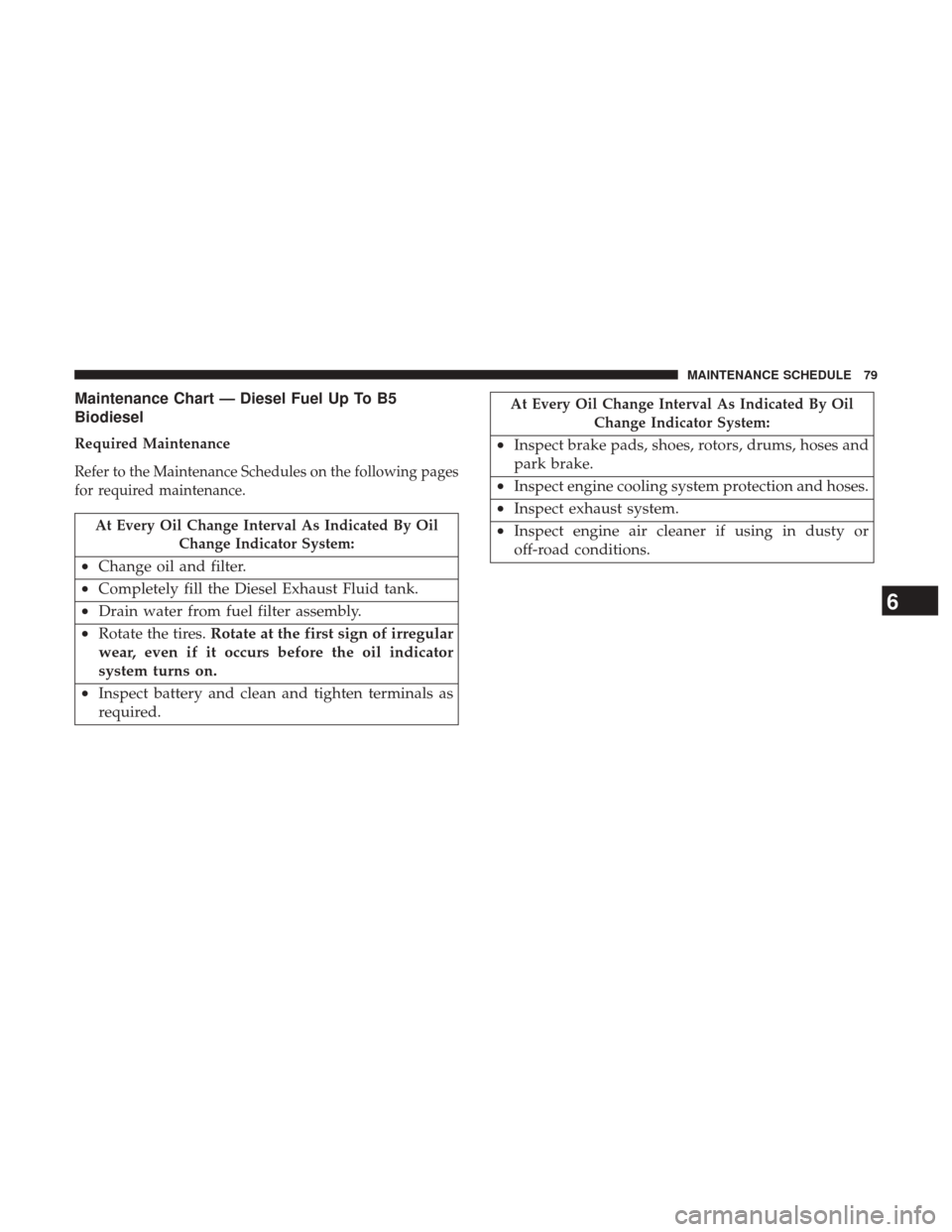
Maintenance Chart — Diesel Fuel Up To B5
Biodiesel
Required Maintenance
Refer to the Maintenance Schedules on the following pages
for required maintenance.
At Every Oil Change Interval As Indicated By OilChange Indicator System:
•Change oil and filter.
• Completely fill the Diesel Exhaust Fluid tank.
• Drain water from fuel filter assembly.
• Rotate the tires. Rotate at the first sign of irregular
wear, even if it occurs before the oil indicator
system turns on.
• Inspect battery and clean and tighten terminals as
required.
At Every Oil Change Interval As Indicated By Oil
Change Indicator System:
•Inspect brake pads, shoes, rotors, drums, hoses and
park brake.
• Inspect engine cooling system protection and hoses.
• Inspect exhaust system.
• Inspect engine air cleaner if using in dusty or
off-road conditions.
6
MAINTENANCE SCHEDULE 79
Page 82 of 228
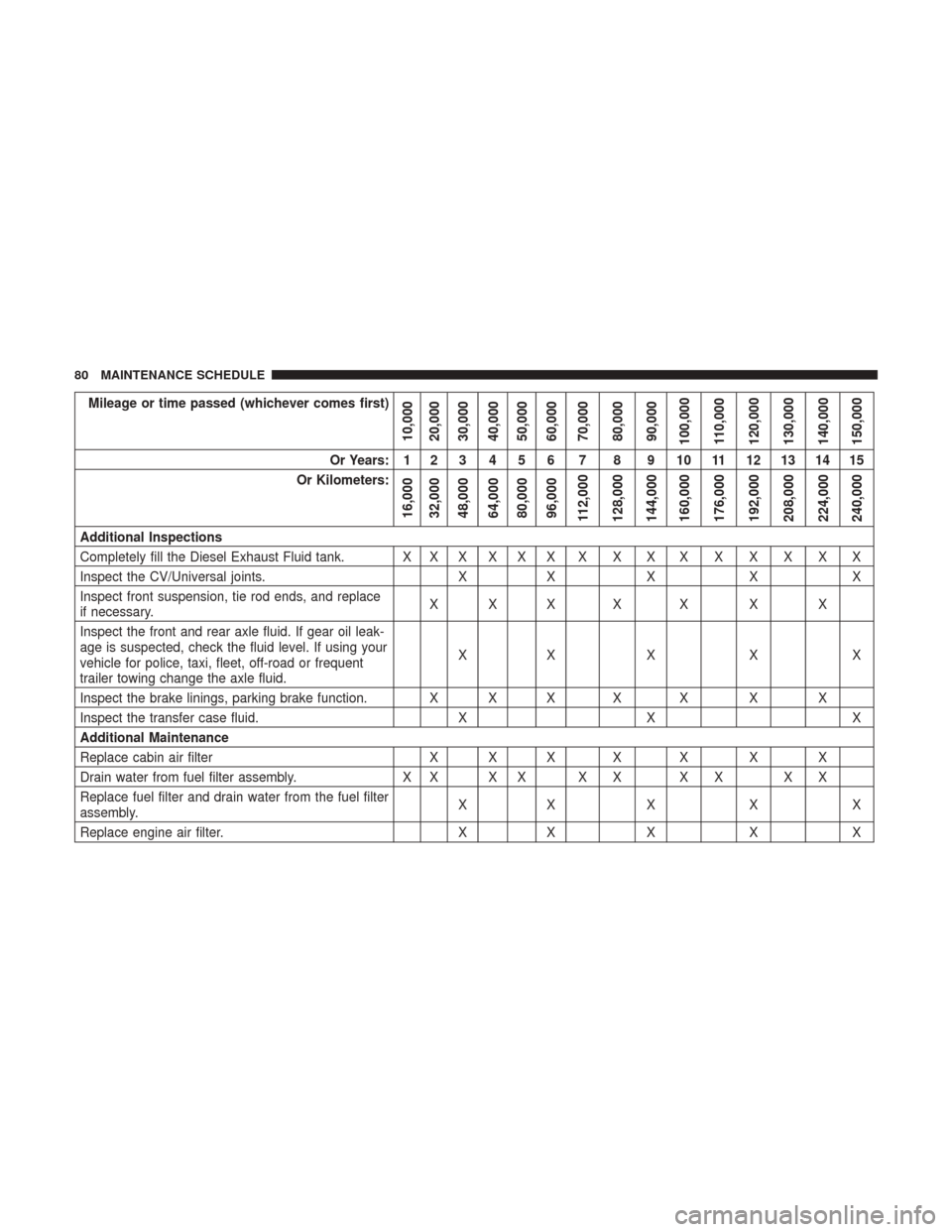
Mileage or time passed (whichever comes first)
10,000
20,000
30,000
40,000
50,000
60,000
70,000
80,000
90,000
100,000
110,000
120,000
130,000
140,000
150,000
Or Years: 1 2 3 4 5 6 7 8 9 10 11 12 13 14 15
Or Kilometers:
16,000
32,000
48,000
64,000
80,000
96,000
112,000
128,000
144,000
160,000
176,000
192,000
208,000
224,000
240,000
Additional Inspections
Completely fill the Diesel Exhaust Fluid tank. X X X X X X X X X X X X X X X
Inspect the CV/Universal joints. XX X X X
Inspect front suspension, tie rod ends, and replace
if necessary. XXX X X X X
Inspect the front and rear axle fluid. If gear oil leak-
age is suspected, check the fluid level. If using your
vehicle for police, taxi, fleet, off-road or frequent
trailer towing change the axle fluid. XX X X X
Inspect the brake linings, parking brake function. X X X X X X X
Inspect the transfer case fluid. XX X
Additional Maintenance
Replace cabin air filter X X X X X X X
Drain water from fuel filter assembly. X X X X X X X X X X
Replace fuel filter and drain water from the fuel filter
assembly. XX X X X
Replace engine air filter. XX X X X
80 MAINTENANCE SCHEDULE
Page 83 of 228
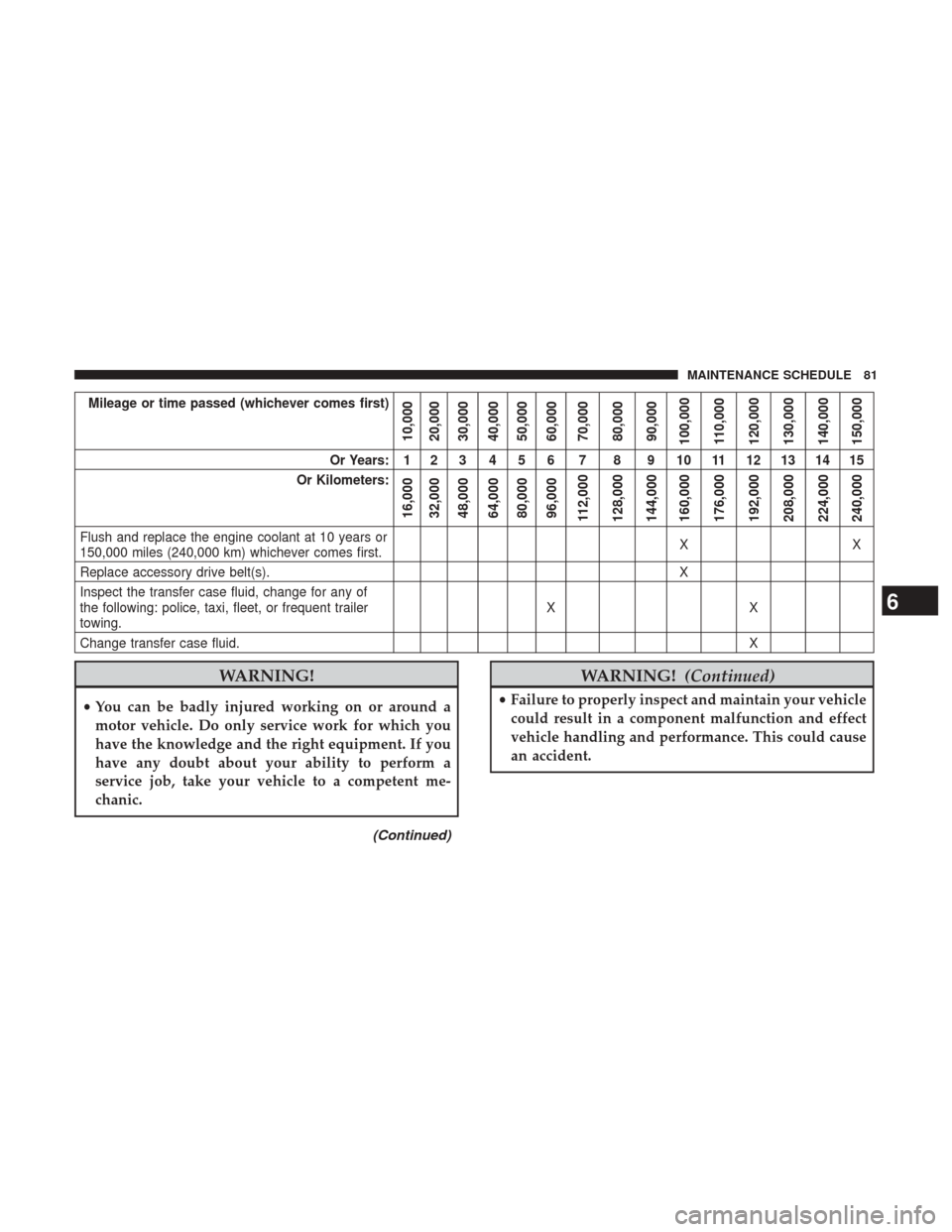
Mileage or time passed (whichever comes first)
10,000
20,000
30,000
40,000
50,000
60,000
70,000
80,000
90,000
100,000
110,000
120,000
130,000
140,000
150,000
Or Years: 1 2 3 4 5 6 7 8 9 10 11 12 13 14 15
Or Kilometers:
16,000
32,000
48,000
64,000
80,000
96,000
112,000
128,000
144,000
160,000
176,000
192,000
208,000
224,000
240,000
Flush and replace the engine coolant at 10 years or
150,000 miles (240,000 km) whichever comes first. XX
Replace accessory drive belt(s). X
Inspect the transfer case fluid, change for any of
the following: police, taxi, fleet, or frequent trailer
towing. XX
Change transfer case fluid. X
WARNING!
•You can be badly injured working on or around a
motor vehicle. Do only service work for which you
have the knowledge and the right equipment. If you
have any doubt about your ability to perform a
service job, take your vehicle to a competent me-
chanic.
(Continued)
WARNING! (Continued)
•Failure to properly inspect and maintain your vehicle
could result in a component malfunction and effect
vehicle handling and performance. This could cause
an accident.
6
MAINTENANCE SCHEDULE 81
Page 84 of 228
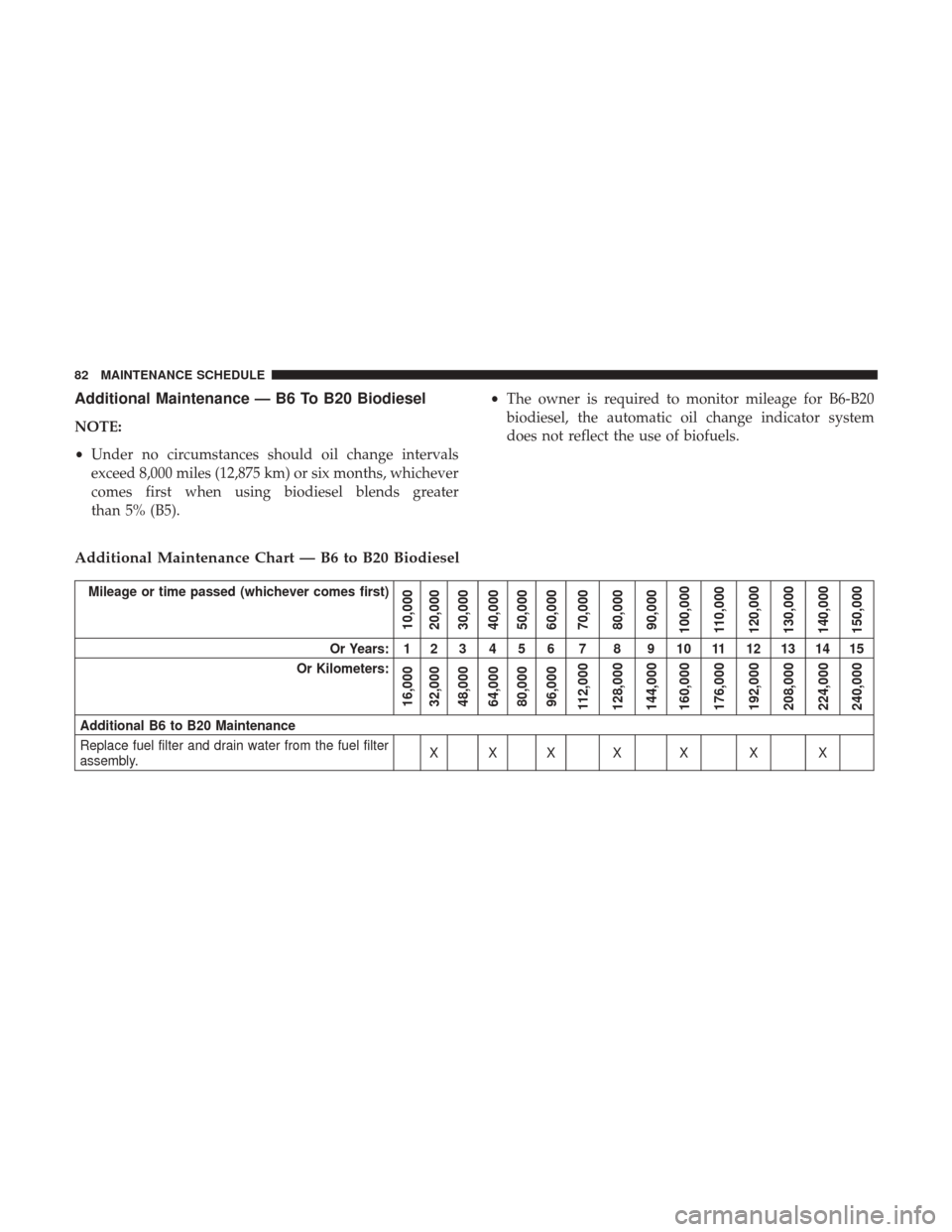
Additional Maintenance — B6 To B20 Biodiesel
NOTE:
•Under no circumstances should oil change intervals
exceed 8,000 miles (12,875 km) or six months, whichever
comes first when using biodiesel blends greater
than 5% (B5). •
The owner is required to monitor mileage for B6-B20
biodiesel, the automatic oil change indicator system
does not reflect the use of biofuels.
Additional Maintenance Chart — B6 to B20 Biodiesel
Mileage or time passed (whichever comes first)
10,000
20,000
30,000
40,000
50,000
60,000
70,000
80,000
90,000
100,000
110,000
120,000
130,000
140,000
150,000
Or Years: 1 2 3 4 5 6 7 8 9 10 11 12 13 14 15
Or Kilometers:
16,000
32,000
48,000
64,000
80,000
96,000
112,000
128,000
144,000
160,000
176,000
192,000
208,000
224,000
240,000
Additional B6 to B20 Maintenance
Replace fuel filter and drain water from the fuel filter
assembly. XXX X X X X
82 MAINTENANCE SCHEDULE
Page 85 of 228
WARNING!
•You can be badly injured working on or around a
motor vehicle. Do only service work for which you
have the knowledge and the right equipment. If you
have any doubt about your ability to perform a
service job, take your vehicle to a competent me-
chanic.
• Failure to properly inspect and maintain your vehicle
could result in a component malfunction and effect
vehicle handling and performance. This could cause
an accident.
6
MAINTENANCE SCHEDULE 83
Page 86 of 228

84 MAINTENANCE SCHEDULE
Page 89 of 228
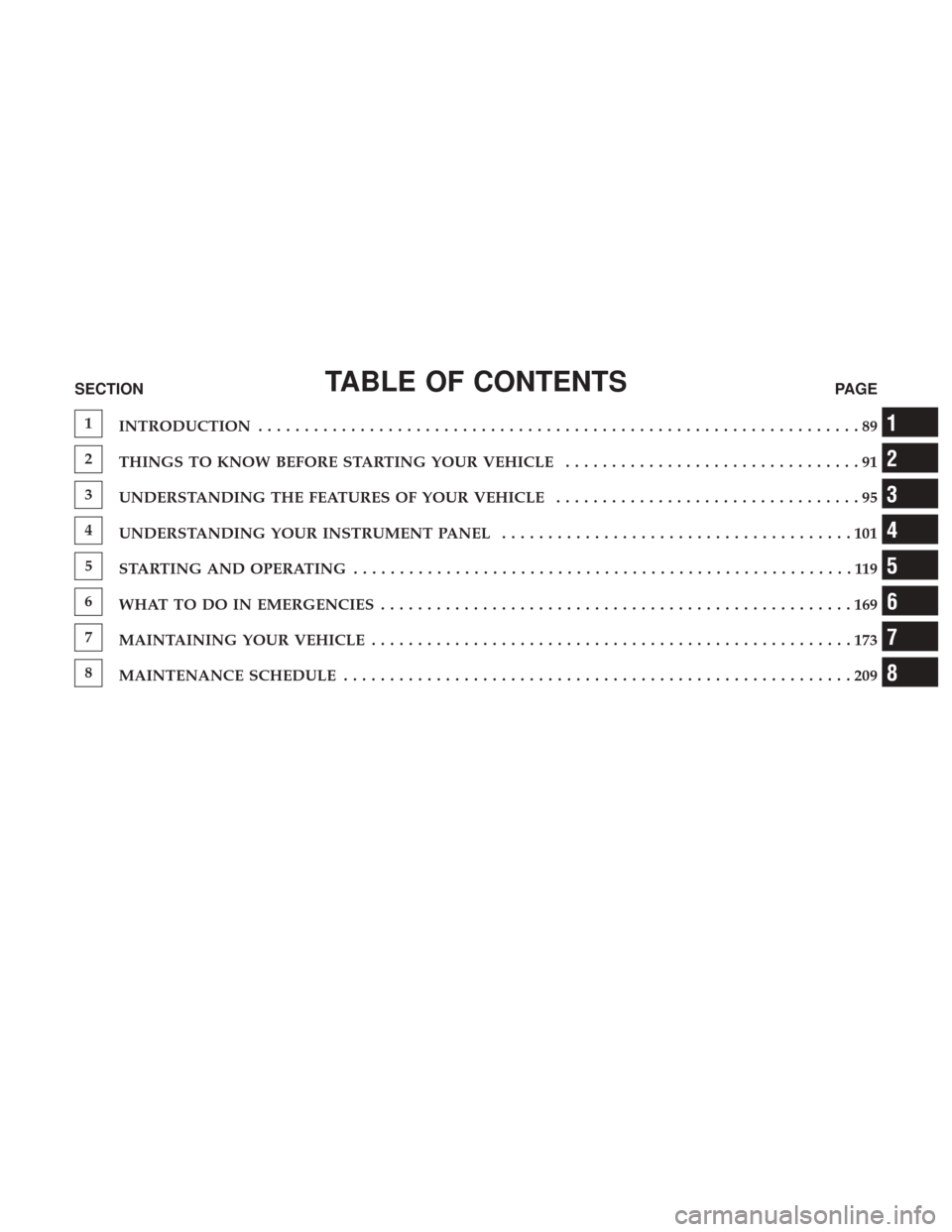
TABLE OF CONTENTSSECTIONPAGE
1
INTRODUCTION .................................................................89
2
THINGS TO KNOW BEFORE STARTING YOUR VEHICLE ................................91
3
UNDERSTANDING THE FEATURES OF YOUR VEHICLE .................................95
4
UNDERSTANDING YOUR INSTRUMENT PANEL ......................................101
5
STARTING AND OPERATING ......................................................119
6
WHAT TO DO IN EMERGENCIES ...................................................169
7
MAINTAINING YOUR VEHICLE ....................................................173
8
MAINTENANCE SCHEDULE .......................................................209
1
2
3
4
5
6
7
8
Page 92 of 228
A MESSAGE FROM FCA US LLC
FCA US LLC and Cummins welcome you as a Cummins
turbocharged diesel-powered truck owner. Your diesel
truck will sound, feel, drive, and operate differently from a
gasoline-powered truck. It is important that you read and
understand this manual.
Almost 100% of the heavy duty trucks in the United States
and Canada are diesel-powered because of the fuel
economy, rugged durability, and high torque which per-
mits pulling heavy loads. Cummins engines power well
over half of these trucks. Now this same technology and
proven performance is yours in your truck equipped with
the Cummins turbocharged diesel engine.
You may find that some of the starting, operating, and
maintenance procedures are different. However, they are
simple to follow and careful adherence to them will ensure
that you take full advantage of the features of this engine.NOTE:
Some aftermarket products may cause severe
engine/transmission and/or exhaust system damage. Your
vehicle’s Powertrain Control Systems can detect and store
information about vehicle modifications that increase
horsepower and torque output such as whether or not
performance-enhancing powertrain components, com-
monly referred to as downloaders, power boxes, or perfor-
mance chips have been used.
This information cannot be erased and will stay in the
system’s memory even if the modification is removed. This
information can be retrieved by FCA US LLC, and service
and repair facilities, when servicing your vehicle. This
information may be used to determine if repair will be
covered by the New Vehicle Limited Warranty.
There is a probability that the use of a “performance chip”
will prohibit the engine from starting. In this instance, the
vehicle will need to be serviced by a authorized dealer in
order to return the vehicle to its factory settings.
When it comes to service, remember that your authorized
dealer knows your vehicle best, has factory-trained techni-
cians and genuine MOPAR® parts, and cares about your
satisfaction.
90 INTRODUCTION
Page 114 of 228
3. Push and release therightarrow button to access the
“Oil Life” screen.
4. Push and hold the right
arrow button to select the
Oil Life Reset.
5. Push and release the appropriate arrow button to select “YES” to reset the Oil Life.
6. Push and release the up
arrow button to exit the
instrument cluster display screen.
NOTE: If the indicator message illuminates when you start
the vehicle, the Oil Life indicator system did not reset. If
necessary, repeat this procedure.
Fuel Filter Life Reset
The cluster will display the “Service Fuel Filter” message
when the fuel filter maintenance life is less than 5%. To
check the remaining fuel filter life, go to the “Fuel Filter
Life” screen in the “Vehicle Info” menu. When this message
appears, dealers should replace the fuel filter.
NOTE: Use the steering wheel button controls for the
following procedure(s) Vehicles Equipped With Passive Entry
1. Without pushing the brake pedal, push the ENGINE
START/STOP button and cycle the ignition to the ON/
RUN position (do not start the engine.)
2. Push and release the DOWN
arrow button to scroll
downward through the main menu to “Vehicle Info”.
3. Push and release the RIGHT
arrow button to access
the ”Fuel Filter Life” screen.
4. Push and release the appropriate arrow button to access the “Reset” screen.
5. Push and release the appropriate arrow to select the reset of the Fuel Filter Life.
6. Push and release the UP
arrow button to exit the
Instrument Cluster Display screen.
Vehicles Not Equipped With Passive Entry
1. Without pressing the brake pedal, cycle the ignition to the ON/RUN position (do not start the engine.)
2. Push and release the DOWN
arrow button to scroll
downward through the main menu to “Vehicle Info”.
112 UNDERSTANDING YOUR INSTRUMENT PANEL