Transmission Ram 1500 2017 Workshop Manual
[x] Cancel search | Manufacturer: RAM, Model Year: 2017, Model line: 1500, Model: Ram 1500 2017Pages: 734, PDF Size: 7.3 MB
Page 411 of 734
gear range will improve performance and extend transmis-
sion life by reducing excessive shifting and heat buildup.
If the transmission temperature exceeds normal operating
limits, the powertrain controller will modify the transmis-
sion shift schedule and expand the range of torque con-
verter clutch engagement. This is done to prevent trans-
mission damage due to overheating.
If the transmission becomes extremely hot or is in danger
of overheating, the “Transmission Temperature Warning
Light” may illuminate and the transmission may operate
differently until the transmission cools down.
NOTE:Use caution when operating a heavily loaded
vehicle at low speeds (such as towing a trailer up a steep
grade, or in stop-and-go traffic) during hot weather. In
these conditions, torque converter slip can impose a sig-
nificant additional heat load on the cooling system. Down-
shifting the transmission to the lowest possible gear (when
climbing a grade), or shifting to NEUTRAL (when stopped
in heavy traffic) can help to reduce this excess heat
generation. During cold temperatures, transmission operation may be
modified depending on engine and transmission tempera-
ture as well as vehicle speed. This feature improves warm
up time of the engine and transmission to achieve maxi-
mum efficiency. Engagement of both the torque converter
clutch and the top overdrive gear are inhibited until the
transmission fluid is warm (refer to the “Note” under
“Torque Converter Clutch” in this section). During ex-
tremely cold temperatures (-16°F [-27°C] or below), opera-
tion may briefly be limited to first and direct gears only.
Normal operation will resume once the transmission tem-
perature has risen to a suitable level.
Transmission Limp Home Mode
Transmission function is monitored electronically for ab-
normal conditions. If a condition is detected that could
result in transmission damage, Transmission Limp Home
Mode is activated. In this mode, the transmission remains
in fourth gear regardless of which forward gear is selected.
PARK, REVERSE, and NEUTRAL will continue to operate.
The Malfunction Indicator Light (MIL) may be illuminated.
Limp Home Mode allows the vehicle to be driven to an
authorized dealer for service without damaging the trans-
mission.
5
STARTING AND OPERATING 409
Page 412 of 734
In the event of a momentary problem, the transmission can
be reset to regain all forward gears by performing the
following steps:
1. Stop the vehicle.
2. Shift the transmission into PARK.
3. Turn the ignition to the OFF position.
4. Wait approximately 10 seconds.
5. Restart the engine.
6. Shift into the desired gear range. If the problem is nolonger detected, the transmission will return to normal
operation.
NOTE: Even if the transmission can be reset, we recom-
mend that you visit your authorized dealer at your earliest
possible convenience. Your authorized dealer has diagnos-
tic equipment to determine if the problem could recur.
If the transmission cannot be reset, authorized dealer
service is required.Electronic Range Select (ERS) Operation
The Electronic Range Select (ERS) shift control allows the
driver to limit the highest available gear when the trans-
mission is in DRIVE. For example, if you set the transmis-
sion gear limit to 4 (fourth gear), the transmission will not
shift above fourth gear, but will shift through the lower
gears normally.
You can switch between DRIVE and ERS mode at any
vehicle speed. When the gear selector is in the DRIVE
position, the transmission will operate automatically, shift-
ing between all available gears. Tapping the ERS (-) switch
will activate ERS mode, display the current gear in the
instrument cluster, and set that gear as the top available
gear. Once in ERS mode, tapping (-) or (+) will change the
top available gear.
410 STARTING AND OPERATING
Page 413 of 734
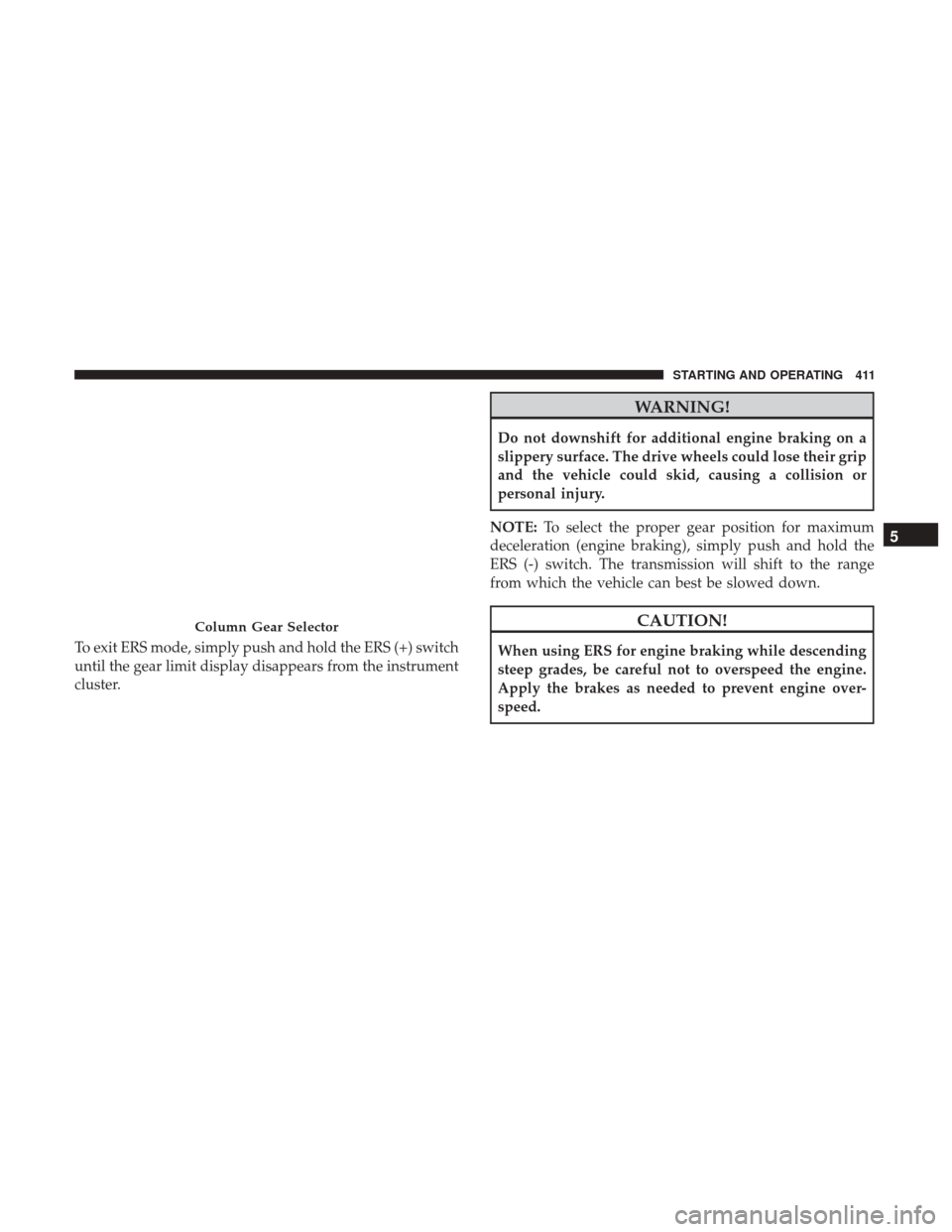
To exit ERS mode, simply push and hold the ERS (+) switch
until the gear limit display disappears from the instrument
cluster.
WARNING!
Do not downshift for additional engine braking on a
slippery surface. The drive wheels could lose their grip
and the vehicle could skid, causing a collision or
personal injury.
NOTE: To select the proper gear position for maximum
deceleration (engine braking), simply push and hold the
ERS (-) switch. The transmission will shift to the range
from which the vehicle can best be slowed down.
CAUTION!
When using ERS for engine braking while descending
steep grades, be careful not to overspeed the engine.
Apply the brakes as needed to prevent engine over-
speed.
Column Gear Selector
5
STARTING AND OPERATING 411
Page 414 of 734
Overdrive Operation
The automatic transmission includes an electronically con-
trolled Overdrive (fifth and sixth gears). The transmission
will automatically shift into Overdrive if the following
conditions are present:
•The gear selector is in the DRIVE position.
• The transmission fluid has reached an adequate tem-
perature.
• The engine coolant has reached an adequate tempera-
ture.
• Vehicle speed is sufficiently high.
• The TOW/HAUL switch has not been activated.
• The driver is not heavily pressing the accelerator.
When To Use TOW/HAUL Mode
When driving in hilly areas, towing a trailer, carrying a
heavy load, etc., and frequent transmission shifting occurs,
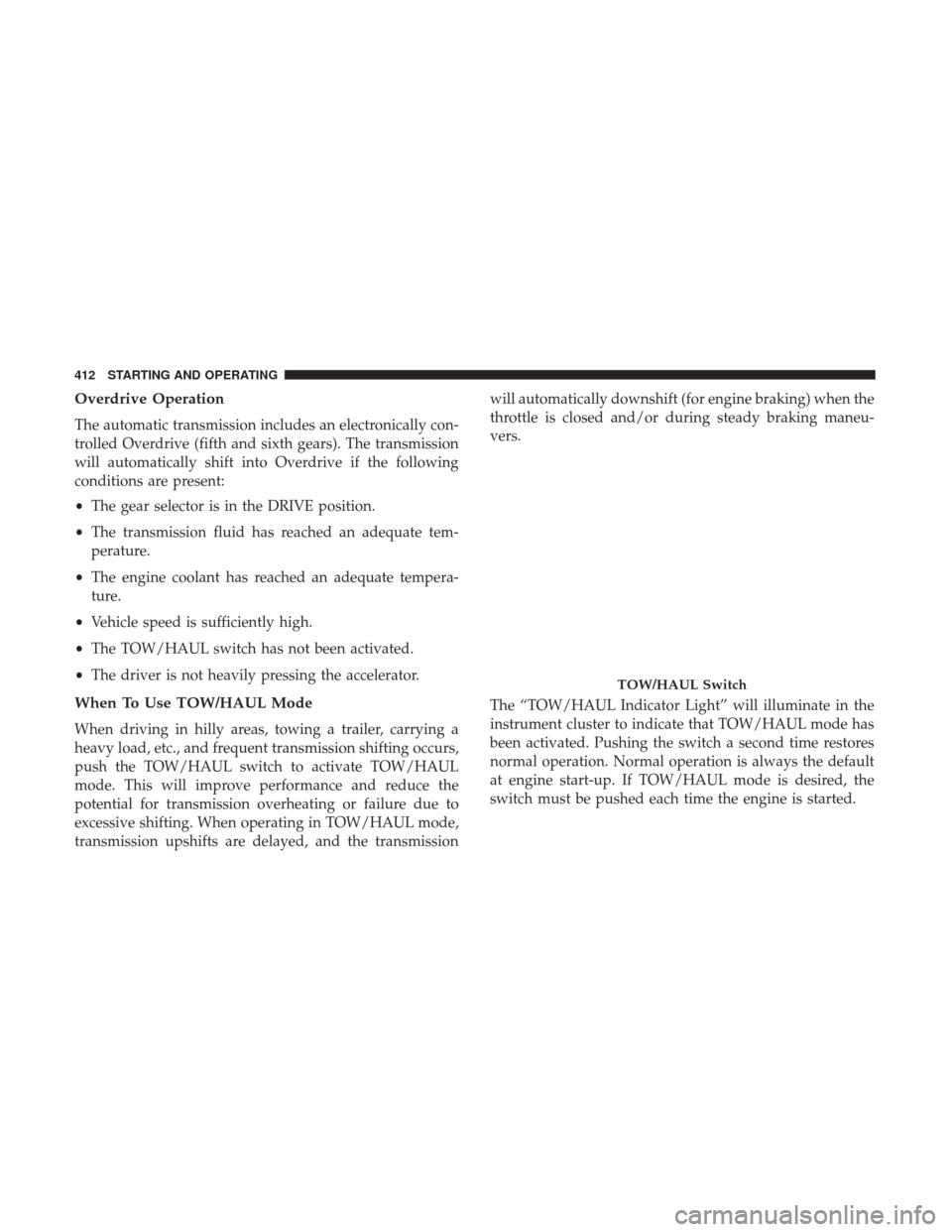
push the TOW/HAUL switch to activate TOW/HAUL
mode. This will improve performance and reduce the
potential for transmission overheating or failure due to
excessive shifting. When operating in TOW/HAUL mode,
transmission upshifts are delayed, and the transmission will automatically downshift (for engine braking) when the
throttle is closed and/or during steady braking maneu-
vers.
The “TOW/HAUL Indicator Light” will illuminate in the
instrument cluster to indicate that TOW/HAUL mode has
been activated. Pushing the switch a second time restores
normal operation. Normal operation is always the default
at engine start-up. If TOW/HAUL mode is desired, the
switch must be pushed each time the engine is started.
TOW/HAUL Switch
412 STARTING AND OPERATING
Page 415 of 734
WARNING!
Do not use the “TOW/HAUL” feature when driving in
icy or slippery conditions. The increased engine brak-
ing can cause the rear wheels to slide, and the vehicle
to swing around with the possible loss of vehicle
control, which may cause an accident possibly result-
ing in personal injury or death.
Torque Converter Clutch
A feature designed to improve fuel economy has been
included in the automatic transmission on your vehicle. A
clutch within the torque converter engages automatically
at calibrated speeds. This may result in a slightly different
feeling or response during normal operation in the upper
gears. When the vehicle speed drops or during some
accelerations, the clutch automatically disengages.NOTE:
•
The torque converter clutch will not engage, and the
transmission will not shift to sixth gear, until the trans-
mission fluid and engine coolant are warm [usually after
1 to 3 miles (2 to 5 km) of driving]. Because sixth gear is
disabled, and engine speed is higher when the torque
converter clutch is not engaged, it may seem as if the
transmission is not shifting properly when cold. This is
normal. Using the Electronic Range Select (ERS) shift
control, when the transmission is sufficiently warm, will
demonstrate that the transmission is able to shift into
and out of Overdrive.
• If the vehicle has not been driven for several days, the
first few seconds of operation after shifting the transmis-
sion into gear may seem sluggish. This is due to the fluid
partially draining from the torque converter into the
transmission. This condition is normal and will not
cause damage to the transmission. The torque converter
will refill within five seconds after starting the engine.
5
STARTING AND OPERATING 413
Page 418 of 734
Shifting Procedure — Manually Shifted Transfer
Case
2H To 4H
Shifting between 2H and 4H can be made with the vehicle
stopped or in motion. If the vehicle is in motion, shifts can
be made up to 55 mph (88 km/h). With the vehicle in
motion, the transfer case will engage/disengage faster if
you momentarily release the accelerator pedal after com-
pleting the shift. Apply a constant force when shifting the
transfer case lever.
2H Or 4H To 4L
NOTE:When shifting into or out of 4L some gear noise
may be heard. This noise is normal and is not detrimental
to the vehicle or occupants.
With the vehicle rolling at 2 to 3 mph (3 to 5 km/h), shift
the transmission into NEUTRAL. While the vehicle is
coasting at 2 to 3 mph (3 to 5 km/h), shift the transfer case
lever firmly to the desired position. Do not pause in
transfer case NEUTRAL. NOTE:
•
Pausing in transfer case NEUTRAL in vehicles equipped
with an automatic transmission may require shutting the
engine OFF to avoid gear clash while completing the
shift. If difficulty occurs, shift the transmission into
NEUTRAL, hold your foot on the brake, and turn the
engine OFF. Complete the range shift to the desired
mode.
• Shifting into or out of 4L is possible with the vehicle
completely stopped, however difficulty may occur due
to the mating clutch teeth not being properly aligned.
Several attempts may be required for clutch teeth align-
ment and shift completion to occur. The preferred
method is with the vehicle rolling 2 to 3 mph (3 to
5 km/h). Avoid attempting to engage or disengage 4L
with the vehicle moving faster than 2 to 3 mph (3 to
5 km/h).
• Do not attempt to shift into or out of 4L while the
transmission is in gear.
416 STARTING AND OPERATING
Page 422 of 734
WARNING!
You or others could be injured or killed if you leave the
vehicle unattended with the transfer case in the NEU-
TRAL position without first fully engaging the park-
ing brake. The transfer case NEUTRAL position disen-
gages both the front and rear drive shafts from the
powertrain and will allow the vehicle to roll, even if
the transmission is in PARK. The parking brake
should always be applied when the driver is not in the
vehicle.
Shifting Procedure
NOTE:
•If any of the requirements to select a new transfer case
position have not been met, the transfer case will not
shift. The position indicator light for the previous posi-
tion will remain ON and the newly selected position
indicator light will continue to flash until all the require-
ments for the selected position have been met. To retry a
shift: return the control switch back to the original
position, make certain all shift requirements have been
met, wait five seconds and try the shift again. •
If all the requirements to select a new transfer case
position have been met, the current position indicator
light will turn OFF, the selected position indicator light
will flash until the transfer case completes the shift.
When the shift is complete, the position indicator light
for the selected position will stop flashing and remain
ON.
2WD To 4WD LOCK
Rotate the 4WD control switch to the desired position.
Shifts between 2WD and 4WD LOCK can be done with the
vehicle stopped or in motion. With the vehicle in motion,
the transfer case will engage/disengage faster if you mo-
mentarily release the accelerator pedal after turning the
control switch. If the vehicle is stopped, the ignition switch
must be in the ON position with the engine either running
or off. This shift cannot be completed if the ignition switch
is in the ACC position.
NOTE: The four-wheel drive system will not allow shifts
between 2WD/4WD LOCK if the front and/or rear wheels
are spinning (no traction). In this situation, the selected
position indicator light will flash and the original position
indicator light will remain ON. At this time, reduce speed
and stop spinning the wheels to complete the shift.
420 STARTING AND OPERATING
Page 423 of 734

2WD Or 4WD LOCK To 4WD LOW
NOTE:When shifting into or out of 4WD LOW some gear
noise may be heard. This noise is normal and is not
detrimental to the vehicle or occupants.
Shifting can be performed with the vehicle rolling 2 to
3 mph (3 to 5 km/h) or completely stopped. You can use
either of the following procedures:
Preferred Procedure
1. With the engine running, slow the vehicle to 2 to 3 mph (3 to 5 km/h).
2. Shift the transmission into NEUTRAL.
3. While still rolling, rotate the transfer case control switch to the desired position.
4. After the desired position indicator light is ON (not flashing), shift the transmission back into gear. Alternate Procedure
1. Bring the vehicle to a complete stop.
2. With the ignition switch in the ON position and the
engine running, shift the transmission into NEUTRAL.
3. Rotate the transfer case control switch to the desired position.
4. After the desired position indicator light is ON (not flashing), shift the transmission back into gear.
NOTE:
•
If Steps 1 or 2 of either the Preferred or Alternate Proce-
dure are not satisfied prior to attempting the shift, then the
desired position indicator light will flash continuously
while the original position indicator light is ON, until all
requirements have been met.
• The ignition switch must be in the ON position for a
shift to take place and for the position indicator lights to
be operable. If the ignition switch is not in the ON
position, the shift will not take place and no position
indicator lights will be on or flashing.
5
STARTING AND OPERATING 421
Page 427 of 734
When operating your vehicle in 4WD LOW, the engine
speed is approximately three times that of the 2WD, 4WD
AUTO or 4WD LOCK positions at a given road speed. Take
care not to overspeed the engine and do not exceed 25 mph
(40 km/h).
Proper operation of four-wheel drive vehicles depends on
tires of equal size, type and circumference on each wheel.
Any difference in tire size can cause damage to the
drivetrain.
Because four-wheel drive provides improved traction,
there is a tendency to exceed safe turning and stopping
speeds. Do not go faster than road conditions permit.
WARNING!
You or others could be injured or killed if you leave the
vehicle unattended with the transfer case in the NEU-
TRAL position without first fully engaging the park-
ing brake. The transfer case NEUTRAL position disen-
gages both the front and rear drive shafts from the
powertrain and will allow the vehicle to roll, even if
the transmission is in PARK. The parking brake
should always be applied when the driver is not in the
vehicle.
Shifting Procedure
NOTE:
•If any of the requirements to select a new transfer case
position have not been met, the transfer case will not
shift. The position indicator light for the previous posi-
tion will remain ON and the newly selected position
indicator light will continue to flash until all the require-
ments for the selected position have been met. To retry a
shift: return the control switch back to the original
position, make certain all shift requirements have been
met, wait five seconds and try the shift again.
• If all the requirements to select a new transfer case
position have been met, the current position indicator
light will turn OFF, the selected position indicator light
will flash until the transfer case completes the shift.
When the shift is complete, the position indicator light
for the selected position will stop flashing and remain
ON.
5
STARTING AND OPERATING 425
Page 428 of 734
2WD To 4WD AUTO Or 4WD LOCK
Rotate the 4WD Control Switch to the desired position.
Shifts between 2WD and 4WD AUTO and 4WD LOCK can
be done with the vehicle stopped or in motion. With the
vehicle in motion, the transfer case will engage/disengage
faster if you momentarily release the accelerator pedal after
turning the control switch. If the vehicle is stopped, the
ignition switch must be in the ON position with the engine
either running or OFF. This shift cannot be completed if the
ignition switch is in the ACC position.
NOTE:The four-wheel drive system will not allow shifts
between 2WD and 4WD AUTO/4WD LOCK if the front
and/or rear wheels are spinning (no traction). In this
situation, the selected position indicator light will flash and
the original position indicator light will remain ON. At this
time, reduce speed and stop spinning the wheels to com-
plete the shift.
2WD Or 4WD AUTO Or 4WD LOCK To 4WD LOW
NOTE: When shifting into or out of 4WD LOW some gear
noise may be heard. This noise is normal and is not
detrimental to the vehicle or occupants. Shifting can be performed with the vehicle rolling 2 to
3 mph (3 to 5 km/h) or completely stopped. Use either of
the following procedures:
Preferred Procedure
1. With the engine running, slow the vehicle to 2 to 3 mph
(3 to 5 km/h).
2. Shift the transmission into NEUTRAL.
3. While still rolling, rotate the 4WD control switch to the desired position.
4. After the desired position indicator light is ON (not flashing), shift the transmission back into gear.
Alternate Procedure
1. Bring the vehicle to complete stop.
2. With the ignition switch in the ON position and the engine running, shift the transmission into NEUTRAL.
3. Rotate the 4WD control switch to the desired position.
4. After the desired position indicator light is ON (not flashing), shift the transmission back into gear.
426 STARTING AND OPERATING