horn Ram 1500 2019 User Guide
[x] Cancel search | Manufacturer: RAM, Model Year: 2019, Model line: 1500, Model: Ram 1500 2019Pages: 698, PDF Size: 9.04 MB
Page 581 of 698
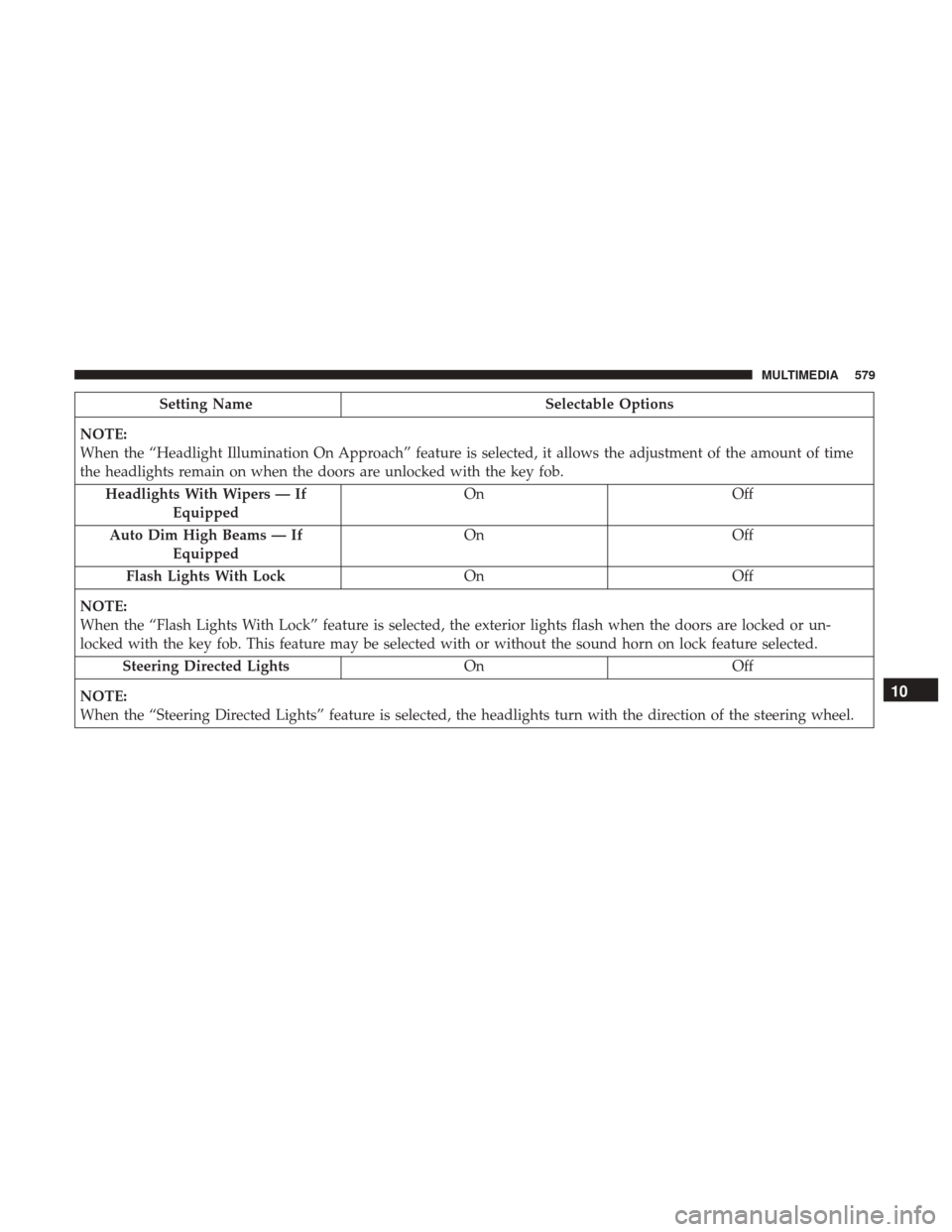
Setting NameSelectable Options
NOTE:
When the “Headlight Illumination On Approach” feature is selected, it allows the adjustment of the amount of time
the headlights remain on when the doors are unlocked with the key fob. Headlights With Wipers — If Equipped On
Off
Auto Dim High Beams — If Equipped On
Off
Flash Lights With Lock OnOff
NOTE:
When the “Flash Lights With Lock” feature is selected, the exterior lights flash when the doors are locked or un-
locked with the key fob. This feature may be selected with or without the sound horn on lock feature selected. Steering Directed Lights OnOff
NOTE:
When the “Steering Directed Lights” feature is selected, the headlights turn with the direction of the steering wheel.
10
MULTIMEDIA 579
Page 582 of 698
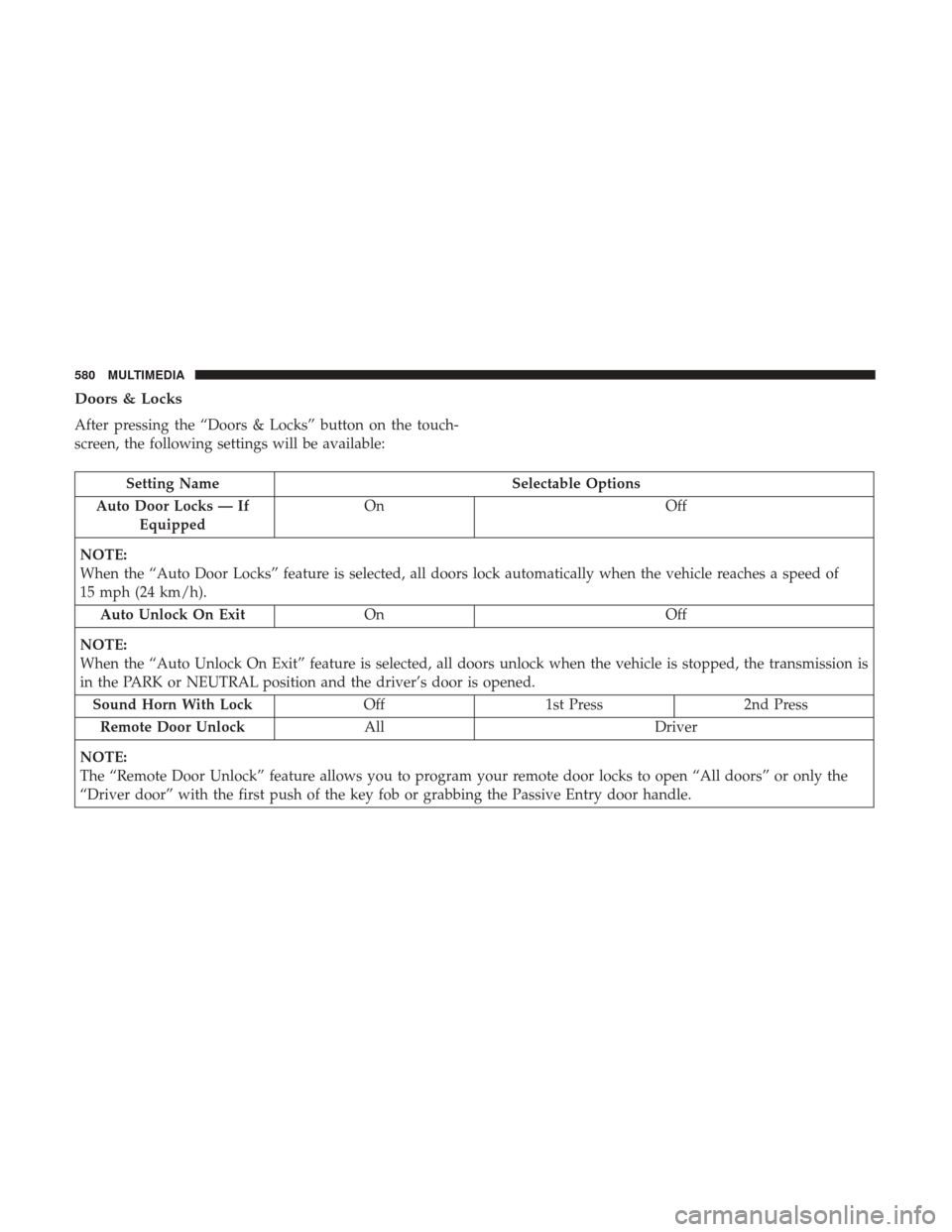
Doors & Locks
After pressing the “Doors & Locks” button on the touch-
screen, the following settings will be available:
Setting NameSelectable Options
Auto Door Locks — If Equipped On
Off
NOTE:
When the “Auto Door Locks” feature is selected, all doors lock automatically when the vehicle reaches a speed of
15 mph (24 km/h). Auto Unlock On Exit On Off
NOTE:
When the “Auto Unlock On Exit” feature is selected, all doors unlock when the vehicle is stopped, the transmission is
in the PARK or NEUTRAL position and the driver’s door is opened. Sound Horn With Lock Off1st Press 2nd Press
Remote Door Unlock All Driver
NOTE:
The “Remote Door Unlock” feature allows you to program your remote door locks to open “All doors” or only the
“Driver door” with the first push of the key fob or grabbing the Passive Entry door handle.
580 MULTIMEDIA
Page 583 of 698
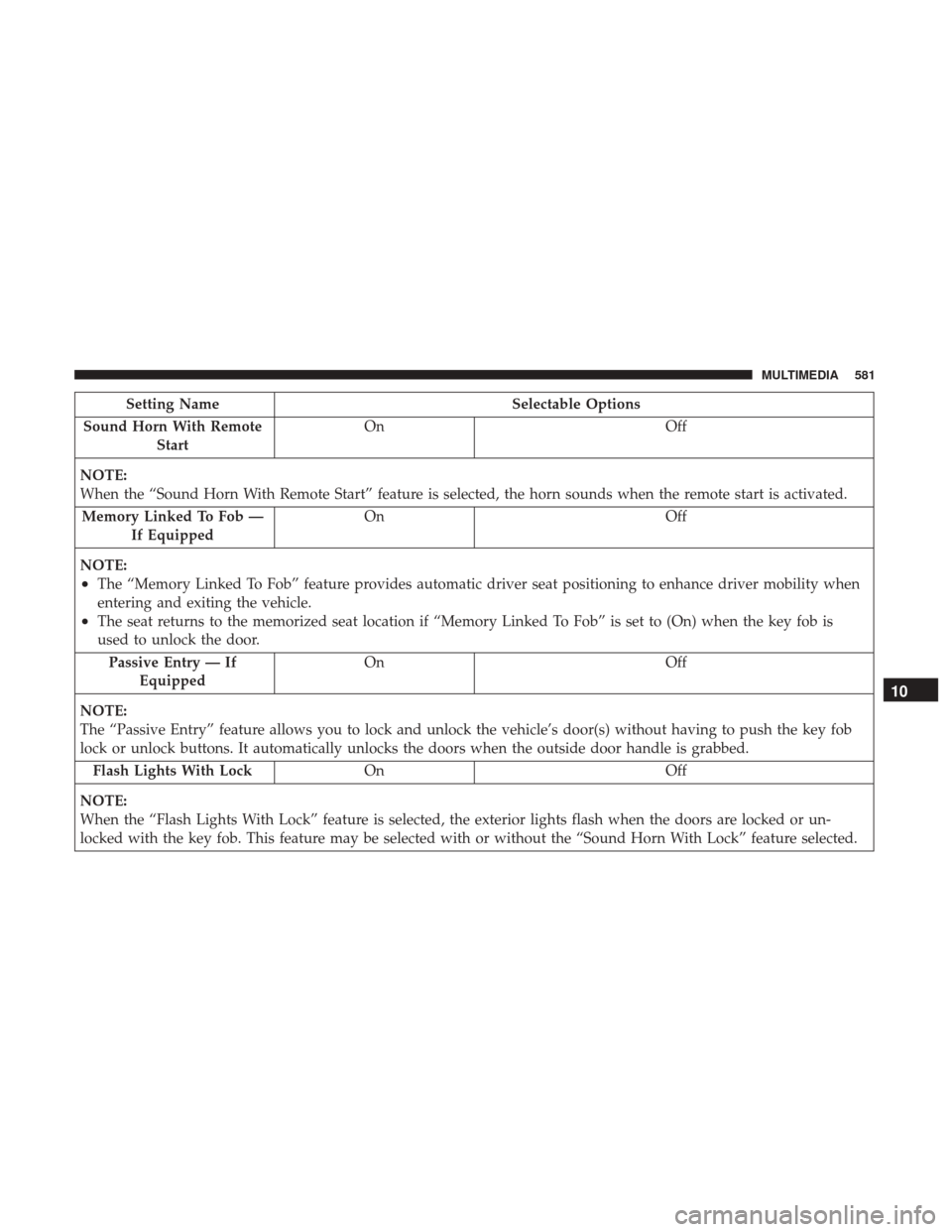
Setting NameSelectable Options
Sound Horn With Remote Start On
Off
NOTE:
When the “Sound Horn With Remote Start” feature is selected, the horn sounds when the remote start is activated. Memory Linked To Fob — If Equipped On
Off
NOTE:
•The “Memory Linked To Fob” feature provides automatic driver seat positioning to enhance driver mobility when
entering and exiting the vehicle.
•The seat returns to the memorized seat location if “Memory Linked To Fob” is set to (On) when the key fob is
used to unlock the door. Passive Entry — If Equipped On Off
NOTE:
The “Passive Entry” feature allows you to lock and unlock the vehicle’s door(s) without having to push the key fob
lock or unlock buttons. It automatically unlocks the doors when the outside door handle is grabbed. Flash Lights With Lock On Off
NOTE:
When the “Flash Lights With Lock” feature is selected, the exterior lights flash when the doors are locked or un-
locked with the key fob. This feature may be selected with or without the “Sound Horn With Lock” feature selected.
10
MULTIMEDIA 581
Page 585 of 698
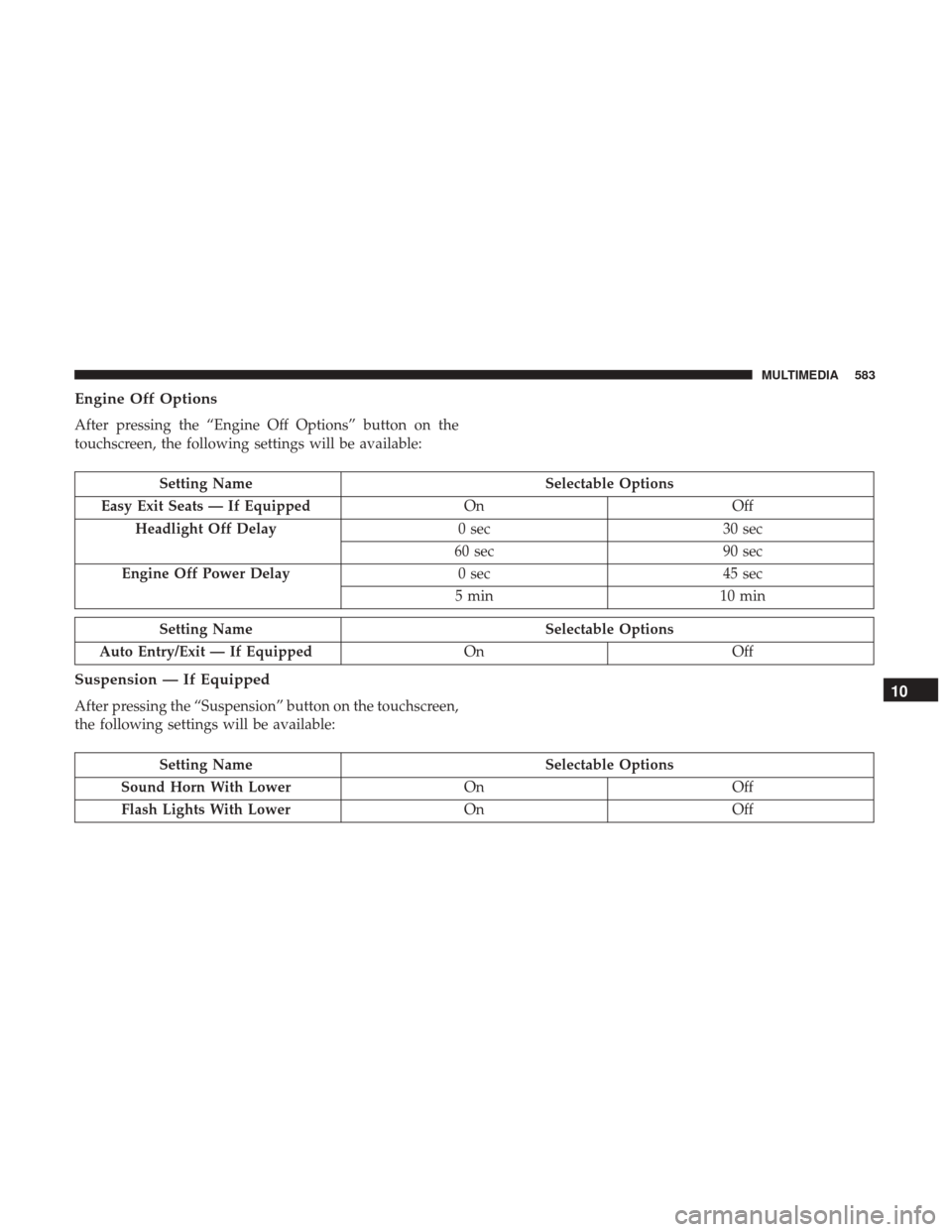
Engine Off Options
After pressing the “Engine Off Options” button on the
touchscreen, the following settings will be available:
Setting NameSelectable Options
Easy Exit Seats — If Equipped OnOff
Headlight Off Delay 0 sec30 sec
60 sec 90 sec
Engine Off Power Delay 0 sec45 sec
5 min 10 min
Setting Name Selectable Options
Auto Entry/Exit — If Equipped OnOff
Suspension — If Equipped
After pressing the “Suspension” button on the touchscreen,
the following settings will be available:
Setting Name Selectable Options
Sound Horn With Lower OnOff
Flash Lights With Lower OnOff
10
MULTIMEDIA 583
Page 605 of 698
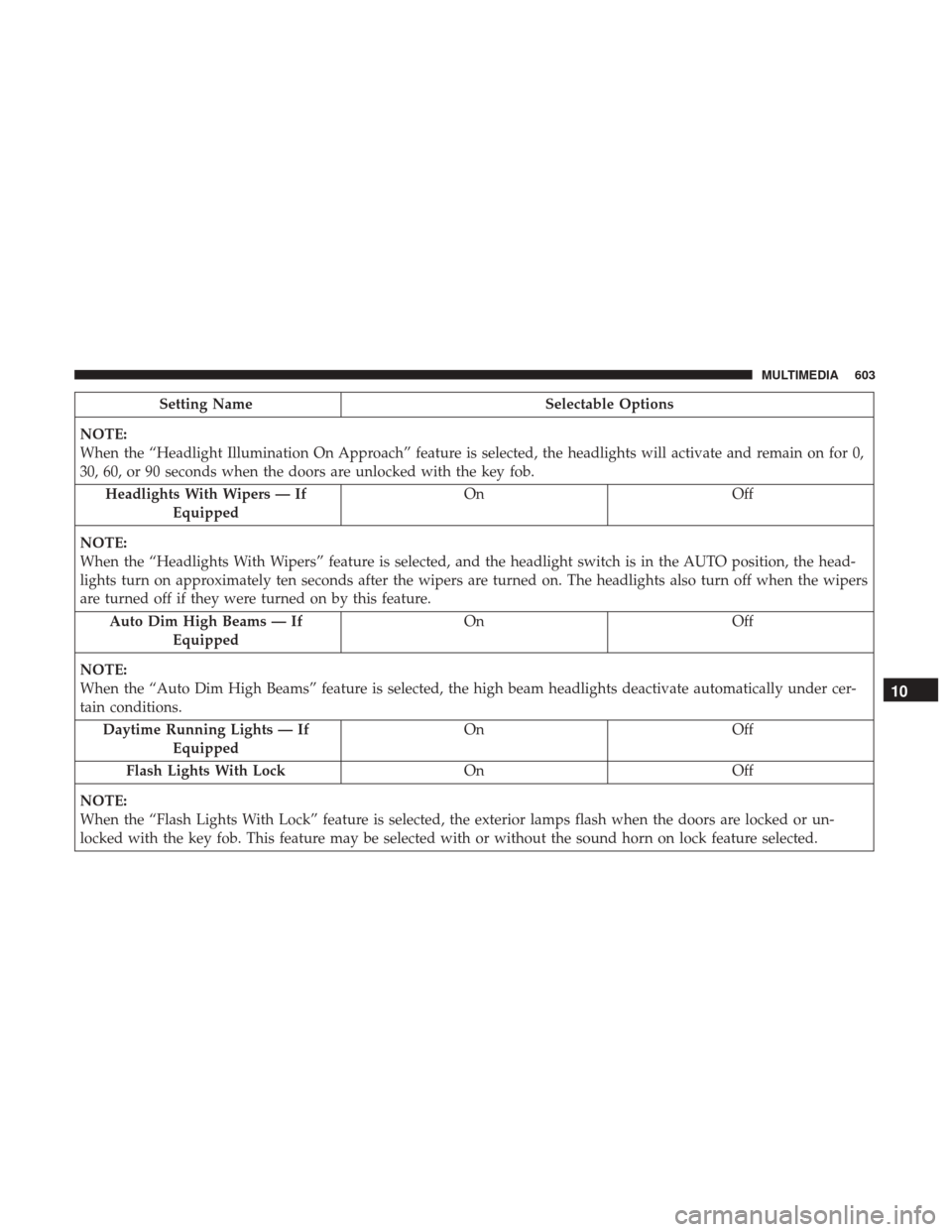
Setting NameSelectable Options
NOTE:
When the “Headlight Illumination On Approach” feature is selected, the headlights will activate and remain on for 0,
30, 60, or 90 seconds when the doors are unlocked with the key fob. Headlights With Wipers — If Equipped On
Off
NOTE:
When the “Headlights With Wipers” feature is selected, and the headlight switch is in the AUTO position, the head-
lights turn on approximately ten seconds after the wipers are turned on. The headlights also turn off when the wipers
are turned off if they were turned on by this feature. Auto Dim High Beams — If Equipped On
Off
NOTE:
When the “Auto Dim High Beams” feature is selected, the high beam headlights deactivate automatically under cer-
tain conditions. Daytime Running Lights — If Equipped On
Off
Flash Lights With Lock OnOff
NOTE:
When the “Flash Lights With Lock” feature is selected, the exterior lamps flash when the doors are locked or un-
locked with the key fob. This feature may be selected with or without the sound horn on lock feature selected.
10
MULTIMEDIA 603
Page 606 of 698
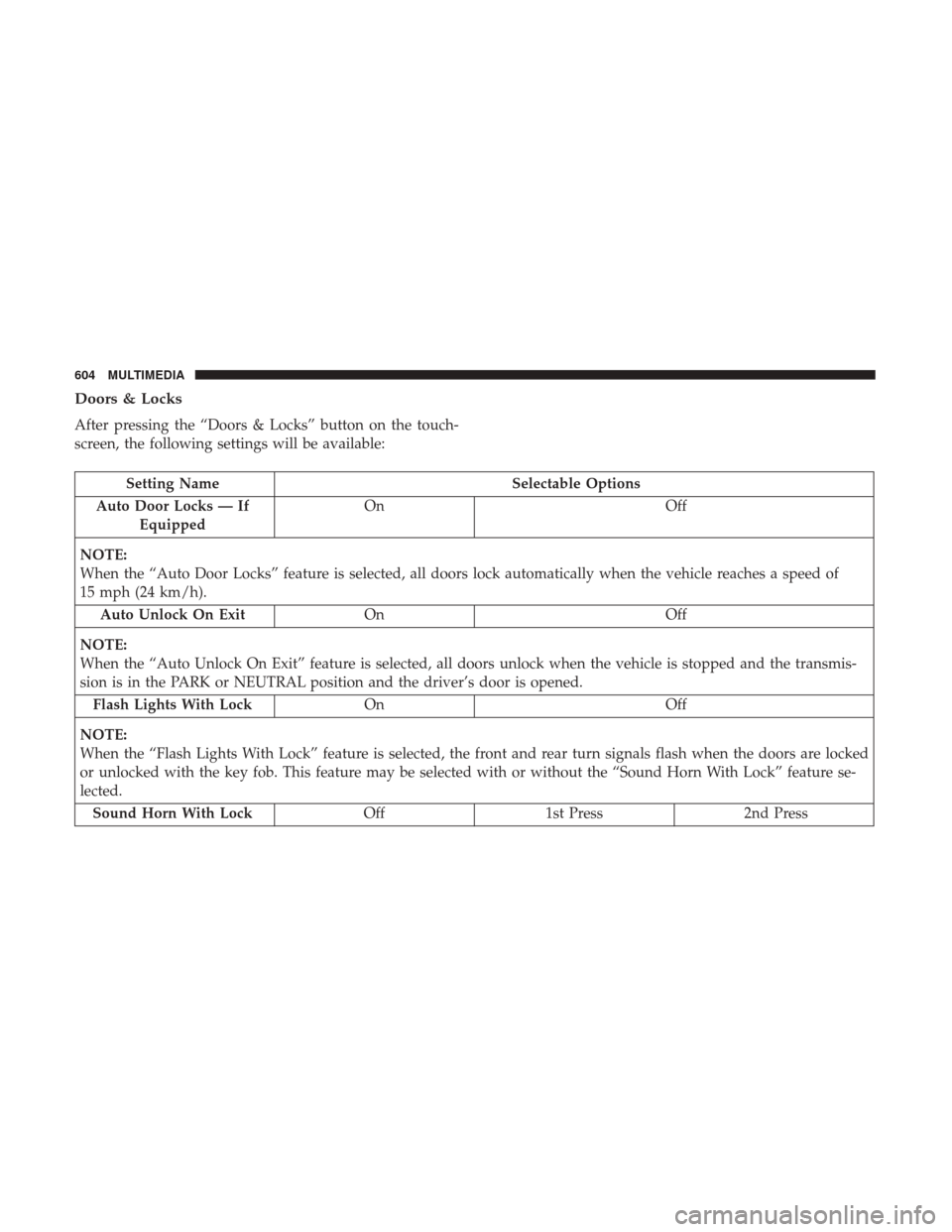
Doors & Locks
After pressing the “Doors & Locks” button on the touch-
screen, the following settings will be available:
Setting NameSelectable Options
Auto Door Locks — If Equipped On
Off
NOTE:
When the “Auto Door Locks” feature is selected, all doors lock automatically when the vehicle reaches a speed of
15 mph (24 km/h). Auto Unlock On Exit On Off
NOTE:
When the “Auto Unlock On Exit” feature is selected, all doors unlock when the vehicle is stopped and the transmis-
sion is in the PARK or NEUTRAL position and the driver’s door is opened. Flash Lights With Lock On Off
NOTE:
When the “Flash Lights With Lock” feature is selected, the front and rear turn signals flash when the doors are locked
or unlocked with the key fob. This feature may be selected with or without the “Sound Horn With Lock” feature se-
lected. Sound Horn With Lock Off1st Press 2nd Press
604 MULTIMEDIA
Page 607 of 698
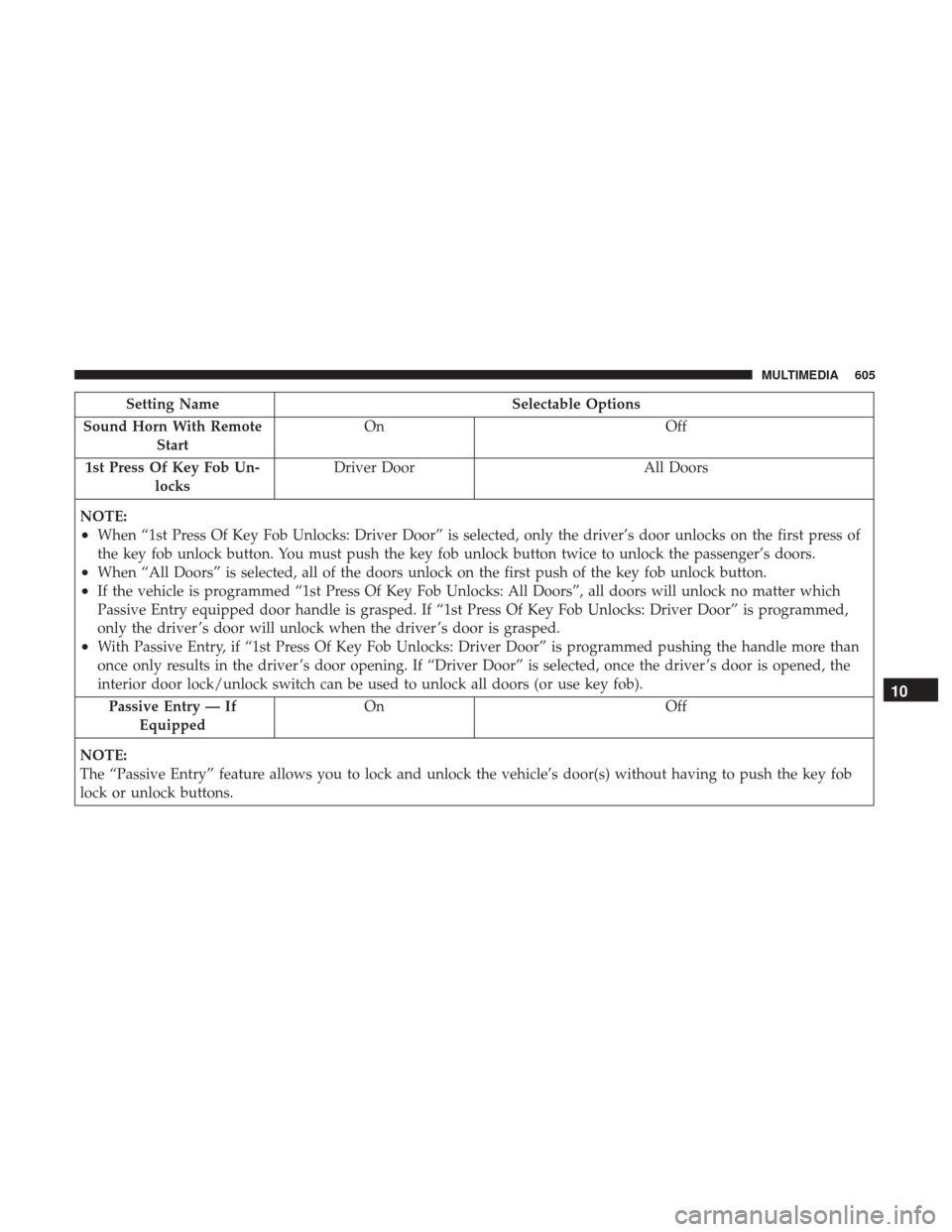
Setting NameSelectable Options
Sound Horn With Remote Start On
Off
1st Press Of Key Fob Un- locks Driver Door
All Doors
NOTE:
•When “1st Press Of Key Fob Unlocks: Driver Door” is selected, only the driver’s door unlocks on the first press of
the key fob unlock button. You must push the key fob unlock button twice to unlock the passenger’s doors.
•When “All Doors” is selected, all of the doors unlock on the first push of the key fob unlock button.
•If the vehicle is programmed “1st Press Of Key Fob Unlocks: All Doors”, all doors will unlock no matter which
Passive Entry equipped door handle is grasped. If “1st Press Of Key Fob Unlocks: Driver Door” is programmed,
only the driver ’s door will unlock when the driver ’s door is grasped.
•With Passive Entry, if “1st Press Of Key Fob Unlocks: Driver Door” is programmed pushing the handle more than
once only results in the driver ’s door opening. If “Driver Door” is selected, once the driver ’s door is opened, the
interior door lock/unlock switch can be used to unlock all doors (or use key fob). Passive Entry — If Equipped On Off
NOTE:
The “Passive Entry” feature allows you to lock and unlock the vehicle’s door(s) without having to push the key fob
lock or unlock buttons.
10
MULTIMEDIA 605
Page 611 of 698
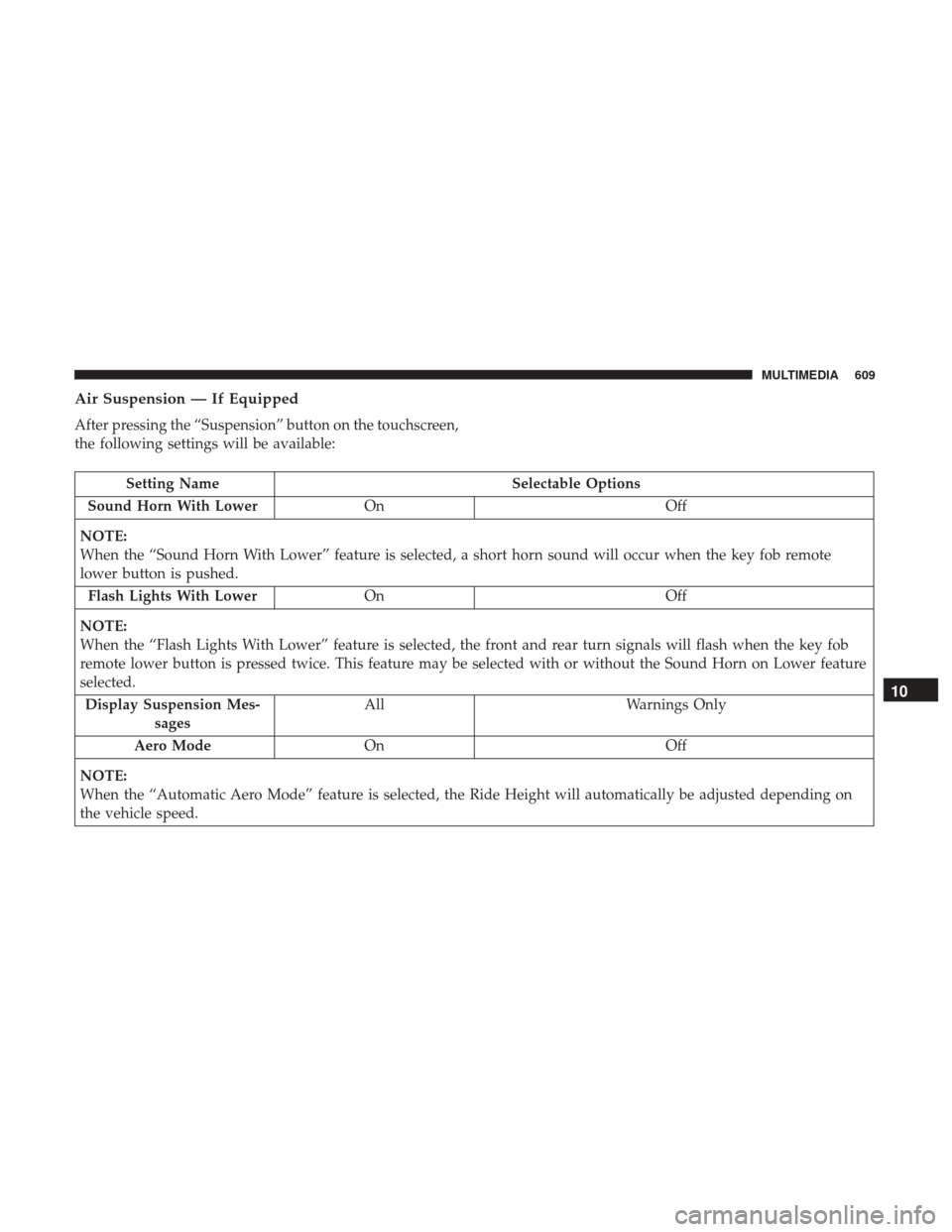
Air Suspension — If Equipped
After pressing the “Suspension” button on the touchscreen,
the following settings will be available:
Setting NameSelectable Options
Sound Horn With Lower On Off
NOTE:
When the “Sound Horn With Lower” feature is selected, a short horn sound will occur when the key fob remote
lower button is pushed. Flash Lights With Lower On Off
NOTE:
When the “Flash Lights With Lower” feature is selected, the front and rear turn signals will flash when the key fob
remote lower button is pressed twice. This feature may be selected with or without the Sound Horn on Lower feature
selected. Display Suspension Mes- sages All
Warnings Only
Aero Mode On Off
NOTE:
When the “Automatic Aero Mode” feature is selected, the Ride Height will automatically be adjusted depending on
the vehicle speed.
10
MULTIMEDIA 609
Page 629 of 698
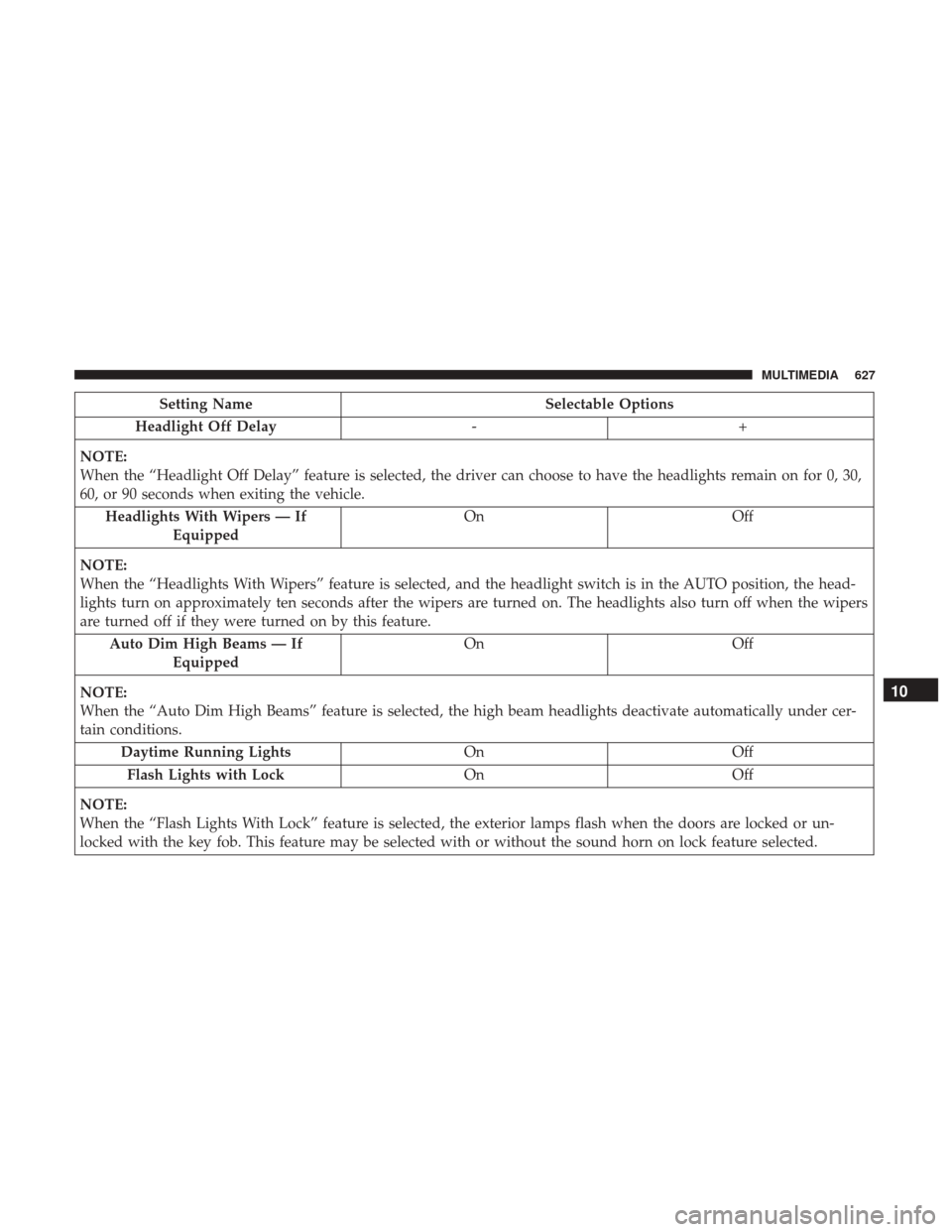
Setting NameSelectable Options
Headlight Off Delay -+
NOTE:
When the “Headlight Off Delay” feature is selected, the driver can choose to have the headlights remain on for 0, 30,
60, or 90 seconds when exiting the vehicle. Headlights With Wipers — If Equipped On
Off
NOTE:
When the “Headlights With Wipers” feature is selected, and the headlight switch is in the AUTO position, the head-
lights turn on approximately ten seconds after the wipers are turned on. The headlights also turn off when the wipers
are turned off if they were turned on by this feature. Auto Dim High Beams — If Equipped On
Off
NOTE:
When the “Auto Dim High Beams” feature is selected, the high beam headlights deactivate automatically under cer-
tain conditions. Daytime Running Lights OnOff
Flash Lights with Lock OnOff
NOTE:
When the “Flash Lights With Lock” feature is selected, the exterior lamps flash when the doors are locked or un-
locked with the key fob. This feature may be selected with or without the sound horn on lock feature selected.
10
MULTIMEDIA 627
Page 630 of 698

Setting NameSelectable Options
Steering Directed Lights OnOff
NOTE:
When the “Steering Directed Lights” feature is selected, the headlights turn with the direction of the steering wheel.
Doors & Locks
After pressing the “Doors & Locks” button on the touch-
screen, the following settings will be available:
Setting Name Selectable Options
Auto Door Locks OnOff
Auto Unlock On Exit OnOff
NOTE:
When the “Auto Unlock On Exit” feature is selected, all doors unlock when the vehicle is stopped and the transmis-
sion is in the PARK or NEUTRAL position and the driver’s door is opened. Flash Lights With Lock OnOff
NOTE:
When the “Flash Lights With Lock” feature is selected, the front and rear turn signals flash when the doors are locked
or unlocked with the key fob. This feature may be selected with or without the “Sound Horn With Lock” feature se-
lected. Sound Horn With Remote Start OnOff
1st Press Of Key Fob Unlocks Driver DoorAll Doors
628 MULTIMEDIA