door lock Ram 1500 2019 Owner's Guide
[x] Cancel search | Manufacturer: RAM, Model Year: 2019, Model line: 1500, Model: Ram 1500 2019Pages: 698, PDF Size: 9.04 MB
Page 44 of 698
NOTE:Use the Auto Unlock Doors feature in accordance
with local laws.
Child-Protection Door Lock
To provide a safer environment for children riding in the
rear seat, the rear doors (if equipped) of your vehicle have
the Child-Protection Door Lock system. To use the system, open each rear door, use a flat blade
screwdriver (or emergency key) and rotate the dial to
engage and disengage the Child-Protection locks. When
the system on a door is engaged, that door can only be
opened by using the outside door handle even if the inside
door lock is in the unlocked position.
Child-Protection Door Lock Location
Child Lock Control
42 GETTING TO KNOW YOUR VEHICLE
Page 45 of 698
WARNING!
Avoid trapping anyone in the vehicle in a collision.
Remember that the sliding doors cannot be opened
from the inside door handle when the Child Protection
Door Locks are engaged.
NOTE:
• After setting the Child-Protection Door Lock system,
always test the door from the inside to make certain it is
in the desired position.
• For emergency exit with the system engaged, move the
door lock switch to the unlock position, roll down the
window, and open the door with the outside door
handle.
SEATS
Seats are a part of the Occupant Restraint System of the
vehicle.
WARNING!
• It is dangerous to ride in a cargo area, inside or
outside of a vehicle. In a collision, people riding in
these areas are more likely to be seriously injured or
killed.
• Do not allow people to ride in any area of your
vehicle that is not equipped with seats and seat belts.
In a collision, people riding in these areas are more
likely to be seriously injured or killed.
• Be sure everyone in your vehicle is in a seat and
using a seat belt properly.
3
GETTING TO KNOW YOUR VEHICLE 43
Page 51 of 698
Driver Memory Seats — If Equipped
This feature allows the driver to store up to two different
memory profiles for easy recall through memory buttons.
Each memory profile contains desired position settings for
the driver ’s seat, side mirrors, adjustable pedals (if
equipped), and a set of desired radio station presets. Your
remote keyless entry key fob can also be programmed to
recall the same positions when the unlock button is
pushed.
NOTE:Your vehicle is equipped with two key fobs, one
key fob can be linked to memory position 1 and the other
key fob can be linked to memory position 2.
The driver memory seat buttons are located on the driver
door, next to the door handle.
Programming The Memory Feature
To create a new memory profile, perform the following:
1. Cycle the vehicle’s ignition to the ON/RUN position (do not start the engine).
2. Adjust all memory profile settings to desired prefer- ences (i.e., driver ’s seat, outside mirrors, adjustable
pedals (if equipped), and radio station presets).
3. Push and release the set (S) button on the memory switch.
Driver Memory Seat Buttons
3
GETTING TO KNOW YOUR VEHICLE 49
Page 53 of 698
Driver One Memory Position Recall
•To recall the memory settings for driver one using the
memory buttons on the door panel, push memory
button (1).
• To recall the memory settings for driver one using the
key fob, push the unlock button on the key fob linked to
memory position 1.
Driver Two Memory Position Recall
• To recall the memory setting for driver two using the
memory buttons on the door panel, push memory
button (2).
• To recall the memory settings for driver two using the
key fob, push the unlock button on the key fob linked to
memory position 2.
A recall can be cancelled by pushing any of the memory
buttons during a recall (S, 1, or 2). When a recall is
canceled, the driver’s seat and the power pedals (if
equipped) stop moving. A delay of one second will occur
before another recall can be selected.Easy Entry/Exit Seat
This feature provides automatic driver ’s seat positioning to
enhance driver mobility when entering and exiting the
vehicle.
The distance the driver ’s seat moves depends on where
you have the driver ’s seat positioned when you remove the
key fob from the ignition.
• When you remove the key fob from the ignition, the
driver ’s seat will move about 2.4 inches (60 mm) rear-
ward if the driver ’s seat position is greater than or equal
to 2.7 inches (67.7 mm) forward of the rear stop. The seat
will return to its previously set position when you place
the ignition into the ACC or RUN position.
• When you remove the key fob from the ignition, the
driver ’s seat will move to a position 0.3 inches (7.7 mm)
forward of the rear stop if the driver ’s seat position is
between 0.9 inches and 2.7 inches (22.7 mm and
67.7 mm) forward of the rear stop. The seat will return to
its previously set position when you place the ignition to
the ACC or RUN position.
3
GETTING TO KNOW YOUR VEHICLE 51
Page 62 of 698
DRIVER ADJUSTABLE PEDALS — IF EQUIPPED
The adjustable pedals system is designed to allow a greater
range of driver comfort for steering wheel tilt and seat
position. This feature allows the brake and accelerator
pedals to move toward or away from the driver to provide
improved position with the steering wheel.
The adjustable pedal switch is located on the instrument
panel, below the headlight switch.
•The pedals can be adjusted with the ignition OFF. •
The pedals cannotbe adjusted when the vehicle is in
REVERSE or when the Speed Control System or Adap-
tive Cruise Control systems are on. The following mes-
sages will appear on vehicles equipped with an instru-
ment cluster display if the pedals are attempted to be
adjusted when the system is locked out: “Adjustable
Pedal Disabled — Cruise Control Engaged” or “Adjust-
able Pedal Disabled — Vehicle In Reverse”.
NOTE:
• Always adjust the pedals to a position that allows full
pedal travel.
• Further small adjustments may be necessary to find the
best possible seat/pedal position.
• For vehicles equipped with Driver Memory Seat, you
can use your key fob or the memory switch on the
driver ’s door trim panel to return the adjustable pedals
to pre-programmed positions.
• Refer to “Driver Memory Seat” in “Getting To Know
Your Vehicle” for further information.
Adjustable Pedals Switch
60 GETTING TO KNOW YOUR VEHICLE
Page 76 of 698
telltale will illuminate in the instrument cluster display
when these lights are on. Pushing the switch a second time
will turn the lights off.
The cargo light and bed lights (if equipped) will turn on for
approximately 60 seconds when a key fob unlock button is
pushed, as part of the Illuminated Entry feature.
Battery Saver
To protect the life of your vehicle’s battery, load shedding
is provided for both the interior and exterior lights.If the ignition is OFF and any door is left ajar for 10 minutes
or the dimmer control is rotated all the way up to the dome
on position for 10 minutes, the interior lights will automati-
cally turn off.
NOTE:
Battery saver mode is canceled if the ignition is
ON.
If the headlights remain on while the ignition is cycled OFF,
the exterior lights will automatically turn off after eight
minutes. If the headlights are turned on and left on for
eight minutes while the ignition is OFF, the exterior lights
will automatically turn off.
INTERIOR LIGHTS
Courtesy Lights
Courtesy and dome lights are turned on when the front
doors are opened, the ambient dimmer control is rotated to
the highest detent, or the Illuminated Entry ON button is
pushed on the overhead console. Also, if your vehicle is
equipped with Remote Keyless Entry, and the unlock
button is pushed on the key fob, the courtesy and dome
lights will turn on.Bed Light Switch In Truck Bed
74 GETTING TO KNOW YOUR VEHICLE
Page 78 of 698
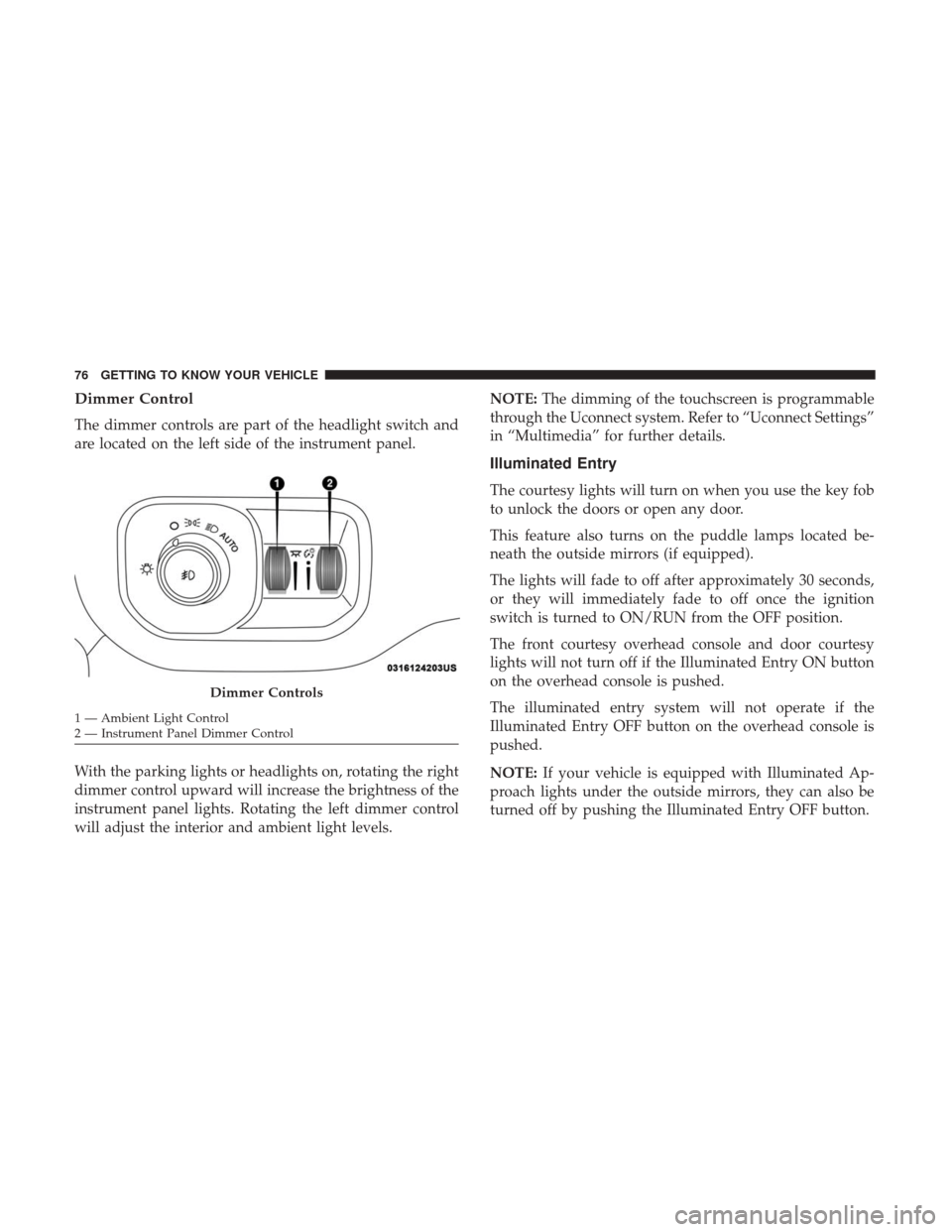
Dimmer Control
The dimmer controls are part of the headlight switch and
are located on the left side of the instrument panel.
With the parking lights or headlights on, rotating the right
dimmer control upward will increase the brightness of the
instrument panel lights. Rotating the left dimmer control
will adjust the interior and ambient light levels.NOTE:
The dimming of the touchscreen is programmable
through the Uconnect system. Refer to “Uconnect Settings”
in “Multimedia” for further details.
Illuminated Entry
The courtesy lights will turn on when you use the key fob
to unlock the doors or open any door.
This feature also turns on the puddle lamps located be-
neath the outside mirrors (if equipped).
The lights will fade to off after approximately 30 seconds,
or they will immediately fade to off once the ignition
switch is turned to ON/RUN from the OFF position.
The front courtesy overhead console and door courtesy
lights will not turn off if the Illuminated Entry ON button
on the overhead console is pushed.
The illuminated entry system will not operate if the
Illuminated Entry OFF button on the overhead console is
pushed.
NOTE: If your vehicle is equipped with Illuminated Ap-
proach lights under the outside mirrors, they can also be
turned off by pushing the Illuminated Entry OFF button.
Dimmer Controls
1 — Ambient Light Control
2 — Instrument Panel Dimmer Control 76 GETTING TO KNOW YOUR VEHICLE
Page 100 of 698
Window Lockout Switch
The window lockout switch on the driver’s door allows
you to disable the window control on the rear passenger
doors. To disable the window controls on the rear passen-
ger doors, push the window lock switch into the latched or
down position. To enable the window controls, push the
window lock switch again and return the switch to the
released or up position.
Power Sliding Rear Window — If Equipped
The switch for the power sliding rear window is located on
the overhead console.
Push the switch rearward to open the glass. Pull the switch
forward to close the glass.
Manual Sliding Rear Window — If Equipped
A locking device in the center of the window helps to
prevent entry from the rear of the vehicle. Squeeze the lock
to release the window.Window Lockout Switch
Rear Window Switch
98 GETTING TO KNOW YOUR VEHICLE
Page 103 of 698
Wind Buffeting
Wind buffeting can be described as the perception of
pressure on the ears or a helicopter-type sound in the ears.
Your vehicle may exhibit wind buffeting with the windows
down, or the sunroof (if equipped) in certain open or
partially open positions. This is a normal occurrence and
can be minimized. If the buffeting occurs with the rear
windows open, then open the front and rear windows
together to minimize the buffeting. If the buffeting occurs
with the sunroof open, adjust the sunroof opening to
minimize the buffeting or open any window.
Sunshade Operation
The sunshade can be opened manually. However, the
sunshade will open automatically as the sunroof opens.
NOTE:The sunshade cannot be closed if the sunroof is
open.
Pinch Protect Feature
This feature will detect an obstruction in the closing of the
sunroof during the Express Close operation. If an obstruc-
tion in the path of the sunroof is detected, the sunroof will
automatically retract. Remove the obstruction if this oc-
curs. NOTE:
If three consecutive sunroof close attempts result in
Pinch Protect reversals, Pinch Protect will disable and the
sunroof must be closed in Manual Mode.
Venting Sunroof — Express
Push and release the Vent button within one half second
and the sunroof will open to the vent position. This is
called “Express Vent”, and it will occur regardless of
sunroof position. During Express Vent operation, any other
actuation of the switch will stop the sunroof.
Sunroof Maintenance
Use only a non-abrasive cleaner and a soft cloth to clean the
glass panel.
Ignition Off Operation
The power sunroof switch will remain active for up to
approximately 10 minutes after the ignition switch is
turned to the OFF/LOCK position. Opening either front
door will cancel this feature.
NOTE: Ignition Off time is programmable through the
Uconnect System. Refer to “Uconnect Settings” in “Multi-
media” for further information.
3
GETTING TO KNOW YOUR VEHICLE 101
Page 108 of 698
Sunroof Maintenance
Use only a non-abrasive cleaner and a soft cloth to clean the
glass panel.
Ignition Off Operation
The power sunroof switch will remain active for up to
approximately 10 minutes after the ignition switch is
turned to the OFF/LOCK position. Opening either front
door will cancel this feature.
NOTE:Ignition Off time is programmable through the
Uconnect System. Refer to “Uconnect Settings” in “Multi-
media” for further information.
HOOD
To Open The Hood
To open the hood, two latches must be released.
1. Pull the hood release lever located below the steering wheel at the base of the instrument panel.
Hood Release Location
106 GETTING TO KNOW YOUR VEHICLE