wheel Ram 1500 2019 Repair Manual
[x] Cancel search | Manufacturer: RAM, Model Year: 2019, Model line: 1500, Model: Ram 1500 2019Pages: 698, PDF Size: 9.04 MB
Page 338 of 698
rear wheel on an excessively slippery surface, slight mo-
mentary application of the parking brake may be necessary
to gain maximum traction.
WARNING!
When servicing vehicles equipped with a limited-slip
or locking differential never run the engine with one
rear wheel off the ground since the vehicle may drive
through the rear wheel remaining on the ground and
result in unintended movement.
Care should be taken to avoid sudden accelerations when
both rear wheels are on a slippery surface. This could cause
both rear wheels to spin, and allow the vehicle to slide
sideways on the crowned surface of a road or in a turn.
POWER STEERING
Electric Power Steering
The electric power steering system will give you good
vehicle response and increased ease of maneuverability in
tight spaces. The system will vary its assist to provide light
efforts while parking and good feel while driving. If the electric steering system experiences a fault that prevents it
from providing assist, you will still have the ability to steer
the vehicle manually.
If the Steering icon is flashing, it indicates that the vehicle
needs to be taken to the dealer for service. It is likely the
vehicle has lost power steering assistance.
If the Steering icon is displayed and the “POWER STEER-
ING SYSTEM OVER TEMP” message is displayed on the
instrument cluster screen, they indicate that extreme steer-
ing maneuvers may have occurred which caused an over
temperature condition in the power steering system. Once
driving conditions are safe, pull over and let the vehicle
idle for a few moments until the icon and message turn off.
Refer to “Instrument Cluster Display” in “Getting To Know
Your Instrument Panel” for further information.
If the Steering icon is displayed and the “SERVICE POWER
STEERING – ASSIST OFF” message is displayed the in-
strument cluster screen, they indicate the vehicle needs to
be taken to the dealer for service. Refer to “Instrument
Cluster Display” in “Getting To Know Your Instrument
Panel” for further information.
336 STARTING AND OPERATING
Page 342 of 698
3. At the next vehicle stop (after turning off the STOP/START system) the engine will not be stopped.
4. If the STOP/START system is manually turned off, the engine can be started and stopped by cycling the
ignition switch or pressing the STOP/START switch
again.
5. The STOP/START system will reset itself back to an ON condition every time the key is turned off and back on.
To Manually Turn On The Stop Start System
1. Push the STOP/START Off switch (located near the gearselector module).
2. The light on the switch will turn off.
System Malfunction
If there is a malfunction in the STOP/START system, the
system will not shut down the engine. A “SERVICE STOP/
START SYSTEM” message will appear in the instrument
cluster display. Refer to “Instrument Cluster Display” in
“Getting To Know Your Instrument Panel” for further
information.
The system will need to be checked by your authorized
dealer.
SPEED CONTROL — IF EQUIPPED
When engaged, the Speed Control takes over accelerator
operations at speeds greater than 20 mph (32 km/h).
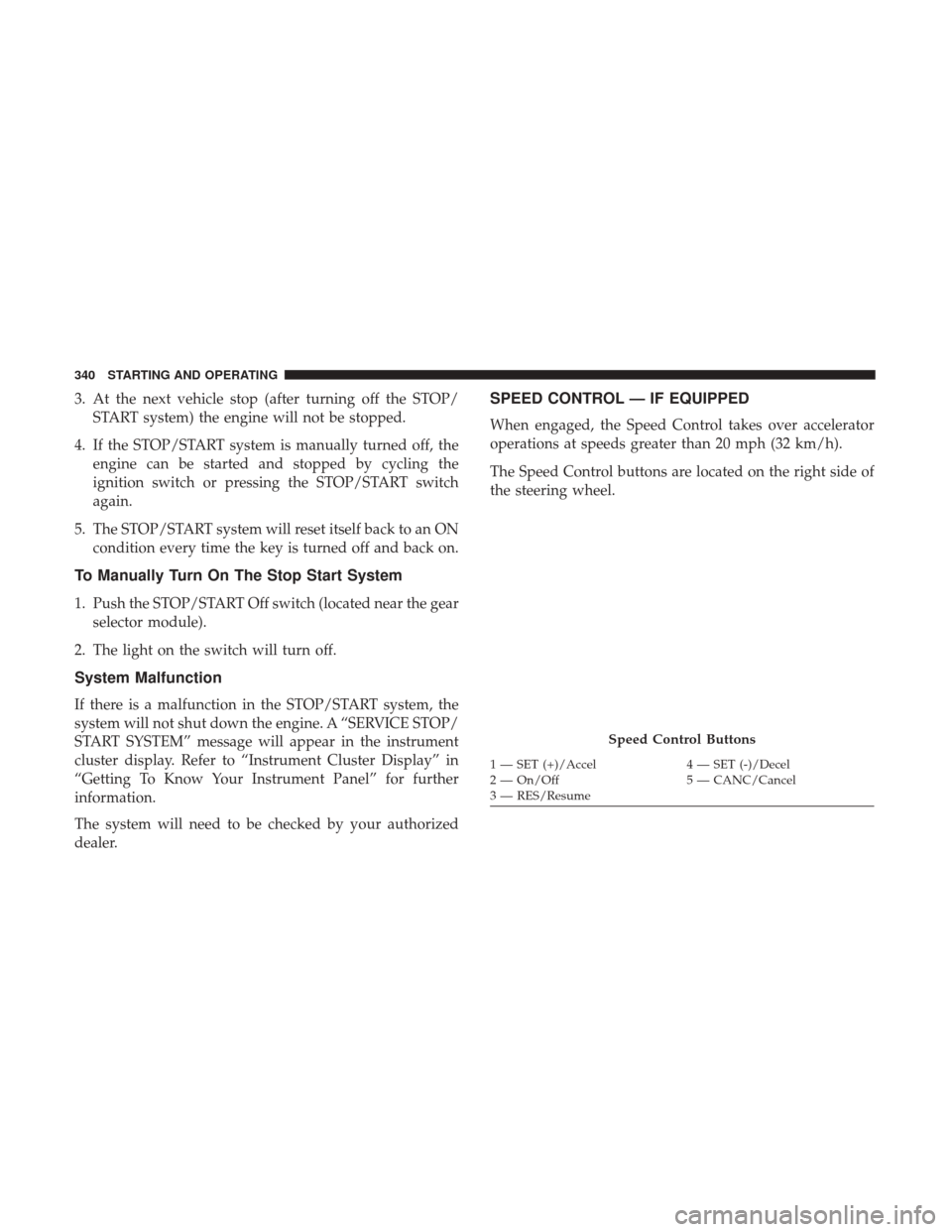
The Speed Control buttons are located on the right side of
the steering wheel.
Speed Control Buttons
1 — SET (+)/Accel 4 — SET (-)/Decel
2 — On/Off 5 — CANC/Cancel
3 — RES/Resume
340 STARTING AND OPERATING
Page 347 of 698
WARNING!(Continued)
You should switch off the ACC system:
•When driving in fog, heavy rain, heavy snow, sleet,
heavy traffic, and complex driving situations (i.e., in
highway construction zones).
• When entering a turn lane or highway off ramp;
when driving on roads that are winding, icy, snow-
covered, slippery, or have steep uphill or downhill
slopes.
• When towing a trailer up or down steep slopes.
• When circumstances do not allow safe driving at a
constant speed.
Adaptive Cruise Control (ACC) Operation
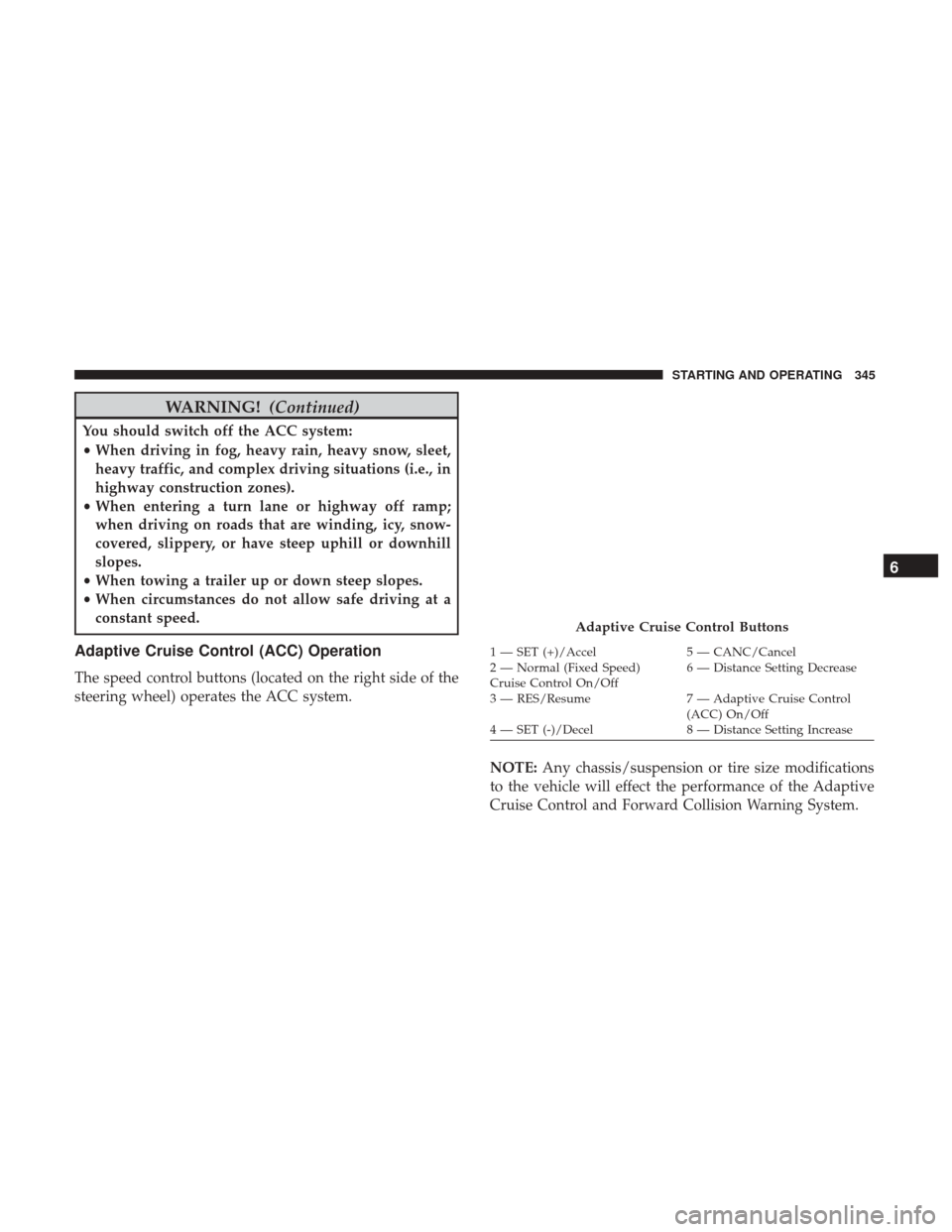
The speed control buttons (located on the right side of the
steering wheel) operates the ACC system.
NOTE:Any chassis/suspension or tire size modifications
to the vehicle will effect the performance of the Adaptive
Cruise Control and Forward Collision Warning System.
Adaptive Cruise Control Buttons
1 — SET (+)/Accel 5 — CANC/Cancel
2 — Normal (Fixed Speed)
Cruise Control On/Off 6 — Distance Setting Decrease
3 — RES/Resume 7 — Adaptive Cruise Control
(ACC) On/Off
4 — SET (-)/Decel 8 — Distance Setting Increase
6
STARTING AND OPERATING 345
Page 348 of 698
Activating Adaptive Cruise Control (ACC)
You can only engage ACC if the vehicle speed is above
0 mph (0 km/h).
The minimum set speed for the ACC system is 20 mph
(32 km/h).
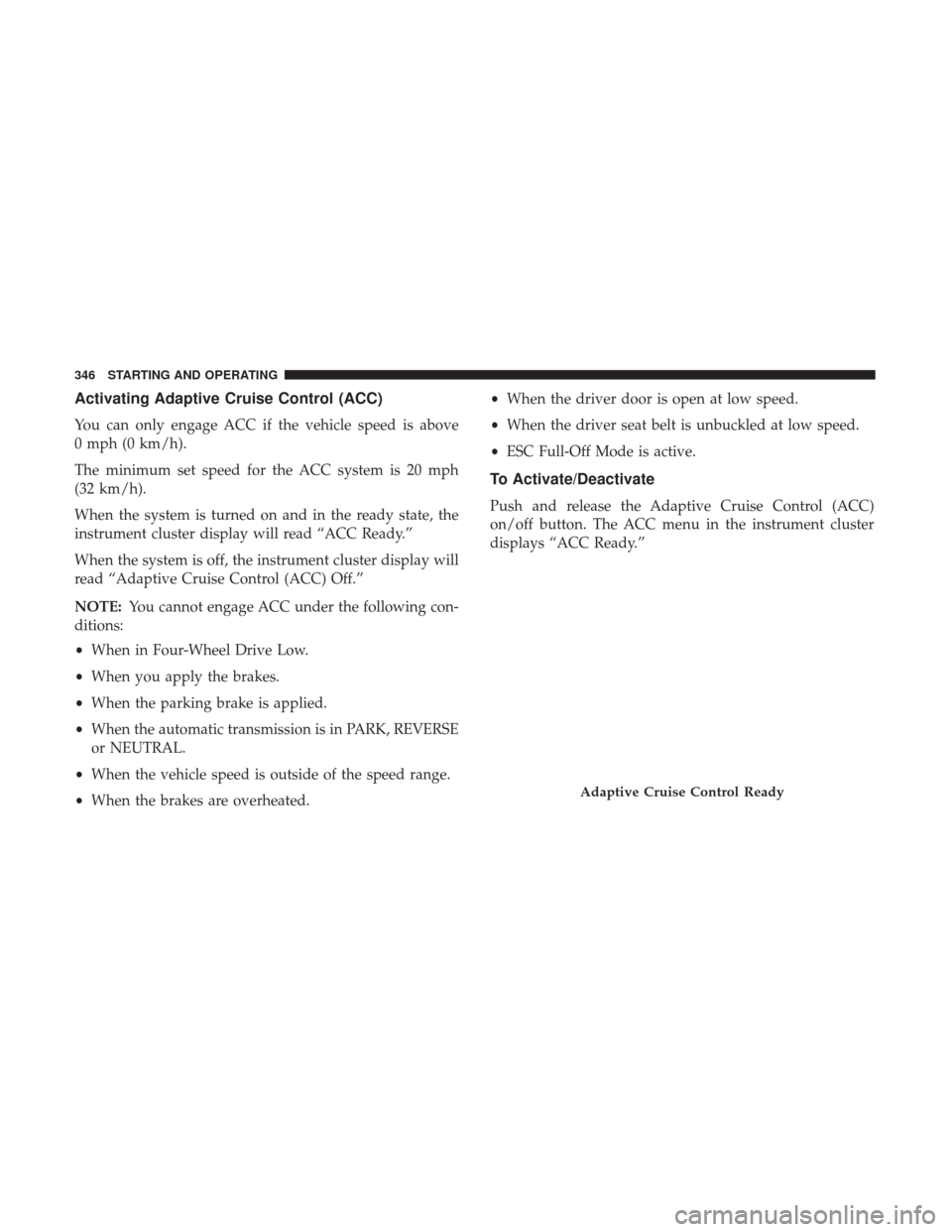
When the system is turned on and in the ready state, the
instrument cluster display will read “ACC Ready.”
When the system is off, the instrument cluster display will
read “Adaptive Cruise Control (ACC) Off.”
NOTE:You cannot engage ACC under the following con-
ditions:
• When in Four-Wheel Drive Low.
• When you apply the brakes.
• When the parking brake is applied.
• When the automatic transmission is in PARK, REVERSE
or NEUTRAL.
• When the vehicle speed is outside of the speed range.
• When the brakes are overheated. •
When the driver door is open at low speed.
• When the driver seat belt is unbuckled at low speed.
• ESC Full-Off Mode is active.
To Activate/Deactivate
Push and release the Adaptive Cruise Control (ACC)
on/off button. The ACC menu in the instrument cluster
displays “ACC Ready.”
Adaptive Cruise Control Ready
346 STARTING AND OPERATING
Page 350 of 698
To Cancel
The following conditions cancel the system:
•The brake pedal is applied.
• The CANC (cancel) button is pushed.
• An Anti-Lock Brake System (ABS) event occurs.
• The gear selector is removed from the DRIVE position.
• The Electronic Stability Control/Traction Control Sys-
tem (ESC/TCS) activates.
• The vehicle parking brake is applied.
• Driver seatbelt is unbuckled at low speeds.
• Driver door is opened at low speeds.
• A Trailer Sway Control (TSC) event occurs.
• The driver switches ESC to full-off mode.
• The braking temperature exceeds normal range (over-
heated).
To Turn Off
The system will turn off and clear the set speed in memory
if:
• The Adaptive Cruise Control (ACC) on/off button is
pushed.
• The Normal (Fixed Speed) Cruise Control on/off button
is pushed.
• The ignition is turned OFF.
• You switch to Four-Wheel Drive Low.
To Resume
If there is a set speed in memory push the RES (resume)
button and then remove your foot from the accelerator
pedal. The instrument cluster display will display the last
set speed.
348 STARTING AND OPERATING
Page 356 of 698

ACC Operation At Stop
In the event that the ACC system brings your vehicle to a
standstill while following a target vehicle, if the target
vehicle starts moving within two seconds of your vehicle
coming to a standstill, your vehicle will resume motion
without the need for any driver action.
If the target vehicle does not start moving within two
seconds of your vehicle coming to a standstill, the driver
will either have to push the RES (resume) button, or apply
the accelerator pedal to reengage the ACC to the existing
Set Speed.
NOTE:After the ACC system holds your vehicle at a
standstill for approximately 3 consecutive minutes, the
parking brake will be activated, and the ACC system will
be cancelled.
While ACC is holding your vehicle at a standstill, if the
driver seatbelt is unbuckled or the driver door is opened,
the parking brake will be activated, and the ACC system
will be cancelled.
WARNING!
When the ACC system is resumed, the driver must
ensure that there are no pedestrians, vehicles or objects
in the path of the vehicle. Failure to follow these
warnings can result in a collision and death or serious
personal injury.
Adaptive Cruise Control (ACC) Menu
The instrument cluster display will show the current ACC
system settings. The instrument cluster display is located
in the center of the instrument cluster. The information it
displays depends on ACC system status.
Push the Adaptive Cruise Control (ACC) on/off button
(located on the steering wheel) until one of the following
appears in the instrument cluster display:
Adaptive Cruise Control Off
When ACC is deactivated, the display will read “Adaptive
Cruise Control Off.”
354 STARTING AND OPERATING
Page 357 of 698
Adaptive Cruise Control Ready
When ACC is activated, but the vehicle speed setting has
not been selected, the display will read “Adaptive Cruise
Control Ready.”
Adaptive Cruise Control Set
When the SET (+) or the SET (-) button (located on the
steering wheel) is pushed, the display will read “ACC
SET.”
When ACC is set, the set speed will show in the instrument
cluster display.
The ACC screen may display once again if any ACC
activity occurs, which may include any of the following:
•System Cancel
• Driver Override
• System Off
• ACC Proximity Warning
• ACC Unavailable Warning
• The instrument cluster display will return to the last
display selected after five seconds of no ACC display
activityDisplay Warnings And Maintenance
“Wipe Front Radar Sensor In Front Of Vehicle”
Warning
The “ACC/FCW Unavailable Wipe Front Radar Sensor”
warning will display and also a chime will indicate when
conditions temporarily limit system performance.
This most often occurs at times of poor visibility, such as in
snow or heavy rain. The ACC system may also become
temporarily blinded due to obstructions, such as mud, dirt
or ice. In these cases, the instrument cluster display will
display “ACC/FCW Unavailable Wipe Front Radar Sen-
sor” and the system will deactivate.
The “ACC/FCW Unavailable Wipe Front Radar Sensor”
message can sometimes be displayed while driving in
highly reflective areas (i.e. tunnels with reflective tiles, or
ice and snow). The ACC system will recover after the
vehicle has left these areas. Under rare conditions, when
the radar is not tracking any vehicles or objects in its path
this warning may temporarily occur.
NOTE:
If the “ACC/FCW Unavailable Wipe Front Radar
Sensor” warning is active Normal (Fixed Speed) Cruise
Control is still available. For additional information refer to
“Normal (Fixed Speed) Cruise Control Mode” in this section.
6
STARTING AND OPERATING 355
Page 366 of 698
•The braking temperature exceeds normal range (over-
heated).
• The gear selector is removed from the DRIVE position.
• The driver switches ESC to full-off mode.
To Resume Speed
To resume a previously set speed, push the RES button and
release. Resume can be used at any speed above 20 mph
(32 km/h).
To Turn Off
The system will turn off and erase the set speed in memory
if:
•The Normal (Fixed Speed) Cruise Control on/off button
is pushed.
• The ignition is turned OFF.
• You engage Four-Wheel Drive Low.
• The Adaptive Cruise Control (ACC) on/off button is
pushed.
PARKSENSE FRONT AND REAR PARK ASSIST
The ParkSense Park Assist system provides visual and
audible indications of the distance between the rear and/or
front fascia and a detected obstacle when backing up or
moving forward, e.g. during a parking maneuver. If your
vehicle is equipped with the automatic braking function,
the vehicle brakes may be automatically applied and
released when performing a reverse parking maneuver if
the system detects a possible collision with an obstacle.
NOTE:
• The driver can override the automatic braking function
by pressing the gas pedal, turning ParkSense off via
ParkSense switch, or changing the gear while the auto-
matic brakes are being applied.
• Automatic brakes will not be available if ESC is not
available.
• Automatic brakes will not be available if there is a
faulted condition detected with the ParkSense Park
Assist system or the Braking System Module.
• The automatic braking function may only be applied if
the vehicle deceleration is not enough to avoid colliding
with a detected obstacle.
364 STARTING AND OPERATING
Page 373 of 698
CAUTION!
•ParkSense is only a parking aid and it is unable to
recognize every obstacle, including small obstacles.
Parking curbs might be temporarily detected or not
detected at all. Obstacles located above or below the
sensors will not be detected when they are in close
proximity.
• The vehicle must be driven slowly when using
ParkSense in order to be able to stop in time when an
obstacle is detected. It is recommended that the
driver looks over his/her shoulder when using
ParkSense.
PARKSENSE ACTIVE PARK ASSIST SYSTEM — IF
EQUIPPED
The ParkSense Active Park Assist system is intended to
assist the driver during parallel and perpendicular parking
maneuvers by identifying a proper parking space, provid-
ing audible/visual instructions, and controlling the steer-
ing wheel. The ParkSense Active Park Assist system is
defined as “semi-automatic” since the driver maintains
control of the accelerator, gear selector and brakes. De-
pending on the driver’s parking maneuver selection, the ParkSense Active Park Assist system is capable of maneu-
vering a vehicle into a parallel or a perpendicular parking
space on either side (i.e., driver side or passenger side).
NOTE:
•
The driver is always responsible for controlling the
vehicle, responsible for any surrounding objects, and
must intervene as required.
• The system is provided to assist the driver and not to
substitute the driver.
• During a semi-automatic maneuver, if the driver touches
the steering wheel after being instructed to remove their
hands from the steering wheel, the system will cancel,
and the driver will be required to manually complete the
parking maneuver.
• The system may not work in all conditions (e.g. envi-
ronmental conditions such as heavy rain, snow, etc., or if
searching for a parking space that has surfaces that will
absorb the ultrasonic sensor waves).
• New vehicles from the dealership must have at least 30
miles (48 km) accumulated before the ParkSense Active
Park Assist system is fully calibrated and performs
accurately. This is due to the system’s dynamic vehicle
calibration to improve the performance of the feature.
6
STARTING AND OPERATING 371
Page 375 of 698
The ParkSense Active Park Assist system will turn off
automatically for any of the following conditions:
•The parking maneuver is completed.
• Vehicle speed greater than 18 mph (30 km/h) when
searching for a parking space.
• Vehicle speed greater than 5 mph (7 km/h) during active
steering guidance into the parking space.
• Touching the steering wheel during active steering guid-
ance into the parking space.
• Pushing the ParkSense Front and Rear Park Assist
switch.
• The driver ’s door is opened.
• The tailgate is opened.
• Electronic Stability Control/Anti-lock Braking System
intervention.
• The ParkSense Active Park Assist system will allow a
maximum of eight shifts between DRIVE and REVERSE.
If the maneuver cannot be completed within eight shifts,
the system will cancel and the instrument cluster display
will instruct the driver to complete the maneuver manu-
ally. The ParkSense Active Park Assist system will only operate
and search for a parking space when the following condi-
tions are present:
•
The gear position is in DRIVE.
• The ignition is in the RUN position.
• The ParkSense Active Park Assist switch is activated.
• The driver ’s door is closed.
• The liftgate is closed.
• Vehicle speed is less than 15 mph (25 km/h).
NOTE: If the vehicle is driven above approximately
15 mph (25 km/h), the instrument cluster display will
instruct the driver to slow down. If the vehicle is driven
above approximately 18 mph (30 km/h), the system will
cancel. The driver must then reactivate the system by
pushing the ParkSense Active Park Assist switch.
• Make sure that the outer surface and the underside of
the front and rear fascias/bumpers are clean and clear of
snow, ice, mud, dirt or other obstruction.
When pushed, the LED on the ParkSense Active Park
Assist switch will blink momentarily, and then the LED
will turn off if any of the above conditions are not present.
6
STARTING AND OPERATING 373