transmission Ram 1500 2019 Manual PDF
[x] Cancel search | Manufacturer: RAM, Model Year: 2019, Model line: 1500, Model: Ram 1500 2019Pages: 698, PDF Size: 9.04 MB
Page 577 of 698
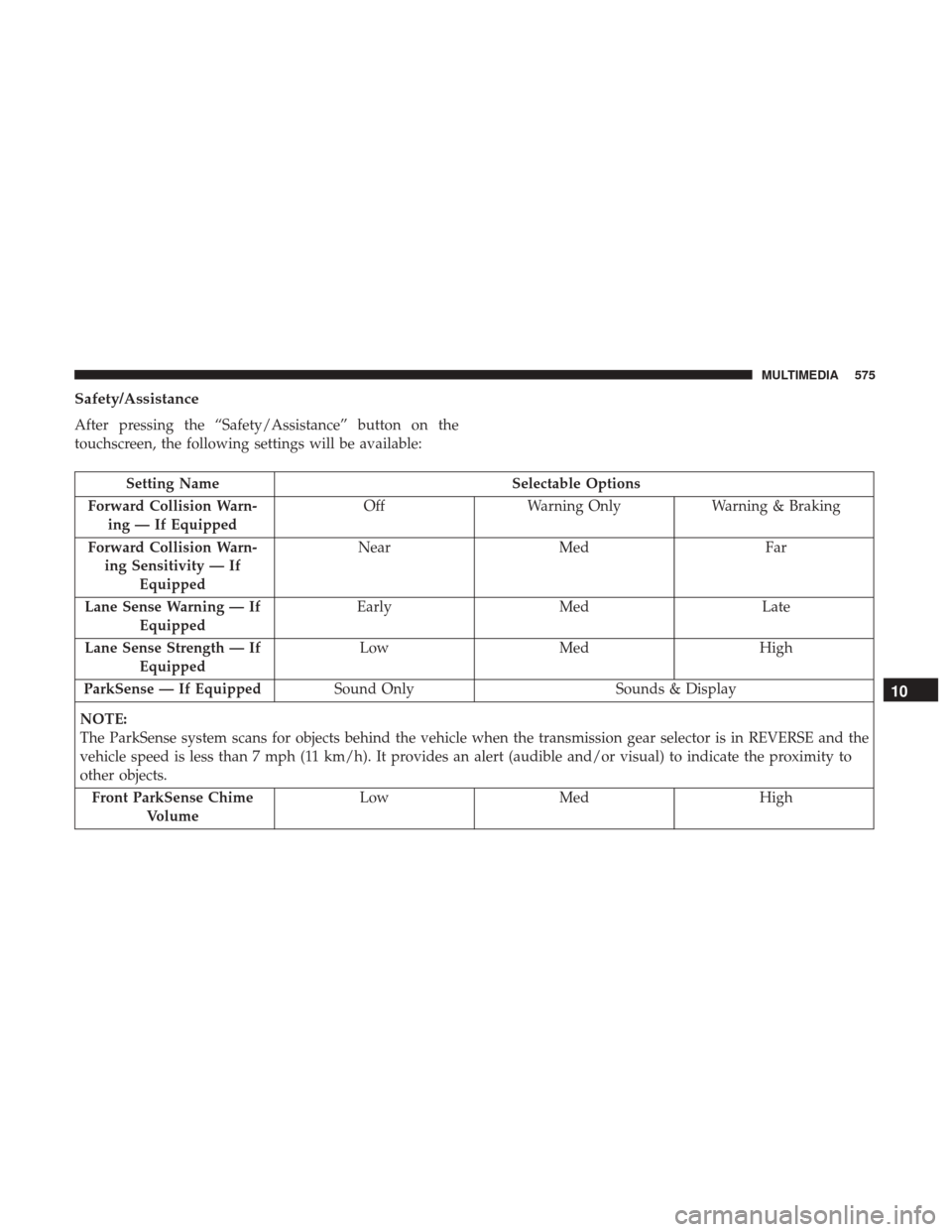
Safety/Assistance
After pressing the “Safety/Assistance” button on the
touchscreen, the following settings will be available:
Setting NameSelectable Options
Forward Collision Warn- ing — If Equipped Off
Warning Only Warning & Braking
Forward Collision Warn- ing Sensitivity — If Equipped Near
Med Far
Lane Sense Warning — If Equipped Early
Med Late
Lane Sense Strength — If Equipped Low
Med High
ParkSense — If Equipped Sound Only Sounds & Display
NOTE:
The ParkSense system scans for objects behind the vehicle when the transmission gear selector is in REVERSE and the
vehicle speed is less than 7 mph (11 km/h). It provides an alert (audible and/or visual) to indicate the proximity to
other objects. Front ParkSense Chime Volume Low
Med High
10
MULTIMEDIA 575
Page 578 of 698
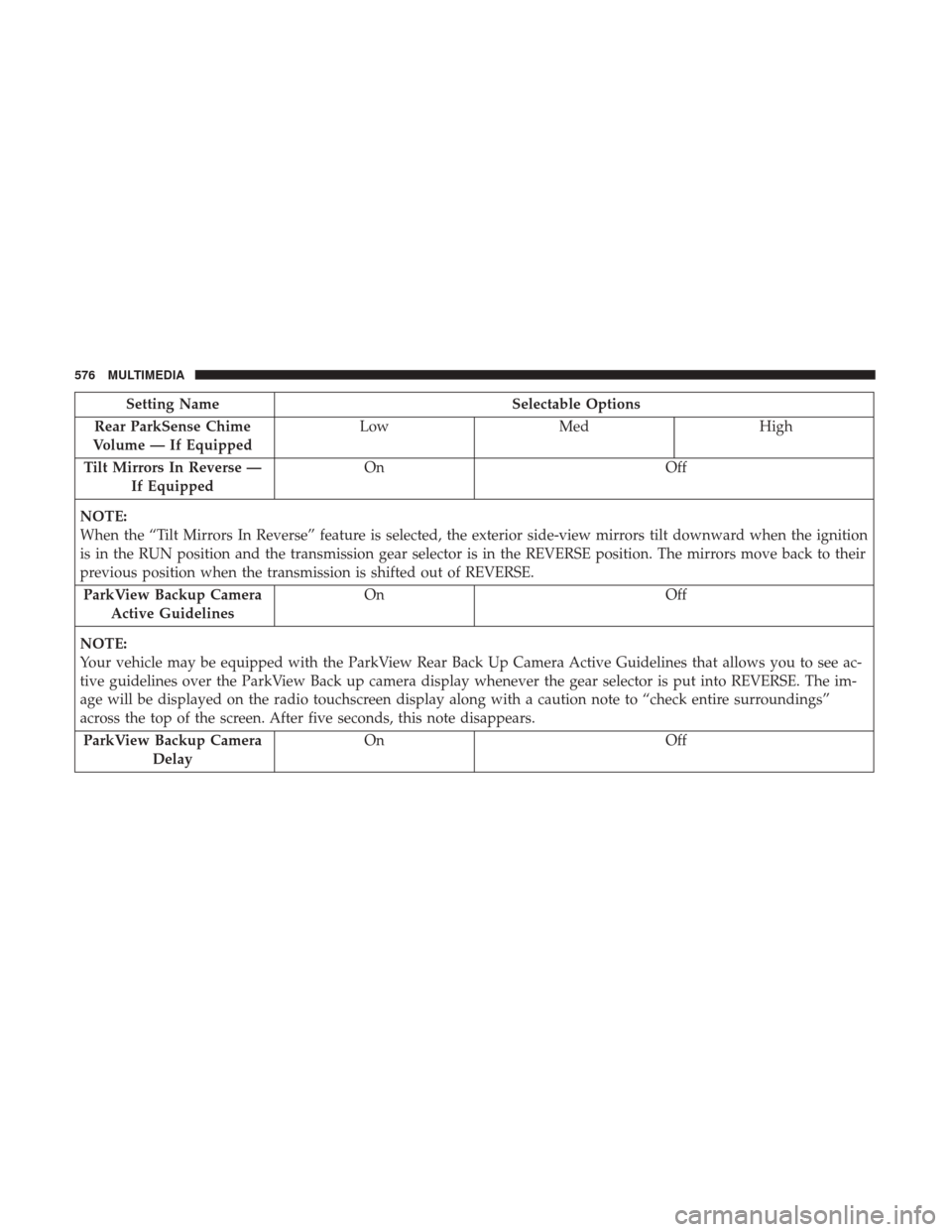
Setting NameSelectable Options
Rear ParkSense Chime
Volume — If Equipped Low
Med High
Tilt Mirrors In Reverse — If Equipped On
Off
NOTE:
When the “Tilt Mirrors In Reverse” feature is selected, the exterior side-view mirrors tilt downward when the ignition
is in the RUN position and the transmission gear selector is in the REVERSE position. The mirrors move back to their
previous position when the transmission is shifted out of REVERSE. ParkView Backup Camera Active Guidelines On
Off
NOTE:
Your vehicle may be equipped with the ParkView Rear Back Up Camera Active Guidelines that allows you to see ac-
tive guidelines over the ParkView Back up camera display whenever the gear selector is put into REVERSE. The im-
age will be displayed on the radio touchscreen display along with a caution note to “check entire surroundings”
across the top of the screen. After five seconds, this note disappears. ParkView Backup Camera Delay On
Off
576 MULTIMEDIA
Page 579 of 698
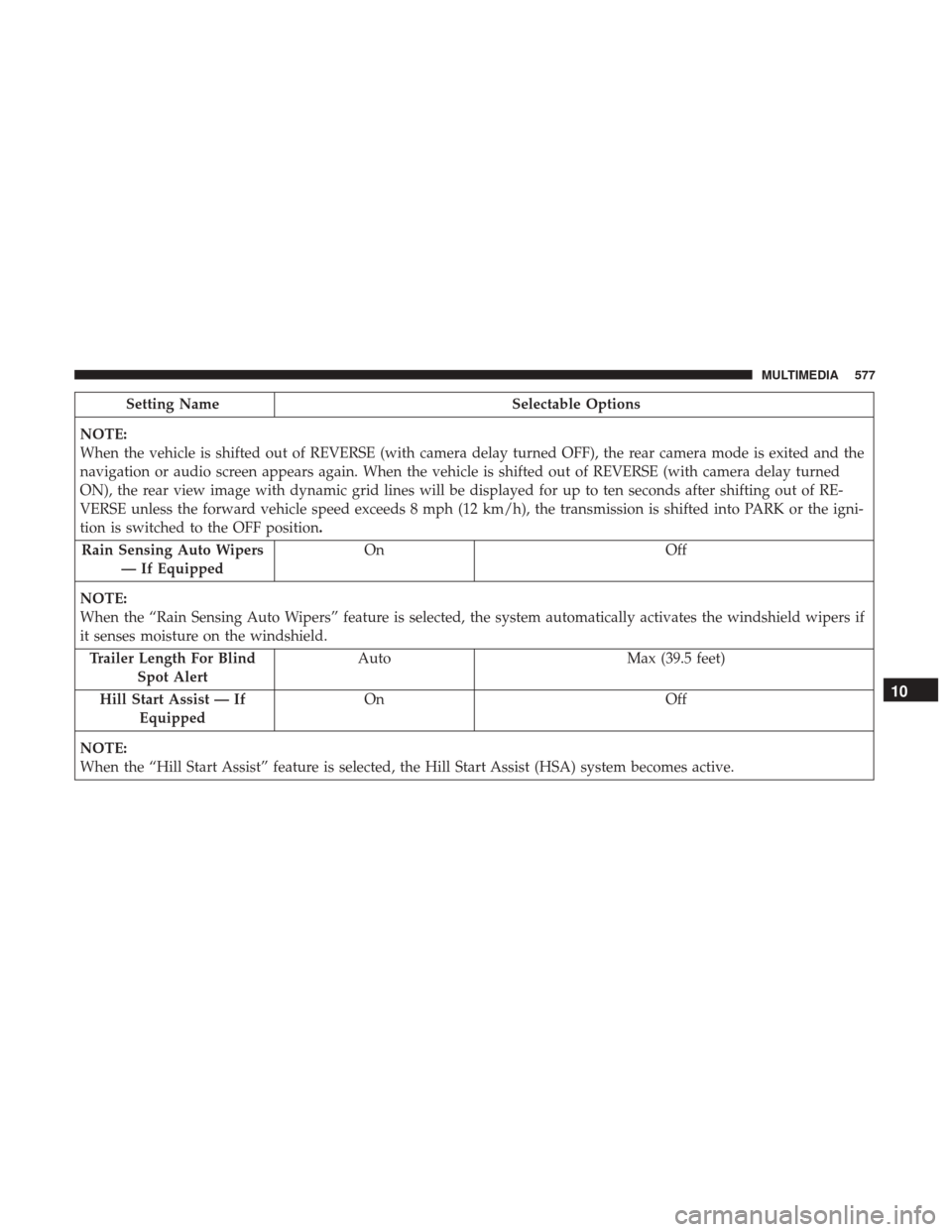
Setting NameSelectable Options
NOTE:
When the vehicle is shifted out of REVERSE (with camera delay turned OFF), the rear camera mode is exited and the
navigation or audio screen appears again. When the vehicle is shifted out of REVERSE (with camera delay turned
ON), the rear view image with dynamic grid lines will be displayed for up to ten seconds after shifting out of RE-
VERSE unless the forward vehicle speed exceeds 8 mph (12 km/h), the transmission is shifted into PARK or the igni-
tion is switched to the OFF position. Rain Sensing Auto Wipers — If Equipped On
Off
NOTE:
When the “Rain Sensing Auto Wipers” feature is selected, the system automatically activates the windshield wipers if
it senses moisture on the windshield. Trailer Length For Blind Spot Alert Auto
Max (39.5 feet)
Hill Start Assist — If Equipped On
Off
NOTE:
When the “Hill Start Assist” feature is selected, the Hill Start Assist (HSA) system becomes active.
10
MULTIMEDIA 577
Page 582 of 698
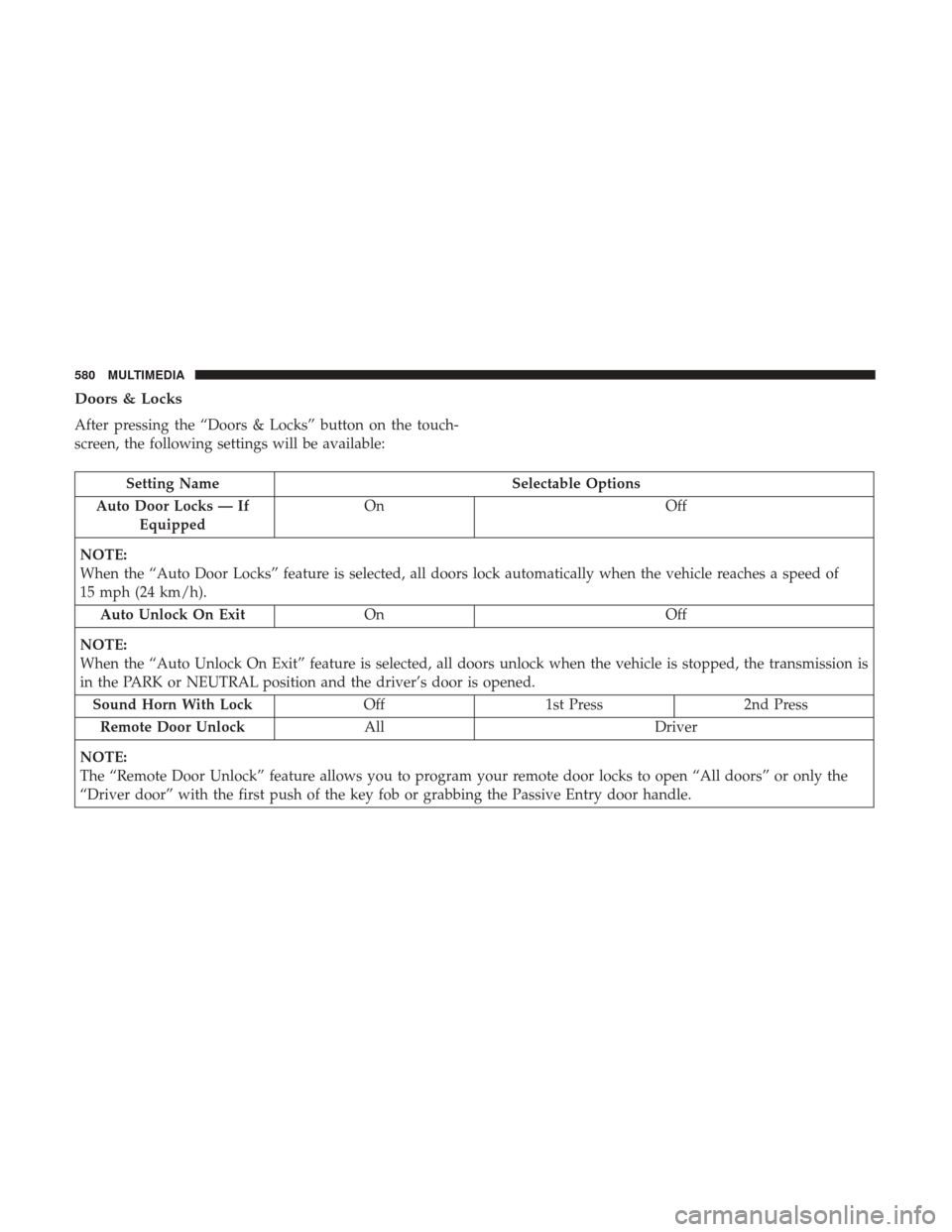
Doors & Locks
After pressing the “Doors & Locks” button on the touch-
screen, the following settings will be available:
Setting NameSelectable Options
Auto Door Locks — If Equipped On
Off
NOTE:
When the “Auto Door Locks” feature is selected, all doors lock automatically when the vehicle reaches a speed of
15 mph (24 km/h). Auto Unlock On Exit On Off
NOTE:
When the “Auto Unlock On Exit” feature is selected, all doors unlock when the vehicle is stopped, the transmission is
in the PARK or NEUTRAL position and the driver’s door is opened. Sound Horn With Lock Off1st Press 2nd Press
Remote Door Unlock All Driver
NOTE:
The “Remote Door Unlock” feature allows you to program your remote door locks to open “All doors” or only the
“Driver door” with the first push of the key fob or grabbing the Passive Entry door handle.
580 MULTIMEDIA
Page 600 of 698
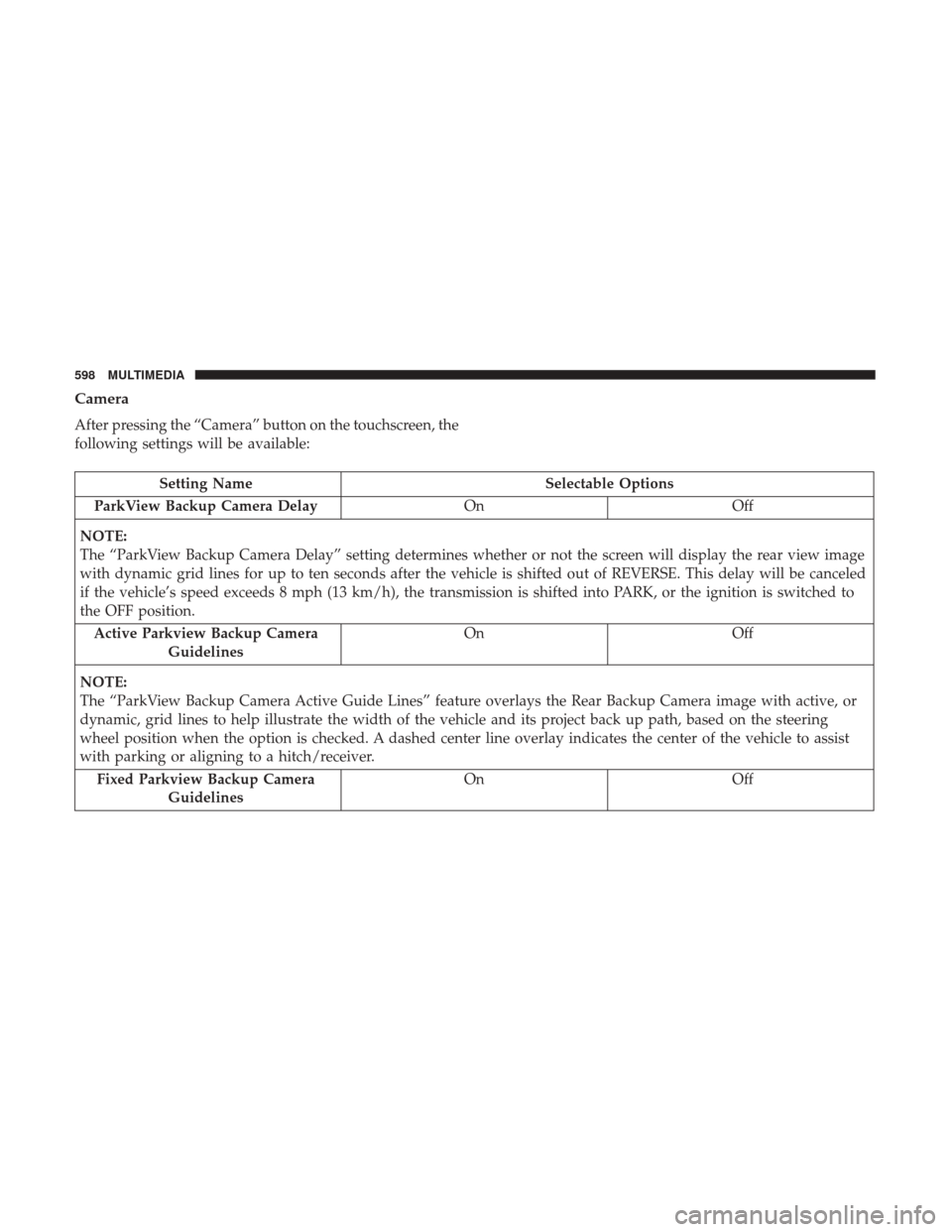
Camera
After pressing the “Camera” button on the touchscreen, the
following settings will be available:
Setting NameSelectable Options
ParkView Backup Camera Delay OnOff
NOTE:
The “ParkView Backup Camera Delay” setting determines whether or not the screen will display the rear view image
with dynamic grid lines for up to ten seconds after the vehicle is shifted out of REVERSE. This delay will be canceled
if the vehicle’s speed exceeds 8 mph (13 km/h), the transmission is shifted into PARK, or the ignition is switched to
the OFF position. Active Parkview Backup Camera Guidelines On
Off
NOTE:
The “ParkView Backup Camera Active Guide Lines” feature overlays the Rear Backup Camera image with active, or
dynamic, grid lines to help illustrate the width of the vehicle and its project back up path, based on the steering
wheel position when the option is checked. A dashed center line overlay indicates the center of the vehicle to assist
with parking or aligning to a hitch/receiver. Fixed Parkview Backup Camera Guidelines On
Off
598 MULTIMEDIA
Page 601 of 698
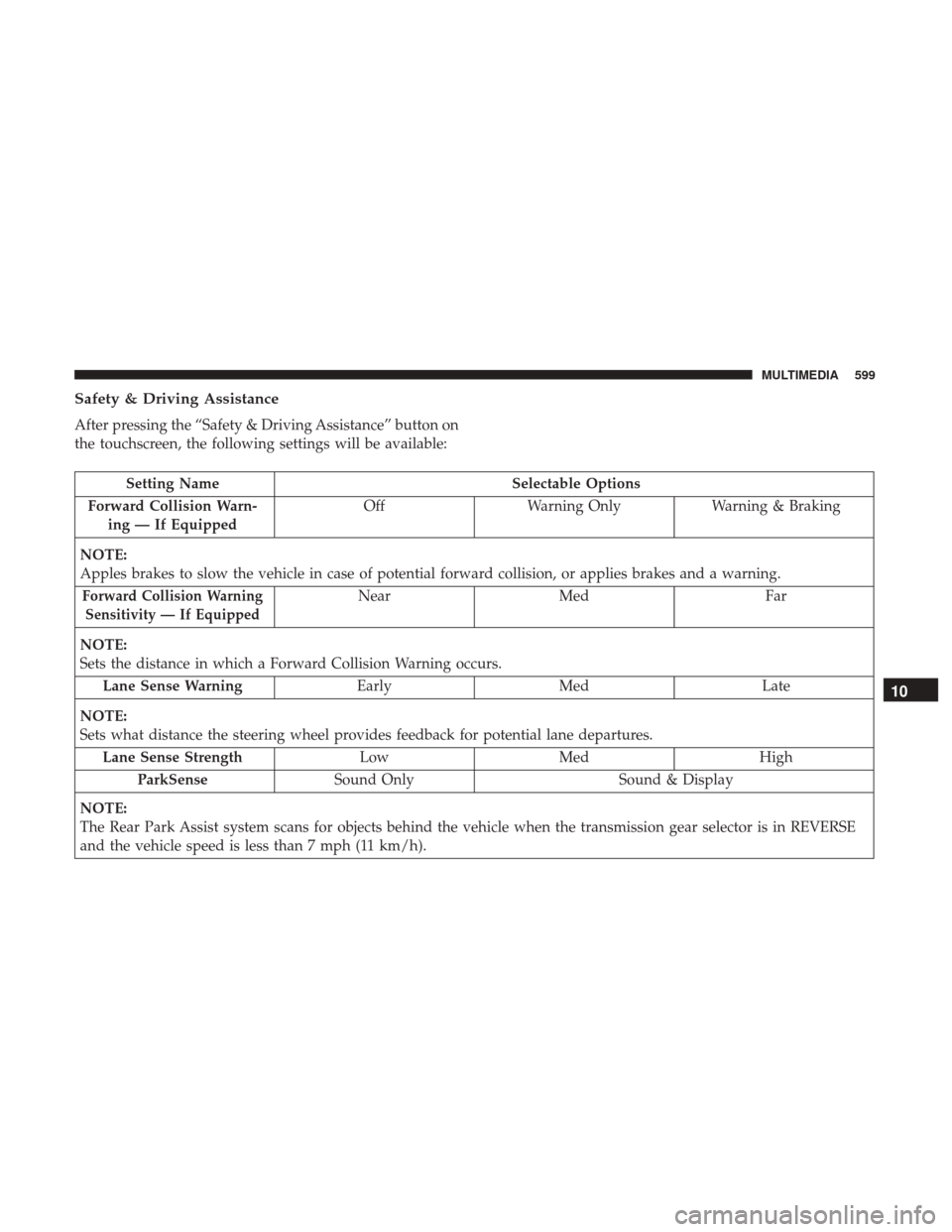
Safety & Driving Assistance
After pressing the “Safety & Driving Assistance” button on
the touchscreen, the following settings will be available:
Setting NameSelectable Options
Forward Collision Warn- ing — If Equipped Off
Warning Only Warning & Braking
NOTE:
Apples brakes to slow the vehicle in case of potential forward collision, or applies brakes and a warning.
Forward Collision Warning Sensitivity — If EquippedNear Med Far
NOTE:
Sets the distance in which a Forward Collision Warning occurs. Lane Sense Warning EarlyMed Late
NOTE:
Sets what distance the steering wheel provides feedback for potential lane departures. Lane Sense Strength LowMed High
ParkSense Sound Only Sound & Display
NOTE:
The Rear Park Assist system scans for objects behind the vehicle when the transmission gear selector is in REVERSE
and the vehicle speed is less than 7 mph (11 km/h).
10
MULTIMEDIA 599
Page 603 of 698
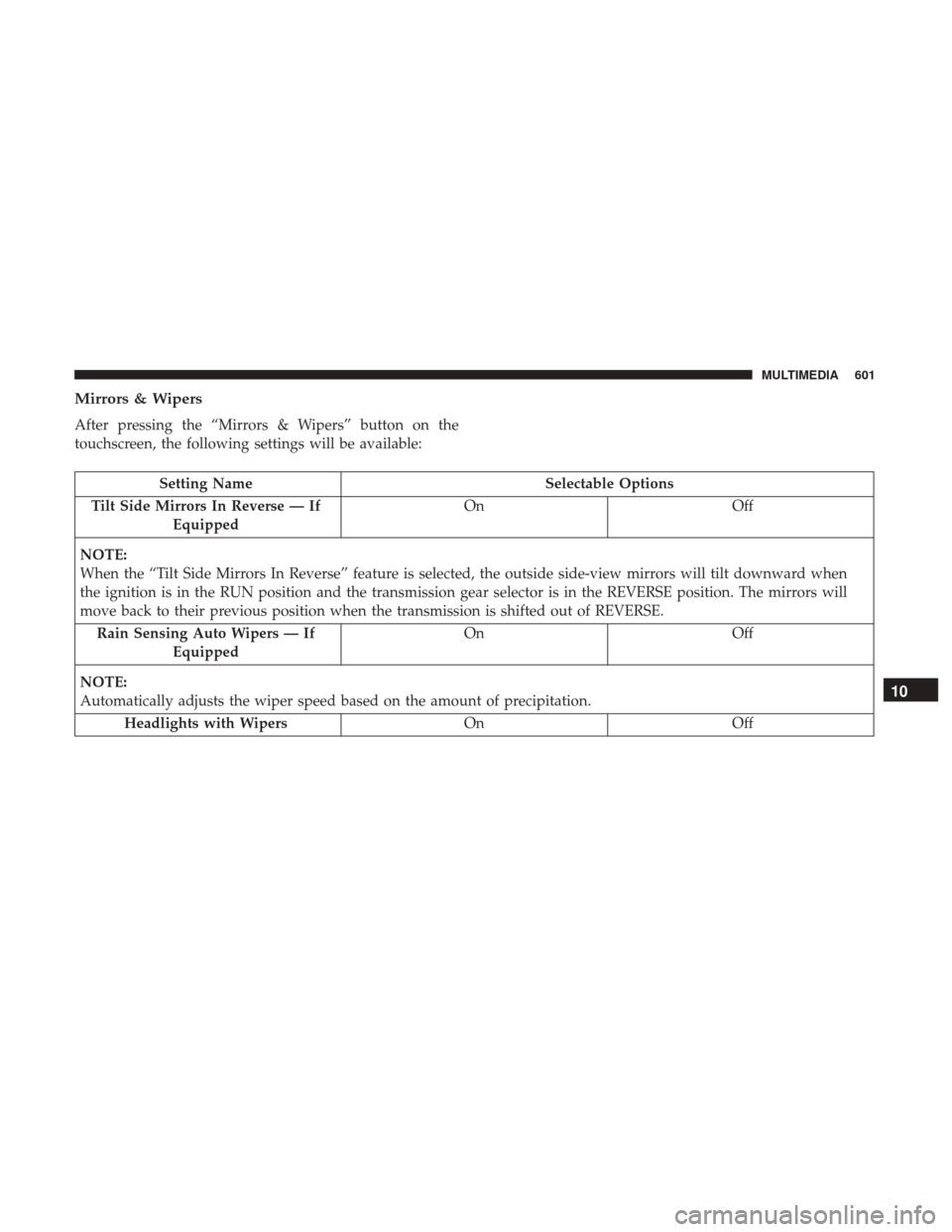
Mirrors & Wipers
After pressing the “Mirrors & Wipers” button on the
touchscreen, the following settings will be available:
Setting NameSelectable Options
Tilt Side Mirrors In Reverse — If Equipped On
Off
NOTE:
When the “Tilt Side Mirrors In Reverse” feature is selected, the outside side-view mirrors will tilt downward when
the ignition is in the RUN position and the transmission gear selector is in the REVERSE position. The mirrors will
move back to their previous position when the transmission is shifted out of REVERSE. Rain Sensing Auto Wipers — If Equipped On
Off
NOTE:
Automatically adjusts the wiper speed based on the amount of precipitation. Headlights with Wipers OnOff
10
MULTIMEDIA 601
Page 624 of 698
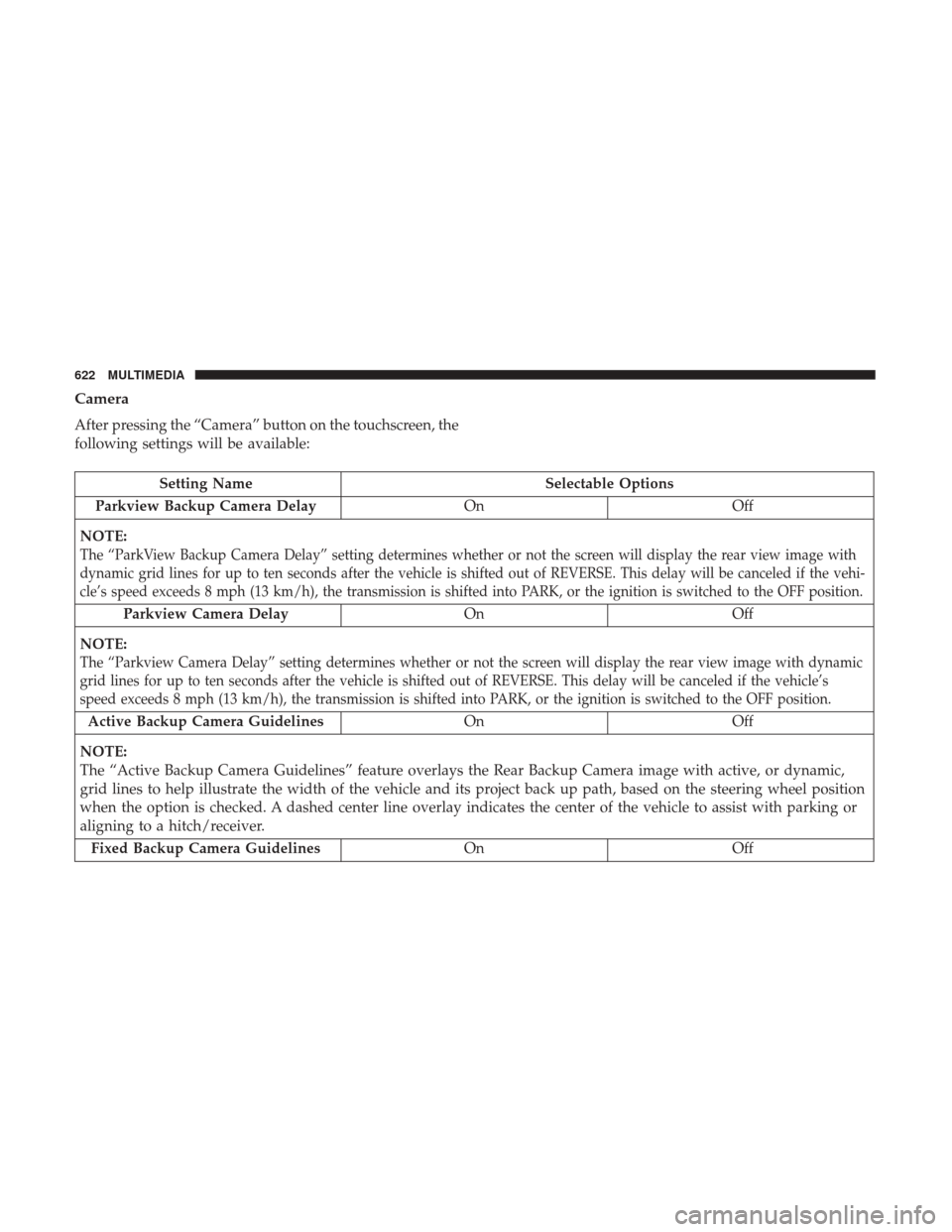
Camera
After pressing the “Camera” button on the touchscreen, the
following settings will be available:
Setting NameSelectable Options
Parkview Backup Camera Delay OnOff
NOTE:
The “ParkView Backup Camera Delay” setting determines whether or not the screen will display the rear view image with
dynamic grid lines for up to ten seconds after the vehicle is shifted out of REVERSE. This delay will be canceled if the vehi-
cle’s speed exceeds 8 mph (13 km/h), the transmission is shifted into PARK, or the ignition is switched to the OFF position.
Parkview Camera Delay On Off
NOTE:
The “Parkview Camera Delay” setting determines whether or not the screen will display the rear view image with dynamic
grid lines for up to ten seconds after the vehicle is shifted out of REVERSE. This delay will be canceled if the vehicle’s
speed exceeds 8 mph (13 km/h), the transmission is shifted into PARK, or the ignition is switched to the OFF position.
Active Backup Camera Guidelines On Off
NOTE:
The “Active Backup Camera Guidelines” feature overlays the Rear Backup Camera image with active, or dynamic,
grid lines to help illustrate the width of the vehicle and its project back up path, based on the steering wheel position
when the option is checked. A dashed center line overlay indicates the center of the vehicle to assist with parking or
aligning to a hitch/receiver. Fixed Backup Camera Guidelines OnOff
622 MULTIMEDIA
Page 625 of 698
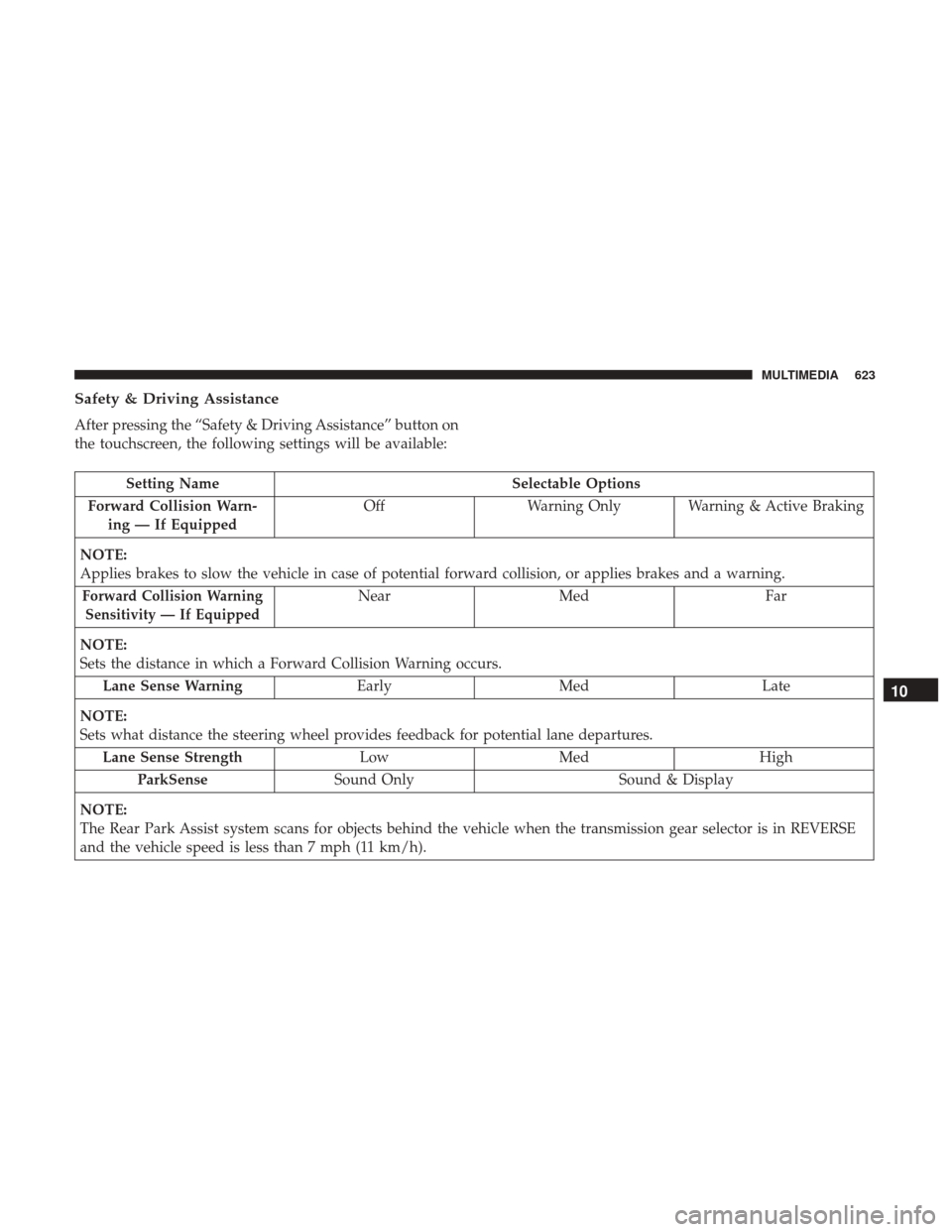
Safety & Driving Assistance
After pressing the “Safety & Driving Assistance” button on
the touchscreen, the following settings will be available:
Setting NameSelectable Options
Forward Collision Warn- ing — If Equipped Off
Warning Only Warning & Active Braking
NOTE:
Applies brakes to slow the vehicle in case of potential forward collision, or applies brakes and a warning.
Forward Collision Warning Sensitivity — If EquippedNear Med Far
NOTE:
Sets the distance in which a Forward Collision Warning occurs. Lane Sense Warning EarlyMed Late
NOTE:
Sets what distance the steering wheel provides feedback for potential lane departures. Lane Sense Strength LowMed High
ParkSense Sound Only Sound & Display
NOTE:
The Rear Park Assist system scans for objects behind the vehicle when the transmission gear selector is in REVERSE
and the vehicle speed is less than 7 mph (11 km/h).
10
MULTIMEDIA 623
Page 627 of 698
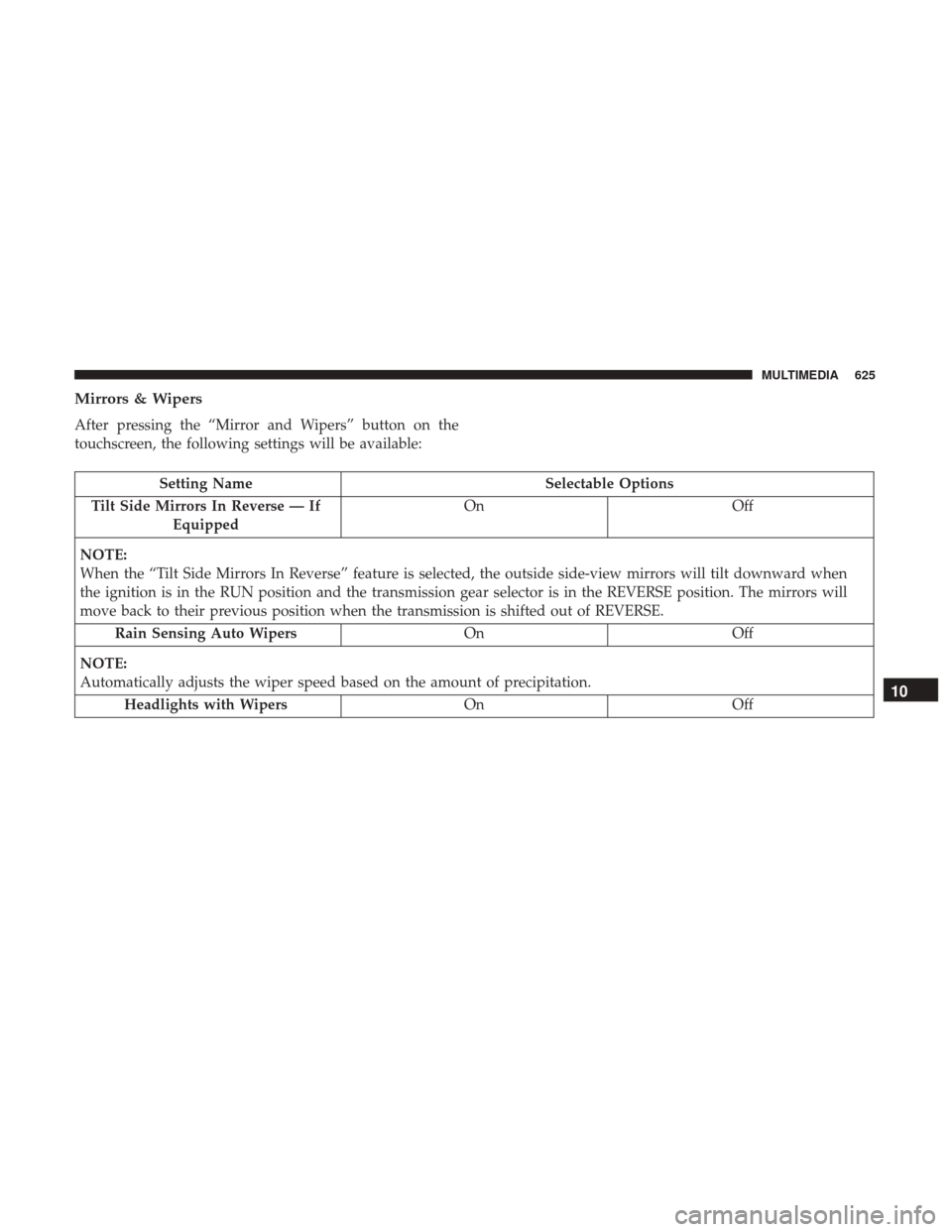
Mirrors & Wipers
After pressing the “Mirror and Wipers” button on the
touchscreen, the following settings will be available:
Setting NameSelectable Options
Tilt Side Mirrors In Reverse — If Equipped On
Off
NOTE:
When the “Tilt Side Mirrors In Reverse” feature is selected, the outside side-view mirrors will tilt downward when
the ignition is in the RUN position and the transmission gear selector is in the REVERSE position. The mirrors will
move back to their previous position when the transmission is shifted out of REVERSE. Rain Sensing Auto Wipers OnOff
NOTE:
Automatically adjusts the wiper speed based on the amount of precipitation. Headlights with Wipers OnOff
10
MULTIMEDIA 625