instrument cluster RAM 1500 2021 User Guide
[x] Cancel search | Manufacturer: RAM, Model Year: 2021, Model line: 1500, Model: RAM 1500 2021Pages: 496, PDF Size: 20.89 MB
Page 46 of 496

44GETTING TO KNOW YOUR VEHICLE
Adjustable Pedals Switch
The pedals can be adjusted with the ignition
placed in the OFF position.
The pedals cannot be adjusted when the
vehicle is in REVERSE or when the Cruise
Control system or Adaptive Cruise Control
system is on. The following messages will
appear in the instrument cluster display if the
pedals are attempted to be adjusted when
the system is locked out: “Adjustable Pedal
Disabled — Cruise Control Engaged” or
“Adjustable Pedal Disabled — Vehicle In
Reverse”.
NOTE:
Always adjust the pedals to a position that
allows full movement of the pedal.
Further small adjustments may be necessary
to find the best possible seat/pedal position.
For vehicles equipped with Driver Memory
Settings Úpage 32, you can use your key fob
or the memory switch on the driver’s door
trim panel to return the adjustable pedals to
pre-programmed positions.
MIRRORS
INSIDE REARVIEW MIRROR
Manual Mirror — If Equipped
The mirror head can be adjusted up, down, left,
and right. The mirror should be adjusted to
center on the view through the rear window.
Headlight glare from vehicles behind you can be
reduced by moving the small control under the
mirror to the night position (toward the rear of
the vehicle). The mirror should be adjusted
while set in the day position (toward the
windshield).
Adjusting Rearview Mirror
WARNING!
Do not adjust the pedals while the vehicle is
moving. You could lose control and have an
accident. Always adjust the pedals while the
vehicle is parked.
CAUTION!
Do not place any article under the adjustable
pedals or impede its ability to move, as it may
cause damage to the pedal controls. Pedal
travel may become limited if movement is
stopped by an obstruction in the adjustable
pedal's path.
21_DT_OM_EN_USC_t.book Page 44
Page 57 of 496
GETTING TO KNOW YOUR VEHICLE55
HEADLIGHT DELAY
To assist when exiting the vehicle, the headlight
delay feature will leave the headlights on for up
to 90 seconds. This delay is initiated when the
ignition is placed in the OFF position while the
headlight switch is on, and then the headlight
switch is cycled off. Headlight delay can be
cancelled by either turning the headlight switch
on then off, or by placing the ignition in the ON
position.
NOTE:
This feature can be programmed through the
Uconnect system Úpage 237.
The headlight delay feature is automatically
activated if the headlight switch is left in the
AUTO position when the ignition is placed in
the OFF position.
LIGHTS-ON REMINDER
If the headlights, parking lights, or cargo lights
are left on after the ignition is placed in the OFF
position, the vehicle will chime when the
driver’s door is opened.
FOG LIGHTS — IF EQUIPPED
The fog lights are turned on by rotating the
headlight switch to the parking light or headlight
position and pushing in the fog light button on
the headlight switch.
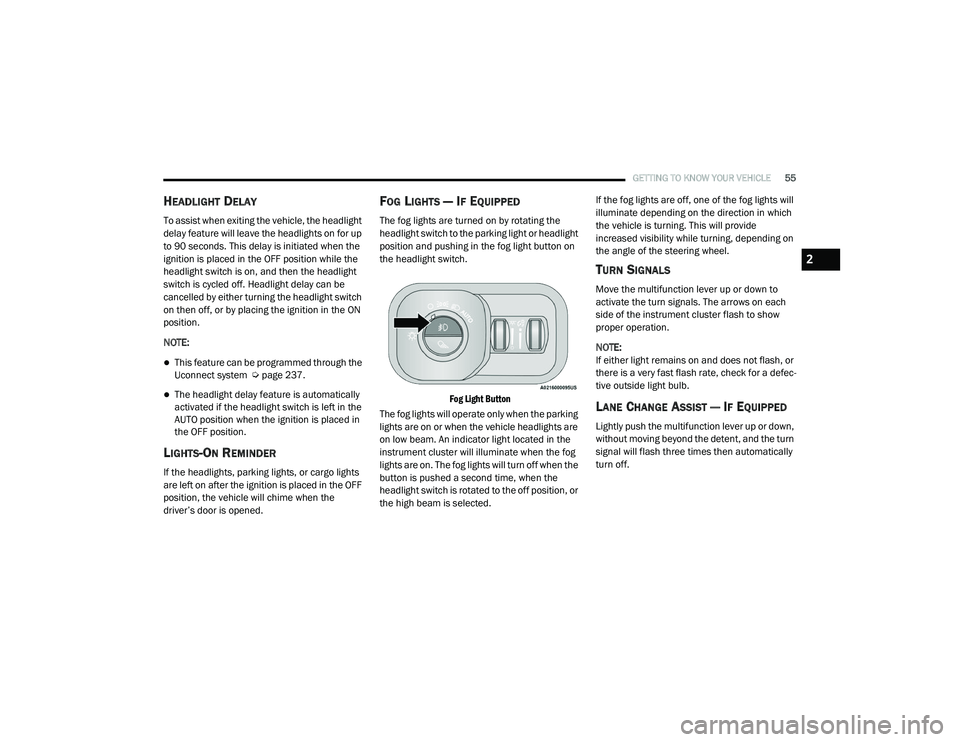
Fog Light Button
The fog lights will operate only when the parking
lights are on or when the vehicle headlights are
on low beam. An indicator light located in the
instrument cluster will illuminate when the fog
lights are on. The fog lights will turn off when the
button is pushed a second time, when the
headlight switch is rotated to the off position, or
the high beam is selected. If the fog lights are off, one of the fog lights will
illuminate depending on the direction in which
the vehicle is turning. This will provide
increased visibility while turning, depending on
the angle of the steering wheel.
TURN SIGNALS
Move the multifunction lever up or down to
activate the turn signals. The arrows on each
side of the instrument cluster flash to show
proper operation.
NOTE:
If either light remains on and does not flash, or
there is a very fast flash rate, check for a defec
-
tive outside light bulb.
LANE CHANGE ASSIST — IF EQUIPPED
Lightly push the multifunction lever up or down,
without moving beyond the detent, and the turn
signal will flash three times then automatically
turn off.
2
21_DT_OM_EN_USC_t.book Page 55
Page 58 of 496

56GETTING TO KNOW YOUR VEHICLE
CARGO LIGHTS/TRAILER SPOTTER
L
IGHTS WITH BED LIGHTS — IF
E
QUIPPED
The cargo light, bed lights, and trailer spotter
lights are turned on by pushing the cargo light
button located on the lower half of the headlight
switch.
Cargo/Bed Lights Button On Headlight Switch Cargo Lights
When the vehicle is stationary, these lights can
also be turned on using the switch located just
inside the pickup box, on the lower part of the
bed light lens. A telltale will illuminate in the
instrument cluster display when these lights are
on. Pushing the switch a second time will turn
the lights off.
Bed Light Switch (Without RamBox)
The cargo light and bed lights (if equipped) will
turn on for approximately 30 seconds when a
key fob unlock button is pushed, as part of the
Illuminated Entry feature.
When these lights are activated using the
button on the headlight switch, the trailer
spotter lights will remain illuminated when the
vehicle transmission is in PARK, NEUTRAL, or
REVERSE. The trailer spotter lights will turn off
when the vehicle transmission is placed in
DRIVE.
NOTE:
The cargo light will automatically turn off if the
vehicle is shifted into NEUTRAL or DRIVE, and
will turn back on when the vehicle is shifted into
PARK or REVERSE. The bed lights are not
affected by gear selection.
NOTE:
For vehicles shipped to or sold in the states of
California or Mississippi, the cargo, bed, and
mirror spotter lights will not work while the
vehicle is in motion. In every other state, the
cargo and mirror spotter lights will turn off when
the vehicle is in motion, but the bed light will
remain on. In all states, including California and
Mississippi, if a bed camera is deactivated, the
bed lights will turn back on.
21_DT_OM_EN_USC_t.book Page 56
Page 106 of 496
104
GETTING TO KNOW YOUR INSTRUMENT PANEL
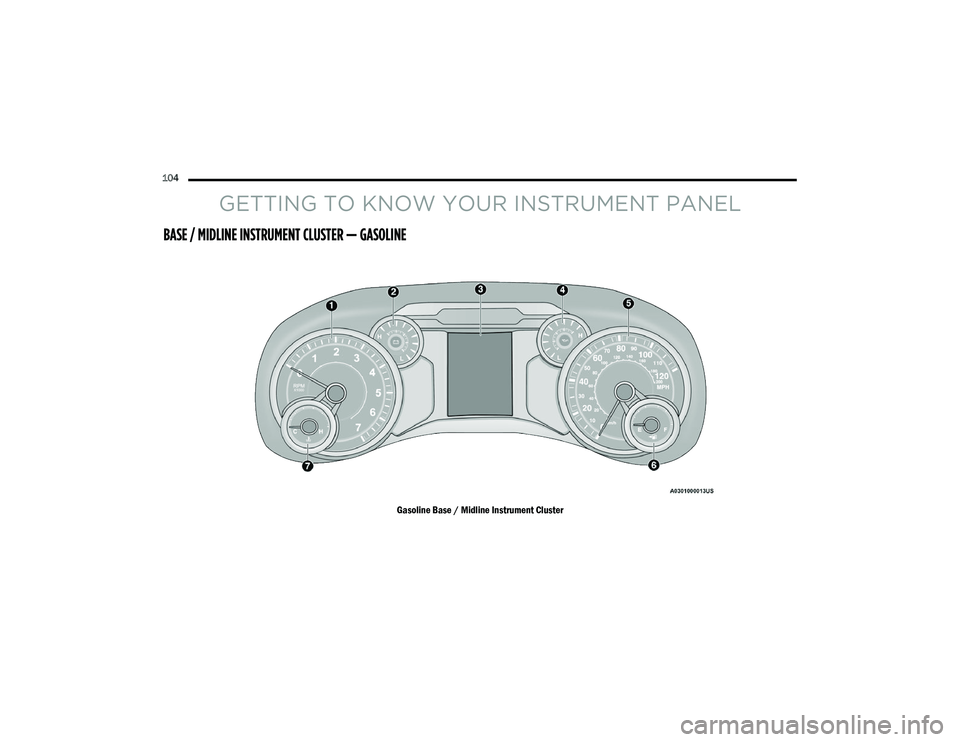
BASE / MIDLINE INSTRUMENT CLUSTER — GASOLINE
Gasoline Base / Midline Instrument Cluster
21_DT_OM_EN_USC_t.book Page 104
Page 107 of 496

GETTING TO KNOW YOUR INSTRUMENT PANEL105
BASE / MIDLINE INSTRUMENT CLUSTER
D
ESCRIPTIONS — GASOLINE
1. Tachometer
Indicates the engine speed in revolutions
per minute (RPM x 1000).
2. Voltmeter
When the vehicle is in the RUN state, the
gauge indicates the electrical system
voltage. The pointer should stay within
the normal range if the battery is
charged. If the pointer moves to either
extreme left or right and remains there
during normal driving, the electrical
system should be serviced.
NOTE:
In vehicles equipped with Stop/Start, a reduced
voltage may be present during an Autostop.
3. Instrument Cluster Display
When the appropriate conditions exist,
this display shows the instrument cluster
display messages Ú page 114.
Instrument Cluster Display/Controls Location
The display always show one of the main
menu item after ignition on.
4. Oil Pressure Gauge
The pointer should always indicate the oil
pressure when the engine is running. A
continuous high or low reading under
normal driving conditions may indicate a
lubrication system malfunction. Imme -
diate service should be obtained from an
authorized dealer.
NOTE:
In vehicles equipped with Stop/Start, an oil
pressure indication of zero is normal during an
Autostop. 5. Speedometer
Indicates vehicle speed.
6. Fuel Gauge
The pointer shows the level of fuel in the
fuel tank when the ignition is in the ON/
RUN position.
The fuel pump symbol points to the
side of the vehicle where the fuel door
is located.
7. Temperature Gauge
The pointer shows engine coolant
temperature. The pointer positioned
within the normal range indicates that
the engine cooling system is operating
satisfactorily.
The pointer will likely indicate a higher
temperature when driving in hot weather,
up mountain grades, or when towing a
trailer. It should not be allowed to exceed
the upper limits of the normal operating
range.
1 – Instrument Cluster Display Controls
2 – Instrument Cluster Display Screen
3
21_DT_OM_EN_USC_t.book Page 105
Page 109 of 496

GETTING TO KNOW YOUR INSTRUMENT PANEL107
PREMIUM INSTRUMENT CLUSTER — GASOLINE
Gasoline Premium Instrument Cluster Display
3
21_DT_OM_EN_USC_t.book Page 107
Page 110 of 496

108GETTING TO KNOW YOUR INSTRUMENT PANEL
PREMIUM INSTRUMENT CLUSTER
D
ESCRIPTIONS — GASOLINE
1. Tachometer
Indicates the engine speed in revolutions
per minute (RPM x 1000).
2. Instrument Cluster Display
When the appropriate conditions exist,
this display shows the instrument cluster
display messages Ú page 114.
Instrument Cluster Display/Controls Location
The display always show one of the main
menu item after ignition on. 3. Speedometer
Indicates vehicle speed.
4. Fuel Gauge
The pointer shows the level of fuel in the
fuel tank when the ignition is in the ON/
RUN position.
The fuel pump symbol points to the
side of the vehicle where the fuel door
is located.
5. Temperature Gauge
The pointer shows engine coolant
temperature. The pointer positioned
within the normal range indicates that
the engine cooling system is operating
satisfactorily.
The pointer will likely indicate a higher
temperature when driving in hot weather,
up mountain grades, or when towing a
trailer. It should not be allowed to exceed
the upper limits of the normal operating
range.
1 – Instrument Cluster Display Controls
2 – Instrument Cluster Display Screen
WARNING!
A hot engine cooling system is dangerous.
You or others could be badly burned by steam
or boiling coolant. You may want to call an
authorized dealer for service if your vehicle
overheats Ú page 423.
CAUTION!
Driving with a hot engine cooling system
could damage your vehicle. If the
temperature gauge reads “H,” pull over and
stop the vehicle. Idle the vehicle with the air
conditioner turned off until the pointer drops
back into the normal range. If the pointer
remains on the “H,” turn the engine off
immediately and call an authorized dealer for
service.
21_DT_OM_EN_USC_t.book Page 108
Page 111 of 496
GETTING TO KNOW YOUR INSTRUMENT PANEL109
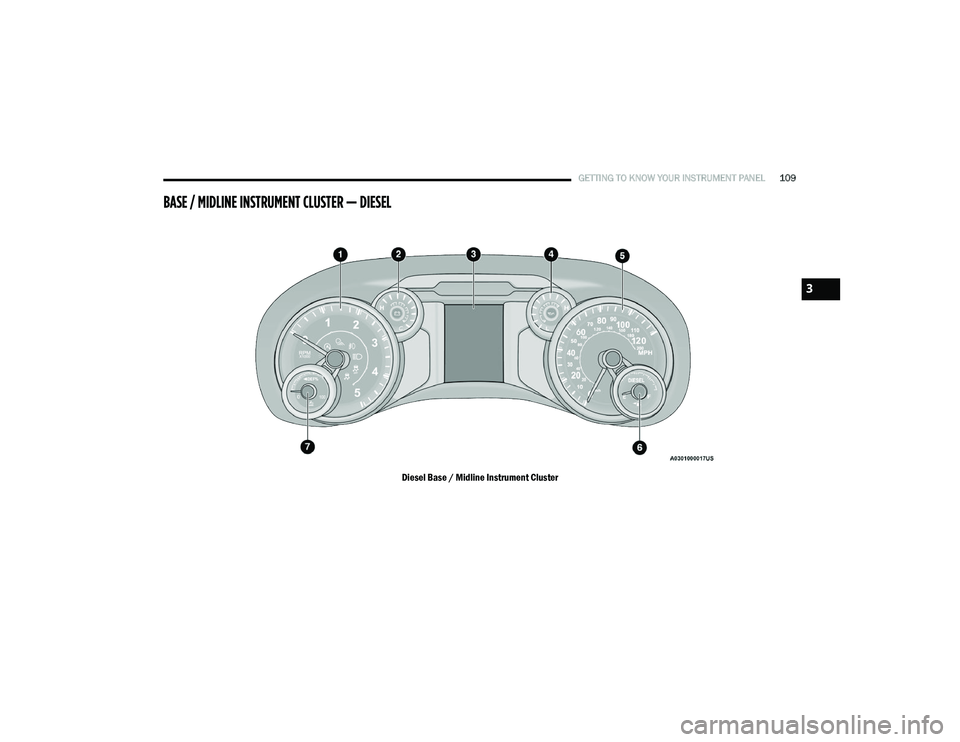
BASE / MIDLINE INSTRUMENT CLUSTER — DIESEL
Diesel Base / Midline Instrument Cluster
3
21_DT_OM_EN_USC_t.book Page 109
Page 112 of 496

110GETTING TO KNOW YOUR INSTRUMENT PANEL
BASE / MIDLINE INSTRUMENT CLUSTER
D
ESCRIPTIONS — DIESEL
1. Tachometer
Indicates the engine speed in revolutions
per minute (RPM x 1000).
2. Engine Coolant Temperature
This gauge shows the engine coolant
temperature. The gauge pointer will likely
show higher temperatures when driving
in hot weather, up mountain grades, or in
heavy stop and go traffic. If the red
Warning Light turns on while driving,
safely bring the vehicle to a stop, and
turn off the engine. DO NOT operate the
vehicle until the cause is corrected.
3. Instrument Cluster Display
When the appropriate conditions exist,
this display shows the instrument cluster
display messages Úpage 114.
Instrument Cluster Display/Controls Location
The display always show one of the main
menu item after ignition on.
4. Oil Pressure Gauge
The pointer should always indicate some
oil pressure when the engine is running.
A continuous high or low reading under
normal driving conditions may indicate a
lubrication system malfunction. Imme -
diate service should be obtained from an
authorized dealer.
WARNING!
A hot engine cooling system is dangerous.
You or others could be badly burned by steam
or boiling coolant. You may want to call an
authorized dealer for service if your vehicle
overheats Ú page 423.
WARNING!
Driving with a hot engine cooling system
could damage your vehicle. If the
temperature gauge reads “H” pull over and
stop the vehicle. Idle the vehicle with the air
conditioner turned off until the pointer drops
back into the normal range. If the pointer
remains on the “H”, turn the engine off
immediately and call an authorized dealer for
service.1 – Instrument Cluster Display Controls
2 – Instrument Cluster Display Screen
21_DT_OM_EN_USC_t.book Page 110
Page 114 of 496
112GETTING TO KNOW YOUR INSTRUMENT PANEL
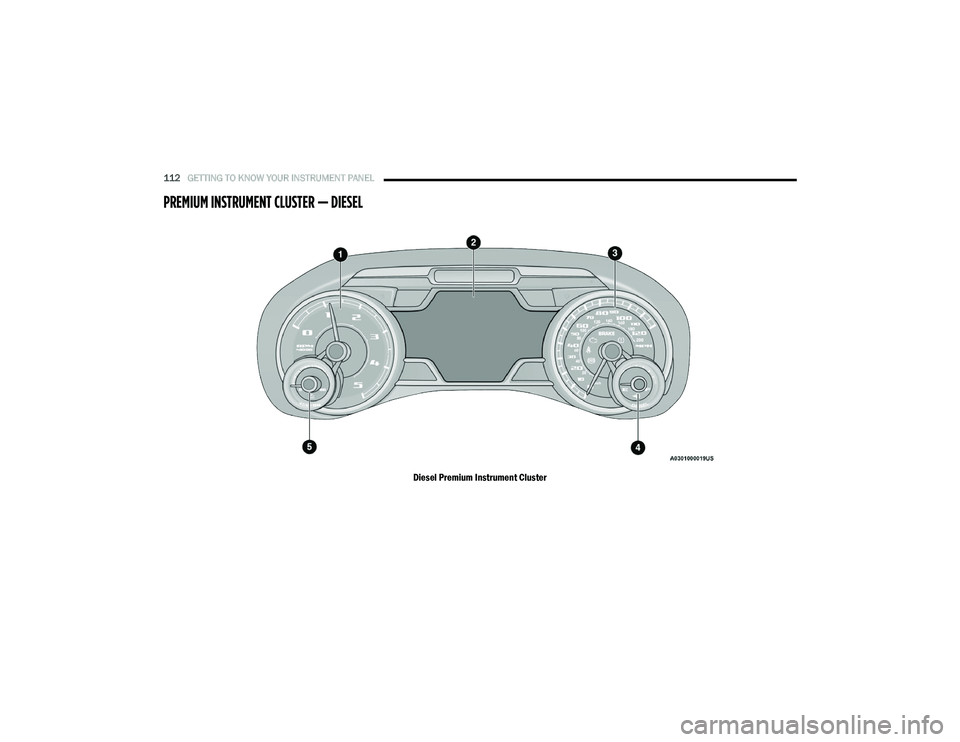
PREMIUM INSTRUMENT CLUSTER — DIESEL
Diesel Premium Instrument Cluster
21_DT_OM_EN_USC_t.book Page 112