instrument panel RAM 1500 2021 Repair Manual
[x] Cancel search | Manufacturer: RAM, Model Year: 2021, Model line: 1500, Model: RAM 1500 2021Pages: 496, PDF Size: 20.89 MB
Page 202 of 496

200STARTING AND OPERATING
TURNING LANESENSE ON OR OFF
The LaneSense button is located on
the switch panel below the Uconnect
display.
NOTE:
If your vehicle is equipped with a 12-inch
Uconnect Display screen, the LaneSense button
is located above the display.
To turn the LaneSense system on, push the
LaneSense button (LED turns off). A
“LaneSense On” message is shown in the
instrument cluster display.
To turn the LaneSense system off, push the
LaneSense button again (LED turns on).
NOTE:
The LaneSense system will retain the last
system state on or off from the last ignition
cycle when the ignition is placed in the ON/RUN
position.
LANESENSE WARNING MESSAGE
The LaneSense system will indicate the current
lane drift condition through the instrument
cluster display.
When the LaneSense system is on, the lane
lines are gray when both of the lane boundaries
have not been detected and the LaneSense
telltale is solid white.
System ON (Gray Lines) With White Telltale
Left Lane Departure — Only Left Lane Detected
When the LaneSense system is on, the Lane-
Sense Telltale is solid white when only the
left lane marking has been detected and the
system is ready to provide visual warnings in
the instrument cluster display if an uninten -
tional lane departure occurs on the left side.
When the LaneSense system senses the lane
has been approached and is in a lane depar -
ture situation, the visual warning in the
instrument cluster display will show the left
lane line flashing yellow (on/off). The Lane -
Sense telltale changes from solid white to
flashing yellow.
Lane Approached (Flashing Yellow Lane Line) With Yel -
low Telltale
NOTE:
The LaneSense system operates with similar
behavior for a right lane departure when only
the right lane marking has been detected.
21_DT_OM_EN_USC_t.book Page 200
Page 214 of 496

212STARTING AND OPERATING
(Continued)
(Continued)
2. Insert DEF fill adapter/nozzle into DEF tank filler neck.
NOTE:
The DEF gauge may take up to five seconds
to update after adding a gallon or more of
(DEF) to the DEF tank. If you have a fault
related to the DEF system, the gauge may not
update to the new level. See an authorized
dealer for service.
The DEF gauge may also not immediately
update after a refill if the temperature of the
DEF fluid is below 12°F (-11°C). The DEF line
heater will possibly warm up the DEF fluid
and allow the gauge to update after a period
of run time. Under very cold conditions, it is
possible that the gauge may not reflect the
new fill level for several drives.
Refilling With Nozzles
You can fill up at any DEF distributor.
Proceed as follows:
Insert the DEF nozzle in the filler, start
refilling and stop refilling at the first
shut-off (the shut-off indicates that the
DEF tank is full). Do not proceed with the
refilling, to prevent spillage of DEF.
Extract the nozzle. Refilling With Containers
Proceed as follows:
Check the expiration date.
Read the advice for use on the label
before pouring the content of the bottle
into the DEF tank.
If systems which cannot be screwed in
(e.g. tanks) are used for refilling, after the
indication appears on the instrument
panel display Ú
page 114 fill the DEF
tank with no more than 2 Gallons (8
liters).
If containers which can be screwed to the
filler are used, the reservoir is full when
the DEF level in the container stops
pouring out. Do not proceed further.
CAUTION!
To avoid DEF spillage, and possible
damage to the DEF tank from overfilling, do
not “top off” the DEF tank after filling.
DO NOT OVERFILL. DEF will freeze below
12ºF (-11ºC). The DEF system is designed
to work in temperatures below the DEF
freezing point, however, if the tank is over -
filled and freezes, the system could be
damaged.
When DEF is spilled, clean the area imme -
diately with water and use an absorbent
material to soak up the spills on the ground.
Do not attempt to start your engine if DEF is
accidentally added to the diesel fuel tank
as it can result in severe damage to your
engine, including but not limited to failure
of the fuel pump and injectors.
CAUTION! (Continued)
21_DT_OM_EN_USC_t.book Page 212
Page 239 of 496
MULTIMEDIA237
UCONNECT SETTINGS
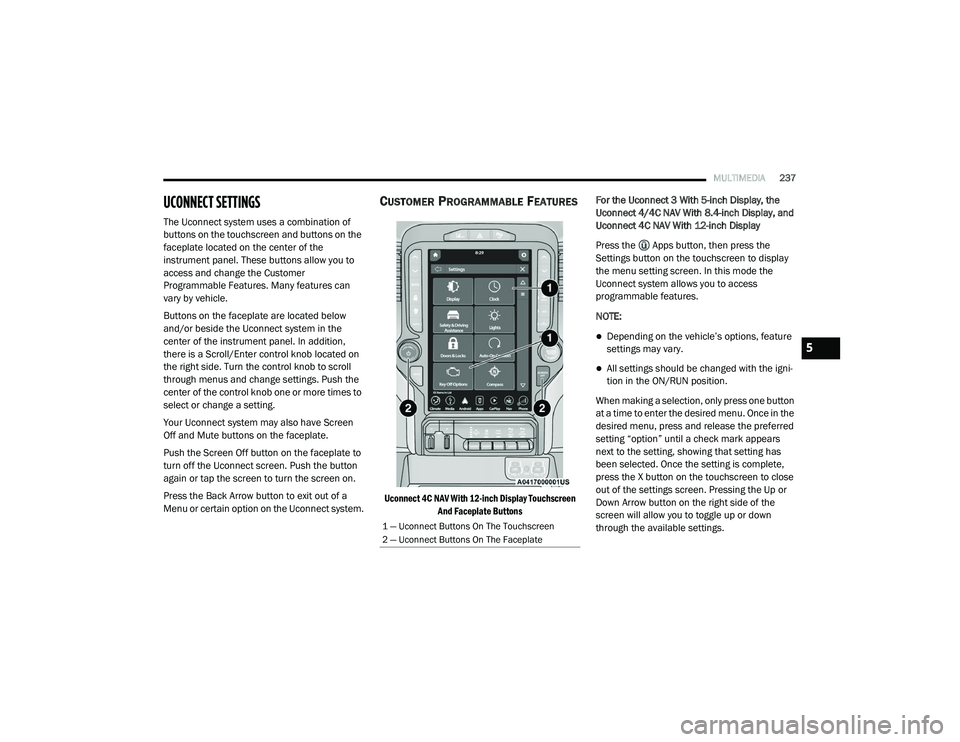
The Uconnect system uses a combination of
buttons on the touchscreen and buttons on the
faceplate located on the center of the
instrument panel. These buttons allow you to
access and change the Customer
Programmable Features. Many features can
vary by vehicle.
Buttons on the faceplate are located below
and/or beside the Uconnect system in the
center of the instrument panel. In addition,
there is a Scroll/Enter control knob located on
the right side. Turn the control knob to scroll
through menus and change settings. Push the
center of the control knob one or more times to
select or change a setting.
Your Uconnect system may also have Screen
Off and Mute buttons on the faceplate.
Push the Screen Off button on the faceplate to
turn off the Uconnect screen. Push the button
again or tap the screen to turn the screen on.
Press the Back Arrow button to exit out of a
Menu or certain option on the Uconnect system.
CUSTOMER PROGRAMMABLE FEATURES
Uconnect 4C NAV With 12-inch Display Touchscreen
And Faceplate Buttons
For the Uconnect 3 With 5-inch Display, the
Uconnect 4/4C NAV With 8.4-inch Display, and
Uconnect 4C NAV With 12-inch Display
Press the Apps button, then press the
Settings button on the touchscreen to display
the menu setting screen. In this mode the
Uconnect system allows you to access
programmable features.
NOTE:
Depending on the vehicle’s options, feature
settings may vary.
All settings should be changed with the igni
-
tion in the ON/RUN position.
When making a selection, only press one button
at a time to enter the desired menu. Once in the
desired menu, press and release the preferred
setting “option” until a check mark appears
next to the setting, showing that setting has
been selected. Once the setting is complete,
press the X button on the touchscreen to close
out of the settings screen. Pressing the Up or
Down Arrow button on the right side of the
screen will allow you to toggle up or down
through the available settings.
1 — Uconnect Buttons On The Touchscreen
2 — Uconnect Buttons On The Faceplate
5
21_DT_OM_EN_USC_t.book Page 237
Page 290 of 496
288MULTIMEDIA
(Continued)
(Continued)
Requirements
This feature is available only on vehicles sold
in the US or Canada.
Vehicle must be properly equipped with the
SiriusXM Guardian™ system. Vehicle must be
registered with SiriusXM Guardian™ and
have an active subscription that includes the
applicable feature.
Vehicle must have an operable LTE (voice/
data) or 3G or 4G (data) network connection
compatible with your device.
Vehicle must be powered in the ON/RUN or
ACC (Accessory) position with a properly func -
tioning electrical system.
WARNING!
Never place anything on or near the
vehicle’s LTE (voice/data) or 3G or 4G
(data) and GPS antennas. You could
prevent LTE (voice/data) or 4G (data) and
GPS signal reception, which can prevent
your vehicle from placing an emergency
call.
Do not add any aftermarket electrical equip -
ment to the vehicle’s electrical system. This
may prevent your vehicle from sending a
signal to initiate an emergency call. To avoid
interference that can cause the SOS Call
system to fail, never add aftermarket equip -
ment (e.g., two-way mobile radio, CB radio,
data recorder, etc.) to your vehicle’s elec -
trical system or modify the antennas on your
vehicle. IF YOUR VEHICLE LOSES POWER
FOR ANY REASON (INCLUDING DURING OR
AFTER AN ACCIDENT), NEITHER THE UCON-
NECT APPS NOR THE SIRIUSXM
GUARDIAN™ SERVICES WILL OPERATE.
The Occupant Restraint Controller (ORC)
turns on the Air Bag Warning Light on the
instrument panel if a malfunction in any part
of the air bag system is detected. If the Air Bag
Warning Light is illuminated, the air bag
system may not be working properly and the
SOS Call system may not be able to send a
signal to the SiriusXM Guardian™ Customer
Care center. If the Air Bag Warning Light is illu -
minated, have an authorized dealer service
your vehicle immediately.
WARNING! (Continued)
Ignoring the Rearview Mirror Light could
mean you will not have SOS Call services if
needed. If the Rearview Mirror Light is illu -
minated, have an authorized dealer service
the SOS Call system immediately.
If anyone in the vehicle could be in danger
(e.g., fire or smoke is visible, dangerous
road conditions or location), do not wait for
voice contact from a SiriusXM Guardian™
Customer Care agent. All occupants should
exit the vehicle immediately and move to a
safe location.
Failure to perform scheduled maintenance
and regular inspection of your vehicle may
result in vehicle damage, accident or injury.
WARNING! (Continued)
21_DT_OM_EN_USC_t.book Page 288
Page 325 of 496

SAFETY323
a trailer will be detected using the blind spot
radar within 90 seconds of forward move -
ment of the vehicle. The vehicle must be
moving above 6 mph (10 km/h) to activate the feature. Once the trailer has been
detected, the system will default to the
maximum blind spot zone until the length has
been verified. You will see “Auto” in the
instrument panel cluster .
Maximum Mode — When “Max Mode” is
selected, the system will default to the
maximum blind spot zone regardless of what
size trailer is attached .
NOTE:
Selected setting is stored when the ignition is
placed in the OFF position. To change this
setting, it must be selected through the
Uconnect settings Ú page 237.
Trailer Length Detection
Once the trailer presence has been established,
the trailer length will be established (by making
a 90 degree turn) and then the trailer length
category (example 10-20 ft (3 m to 6 m)) will be
displayed. This can take up to 30 seconds after
completing the turn. NOTE:
During the same ignition cycle, if the vehicle is
at a standstill for a minimum of 90 seconds, a
new “trailer detection request” is enabled by
the system once the vehicle resumes motion.
Maximum length supported by the Trailer Merge
Assist feature is 39.5 ft (12 m). Trailer length is
considered the forward most portion of the
trailer hitch to the rearward most portion of the
body, fascia/bumper, or ramp of the trailer.
Maximum width supported by the Trailer Merge
Assist feature is 8.5 ft (2.59 m). Trailer width is
measured at the widest portion of the trailer
and may include wheels, tires, finders, or rails.
NOTE:
Fifth wheel or gooseneck trailers are not
supported by Trailer Merge Assist.
NOTE:
The ability to detect a trailer may be degraded in
crowded or busy environments. Busy parking
lots, narrow areas surrounded with trees, or any
other crowded area may prevent the radar
sensors from being able to adequately detect
the trailer. The system will try to detect a trailer
at every ignition cycle or 90 seconds of stand
-
still.
Trailer Length Detection
Trailer length will be identified and placed into
one of the following categories:
Trailer length up to 10 ft (3 m) — Blind spot
zone will be adjusted to 10 ft (3 m) .
Trailer length between 10 ft to 20 ft (3 m to
6 m) — Blind spot zone will be adjusted to
20 ft (6 m) .
Trailer length between 20 ft to 30 ft (6 m to
9 m) — Blind spot zone will be adjusted to
30 ft (9 m) .
1 — Trailer Length
2 — Trailer Width
3 — Trailer Hitch
6
21_DT_OM_EN_USC_t.book Page 323
Page 344 of 496
342SAFETY
SUPPLEMENTAL RESTRAINT SYSTEMS
(SRS)
Some of the safety features described in this
section may be standard equipment on some
models, or may be optional equipment on
others. If you are not sure, ask an authorized
dealer.
The air bag system must be ready to protect you
in a collision. The Occupant Restraint Controller
(ORC) monitors the internal circuits and
interconnecting wiring associated with the
electrical Air Bag System Components. Your
vehicle may be equipped with the following Air
Bag System Components:
Air Bag System Components
Occupant Restraint Controller (ORC)
Air Bag Warning Light
Steering Wheel and Column
Instrument Panel
Knee Impact Bolsters
Driver and Front Passenger Air Bags
Seat Belt Buckle Switch
Supplemental Side Air Bags
Front and Side Impact Sensors
Seat Belt Pretensioners
Seat Track Position Sensors
Occupant Classification System
Air Bag Warning Light
The Occupant Restraint Controller
(ORC) monitors the readiness of the
electronic parts of the air bag system
whenever the ignition switch is in the
START or ON/RUN position. If the ignition switch
is in the OFF position or in the ACC position, the
air bag system is not on and the air bags will not
inflate. The ORC contains a backup power supply
system that may deploy the air bag system even
if the battery loses power or it becomes
disconnected prior to deployment.
The ORC turns on the Air Bag Warning Light in
the instrument panel for approximately four to
eight seconds for a self-check when the ignition
switch is first in the ON/RUN position. After the
self-check, the Air Bag Warning Light will turn
off. If the ORC detects a malfunction in any part
of the system, it turns on the Air Bag Warning
Light, either momentarily or continuously. A
single chime will sound to alert you if the light
comes on again after initial startup.
The ORC also includes diagnostics that will
illuminate the instrument panel Air Bag Warning
Light if a malfunction is detected that could
affect the air bag system. The diagnostics also
record the nature of the malfunction. While the
air bag system is designed to be maintenance
free, if any of the following occurs, have an
authorized dealer service the air bag system
immediately.
Failure to replace the seat belt assembly
could increase the risk of injury in colli
-
sions.
Do not use the Automatic Locking Mode to
restrain occupants who are wearing the
seat belt or children who are using booster
seats. The locked mode is only used to
install rear-facing or forward-facing child
restraints that have a harness for
restraining the child.
WARNING! (Continued)
21_DT_OM_EN_USC_t.book Page 342
Page 345 of 496
SAFETY343
(Continued)
The Air Bag Warning Light does not come on
during the four to eight seconds when the
ignition switch is first in the ON/RUN position.
The Air Bag Warning Light remains on after
the four to eight-second interval.
The Air Bag Warning Light comes on intermit -
tently or remains on while driving.
NOTE:
If the speedometer, tachometer, or any engine
related gauges are not working, the Occupant
Restraint Controller (ORC) may also be
disabled. In this condition the air bags may not
be ready to inflate for your protection. Have an
authorized dealer service the air bag system
immediately.
Redundant Air Bag Warning Light
If a fault with the Air Bag Warning
Light is detected, which could affect
the Supplemental Restraint System
(SRS), the Redundant Air Bag Warning
Light will illuminate on the instrument panel.
The Redundant Air Bag Warning Light will stay
on until the fault is cleared. In addition, a single
chime will sound to alert you that the
Redundant Air Bag Warning Light has come on
and a fault has been detected. If the Redundant
Air Bag Warning Light comes on intermittently or
remains on while driving have an authorized
dealer service the vehicle immediately
Ú page 126.
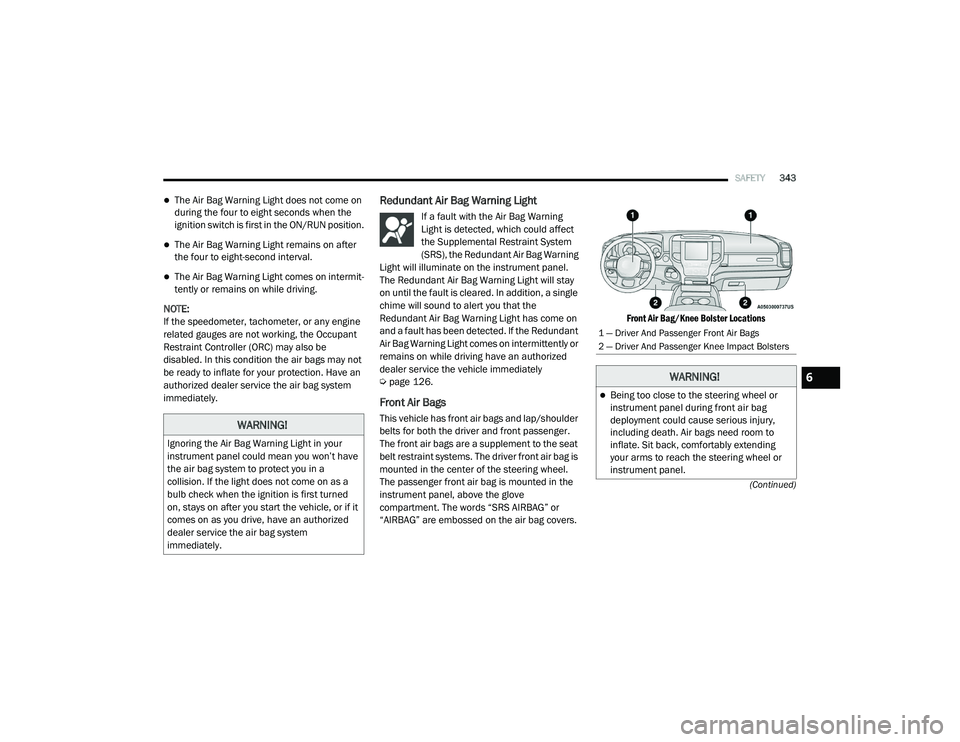
Front Air Bags
This vehicle has front air bags and lap/shoulder
belts for both the driver and front passenger.
The front air bags are a supplement to the seat
belt restraint systems. The driver front air bag is
mounted in the center of the steering wheel.
The passenger front air bag is mounted in the
instrument panel, above the glove
compartment. The words “SRS AIRBAG” or
“AIRBAG” are embossed on the air bag covers.
Front Air Bag/Knee Bolster Locations
WARNING!
Ignoring the Air Bag Warning Light in your
instrument panel could mean you won’t have
the air bag system to protect you in a
collision. If the light does not come on as a
bulb check when the ignition is first turned
on, stays on after you start the vehicle, or if it
comes on as you drive, have an authorized
dealer service the air bag system
immediately.
1 — Driver And Passenger Front Air Bags
2 — Driver And Passenger Knee Impact Bolsters
WARNING!
Being too close to the steering wheel or
instrument panel during front air bag
deployment could cause serious injury,
including death. Air bags need room to
inflate. Sit back, comfortably extending
your arms to reach the steering wheel or
instrument panel.
6
21_DT_OM_EN_USC_t.book Page 343
Page 346 of 496
344SAFETY
(Continued)
Driver And Passenger Front Air Bag
Features
The Advanced Front Air Bag system has
multistage driver and front passenger air bags.
This system provides output appropriate to the
severity and type of collision as determined by
the Occupant Restraint Controller (ORC), which
may receive information from the front impact
sensors (if equipped) or other system
components.
The first stage inflator is triggered immediately
during an impact that requires air bag
deployment. A low energy output is used in less severe collisions. A higher energy output is used
for more severe collisions.
This vehicle may be equipped with a driver and/
or front passenger seat belt buckle switch that
detects whether the driver or front passenger
seat belt is buckled. The seat belt buckle switch
may adjust the inflation rate of the Advanced
Front Air Bags.
This vehicle may be equipped with driver and/or
front passenger seat track position sensors that
may adjust the inflation rate of the Advanced
Front Air Bags based upon seat position.
This vehicle is equipped with a right front
passenger Occupant Classification System
(“OCS”) that is designed to provide Passenger
Advanced Front Air Bag output appropriate to
the occupant’s seated weight input, as
determined by the OCS.Front Air Bag Operation
Front Air Bags are designed to provide
additional protection by supplementing the seat
belts. Front air bags are not expected to reduce
the risk of injury in rear, side, or rollover
collisions. The front air bags will not deploy in all
frontal collisions, including some that may
produce substantial vehicle damage — for
example, some pole collisions, truck
underrides, and angle offset collisions.
Never place a rear-facing child restraint in
front of an air bag. A deploying passenger
front air bag can cause death or serious
injury to a child 12 years or younger,
including a child in a rear-facing child
restraint.
Never install a rear-facing child restraint in
the front seat of a vehicle. Only use a
rear-facing child restraint in the rear seat. If
the vehicle does not have a rear seat, do
not transport a rear-facing child restraint in
that vehicle.
WARNING!
(Continued)
WARNING!
No objects should be placed over or near
the air bag on the instrument panel or
steering wheel because any such objects
could cause harm if the vehicle is in a colli -
sion severe enough to cause the air bag to
inflate.
Do not put anything on or around the air
bag covers or attempt to open them manu -
ally. You may damage the air bags and you
could be injured because the air bags may
no longer be functional. The protective
covers for the air bag cushions are
designed to open only when the air bags
are inflating.
Relying on the air bags alone could lead to
more severe injuries in a collision. The air
bags work with your seat belt to restrain you
properly. In some collisions, air bags won’t
deploy at all. Always wear your seat belts
even though you have air bags.
WARNING! (Continued)
21_DT_OM_EN_USC_t.book Page 344
Page 347 of 496
SAFETY345
On the other hand, depending on the type and
location of impact, front air bags may deploy in
crashes with little vehicle front-end damage but
that produce a severe initial deceleration.
Because air bag sensors measure vehicle
deceleration over time, vehicle speed and
damage by themselves are not good indicators
of whether or not an air bag should have
deployed.
Seat belts are necessary for your protection in
all collisions, and also are needed to help keep
you in position, away from an inflating air bag.
When the Occupant Restraint Controller (ORC)
detects a collision requiring the front air bags, it
signals the inflator units. A large quantity of
non-toxic gas is generated to inflate the front air
bags.
The steering wheel hub trim cover and the
upper passenger side of the instrument panel
separate and fold out of the way as the air bags
inflate to their full size. The front air bags fully
inflate in less time than it takes to blink your
eyes. The front air bags then quickly deflate
while helping to restrain the driver and front
passenger.Occupant Classification System (OCS) —
Front Passenger Seat
The OCS is part of a Federally regulated safety
system for this vehicle. It is designed to provide
Passenger Advanced Front Air Bag output
appropriate to the occupant’s seated weight, as
determined by the OCS.
The Occupant Classification System (OCS)
consists of the following:
Occupant Restraint Controller (ORC)
Occupant Classification Module (OCM) and
Sensor located in the front passenger seat
Air Bag Warning Light
Occupant Classification Module (OCM) And
Sensor
The Occupant Classification Module (OCM) is
located underneath the front passenger seat.
The Sensor is located beneath the passenger
seat cushion foam. Any weight on the seat will
be sensed by the Sensor. The OCM uses input
from the Sensor to determine the front
passenger’s most probable classification. The
OCM communicates this information to the ORC. The ORC may reduce the inflation rate of
the Passenger Advanced Front Air Bag
deployment based on occupant classification.
In order for the OCS to operate as designed, it is
important for the front passenger to be seated
properly and properly wearing the seat belt.
The OCS will NOT prevent deployment of the
Passenger Advanced Front Air Bag. The OCS
may reduce the inflation rate of the Passenger
Advanced Front Air Bag if the OCS estimates
that:
The front passenger seat is unoccupied or
has very light objects on it; or
The front passenger seat is occupied by a
small passenger, including a child; or
The front passenger seat is occupied by a
rear-facing child restraint; or
The front passenger is not properly seated or
his or her weight is taken off of the seat for a
period of time.
6
21_DT_OM_EN_USC_t.book Page 345
Page 349 of 496
SAFETY347
Lighter Weight Passengers (Including Small
Adults)
When a lighter weight passenger, including a
small adult, occupies the front passenger seat,
the OCS may reduce the inflation rate of the
Passenger Advanced Front Air Bag. This does
not mean that the OCS is working improperly.
Do not decrease OR increase the front
passenger’s seated weight on the front
passenger seat
The front passenger’s seated weight must be
properly positioned on the front passenger seat.
Failure to do so may result in serious injury or
death. The OCS determines the most probable
classification of the occupant that it detects.
The OCS will detect the front passenger’s
decreased or increased seated weight, which
may result in an adjusted inflation rate of the
Passenger Advanced Front Air Bag in a collision.
This does not mean that the OCS is working
improperly. Decreasing the front passenger’s
seated weight on the front passenger seat may
result in a reduced-power deployment of the
Passenger Advanced Front Air Bag. Increasing
the front passenger’s seated weight on the front
passenger seat may result in a full-power
deployment of the Passenger Advanced Front
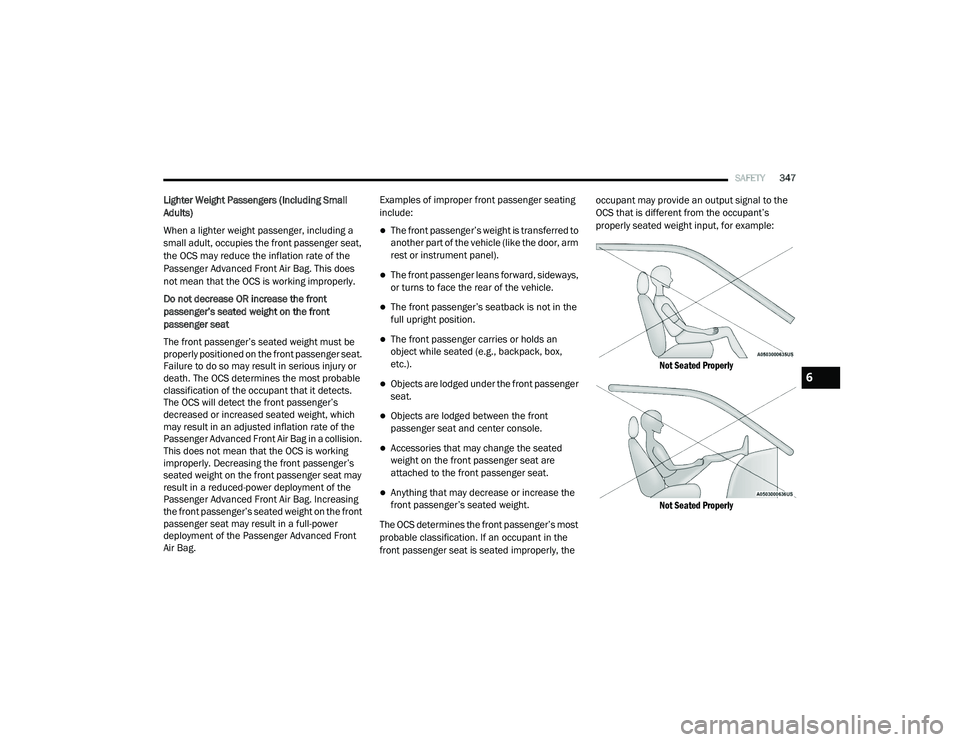
Air Bag. Examples of improper front passenger seating
include:
The front passenger’s weight is transferred to
another part of the vehicle (like the door, arm
rest or instrument panel).
The front passenger leans forward, sideways,
or turns to face the rear of the vehicle.
The front passenger’s seatback is not in the
full upright position.
The front passenger carries or holds an
object while seated (e.g., backpack, box,
etc.).
Objects are lodged under the front passenger
seat.
Objects are lodged between the front
passenger seat and center console.
Accessories that may change the seated
weight on the front passenger seat are
attached to the front passenger seat.
Anything that may decrease or increase the
front passenger’s seated weight.
The OCS determines the front passenger’s most
probable classification. If an occupant in the
front passenger seat is seated improperly, the occupant may provide an output signal to the
OCS that is different from the occupant’s
properly seated weight input, for example:
Not Seated Properly
Not Seated Properly
6
21_DT_OM_EN_USC_t.book Page 347