air suspension RAM 1500 2022 User Guide
[x] Cancel search | Manufacturer: RAM, Model Year: 2022, Model line: 1500, Model: RAM 1500 2022Pages: 496, PDF Size: 18.03 MB
Page 167 of 496
STARTING AND OPERATING165
ACTIVE-LEVEL FOUR CORNER AIR
SUSPENSION SYSTEM — IF EQUIPPED
DESCRIPTION
The air suspension system provides full-time
load-leveling capability along with the benefit of
being able to adjust vehicle height by using the
toggle switch.
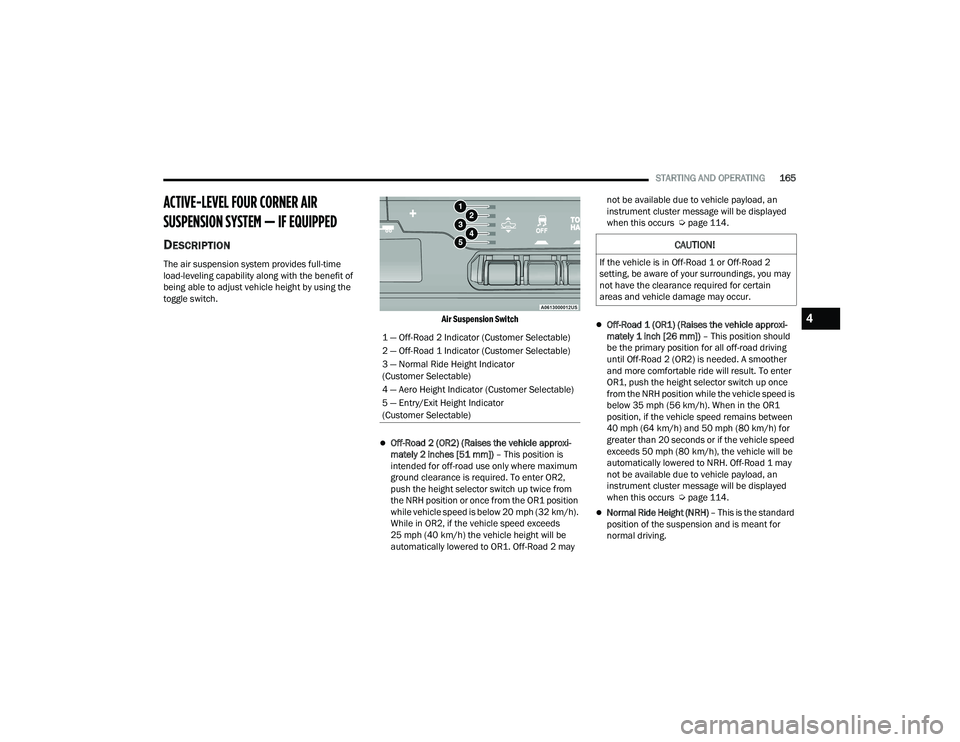
Air Suspension Switch
Off-Road 2 (OR2) (Raises the vehicle approxi-
mately 2 inches [51 mm]) – This position is
intended for off-road use only where maximum
ground clearance is required. To enter OR2,
push the height selector switch up twice from
the NRH position or once from the OR1 position
while vehicle speed is below 20 mph (32 km/h).
While in OR2, if the vehicle speed exceeds
25 mph (40 km/h) the vehicle height will be
automatically lowered to OR1. Off-Road 2 may not be available due to vehicle payload, an
instrument cluster message will be displayed
when this occurs Ú
page 114.
Off-Road 1 (OR1) (Raises the vehicle approxi -
mately 1 inch [26 mm]) – This position should
be the primary position for all off-road driving
until Off-Road 2 (OR2) is needed. A smoother
and more comfortable ride will result. To enter
OR1, push the height selector switch up once
from the NRH position while the vehicle speed is
below 35 mph (56 km/h). When in the OR1
position, if the vehicle speed remains between
40 mph (64 km/h) and 50 mph (80 km/h) for
greater than 20 seconds or if the vehicle speed
exceeds 50 mph (80 km/h), the vehicle will be
automatically lowered to NRH. Off-Road 1 may
not be available due to vehicle payload, an
instrument cluster message will be displayed
when this occurs Ú page 114.
Normal Ride Height (NRH) – This is the standard
position of the suspension and is meant for
normal driving.
1 — Off-Road 2 Indicator (Customer Selectable)
2 — Off-Road 1 Indicator (Customer Selectable)
3 — Normal Ride Height Indicator
(Customer Selectable)
4 — Aero Height Indicator (Customer Selectable)
5 — Entry/Exit Height Indicator
(Customer Selectable)
CAUTION!
If the vehicle is in Off-Road 1 or Off-Road 2
setting, be aware of your surroundings, you may
not have the clearance required for certain
areas and vehicle damage may occur.
4
22_DT_OM_EN_USC_t.book Page 165
Page 168 of 496
![RAM 1500 2022 User Guide
166STARTING AND OPERATING
Aero Height (Lowers the vehicle approximately
0.6 inch [15 mm]) – This position provides
improved aerodynamics by lowering the vehicle.
The vehicle will automatica](/img/34/59196/w960_59196-167.png "RAM 1500 2022 User Guide
166STARTING AND OPERATING
Aero Height (Lowers the vehicle approximately
0.6 inch [15 mm]) – This position provides
improved aerodynamics by lowering the vehicle.
The vehicle will automatica")
166STARTING AND OPERATING
Aero Height (Lowers the vehicle approximately
0.6 inch [15 mm]) – This position provides
improved aerodynamics by lowering the vehicle.
The vehicle will automatically enter Automatic
Aero Mode when the vehicle speed remains
between 62 mph (100 km/h) and 66 mph
(106 km/h) for greater than 20 seconds or if the
vehicle speed exceeds 66 mph (106 km/h). The
vehicle will return to NRH from Aero Mode if the
vehicle speed remains between 30 mph
(48 km/h) and 35 mph (56 km/h) for greater
than 20 seconds or if the vehicle speed falls
below 30 mph (48 km/h).
NOTE:
Automatic Aero mode will be disabled if a
trailer is detected to prevent shifting loads.
Speed thresholds for raising/lowering the
vehicle automatically at higher speeds only
apply if Automatic Aero Mode is enabled in
your Uconnect Radio settings.
To enter Aero Height manually push the height
selector switch down once from NRH at any
vehicle speed. To return to NRH push the height
selector switch up once while vehicle speed is
less than 56 mph (90 km/h).
NOTE:Automatic Aero Mode may be disabled through
vehicle settings in the instrument cluster display
Ú page 114 or through your Uconnect Radio (if
equipped) Ú page 234.
Entry/Exit Height (Lowers the vehicle approxi -
mately 2 inches [51 mm]) – This position lowers
the vehicle for easier passenger entry and exit
as well as lowering the vehicle for easier loading
and unloading of cargo. To enter Entry/Exit
Mode, push the height selector switch down
once from the NRH while the vehicle speed is
below 33 mph (53 km/h). Once the vehicle
speed goes below 15 mph (24 km/h) the
vehicle height will begin to lower. If the vehicle
speed remains between 15 mph (24 km/h) and
25 mph (40 km/h) for greater than 60 seconds,
or the vehicle speed exceeds 25 mph (40 km/h)
the Entry/Exit change will be canceled. To return
to Normal Height Mode, push the height
selector switch up once while in Entry/Exit or
drive the vehicle over 15 mph (24 km/h).
NOTE:Entry/Exit Height may be achieved using the
Remote Lowering feature on your key fob for easier
entry/loading Ú page 19. The system requires that the ignition be in the ON/
RUN position or the engine running for all user
requested changes. When lowering the vehicle, all
of the doors must be closed. If a door is opened at
any time while the vehicle is lowering, the change
will not be completed until the open door(s) is
closed.
This system uses a lifting and lowering pattern
which keeps the headlights from incorrectly
shining into oncoming traffic. When raising the
vehicle, the rear of the vehicle will move up first
and then the front. When lowering the vehicle, the
front will move down first and then the rear.
After the engine is turned off, it may be noticed that
the air suspension system operates briefly; this is
normal. The system is correcting the position of the
vehicle to ensure a proper appearance.
To assist with changing a spare tire, the air
suspension system has a feature which allows the
automatic leveling to be disabled Ú
page 114.
CAUTION!
When in ENTRY/EXIT Height, be aware of your
surroundings, you may not have the clearance
required for certain areas and vehicle damage
may occur.
22_DT_OM_EN_USC_t.book Page 166
Page 169 of 496
STARTING AND OPERATING167
NOTE:Default Ride Height:
Select Aero Height or Normal Ride Height as the
default for all vehicle speeds and operation.
This is the selected height that the suspension
will level for speed changes (e.g. raising from
Entry/Exit Height at speed, lowering from Off
Road Height at speed, etc.).
Default ride height can be changed by manually
adjusting the Air Suspension switch to Normal
Ride Height or Aero Ride Height and staying in
the selected height for 2.5 seconds. It will be
stored as the default ride height and the height
will be maintained until a new default ride
height is selected.
If equipped with a touchscreen radio, all enabling/
disabling of air suspension features must be done
through the radio Ú page 234.
AIR SUSPENSION MODES
The air suspension system has multiple modes to
protect the system in unique situations. The engine
should be running to change between Air
Suspension Modes.
Automatic Areo Mode
To improve aerodynamics, the air suspension
system has a feature which will put the vehicle into
Aeroheight automatically at higher speeds
Úpage 114.
Automatic Aero Mode may be disabled through
vehicle settings in the Uconnect Radio (if
equipped) Ú page 234.
Tire Jack Mode
To assist with changing a tire, the air suspension
system has a feature which allows the automatic
leveling to be disabled Ú page 234.
Transport Mode
For towing your vehicle with four wheels off the
road, the air suspension system has a feature
which will put the vehicle into Entry/Exit height and
disable the automatic load leveling system
Ú page 234. Wheel Alignment Mode
Before performing a wheel alignment, this mode
must be enabled which will put the vehicle into
NRH and disable automatic leveling Ú
page 234.
Protection Strategy
In order to protect the air suspension system, the
vehicle will disable load leveling as required
(suspension overloaded, battery charge low, etc.).
Load leveling will automatically resume as soon as
system operation requirements are met. See an
authorized dealer if system does not resume.
NOTE:For towing with air suspension Ú page 212.
INSTRUMENT CLUSTER DISPLAY
M
ESSAGES
When the appropriate conditions exist, a message
will appear in the instrument cluster display
Ú page 114.
An audible chime will be heard whenever a system
error has been detected.
See an authorized dealer for system service if
normal operation does not resume.
WARNING!
The air suspension system uses a high pressure
volume of air to operate the system. To avoid
personal injury or damage to the system, see an
authorized dealer for service.
4
22_DT_OM_EN_USC_t.book Page 167
Page 170 of 496
168STARTING AND OPERATING
OPERATION
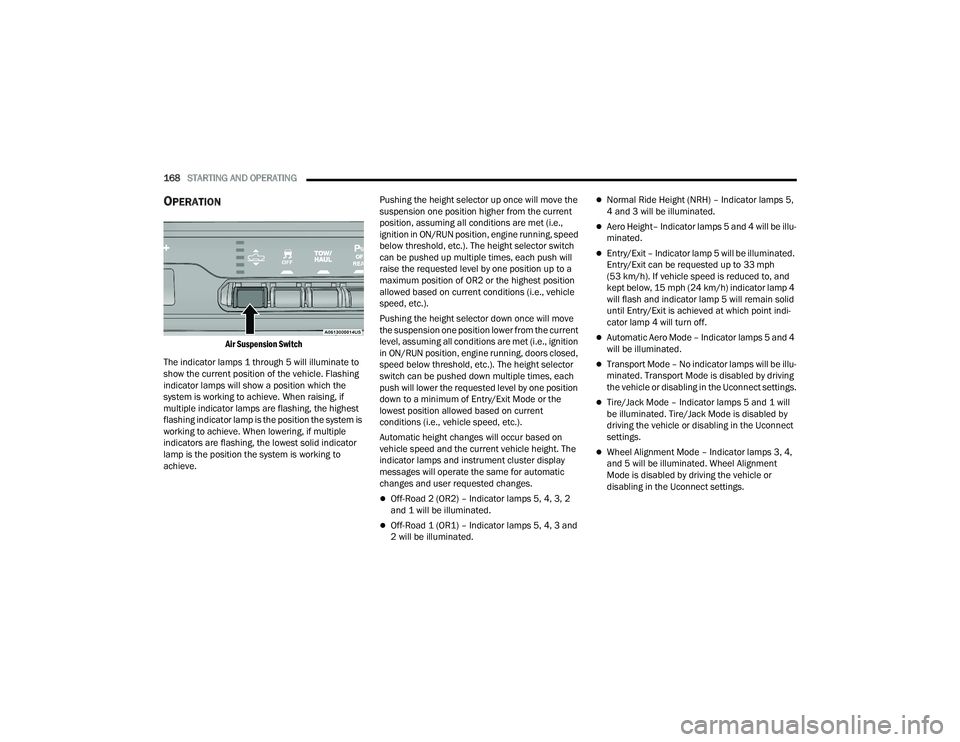
Air Suspension Switch
The indicator lamps 1 through 5 will illuminate to
show the current position of the vehicle. Flashing
indicator lamps will show a position which the
system is working to achieve. When raising, if
multiple indicator lamps are flashing, the highest
flashing indicator lamp is the position the system is
working to achieve. When lowering, if multiple
indicators are flashing, the lowest solid indicator
lamp is the position the system is working to
achieve. Pushing the height selector up once will move the
suspension one position higher from the current
position, assuming all conditions are met (i.e.,
ignition in ON/RUN position, engine running, speed
below threshold, etc.). The height selector switch
can be pushed up multiple times, each push will
raise the requested level by one position up to a
maximum position of OR2 or the highest position
allowed based on current conditions (i.e., vehicle
speed, etc.).
Pushing the height selector down once will move
the suspension one position lower from the current
level, assuming all conditions are met (i.e., ignition
in ON/RUN position, engine running, doors closed,
speed below threshold, etc.). The height selector
switch can be pushed down multiple times, each
push will lower the requested level by one position
down to a minimum of Entry/Exit Mode or the
lowest position allowed based on current
conditions (i.e., vehicle speed, etc.).
Automatic height changes will occur based on
vehicle speed and the current vehicle height. The
indicator lamps and instrument cluster display
messages will operate the same for automatic
changes and user requested changes.
Off-Road 2 (OR2) – Indicator lamps 5, 4, 3, 2
and 1 will be illuminated.
Off-Road 1 (OR1) – Indicator lamps 5, 4, 3 and
2 will be illuminated.
Normal Ride Height (NRH) – Indicator lamps 5,
4 and 3 will be illuminated.
Aero Height– Indicator lamps 5 and 4 will be illu
-
minated.
Entry/Exit – Indicator lamp 5 will be illuminated.
Entry/Exit can be requested up to 33 mph
(53 km/h). If vehicle speed is reduced to, and
kept below, 15 mph (24 km/h) indicator lamp 4 will flash and indicator lamp 5 will remain solid
until Entry/Exit is achieved at which point indi -
cator lamp 4 will turn off.
Automatic Aero Mode – Indicator lamps 5 and 4
will be illuminated.
Transport Mode – No indicator lamps will be illu -
minated. Transport Mode is disabled by driving
the vehicle or disabling in the Uconnect settings.
Tire/Jack Mode – Indicator lamps 5 and 1 will
be illuminated. Tire/Jack Mode is disabled by
driving the vehicle or disabling in the Uconnect
settings.
Wheel Alignment Mode – Indicator lamps 3, 4,
and 5 will be illuminated. Wheel Alignment
Mode is disabled by driving the vehicle or
disabling in the Uconnect settings.
22_DT_OM_EN_USC_t.book Page 168
Page 171 of 496
STARTING AND OPERATING169
ACTIVE-LEVEL FOUR CORNER AIR
SUSPENSION SYSTEM (OFF-ROAD GROUP) —
IF EQUIPPED
DESCRIPTION
The air suspension system provides full-time
load-leveling capability along with the benefit of
being able to adjust vehicle height by using the
toggle switch.
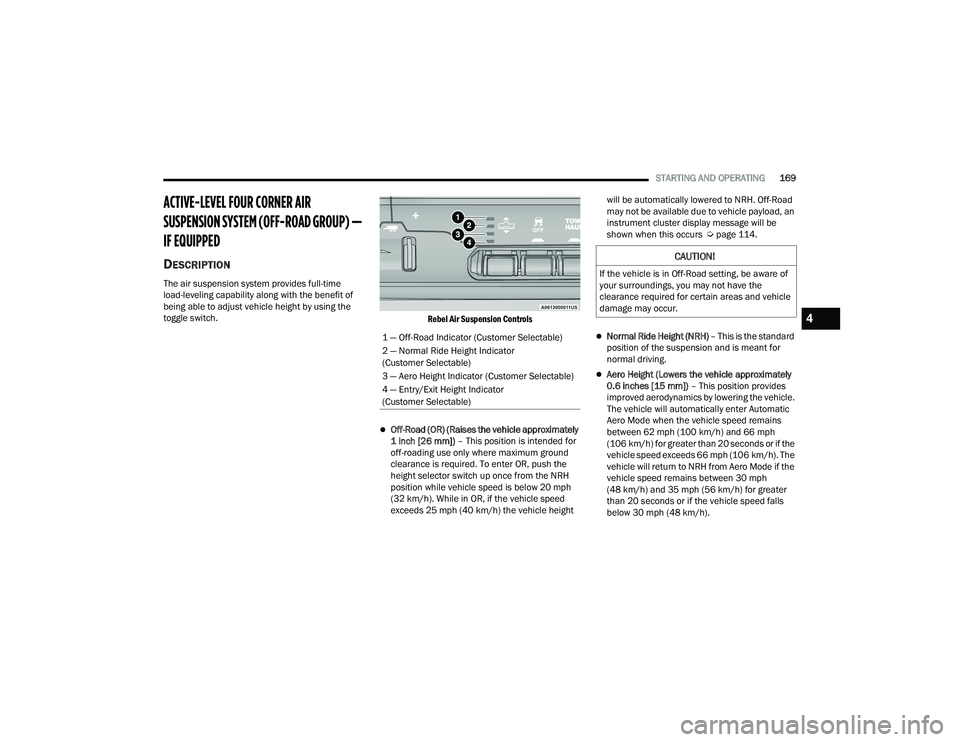
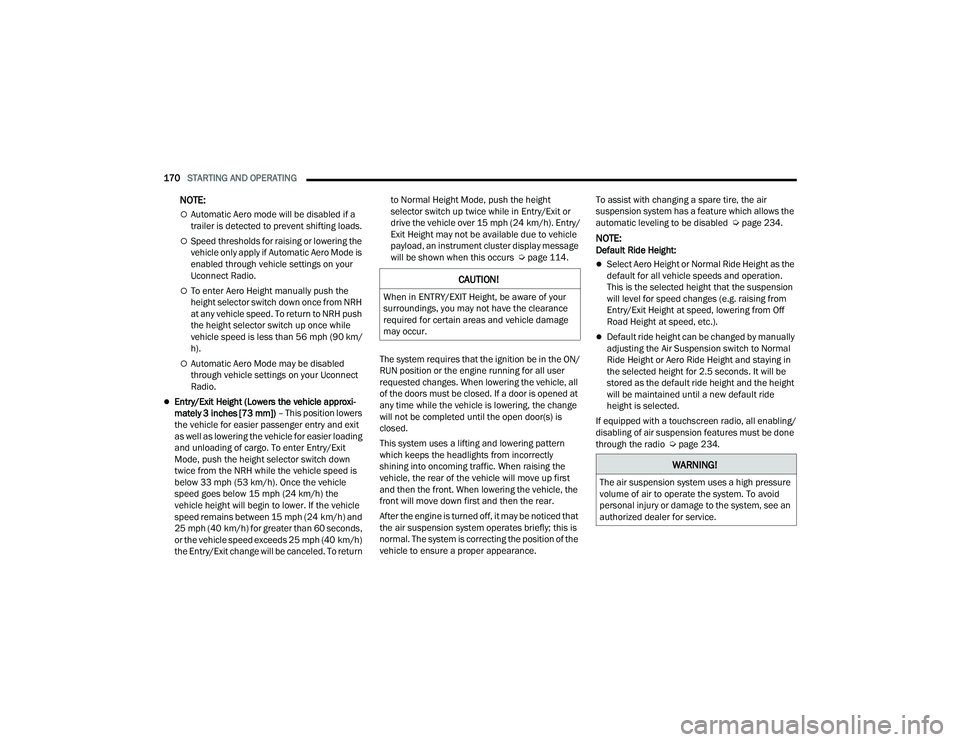
Rebel Air Suspension Controls
Off-Road (OR) (Raises the vehicle approximately
1 inch [26 mm]) – This position is intended for
off-roading use only where maximum ground
clearance is required. To enter OR, push the
height selector switch up once from the NRH
position while vehicle speed is below 20 mph
(32 km/h). While in OR, if the vehicle speed
exceeds 25 mph (40 km/h) the vehicle height will be automatically lowered to NRH. Off-Road
may not be available due to vehicle payload, an
instrument cluster display message will be
shown when this occurs Ú
page 114.
Normal Ride Height (NRH) – This is the standard
position of the suspension and is meant for
normal driving.
Aero Height (Lowers the vehicle approximately
0.6 inches [15 mm]) – This position provides
improved aerodynamics by lowering the vehicle.
The vehicle will automatically enter Automatic
Aero Mode when the vehicle speed remains
between 62 mph (100 km/h) and 66 mph
(106 km/h) for greater than 20 seconds or if the
vehicle speed exceeds 66 mph (106 km/h). The
vehicle will return to NRH from Aero Mode if the
vehicle speed remains between 30 mph
(48 km/h) and 35 mph (56 km/h) for greater
than 20 seconds or if the vehicle speed falls
below 30 mph (48 km/h).
1 — Off-Road Indicator (Customer Selectable)
2 — Normal Ride Height Indicator
(Customer Selectable)
3 — Aero Height Indicator (Customer Selectable)
4 — Entry/Exit Height Indicator
(Customer Selectable)
CAUTION!
If the vehicle is in Off-Road setting, be aware of
your surroundings, you may not have the
clearance required for certain areas and vehicle
damage may occur.
4
22_DT_OM_EN_USC_t.book Page 169
Page 172 of 496
170STARTING AND OPERATING
NOTE:
Automatic Aero mode will be disabled if a
trailer is detected to prevent shifting loads.
Speed thresholds for raising or lowering the
vehicle only apply if Automatic Aero Mode is
enabled through vehicle settings on your
Uconnect Radio.
To enter Aero Height manually push the
height selector switch down once from NRH
at any vehicle speed. To return to NRH push
the height selector switch up once while
vehicle speed is less than 56 mph (90 km/
h).
Automatic Aero Mode may be disabled
through vehicle settings on your Uconnect
Radio.
Entry/Exit Height (Lowers the vehicle approxi -
mately 3 inches [73 mm]) – This position lowers
the vehicle for easier passenger entry and exit
as well as lowering the vehicle for easier loading
and unloading of cargo. To enter Entry/Exit
Mode, push the height selector switch down
twice from the NRH while the vehicle speed is
below 33 mph (53 km/h). Once the vehicle
speed goes below 15 mph (24 km/h) the
vehicle height will begin to lower. If the vehicle
speed remains between 15 mph (24 km/h) and
25 mph (40 km/h) for greater than 60 seconds,
or the vehicle speed exceeds 25 mph (40 km/h)
the Entry/Exit change will be canceled. To return to Normal Height Mode, push the height
selector switch up twice while in Entry/Exit or
drive the vehicle over 15 mph (24 km/h). Entry/
Exit Height may not be available due to vehicle
payload, an instrument cluster display message
will be shown when this occurs Ú
page 114.
The system requires that the ignition be in the ON/
RUN position or the engine running for all user
requested changes. When lowering the vehicle, all
of the doors must be closed. If a door is opened at
any time while the vehicle is lowering, the change
will not be completed until the open door(s) is
closed.
This system uses a lifting and lowering pattern
which keeps the headlights from incorrectly
shining into oncoming traffic. When raising the
vehicle, the rear of the vehicle will move up first
and then the front. When lowering the vehicle, the
front will move down first and then the rear.
After the engine is turned off, it may be noticed that
the air suspension system operates briefly; this is
normal. The system is correcting the position of the
vehicle to ensure a proper appearance. To assist with changing a spare tire, the air
suspension system has a feature which allows the
automatic leveling to be disabled Ú
page 234.
NOTE:Default Ride Height:
Select Aero Height or Normal Ride Height as the
default for all vehicle speeds and operation.
This is the selected height that the suspension
will level for speed changes (e.g. raising from
Entry/Exit Height at speed, lowering from Off
Road Height at speed, etc.).
Default ride height can be changed by manually
adjusting the Air Suspension switch to Normal
Ride Height or Aero Ride Height and staying in
the selected height for 2.5 seconds. It will be
stored as the default ride height and the height
will be maintained until a new default ride
height is selected.
If equipped with a touchscreen radio, all enabling/
disabling of air suspension features must be done
through the radio Ú page 234.
CAUTION!
When in ENTRY/EXIT Height, be aware of your
surroundings, you may not have the clearance
required for certain areas and vehicle damage
may occur.
WARNING!
The air suspension system uses a high pressure
volume of air to operate the system. To avoid
personal injury or damage to the system, see an
authorized dealer for service.
22_DT_OM_EN_USC_t.book Page 170
Page 173 of 496

STARTING AND OPERATING171
AIR SUSPENSION MODES
The air suspension system has multiple modes to
protect the system in unique situations:
Automatic Aero Mode
To improve aerodynamics, the air suspension
system has a feature which will put the vehicle into
Aero height automatically at higher speeds
Úpage 114.
Tire Jack Mode
To assist with changing a tire, the air suspension
system has a feature which allows the automatic
leveling to be disabled Ú page 234.
Transport Mode
For towing your vehicle with four wheels off the
road, the air suspension system has a feature
which will put the vehicle into Entry/Exit height and
disable the automatic load leveling system
Ú page 234.
Wheel Alignment Mode
Before performing a wheel alignment, this mode
must be enabled which moves the vehicle to
normal ride height and disables the automatic
leveling Ú page 234.
Protection Strategy
In order to protect the air suspension system, the
vehicle will disable load leveling as required
(suspension overloaded, battery charge low, etc.). Load leveling will automatically resume as soon as
system operation requirements are met. See an
authorized dealer if system does not resume.
NOTE:For towing with air suspension Ú
page 212.
INSTRUMENT CLUSTER DISPLAY
M
ESSAGES
When the appropriate conditions exist, a message
will appear in the instrument cluster display
Ú page 114.
An audible chime will be heard whenever a system
error has been detected.
See an authorized dealer for system service if
normal operation does not resume.
OPERATION
Air Suspension Switch
The indicator lamps 1 through 4 will illuminate to
show the current position of the vehicle. Flashing
indicator lamps will show a position which the
system is working to achieve. When raising or
lowering, the flashing indicator lamp is the position
the system is working to achieve.
Pushing the height selector switch up once will
move the suspension one position higher from the
current position, assuming all conditions are met
(i.e., key in ON/RUN position, engine running,
speed below threshold, etc.). The height selector
switch can be pushed up multiple times, each push
will raise the requested level by one position up to
a maximum position of OR or the highest position
allowed based on current conditions (i.e., vehicle
speed, etc.).
Pushing the height selector switch down once will
move the suspension one position lower from the
current level, assuming all conditions are met (i.e.,
key in ON/RUN position, engine running, doors
closed, speed below threshold, etc.). The height
selector switch can be pushed down multiple
times, each push will lower the requested level by
one position down to a minimum of Entry/Exit
Mode or the lowest position allowed based on
current conditions (i.e., vehicle speed, etc.).
4
22_DT_OM_EN_USC_t.book Page 171
Page 217 of 496

STARTING AND OPERATING215
RECOMMENDED DISTRIBUTION HITCH
ADJUSTMENT
Towing With Air Suspension — If Equipped
1. Verify that the vehicle is at the normal ride
height.
NOTE:The vehicle must remain in the engine run position
with all doors closed while attaching a trailer for
proper leveling of the air suspension system.
2. Position the truck to be ready to connect to the trailer (do not connect the trailer).
3. Enable tire jack mode through the instrument cluster or touchscreen radio settings. Tire jack
mode will be canceled and the procedure must
be restarted if the vehicle is driven at speeds
above 5 mph (8 km/h).
4. Measure the height from the top of the front wheel opening on the fender to ground; this is
height H1.
Measuring Height (H)
5. Attach the trailer to the vehicle without the weight-distributing bars connected.
6. Measure the height from the top of the front wheel opening on the fender to the ground;
this is height H2.
7. Install and adjust the tension in the weight-distributing bars per the
manufacturer’s recommendations so that the
height of the front fender is approximately
(H2-H1)/3+H1 (about 1/3 the difference
between H2 and H1 above normal ride height
[H1]). 8. Use the instrument cluster or touchscreen
radio settings and switch off tire jack mode.
Make sure the truck returns to normal ride
height. Perform a visual inspection of the
trailer and weight-distributing hitch to confirm
the manufacturer’s recommendations have
been met.
9. The truck can now be driven.
NOTE:For all towing conditions, we recommend towing
with Tow/Haul mode engaged.
Measurement Example Example Height (mm)
H1
925
H2 946
H2-H1 21
(H2-H1)/3 7
(H2-H1)/3 + H1 932
4
22_DT_OM_EN_USC_t.book Page 215
Page 227 of 496

STARTING AND OPERATING225
TOWING TIPS
Before towing, practice turning, stopping, and
backing up the trailer in an area located away from
heavy traffic.
Automatic Transmission
The DRIVE range can be selected when towing. The
transmission controls include a drive strategy to
avoid frequent shifting when towing. However, if
frequent shifting does occur while in DRIVE, select
TOW/HAUL mode or select a lower gear range
(using the Electronic Range Select (ERS) shift
control).
NOTE:Using TOW/HAUL mode or selecting a lower gear
range (using the ERS shift control) while operating
the vehicle under heavy loading conditions will
improve performance and extend transmission life
by reducing excessive shifting and heat build up.
This action will also provide better engine braking.
Tow/Haul Mode
To reduce potential for automatic transmission
overheating, activate TOW/HAUL mode when
driving in hilly areas, or select a lower gear range
(using the (ERS) shift control) on more severe
grades.
Cruise Control — If Equipped
Do not use on hilly terrain or with heavy loads.
When using the Cruise Control, if you experience
speed drops greater than 10 mph (16 km/h),
disengage until you can get back to cruising
speed.
Use Cruise Control in flat terrain and with light
loads to maximize fuel efficiency.
Air Suspension System
To aid in attaching/detaching the trailer from the
vehicle, the air suspension system can be used
Úpage 165. Selecting Tow/Haul or connecting a
trailer with an Integrated Trailer Brake Module
(ITBM) will disable Automatic Aero mode to avoid
height changes while towing and shifting loads or
tongue weights.
NOTE:The vehicle must remain in the engine running
position while attaching a trailer for proper leveling
of the air suspension system.
SNOWPLOW
Snowplow Prep Packages are available as a factory
installed option. These packages include
components necessary to equip your vehicle with a
snowplow.
NOTE:Before installation of a snowplow it is highly recom -
mended that the owner/installer obtain and follow
the recommendations contained within the current
Body Builder’s Guide. See an authorized dealer,
installer or snowplow manufacturer for this infor -
mation. There are unique electrical systems that
must be connected to properly ensure operator
safety and prevent overloading vehicle systems.
WARNING!
Attaching a snowplow to this vehicle could
adversely affect performance of the airbag
system in a collision. Do not expect that the
airbag will perform as described earlier in this
manual.
CAUTION!
The “Lamp Out” indicator could illuminate if
exterior lamps are not properly installed.
4
22_DT_OM_EN_USC_t.book Page 225
Page 229 of 496

STARTING AND OPERATING227
RECREATIONAL TOWING (BEHIND MOTORHOME)
TOWING THIS VEHICLE BEHIND ANOTHER VEHICLE
NOTE:
When towing your vehicle, always follow applicable state and provincial laws. Contact state and provincial Highway Safety offices for additional details.
Vehicles equipped with Active-Level Four Corner Air Suspension must be placed in Transport mode before tying them down (from the body) on a trailer or
flatbed truck Úpage 165. If the vehicle cannot be placed in Transport mode (for example, engine will not run), tie-downs must be fastened to the axles
(not to the body). Failure to follow these instructions may cause fault codes to be set and/or cause loss of proper tie-down tension.
Towing Condition Wheels OFF The Ground Two-Wheel Drive Models Four-Wheel Drive Models
Flat TowNONENOT ALLOWED See InstructionsTransmission in PARK
Transfer case in N (Neutral)
Tow in forward direction
Dolly Tow Front
NOT ALLOWED NOT ALLOWED
Rear OK NOT ALLOWED
On Trailer ALLOK OK4
22_DT_OM_EN_USC_t.book Page 227