instrument panel RAM 1500 2022 User Guide
[x] Cancel search | Manufacturer: RAM, Model Year: 2022, Model line: 1500, Model: RAM 1500 2022Pages: 496, PDF Size: 18.03 MB
Page 69 of 496

GETTING TO KNOW YOUR VEHICLE67
Blower Control
Blower Control regulates the amount of
air forced through the climate control
system. There are seven blower speeds
available. The blower speed increases as
you turn the blower control knob clockwise from
the lowest blower setting. The blower speed
decreases as you turn the blower control knob
counterclockwise.
Mode Control
Turn the mode control knob or press the
mode control button (if equipped) to
adjust airflow distribution. The airflow
distribution mode can be adjusted so air
comes from the instrument panel outlets, floor
outlets, defrost outlets and demist outlets.
Panel Mode
Air comes from the outlets in the
instrument panel. Each of these outlets
can be individually adjusted to direct the
flow of air. The air vanes of the center
outlets and outboard outlets can be moved up and
down or side to side to regulate airflow direction.
There is a shut-off wheel located below the air
vanes to shut off or adjust the amount of airflow
from these outlets.
Bi-Level Mode
Air comes from the instrument panel
outlets and floor outlets. A slight amount
of air is directed through the defrost and
side window demister outlets.
NOTE:Bi-Level mode is designed under comfort condi -
tions to provide cooler air out of the panel outlets
and warmer air from the floor outlets.
Floor Mode
Air comes from the floor outlets. A slight
amount of air is directed through the
defrost and side window demister
outlets.
Mix Mode
Air is directed through the floor, defrost,
and side window demister outlets. This
setting works best in cold or snowy
conditions that require extra heat to the
windshield. This setting is good for maintaining
comfort while reducing moisture on the
windshield.
AUTOMATIC TEMPERATURE CONTROL
(ATC) — I
F EQUIPPED
Automatic Operation
1. Push the AUTO button on the faceplate, or the
AUTO button on the touchscreen on the
Automatic Temperature Control (ATC) Panel.
2. Next, adjust the temperature that you would like the system to maintain by adjusting the
driver and passenger temperature control
buttons. Once the desired temperature is
displayed, the system will achieve and
automatically maintain that temperature.
3. When the system is set up for your comfort level, it is not necessary to change the
settings. You will experience the greatest
efficiency by simply allowing the system to
function automatically.
NOTE:
It is not necessary to move the temperature
settings for cold or hot vehicles. The system
automatically adjusts the temperature, mode,
and blower speed to provide comfort as quickly
as possible.
The temperature can be displayed in US or
Metric units by selecting the US/Metric
customer-programmable feature within Ucon -
nect Settings Ú page 234.
2
22_DT_OM_EN_USC_t.book Page 67
Page 71 of 496
GETTING TO KNOW YOUR VEHICLE69
Operating Tips ChartINTERIOR STORAGE AND EQUIPMENT
STORAGE
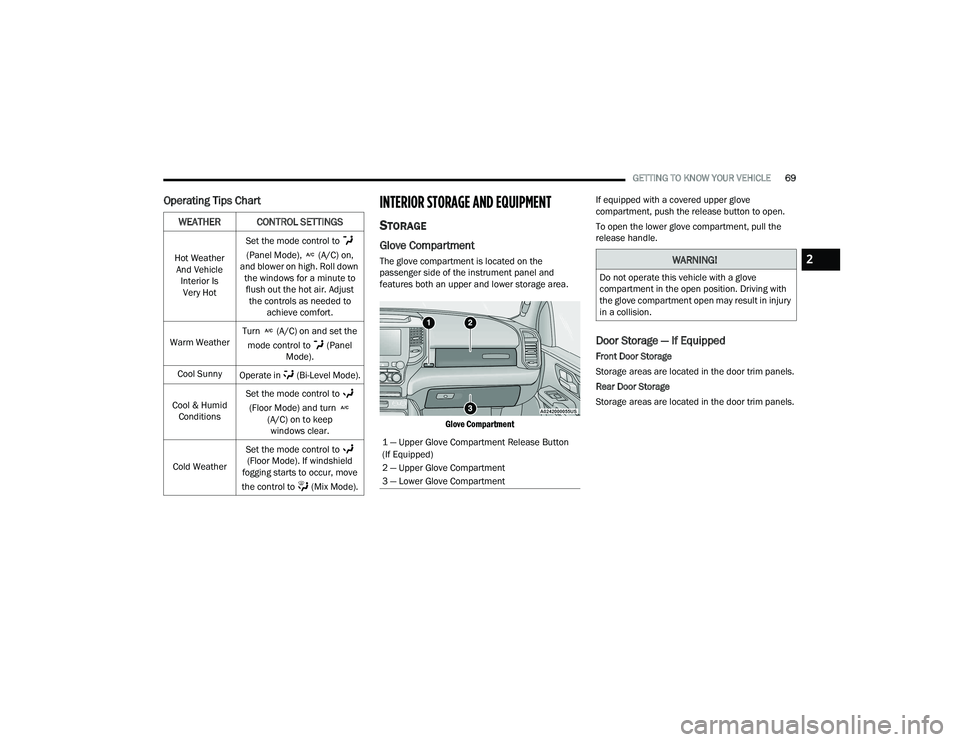
Glove Compartment
The glove compartment is located on the
passenger side of the instrument panel and
features both an upper and lower storage area.
Glove Compartment
If equipped with a covered upper glove
compartment, push the release button to open.
To open the lower glove compartment, pull the
release handle.
Door Storage — If Equipped
Front Door Storage
Storage areas are located in the door trim panels.
Rear Door Storage
Storage areas are located in the door trim panels.
WEATHER CONTROL SETTINGS
Hot Weather
And Vehicle Interior Is Very Hot Set the mode control to
(Panel Mode), (A/C) on,
and blower on high. Roll down the windows for a minute to flush out the hot air. Adjust the controls as needed to achieve comfort.
Warm Weather Turn (A/C) on and set the
mode control to (Panel Mode).
Cool Sunny Operate in (Bi-Level Mode).
Cool & Humid Conditions Set the mode control to
(Floor Mode) and turn (A/C) on to keep windows clear.
Cold Weather Set the mode control to
(Floor Mode). If windshield
fogging starts to occur, move
the control to (Mix Mode).
1 — Upper Glove Compartment Release Button
(If Equipped)
2 — Upper Glove Compartment
3 — Lower Glove Compartment
WARNING!
Do not operate this vehicle with a glove
compartment in the open position. Driving with
the glove compartment open may result in injury
in a collision.
2
22_DT_OM_EN_USC_t.book Page 69
Page 75 of 496
GETTING TO KNOW YOUR VEHICLE73
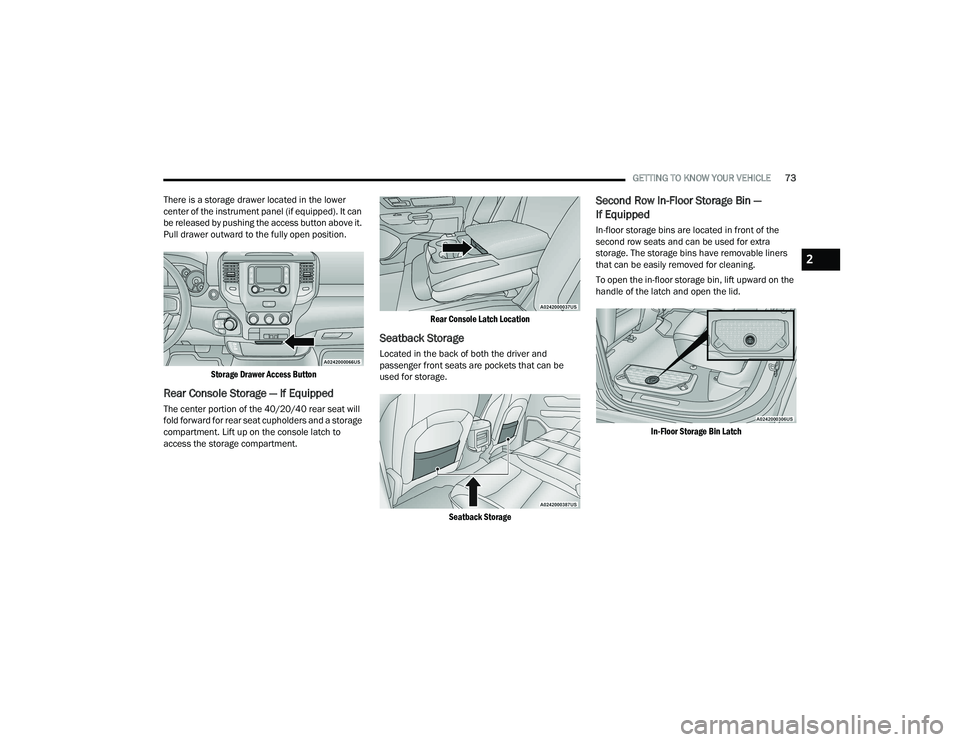
There is a storage drawer located in the lower
center of the instrument panel (if equipped). It can
be released by pushing the access button above it.
Pull drawer outward to the fully open position.
Storage Drawer Access Button
Rear Console Storage — If Equipped
The center portion of the 40/20/40 rear seat will
fold forward for rear seat cupholders and a storage
compartment. Lift up on the console latch to
access the storage compartment.
Rear Console Latch Location
Seatback Storage
Located in the back of both the driver and
passenger front seats are pockets that can be
used for storage.
Seatback Storage
Second Row In-Floor Storage Bin —
If Equipped
In-floor storage bins are located in front of the
second row seats and can be used for extra
storage. The storage bins have removable liners
that can be easily removed for cleaning.
To open the in-floor storage bin, lift upward on the
handle of the latch and open the lid.
In-Floor Storage Bin Latch
2
22_DT_OM_EN_USC_t.book Page 73
Page 77 of 496
GETTING TO KNOW YOUR VEHICLE75
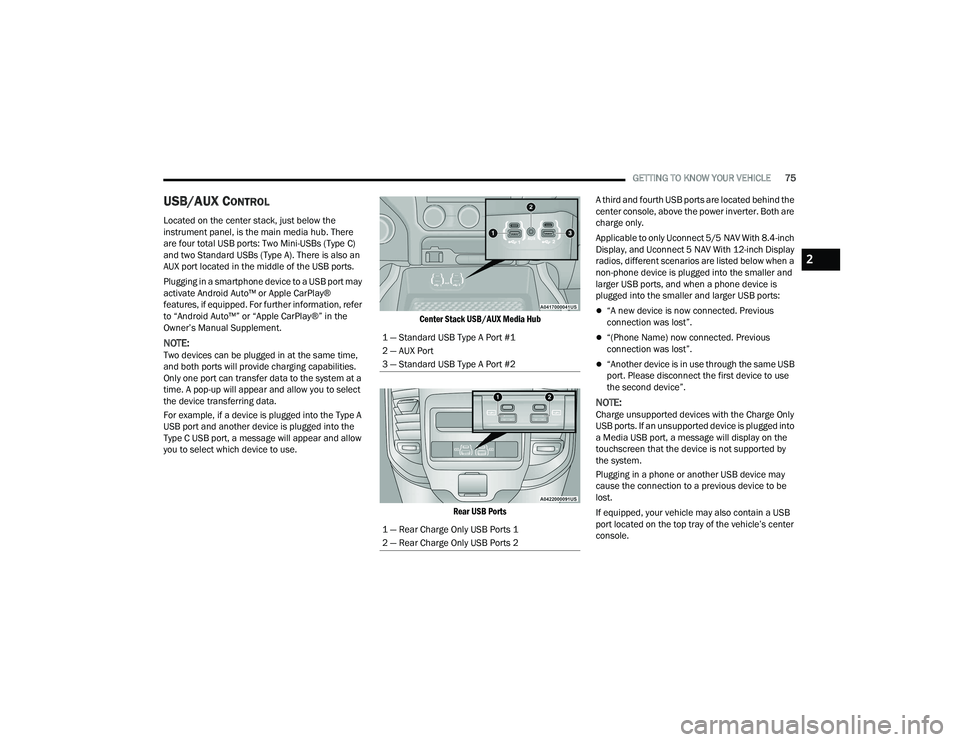
USB/AUX CONTROL
Located on the center stack, just below the
instrument panel, is the main media hub. There
are four total USB ports: Two Mini-USBs (Type C)
and two Standard USBs (Type A). There is also an
AUX port located in the middle of the USB ports.
Plugging in a smartphone device to a USB port may
activate Android Auto™ or Apple CarPlay®
features, if equipped. For further information, refer
to “Android Auto™” or “Apple CarPlay®” in the
Owner’s Manual Supplement.
NOTE:Two devices can be plugged in at the same time,
and both ports will provide charging capabilities.
Only one port can transfer data to the system at a
time. A pop-up will appear and allow you to select
the device transferring data.
For example, if a device is plugged into the Type A
USB port and another device is plugged into the
Type C USB port, a message will appear and allow
you to select which device to use.
Center Stack USB/AUX Media Hub
Rear USB Ports
A third and fourth USB ports are located behind the
center console, above the power inverter. Both are
charge only.
Applicable to only Uconnect 5/5 NAV With 8.4-inch
Display, and Uconnect 5 NAV With 12-inch Display
radios, different scenarios are listed below when a
non-phone device is plugged into the smaller and
larger USB ports, and when a phone device is
plugged into the smaller and larger USB ports:
“A new device is now connected. Previous
connection was lost”.
“(Phone Name) now connected. Previous
connection was lost”.
“Another device is in use through the same USB
port. Please disconnect the first device to use
the second device”.
NOTE:Charge unsupported devices with the Charge Only
USB ports. If an unsupported device is plugged into
a Media USB port, a message will display on the
touchscreen that the device is not supported by
the system.
Plugging in a phone or another USB device may
cause the connection to a previous device to be
lost.
If equipped, your vehicle may also contain a USB
port located on the top tray of the vehicle’s center
console.
1 — Standard USB Type A Port #1
2 — AUX Port
3 — Standard USB Type A Port #2
1 — Rear Charge Only USB Ports 1
2 — Rear Charge Only USB Ports 2
2
22_DT_OM_EN_USC_t.book Page 75
Page 79 of 496

GETTING TO KNOW YOUR VEHICLE77
(Continued)
The auxiliary power outlet can be changed to battery
powered at all times by switching the power outlet
fuses in the Internal Power Distribution Center
located under the driver’s side instrument panel.
Power Outlet Fuse Locations
When the vehicle is turned off, be sure to unplug
any equipment as to not drain the battery of the
vehicle. All accessories connected to the outlet(s)
should be removed or turned off when the vehicle
is not in use to protect the battery against
discharge.
POWER INVERTER — IF EQUIPPED
A 115 Volt (400 Watts Maximum) inverter may be
located inside the center console towards the right
hand side. This inverter can power cellular phones,
electronics and other low power devices requiring
power up to 400 Watts. Certain video game
consoles exceed this power limit, as will most
power tools.
Center Console Power Inverter Outlet
1 — F54 Fuse 20 A Yellow Power Outlet Battery
Fed Position
2 — F54 Fuse 20 A Yellow Power Outlet Ignition
Fed Position
3 — F48 Fuse 10 A Red Port Power or Rear USB
(Charge Only)
WARNING!
To avoid serious injury or death:
Only devices designed for use in this type of
outlet should be inserted into any 12 Volt
outlet.
Do not touch with wet hands.
Close the lid when not in use and while driving
the vehicle.
If this outlet is mishandled, it may cause an
electric shock and failure.
CAUTION!
Many accessories that can be plugged in draw
power from the vehicle's battery, even when
not in use (i.e., cellular phones, etc.). Eventu
-
ally, if plugged in long enough, the vehicle's
battery will discharge sufficiently to degrade
battery life and/or prevent the engine from
starting.
Accessories that draw higher power
(i.e., coolers, vacuum cleaners, lights, etc.),
will discharge the battery even more quickly.
Only use these intermittently and with greater
caution.
After the use of high power draw accessories,
or long periods of the vehicle not being started
(with accessories still plugged in), the vehicle
must be driven a sufficient length of time to
allow the generator to recharge the vehicle's
battery.
CAUTION!
2
22_DT_OM_EN_USC_t.book Page 77
Page 87 of 496
GETTING TO KNOW YOUR VEHICLE85
Manual Open/Close
Push and hold the sunshade switch rearward, the
sunshade will open to the half open position and
stop automatically. Push and hold the sunshade
switch again and the sunshade will open to the full
open position.
Push and hold the switch forward and the
sunshade will close and stop at full closed position.
Releasing the switch while the sunshade is in
motion will stop the sunshade in a partially open
position.
Pinch Protect Feature
This feature will detect an obstruction in the
opening of the sunroof during Express Close
operation. If an obstruction in the path of the
sunroof is detected, the sunroof will automatically
retract. Remove the obstruction if this occurs.
NOTE:If three consecutive sunroof close attempts result
in Pinch Protect reversals, Pinch Protect will
disable and the sunroof must be closed in
Manual Mode.
Venting Sunroof
Push and release the Vent button within one half
second and the sunroof will open to the vent
position. This is called “Express Vent” and it will
occur regardless of sunroof position. During
Express Vent operation, any movement of the
switch will stop the sunroof.
NOTE:If the sunshade was not already open, it will auto -
matically open prior to the roof opening to the vent
position.
Ignition Off Operation
The power sunroof switch will remain active for up
to approximately 10 minutes after the ignition
switch is placed in the OFF position. Opening either
front door will cancel this feature.
NOTE:Ignition Off time is programmable through the
Uconnect system Ú page 234.
Sunroof Maintenance
Use only a non-abrasive cleaner and a soft cloth to
clean the glass panel. Periodically check for and
clear out any debris that may have collected in the
tracks.
HOOD
TO OPEN THE HOOD
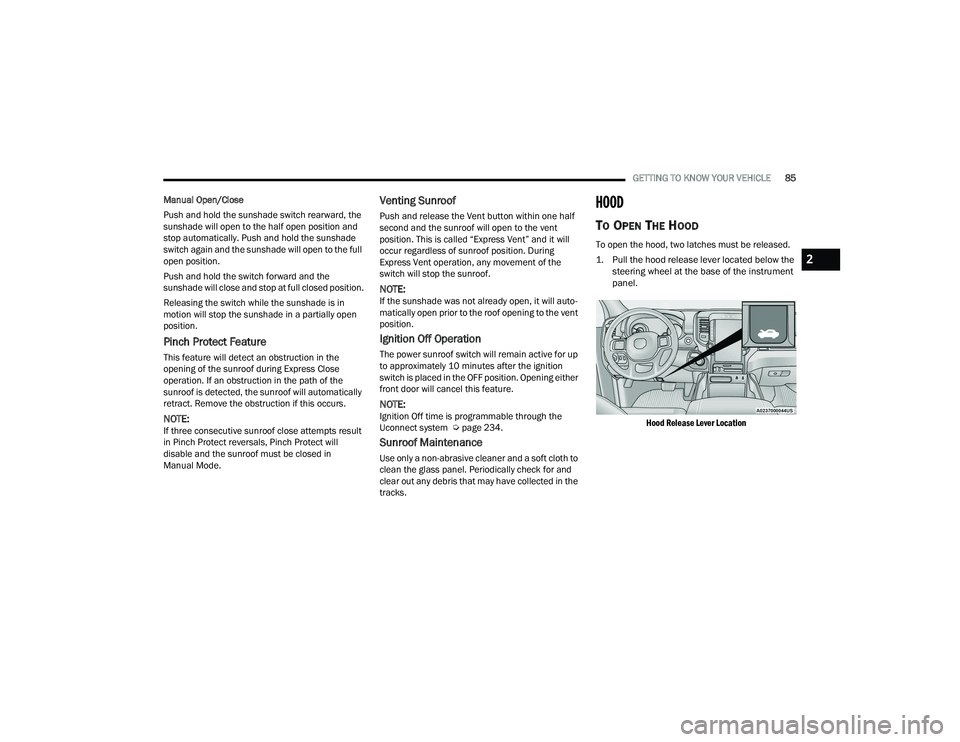
To open the hood, two latches must be released.
1. Pull the hood release lever located below the
steering wheel at the base of the instrument
panel.
Hood Release Lever Location
2
22_DT_OM_EN_USC_t.book Page 85
Page 98 of 496
96GETTING TO KNOW YOUR VEHICLE
(Continued)
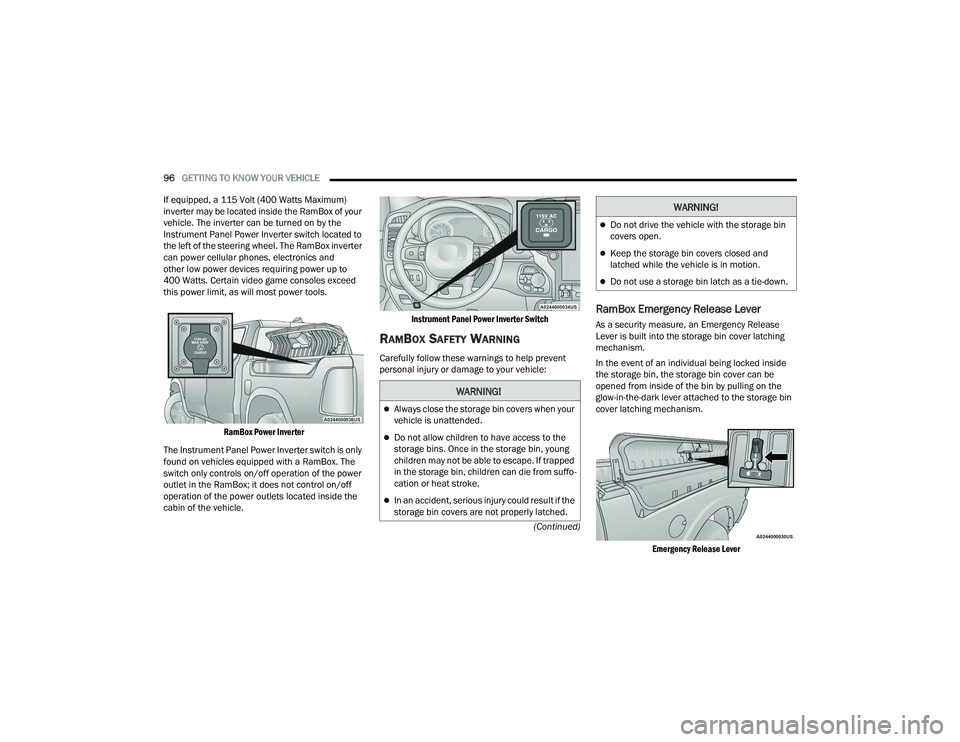
If equipped, a 115 Volt (400 Watts Maximum)
inverter may be located inside the RamBox of your
vehicle. The inverter can be turned on by the
Instrument Panel Power Inverter switch located to
the left of the steering wheel. The RamBox inverter
can power cellular phones, electronics and
other low power devices requiring power up to
400 Watts. Certain video game consoles exceed
this power limit, as will most power tools.
RamBox Power Inverter
The Instrument Panel Power Inverter switch is only
found on vehicles equipped with a RamBox. The
switch only controls on/off operation of the power
outlet in the RamBox; it does not control on/off
operation of the power outlets located inside the
cabin of the vehicle.
Instrument Panel Power Inverter Switch
RAMBOX SAFETY WARNING
Carefully follow these warnings to help prevent
personal injury or damage to your vehicle:
RamBox Emergency Release Lever
As a security measure, an Emergency Release
Lever is built into the storage bin cover latching
mechanism.
In the event of an individual being locked inside
the storage bin, the storage bin cover can be
opened from inside of the bin by pulling on the
glow-in-the-dark lever attached to the storage bin
cover latching mechanism.
Emergency Release Lever
WARNING!
Always close the storage bin covers when your
vehicle is unattended.
Do not allow children to have access to the
storage bins. Once in the storage bin, young
children may not be able to escape. If trapped
in the storage bin, children can die from suffo -
cation or heat stroke.
In an accident, serious injury could result if the
storage bin covers are not properly latched.
Do not drive the vehicle with the storage bin
covers open.
Keep the storage bin covers closed and
latched while the vehicle is in motion.
Do not use a storage bin latch as a tie-down.
WARNING!
22_DT_OM_EN_USC_t.book Page 96
Page 108 of 496
106
GETTING TO KNOW YOUR INSTRUMENT PANEL
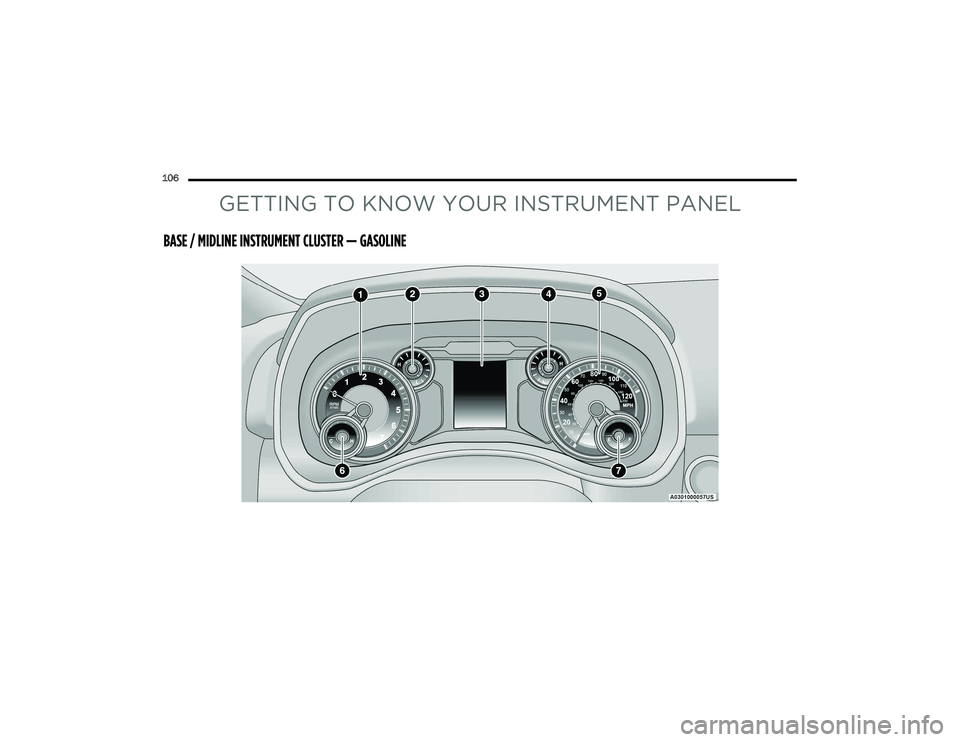
BASE / MIDLINE INSTRUMENT CLUSTER — GASOLINE
22_DT_OM_EN_USC_t.book Page 106
Page 109 of 496

GETTING TO KNOW YOUR INSTRUMENT PANEL107
BASE / MIDLINE INSTRUMENT CLUSTER
D
ESCRIPTIONS — GASOLINE
1. Tachometer
Indicates the engine speed in revolutions
per minute (RPM x 1000).
2. Voltmeter
When the vehicle is in the RUN state, the
gauge indicates the electrical system
voltage. The pointer should stay within the
normal range if the battery is charged. If the
pointer moves to either extreme left or right
and remains there during normal driving,
the electrical system should be serviced.
NOTE:In vehicles equipped with Stop/Start, a reduced
voltage may be present during an Autostop.
3. Instrument Cluster Display
When the appropriate conditions exist, this
display shows the instrument cluster
display messages Ú page 114.
The display always shows one of the main
menu items after ignition on. 4. Oil Pressure Gauge
The pointer should always indicate the oil
pressure when the engine is running. A
continuous high or low reading under
normal driving conditions may indicate a
lubrication system malfunction. Immediate
service should be obtained from an autho
-
rized dealer.
NOTE:In vehicles equipped with Stop/Start, an oil
pressure indication of zero is normal during an
Autostop.
5. Speedometer
Indicates vehicle speed.
6. Temperature Gauge
The pointer shows engine coolant tempera -
ture. The pointer positioned within the
normal range indicates that the engine
cooling system is operating satisfactorily.
The pointer will likely indicate a higher
temperature when driving in hot weather,
up mountain grades, or when towing a
trailer. It should not be allowed to exceed
the upper limits of the normal operating
range. 7. Fuel GaugeThe pointer shows the level of fuel in the
fuel tank when the ignition is in the ON/RUN
position.
The fuel pump symbol points to
the side of the vehicle where the
fuel door is located.
WARNING!
A hot engine cooling system is dangerous. You or
others could be badly burned by steam or boiling
coolant. You may want to call an authorized
dealer for service if your vehicle overheats
Ú page 423.
CAUTION!
Driving with a hot engine cooling system could
damage your vehicle. If the temperature gauge
reads “H,” pull over and stop the vehicle. Idle the
vehicle with the air conditioner turned off until
the pointer drops back into the normal range. If
the pointer remains on the “H,” turn the engine
off immediately and call an authorized dealer for
service.
3
22_DT_OM_EN_USC_t.book Page 107
Page 110 of 496
108GETTING TO KNOW YOUR INSTRUMENT PANEL
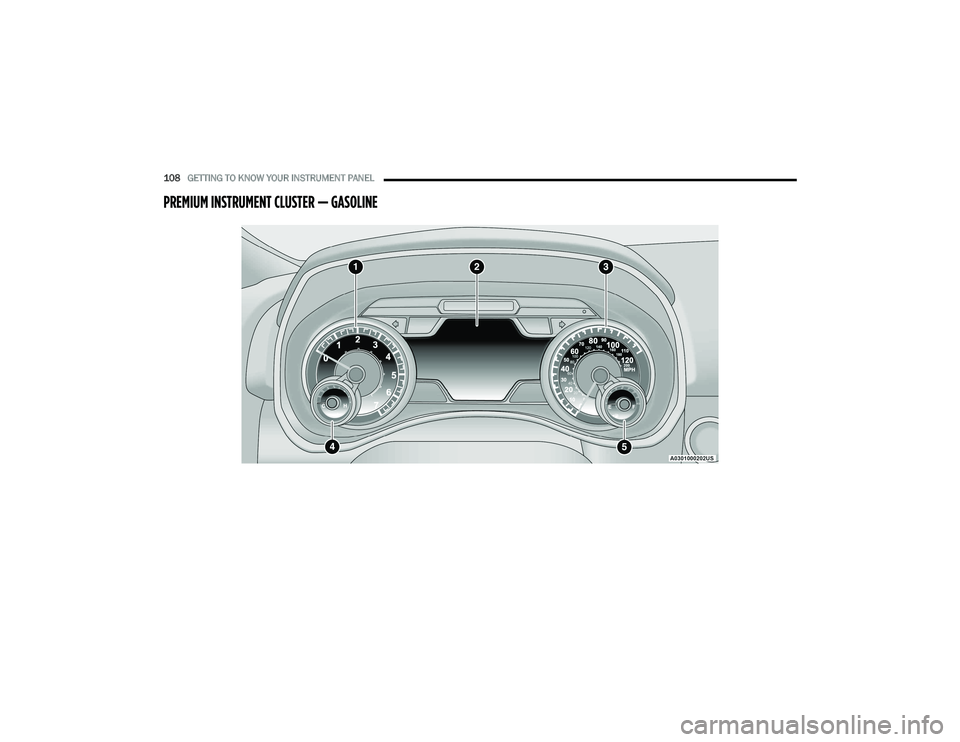
PREMIUM INSTRUMENT CLUSTER — GASOLINE
22_DT_OM_EN_USC_t.book Page 108