steering wheel RAM 1500 2022 User Guide
[x] Cancel search | Manufacturer: RAM, Model Year: 2022, Model line: 1500, Model: RAM 1500 2022Pages: 496, PDF Size: 18.03 MB
Page 87 of 496
GETTING TO KNOW YOUR VEHICLE85
Manual Open/Close
Push and hold the sunshade switch rearward, the
sunshade will open to the half open position and
stop automatically. Push and hold the sunshade
switch again and the sunshade will open to the full
open position.
Push and hold the switch forward and the
sunshade will close and stop at full closed position.
Releasing the switch while the sunshade is in
motion will stop the sunshade in a partially open
position.
Pinch Protect Feature
This feature will detect an obstruction in the
opening of the sunroof during Express Close
operation. If an obstruction in the path of the
sunroof is detected, the sunroof will automatically
retract. Remove the obstruction if this occurs.
NOTE:If three consecutive sunroof close attempts result
in Pinch Protect reversals, Pinch Protect will
disable and the sunroof must be closed in
Manual Mode.
Venting Sunroof
Push and release the Vent button within one half
second and the sunroof will open to the vent
position. This is called “Express Vent” and it will
occur regardless of sunroof position. During
Express Vent operation, any movement of the
switch will stop the sunroof.
NOTE:If the sunshade was not already open, it will auto -
matically open prior to the roof opening to the vent
position.
Ignition Off Operation
The power sunroof switch will remain active for up
to approximately 10 minutes after the ignition
switch is placed in the OFF position. Opening either
front door will cancel this feature.
NOTE:Ignition Off time is programmable through the
Uconnect system Ú page 234.
Sunroof Maintenance
Use only a non-abrasive cleaner and a soft cloth to
clean the glass panel. Periodically check for and
clear out any debris that may have collected in the
tracks.
HOOD
TO OPEN THE HOOD
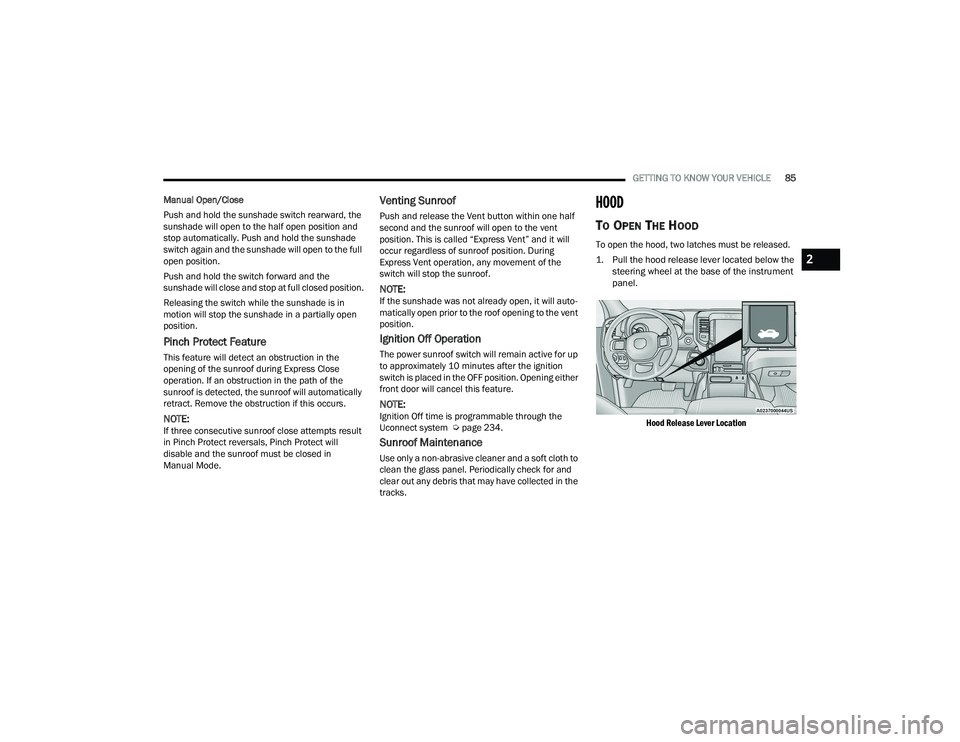
To open the hood, two latches must be released.
1. Pull the hood release lever located below the
steering wheel at the base of the instrument
panel.
Hood Release Lever Location
2
22_DT_OM_EN_USC_t.book Page 85
Page 98 of 496
96GETTING TO KNOW YOUR VEHICLE
(Continued)
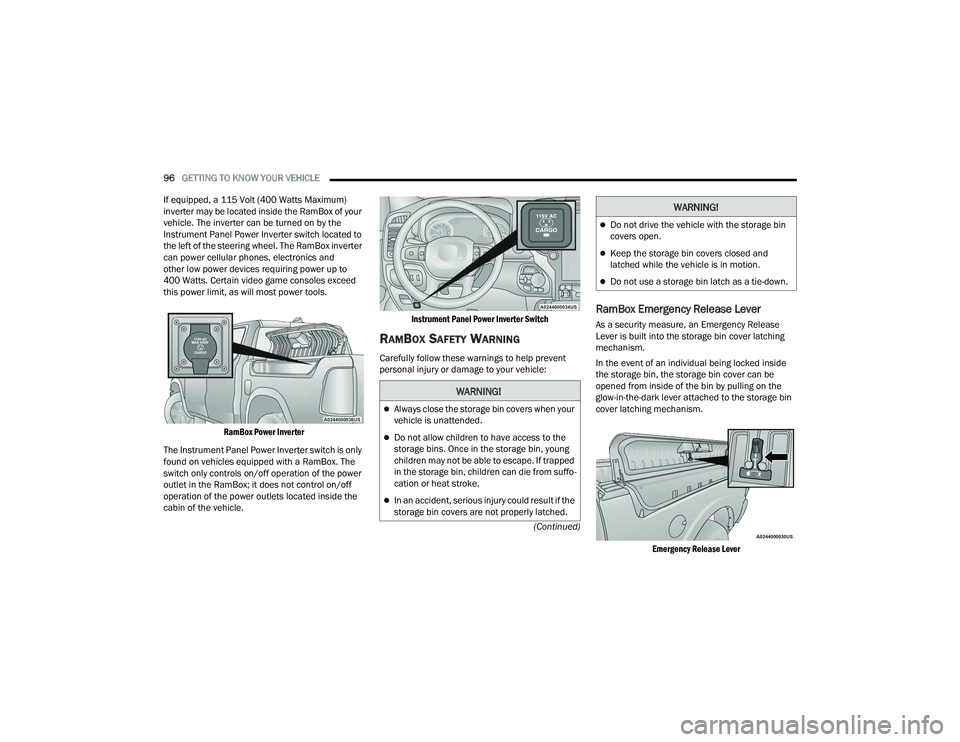
If equipped, a 115 Volt (400 Watts Maximum)
inverter may be located inside the RamBox of your
vehicle. The inverter can be turned on by the
Instrument Panel Power Inverter switch located to
the left of the steering wheel. The RamBox inverter
can power cellular phones, electronics and
other low power devices requiring power up to
400 Watts. Certain video game consoles exceed
this power limit, as will most power tools.
RamBox Power Inverter
The Instrument Panel Power Inverter switch is only
found on vehicles equipped with a RamBox. The
switch only controls on/off operation of the power
outlet in the RamBox; it does not control on/off
operation of the power outlets located inside the
cabin of the vehicle.
Instrument Panel Power Inverter Switch
RAMBOX SAFETY WARNING
Carefully follow these warnings to help prevent
personal injury or damage to your vehicle:
RamBox Emergency Release Lever
As a security measure, an Emergency Release
Lever is built into the storage bin cover latching
mechanism.
In the event of an individual being locked inside
the storage bin, the storage bin cover can be
opened from inside of the bin by pulling on the
glow-in-the-dark lever attached to the storage bin
cover latching mechanism.
Emergency Release Lever
WARNING!
Always close the storage bin covers when your
vehicle is unattended.
Do not allow children to have access to the
storage bins. Once in the storage bin, young
children may not be able to escape. If trapped
in the storage bin, children can die from suffo -
cation or heat stroke.
In an accident, serious injury could result if the
storage bin covers are not properly latched.
Do not drive the vehicle with the storage bin
covers open.
Keep the storage bin covers closed and
latched while the vehicle is in motion.
Do not use a storage bin latch as a tie-down.
WARNING!
22_DT_OM_EN_USC_t.book Page 96
Page 116 of 496

114GETTING TO KNOW YOUR INSTRUMENT PANEL
PREMIUM INSTRUMENT CLUSTER
D
ESCRIPTIONS — DIESEL
1. Tachometer
Indicates the engine speed in revolutions
per minute (RPM x 1000).
2. Instrument Cluster Display
When the appropriate conditions exist, this
display shows the instrument cluster
display messages Ú page 114.
The display always shows one of the main
menu items after ignition on.
3. Speedometer
Indicates vehicle speed.
4. Diesel Exhaust Fluid (DEF) Gauge
The DEF Gauge displays the actual level of
Diesel Exhaust Fluid in the DEF tank. DEF is
required to maintain normal vehicle opera -
tion and emissions compliance. If some -
thing is wrong with the gauge, a DEF
Warning Message or Malfunction Indicator
Light (MIL) will be displayed Ú page 125.
NOTE:
• The DEF tank on these vehicles is
designed with a large amount of full
reserve. So the level sensor will indicate
a full reading even before the tank is completely full. To put it another way,
there’s additional storage capacity in the
tank above the Full mark that’s not repre
-
sented in the gauge. You may not see any
movement in the reading – even after
driving up to 2,000 miles (3,219 km) in
some cases.
• The gauge may take up to five seconds to update after adding a gallon or more of
DEF to the DEF tank. If you have a fault
related to the DEF system, the gauge may
not update to the new level. See an
authorized dealer for service.
• The DEF gauge may also not immediately update after a refill if the temperature of
the DEF fluid is below 12°F (-11°C). The
DEF line heater will possibly warm up the
DEF fluid and allow the gauge to update
after a period of run time. Under very cold
conditions, it is possible that the gauge
may not reflect the new fill level for
several drives.
• Outside temperature can affect DEF consumption. In cold conditions, 12°F
(-11°C) and below, the DEF gauge needle
can stay on a fixed position and may not
move for extended periods of time. This is
a normal function of the system.
5. Fuel Gauge
The pointer shows the level of fuel in the
fuel tank when the ignition switch is in the
ON/RUN position.
The fuel pump symbol points to
the side of the vehicle where the
fuel filler door is located.
INSTRUMENT CLUSTER DISPLAY
Your vehicle will be equipped with an instrument
cluster display, which offers useful information to
the driver. With the ignition in the OFF mode,
opening/closing of a door will activate the display
for viewing, and display the total miles, or
kilometers, in the odometer. Your instrument
cluster display is designed to display important
information about your vehicle’s systems and
features. Using a driver interactive display located
on the instrument panel, your instrument cluster
display can show you how systems are working and
give you warnings when they are not. The steering
wheel mounted controls allow you to scroll through
the main menus and submenus. You can access
the specific information you want and make
selections and adjustments.
22_DT_OM_EN_USC_t.book Page 114
Page 117 of 496
GETTING TO KNOW YOUR INSTRUMENT PANEL115
INSTRUMENT CLUSTER DISPLAY
L
OCATION AND CONTROLS
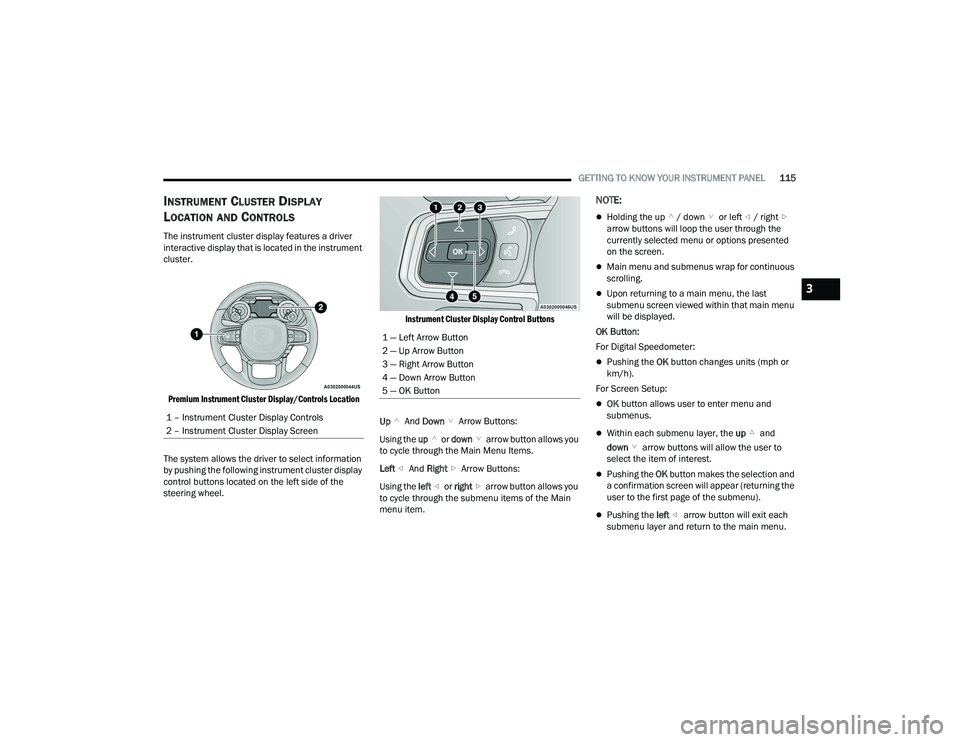
The instrument cluster display features a driver
interactive display that is located in the instrument
cluster.
Premium Instrument Cluster Display/Controls Location
The system allows the driver to select information
by pushing the following instrument cluster display
control buttons located on the left side of the
steering wheel.
Instrument Cluster Display Control Buttons
Up And Down Arrow Buttons:
Using the up or down arrow button allows you
to cycle through the Main Menu Items.
Left And Right Arrow Buttons:
Using the left or right arrow button allows you
to cycle through the submenu items of the Main
menu item.
NOTE:
Holding the up / down or left / right
arrow buttons will loop the user through the
currently selected menu or options presented
on the screen.
Main menu and submenus wrap for continuous
scrolling.
Upon returning to a main menu, the last
submenu screen viewed within that main menu
will be displayed.
OK Button:
For Digital Speedometer:
Pushing the OK button changes units (mph or
km/h).
For Screen Setup:
OK button allows user to enter menu and
submenus.
Within each submenu layer, the up and
down arrow buttons will allow the user to
select the item of interest.
Pushing the OK button makes the selection and
a confirmation screen will appear (returning the
user to the first page of the submenu).
Pushing the left arrow button will exit each
submenu layer and return to the main menu.
1 – Instrument Cluster Display Controls
2 – Instrument Cluster Display Screen
1 — Left Arrow Button
2 — Up Arrow Button
3 — Right Arrow Button
4 — Down Arrow Button
5 — OK Button
3
22_DT_OM_EN_USC_t.book Page 115
Page 119 of 496

GETTING TO KNOW YOUR INSTRUMENT PANEL117
Off Road – If Equipped
Push and release the up or down arrow
button until the Off Road menu icon is displayed in
the instrument cluster display. Push and release
the left or right arrow button to scroll through
the information submenus.
Drivetrain
Front Wheel Angle: displays the graphical
and numerical value of calculated average
front wheel angle from the steering wheel
orientation.
Transfer Case Lock Status: displays “Lock”
graphic only during 4WD High, 4WD High
Part Time, 4WD Low status.
Axle Lock And Sway Bar Status (If
Equipped): displays front and rear or rear
only axle locker graphic, and sway bar
connection graphic with text message
(connected or disconnected).
Pitch And Roll
Displays the pitch and roll of the vehicle in
the graphic with the angle number on the
screen.
NOTE:When vehicle speed becomes too high to display
the pitch and roll, “- -” will display in place of the
numbers, and the graphic will be grayed out. A
message indicating the necessary speed for the
feature to become available will also display.
Driver Assist — If Equipped
The Driver Assist menu displays the status of the
ACC and LaneSense systems.
Push and release the up or down arrow
button until the Driver Assist menu is displayed in
the instrument cluster display.
Adaptive Cruise Control (ACC) Feature
The instrument cluster display displays the current
ACC system settings. The information displayed
depends on ACC system status.
Push the ACC on/off button (located on the
steering wheel) until one of the following displays
in the instrument cluster display:
Adaptive Cruise Control Off
When ACC is deactivated, the display will read
“Adaptive Cruise Control Off.” Adaptive Cruise Control Ready
When ACC is activated but the vehicle speed
setting has not been selected, the display will read
“Adaptive Cruise Control Ready.”
Push the SET + or the SET- button (located on the
steering wheel) and the following will display in the
instrument cluster display:
ACC SET
When ACC is set, the set speed will display in the
instrument cluster Ú
page 178.
The ACC screen may display once again if any ACC
activity occurs, which may include any of the
following:
Distance Setting Change
System Cancel
Driver Override
System Off
ACC Proximity Warning
ACC Unavailable Warning
LaneSense — If Equipped
The instrument cluster display displays the current
LaneSense system settings. The information
displayed depends on LaneSense system status
and the conditions that need to be met
Ú page 137.
3
22_DT_OM_EN_USC_t.book Page 117
Page 153 of 496

STARTING AND OPERATING151
(Continued)
The parking brake switch is located on the
instrument panel to the left of the steering wheel
(below the headlamp switch).
Electric Park Brake Switch
To apply the parking brake manually, pull up on the
switch momentarily. You may hear a slight sound
from the back of the vehicle while the parking
brake engages. Once the park brake is fully
engaged, the BRAKE telltale light in the instrument
cluster and an indicator on the switch will
illuminate. If your foot is on the brake pedal while
you apply the parking brake, you may notice a
small amount of brake pedal movement. The
parking brake can be applied even when the
ignition switch is OFF but the BRAKE telltale light
will not illuminate, however, it can only be released
when the ignition is in the ON/RUN position.
NOTE:The EPB fault light will illuminate if the EPB switch
is held for longer than 20 seconds in either the
released or applied position. The light will extin -
guish upon releasing the switch.
If the Auto Park Brake feature is enabled, the
parking brake will automatically engage whenever
the transmission is placed into PARK. If your foot is
on the brake pedal, you may notice a small amount
of brake pedal movement while the parking brake
is engaging.
The parking brake will release automatically when
the ignition is ON, the transmission is in DRIVE or
REVERSE, the driver seat belt is buckled, and an
attempt is made to drive away.
To release the parking brake manually, the ignition
switch must be in the ON/RUN position. Put your
foot on the brake pedal, then push the parking
brake switch down momentarily. You may hear a
slight whirring sound from the back of the vehicle
while the parking brake disengages. You may also
notice a small amount of movement in the brake
pedal. Once the parking brake is fully disengaged,
the BRAKE telltale light in the instrument cluster
and the LED indicator on the switch will extinguish.NOTE:When parking on a hill, it is important to turn the
front wheels toward the curb on a downhill grade
and away from the curb on an uphill grade. Apply
the parking brake before placing the gear selector
in PARK, otherwise the load on the transmission
locking mechanism may make it difficult to move
the gear selector out of PARK.
WARNING!
Never use the PARK position as a substitute
for the parking brake. Always apply the
parking brake fully when parked to guard
against vehicle movement and possible injury
or damage.
When exiting the vehicle, always remove the
key fob from the ignition and lock your vehicle.
Never leave children alone in a vehicle, or with
access to an unlocked vehicle. Allowing chil -
dren to be in a vehicle unattended is
dangerous for a number of reasons. A child or
others could be seriously or fatally injured.
Children should be warned not to touch the
parking brake, brake pedal or the gear
selector.
4
22_DT_OM_EN_USC_t.book Page 151
Page 157 of 496

STARTING AND OPERATING155
NOTE:In the event of a mismatch between the gear
selector position and the actual transmission gear
(for example, driver selects PARK while driving),
the position indicator will blink continuously until
the selector is returned to the proper position, or
the requested shift can be completed.
The electronically controlled transmission adapts
its shift schedule based on driver inputs, along
with environmental and road conditions. The
transmission electronics are self-calibrating;
therefore, the first few shifts on a new vehicle may
be somewhat abrupt. This is a normal condition,
and precision shifts will develop within a few
hundred miles (kilometers).
Only shift from DRIVE to PARK or REVERSE when
the accelerator pedal is released and the vehicle is
stopped. Be sure to keep your foot on the brake
pedal when shifting between these gears.
The transmission gear selector has only PARK,
REVERSE, NEUTRAL, and DRIVE positions. Manual
downshifts can be made using the Electronic
Range Select (ERS) shift control. Pushing the
GEAR “-”/GEAR “+” switches (on the steering
wheel) while in the DRIVE position will select the
highest available transmission gear, and will
display that gear limit in the instrument cluster as
1, 2, 3, etc. Úpage 158. Some models will display
both the selected gear limit, and the actual current
gear, while in ERS mode.
Electronic Transmission Gear Selector
Console Shifter — If Equipped
The transmission gear range is displayed both
beside the gear selector and in the instrument
cluster. To select a gear range, push the lock
button on the gear selector and move the selector
rearward or forward. To shift the transmission out
of PARK (P), the engine must be running and the
brake pedal must be pressed. You must also press
the brake pedal to shift from NEUTRAL (N) into
DRIVE (D) or REVERSE (R) when the vehicle is
stopped or moving at low speeds. Select the DRIVE
range for normal driving.
NOTE:
The transmission electronics are self-calibrating;
therefore, the first few shifts on a new vehicle
may be somewhat abrupt. This is a normal condi -
tion, and precision shifts will develop within a
few hundred miles (kilometers).
In the event of a mismatch between the gear
selector position and the actual transmission
gear (for example, driver selects PARK while
driving), the position indicator will blink continu -
ously until the selector is returned to the proper
position, or the requested shift can be
completed.
The electronically controlled transmission adapts
its shift schedule based on driver inputs, along
with environmental and road conditions.
Only shift from DRIVE to PARK or REVERSE when
the accelerator pedal is released and the vehicle is
stopped. Be sure to keep your foot on the brake
pedal when shifting between these gears.
The transmission gear selector provides PARK,
REVERSE, NEUTRAL, and SPORT (S) (AutoStick)
shift positions. Manual shifts can be made using
the AutoStick shift control. Toggling the gear
selector forward (-) or rearward (+) while in the
SPORT (AutoStick) position (beside the DRIVE
position), or tapping the paddle shifters (+/-)
(if equipped), will manually select the transmission
gear, and will display the current gear in the
instrument cluster Ú page 159.
4
22_DT_OM_EN_USC_t.book Page 155
Page 160 of 496

158STARTING AND OPERATING
DRIVE (D)
This range should be used for most city and
highway driving. It provides the smoothest upshifts
and downshifts, and the best fuel economy. The
transmission automatically upshifts through all
forward gears.
When frequent transmission shifting occurs (such
as when operating the vehicle under heavy loading
conditions, in hilly terrain, traveling into strong
head winds, or while towing a heavy trailer), select
TOW/HAUL mode or use the Electronic Range
Select (ERS) shift control to select a lower gear
range Úpage 158. Under these conditions, using
a lower gear range will improve performance and
extend transmission life by reducing excessive
shifting and heat buildup.
During extremely cold temperatures (-22°F
[-30°C] or below), transmission operation may be
modified depending on engine and transmission
temperature as well as vehicle speed. Normal
operation will resume once the transmission
temperature has risen to a suitable level.
Transmission Limp Home Mode
Transmission function is monitored electronically
for abnormal conditions. If a condition is detected
that could result in transmission damage,
Transmission Limp Home Mode is activated. In this
mode, the transmission may operate only in
certain gears, or may not shift at all. Vehicle performance may be severely degraded
and the engine may stall. In some situations, the
transmission may not re-engage if the engine is
turned off and restarted. The Malfunction Indicator
Light (MIL) may be illuminated. A message in the
instrument cluster will inform the driver of the
more serious conditions, and indicate what actions
may be necessary.
In the event of a momentary problem, the
transmission can be reset to regain all forward
gears by performing the following steps:
NOTE:In cases where the instrument cluster message
indicates the transmission may not re-engage after
engine shutdown, perform this procedure only in a
desired location (preferably, at an authorized
dealer).
1. Stop the vehicle.
2. Shift the transmission into PARK, if possible.
If not, shift the transmission to NEUTRAL.
3. Push and hold the ignition switch until the engine turns off.
4. Wait approximately 30 seconds.
5. Restart the engine.
6. Shift into the desired gear range. If the problem is no longer detected, the
transmission will return to normal operation.
NOTE:Even if the transmission can be reset, we
recommend that you visit an authorized dealer at
your earliest possible convenience. An authorized
dealer has diagnostic equipment to assess the
condition of your transmission. If the transmission
cannot be reset, an authorized dealer service is
required.
Electronic Range Select (ERS) Operation —
If Equipped
The ERS shift control allows the driver to limit the
highest available gear when the transmission is in
DRIVE and ERS mode is not active. For example, if
you set the transmission gear limit to FOURTH
gear, the transmission will hold that gear and not
shift above FOURTH gear, but will shift through the
lower gears normally.
NOTE:ERS will only upshift during a FIRST to SECOND
gear shift when in 4WD LOW. All other ranges will
hold the gear.
You can switch between DRIVE and ERS mode at
any vehicle speed. When the transmission gear
selector is in DRIVE, the transmission will operate
automatically, shifting between all available gears.
Tapping the “-” button (on the steering wheel) will
activate ERS mode, display the current gear in the
instrument cluster, and set that gear as the top
available gear. Once in ERS mode, tapping the “-”
or “+” button will change the top available gear.
22_DT_OM_EN_USC_t.book Page 158
Page 161 of 496

STARTING AND OPERATING159
Electronic Range Select (ERS)
To exit ERS mode, simply push and hold the “+”
button until the gear limit display disappears from
the instrument cluster.
AutoStick — If Equipped
AutoStick is a driver-interactive transmission
feature providing manual shift control, giving you
more control of the vehicle. AutoStick allows you to maximize engine braking, eliminate undesirable
upshifts and downshifts, and improve overall
vehicle performance. This feature can also provide
you with more control during passing, city driving,
cold slippery conditions, mountain driving, trailer
towing, and many other situations.
Paddle Shifters
Operation
In AutoStick mode, you can use the gear selector
(in the SPORT position), or the paddle shifters, to
manually shift the transmission. To activate
AutoStick mode, move the gear selector into the
SPORT (S) position (beside the DRIVE position), or
tap one of the paddle shifters on the steering
wheel. Tapping the “-” shift paddle to enter AutoStick mode will downshift the transmission to
the next lower gear, while tapping “+” to enter
AutoStick mode will retain the current gear. The
current transmission gear will be displayed in the
instrument cluster.
AutoStick mode has the following operational
benefits:
The transmission will automatically downshift
as the vehicle slows (to prevent engine lugging)
and will display the current gear.
The transmission will automatically downshift to
FIRST gear when coming to a stop. After a stop,
the driver should manually upshift “+” the trans
-
mission as the vehicle is accelerated.
You can start out, from a stop, in FIRST or
SECOND gear (or THIRD gear, in 4WD LOW).
Tapping “+” (at a stop) will allow starting in
SECOND gear. Starting out in SECOND or THIRD
gear can be helpful in snowy or icy conditions.
If a requested downshift would cause the
engine to over-speed, that shift will not occur.
The system will ignore attempts to upshift at too
low of a vehicle speed.
Holding the “-” paddle pressed, or holding the
gear selector in the “-” position, will downshift
the transmission to the lowest gear possible at
the current speed.
1 — Shift Up “+”
2 — Shift Down “–”
WARNING!
Do not downshift for additional engine braking
on a slippery surface. The drive wheels could
lose their grip and the vehicle could skid,
causing a collision or personal injury.
1 — “-” Paddle
2 — “+” Paddle
4
22_DT_OM_EN_USC_t.book Page 159
Page 175 of 496

STARTING AND OPERATING173
Operating the locker in 2WD, 4WD AUTO, and
4WD LOCK/HIGH, the locker can be engaged up to
20 mph (32 km/h). While driving with the locker
engaged, if speed exceeds 25 mph (40 km/h), the
locker will automatically disengage, but will
automatically re-engage at 20 mph (32 km/h).
NOTE:Left to right wheel speed difference may be
necessary to allow the rear axle to fully lock. If the
indicator light is flashing after selecting the rear
axle lock mode, drive the vehicle in a turn or on
loose gravel to expedite the locking action.
The axle locker could become torque locked due to
side to side loads on the rear axle. Driving slowly
while turning the steering wheel from a left hand
turn to a right hand turn or driving in REVERSE for
a short distance may be required to release the
torque lock and unlock the axles.
To unlock the rear axle, push the AXLE LOCK
button. The AXLE LOCK indicator light will go out
when the rear axle is unlocked.
LIMITED-SLIP DIFFERENTIAL —
IF EQUIPPED
The limited-slip differential provides additional
traction on snow, ice, mud, sand and gravel,
particularly when there is a difference between the
traction characteristics of the surface under the
right and left rear wheels. During normal driving and cornering, the limited-slip unit performs
similarly to a conventional differential. On slippery
surfaces, however, the differential delivers more of
the driving effort to the rear wheel having the
better traction.
The limited-slip differential is especially helpful
during slippery driving conditions. With both rear
wheels on a slippery surface, a slight application of
the accelerator will supply maximum traction.
When starting with only one rear wheel on an
excessively slippery surface, slight momentary
application of the parking brake may be necessary
to gain maximum traction.
Care should be taken to avoid sudden
accelerations when both rear wheels are on a
slippery surface. This could cause both rear wheels
to spin, and allow the vehicle to slide sideways on
the crowned surface of a road or in a turn.
POWER STEERING
ELECTRIC POWER STEERING
The electric power steering system will provide
increased vehicle response and ease of
maneuverability. The power steering system
adapts to different driving conditions.
If the steering icon is flashing, it indicates that the
vehicle needs to be taken to the dealer for service.
It is likely the vehicle has lost power steering
assistance.
If the steering icon is displayed and the “POWER
STEERING SYSTEM OVER TEMP” message is
displayed on the instrument cluster screen, this
indicates an over temperature condition in the
power steering system. Once driving conditions are
safe, pull over and let the vehicle idle for a few
moments until the icon and message turn off
Ú
page 114.
If the steering icon is displayed and the “SERVICE
POWER STEERING – ASSIST OFF” message is
displayed on the instrument cluster screen, this
indicates the vehicle needs to be taken to the
dealer for service Ú page 114.
WARNING!
When servicing vehicles equipped with a
limited-slip or locking differential, never run the
engine with one rear wheel off the ground as the
vehicle may drive through the rear wheel
remaining on the ground and result in
unintended movement.
4
22_DT_OM_EN_USC_t.book Page 173