tire pressure RAM 1500 2022 Owner's Manual
[x] Cancel search | Manufacturer: RAM, Model Year: 2022, Model line: 1500, Model: RAM 1500 2022Pages: 496, PDF Size: 18.03 MB
Page 334 of 496
332SAFETY
For each subsequent ignition switch cycle, a
chime will sound, the Tire Pressure Monitoring
System (TPMS) Warning Light will flash on and
off for 75 seconds and then remain on solid,
and the instrument cluster will display a
"SERVICE TPM SYSTEM" message for a
minimum of five seconds and then display
dashes (--) in place of the pressure value.
Once you repair or replace the original road tire
and reinstall it on the vehicle in place of the
non-matching full size spare or compact spare,
the TPMS will update automatically. In addition,
the Tire Pressure Monitoring System (TPMS)
Warning Light will turn off and the graphic in the
instrument cluster will display a new pressure
value instead of dashes (--), as long as no tire
pressure is below the low-pressure warning limit
in any of the four active road tires. The vehicle
may need to be driven for up to 20 minutes
above 15 mph (24 km/h) in order for the TPMS
to receive this information.
Tire Fill Alert
This feature notifies the user when the placard tire
pressure is attained while inflating or deflating the
tire.
You may choose to disable or enable the Tire Fill
Alert feature through use of the Uconnect Settings
in the radio.
NOTE:
Only one tire can be filled at a time when using
the Tire Fill Alert system.
The Tire Fill Alert feature cannot be entered if an
existing TPMS fault is set to “active” or if the
system is in deactivation mode (if equipped).
The system will be activated when a positive
increase in tire pressure is detected by the TPMS
while inflating the tire. The ignition must be in the
RUN mode, with the transmission in PARK.
NOTE:It is not required to have the engine running to
enter Tire Fill Alert mode.
The hazard lamps will come on to confirm the
vehicle is in Tire Fill Alert mode.
When Tire Fill Alert mode is entered, the tire
pressure display screen will be displayed in the
instrument cluster.
If the hazard lamps do not come on while inflating
the tire, the TPMS sensor may be out of range
preventing the TPMS sensor signal from being
received. In this case, the vehicle may need to be
moved either forward or backward slightly to exit
the null spot. Operation:
The horn will sound once to let the user know
when to stop filling the tire, when it reaches
recommended pressure.
The horn will sound three times if the tire is over
-
filled and will continue to sound every five
seconds if the user continues to inflate the tire.
The horn will sound once again when enough air
is let out to reach proper inflation level.
The horn will also sound three times if the tire is
then underinflated and will continue to sound
every five seconds if the user continues to
deflate the tire.
Trailer Tire Pressure Monitoring System
(TTPMS) — If Equipped
The Trailer Tire Pressure Monitoring System
(TTPMS) is a feature that displays the trailer tire
pressure values and warns the driver of a low tire
pressure event based on the driver’s set target tire
pressure value, through TTPMS settings found in
the radio.
The TTPMS monitors the pressure of each tire and
warns the driver through the instrument cluster,
when either a low tire pressure condition falls
below 25% of the driver’s set pressure or if a
system malfunction occurs. The instrument cluster
will display the actual tire pressure or dashes for
each of the trailer tires in the correct trailer
position, based on trailer configuration.
22_DT_OM_EN_USC_t.book Page 332
Page 335 of 496

SAFETY333
The TTPMS can support up to 12 trailer tires per
configured trailer on up to four configurable trailers
Ú page 234.
Trailer Tire Pressure Monitoring System
Trailer Tire Pressure Sensor Pairing
In order use this feature, the provided tire pressure
sensors must be installed in the desired trailer
tires and the sensors must be paired to the truck.
If the target trailer requires more than the provided
four sensors, additional sensors can be purchased
at an authorized Ram dealership.
With the sensors installed and the trailer near or
connected to your Ram truck, initiate the pairing
process by entering the settings menu in the radio
and selecting trailer. Select the desired trailer
profile to pair to, open the “Tire Pressure” menu,
and hit “Setup All Tires” Ú page 234.
NOTE:The vehicle may not be driven until the pairing
process is complete.
Trailer Tire Pressure Settings
Trailer Tire Pressure Pairing
Follow the on screen prompts to select the number
of axles (1 - 3), the number of trailer tires (2, 4, 6,
8, or 12), and the set trailer tire pressure. The
range is selectable anywhere between 25-125 psi
(172-862 kPa).
Once psi (kPa) is programmed, the pairing screen
appears. Tire sensors must be paired in order
shown. Starting with Tire 1, deflate tire by 5 psi (34
kPa) and wait for a horn chirp. It may take up to
three minutes for the chirp to occur, indicating that
the sensor has paired. Repeat process on each
tire, in order, until complete. Do not exit the pairing
screen until process is complete. If pairing was
unsuccessful, a double horn chirp will sound, and
a prompt on the touchscreen will allow you to retry
the procedure; “Retry” will only appear when setup
fails. Each tire must be successfully paired during
a single pairing process to receive the success
screen.
NOTE:If the pairing process times out after three minutes
of no communication with a sensor, a double horn
chip will occur indicating the pairing has failed and
a message will display on the radio indicating the
process was unsuccessful. Under certain circum
-
stances, the double horn chirp may continue to
happen every three minutes indicating the failed
pairing. If this happens, the horn chirping may be
canceled by cycling the ignition button OFF and
then back to RUN position.
6
22_DT_OM_EN_USC_t.book Page 333
Page 336 of 496
334SAFETY
Tire Pressure Monitoring System Low Pressure
Warnings
When a tire pressure low in one or more of the
active road tires is detected, the instrument cluster
will display a message stating “Trailer Tire
Pressure Low”. The instrument cluster will then
display the TTPMS graphic showing the pressure
values of each tire with the low tire pressure values
in a different color.
Should this occur, you should stop as soon as
possible and inflate the tires with a low pressure
condition (those in a different color in the
instrument cluster graphic) to the customer
programmed target tire pressure value as shown
at the top of the TTPMS instrument cluster graphic.
Once the tire(s) are inflated, the system will
automatically update the graphic display in the
instrument cluster, returning to its original color.
The vehicle may need to be driven for up to
10 minutes above 15 mph (24 km/h) in order for
the TTPMS to receive the updated information.
Service TTPMS Warning
If a system fault is detected, the instrument cluster
will display a “Trailer Tire Pressure System Service
Required” message for a minimum of five seconds. Once the system fault is corrected the "Trailer Tire
Pressure System Service Required" message will
no longer be displayed. The vehicle may need to be
driven for up to 10 minutes above 15 mph
(24 km/h) in order for the TTPMS to receive the
trailer tire pressure information.
Trailer Tire Pressure System Not Configured
A “Trailer Tire Pressure System Not Configured”
message will be displayed in the instrument
cluster on the TTPMS instrument cluster graphic
when a trailer number is selected that has not had
trailer tire pressure sensors paired. To correct this
condition, see Ú
page 234.
Trailer Sensors Detected Do Not Match Active
Trailer
The “Trailer Sensors Detected Do Not Match Active
Trailer” message will be displayed in the
instrument cluster when the trailer sensors being
received by the TTPMS module do not match the
trailer sensors paired to the current trailer number
selected. This message will be displayed when the
sensors being received completely match the
sensors paired to another trailer number
configured in the TTPMS module.
To correct this condition, the correct trailer number
must be selected in the radio Ú page 234.
OCCUPANT RESTRAINT SYSTEMS
Some of the most important safety features in your
vehicle are the restraint systems:
OCCUPANT RESTRAINT SYSTEMS
F
EATURES
Seat Belt Systems
Supplemental Restraint Systems (SRS) Air Bags
Child Restraints
Some of the safety features described in this
section may be standard equipment on some
models, or may be optional equipment on others. If
you are not sure, ask an authorized dealer.
IMPORTANT SAFETY PRECAUTIONS
Please pay close attention to the information in
this section. It tells you how to use your restraint
system properly, to keep you and your passengers
as safe as possible.
22_DT_OM_EN_USC_t.book Page 334
Page 371 of 496

SAFETY369
(Continued)
(Continued)
PERIODIC SAFETY CHECKS YOU SHOULD
M
AKE OUTSIDE THE VEHICLE
Tires
Examine tires for excessive tread wear and uneven
wear patterns. Check for stones, nails, glass, or
other objects lodged in the tread or sidewall.
Inspect the tread for cuts and cracks. Inspect
sidewalls for cuts, cracks, and bulges. Check the
lug nut/bolt torque for tightness. Check the tires
(including spare) for proper cold inflation pressure.
WARNING!
An improperly attached, damaged, folded, or
stacked floor mat, or damaged floor mat
fasteners may cause your floor mat to interfere
with the accelerator, brake, or clutch pedals and
cause a loss of vehicle control. To prevent
SERIOUS INJURY or DEATH:
ALWAYS securely attach your floor
mat using the floor mat fasteners.
DO NOT install your floor mat upside
down or turn your floor mat over.
Lightly pull to confirm mat is secured using the
floor mat fasteners on a regular basis.
ALWAYS REMOVE THE EXISTING
FLOOR MAT FROM THE VEHICLE
before installing any other floor mat.
NEVER install or stack an additional
floor mat on top of an existing floor mat.
ONLY install floor mats designed to fit your
vehicle. NEVER install a floor mat that cannot
be properly attached and secured to your
vehicle. If a floor mat needs to be replaced,
only use a FCA approved floor mat for the
specific make, model, and year of your
vehicle.
ONLY use the driver’s side floor mat on the
driver’s side floor area. To check for interfer -
ence, with the vehicle properly parked with the
engine off, fully depress the accelerator, the
brake, and the clutch pedal (if present) to
check for interference. If your floor mat inter -
feres with the operation of any pedal, or is not
secure to the floor, remove the floor mat from
the vehicle and place the floor mat in your
trunk.
ONLY use the passenger’s side floor mat on
the passenger’s side floor area.
ALWAYS make sure objects cannot fall or slide
into the driver’s side floor area when the
vehicle is moving. Objects can become
trapped under accelerator, brake, or clutch
pedals and could cause a loss of vehicle
control.
NEVER place any objects under the floor mat
(e.g., towels, keys, etc.). These objects could
change the position of the floor mat and may
cause interference with the accelerator,
brake, or clutch pedals.
WARNING!
If the vehicle carpet has been removed and
re-installed, always properly attach carpet to
the floor and check the floor mat fasteners are
secure to the vehicle carpet. Fully depress
each pedal to check for interference with the
accelerator, brake, or clutch pedals then
re-install the floor mats.
It is recommended to only use mild soap and
water to clean your floor mats. After cleaning,
always check your floor mat has been properly
installed and is secured to your vehicle using
the floor mat fasteners by lightly pulling mat.
WARNING!
6
22_DT_OM_EN_USC_t.book Page 369
Page 384 of 496
382IN CASE OF EMERGENCY
7. Lower the vehicle to the ground and finish tightening the lug nuts. Push down on the
wrench handle for increased leverage. Tighten
the lug nuts in a star pattern until each lug nut
has been tightened twice Ú page 466. If in
doubt about the correct tightness, have them
checked with a torque wrench by an
authorized dealer or at a service station.
8. If your vehicle is equipped with a wheel center cap, install the cap and remove the wheel
blocks. Do not install chrome or aluminum
wheel center caps on the spare wheel. This
may result in cap damage.
9. Lower the jack to its fully closed position. Stow the replaced tire, and secure the jack and tools
in the proper location.
10. Adjust the tire pressure when possible.
TO STOW THE FLAT OR SPARE
1. Lift the spare tire with one hand to give clearance to tilt the retainer at the end of the
cable.
2. Position the wheel behind the rear fascia/ bumper facing outward. Push the end of the
winch’s cable, spring and steel sleeve through
the back of the road wheel. Making sure the
valve stem is facing the ground when the
wheel is stowed.
Reinstalling The Retainer
3. Remove the extension with the hook and
reattach the short extension 5. Attach the lug
wrench to the extension tubes with the curved
angle facing away from the vehicle
Úpage 376. Insert the extension tubes
through the access hole between the lower
tailgate and the top of the fascia/bumper and
into the winch mechanism tube.
Reinstalling The Flat Or Spare Tire
WARNING!
A loose tire or jack thrown forward in a collision
or hard stop, could endanger the occupants of
the vehicle. Always stow the jack parts and the
spare tire in the places provided.
CAUTION!
The winch mechanism is designed for use with
the jack extension tube only. Use of an air
wrench or other power tools is not
recommended and can damage the winch.
22_DT_OM_EN_USC_t.book Page 382
Page 395 of 496

393
SERVICING AND MAINTENANCE
SCHEDULED SERVICING — GASOLINE
ENGINE
Your vehicle is equipped with an automatic oil
change indicator system. The oil change indicator
system will remind you that it is time to take your
vehicle in for scheduled maintenance.
Based on engine operation conditions, the oil
change indicator message will illuminate. This
means that service is required for your vehicle.
Operating conditions such as frequent short-trips,
trailer tow, and extremely hot or cold ambient
temperatures will influence when the “Oil Change
Required” message is displayed. Have your vehicle
serviced as soon as possible, within the next
500 miles (805 km).An authorized dealer will reset the oil change
indicator message after completing the scheduled
oil change. If a scheduled oil change is performed
by someone other than an authorized dealer, the
message can be reset by referring to the steps
described under Instrument Cluster Display
Ú
page 114.
NOTE:Under no circumstances should oil change
intervals exceed 10,000 miles (16,000 km),
12 months or 350 hours of engine run time,
whichever comes first. The 350 hours of engine
run or idle time is generally only a concern for fleet
customers. Once A Month Or Before A Long Trip:
Check engine oil level.
Check windshield washer fluid level.
Check tire pressure and look for unusual wear
or damage. Rotate tires at the first sign of irreg
-
ular wear, even if it occurs before the oil indi -
cator system turns on.
Check the fluid levels of the coolant reservoir,
brake master cylinder, and fill as needed.
Check function of all interior and exterior lights.
8
22_DT_OM_EN_USC_t.book Page 393
Page 400 of 496

398SERVICING AND MAINTENANCE
SCHEDULED SERVICING — DIESEL ENGINE
Your vehicle is equipped with an automatic oil
change indicator system. The oil change indicator
system will remind you that it is time to take your
vehicle in for scheduled maintenance.
Based on engine operation conditions, the oil
change indicator message will illuminate. This
means that service is required for your vehicle.
Operating conditions such as frequent short-trips,
trailer tow, extremely hot or cold ambient
temperatures will influence when the “Oil Change
Required” message is displayed. Have your vehicle
serviced as soon as possible, within the next
500 miles (805 km). An authorized dealer will reset the oil change
indicator message after completing the scheduled
oil change. If a scheduled oil change is performed
by someone other than an authorized dealer, the
message can be reset by referring to the steps
described under Instrument Cluster Display
Ú
page 114.
NOTE:Under no circumstances should oil change
intervals exceed 10,000 miles (16,000 km) or
12 months, whichever comes first. Once A Month Or Before A Long Trip:
Check engine oil level.
Check windshield washer fluid level.
Check the tire inflation pressures and look for
unusual wear or damage.
Check the fluid levels of the coolant reservoir,
brake master cylinder, and power steering, and
fill as needed.
Check function of all interior and exterior lights.
22_DT_OM_EN_USC_t.book Page 398
Page 423 of 496
SERVICING AND MAINTENANCE421
(Continued)
Under normal operating conditions, the catalytic
converter will not require maintenance. However, it
is important to keep the engine properly tuned to
assure proper catalyst operation and prevent
possible catalyst damage.
NOTE:Intentional tampering with emissions control
systems can result in civil penalties being
assessed against you.
In unusual situations involving grossly
malfunctioning engine operation, a scorching odor
may suggest severe and abnormal catalyst
overheating. If this occurs, stop the vehicle, turn off
the engine and allow it to cool. Service, including a
tune-up to manufacturer's specifications, should
be obtained immediately. To minimize the possibility of catalytic converter
damage:
Do not interrupt the ignition when the transmis
-
sion is in gear and the vehicle is in motion.
Do not try to start the vehicle by pushing or
towing the vehicle.
Do not idle the engine with any ignition compo -
nents disconnected or removed, such as when
diagnostic testing, or for prolonged periods
during very rough idle or malfunctioning oper -
ating conditions.
COOLING SYSTEM
Engine Coolant Checks
Check the engine coolant (antifreeze) protection
every 12 months (before the onset of freezing
weather, where applicable). If the engine coolant is
dirty or rusty in appearance, the system should be
drained, flushed and refilled with fresh coolant.
Check the front of the A/C condenser (if equipped)
or radiator for any accumulation of bugs, leaves,
etc. If dirty, clean by gently spraying water from a
garden hose vertically down the face of the A/C
condenser (if equipped) or the back of the radiator
core.
Check the engine cooling system hoses for brittle
rubber, cracking, tears, cuts and tightness of the
connection at the coolant recovery bottle and
radiator. Inspect the entire system for leaks.
DO NOT REMOVE THE COOLANT PRESSURE CAP
WHEN THE COOLING SYSTEM IS HOT.
Damage to the catalytic converter can result if
your vehicle is not kept in proper operating
condition. In the event of engine malfunction,
particularly involving engine misfire or other
apparent loss of performance, have your
vehicle serviced promptly. Continued opera -
tion of your vehicle with a severe malfunction
could cause the converter to overheat,
resulting in possible damage to the converter
and vehicle.
CAUTION!
WARNING!
You or others can be badly burned by hot
engine coolant (antifreeze) or steam from your
radiator. If you see or hear steam coming from
under the hood, do not open the hood until the
radiator has had time to cool. Never open a
cooling system pressure cap when the radi -
ator or coolant bottle is hot.
Keep hands, tools, clothing, and jewelry away
from the radiator cooling fan when the hood is
raised. The fan starts automatically and may
start at any time, whether the engine is
running or not.
When working near the radiator cooling fan,
disconnect the fan motor lead or turn the igni -
tion to the OFF mode. The fan is temperature
controlled and can start at any time the igni -
tion is in the ON mode.
WARNING!
8
22_DT_OM_EN_USC_t.book Page 421
Page 446 of 496
444SERVICING AND MAINTENANCE
TIRES
TIRE SAFETY INFORMATION
Tire safety information will cover aspects of the
following information: Tire Markings, Tire
Identification Numbers, Tire Terminology and
Definitions, Tire Pressures, and Tire Loading.
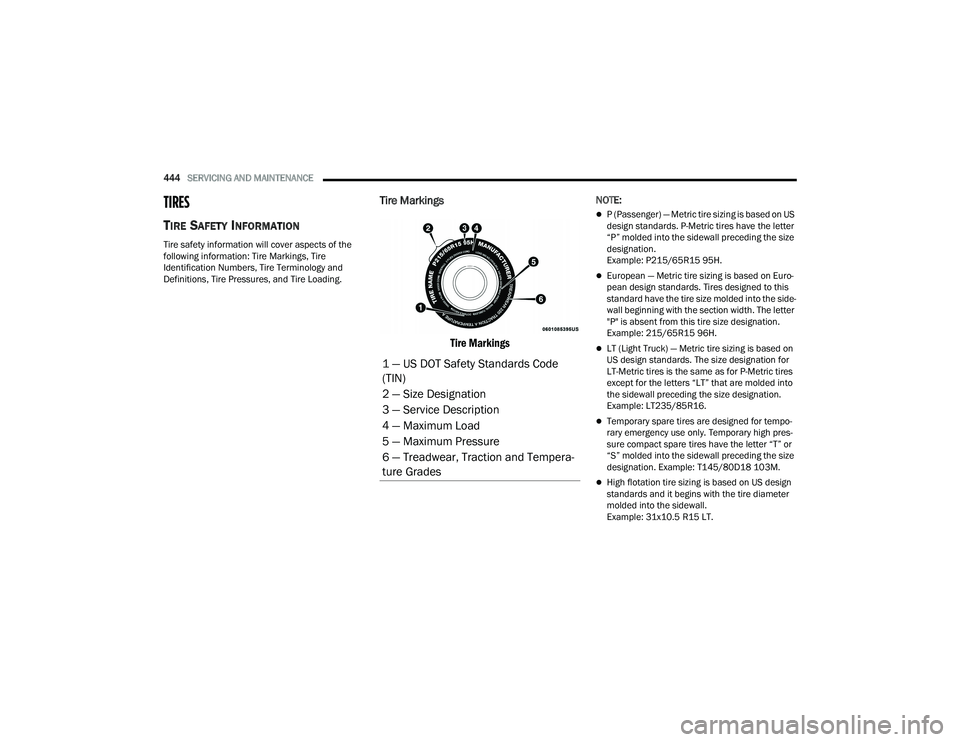
Tire Markings
Tire Markings
NOTE:
P (Passenger) — Metric tire sizing is based on US
design standards. P-Metric tires have the letter
“P” molded into the sidewall preceding the size
designation.
Example: P215/65R15 95H.
European — Metric tire sizing is based on Euro -
pean design standards. Tires designed to this
standard have the tire size molded into the side -
wall beginning with the section width. The letter
"P" is absent from this tire size designation.
Example: 215/65R15 96H.
LT (Light Truck) — Metric tire sizing is based on
US design standards. The size designation for
LT-Metric tires is the same as for P-Metric tires
except for the letters “LT” that are molded into
the sidewall preceding the size designation.
Example: LT235/85R16.
Temporary spare tires are designed for tempo -
rary emergency use only. Temporary high pres -
sure compact spare tires have the letter “T” or
“S” molded into the sidewall preceding the size
designation. Example: T145/80D18 103M.
High flotation tire sizing is based on US design
standards and it begins with the tire diameter
molded into the sidewall.
Example: 31x10.5 R15 LT.
1 — US DOT Safety Standards Code
(TIN)
2 — Size Designation
3 — Service Description
4 — Maximum Load
5 — Maximum Pressure
6 — Treadwear, Traction and Tempera -
ture Grades
22_DT_OM_EN_USC_t.book Page 444
Page 447 of 496
SERVICING AND MAINTENANCE445
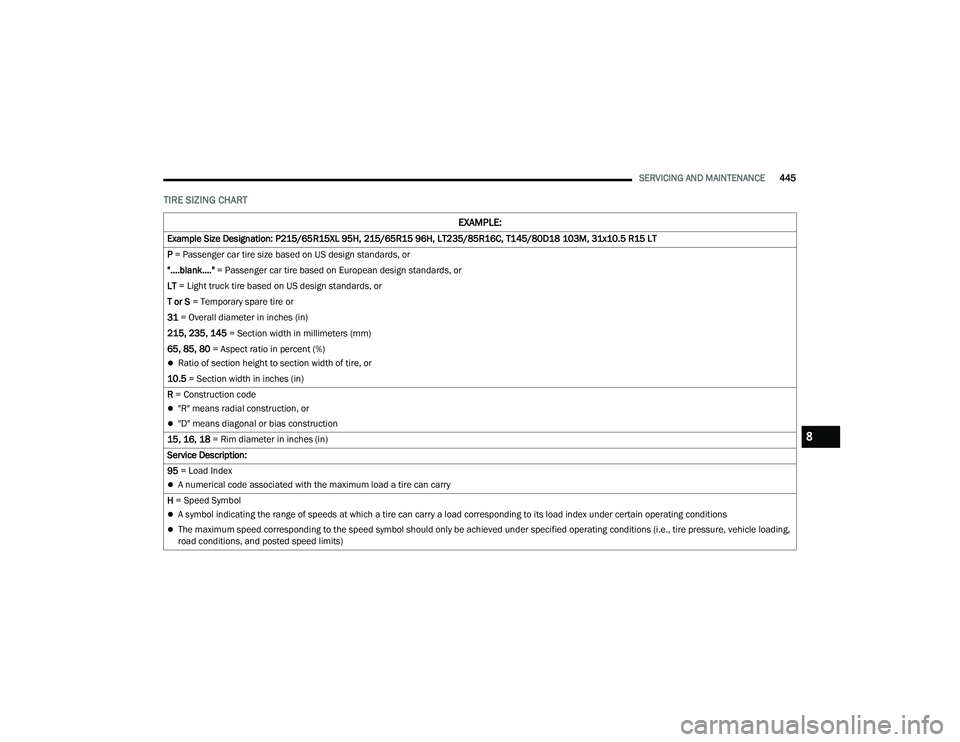
TIRE SIZING CHART
EXAMPLE:
Example Size Designation: P215/65R15XL 95H, 215/65R15 96H, LT235/85R16C, T145/80D18 103M, 31x10.5 R15 LT
P = Passenger car tire size based on US design standards, or
"....blank...." = Passenger car tire based on European design standards, or
LT = Light truck tire based on US design standards, or
T or S = Temporary spare tire or
31 = Overall diameter in inches (in)
215, 235, 145 = Section width in millimeters (mm)
65, 85, 80 = Aspect ratio in percent (%)
Ratio of section height to section width of tire, or
10.5 = Section width in inches (in)
R = Construction code
"R" means radial construction, or
"D" means diagonal or bias construction
15, 16, 18 = Rim diameter in inches (in)
Service Description:
95 = Load Index
A numerical code associated with the maximum load a tire can carry
H = Speed Symbol
A symbol indicating the range of speeds at which a tire can carry a load corresponding to its load index under certain operating conditions
The maximum speed corresponding to the speed symbol should only be achieved under specified operating conditions (i.e., tire pressure, vehicle loading,
road conditions, and posted speed limits)
8
22_DT_OM_EN_USC_t.book Page 445