window RAM 1500 2022 Owner's Manual
[x] Cancel search | Manufacturer: RAM, Model Year: 2022, Model line: 1500, Model: RAM 1500 2022Pages: 496, PDF Size: 18.03 MB
Page 89 of 496
GETTING TO KNOW YOUR VEHICLE87
MULTIFUNCTION TAILGATE —
I
F EQUIPPED
The 60/40 multifunction tailgate has two swing
doors to allow for closer access to the pickup box
with the doors open.
Opening
The tailgate must be latched closed to open the
swing doors. Push the paddle down, then pull the
release handle beneath the tailgate lowering
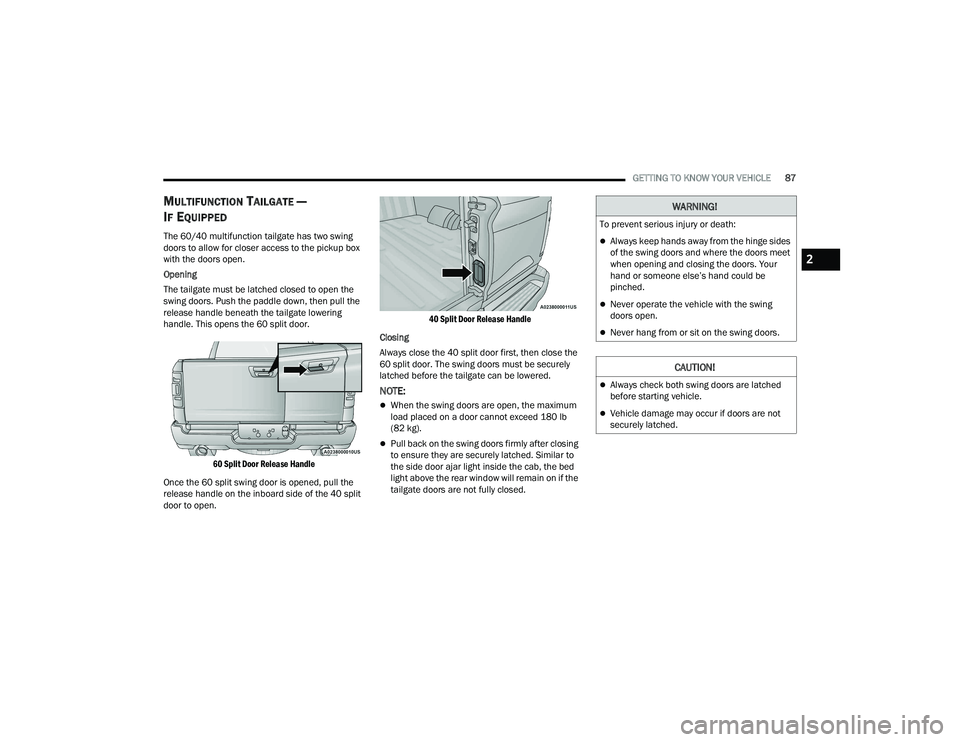
handle. This opens the 60 split door.
60 Split Door Release Handle
Once the 60 split swing door is opened, pull the
release handle on the inboard side of the 40 split
door to open.
40 Split Door Release Handle
Closing
Always close the 40 split door first, then close the
60 split door. The swing doors must be securely
latched before the tailgate can be lowered.
NOTE:
When the swing doors are open, the maximum
load placed on a door cannot exceed 180 lb
(82 kg).
Pull back on the swing doors firmly after closing
to ensure they are securely latched. Similar to
the side door ajar light inside the cab, the bed
light above the rear window will remain on if the
tailgate doors are not fully closed.
WARNING!
To prevent serious injury or death:
Always keep hands away from the hinge sides
of the swing doors and where the doors meet
when opening and closing the doors. Your
hand or someone else’s hand could be
pinched.
Never operate the vehicle with the swing
doors open.
Never hang from or sit on the swing doors.
CAUTION!
Always check both swing doors are latched
before starting vehicle.
Vehicle damage may occur if doors are not
securely latched.
2
22_DT_OM_EN_USC_t.book Page 87
Page 142 of 496
140 (Continued)
STARTING AND OPERATING
STARTING THE ENGINE
GASOLINE ENGINE
Before starting your vehicle, adjust your seat,
adjust both inside and outside mirrors, and fasten
your seat belt.
The starter should not be operated for more than
10-second intervals. Waiting at least 10 to 15
seconds between such intervals will protect the
starter from overheating. DIESEL ENGINE
Before starting your vehicle, adjust your seat, both
inside and outside mirrors, and fasten your seat
belts.
The starter is allowed to crank for up to 25-second
intervals. Waiting at least two minutes between
such intervals will protect the starter from
overheating.
WARNING!
When leaving the vehicle, always make sure
the keyless ignition node is in the OFF posi-
tion, remove the key fob from the vehicle and
lock the vehicle.
Never leave children alone in a vehicle, or with
access to an unlocked vehicle. Allowing chil -
dren to be in a vehicle unattended is
dangerous for a number of reasons. A child or
others could be seriously or fatally injured.
Children should be warned not to touch the
parking brake, brake pedal or the gear
selector.
Do not leave the key fob in or near the vehicle,
or in a location accessible to children, and do
not leave the ignition of a vehicle equipped
with Keyless Enter ‘n Go™ in the ACC or
ON/RUN position. A child could operate power
windows, other controls, or move the vehicle.
Do not leave children or animals inside parked
vehicles in hot weather. Interior heat buildup
may cause serious injury or death.
WARNING!WARNING!
Before exiting a vehicle, always come to a
complete stop, then shift the automatic trans -
mission into PARK and apply the parking brake.
Always make sure the ENGINE START/STOP
button is in the OFF position, key fob is removed
from the vehicle and vehicle is locked.
Never leave children alone in a vehicle, or with
access to an unlocked vehicle. Leaving chil -
dren in a vehicle unattended is dangerous for
a number of reasons. A child or others could
be seriously or fatally injured. Children should
be warned not to touch the parking brake,
brake pedal or the gear selector.
Do not leave the key fob in or near the vehicle,
or in a location accessible to children, and do
not leave the ignition of a vehicle equipped
with Keyless Enter ‘n Go™ in the ACC or ON/
RUN position. A child could operate power
windows, other controls, or move the vehicle.
Do not leave children or animals inside parked
vehicles in hot weather. Interior heat buildup
may cause serious injury or death.
22_DT_OM_EN_USC_t.book Page 140
Page 147 of 496

STARTING AND OPERATING145
(Continued)
ENGINE START/STOP Button Functions — With
Driver’s Foot OFF The Brake Pedal (In PARK Or
NEUTRAL Position)
The ENGINE START/STOP button operates similar
to an ignition switch. It has three positions: OFF,
ACC, and ON/RUN. To change the ignition modes
without starting the vehicle and use the
accessories, follow these directions:
1. Start with the ignition in the OFF position.
2. Push the ENGINE START/STOP button once to
place the ignition to the ACC position.
3. Push the ENGINE START/STOP button a second time to place the ignition to the ON/
RUN position.
4. Push the ENGINE START/STOP button a third time to return the ignition to the OFF position.
COLD WEATHER OPERATION (BELOW
–22°F O
R −30°C)
To ensure reliable starting at these temperatures,
use of an externally powered electric engine block
heater (available from an authorized dealer) is
recommended.
AFTER STARTING
The idle speed is controlled automatically, and it
will decrease as the engine warms up.
STARTING FLUIDS — DIESEL ENGINE
O
NLY
The engine is equipped with a glow plug preheating
system. If the instructions in this manual are
followed, the engine should start in all conditions
and no type of starting fluid should be used.
WARNING!
Do not leave children or animals inside parked
vehicles in hot weather. Interior heat build up
may cause serious injury or death.
When leaving the vehicle, always make sure
the wireless ignition node is in the OFF posi -
tion, remove the key fob from the vehicle and
lock the vehicle.
Never leave children alone in a vehicle, or with
access to an unlocked vehicle. Allowing
children to be in a vehicle unattended is
dangerous for a number of reasons. A child or
others could be seriously or fatally injured.
Children should be warned not to touch the
parking brake, brake pedal or the gear
selector.
Do not leave the key fob in or near the vehicle,
or in a location accessible to children, and do
not leave the ignition of a vehicle equipped
with Keyless Enter ‘n Go™ in the ACC or ON/
RUN position. A child could operate power
windows, other controls, or move the vehicle.
WARNING!
4
22_DT_OM_EN_USC_t.book Page 145
Page 154 of 496

152STARTING AND OPERATING
If exceptional circumstances should make it
necessary to engage the parking brake while the
vehicle is in motion, maintain upward pressure on
the EPB switch for as long as engagement is
desired. The BRAKE telltale light will illuminate,
and a continuous chime will sound. The rear stop
lamps will also be illuminated automatically while
the vehicle remains in motion.
To disengage the parking brake while the vehicle is
in motion, release the switch. If the vehicle is
brought to a complete stop using the parking
brake, when the vehicle reaches approximately
3 mph, (5 km/h) the parking brake will remain
engaged.
In the unlikely event of a malfunction of the EPB
system, a yellow EPB fault light will illuminate. This
may be accompanied by the BRAKE telltale light
flashing. In this event, urgent service of the EPB
system is required. Do not rely on the parking
brake to hold the vehicle stationary.
Auto Park Brake
The Electric Park Brake (EPB) can be programmed
to be applied automatically whenever the vehicle is
at a standstill and the automatic transmission is
placed in PARK. Auto Park Brake is enabled and
disabled by customer selection through the
Customer Programmable Features section of the
Uconnect Settings Ú page 249.
Any single Auto Park Brake application can be
bypassed by pushing the EPB switch to the release
position while the transmission is placed in PARK.
SafeHold
SafeHold is a safety feature of the Electric Park
Brake (EPB) system that will engage the parking
brake automatically if the vehicle is left unsecured
while the ignition is in ON/RUN.
The parking brake will automatically engage if all of
the following conditions are met:
The vehicle is at a standstill.
There is no attempt to press the brake pedal
and accelerator pedal.
The seat belt is unbuckled.
The driver door is open.
Do not leave the key fob in or near the vehicle,
or in a location accessible to children, and do
not leave a vehicle equipped with Keyless
Enter ‘n Go™ in the ACC or ON/RUN position.
A child could operate power windows, other
controls, or move the vehicle.
Be sure the parking brake is fully disengaged
before driving; failure to do so can lead to
brake failure and a collision.
Always fully apply the parking brake when
leaving your vehicle, or it may roll and cause
damage or injury. Also be certain to leave the
transmission in PARK. Failure to do so may
allow the vehicle to roll and cause damage or
injury.
CAUTION!
If the Brake System Warning Light remains on
with the parking brake released, a brake system
malfunction is indicated. Have the brake system
serviced by an authorized dealer immediately.
WARNING!
WARNING!
Driving the vehicle with the parking brake
engaged, or repeated use of the parking brake
to slow the vehicle, may cause serious damage
to the brake system. Be sure the parking brake
is fully disengaged before driving; failure to do
so can lead to brake failure and a collision.
22_DT_OM_EN_USC_t.book Page 152
Page 156 of 496

154STARTING AND OPERATING
IGNITION PARK INTERLOCK
This vehicle is equipped with an Ignition Park
Interlock which requires the transmission to be in
PARK before the ignition can be turned to the OFF
position. This helps the driver avoid inadvertently
leaving the vehicle without placing the
transmission in PARK. This system also locks the
transmission in PARK whenever the ignition is in
the OFF position.
NOTE:The transmission is NOT locked in PARK when the
ignition is in the ACC position (even though the
engine will be off). Ensure that the transmission is
in PARK, and the ignition is OFF (not in ACC
position) before exiting the vehicle.
BRAKE/TRANSMISSION SHIFT
I
NTERLOCK (BTSI) SYSTEM
This vehicle is equipped with a BTSI system that
holds the transmission gear selector in PARK
unless the brakes are applied. To shift the
transmission out of PARK, the engine must be
running and the brake pedal must be pressed.
The brake pedal must also be pressed to shift from
NEUTRAL into DRIVE or REVERSE when the vehicle
is stopped or moving at low speeds.
8-SPEED AUTOMATIC TRANSMISSION
Rotary Shifter — If Equipped
The transmission is controlled using a rotary
electronic gear selector located on the instrument
panel. The transmission gear range (PRND) is
displayed both above the gear selector and in the
instrument cluster. To select a gear range, simply
rotate the gear selector. You must press the brake
pedal to shift the transmission out of PARK (or
NEUTRAL, when the vehicle is stopped or moving at
low speeds). To shift past multiple gear ranges at
once (such as PARK to DRIVE), simply rotate the
gear selector to the appropriate detent. Select the
DRIVE range for normal driving.
Unintended movement of a vehicle could
injure those in or near the vehicle. As with all
vehicles, you should never exit a vehicle while
the engine is running. Before exiting a vehicle,
always come to a complete stop, then apply
the parking brake, shift the transmission into
PARK, and turn the ignition OFF. When the
ignition is in the OFF position, the transmis -
sion is locked in PARK, securing the vehicle
against unwanted movement.
When exiting the vehicle, always make sure
the ignition is in the OFF position, remove the
key fob from the vehicle, and lock the vehicle.
Never leave children alone in a vehicle, or with
access to an unlocked vehicle. Allowing chil -
dren to be in a vehicle unattended is
dangerous for a number of reasons. A child or
others could be seriously or fatally injured.
Children should be warned not to touch the
parking brake, brake pedal or the transmis -
sion gear selector.
Do not leave the key fob in or near the vehicle
(or in a location accessible to children), and do
not leave the ignition in the ACC or ON/RUN
position. A child could operate power
windows, other controls, or move the vehicle.
WARNING!CAUTION!
Shift into or out of PARK or REVERSE only after
the vehicle has come to a complete stop.
Do not shift between PARK, REVERSE,
NEUTRAL, or DRIVE when the engine is above
idle speed.
Before shifting into any gear, make sure your
foot is firmly pressing the brake pedal.
22_DT_OM_EN_USC_t.book Page 154
Page 159 of 496

STARTING AND OPERATING157
(Continued) The following indicators should be used to ensure
that you have properly engaged the transmission
into the PARK position:
Look at the transmission gear position display
and verify that it indicates the PARK position (P),
and is not blinking.
With the brake pedal released, verify that the
gear selector will not move out of PARK. REVERSE (R)
This range is for moving the vehicle backward.
Shift into REVERSE only after the vehicle has come
to a complete stop.
NEUTRAL (N)
Use this range when the vehicle is standing for
prolonged periods with the engine running. Apply
the parking brake and shift the transmission into
PARK if you must exit the vehicle.
Unintended movement of a vehicle could
injure those in or near the vehicle. As with all
vehicles, you should never exit a vehicle while
the engine is running. Before exiting a vehicle,
always come to a complete stop, then apply
the parking brake, shift the transmission into
PARK, and turn the ignition OFF. When the
ignition is in the OFF position, the transmis
-
sion is locked in PARK, securing the vehicle
against unwanted movement.
When exiting the vehicle, always make sure
the ignition is in the OFF position, remove the
key fob from the vehicle, and lock the vehicle.
Never leave children alone in a vehicle, or with
access to an unlocked vehicle. Allowing chil -
dren to be in a vehicle unattended is
dangerous for a number of reasons. A child or
others could be seriously or fatally injured.
Children should be warned not to touch the
parking brake, brake pedal or the transmis -
sion gear selector.
WARNING!
Do not leave the key fob in or near the vehicle
(or in a location accessible to children), and do
not leave the ignition in the ACC or ON/RUN
position. A child could operate power
windows, other controls, or move the vehicle.
CAUTION!
DO NOT race the engine when shifting from
PARK or NEUTRAL into another gear range, as
this can damage the drivetrain.
Before moving the transmission gear selector
out of PARK, you must start the engine, and
also press the brake pedal. Otherwise,
damage to the gear selector could result.
WARNING!
WARNING!
Do not coast in NEUTRAL and never turn off the
ignition to coast down a hill. These are unsafe
practices that limit your response to changing
traffic or road conditions. You might lose control
of the vehicle and have a collision.
CAUTION!
Towing the vehicle, coasting, or driving for any
other reason with the transmission in NEUTRAL
can cause severe transmission damage.
For Recreational Towing Ú page 228.
For Towing A Disabled Vehicle Ú page 390.
4
22_DT_OM_EN_USC_t.book Page 157
Page 273 of 496

MULTIMEDIA271
AUX MODE
Overview
Auxiliary Mode (AUX) is entered by inserting an AUX
device using a cable with a 3.5 mm audio jack into
the AUX port, or by pushing the MEDIA button on
the faceplate, selecting the Source button and
then the AUX button.
To insert an Auxiliary device, gently insert the
Auxiliary device cable into the AUX port. If you
insert an Auxiliary device with the ignition and the
radio on, the unit will switch to AUX Mode and
begin to play.
Controlling The Auxiliary Device
The control of the Auxiliary device (e.g., selecting
playlists, play, fast forward, etc.) cannot be
provided by the radio; use the device controls
instead. Adjust the volume with the Volume button,
Volume/Mute rotary knob, or the On/Off rotary
knob, or with the volume of the attached device.
NOTE:The radio unit is acting as the amplifier for audio
output from the Auxiliary device. Therefore, if the
volume control on the Auxiliary device is set too
low, there will be insufficient audio signal for the
radio unit to play the music on the device. Seek Up
/Seek Down
In USB Mode, press the Seek Up button on the
touchscreen for the next selection on the USB
device. Press and release the Seek Down button
on the touchscreen to return to the beginning of
the current selection, or to return to the beginning
of the previous selection if the USB device is within
the first three seconds of the current selection.
In Bluetooth® Mode, press and release the Seek
Up button on the touchscreen for the next
selection on the Bluetooth® device. Press and
release the Seek Down button on the touchscreen
to return to the beginning of the current selection,
or return to the beginning of the previous selection
if the Bluetooth® device is within the first second
of the current selection.
Browse
In USB Mode, press the Browse button on the
touchscreen to display the browse window. In USB
Mode, the left side of the browse window displays
a list of ways you can browse through the contents
of the USB device. If supported by the device, you
can browse by Folder, Artist, Playlist, Album, Song,
etc. Press the desired button on the touchscreen
on the left side of the screen. The center of the
browse window shows items and their
sub-functions, which can be scrolled through by
pressing the Up and Down buttons to the right. The
TUNE/SCROLL knob can also be used to scroll. On the Uconnect 3 With 5-inch Display, select the
Browse button on the touchscreen to scroll
through and select a desired track on the device.
Press the Exit button on the touchscreen if you
wish to cancel the Browse function.
Media Mode
In USB Mode, press the Media button on the
touchscreen to select the desired audio source:
USB.
In Bluetooth® Mode, press the Media button on
the touchscreen to select the desired audio
source: Bluetooth®.
In AUX Mode, press the Media button on the
touchscreen to select the desired audio source:
AUX.
Repeat
In USB Mode, press the Repeat button on the
touchscreen to toggle the repeat functionality. The
Repeat button on the touchscreen is highlighted
when active. The Radio will continue to play the
current track, repeatedly, as long as the repeat is
active. Press the Repeat button again to enter
Repeat All. The radio will continue to play all the
current tracks, repeatedly, as long as the repeat
function is active. To cancel Repeat, press the
Repeat button a third time.
5
22_DT_OM_EN_USC_t.book Page 271
Page 282 of 496
280MULTIMEDIA
MAKING A SECOND CALL WHILE CURRENT
CALL IS IN PROGRESS
You can place a call on hold by pressing the Hold
button on the Phone main screen, then dial a
number from the keypad (if supported by your
mobile phone), recent calls, SMS Inbox or from the
phonebooks.
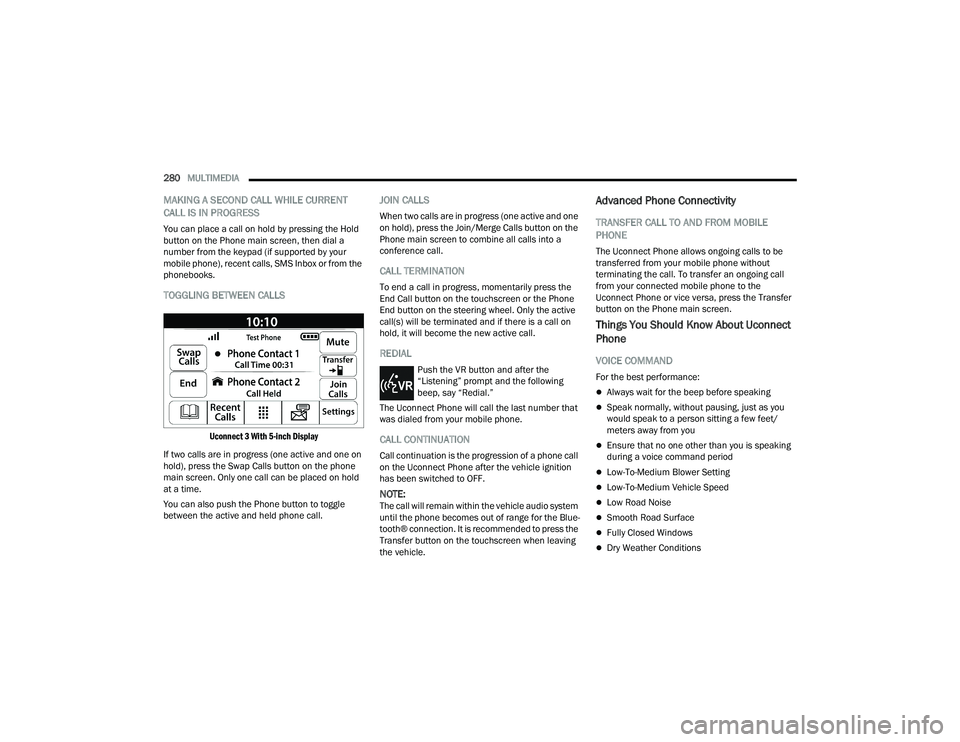
TOGGLING BETWEEN CALLS
Uconnect 3 With 5-inch Display
If two calls are in progress (one active and one on
hold), press the Swap Calls button on the phone
main screen. Only one call can be placed on hold
at a time.
You can also push the Phone button to toggle
between the active and held phone call.
JOIN CALLS
When two calls are in progress (one active and one
on hold), press the Join/Merge Calls button on the
Phone main screen to combine all calls into a
conference call.
CALL TERMINATION
To end a call in progress, momentarily press the
End Call button on the touchscreen or the Phone
End button on the steering wheel. Only the active
call(s) will be terminated and if there is a call on
hold, it will become the new active call.
REDIAL
Push the VR button and after the
“Listening” prompt and the following
beep, say “Redial.”
The Uconnect Phone will call the last number that
was dialed from your mobile phone.
CALL CONTINUATION
Call continuation is the progression of a phone call
on the Uconnect Phone after the vehicle ignition
has been switched to OFF.
NOTE:The call will remain within the vehicle audio system
until the phone becomes out of range for the Blue -
tooth® connection. It is recommended to press the
Transfer button on the touchscreen when leaving
the vehicle.
Advanced Phone Connectivity
TRANSFER CALL TO AND FROM MOBILE
PHONE
The Uconnect Phone allows ongoing calls to be
transferred from your mobile phone without
terminating the call. To transfer an ongoing call
from your connected mobile phone to the
Uconnect Phone or vice versa, press the Transfer
button on the Phone main screen.
Things You Should Know About Uconnect
Phone
VOICE COMMAND
For the best performance:
Always wait for the beep before speaking
Speak normally, without pausing, just as you
would speak to a person sitting a few feet/
meters away from you
Ensure that no one other than you is speaking
during a voice command period
Low-To-Medium Blower Setting
Low-To-Medium Vehicle Speed
Low Road Noise
Smooth Road Surface
Fully Closed Windows
Dry Weather Conditions
22_DT_OM_EN_USC_t.book Page 280
Page 283 of 496
MULTIMEDIA281
Even though the system is designed for many
languages and accents, the system may not always
work for some.
NOTE:It is recommended that you do not store names in
your Favorites phonebook while the vehicle is in
motion.
Number and name recognition rate is optimized
when the entries are not similar. You can say “O”
(letter “O”) for “0” (zero).
Even though international dialing for most number
combinations is supported, some shortcut dialing
number combinations may not be supported.
Audio Performance
Audio quality is maximized under:
Low-To-Medium Blower Setting
Low-To-Medium Vehicle Speed
Low Road Noise
Smooth Road Surface
Fully Closed Windows
Dry Weather Conditions
Operation From The Driver's Seat
Performance such as audio clarity, echo, and
loudness to a large degree rely on the phone and
network, and not the Uconnect Phone.
Echo at the far end can sometimes be reduced by
lowering the in-vehicle audio volume.
Phone Voice Commands
Making and answering hands-free phone calls is
easy with Uconnect. When the Phonebook button
is illuminated on your touchscreen, your system is
ready. Check
UconnectPhone.com for mobile
phone compatibility and pairing instructions.
Push the Phone button and wait for the beep to
say a command. See some examples below:
“ Call John Smith”
“Dial 123 456 7890”
“Redial ” (call previous outgoing phone number)
“Call back ” (call previously answered incoming
phone number) Did You Know:
When providing a Voice Command,
push the Phone button and say “ Call”, then
pronounce the name exactly as it appears in your
phonebook. When a contact has multiple phone
numbers, you can say “ Call John Smith work”.
Voice Text Reply — If Equipped
Uconnect can announce incoming text messages.
Push the VR button or Phone button and
say:
1. “
Listen
” to have the system read an incoming
text message. (Must have compatible mobile
phone paired to Uconnect system.)
2. “ Reply ” after an incoming text message has
been read.
Listen to the Uconnect prompts. After the
beep, repeat one of the predefined messag -
es and follow the system prompts.
WARNING!
ALWAYS drive safely with your hands on the
wheel. You have full responsibility and assume
all risks related to the use of the Uconnect
features and applications in this vehicle. Only
use Uconnect when it is safe to do so. Failure to
do so may result in an accident involving serious
injury or death.
5
22_DT_OM_EN_USC_t.book Page 281
Page 333 of 496

SAFETY331
NOTE:When filling warm tires, the tire pressure may need
to be increased up to an additional 4 psi (28 kPa)
above the recommended cold placard pressure in
order to turn the Tire Pressure Monitoring System
Warning Light off.
Service TPMS Warning
If a system fault is detected, the Tire Pressure
Monitoring System (TPMS) Warning Light will flash
on and off for 75 seconds and then remain on
solid. The system fault will also sound a chime. In
addition, the instrument cluster will display a
"SERVICE TPM SYSTEM" message for a minimum
of five seconds and then display dashes (--) in
place of the pressure value to indicate which
sensor is not being received.
If the ignition switch is cycled, this sequence will
repeat, providing the system fault still exists. If the
system fault no longer exists, the Tire Pressure
Monitoring System Warning Light will no longer
flash, and the "SERVICE TPM SYSTEM" message
will no longer display, and a pressure value will
display in place of the dashes. A system fault can
occur due to any of the following:
Signal interference due to electronic devices or
driving next to facilities emitting the same radio
frequencies as the Tire Pressure Monitoring
System sensors
Installing aftermarket window tinting that
contains materials that may block radio wave
signals
Accumulation of snow or ice around the wheels
or wheel housings
Using tire chains on the vehicle
Using wheels/tires not equipped with TPMS
sensors
A system fault may occur due to an incorrect TPMS
sensor location condition. When a system fault
occurs due to an incorrect TPMS sensor location,
the Tire Pressure Monitoring System (TPMS)
Warning Light will flash on and off for 75 seconds
and then remain on solid. The system fault will also
sound a chime. In addition, the instrument cluster
will display a Tire Pressure Temporarily Unavailable
message in place of the tire pressure display
screen. If the ignition switch is cycled, this
sequence will repeat, providing the system fault
still exists. If the system fault no longer exists, the
“Tire Pressure Monitoring System Warning Light”
will no longer flash and the tire pressure display
screen will be displayed showing the tire pressure
values the correct locations. Vehicles With Non-Matching Full Size Spare Or
Compact Spare
The non-matching full size spare or compact
spare tire does not have a TPMS sensor. There
-
fore, the TPMS will not monitor the pressure in
the non-matching full size spare or compact
spare tire.
If you install the non-matching full size spare or
compact spare tire in place of a road tire that
has a pressure below the low-pressure warning
limit, upon the next ignition switch cycle, the Tire
Pressure Monitoring System (TPMS) Warning
Light and a “LOW TIRE” message will remain on
and a chime will sound. In addition, the graphic
in the instrument cluster will still display a pres -
sure value in a different color and an “Inflate to
XX” message.
After driving the vehicle for up to 20 minutes
above 15 mph (24 km/h), the Tire Pressure
Monitoring System (TPMS) Warning Light will
flash on and off for 75 seconds and then remain
on solid. In addition, the instrument cluster will
display a "SERVICE TPM SYSTEM" message for a
minimum of five seconds and then display
dashes (--) in place of the pressure value.
6
22_DT_OM_EN_USC_t.book Page 331