door lock RAM 1500 2022 Owner's Guide
[x] Cancel search | Manufacturer: RAM, Model Year: 2022, Model line: 1500, Model: RAM 1500 2022Pages: 496, PDF Size: 18.03 MB
Page 288 of 496
286MULTIMEDIA
Editing Your Notifications
Notifications are an important element of your
SiriusXM Guardian™ account. For example, any
time you use your remote services (such as
Remote Door Unlock), you can elect to receive a
text message, push notification, and/or E-mail to
notify you of the event. To set up the notifications,
please follow these instructions.
1. Log on to your Owner’s Account at
https://
www.mopar.com/en-us.html (US Residents)
and select “Dashboard”, or www.mopar.ca
(Canadian Residents), select “My Vehicle”
and then “Dashboard”.
2. Click the Edit/Edit Profile button.
3. Once there, select “SiriusXM Guardian™” where you can edit Notification Preferences.
4. You can enter a mobile phone and/or email address to notify you, and you can customize
the types of messages.
USING SIRIUSXM GUARDIAN™
SOS Call — If Equipped
Access To Emergency Services At The Push Of A
Button
SiriusXM Guardian™ In-Vehicle Assistance
Features
With SiriusXM Guardian™, your vehicle has
onboard assistance features located on the
rearview mirror or overhead console designed to
enhance your driving experience if you should ever
need assistance or support.
Description
SOS Call offers a convenient way to get in contact
with a SiriusXM Guardian™ Customer Care agent
in the event of an emergency. When the
connection between the vehicle and the live agent
is made, your vehicle will automatically transmit
location information. In the event of a minor
collision, medical or any other emergency, press
the SOS button to be connected to a call center
agent who can send emergency assistance to your
vehicle’s location.NOTE:Certain SiriusXM Guardian™ connected services
are dependent on an operational Uconnect
system, cellular network availability that is
compatible with the device in your vehicle, and
GPS network availability. Not all features of
SiriusXM Guardian™ are available everywhere at
all times, particularly in remote or enclosed areas.
How It Works
1. Push the SOS Call button; the indicator light will turn green indicating a call has been
placed.
NOTE:
In case the SOS Call button is accidentally
pushed, there is a 10-second delay before
the SOS call is placed. The system will
verbally alert you that a call is about to be
made. To cancel the SOS Call connection,
push the SOS Call button on the rearview
mirror or overhead console or press the
Cancel button on the touchscreen within 10
seconds.
During an SOS Call, the Bluetooth®-paired
phone is disconnected so incoming or
outgoing calls will go through your mobile
device versus the hands-free system which
is not available due to the SOS Call.
WARNING!
Some SiriusXM Guardian™ connected services,
including SOS Call and Roadside Assistance
Call, will NOT work without a network connection
compatible with your device.
Center Light Status Description
Off No call activated
Green Active call in progress Red System error
22_DT_OM_EN_USC_t.book Page 286
Page 292 of 496
290MULTIMEDIA
3. On your dashboard, you will see remote commands. Press the desired icon to activate
that feature.
4. You will then be asked to enter your SiriusXM Guardian™ Security PIN (this is the same
four-digit code established when you activated
your SiriusXM Guardian™ system). Please
enter your SiriusXM Guardian™ Security PIN.
5. A message will appear on the screen to let you know if the command was received by your
vehicle.
Contacting SiriusXM Guardian™ Customer Care
(for example, in case of an accidental lock-out):
1. Contact SiriusXM Guardian™ Customer Care if you are unable to lock your vehicle through
the Mobile App or your key fob.
2. For security purposes, the SiriusXM Guardian™ Customer Care agent will verify
your identity by asking for your four-digit
SiriusXM Guardian™ Security PIN.
3. After providing your SiriusXM Guardian™ Security PIN, you can ask them to perform a
remote command.
NOTE:Anyone with access to your PIN may request
Remote Door Lock/Unlock. It is your responsibility
to protect your PIN appropriately.
Remote Door Lock/Unlock
Description
The Remote Door Lock/Unlock feature provides
you the ability to lock or unlock the door on your
vehicle without the keys and from virtually any
distance.
Working Vehicle Conditions
The vehicle must in PARK or at a standstill.
The vehicle must be in an open area with cell
tower reception.
Your mobile device must have a cellular or Wi-Fi
connection.
Requirements
Vehicle must be properly equipped with Siri -
usXM Guardian™.
Vehicle must have an operable LTE (voice/data)
or 3G or 4G (data) network connection. If using
the Mobile App to command your vehicle, your
device must be compatible and be connected to
an operable LTE (voice/data) or 3G or 4G (data)
network connection.
Vehicle must be registered with SiriusXM
Guardian™ and have an active subscription that
includes the applicable feature.
An ignition cycle is required for some remote
commands, such as Remote Vehicle Start and
Remote Door Lock/Unlock if following a Remote
Horn & Lights activation.
Your Remote Door Lock/Unlock request will not
be processed if the vehicle is in motion, the igni -
tion key is on or during an emergency call.
NOTE:All other remote services should be performed via
your Owner’s Site or through the Mobile App on
your compatible device.
Remote Vehicle Start
Description
The Remote Vehicle Start feature provides you with
the ability to start the engine on your vehicle
without the keys and from virtually any distance.
Once started, the preset climate controls in your
vehicle can warm up or cool down the interior.
You can also send a command to turn off an
engine that has been started using Remote Vehicle
Start. After 15 minutes, if you have not entered
your vehicle with the key, the engine will shut off
automatically.
This remote function requires your vehicle to be
equipped with a factory-installed Remote Start
system.
You can set up push notifications every time a
command is sent to activate or cancel Remote
Start.
22_DT_OM_EN_USC_t.book Page 290
Page 300 of 496

298MULTIMEDIA
CONNECTED SERVICES SOS FAQS — IF
E
QUIPPED
1.
What happens if I accidentally push the SOS
Call button on the mirror or overhead console?
You have 10 seconds after pushing the SOS
Call button to cancel the call. To cancel the
call, either push the SOS Call button again, or
press the Cancel button on the in-vehicle
touchscreen.
2. What type of information is sent when I use the
SOS Call button from my vehicle? Certain
vehicle information, such as make and model,
is transmitted along with the last known GPS
location.
3. When could I use the SOS Call button? You can
use the SOS Call button to make a call if you or
someone else needs emergency assistance.
CONNECTED SERVICES REMOTE DOOR
L
OCK/UNLOCK FAQS
1.
How long does it take to unlock or lock the
door?
Depending on various conditions, it can
take up to three minutes or more for the
request to get to your vehicle.
2.
Which is faster, my key fob or the Mobile App?
Your key fob will lock/unlock the door more
quickly, however its range is limited and your
Mobile App comes in handy for these and
other situations.
3. Will my vehicle be safe if I lose my device?
People sometimes lose their mobile devices,
which is why security measures have been
engineered into the Mobile App. Asking for
your username, password and SiriusXM
Guardian™ Security PIN are required for the
activation of Remote services through your
mobile device. It is your responsibility to
protect your passwords and PINs.
4. Why can’t all mobile devices use the Mobile
App? The Mobile App is compatible with most
devices with the Apple® and Android™
operating systems. The capabilities of these
devices allow us to remotely command your
vehicle. Other operating systems may be
supported in the future.
5. Why is the Mobile App running slow? The
Mobile App relies on a mobile network
connection from your device to send
commands to your vehicle which must have an
operable LTE (voice/data) or 3G, 4G (data), or
5G (data) network connection. If either your
device or your vehicle is in an area with below
average coverage, it may take longer to log in
and send commands.
CONNECTED SERVICES ROADSIDE
A
SSISTANCE FAQS
1.
What is the phone number for roadside
assistance call? The phone number is:
US: 1-800-521-2779
Canada: 1-800-363-4869
2. If I am subscribed to SiriusXM Guardian™,
does it cover towing or other expenses
incurred by using roadside assistance? No,
however your new vehicle may include
Roadside Assistance Call services.
CONNECTED SERVICES SEND & GO
FAQ
S — IF EQUIPPED
1.
How long does it take to send the route and
destination to my vehicle?
Depending on
various conditions, it can take up to three
minutes for the request to get through to your
vehicle.
2. Can I cancel a route I sent to my vehicle? Yes,
once you enter your vehicle, and start the
engine, the pop-up message stating that you
have a new route will appear. There is an exit
button on the pop-up that will cancel the route
if selected.
22_DT_OM_EN_USC_t.book Page 298
Page 303 of 496

MULTIMEDIA301
2. Why do I need an email address? Without an
email address, customers cannot register for
SiriusXM Guardian™. Customers need to
register so they can subscribe to receive
additional services and create a SiriusXM
Guardian™ Security PIN for remote command
requests.
3. How do I create a SiriusXM Guardian™ security
PIN? Set up your SiriusXM Guardian™ Security
PIN during the registration process. The
SiriusXM Guardian™ Security PIN will be
required to authenticate you when accessing
your account via SiriusXM Guardian™ Call or
performing any remote services, such as
Remote Door Lock/Unlock, Remote Horn &
Lights, or Remote Vehicle Start.
4. What if I forgot my SiriusXM Guardian™
security PIN? If you’ve already activated
services and forgot your SiriusXM Guardian™
Security PIN, you can reset the PIN by selecting
Edit Profile on your Owner’s Site.
5. How do I update my SiriusXM Guardian™
payment account address? Your SiriusXM
Guardian™ Payment Account address can be
updated online, or by calling SiriusXM
Guardian™ Customer Care from ASSIST in your
vehicle. To update online: login to your Owner’s
Site, and select Edit Profile > SiriusXM
Guardian™ Payment Account. 6.
How do I update my SiriusXM Guardian™
profile? Your name, home address, phone
number, email address and SiriusXM
Guardian™ Security PIN can be updated online
on your Owner’s Site. Log in to your Owner’s
Site then select Edit Profile to edit your
personal information. Make your edits and
click Save.
7. Can I try features or packages before I buy
them? Your new vehicle purchase may have
come with an included trial period for certain
Apps and services.
8. Can I access every App and service while
driving? No, some applications and services
are not available while driving. For your own
safety, it is not possible to use some of the
touchscreen features while the vehicle is in
motion (e.g. key pad).
9. What happens when my subscription comes
up for renewal? If you have added a credit card
to your account information, your subscription
will be automatically renewed for a term length
in accordance with the service plan that you
have selected at the then current subscription
rate and on every renewal date thereafter,
unless you cancel your subscription by calling
SiriusXM Guardian™ Care. If you have not added a credit card to your account, SiriusXM
Guardian™ will send you an email or letter in
advance of your expiration date to remind you
that your subscription is ending soon.
10. How do I manage my SiriusXM Guardian™
notification preferences? Contact SiriusXM
Guardian™ Customer Care, or go to your
Owner’s Site and then update your
preferences on the SiriusXM Guardian™
customer web portal.
11. How do I purchase a subscription? Contact
SiriusXM Guardian™ Customer Care by
pushing the ASSIST button on your rearview
mirror or overhead console.
12. How do I update my credit card information?
Login to your Owner’s Site, and select Edit
Profile, then select SiriusXM Guardian™
Payment Account.
13. How do I find out how much longer I have on
my subscription? Contact SiriusXM Guardian™
Customer Care.
You also can visit your Owner’s Site and
choose a subscription to view its expiration
date. When your subscription is about to ex -
pire, you will receive an email or letter of no -
tification.
5
22_DT_OM_EN_USC_t.book Page 301
Page 352 of 496

350SAFETY
The SABIC deploys downward, covering the side
windows. An inflating SABIC pushes the outside
edge of the headliner out of the way and covers the
window. The SABICs inflate with enough force to
injure occupants if they are not belted and seated
properly, or if items are positioned in the area
where the SABICs inflate. Children are at an even
greater risk of injury from a deploying air bag.
The SABICs may help reduce the risk of partial or
complete ejection of vehicle occupants through
side windows in certain side impact events. Side Impacts
The Side Air Bags are designed to activate in
certain side impacts. The Occupant Restraint
Controller (ORC) determines whether the
deployment of the Side Air Bags in a particular
impact event is appropriate, based on the severity
and type of collision. The side impact sensors aid
the ORC in determining the appropriate response
to impact events. The system is calibrated to
deploy the Side Air Bags on the impact side of the
vehicle during impacts that require Side Air Bag
occupant protection. In side impacts, the Side Air
Bags deploy independently; a left side impact
deploys the left Side Air Bags only and a right-side
impact deploys the right Side Air Bags only. Vehicle
damage by itself is not a good indicator of whether
or not Side Air Bags should have deployed.
The Side Air Bags will not deploy in all side
collisions, including some collisions at certain
angles, or some side collisions that do not impact
the area of the passenger compartment. The Side
Air Bags may deploy during angled or offset frontal
collisions where the front air bags deploy.
Side Air Bags are a supplement to the seat belt
restraint system. Side Air Bags deploy in less time
than it takes to blink your eyes.
WARNING!
Do not mount equipment, or stack luggage or
other cargo up high enough to block the
deployment of the SABICs. The trim covering
above the side windows where the SABIC and
its deployment path are located should
remain free from any obstructions.
In order for the SABICs to work as intended, do
not install any accessory items in your vehicle
which could alter the roof. Do not add an after
-
market sunroof to your vehicle. Do not add
roof racks that require permanent attach -
ments (bolts or screws) for installation on the
vehicle roof. Do not drill into the roof of the
vehicle for any reason.
WARNING!
Occupants, including children, who are up
against or very close to Side Air Bags can be
seriously injured or killed. Occupants,
including children, should never lean on or
sleep against the door, side windows, or area
where the side air bags inflate, even if they are
in an infant or child restraint.
Seat belts (and child restraints where appro -
priate) are necessary for your protection in all
collisions. They also help keep you in position,
away from an inflating Side Air Bag. To get the
best protection from the Side Air Bags, occu -
pants must wear their seat belts properly and
sit upright with their backs against the seats.
Children must be properly restrained in a child
restraint or booster seat that is appropriate for
the size of the child.
22_DT_OM_EN_USC_t.book Page 350
Page 354 of 496

352SAFETY
If you do have a collision which deploys the air
bags, any or all of the following may occur:
The air bag material may sometimes cause
abrasions and/or skin reddening to the occu -
pants as the air bags deploy and unfold. The
abrasions are similar to friction rope burns or
those you might get sliding along a carpet or
gymnasium floor. They are not caused by
contact with chemicals. They are not permanent
and normally heal quickly. However, if you
haven’t healed significantly within a few days, or
if you have any blistering, see your doctor imme -
diately.
As the air bags deflate, you may see some
smoke-like particles. The particles are a normal
by-product of the process that generates the
non-toxic gas used for air bag inflation. These
airborne particles may irritate the skin, eyes,
nose, or throat. If you have skin or eye irritation,
rinse the area with cool water. For nose or throat
irritation, move to fresh air. If the irritation
continues, see your doctor. If these particles
settle on your clothing, follow the garment
manufacturer’s instructions for cleaning.
Do not drive your vehicle after the air bags have
deployed. If you are involved in another collision,
the air bags will not be in place to protect you.
NOTE:
Air bag covers may not be obvious in the interior
trim, but they will open during air bag deploy -
ment.
After any collision, the vehicle should be taken
to an authorized dealer immediately.
Enhanced Accident Response System
In the event of an impact, if the communication
network remains intact, and the power remains
intact, depending on the nature of the event, the
Occupant Restraint Controller (ORC) will determine
whether to have the Enhanced Accident Response
System perform the following functions:
Cut off fuel to the engine (if equipped)
Cut off battery power to the electric motor (if
equipped)
Flash hazard lights as long as the battery has
power
Turn on the interior lights, which remain on as
long as the battery has power or for 15 minutes
from the intervention of the Enhanced Accident
Response System
Unlock the power door locks
Your vehicle may also be designed to perform any
of these other functions in response to the
Enhanced Accident Response System:
Turn off the Fuel Filter Heater, Turn off the HVAC
Blower Motor, Close the HVAC Circulation Door
Cut off battery power to the:
Engine
Electric Motor (if equipped)
Electric power steering
Brake booster
Electric park brake
Automatic transmission gear selector
Horn
Front wiper
Headlamp washer pump (if equipped)
WARNING!
Deployed air bags and seat belt pretensioners
cannot protect you in another collision. Have the
air bags, seat belt pretensioners, and the seat
belt retractor assemblies replaced by an
authorized dealer immediately. Also, have the
Occupant Restraint Controller System serviced
as well.
22_DT_OM_EN_USC_t.book Page 352
Page 372 of 496
370SAFETY
(Continued)
Lights
Have someone observe the operation of brake
lights and exterior lights while you work the
controls. Check turn signal and high beam
indicator lights on the instrument panel.
Door Latches
Check for proper closing, latching, and locking.
Fluid Leaks
Check area under the vehicle after overnight
parking for fuel, coolant, oil, or other fluid leaks.
Also, if gasoline fumes are detected or if fuel or
brake fluid leaks are suspected, the cause should
be located and corrected immediately.
EXHAUST GAS
The best protection against carbon monoxide entry
into the vehicle body is a properly maintained
engine exhaust system.
Whenever a change is noticed in the sound of the
exhaust system, when exhaust fumes can be
detected inside the vehicle, or when the underside
or rear of the vehicle is damaged, have an
authorized dealer inspect the complete exhaust
system and adjacent body areas for broken,
damaged, deteriorated, or mispositioned parts.
Open seams or loose connections could permit
exhaust fumes to seep into the passenger
compartment. In addition, inspect the exhaust
system each time the vehicle is raised for
lubrication or oil change. Replace as required.
CARBON MONOXIDE WARNINGS
WARNING!
Exhaust gases can injure or kill. They contain
carbon monoxide (CO), which is colorless and
odorless. Breathing it can make you
unconscious and can eventually poison you. To
avoid breathing (CO), follow these safety tips:
Do not run the engine in a closed garage or in
confined areas any longer than needed to
move your vehicle in or out of the area.
If you are required to drive with the trunk/lift -
gate/rear doors open, make sure that all
windows are closed and the climate control
BLOWER switch is set at high speed. DO NOT
use the recirculation mode.
If it is necessary to sit in a parked vehicle with
the engine running, adjust your heating or
cooling controls to force outside air into the
vehicle. Set the blower at high speed.
WARNING!
WARNING!
Carbon monoxide (CO) in exhaust gases is
deadly. Follow the precautions below to prevent
carbon monoxide poisoning:
Do not inhale exhaust gases. They contain
carbon monoxide, a colorless and odorless
gas, which can kill. Never run the engine in a
closed area, such as a garage, and never sit in
a parked vehicle with the engine running for
an extended period. If the vehicle is stopped in
an open area with the engine running for more
than a short period, adjust the ventilation
system to force fresh, outside air into the
vehicle.
Guard against carbon monoxide with proper
maintenance. Have the exhaust system
inspected every time the vehicle is raised.
Have any abnormal conditions repaired
promptly. Until repaired, drive with all side
windows fully open.
22_DT_OM_EN_USC_t.book Page 370
Page 420 of 496
418SERVICING AND MAINTENANCE
ACCESSORY DRIVE BELT INSPECTION
When inspecting accessory drive belts, small
cracks that run across the ribbed surface of the
belt from rib to rib, are considered normal. This is
not a reason to replace the belt. However, cracks
running along a rib (not across) are not normal. Any
belt with cracks running along a rib must be
replaced. Also have the belt replaced if it has
excessive wear, frayed cords or severe glazing.
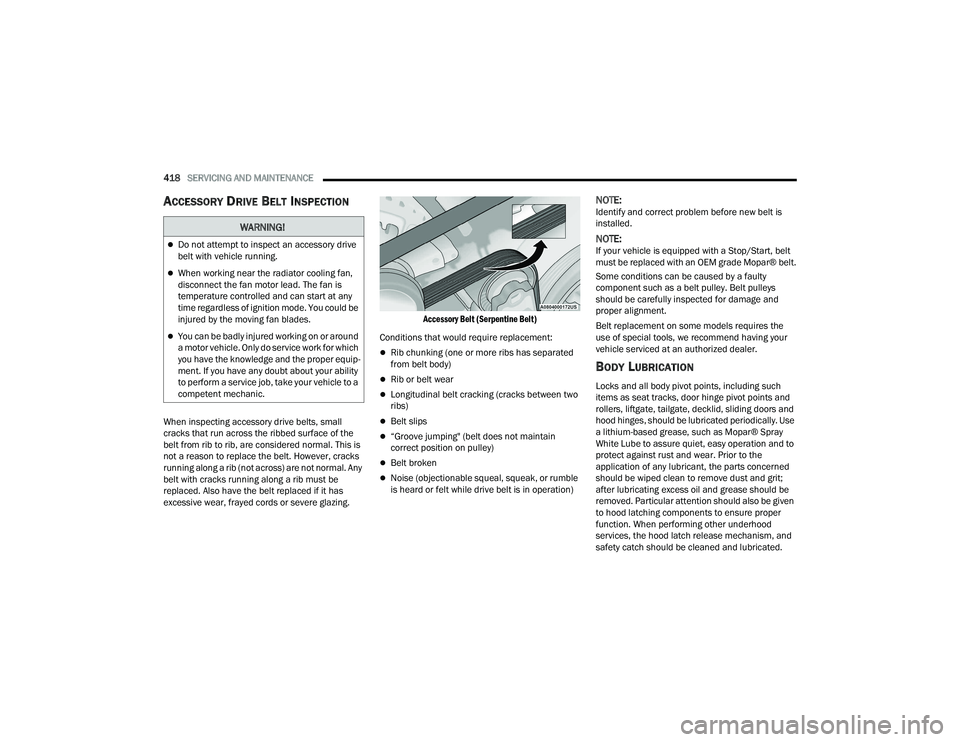
Accessory Belt (Serpentine Belt)
Conditions that would require replacement:
Rib chunking (one or more ribs has separated
from belt body)
Rib or belt wear
Longitudinal belt cracking (cracks between two
ribs)
Belt slips
“Groove jumping" (belt does not maintain
correct position on pulley)
Belt broken
Noise (objectionable squeal, squeak, or rumble
is heard or felt while drive belt is in operation)
NOTE:Identify and correct problem before new belt is
installed.
NOTE:If your vehicle is equipped with a Stop/Start, belt
must be replaced with an OEM grade Mopar® belt.
Some conditions can be caused by a faulty
component such as a belt pulley. Belt pulleys
should be carefully inspected for damage and
proper alignment.
Belt replacement on some models requires the
use of special tools, we recommend having your
vehicle serviced at an authorized dealer.
BODY LUBRICATION
Locks and all body pivot points, including such
items as seat tracks, door hinge pivot points and
rollers, liftgate, tailgate, decklid, sliding doors and
hood hinges, should be lubricated periodically. Use
a lithium-based grease, such as Mopar® Spray
White Lube to assure quiet, easy operation and to
protect against rust and wear. Prior to the
application of any lubricant, the parts concerned
should be wiped clean to remove dust and grit;
after lubricating excess oil and grease should be
removed. Particular attention should also be given
to hood latching components to ensure proper
function. When performing other underhood
services, the hood latch release mechanism, and
safety catch should be cleaned and lubricated.
WARNING!
Do not attempt to inspect an accessory drive
belt with vehicle running.
When working near the radiator cooling fan,
disconnect the fan motor lead. The fan is
temperature controlled and can start at any
time regardless of ignition mode. You could be
injured by the moving fan blades.
You can be badly injured working on or around
a motor vehicle. Only do service work for which
you have the knowledge and the proper equip -
ment. If you have any doubt about your ability
to perform a service job, take your vehicle to a
competent mechanic.
22_DT_OM_EN_USC_t.book Page 418
Page 483 of 496

481
INDEX
A
Accessory Drive Belt Inspection..................... 418Adaptive Cruise Control (ACC)
(Cruise Control).........131, 136, 137, 176, 178Adding Engine Coolant (Antifreeze)............... 422Adding Fuel.......................................... 207, 208Additives, Fuel............................................... 468AdjustDown........................................................... 38Forward....................................................... 38Rearward..................................................... 38Up................................................................ 38Adjustable Pedals............................................ 44Advance Phone Connectivity......................... 280Air BagAir Bag Operation...................................... 344Air Bag Warning Light...................... 342, 344Enhanced Accident Response......... 352, 392Event Data Recorder (EDR)....................... 392Front Air Bag............................................. 344If Deployment Occurs................................ 351Knee Impact Bolsters................................ 349Maintaining Your Air Bag System.............. 353Maintenance............................................. 353Redundant Air Bag Warning Light.............342Transporting Pets...................................... 368
Air Bag Light................................ 128, 342, 368Air Cleaner, Engine
(Engine Air Cleaner Filter)............................. 410Air Conditioner Maintenance........................ 415Air Conditioner Refrigerant........................... 415Air Conditioner System................................. 415Air Conditioning......................................... 62, 65Air Conditioning Filter..............................68, 416Air Conditioning System................................... 67Air Conditioning, Operating Tips....................... 68Air Filter............................................... 410, 412Air PressureTires......................................................... 452Air Suspension......... 131, 134, 135, 165, 169AlarmSecurity Alarm....................................27, 131Alterations/ModificationsVehicle......................................................... 13Antifreeze (Engine Coolant)................. 422, 472Disposal................................................... 423Anti-Lock Brake System (ABS)...................... 312Anti-Lock Warning Light................................ 131Assist, Hill Start............................................. 318Audio Settings............................................... 268Audio Systems (Radio).................................. 233Auto Down Power Windows............................. 80
Automatic Door Locks......................................32Automatic Headlights.......................................56Automatic High Beams.....................................55Automatic Tailgate Release.............................86Automatic Temperature Control (ATC)..............67Automatic Transmission....................... 154, 426Adding Fluid.............................................. 426Fluid And Filter Change............................. 426Fluid Change............................................. 426Fluid Level Check...................................... 426Fluid Type........................................ 426, 476Special Additives...................................... 426Automatic Transmission Limp Home Mode... 158AutoPark....................................................... 142AUX Camera.................................................. 203Auxiliary Driving Systems.............................. 319Axle Fluid.............................................. 427, 476Axle Locker System....................................... 172Axle Lubrication............................................ 427
B
Back-Up Camera........................................... 199Battery................................................. 129, 408Charging System Light.............................. 129Keyless Key Fob Replacement....................21Battery Saver Feature......................................59
11
22_DT_OM_EN_USC_t.book Page 481
Page 485 of 496

483
Cruise Control Accel/Decel
............................................... 177Cancel....................................................... 177Resume..................................................... 177Cruise Control (Speed Control)... 133, 176, 178Cruise Light......................................... 136, 137Customer Assistance..................................... 477Cybersecurity................................................. 233
D
Daytime Running Lights................................... 55Dealer Service............................................... 408Defroster, Windshield...................... 62, 65, 368Deleting A Phone........................................... 276Diagnostic System, Onboard......................... 138Diesel Exhaust Fluid...................................... 209Adding....................................................... 209Fill Procedure............................................ 210Storage...................................................... 209Diesel Fuel..................................................... 469Diesel Fuel Requirements............................. 469Bulk Storage Of......................................... 209Diesel Fuel System, Re-Priming..................... 414Differential, Limited Slip................................ 173Dimmer Control Switch.................................... 60Disable Vehicle Towing.................................. 390
Disc Drive..................................................... 270Disconnecting............................................... 276DisposalAntifreeze (Engine Coolant)...................... 423Disturb.......................................................... 279Door Ajar Light..................................... 129, 130Door LocksAutomatic.................................................... 32Doors............................................................... 28Draining Fuel/Water Separator Filter............ 412Driver Memory Presets................................. 268Driver’s Seat Back Tilt...................................... 35DrivingThrough Flowing, Rising, Or ShallowStanding Water
.................................... 231Driving Tips................................................... 230Dual Rear Wheels......................................... 466
E
Electric Brake Control System....................... 313Anti-Lock Brake System............................ 312Electronic Roll Mitigation................. 314, 319Electric Parking Brake................................... 150Electric Power Steering................................. 173Electrical Power Outlets................................... 76Electronic Range Select (ERS)...................... 158Electronic Stability Control
(ESC)........................................... 131, 132, 314
Electronic Throttle Control Warning Light...... 129Electronically Shifted Transfer Case.... 160, 162Emergency Braking....................................... 327Emergency Gas Can Refueling...................... 386Emergency, In Case OfFreeing Vehicle When Stuck..................... 389Hazard Warning Flasher........................... 371Jump Starting........................................... 384Emission Control System Maintenance......... 139Engine........................................................... 403Air Cleaner................................................ 410Block Heater............................................. 149Break-In Recommendations..................... 150Compartment............... 403, 404, 405, 406CompartmentIdentification............ 403, 404, 405, 406Coolant (Antifreeze).................................. 473Exhaust Gas Caution................................ 370Fails To Start............................................. 143Flooded, Starting...................................... 143Fuel Requirements.......................... 467, 472Idling......................................................... 147Jump Starting........................................... 384Oil...........................................409, 472, 473Oil Filler Cap............................................. 403Oil Filter.................................................... 409
11
22_DT_OM_EN_USC_t.book Page 483