AUX RAM 1500 2023 User Guide
[x] Cancel search | Manufacturer: RAM, Model Year: 2023, Model line: 1500, Model: RAM 1500 2023Pages: 416, PDF Size: 20.59 MB
Page 220 of 416
218MULTIMEDIA
UCONNECT MODES
STEERING WHEEL AUDIO CONTROLS
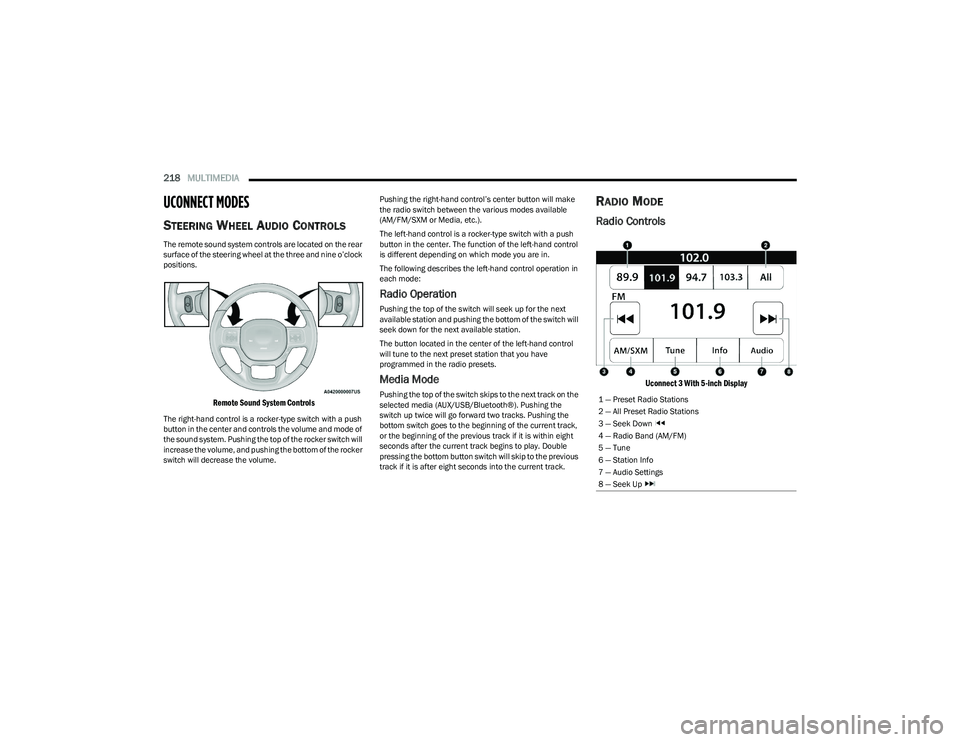
The remote sound system controls are located on the rear
surface of the steering wheel at the three and nine o’clock
positions.
Remote Sound System Controls
The right-hand control is a rocker-type switch with a push
button in the center and controls the volume and mode of
the sound system. Pushing the top of the rocker switch will
increase the volume, and pushing the bottom of the rocker
switch will decrease the volume. Pushing the right-hand control’s center button will make
the radio switch between the various modes available
(AM/FM/SXM or Media, etc.).
The left-hand control is a rocker-type switch with a push
button in the center. The function of the left-hand control
is different depending on which mode you are in.
The following describes the left-hand control operation in
each mode:
Radio Operation
Pushing the top of the switch will seek up for the next
available station and pushing the bottom of the switch will
seek down for the next available station.
The button located in the center of the left-hand control
will tune to the next preset station that you have
programmed in the radio presets.
Media Mode
Pushing the top of the switch skips to the next track on the
selected media (AUX/USB/Bluetooth®). Pushing the
switch up twice will go forward two tracks. Pushing the
bottom switch goes to the beginning of the current track,
or the beginning of the previous track if it is within eight
seconds after the current track begins to play. Double
pressing the bottom button switch will skip to the previous
track if it is after eight seconds into the current track.
RADIO MODE
Radio Controls
Uconnect 3 With 5-inch Display
1 — Preset Radio Stations
2 — All Preset Radio Stations
3 — Seek Down
4 — Radio Band (AM/FM)
5 — Tune
6 — Station Info
7 — Audio Settings
8 — Seek Up
23_DT_OM_EN_USC_t.book Page 218
Page 227 of 416
MULTIMEDIA225
Audio Setting Description
Balance/FadePress the Balance/Fade button on the touchscreen to balance audio between the front
speakers or fade the audio between the rear and front speakers. Press the Front, Rear,
Left or Right button or press and drag the red Speaker icon to adjust the Balance/Fade.
Equalizer Press the + or - button or press and drag the level bar to increase or decrease each of the
equalizer bands. The level value, which spans between plus or minus nine, is displayed at
the top of each of the bands.
Speed Adjusted Volume The Speed Adjusted Volume is adjusted by selecting from “Off”, “1”, “2”, and “3”.
This alters the automatic adjustment of the audio volume with variation to vehicle speed. Volume increases automatically as speed increases to compensate for normal road noise.
Surround Sound When Surround Sound is on, you can hear audio coming from every direction as in a
movie theatre or home theatre system.
Loudness When Loudness is on, the sound quality at lower volumes improves.
AUX Volume Offset The AUX Volume Offset is adjusted by pressing + and - buttons. This alters the AUX input
audio volume. The level value, which spans between plus or minus three, is displayed above the adjustment bar.
Radio Off With Door The Radio Off With Door feature, when activated, keeps the radio on until the driver or
passenger door is opened or until the “Radio Off Delay” selected time has expired.
5
23_DT_OM_EN_USC_t.book Page 225
Page 228 of 416
226MULTIMEDIA
MEDIA MODE
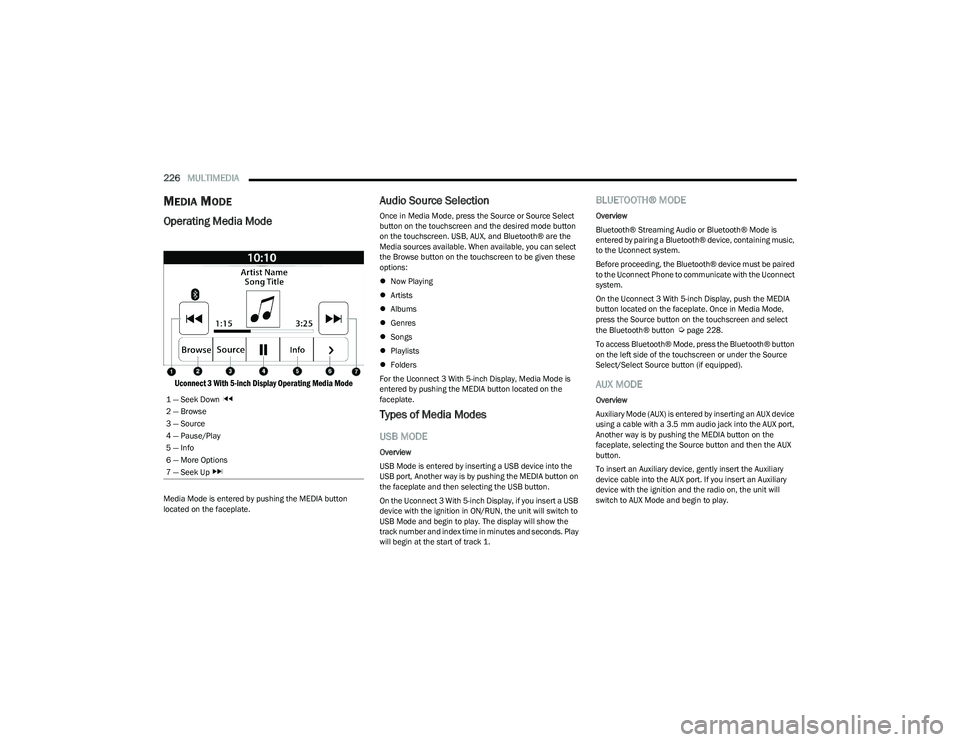
Operating Media Mode
Uconnect 3 With 5-inch Display Operating Media Mode
Media Mode is entered by pushing the MEDIA button
located on the faceplate.
Audio Source Selection
Once in Media Mode, press the Source or Source Select
button on the touchscreen and the desired mode button
on the touchscreen. USB, AUX, and Bluetooth® are the
Media sources available. When available, you can select
the Browse button on the touchscreen to be given these
options:
Now Playing
Artists
Albums
Genres
Songs
Playlists
Folders
For the Uconnect 3 With 5-inch Display, Media Mode is
entered by pushing the MEDIA button located on the
faceplate.
Types of Media Modes
USB MODE
Overview
USB Mode is entered by inserting a USB device into the
USB port, Another way is by pushing the MEDIA button on
the faceplate and then selecting the USB button.
On the Uconnect 3 With 5-inch Display, if you insert a USB
device with the ignition in ON/RUN, the unit will switch to
USB Mode and begin to play. The display will show the
track number and index time in minutes and seconds. Play
will begin at the start of track 1.
BLUETOOTH® MODE
Overview
Bluetooth® Streaming Audio or Bluetooth® Mode is
entered by pairing a Bluetooth® device, containing music,
to the Uconnect system.
Before proceeding, the Bluetooth® device must be paired
to the Uconnect Phone to communicate with the Uconnect
system.
On the Uconnect 3 With 5-inch Display, push the MEDIA
button located on the faceplate. Once in Media Mode,
press the Source button on the touchscreen and select
the Bluetooth® button
Úpage 228.
To access Bluetooth® Mode, press the Bluetooth® button
on the left side of the touchscreen or under the Source
Select/Select Source button (if equipped).
AUX MODE
Overview
Auxiliary Mode (AUX) is entered by inserting an AUX device
using a cable with a 3.5 mm audio jack into the AUX port,
Another way is by pushing the MEDIA button on the
faceplate, selecting the Source button and then the AUX
button.
To insert an Auxiliary device, gently insert the Auxiliary
device cable into the AUX port. If you insert an Auxiliary
device with the ignition and the radio on, the unit will
switch to AUX Mode and begin to play.
1 — Seek Down
2 — Browse
3 — Source
4 — Pause/Play
5 — Info
6 — More Options
7 — Seek Up
23_DT_OM_EN_USC_t.book Page 226
Page 229 of 416
MULTIMEDIA227
Controlling The Auxiliary Device
Auxiliary Mode (AUX) is entered by inserting an AUX device
using a cable with a 3.5 mm audio jack into the AUX port
Another way is by pushing the MEDIA button on the
faceplate, selecting the Source button, and then the AUX
button.
NOTE:The radio unit is acting as the amplifier for audio output
from the Auxiliary device. Therefore, if the volume control
on the Auxiliary device is set too low, there will be insuffi -
cient audio signal for the radio unit to play the music on
the device.
Seek Up /Seek Down
In USB Mode, press the Seek Up button on the
touchscreen for the next selection on the USB device.
Press and release the Seek Down button on the
touchscreen to return to the beginning of the current
selection, or to return to the beginning of the previous
selection if the USB device is within the first three seconds
of the current selection.
In Bluetooth® Mode, press and release the Seek Up
button on the touchscreen for the next selection on the
Bluetooth® device. Press and release the Seek Down
button on the touchscreen to return to the beginning of
the current selection, or return to the beginning of the
previous selection if the Bluetooth® device is within the
first second of the current selection. Browse
In USB Mode, press the Browse button on the touchscreen
to display the browse window. In USB Mode, the left side
of the browse window displays a list of ways you can
browse through the contents of the USB device.
If supported by the device, you can browse by Folder,
Artist, Playlist, Album, Song, etc. Press the desired button
on the touchscreen on the left side of the screen. The
center of the browse window shows items and their
sub-functions, which can be scrolled through by pressing
the Up and Down buttons to the right. The TUNE/SCROLL
knob can also be used to scroll.
On the Uconnect 3 With 5-inch Display, rotate the
ENTER/BROWSE button on the faceplate or press the
Browse button on the touchscreen to scroll through and
select a desired track on the device. Press the Exit button
on the touchscreen if you wish to cancel the Browse
function.
Media Mode
In USB Mode, press the Media button on the touchscreen
to select the desired audio source: USB.
In Bluetooth® Mode, press the Media button on the
touchscreen to select the desired audio source:
Bluetooth®.
In AUX Mode, press the Media button on the touchscreen
to select the desired audio source: AUX.
Repeat
In USB Mode, press the Repeat button on the touchscreen
to toggle the repeat functionality. The Repeat button on
the touchscreen is highlighted when active. The Radio will
continue to play the current track, repeatedly, as long as
the repeat is active. Press the Repeat button again to
enter Repeat All. The radio will continue to play all the
current tracks, repeatedly, as long as the repeat function
is active. To cancel Repeat, press the Repeat button a
third time.
Shuffle
In USB Mode, press the Shuffle button on the touchscreen
to play the selections on the USB device in random order
to provide an interesting change of pace. Press the Shuffle
button on the touchscreen a second time to turn this
feature off.
Audio
Audio settings can be accessed by pressing the Audio
button
Úpage 218.
Info
In USB Mode, press the Info button on the touchscreen to
display the current track information. Press the Info or X
button on the touchscreen a second time to cancel this
feature.
5
23_DT_OM_EN_USC_t.book Page 227
Page 230 of 416
228MULTIMEDIA
Tracks
In USB Mode, press the Tracks button on the touchscreen
to display a pop-up with the Song List. The song currently
playing is indicated by an arrow and lines above and below
the song title. When in the Tracks List screen you can
rotate the TUNE/SCROLL knob to highlight a track
(indicated by the line above and below the track name)
and then push the ENTER/BROWSE knob to start playing
that track.
In Bluetooth® Mode, if the Bluetooth® device supports
this feature, press the Tracks button on the touchscreen
to display a pop-up with the Song List. The currently
playing song is indicated by a red arrow and lines above
and below the song title.
Pressing the Tracks button on the touchscreen while the
pop-up is displayed will close the pop-up.
MEDIA VOICE COMMANDS
Uconnect offers connections via USB, Bluetooth®, and
auxiliary (AUX) ports. Voice operation is only available for
connected USB and AUX devices.
Push the VR button located on the steering wheel.
After the beep, say one of the following commands and
follow the prompts to switch your media source or choose
an artist:
“Change source to Bluetooth®”
“Change source to AUX”
“Change source to USB”
“Play artist Beethoven”; “ Play album Greatest Hits”;
“ Play song Moonlight Sonata”; “ Play genre Classical” Did You Know:
Press the Browse button on the
touchscreen to see all of the music on your USB device.
Your Voice Command must match exactly how the artist,
album, song, and genre information is displayed.
PHONE MODE
Overview
Uconnect Phone is a voice-activated, hands-free,
in-vehicle communications system. It allows you to dial a
phone number with your mobile phone.
The feature supports the following:
Voice Activated Features
Hands-Free dialing via Voice (“Call John Smith Mobile”
or “Dial 248-555-1212”).
Hands-Free text-to-speech listening of your incoming
SMS messages.
Hands-Free Text Message Replying: Forward one of
18 predefined SMS messages to incoming calls/text
messages.
Redialing last dialed numbers (“Redial”).
Calling Back the last incoming call number
(“Call Back”).
Viewing call logs on screen (“Show Incoming Calls,”
“Show Outgoing Calls,” “Show Missed Calls,” or “Show
Recent Calls”).
Searching Contacts phone number
(“Search for John Smith Mobile”). Screen Activated Features
Dialing via Keypad using touchscreen.
Viewing and Calling contacts from Phonebooks
displayed on the touchscreen.
Setting Favorite Contact phone numbers so they are
easily accessible on the Main Phone screen.
Viewing and Calling contacts from Recent Call logs.
Reviewing your recent Incoming SMS Messages.
Pairing up to 10 phones/audio devices for easy access
to connect to them quickly.
NOTE:Your phone must be capable of SMS messaging via Blue -
tooth® for messaging features to work properly.
Your mobile phone’s audio is transmitted through your
vehicle’s audio system; the system will automatically mute
your radio when using the Uconnect Phone.
For Uconnect customer support:
US visit UconnectPhone.com or call 877-855-8400
Canada visit UconnectPhone.com or call
800-465-2001 (English) or (French) call
800-387-9983
Uconnect Phone allows you to transfer calls between the
system and your mobile phone as you enter or exit your
vehicle and enables you to mute the system's microphone
for private conversation.
23_DT_OM_EN_USC_t.book Page 228
Page 271 of 416

SAFETY269
AUXILIARY DRIVING SYSTEMS
BLIND SPOT MONITORING (BSM) —
I
F EQUIPPED
BSM uses two radar sensors, located inside the taillights,
to detect highway licensable vehicles (automobiles,
trucks, motorcycles, etc.) that enter the blind spot zones
from the rear/front/side of the vehicle.
Rear Detection Zones
When the vehicle is started, the BSM Warning Light will
momentarily illuminate in both outside rearview mirrors to
let the driver know that the system is operational. The
BSM system sensors operate when the vehicle is in any
forward gear and enters standby mode when the vehicle is
in PARK. The BSM detection zone covers approximately one lane
width on both sides of the vehicle 12 ft (3.8 m). The zone
length starts at the outside rearview mirror and extends
approximately 10 ft (3 m) beyond the rear fascia/bumper
of the vehicle. The BSM system monitors the detection
zones on both sides of the vehicle when the vehicle speed
reaches approximately 6 mph (10 km/h) or higher and will
alert the driver of vehicles in these areas.
NOTE:
The BSM system DOES NOT alert the driver about
rapidly approaching vehicles that are outside the
detection zones.
BSM may experience dropouts (blinking on and off) of
the side mirror warning indicator lights when a motor -
cycle or any small object remains at the side of the
vehicle for extended periods of time (more than a
couple of seconds).
The BSM system can become blocked if snow, ice, mud, or
other road contaminations accumulate on the rear fascia/
bumper where the radar sensors are located. The system
may also detect blockage if the vehicle is operated in
areas with extremely low radar returns such as a desert or
parallel to a large elevation drop. If blockage is detected,
a “Blind Spot Temporarily Unavailable, Wipe Rear
Corners” message will display in the cluster, both mirror
lights will illuminate, and BSM and RCP alerts will not
occur. This is normal operation. The system will
automatically recover and resume function when the
condition clears. To minimize system blockage, do not
block the area of the rear fascia/bumper where the radar
sensors are located with foreign objects (bumper stickers,
bicycle racks, etc.) and keep it clear of road
contaminations.
Radar Sensor Locations
If the system detects degraded performance due to
contamination or foreign objects, a message will warn you
of a blocked sensor and the warning indicators in side
view mirrors will be on. The warning indicators will remain
illuminated until blockage clearing conditions are met.
First clear the taillights around the sensors of the
blockage. After removing the blockage, the following
procedure can be used to reset the system:
Cycle the ignition from ON to OFF and then back ON.
If the blockage message is still present after cycling the
ignition and driving in traffic, check again for a blockage.
The system may also detect a blockage if the vehicle is
operated in areas with extremely low radar returns such as
a desert or parallel to a large elevation drop.
6
23_DT_OM_EN_USC_t.book Page 269
Page 361 of 416
SERVICING AND MAINTENANCE359
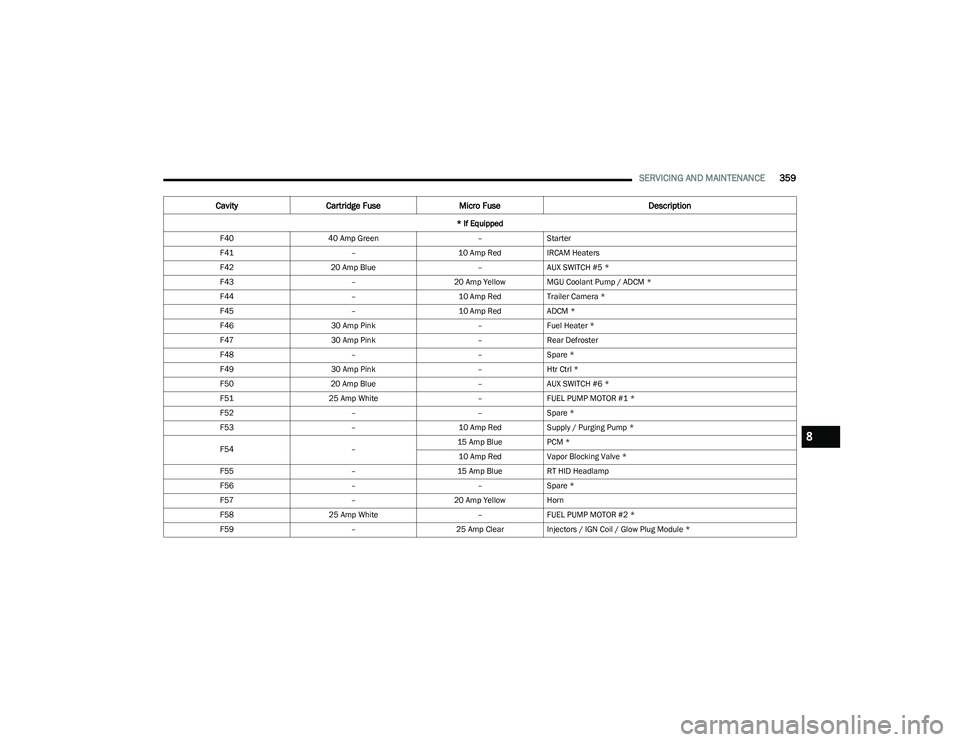
F4040 Amp Green –Starter
F41 –10 Amp RedIRCAM Heaters
F42 20 Amp Blue –AUX SWITCH #5 *
F43 –20 Amp Yellow MGU Coolant Pump / ADCM *
F44 –10 Amp RedTrailer Camera *
F45 –10 Amp RedADCM *
F46 30 Amp Pink –Fuel Heater *
F47 30 Amp Pink –Rear Defroster
F48 ––Spare *
F49 30 Amp Pink –Htr Ctrl *
F50 20 Amp Blue –AUX SWITCH #6 *
F51 25 Amp White –FUEL PUMP MOTOR #1 *
F52 ––Spare *
F53 –10 Amp RedSupply / Purging Pump *
F54 –15 Amp Blue
PCM *
10 Amp Red Vapor Blocking Valve *
F55 –15 Amp BlueRT HID Headlamp
F56 ––Spare *
F57 –20 Amp Yellow Horn
F58 25 Amp White –FUEL PUMP MOTOR #2 *
F59 –25 Amp ClearInjectors / IGN Coil / Glow Plug Module *
Cavity Cartridge Fuse Micro Fuse Description
* If Equipped
8
23_DT_OM_EN_USC_t.book Page 359
Page 404 of 416

402CUSTOMER ASSISTANCE
Owner's Manuals
These Owner's Manuals have been prepared with the
assistance of service and engineering specialists to
acquaint you with specific FCA vehicles.
To access your Owner's Information online, visit
www.mopar.com/om (US) or www.owners.mopar.ca
(Canada).
Or
Call Tech Authority toll free at:
1-800-890-4038 (US)
Owner's Manuals, Radio Manuals and Warranty
Information Books can be ordered through Archway at:
1-800-387-1143 (Canada)
CHANGE OF OWNERSHIP OR ADDRESS
*If you have purchased this vehicle used or have changed
your address, please provide the following information
and mail to:
FCA US LLC
P.O. Box 21–8008
Auburn Hills, MI 48321–8004 Make sure to include the following:
Date of Sale (mm/dd/yy)
Vehicle Identification Number (17 Character ID located
on top left of the instrument panel)
Exact Odometer Reading
First and Last Name
Phone Number
Street Address, City, State and Zip Code
Email Address
*Applies to US residents only.
GENERAL INFORMATION
The following regulatory statement applies to all Radio
Frequency (RF) devices equipped in this vehicle:
This device complies with Part 15 of the FCC Rules and
with Innovation, Science and Economic Development
Canada license-exempt RSS standard(s). Operation is
subject to the following two conditions:
1. This device may not cause harmful interference, and
2. This device must accept any interference received, including interference that may cause undesired
operation. Le présent appareil est conforme aux CNR d`Innovation,
Science and Economic Development applicables aux
appareils radio exempts de licence. L'exploitation est
autorisée aux deux conditions suivantes:
1. l'appareil ne doit pas produire de brouillage, et
2. l'utilisateur de l'appareil doit accepter tout brouillage
radioélectrique subi, même si le brouillage est
susceptible d'en compromettre le fonctionnement.
La operación de este equipo está sujeta a las siguientes
dos condiciones:
1. es posible que este equipo o dispositivo no cause interferencia perjudicial y
2. este equipo o dispositivo debe aceptar cualquier interferencia, incluyendo la que pueda causar su
operación no deseada.
NOTE:Changes or modifications not expressly approved by the
party responsible for compliance could void the user’s
authority to operate the equipment.
23_DT_OM_EN_USC_t.book Page 402
Page 405 of 416

403
INDEX
AAccessory Drive Belt Inspection .................................. 346
Adaptive Cruise Control (ACC)
(Cruise Control) ................................................... 143
, 145
Adding Engine Coolant (Antifreeze) ............................ 350
Adding Fuel................................................................... 171
Additives, Fuel .............................................................. 393
Adjust Down...........................................................................32
Forward ...................................................................... 32
Rearward ....................................................................32
Up................................................................................ 32
Adjustable Pedals ...........................................................38
Advance Phone Connectivity ....................................... 235
Air Bag Air Bag Operation.................................................... 290
Air Bag Warning Light .................................... 288
, 291
Enhanced Accident Response ...................... 297, 332
Event Data Recorder (EDR).................................... 332 Front Air Bag ........................................................... 291
If Deployment Occurs ............................................. 297
Knee Impact Bolsters ............................................. 294
Maintaining Your Air Bag System .......................... 298
Maintenance ........................................................... 298
Redundant Air Bag Warning Light ......................... 289
Transporting Pets.................................................... 311
Air Bag Light ...............................................108
, 288, 311
Air Cleaner, Engine (Engine Air Cleaner Filter) ........... 342
Air Conditioner Maintenance ...................................... 344
Air Conditioner Refrigerant .......................................... 344
Air Conditioner System ................................................ 344 Air Conditioning........................................................ 54
, 56
Air Conditioning Filter ............................................59, 344
Air Conditioning System ................................................. 59
Air Conditioning, Operating Tips .................................... 59
Air Filter ............................................................... 342
, 344
Air Pressure Tires.......................................................................... 377
Air Suspension .................................................... 134
, 137
Alarm Panic........................................................................... 17
Security Alarm...................................................23
, 110
Alterations/Modifications Vehicle........................................................................ 11
Antifreeze (Engine Coolant) ............................... 350
, 395
Disposal ...................................................................351
Anti-Lock Brake System (ABS) ..................................... 262
Anti-Lock Warning Light................................................ 110
Assist, Hill Start ............................................................. 266
Audio Settings ............................................................... 224
Audio Systems (Radio) ................................................. 191
Auto Down Power Windows............................................ 70
Automatic Door Locks .................................................... 27 Automatic Headlights ..................................................... 48Automatic High Beams ................................................... 47
Automatic Tailgate Release ........................................... 75
Automatic Temperature Control (ATC) .......................... 59
Automatic Transmission ..................................... 125
, 353
Adding Fluid ............................................................. 353
Fluid And Filter Change ...........................................353
Fluid Change ............................................................353 Fluid Level Check ....................................................353 Fluid Type .......................................................353
, 397
Special Additives ..................................................... 353
Automatic Transmission Limp Home Mode ............... 128
AutoPark ....................................................................... 119
AUX Camera .................................................................. 168
Auxiliary Driving Systems ............................................. 269
Axle Fluid.............................................................. 353
, 397
Axle Locker System ...................................................... 140
Axle Lubrication ............................................................ 353
BBack-Up Camera........................................................... 163
Battery..................................................................108, 340
Charging System Light ............................................ 108
Keyless Key Fob Replacement................................. 17
Battery Saver Feature .................................................... 50
Bed Divider ..................................................................... 84 Bed Extender .................................................................. 84
Bed Step ......................................................................... 78
Bedliner......................................................................... 389
Belts, Seat..................................................................... 311
Blind Spot Monitoring .................................................. 269
Bluetooth Connecting To A Particular Mobile Phone Or Audio Device After Pairing ................................. 231
Body Builders Guide..........................................................9
Body Mechanism Lubrication ...................................... 347
Bodywork ...................................................................... 388
B-Pillar Location ........................................................... 374
Brake Assist System..................................................... 263
Brake Control System .................................................. 263
11
23_DT_OM_EN_USC_t.book Page 403
Page 406 of 416

404
Brake Fluid .......................................................... 352, 397
Brake System ...................................................... 352, 392
Fluid Check.............................................................. 352
Master Cylinder ....................................................... 352
Parking .................................................................... 122
Warning Light .......................................................... 108
Brake/Transmission Interlock..................................... 125
Bulb Replacement ....................................................... 365
Bulbs, Light.......................................................... 313
, 365
CCamera ......................................................................... 163
Camera, AUX................................................................. 168
Camera, Rear ............................................................... 163
Camera, Surround View ............................................... 165
Camera, Trailer 360..................................................... 168
Capacities, Fuel............................................................ 395
Caps, Filler Oil (Engine) .............................................................. 337
Radiator (Coolant Pressure)................................... 350
Car Washes .................................................................. 388
Carbon Monoxide Warning .......................................... 313
Care And Maintenance ................................................ 388
Cargo Light ...................................................................... 49
CD.................................................................................. 226
Cellular Phone .............................................................. 252
Center High Mounted Stop Light................................. 369
Center Seat Storage Compartment ...............................60
Chart, Tire Sizing .......................................................... 371
Check Engine Light (Malfunction Indicator Light) ...... 117
Checking Your Vehicle For Safety ............................... 311
Checks, Safety.............................................................. 311
Child Restraint.............................................................. 298 Child Restraints
Booster Seats .......................................................... 301
Child Seat Installation ................................... 306
, 308
How To Stow An unused ALR Seat Belt .................305 Infant And Child Restraints ..................................... 300
Locating The LATCH Anchorages............................ 304
Lower Anchors And Tethers For Children............... 302
Older Children And Child Restraints....................... 300
Seating Positions ..................................................... 301
Clean Air Gasoline ........................................................ 393
Cleaning Wheels .....................................................................383
Climate Control ............................................................... 54 Automatic ................................................................... 54
Manual ....................................................................... 56
Compact Spare Tire ...................................................... 381
Connected Services ................ 236
, 237, 238, 239, 248
Contract, Service .......................................................... 400
Controls ......................................................................... 218
Cooling Pressure Cap (Radiator Cap) ..........................350
Cooling System ............................................................. 349 Adding Coolant (Antifreeze) ....................................350
Coolant Level ................................................. 349
, 351
Cooling Capacity ...................................................... 395
Disposal Of Used Coolant ....................................... 351 Drain, Flush, And Refill............................................349
Inspection ................................................................ 351
Points To Remember............................................... 352
Pressure Cap ...........................................................350
Radiator Cap ............................................................350Selection Of Coolant (Antifreeze) ........ 350
, 395, 396
Corrosion Protection ..................................................... 388
Cruise Control Accel/Decel.............................................................. 144 Cancel ...................................................................... 145
Resume.................................................................... 144
Cruise Control (Speed Control) ........................... 143
, 145
Cruise Light ..........................................................115, 116
Customer Assistance ................................................... 398
Cybersecurity ................................................................ 191
DDaytime Running Lights ................................................. 47 Dealer Service .............................................................. 341
Defroster, Windshield .................................... 54
, 56, 311
Deleting A Phone .......................................................... 231
Diagnostic System, Onboard ....................................... 116
Differential, Limited Slip .............................................. 140
Dimmer Control Switch .................................................. 51
Disable Vehicle Towing ................................................ 330
Disc Drive ...................................................................... 226
Disconnecting ............................................................... 231
Disposal Antifreeze (Engine Coolant) .................................... 351
Disturb........................................................................... 234
Door Ajar .............................................................. 108
, 110
Door Ajar Light ..................................................... 108, 110
Door Locks Automatic .................................................................. 27
Doors ............................................................................... 24
Driver Memory Presets ................................................ 224
Driver’s Seat Back Tilt .................................................... 30
Driving Through Flowing, Rising, Or Shallow Standing Water .................................................. 189
Driving Tips ................................................................... 189
Dual Rear Wheels......................................................... 392
23_DT_OM_EN_USC_t.book Page 404