ECO mode RAM 1500 2023 User Guide
[x] Cancel search | Manufacturer: RAM, Model Year: 2023, Model line: 1500, Model: RAM 1500 2023Pages: 416, PDF Size: 20.59 MB
Page 27 of 416

GETTING TO KNOW YOUR VEHICLE25
POWER DOOR LOCKS — IF EQUIPPED
The power door lock switches are located on each front
door panel. Push the switch to lock or unlock the doors.
Power Door Lock Switches
The driver’s door will unlock automatically if the key fob is
detected inside the vehicle when the door lock button on
the front door panel is used to lock the door. This will occur
for two attempts. Upon the third attempt, the doors will
lock even if the key fob is inside.
NOTE:If the key fob is located next to a mobile phone, laptop, or
other electronic device, the wireless signal may get
blocked, and the driver’s door may not unlock
automatically. If the door lock switch is pushed while the ignition is in
ACC or ON/RUN and the driver's door is open, the doors
will not lock.
If a rear door is locked, it cannot be opened from inside
the vehicle without first unlocking the door. The door may
be unlocked manually by raising the lock knob.
POWER SIDE STEPS — IF EQUIPPED
The Power Side Steps will extend a step for easier entry
and exit of the vehicle.
When configured for Auto mode, the Power Side Steps will
deploy when any of the doors are opened, or when the
deploy setting is activated through the touchscreen. When
configured for Store mode, the steps will not deploy unless
the setting is selected manually through the Controls
menu within the touchscreen.
If the vehicle speed exceeds 5 mph (8 km/h), or if the
retract setting is selected within Uconnect Settings
Úpage 191, the steps will retract.
KEYLESS ENTER ‘N GO™ —
P
ASSIVE ENTRY
The Passive Entry system is an enhancement to the
vehicle’s key fob and a feature of Keyless Enter ‘n Go™ —
Passive Entry. This feature allows you to lock and unlock
the vehicle’s door(s) without having to push the key fob
lock or unlock buttons.
NOTE:
Passive Entry may be programmed on or off within
Uconnect Settings Úpage 191.
The key fob may not be detected by the vehicle Passive
Entry system if it is located next to a mobile phone,
laptop, or other electronic device; these devices may
block the key fob’s wireless signal and prevent the
Passive Entry system from locking/unlocking the
vehicle.
Passive Entry Unlock initiates illuminated approach
(low beams, license plate lamp, position lamps) for
whichever duration is set between 0, 30, 60 or
90 seconds. Passive Entry Unlock also initiates two
flashes of the turn signals.
If wearing gloves, if it has been raining/snowing, or if
there is salt/dirt covering the Passive Entry door
handle, the unlock sensitivity can be affected, resulting
in a slower response time.
The doors may unlock when water is sprayed on the
Passive Entry door handles, if the key fob is located
outside of the vehicle within 5 ft (1.5 m) of the handle.
If the vehicle is unlocked by Passive Entry and no door
is opened within 60 seconds, the vehicle will relock and
(if equipped) will arm the Vehicle Security system.
2
23_DT_OM_EN_USC_t.book Page 25
Page 36 of 416

34GETTING TO KNOW YOUR VEHICLE
Front Heated Seats — If Equipped
The heated seat control buttons are located on
the center stack below the radio screen, or
within the Uconnect system.
Press the heated seat button once to turn the HI
setting on.
Press the heated seat button a second time to turn the
MED setting on.
Press the heated seat button a third time to turn the
LO setting on.
Press the heated seat button a fourth time to turn the
heating elements off.
NOTE:
Once a heat setting is selected, heat will be felt within
two to five minutes.
The engine must be running for the heated seats to
operate.
The level of heat selected will stay on until the operator
changes it.
For information on use with the Remote Start system, see
Úpage 22.
Rear Heated Seats — If Equipped
On some models, the two rear outboard seats
may be equipped with heated seats. There are
two heated seat switches that allow the rear
passengers to operate the seats
independently. The heated seat switches for each heater
are located on the rear of the center console. You can choose from HI, MED, LO, or OFF heat settings.
Indicator lights in each switch indicate the level of heat in
use.
Push the heated seat button once to turn the HI
setting on.
Push the heated seat button a second time to turn the
MED setting on.
Push the heated seat button a third time to turn the
LO setting on.
Push the heated seat button a fourth time to turn the
heating elements off.
NOTE:The level of heat selected will stay on until the operator
changes it.
VENTILATED SEATS — IF EQUIPPED
Front Ventilated Seats
The ventilated seat control buttons are located
on the center stack below the radio screen, or
within the Uconnect system. The fans operate
at three speeds: HI, MED and LO.
Press the ventilated seat button once to choose HI.
Press the ventilated seat button a second time to
choose MED.
Press the ventilated seat button a third time to choose
LO.
Press the ventilated seat button a fourth time to turn
the ventilation off.
NOTE:The engine must be running for the ventilated seats to
operate.
For information on use with the Remote Start system, see
Úpage 22.
Rear Ventilated Seats — If Equipped
If equipped, the two outboard rear seats will
have ventilated seats. The rear ventilated seat
control switches are located on the rear of the
center console.
The fans operate at three speeds: HI, MED, and LO. Push
the ventilated seat buttons to toggle through the speeds,
or to turn the feature off.
NOTE:The engine must be running for the ventilated seats to
operate.
PLASTIC GROCERY BAG RETAINERS —
I
F EQUIPPED
Retainer hooks which will hold plastic grocery bag handles
are attached to the underside of the rear seat cushion. To
access these hooks, lift the rear seat cushion upward.
HEAD RESTRAINTS
Head restraints are designed to reduce the risk of injury by
restricting head movement in the event of a rear impact.
Head restraints should be adjusted so that the top of the
head restraint is located above the top of your ear.
23_DT_OM_EN_USC_t.book Page 34
Page 50 of 416
48GETTING TO KNOW YOUR VEHICLE
FLASH-TO-PASS
You can signal another vehicle with your headlights by
lightly pulling the multifunction lever toward you. This will
cause the high beam headlights to turn on, and remain on,
until the lever is released.
AUTOMATIC HEADLIGHTS — IF EQUIPPED
This system automatically turns the headlights on or off
according to ambient light levels. To turn the system on,
rotate the headlight switch to the AUTO position.
When the system is on, the Headlight Delay feature is
also on. This means the headlights will stay on for up to
90 seconds after you place the ignition into the OFF
position. To turn the automatic headlights off, turn the
headlight switch out of the AUTO position.
NOTE:The engine must be running before the headlights will turn
on in the Automatic Mode.
PARKING LIGHTS AND PANEL LIGHTS
To turn on the parking lights and instrument panel lights,
rotate the headlight switch clockwise. To turn off the
parking lights, rotate the headlight switch back to the O
(off) position.
NOTE:Vehicles sold in Canada are equipped with a headlight
switch with an AUTO and ON detent but without an OFF
detent. Headlights will be deactivated when the headlight
switch is placed in the parking lights position. However,
the Daytime Running Lights (DRLs) will be activated along
with the front and rear marker lights. The DRLs may be
deactivated when the parking brake is engaged.
AUTOMATIC HEADLIGHTS WITH WIPERS
If your vehicle is equipped with Automatic Headlights, it
also has this customer-programmable feature. When your
headlights are in the automatic mode and the engine is
running, they will automatically turn on when the wiper
system is on. This feature is programmable through the
Uconnect system
Úpage 191.
If your vehicle is equipped with the Rain Sensing Wiper
system
Úpage 53, and it is activated, the headlights will
automatically turn on after the wipers complete five wipe
cycles within approximately one minute. They will turn off
approximately four minutes after the wipers completely
stop.
NOTE:When your headlights come on during the daytime, the
instrument panel lights will automatically dim to the lower
nighttime intensity.
HEADLIGHT DELAY
To assist when exiting the vehicle, the headlight delay
feature will leave the headlights on for up to 90 seconds.
This delay is initiated when the ignition is placed in the OFF
position while the headlight switch is on, and then the
headlight switch is cycled off. Headlight delay can be
canceled by either turning the headlight switch on then
off, or by placing the ignition in the ON position.
NOTE:
This feature can be programmed through the Uconnect
system Úpage 191.
The headlight delay feature is automatically activated if
the headlight switch is left in the AUTO position when
the ignition is placed in the OFF position.
LIGHTS-ON REMINDER
If the headlights, parking lights, or cargo lights are left on
after the ignition is placed in the OFF position, the vehicle
will chime when the driver’s door is opened.
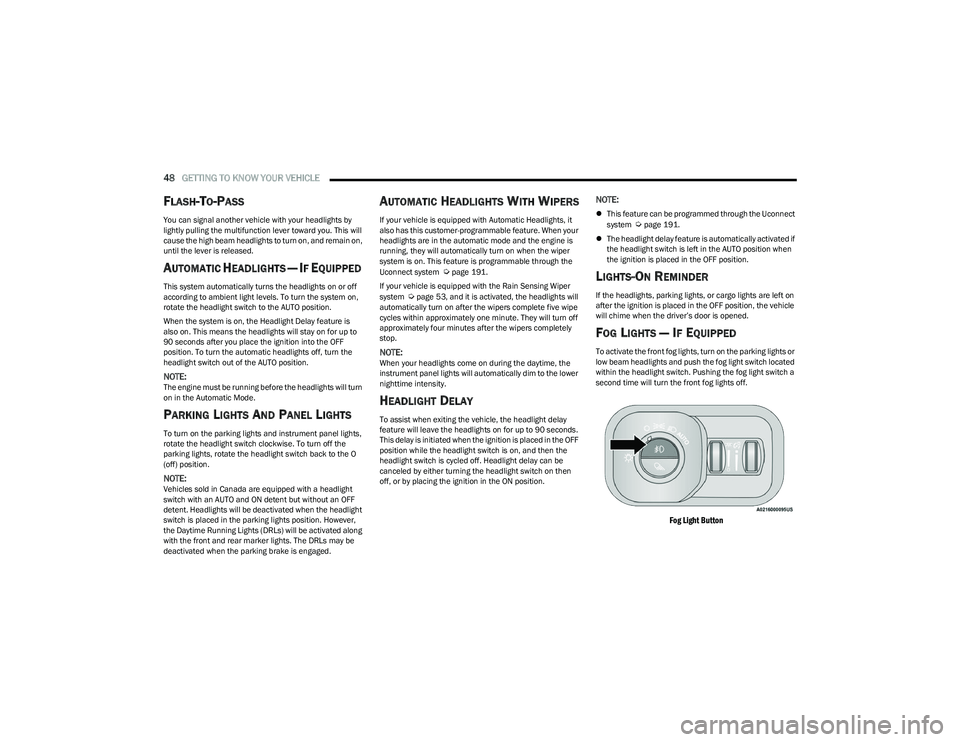
FOG LIGHTS — IF EQUIPPED
To activate the front fog lights, turn on the parking lights or
low beam headlights and push the fog light switch located
within the headlight switch. Pushing the fog light switch a
second time will turn the front fog lights off.
Fog Light Button
23_DT_OM_EN_USC_t.book Page 48
Page 52 of 416
50GETTING TO KNOW YOUR VEHICLE
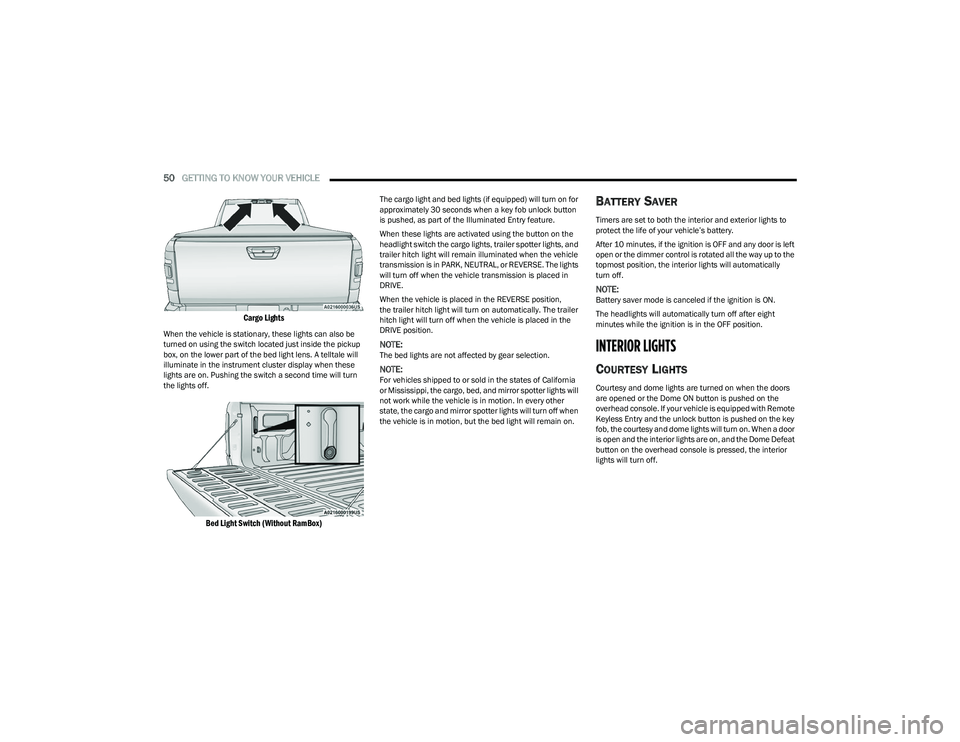
Cargo Lights
When the vehicle is stationary, these lights can also be
turned on using the switch located just inside the pickup
box, on the lower part of the bed light lens. A telltale will
illuminate in the instrument cluster display when these
lights are on. Pushing the switch a second time will turn
the lights off.
Bed Light Switch (Without RamBox)
The cargo light and bed lights (if equipped) will turn on for
approximately 30 seconds when a key fob unlock button
is pushed, as part of the Illuminated Entry feature.
When these lights are activated using the button on the
headlight switch the cargo lights, trailer spotter lights, and
trailer hitch light will remain illuminated when the vehicle
transmission is in PARK, NEUTRAL, or REVERSE. The lights
will turn off when the vehicle transmission is placed in
DRIVE.
When the vehicle is placed in the REVERSE position,
the trailer hitch light will turn on automatically. The trailer
hitch light will turn off when the vehicle is placed in the
DRIVE position.
NOTE:The bed lights are not affected by gear selection.
NOTE:For vehicles shipped to or sold in the states of California
or Mississippi, the cargo, bed, and mirror spotter lights will
not work while the vehicle is in motion. In every other
state, the cargo and mirror spotter lights will turn off when
the vehicle is in motion, but the bed light will remain on.
BATTERY SAVER
Timers are set to both the interior and exterior lights to
protect the life of your vehicle’s battery.
After 10 minutes, if the ignition is OFF and any door is left
open or the dimmer control is rotated all the way up to the
topmost position, the interior lights will automatically
turn off.
NOTE:Battery saver mode is canceled if the ignition is ON.
The headlights will automatically turn off after eight
minutes while the ignition is in the OFF position.
INTERIOR LIGHTS
COURTESY LIGHTS
Courtesy and dome lights are turned on when the doors
are opened or the Dome ON button is pushed on the
overhead console. If your vehicle is equipped with Remote
Keyless Entry and the unlock button is pushed on the key
fob, the courtesy and dome lights will turn on. When a door
is open and the interior lights are on, and the Dome Defeat
button on the overhead console is pressed, the interior
lights will turn off.
23_DT_OM_EN_USC_t.book Page 50
Page 54 of 416
52GETTING TO KNOW YOUR VEHICLE
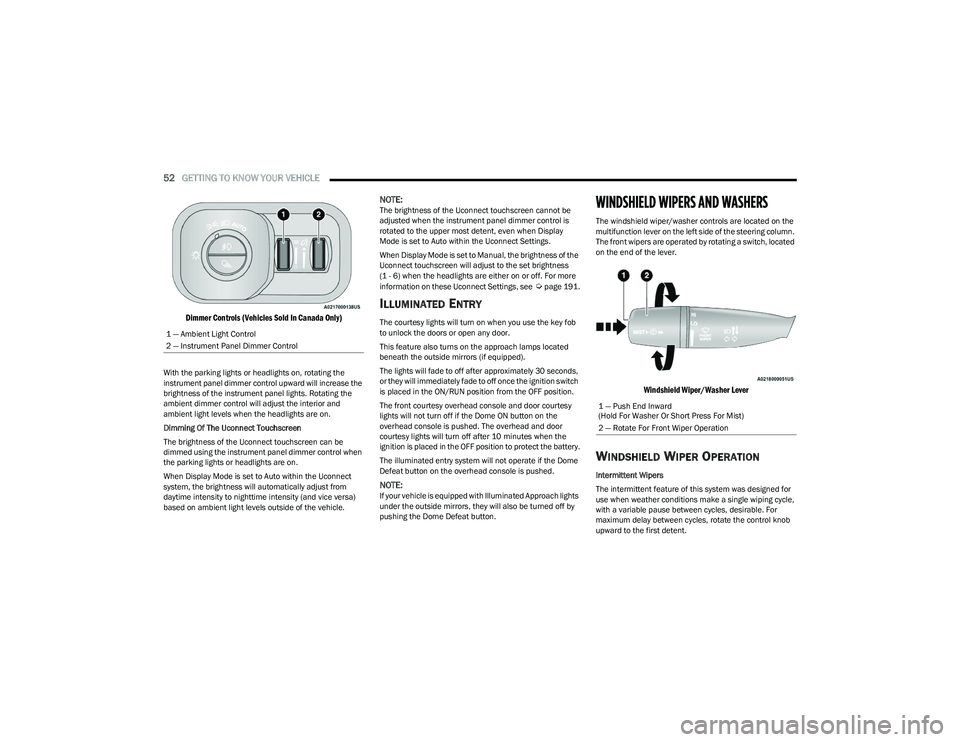
Dimmer Controls (Vehicles Sold In Canada Only)
With the parking lights or headlights on, rotating the
instrument panel dimmer control upward will increase the
brightness of the instrument panel lights. Rotating the
ambient dimmer control will adjust the interior and
ambient light levels when the headlights are on.
Dimming Of The Uconnect Touchscreen
The brightness of the Uconnect touchscreen can be
dimmed using the instrument panel dimmer control when
the parking lights or headlights are on.
When Display Mode is set to Auto within the Uconnect
system, the brightness will automatically adjust from
daytime intensity to nighttime intensity (and vice versa)
based on ambient light levels outside of the vehicle.
NOTE:The brightness of the Uconnect touchscreen cannot be
adjusted when the instrument panel dimmer control is
rotated to the upper most detent, even when Display
Mode is set to Auto within the Uconnect Settings.
When Display Mode is set to Manual, the brightness of the
Uconnect touchscreen will adjust to the set brightness
(1 - 6) when the headlights are either on or off. For more
information on these Uconnect Settings, see
Úpage 191.
ILLUMINATED ENTRY
The courtesy lights will turn on when you use the key fob
to unlock the doors or open any door.
This feature also turns on the approach lamps located
beneath the outside mirrors (if equipped).
The lights will fade to off after approximately 30 seconds,
or they will immediately fade to off once the ignition switch
is placed in the ON/RUN position from the OFF position.
The front courtesy overhead console and door courtesy
lights will not turn off if the Dome ON button on the
overhead console is pushed. The overhead and door
courtesy lights will turn off after 10 minutes when the
ignition is placed in the OFF position to protect the battery.
The illuminated entry system will not operate if the Dome
Defeat button on the overhead console is pushed.
NOTE:If your vehicle is equipped with Illuminated Approach lights
under the outside mirrors, they will also be turned off by
pushing the Dome Defeat button.
WINDSHIELD WIPERS AND WASHERS
The windshield wiper/washer controls are located on the
multifunction lever on the left side of the steering column.
The front wipers are operated by rotating a switch, located
on the end of the lever.
Windshield Wiper/Washer Lever
WINDSHIELD WIPER OPERATION
Intermittent Wipers
The intermittent feature of this system was designed for
use when weather conditions make a single wiping cycle,
with a variable pause between cycles, desirable. For
maximum delay between cycles, rotate the control knob
upward to the first detent.
1 — Ambient Light Control
2 — Instrument Panel Dimmer Control
1 — Push End Inward
(Hold For Washer Or Short Press For Mist)
2 — Rotate For Front Wiper Operation
23_DT_OM_EN_USC_t.book Page 52
Page 55 of 416
GETTING TO KNOW YOUR VEHICLE53
The delay interval decreases as you rotate the knob until
it enters the low continual speed position. The delay can
be regulated from a maximum of about 18 seconds
between cycles, to a cycle every one second. The delay
intervals will double in duration when the vehicle speed is
10 mph (16 km/h) or less.
Windshield Washers
To use the windshield washer, push the washer knob,
located on the end of the multifunction lever, inward and
hold. Washer fluid will be sprayed and the wipers will
operate for two to three cycles after the washer knob is
released.
If the washer knob is pushed while in the delay range, the
wipers will operate for several seconds after the washer
knob is released. It will then resume the intermittent
interval previously selected. If the washer knob is pushed
while in the off position, the wipers will turn on and cycle
approximately three times after the washer knob is
released.
To prevent freeze-up of your windshield washer system in
cold weather, select a solution or mixture that meets or
exceeds the temperature range of your climate. This rating
information can be found on most washer fluid containers. Mist
When a single wipe to clear off road mist or spray from a
passing vehicle is needed, push the washer knob, located
on the end of the multifunction lever, inward briefly and
release. The wipers will cycle one time and automatically
shut off.
NOTE:The mist feature does not activate the washer pump;
therefore, no washer fluid will be sprayed on the wind
-
shield. The washer function must be used in order to spray
the windshield with washer fluid.
For information on wiper care and replacement, see
Úpage 347.
RAIN SENSING WIPERS — IF EQUIPPED
This feature senses rain or snowfall on the windshield and
automatically activates the wipers. Rotate the end of the
multifunction lever to one of four detent positions to
activate this feature.
The sensitivity of the system can be adjusted with the
multifunction lever. Wiper delay position one is the least
sensitive, and wiper delay detent position four is the most
sensitive.
Wiper delay position three should be used for normal rain
conditions.
Positions one and two can be used if the driver desires
less wiper sensitivity. Position four can be used if the
driver desires more sensitivity. Place the wiper switch in
the O (off) position when not using the system.
NOTE:
The Rain Sensing feature will not operate when the
wiper switch is in the low or high-speed position.
The Rain Sensing feature may not function properly
when ice, or dried salt water is present on the wind -
shield.
Use of products containing wax or silicone may reduce
Rain Sensing performance.
The Rain Sensing feature can be turned on and off
using the Uconnect system
Úpage 191.
The Rain Sensing system has protection features for the
wiper blades and arms, and will not operate under the
following conditions:
Low Ambient Temperature — When the ignition is first
placed in the ON position, the Rain Sensing system will
not operate until the wiper switch is moved, vehicle
speed is greater than 3 mph (5 km/h), or the outside
temperature is greater than 32°F (0°C).
Transmission In NEUTRAL Position — When the ignition
is ON, and the automatic transmission is in the
NEUTRAL position, the Rain Sensing system will not
operate until the wiper switch is moved, vehicle speed
is greater than 3 mph (5 km/h), or the gear selector is
moved out of the NEUTRAL position.
Remote Start Mode Inhibit — On vehicles equipped
with a Remote Start system, Rain Sensing wipers are
not operational when the vehicle is in the Remote
Start mode.
WARNING!
Sudden loss of visibility through the windshield could
lead to a collision. You might not see other vehicles or
other obstacles. To avoid sudden icing of the windshield
during freezing weather, warm the windshield with the
defroster before and during windshield washer use.
2
23_DT_OM_EN_USC_t.book Page 53
Page 56 of 416
54GETTING TO KNOW YOUR VEHICLE
CLIMATE CONTROLS
The Climate Control system allows you to regulate the
temperature, air flow, and direction of air circulating
throughout the vehicle. The controls are located on the
touchscreen, on the sides of the touchscreen, or on the
instrument panel below the radio.
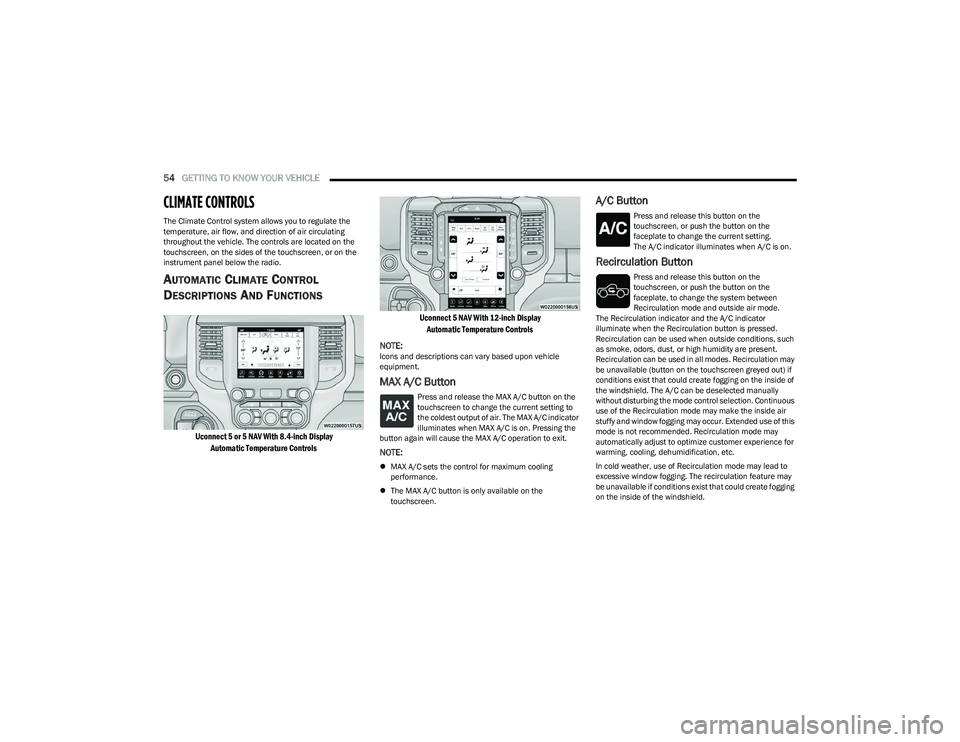
AUTOMATIC CLIMATE CONTROL
D
ESCRIPTIONS AND FUNCTIONS
Uconnect 5 or 5 NAV With 8.4-inch Display
Automatic Temperature Controls Uconnect 5 NAV With 12-inch Display
Automatic Temperature Controls
NOTE:
Icons and descriptions can vary based upon vehicle
equipment.
MAX A/C Button
Press and release the MAX A/C button on the
touchscreen to change the current setting to
the coldest output of air. The MAX A/C indicator
illuminates when MAX A/C is on. Pressing the
button again will cause the MAX A/C operation to exit.
NOTE:
MAX A/C sets the control for maximum cooling
performance.
The MAX A/C button is only available on the
touchscreen.
A/C Button
Press and release this button on the
touchscreen, or push the button on the
faceplate to change the current setting.
The A/C indicator illuminates when A/C is on.
Recirculation Button
Press and release this button on the
touchscreen, or push the button on the
faceplate, to change the system between
Recirculation mode and outside air mode.
The Recirculation indicator and the A/C indicator
illuminate when the Recirculation button is pressed.
Recirculation can be used when outside conditions, such
as smoke, odors, dust, or high humidity are present.
Recirculation can be used in all modes. Recirculation may
be unavailable (button on the touchscreen greyed out) if
conditions exist that could create fogging on the inside of
the windshield. The A/C can be deselected manually
without disturbing the mode control selection. Continuous
use of the Recirculation mode may make the inside air
stuffy and window fogging may occur. Extended use of this
mode is not recommended. Recirculation mode may
automatically adjust to optimize customer experience for
warming, cooling, dehumidification, etc.
In cold weather, use of Recirculation mode may lead to
excessive window fogging. The recirculation feature may
be unavailable if conditions exist that could create fogging
on the inside of the windshield.
23_DT_OM_EN_USC_t.book Page 54
Page 57 of 416
GETTING TO KNOW YOUR VEHICLE55
Auto Button
Set your desired temperature and press AUTO.
AUTO will achieve and maintain your desired
temperature by automatically adjusting the
blower speed and air distribution. Air
Conditioning (A/C) may be active during AUTO operation to
improve performance. AUTO mode is highly recommended
for efficiency.
You can turn AUTO on in one of two ways:
Press and release this button on the touchscreen.
Push the button on the faceplate.
Toggling this function will cause the system to switch
between manual mode and automatic mode
Úpage 59.
Front Defrost Button
Press and release the Front Defrost button on
the touchscreen, or push and release the
button on the faceplate, to change the current
airflow setting to Defrost mode. The Front
Defrost indicator illuminates when Front Defrost is on.
Air comes from the windshield and side window demist
outlets. When the defrost button is selected, the blower
level may increase. Use Defrost mode with maximum
temperature settings for best windshield and side window
defrosting and defogging. When toggling the front defrost
mode button, the climate system will return to the
previous setting.
Rear Defrost Button
Press and release the Rear Defrost button on
the touchscreen, or push and release the
button on the faceplate, to turn on the rear
window defroster and the heated outside
mirrors (if equipped). The Rear Defrost indicator
illuminates when the rear window defroster is on. The rear
window defroster automatically turns off after 10 minutes.
Driver And Passenger Temperature Up And
Down Buttons
These buttons provide the driver and passenger with
independent temperature control. Push the red button (or rotate knob if
equipped) on the faceplate, press the red
button on the touchscreen, or press and slide
the temperature bar towards the red arrow
button on the touchscreen for warmer temperature
settings.
Push the blue button (or rotate knob if
equipped) on the faceplate, press the blue
button on the touchscreen, or press and slide
the temperature bar towards the blue arrow
button on the touchscreen for cooler temperature
settings.
NOTE:
The numbers within the temperature display will only
appear if the system is equipped with an automatic
climate control system.
Up and down buttons are only available on vehicles
equipped with a 12-inch display.
SYNC Button
Press the SYNC button on the touchscreen to
toggle the SYNC feature on/off. The SYNC
indicator illuminates when SYNC is on. SYNC
synchronizes the passenger temperature
setting with the driver temperature setting. Changing the
passenger’s temperature setting while in SYNC will
automatically exit this feature.
NOTE:The SYNC button is only available on the touchscreen.
CAUTION!
Failure to follow these cautions can cause damage to
the heating elements:
Use care when washing the inside of the rear
window. Do not use abrasive window cleaners on the
interior surface of the window. Use a soft cloth and a
mild washing solution, wiping parallel to the heating
elements. Labels can be peeled off after soaking
with warm water.
Do not use scrapers, sharp instruments, or abrasive
window cleaners on the interior surface of the
window.
Keep all objects a safe distance from the window.
2
23_DT_OM_EN_USC_t.book Page 55
Page 59 of 416
GETTING TO KNOW YOUR VEHICLE57
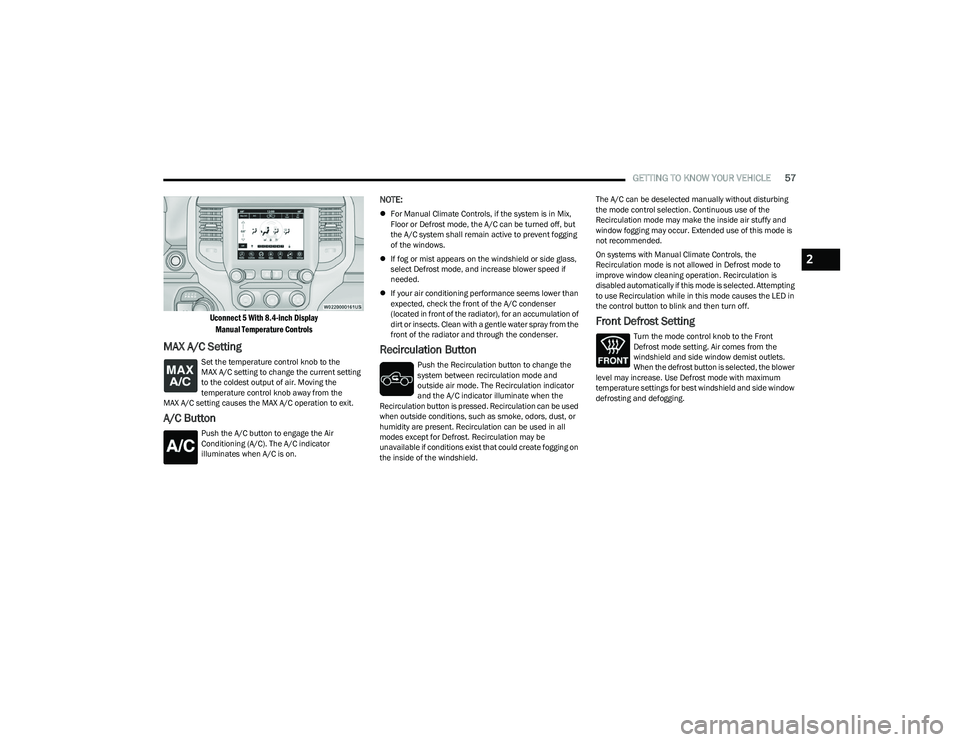
Uconnect 5 With 8.4-inch Display
Manual Temperature Controls
MAX A/C Setting
Set the temperature control knob to the
MAX A/C setting to change the current setting
to the coldest output of air. Moving the
temperature control knob away from the
MAX A/C setting causes the MAX A/C operation to exit.
A/C Button
Push the A/C button to engage the Air
Conditioning (A/C). The A/C indicator
illuminates when A/C is on.
NOTE:
For Manual Climate Controls, if the system is in Mix,
Floor or Defrost mode, the A/C can be turned off, but
the A/C system shall remain active to prevent fogging
of the windows.
If fog or mist appears on the windshield or side glass,
select Defrost mode, and increase blower speed if
needed.
If your air conditioning performance seems lower than
expected, check the front of the A/C condenser
(located in front of the radiator), for an accumulation of
dirt or insects. Clean with a gentle water spray from the
front of the radiator and through the condenser.
Recirculation Button
Push the Recirculation button to change the
system between recirculation mode and
outside air mode. The Recirculation indicator
and the A/C indicator illuminate when the
Recirculation button is pressed. Recirculation can be used
when outside conditions, such as smoke, odors, dust, or
humidity are present. Recirculation can be used in all
modes except for Defrost. Recirculation may be
unavailable if conditions exist that could create fogging on
the inside of the windshield. The A/C can be deselected manually without disturbing
the mode control selection. Continuous use of the
Recirculation mode may make the inside air stuffy and
window fogging may occur. Extended use of this mode is
not recommended.
On systems with Manual Climate Controls, the
Recirculation mode is not allowed in Defrost mode to
improve window cleaning operation. Recirculation is
disabled automatically if this mode is selected. Attempting
to use Recirculation while in this mode causes the LED in
the control button to blink and then turn off.
Front Defrost Setting
Turn the mode control knob to the Front
Defrost mode setting. Air comes from the
windshield and side window demist outlets.
When the defrost button is selected, the blower
level may increase. Use Defrost mode with maximum
temperature settings for best windshield and side window
defrosting and defogging.
2
23_DT_OM_EN_USC_t.book Page 57
Page 61 of 416
GETTING TO KNOW YOUR VEHICLE59
AUTOMATIC TEMPERATURE CONTROL
(ATC) — I
F EQUIPPED
Automatic Operation
1. Push the AUTO button on the faceplate, or the AUTO
button on the touchscreen on the Automatic
Temperature Control (ATC) Panel.
2. Next, adjust the temperature that you would like the system to maintain by adjusting the driver and
passenger temperature control buttons. Once the
desired temperature is displayed, the system will
achieve and automatically maintain that
temperature.
3. When the system is set up for your comfort level, it is not necessary to change the settings. You will
experience the greatest efficiency by simply allowing
the system to function automatically.
NOTE:
It is not necessary to move the temperature settings for
cold or hot vehicles. The system automatically adjusts
the temperature, mode, and blower speed to provide
comfort as quickly as possible.
The temperature can be displayed in US or Metric units
by selecting the US/Metric customer-programmable
feature within Uconnect Settings
Úpage 191.
To provide you with maximum comfort in the Automatic
mode during cold start-ups, the blower fan will remain on
low until the engine warms up. The blower will increase in
speed and transition into Auto mode.
Manual Operation Override
This system offers a full complement of manual override
features. The AUTO symbol in the front ATC display will be
turned off when the system is being used in the manual
mode.
CLIMATE VOICE RECOGNITION —
I
F EQUIPPED
Adjust vehicle temperatures hands-free and keep
everyone comfortable while you keep moving ahead.
Push the VR button on the steering wheel. After the beep,
say one of the following commands:
“Set driver temperature to 70 degrees”
“Set passenger temperature to 70 degrees”
Did you know: Voice Command for Climate may only be
used to adjust the interior temperature of your vehicle.
Voice Command will not work to adjust the heated seats
or steering wheel if equipped.
OPERATING TIPS
Refer to the chart at the end of this section for suggested
control settings for various weather conditions.
Summer Operation
The engine cooling system must be protected with a
high-quality antifreeze coolant to provide proper corrosion
protection and to protect against engine overheating. OAT
coolant (conforming to MS.90032) is recommended.
Winter Operation
To ensure the best possible heater and defroster
performance, make sure the engine cooling system is
functioning properly and the proper amount, type, and
concentration of coolant is used. Use of the Air
Recirculation mode during Winter months is not
recommended, because it may cause window fogging.
Vacation/Storage
For information on maintaining the Climate Control system
when the vehicle is being stored for an extended period of
time, see
Úpage 387.
Window Fogging
Vehicle windows tend to fog on the inside in mild, rainy,
and/or humid weather. To clear the windows, select
Defrost or Mix mode and increase the front blower speed.
Do not use the Recirculation mode without A/C for long
periods, as fogging may occur.
Outside Air Intake
Make sure the air intake, located directly in front of the
windshield, is free of obstructions, such as leaves. Leaves
collected in the air intake may reduce airflow, and if they
enter the air distribution box, they could plug the water
drains. In Winter months, make sure the air intake is clear
of ice, slush, and snow.
Cabin Air Filter
The Climate Control system filters out dust and pollen
from the air. Contact an authorized dealer to service your
cabin air filter, and to have it replaced when needed.
2
23_DT_OM_EN_USC_t.book Page 59