power steering RAM 1500 2023 User Guide
[x] Cancel search | Manufacturer: RAM, Model Year: 2023, Model line: 1500, Model: RAM 1500 2023Pages: 416, PDF Size: 20.59 MB
Page 210 of 416

208MULTIMEDIA
Seats & Comfort/Auto-On Comfort Systems
Key Off Options/Engine Off Options
When Seats & Comfort/Auto-On Comfort Systems button is pressed on the touchscreen, the system displays the options related to the vehicle’s comfort systems when remote start
has been activated or the vehicle has been started.
NOTE:Depending on the vehicle’s options, feature settings may vary.
Setting Name Description
Auto-On Driver Heated/Ventilated Seat & Heated Steering Wheel With Vehicle Start This setting will activate the vehicle’s comfort systems and heated seats or heated
steering wheel when the vehicle is remote started or ignition is started. The “Off” setting
will not activate the comfort systems. The “Remote Start” setting will only activate the
comfort systems when using Remote Start. The “All Start” setting will activate the comfort
systems whenever the vehicle is started.
Easy Exit Seats This setting will automatically move the driver seat rearward when the engine is shut off.
The available settings are “On” and “Off”.
When the Key Off Options/Engine Off Options button is pressed on the touchscreen, the system displays the options related to vehicle shutoff. These settings will only activate when
the ignition is set to OFF.
NOTE:Depending on the vehicle’s options, feature settings may vary.
Setting Name
Description
Easy Exit Seat This setting adjusts the seats to make exiting the vehicle easier.
Key Off Power Delay/Engine Off Power Delay This setting will keep certain electrical features running after the engine is turned off.
When any door is opened, the electronics will deactivate. The available settings are
“0 sec”, “45 sec”, “5 min”, and “10 min”.
23_DT_OM_EN_USC_t.book Page 208
Page 238 of 416

236MULTIMEDIA
Voice Text Reply — If Equipped
Uconnect can announce incoming text messages. Push
the VR button or Phone button and say:
1. “
Listen
” to have the system read an incoming text
message. (Must have compatible mobile phone
paired to Uconnect system.)
2. “ Reply” after an incoming text message has been
read.
Listen to the Uconnect prompts. After the beep, re -
peat one of the predefined messages and follow the
system prompts.NOTE:Only use the numbering listed in the provided table.
Otherwise, the system will not transpose the message.
Did You Know: Your mobile phone must have the full
implementation of the Message Access Profile (MAP) to
take advantage of this feature. For details about MAP, visit
UconnectPhone.com.
Apple® iPhone® iOS 5 or later supports reading incoming
text messages only. For further information on how to
enable this feature on your Apple® iPhone®, refer to your
iPhone® “User Manual”.
Did You Know: Voice Text Reply is not compatible with
iPhone®, but if your vehicle is equipped with Siri® Eyes
Free, you can use your voice to send a text message.
Siri® Eyes Free — If Equipped
When used with your Apple® iPhone® connected to your
vehicle via Bluetooth®, Siri lets you use your voice to send
text messages, select media, place phone calls and much
more. Siri uses your natural language to understand what
you mean and responds back to confirm your requests.
The system is designed to keep your eyes on the road and
your hands on the wheel by letting Siri help you perform
useful tasks.
To enable Siri, push and hold, then release the Uconnect
Voice Recognition (VR) button on the steering wheel. After
you hear a double beep, you can ask Siri to play podcasts
and music, get directions, read text messages, and many
other useful requests.BLUETOOTH® COMMUNICATION LINK
Mobile phones may lose connection to the Uconnect
Phone. When this happens, the connection can generally
be re-established by restarting the mobile phone. Your
mobile phone is recommended to remain in Bluetooth®
ON Mode.
POWER-UP
After switching the ignition key from OFF to either the
ON/RUN or ACC position, or after a language change, you
must wait at least 15 seconds prior to using the system
Úpage 402.
CONNECTED VEHICLE SERVICES —
IF EQUIPPED
IS MY VEHICLE CONNECTED?
If equipped, vehicles with an ASSIST and an SOS button
are connected vehicles. These buttons will be located on
either the rearview mirror or overhead console, depending
on the vehicle. If these buttons are present in your vehicle,
you have a connected radio and can take advantage of the
many connected vehicle features.
For further information about the ASSIST and SOS buttons
Úpage 314.
PRE-DEFINED VOICE TEXT REPLY RESPONSES
Yes. Stuck in traffic. See you later.
No. Start without
me. I’ll be late.
Okay. Where are you? I will be 5
minutes late.
Call me.
Are you there
yet?
I’ll call you later. I need
directions. See you in 5
I’m on my way.
Can’t talk right
now.
I’m lost. Thanks.
23_DT_OM_EN_USC_t.book Page 236
Page 257 of 416

MULTIMEDIA255
The friction circle display shows instantaneous G-Force as
a highlight and previous G-Force as dots within the circle.
The system records previous G-Force for three minutes.
If there are multiple samples at a given point, the color of
the dot will darken from blue to red. Vectors more frequent
will show in red; infrequent vectors will show in blue.
Pitch & Roll
The G-Force page displays the vehicle’s current pitch
(angle up and down) and roll (angle side to side) in
degrees. The Pitch & Roll gauges provide a visualization of
the current vehicle angle.
DYNAMOMETER (DYNO)/ENGINE
Dynamometer (Dyno)
The system will start drawing graphs for Power and Torque
(top chart) and Engine Speed (bottom chart). The graph
will fill from the left side of the x-axis and fill to the right
side of the x-axis (based on History time selected). Once
the right side of the page is reached, the graph will scroll
with the right side always being the most recent recorded
sample. The following options can be selected:
Pressing the STOP button will freeze the graph.
Selecting “Play” will clear the graph and restart the
process.
Press the + or - button to change the history of the
graph. The selectable options are “30”, “60”, “90”, and
“120” seconds. The graph will expand or constrict
depending on the setting selected.
Select the “Gear” display setting to turn the graph gear
markers on or off.
NOTE:The Gear On/Off feature will only display if your vehicle is
equipped with an Automatic Transmission.
Engine
Press the Left and Right Arrow buttons on the bottom of
the touchscreen to cycle between the Dyno and Engine
pages.
When selected, this screen displays the following values:
Vehicle Speed : Shows the actual vehicle speed.
Engine Power : Shows the instantaneous power.
Engine Torque: Shows the instantaneous torque.
Boost Pressure : Shows the actual engine boost pres -
sure.
Gear : Shows the current (or pending) operating gear of
the vehicle.
VEHICLE DYNAMICS
The Vehicle Dynamics page displays information
concerning the vehicle’s drivetrain.
Steering Angle — If Equipped
Steering Angle utilizes the steering angle sensor to
calculate the degree of the steering relative to zero
(straight ahead) reference angle. The zero degree
reference angle measurement indicates the actual front
tire steering angle.
Transfer Case
This feature will be active when the vehicle is in 4WD
HIGH, 4WD AUTO, Neutral, or 4WD LOW.
NOTE:A lock symbol will only be present on the Transfer Case
button when the vehicle is in 4WD LOW.
Rear Axle Locker
This feature will allow you to lock and unlock the rear axle.
To change the status, push the AXLE LOCK button.
5
23_DT_OM_EN_USC_t.book Page 255
Page 266 of 416

264SAFETY
Electronic Roll Mitigation (ERM)
The ERM system anticipates the potential for wheel lift by
monitoring the driver’s steering wheel input and the speed
of the vehicle. When ERM determines that the rate of
change of the steering wheel angle and vehicle’s speed
are sufficient to potentially cause wheel lift, it then applies
the appropriate brake and may also reduce engine power
to lessen the chance that wheel lift will occur. ERM can
only reduce the chance of wheel lift occurring during
severe or evasive driving maneuvers; it cannot prevent
wheel lift due to other factors, such as road conditions,
leaving the roadway, striking objects or other vehicles.
Electronic Stability Control (ESC)
ESC enhances directional control and stability of the
vehicle under various driving conditions. ESC corrects for
oversteering or understeering of the vehicle by applying
the brake of the appropriate wheel(s) to counteract these
conditions. Engine power may also be reduced to help the
vehicle maintain the desired path.
Oversteer — when the vehicle is turning more than
appropriate for the steering wheel position.
Understeer — when the vehicle is turning less than
appropriate for the steering wheel position.
ESC uses sensors in the vehicle to determine the vehicle
path intended by the driver and compares it to the actual
path of the vehicle. When the actual path does not match
the intended path, ESC applies the brake of the
appropriate wheel to assist in counteracting the oversteer
or understeer condition.
The ESC Activation/Malfunction Indicator Light located in
the instrument cluster will start to flash as soon as the ESC
system becomes active. The ESC Activation/Malfunction
Indicator Light also flashes when the TCS is active. If the
ESC Activation/Malfunction Indicator Light begins to flash
during acceleration, ease up on the accelerator and apply
as little throttle as possible. Be sure to adapt your speed
and driving to the prevailing road conditions.
WARNING!
Many factors, such as vehicle loading, road conditions
and driving conditions, influence the chance that wheel
lift or rollover may occur. ERM cannot prevent all wheel
lift or rollovers, especially those that involve leaving the
roadway or striking objects or other vehicles. The
capabilities of an ERM-equipped vehicle must never be
exploited in a reckless or dangerous manner which
could jeopardize the user's safety or the safety of
others.
WARNING!
Electronic Stability Control (ESC) cannot prevent the
natural laws of physics from acting on the vehicle,
nor can it increase the traction afforded by prevailing
road conditions. ESC cannot prevent accidents,
including those resulting from excessive speed in
turns, driving on very slippery surfaces, or hydro -
planing. ESC also cannot prevent accidents resulting
from loss of vehicle control due to inappropriate
driver input for the conditions. Only a safe, attentive,
and skillful driver can prevent accidents. The capabil -
ities of an ESC equipped vehicle must never be
exploited in a reckless or dangerous manner which
could jeopardize the user’s safety or the safety of
others.
Vehicle modifications, or failure to properly maintain
your vehicle, may change the handling characteris -
tics of your vehicle, and may negatively affect the
performance of the ESC system. Changes to the
steering system, suspension, braking system, tire
type and size or wheel size may adversely affect ESC
performance. Improperly inflated and unevenly worn
tires may also degrade ESC performance. Any vehicle
modification or poor vehicle maintenance that
reduces the effectiveness of the ESC system can
increase the risk of loss of vehicle control, vehicle
rollover, personal injury and death.
23_DT_OM_EN_USC_t.book Page 264
Page 291 of 416
SAFETY289
The ORC contains a backup power supply system that may
deploy the air bag system even if the battery loses power
or it becomes disconnected prior to deployment.
The ORC turns on the Air Bag Warning Light in the
instrument panel for approximately four to eight seconds
for a self-check when the ignition switch is first in the
ON/RUN position. After the self-check, the Air Bag Warning
Light will turn off. If the ORC detects a malfunction in any
part of the system, it turns on the Air Bag Warning Light,
either momentarily or continuously. A single chime will
sound to alert you if the light comes on again after initial
startup.
The ORC also includes diagnostics that will illuminate the
instrument panel Air Bag Warning Light if a malfunction is
detected that could affect the air bag system. The
diagnostics also record the nature of the malfunction.
While the air bag system is designed to be maintenance
free, if any of the following occurs, have an authorized
dealer service the air bag system immediately.
The Air Bag Warning Light does not come on during the
four to eight seconds when the ignition switch is first in
the ON/RUN position.
The Air Bag Warning Light remains on after the four to
eight-second interval.
The Air Bag Warning Light comes on intermittently or
remains on while driving.NOTE:If the speedometer, tachometer, or any engine related
gauges are not working, the Occupant Restraint Controller
(ORC) may also be disabled. In this condition the air bags
may not be ready to inflate for your protection. Have an
authorized dealer service the air bag system immediately.
Redundant Air Bag Warning Light
If a fault with the Air Bag Warning Light is
detected, which could affect the Supplemental
Restraint System (SRS), the Redundant Air Bag
Warning Light will illuminate on the instrument
panel. The Redundant Air Bag Warning Light will stay on
until the fault is cleared. In addition, a single chime will
sound to alert you that the Redundant Air Bag Warning
Light has come on and a fault has been detected. If the
Redundant Air Bag Warning Light comes on intermittently
or remains on while driving have an authorized dealer
service the vehicle immediately
Úpage 107.
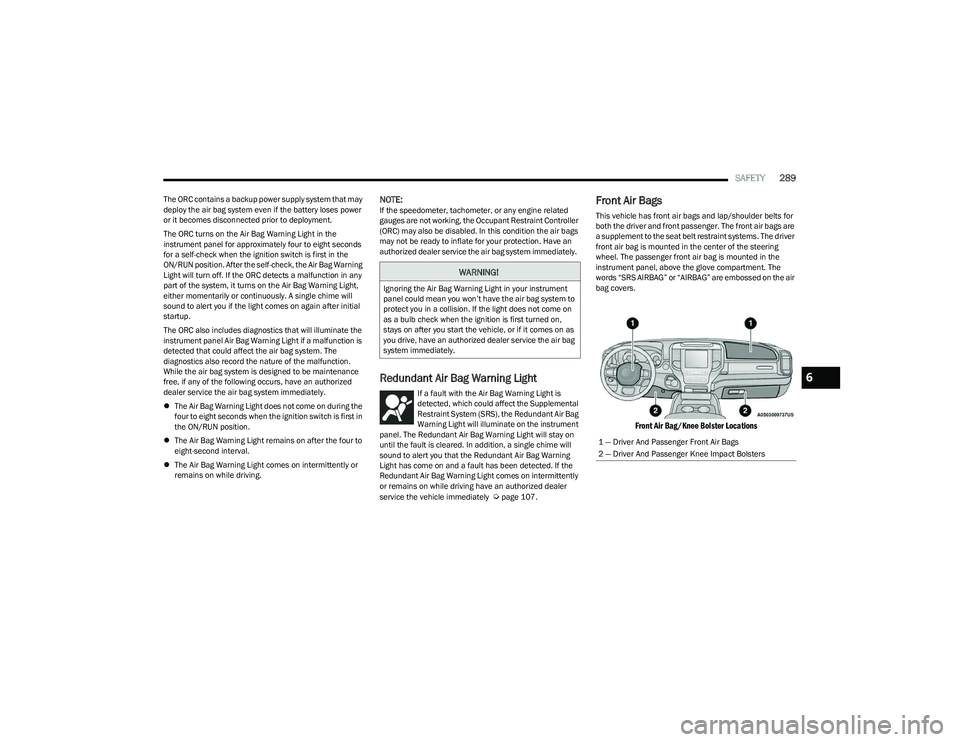
Front Air Bags
This vehicle has front air bags and lap/shoulder belts for
both the driver and front passenger. The front air bags are
a supplement to the seat belt restraint systems. The driver
front air bag is mounted in the center of the steering
wheel. The passenger front air bag is mounted in the
instrument panel, above the glove compartment. The
words “SRS AIRBAG” or “AIRBAG” are embossed on the air
bag covers.
Front Air Bag/Knee Bolster Locations
WARNING!
Ignoring the Air Bag Warning Light in your instrument
panel could mean you won’t have the air bag system to
protect you in a collision. If the light does not come on
as a bulb check when the ignition is first turned on,
stays on after you start the vehicle, or if it comes on as
you drive, have an authorized dealer service the air bag
system immediately.
1 — Driver And Passenger Front Air Bags
2 — Driver And Passenger Knee Impact Bolsters
6
23_DT_OM_EN_USC_t.book Page 289
Page 299 of 416
SAFETY297
If A Deployment Occurs
The front air bags are designed to deflate immediately
after deployment.
NOTE:Front and/or side air bags will not deploy in all collisions.
This does not mean something is wrong with the air bag
system.
If you do have a collision which deploys the air bags, any
or all of the following may occur:
The air bag material may sometimes cause abrasions
and/or skin reddening to the occupants as the air bags
deploy and unfold. The abrasions are similar to friction
rope burns or those you might get sliding along a carpet
or gymnasium floor. They are not caused by contact
with chemicals. They are not permanent and normally
heal quickly. However, if you haven’t healed signifi -
cantly within a few days, or if you have any blistering,
see your doctor immediately.
As the air bags deflate, you may see some smoke-like
particles. The particles are a normal by-product of the
process that generates the non-toxic gas used for air
bag inflation. These airborne particles may irritate the
skin, eyes, nose, or throat. If you have skin or eye irrita -
tion, rinse the area with cool water. For nose or throat
irritation, move to fresh air. If the irritation continues,
see your doctor. If these particles settle on your
clothing, follow the garment manufacturer’s instruc -
tions for cleaning. Do not drive your vehicle after the air bags have deployed.
If you are involved in another collision, the air bags will not
be in place to protect you.
NOTE:
Air bag covers may not be obvious in the interior trim,
but they will open during air bag deployment.
After any collision, the vehicle should be taken to an
authorized dealer immediately.
Enhanced Accident Response System
In the event of an impact, if the communication network
remains intact, and the power remains intact, depending
on the nature of the event, the Occupant Restraint
Controller (ORC) will determine whether to have the
Enhanced Accident Response System perform the
following functions:
Cut off fuel to the engine (if equipped)
Cut off battery power to the electric motor (if equipped)
Flash hazard lights as long as the battery has power
Turn on the interior lights, which remain on as long as
the battery has power or for 15 minutes from the inter -
vention of the Enhanced Accident Response System
Unlock the power door locks
Your vehicle may also be designed to perform any of these
other functions in response to the Enhanced Accident
Response System:
Turn off the Fuel Filter Heater, Turn off the HVAC Blower
Motor, Close the HVAC Circulation Door
Cut off battery power to the:
Engine
Electric Motor (if equipped)
Electric power steering
Brake booster
Electric park brake
Automatic transmission gear selector
Horn
Front wiper
Headlight washer pump (if equipped)
NOTE:After an accident, remember to cycle the ignition to the
STOP (OFF/LOCK) position and remove the key from the
ignition switch to avoid draining the battery. Carefully
check the vehicle for fuel leaks in the engine compartment
and on the ground near the engine compartment and fuel
tank before resetting the system and starting the engine.
If there are no fuel leaks or damage to the vehicle elec -
trical devices (e.g. headlights) after an accident, reset the
system by following the procedure described below. If you
have any doubt, contact an authorized dealer.
WARNING!
Deployed air bags and seat belt pretensioners cannot
protect you in another collision. Have the air bags, seat
belt pretensioners, and the seat belt retractor
assemblies replaced by an authorized dealer
immediately. Also, have the Occupant Restraint
Controller System serviced as well.
6
23_DT_OM_EN_USC_t.book Page 297
Page 356 of 416

354SERVICING AND MAINTENANCE
Drain And Refill
For the proper maintenance intervals Úpage 334.
Lubricant Selection
For further information Úpage 397.
NOTE:The presence of water in the gear lubricant will result in
corrosion and possible failure of differential components.
Operation of the vehicle in water, as may be encountered
in some off-highway types of service, will require draining
and refilling the axle to avoid damage.
Limited-Slip Differentials
Rear axles equipped with a Limited Slip Differential
require that 5 oz. (148 ml) Mopar® Limited Slip Additive
be added to the gear lubricant
Úpage 397. The Mopar®
Limited Slip Additive should be added to the gear lubricant
whenever a fluid change is made to an axle equipped with
a Limited Slip Differential.
NOTE:When refilling a limited slip differential axle which requires
a friction modification additive, the additive should be
added before the gear lubricant to ensure proper
additive fill.
TRANSFER CASE
Fluid Level Check
This fluid level can be checked by removing the filler plug.
The fluid level should be to the bottom edge of the filler
plug hole (or within 1/8 inch of the bottom) with the
vehicle in a level position.
Drain And Refill
For the proper maintenance intervals Úpage 334.
Selection Of Lubricant
Use only the manufacturer recommended fluid Úpage 397.
FUSES
General Information
WARNING!
When replacing a blown fuse, always use an appro -
priate replacement fuse with the same amp rating as
the original fuse. Never replace a fuse with another
fuse of higher amp rating. The use of a fuse with a
rating other than indicated may result in a dangerous
electrical system overload. If a properly rated fuse
continues to blow, it indicates a problem in the circuit
that must be corrected. Never replace a blown fuse
with metal wires or any other material. Do not place
a fuse inside a circuit breaker cavity or vice versa.
Failure to use proper fuses may result in serious
personal injury, fire and/or property damage.
Before replacing a fuse, make sure that the ignition
is off and that all the other services are switched off
and/or disengaged.
If the replaced fuse blows again, contact an
authorized dealer.
If a general protection fuse for safety systems (air
bag system, braking system), power unit systems
(engine system, transmission system) or steering
system blows, contact an authorized dealer.
23_DT_OM_EN_USC_t.book Page 354
Page 363 of 416
SERVICING AND MAINTENANCE361
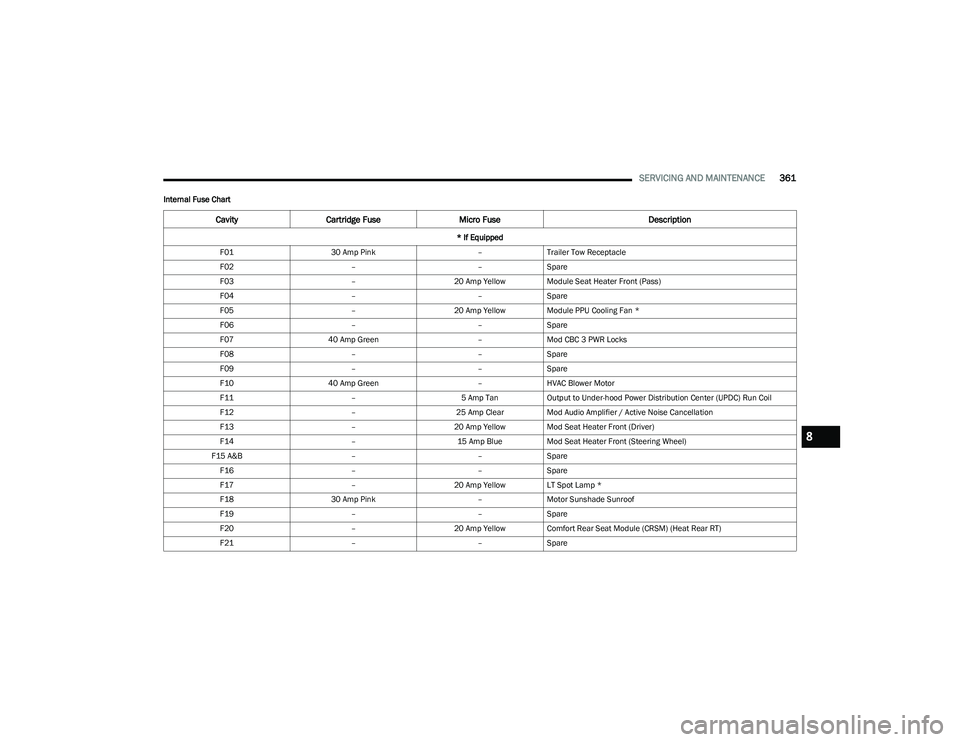
Internal Fuse Chart
CavityCartridge Fuse Micro Fuse Description
* If Equipped
F01 30 Amp Pink –Trailer Tow Receptacle
F02 ––Spare
F03 –20 Amp Yellow Module Seat Heater Front (Pass)
F04 ––Spare
F05 –20 Amp Yellow Module PPU Cooling Fan *
F06 ––Spare
F07 40 Amp Green –Mod CBC 3 PWR Locks
F08 ––Spare
F09 ––Spare
F10 40 Amp Green –HVAC Blower Motor
F11 –5 Amp TanOutput to Under-hood Power Distribution Center (UPDC) Run Coil
F12 –25 Amp ClearMod Audio Amplifier / Active Noise Cancellation
F13 –20 Amp Yellow Mod Seat Heater Front (Driver)
F14 –15 Amp BlueMod Seat Heater Front (Steering Wheel)
F15 A&B ––Spare
F16 ––Spare
F17 –20 Amp Yellow LT Spot Lamp *
F18 30 Amp Pink –Motor Sunshade Sunroof
F19 ––Spare
F20 –20 Amp Yellow Comfort Rear Seat Module (CRSM) (Heat Rear RT)
F21 ––Spare
8
23_DT_OM_EN_USC_t.book Page 361
Page 365 of 416

SERVICING AND MAINTENANCE363
F41 A&B –15 Amp BlueLumbar Support & Pass SW / Steering Column Control Module / HVAC
Control Module / ICS Switch Bank / Upper Switch Bank
F42 A&B –10 Amp RedMod Transfer Case Switch Module (TCSM) / SBW / Electric Park Brake
SW / Module TPM Trailer / Module Gateway Can-C Trailer TPM / Seat
LT & RT Vent
F43 A&B –10 Amp RedPort Diagnostics / Front & Rear USB
F44 –20 Amp Yellow Radio / DCSD / Telematics Box Mod / Trailer Gateway Module (360)
F45 30 Amp Pink –Mod Door MUX Driver
F46 30 Amp Pink –Mod Door MUX Passenger
F47 ––Spare
F48A –10 Amp RedRear View Mirror / SW Window Passenger / Rear USB / Wireless
Charging Pad Mod
F49 –15 Amp BlueMod CVPM / SNSR Blind Spot / HDLP Adaptive Front Lighting Sensor
(AFLS)
F50A –10 Amp RedBattery PACK Control Mod (BPCM) *
F51 A&B ––Spare
F52 20 Amp Blue –Direct Battery Feed *
F53 –10 Amp RedTrailer Reverse Steering Control / Trailer Steering Control Knob
F54 A&B –20 Amp YellowPower Outlet Center Seat Battery Feed Position
Power Outlet Center Seat Ignition Feed Position
F55 25 Amp White –Upfitter *
F56 30 Amp Pink –Mod Network Interface *
F57 20 Amp Blue –Direct Battery Feed *
Cavity Cartridge Fuse Micro Fuse Description
* If Equipped
8
23_DT_OM_EN_USC_t.book Page 363
Page 407 of 416

405
E
Electric Brake Control System..................................... 263 Anti-Lock Brake System ......................................... 262
Electronic Roll Mitigation .............................. 264
, 268
Electric Parking Brake ................................................. 122
Electric Power Steering................................................ 141
Electrical Power Outlets..................................................66 Electronic Range Select (ERS) .................................... 128
Electronic Stability Control (ESC) ................................ 264
Electronic Throttle Control Warning Light................... 109
Electronically Shifted Transfer Case .................. 130
, 132
Emergency Braking ...................................................... 276
Emergency Gas Can Refueling .................................... 326
Emergency, In Case Of Freeing Vehicle When Stuck .................................. 329
Hazard Warning Flasher ......................................... 314
Jump Starting .......................................................... 325
Emission Control System Maintenance...................... 117
Engine ........................................................................... 337 Air Cleaner ............................................................... 342Block Heater ........................................................... 121
Break-In Recommendations .................................. 122
Compartment ........................................337
, 338, 339
Compartment Identification .................337, 338, 339
Coolant (Antifreeze) ................................................ 396
Exhaust Gas Caution .............................................. 313
Fails To Start ........................................................... 121
Flooded, Starting .................................................... 121
Fuel Requirements ........................................ 393
, 395
Jump Starting .......................................................... 325
Oil ...........................................................341
, 395, 396
Oil Filler Cap ............................................................ 337 Oil Filter ....................................................................342
Oil Selection ................................................... 341
, 395
Oil Synthetic ............................................................. 342
Overheating ............................................................. 327
Starting.....................................................................118
Enhanced Accident Response Feature ............. 297
, 332
Entry System, Illuminated .............................................. 52 Ethanol .......................................................................... 394
Exhaust Gas Cautions ..................................................313
Exhaust System .................................................. 313
, 348
Exterior Lights ........................................................46, 313
FFamily Alerts .................................................................. 248
FAQ ................................................................................ 248
Features ........................................................................ 239
Filters Air Cleaner ............................................................... 342
Air Conditioning ................................................59
, 344
Engine Oil ................................................................. 342
Engine Oil Disposal..................................................342
Flashers Turn Signals ................................................... 115
, 313
Flash-To-Pass .................................................................. 48
Flat Tire Stowage .......................................................... 323
Fluid Capacities ............................................................395
Fluid Leaks ....................................................................313
Fluid Level Checks Brake ........................................................................ 352
Fluid, Brake ...................................................................397
Fog Lights ...............................................................48
, 368
Fold-Flat Seats ................................................................ 30 Forward Collision Warning ........................................... 274
Four Wheel Drive .......................................................... 130
Four-Way Hazard Flasher ............................................. 314
Freeing A Stuck Vehicle ............................................... 329
Front Axle (Differential) ................................................ 353
Fuel................................................................................ 393
Adding ...................................................................... 171Additives .................................................................. 393
Clean Air .................................................................. 393
Ethanol..................................................................... 394Gasoline ................................................................... 393
Light ......................................................................... 111
Materials Added ...................................................... 393
Methanol ................................................................. 394
Octane Rating.................................................393
, 396
Requirements .................................................393, 395
Tank Capacity .......................................................... 395
Fuel Saver Technology ................................................. 141
Fuses ............................................................................. 354
GGarage Door Opener (HomeLink) .................................. 42 Gasoline, Clean Air ....................................................... 393
Gasoline, Reformulated ............................................... 393
Getting Started ............................................................. 238
Glass Cleaning .............................................................. 391
Grocery Bag Retainer ..................................................... 34
Gross Axle Weight Rating ............................................. 173
Gross Combination Weight Rating .............................. 173
Gross Trailer Weight ..................................................... 173
Gross Vehicle Weight Rating ....................................... 173
Guide Body Builders ...............................................................9
GVWR ............................................................................ 172
11
23_DT_OM_EN_USC_t.book Page 405