sport mode RAM 1500 2023 User Guide
[x] Cancel search | Manufacturer: RAM, Model Year: 2023, Model line: 1500, Model: RAM 1500 2023Pages: 416, PDF Size: 20.59 MB
Page 211 of 416
MULTIMEDIA209
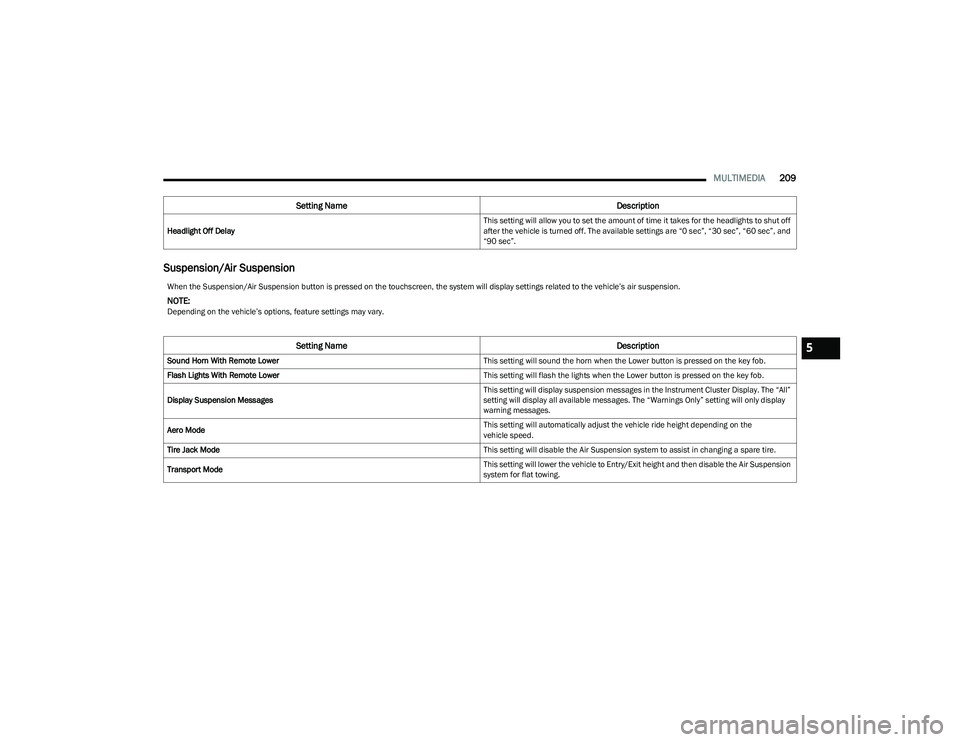
Suspension/Air Suspension
Headlight Off Delay This setting will allow you to set the amount of time it takes for the headlights to shut off
after the vehicle is turned off. The available settings are “0 sec”, “30 sec”, “60 sec”, and
“90 sec”.
Setting Name
Description
When the Suspension/Air Suspension button is pressed on the touchscreen, the system will display settings related to the vehicle’s air suspension.
NOTE:Depending on the vehicle’s options, feature settings may vary.
Setting NameDescription
Sound Horn With Remote Lower This setting will sound the horn when the Lower button is pressed on the key fob.
Flash Lights With Remote Lower This setting will flash the lights when the Lower button is pressed on the key fob.
Display Suspension Messages This setting will display suspension messages in the Instrument Cluster Display. The “All”
setting will display all available messages. The “Warnings Only” setting will only display
warning messages.
Aero Mode This setting will automatically adjust the vehicle ride height depending on the
vehicle speed.
Tire Jack Mode This setting will disable the Air Suspension system to assist in changing a spare tire.
Transport Mode This setting will lower the vehicle to Entry/Exit height and then disable the Air Suspension
system for flat towing.5
23_DT_OM_EN_USC_t.book Page 209
Page 212 of 416
210MULTIMEDIA
AUX Switches
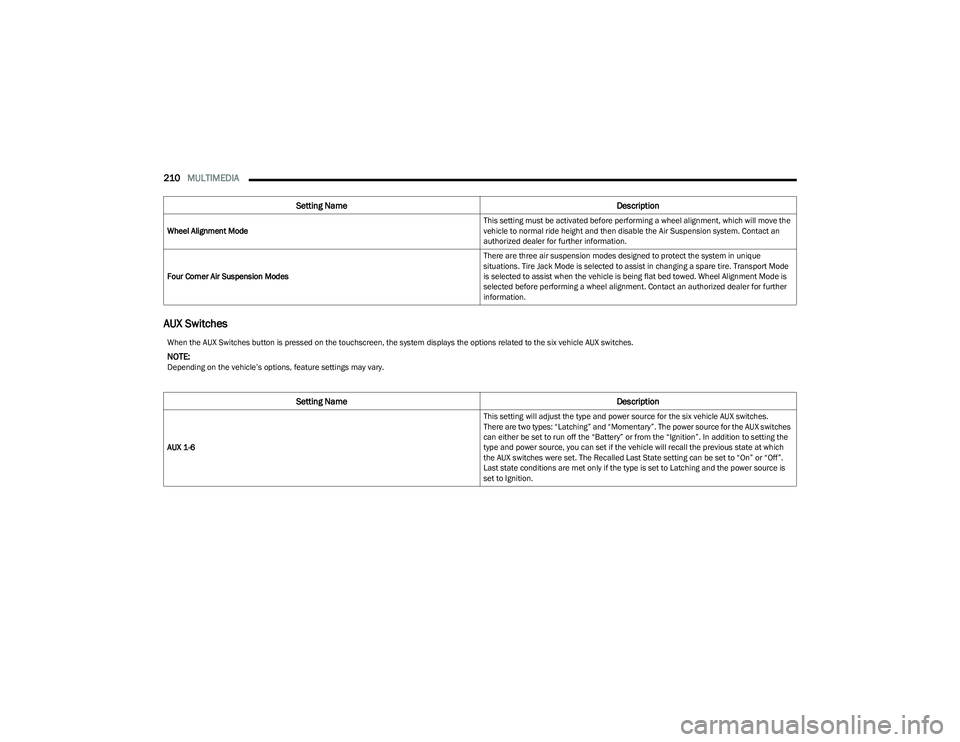
Wheel Alignment Mode This setting must be activated before performing a wheel alignment, which will move the
vehicle to normal ride height and then disable the Air Suspension system. Contact an
authorized dealer for further information.
Four Corner Air Suspension Modes There are three air suspension modes designed to protect the system in unique
situations. Tire Jack Mode is selected to assist in changing a spare tire. Transport Mode
is selected to assist when the vehicle is being flat bed towed. Wheel Alignment Mode is
selected before performing a wheel alignment. Contact an authorized dealer for further
information.
Setting Name
Description
When the AUX Switches button is pressed on the touchscreen, the system displays the options related to the six vehicle AUX switches.
NOTE:Depending on the vehicle’s options, feature settings may vary.
Setting NameDescription
AUX 1-6 This setting will adjust the type and power source for the six vehicle AUX switches.
There are two types: “Latching” and “Momentary”. The power source for the AUX switches
can either be set to run off the “Battery” or from the “Ignition”. In addition to setting the
type and power source, you can set if the vehicle will recall the previous state at which
the AUX switches were set. The Recalled Last State setting can be set to “On” or “Off”.
Last state conditions are met only if the type is set to Latching and the power source is
set to Ignition.
23_DT_OM_EN_USC_t.book Page 210
Page 222 of 416
220MULTIMEDIA
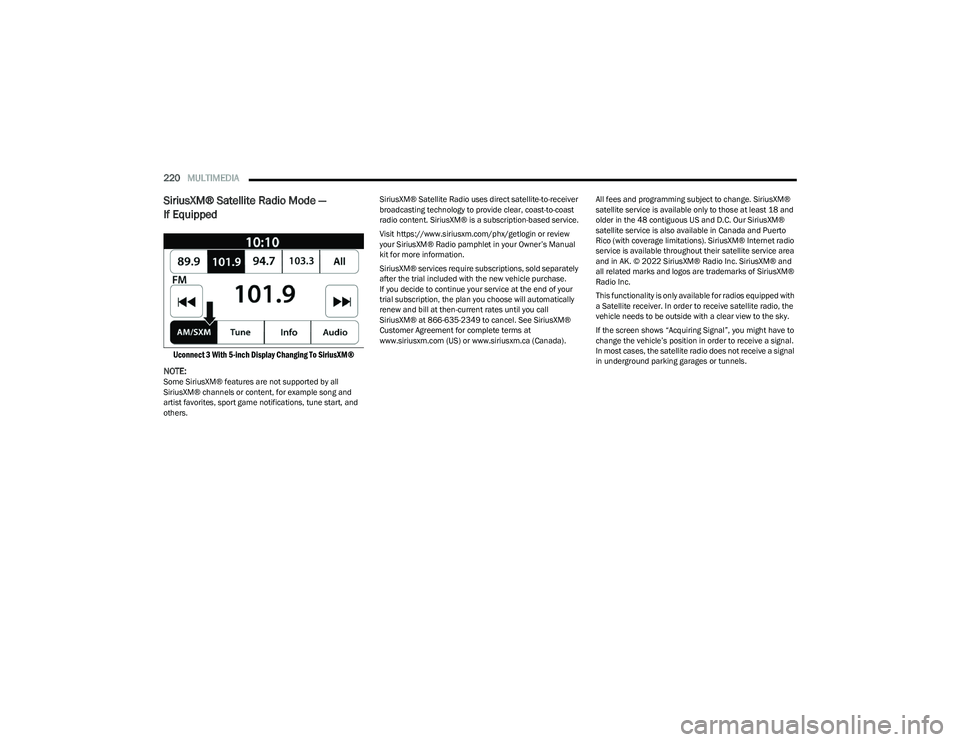
SiriusXM® Satellite Radio Mode —
If Equipped
Uconnect 3 With 5-inch Display Changing To SiriusXM®
NOTE:
Some SiriusXM® features are not supported by all
SiriusXM® channels or content, for example song and
artist favorites, sport game notifications, tune start, and
others. SiriusXM® Satellite Radio uses direct satellite-to-receiver
broadcasting technology to provide clear, coast-to-coast
radio content. SiriusXM® is a subscription-based service.
Visit https://www.siriusxm.com/phx/getlogin or review
your SiriusXM® Radio pamphlet in your Owner’s Manual
kit for more information.
SiriusXM® services require subscriptions, sold separately
after the trial included with the new vehicle purchase.
If you decide to continue your service at the end of your
trial subscription, the plan you choose will automatically
renew and bill at then-current rates until you call
SiriusXM® at 866-635-2349 to cancel. See SiriusXM®
Customer Agreement for complete terms at
www.siriusxm.com (US) or www.siriusxm.ca (Canada).
All fees and programming subject to change. SiriusXM®
satellite service is available only to those at least 18 and
older in the 48 contiguous US and D.C. Our SiriusXM®
satellite service is also available in Canada and Puerto
Rico (with coverage limitations). SiriusXM® Internet radio
service is available throughout their satellite service area
and in AK. © 2022 SiriusXM® Radio Inc. SiriusXM® and
all related marks and logos are trademarks of SiriusXM®
Radio Inc.
This functionality is only available for radios equipped with
a Satellite receiver. In order to receive satellite radio, the
vehicle needs to be outside with a clear view to the sky.
If the screen shows “Acquiring Signal”, you might have to
change the vehicle’s position in order to receive a signal.
In most cases, the satellite radio does not receive a signal
in underground parking garages or tunnels.
23_DT_OM_EN_USC_t.book Page 220
Page 256 of 416
254MULTIMEDIA
Save
Pressing the SAVE button will let you save the timer data
for Recent, Last, and Best recorded times to an inserted
USB flash drive.
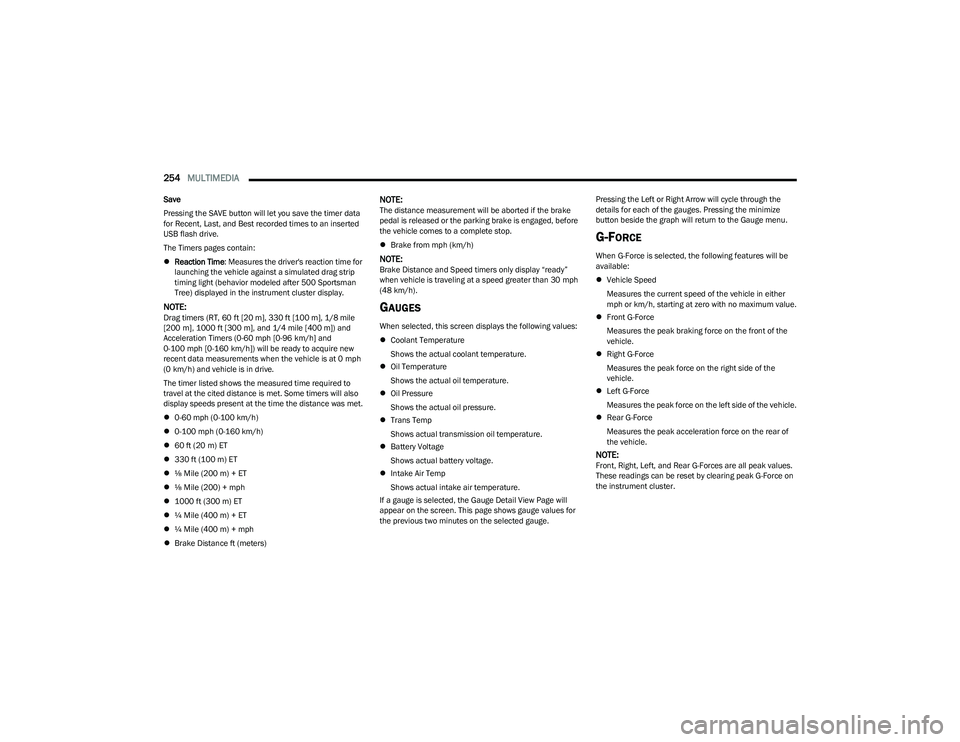
The Timers pages contain:
Reaction Time : Measures the driver's reaction time for
launching the vehicle against a simulated drag strip
timing light (behavior modeled after 500 Sportsman
Tree) displayed in the instrument cluster display.
NOTE:Drag timers (RT, 60 ft [20 m], 330 ft [100 m], 1/8 mile
[200 m], 1000 ft [300 m], and 1/4 mile [400 m]) and Acceleration Timers (0-60 mph [0-96 km/h] and
0-100 mph [0-160 km/h]) will be ready to acquire new
recent data measurements when the vehicle is at 0 mph
(0 km/h) and vehicle is in drive.
The timer listed shows the measured time required to
travel at the cited distance is met. Some timers will also
display speeds present at the time the distance was met.
0-60 mph (0-100 km/h)
0-100 mph (0-160 km/h)
60 ft (20 m) ET
330 ft (100 m) ET
⅛ Mile (200 m) + ET
⅛ Mile (200) + mph
1000 ft (300 m) ET
¼ Mile (400 m) + ET
¼ Mile (400 m) + mph
Brake Distance ft (meters)
NOTE:The distance measurement will be aborted if the brake
pedal is released or the parking brake is engaged, before
the vehicle comes to a complete stop.
Brake from mph (km/h)
NOTE:Brake Distance and Speed timers only display “ready”
when vehicle is traveling at a speed greater than 30 mph
(48 km/h).
GAUGES
When selected, this screen displays the following values:
Coolant Temperature
Shows the actual coolant temperature.
Oil Temperature
Shows the actual oil temperature.
Oil Pressure
Shows the actual oil pressure.
Trans Temp
Shows actual transmission oil temperature.
Battery Voltage
Shows actual battery voltage.
Intake Air Temp
Shows actual intake air temperature.
If a gauge is selected, the Gauge Detail View Page will
appear on the screen. This page shows gauge values for
the previous two minutes on the selected gauge. Pressing the Left or Right Arrow will cycle through the
details for each of the gauges. Pressing the minimize
button beside the graph will return to the Gauge menu.
G-FORCE
When G-Force is selected, the following features will be
available:
Vehicle Speed
Measures the current speed of the vehicle in either
mph or km/h, starting at zero with no maximum value.
Front G-Force
Measures the peak braking force on the front of the
vehicle.
Right G-Force
Measures the peak force on the right side of the
vehicle.
Left G-Force
Measures the peak force on the left side of the vehicle.
Rear G-Force
Measures the peak acceleration force on the rear of
the vehicle.
NOTE:Front, Right, Left, and Rear G-Forces are all peak values.
These readings can be reset by clearing peak G-Force on
the instrument cluster.
23_DT_OM_EN_USC_t.book Page 254
Page 284 of 416
282SAFETY
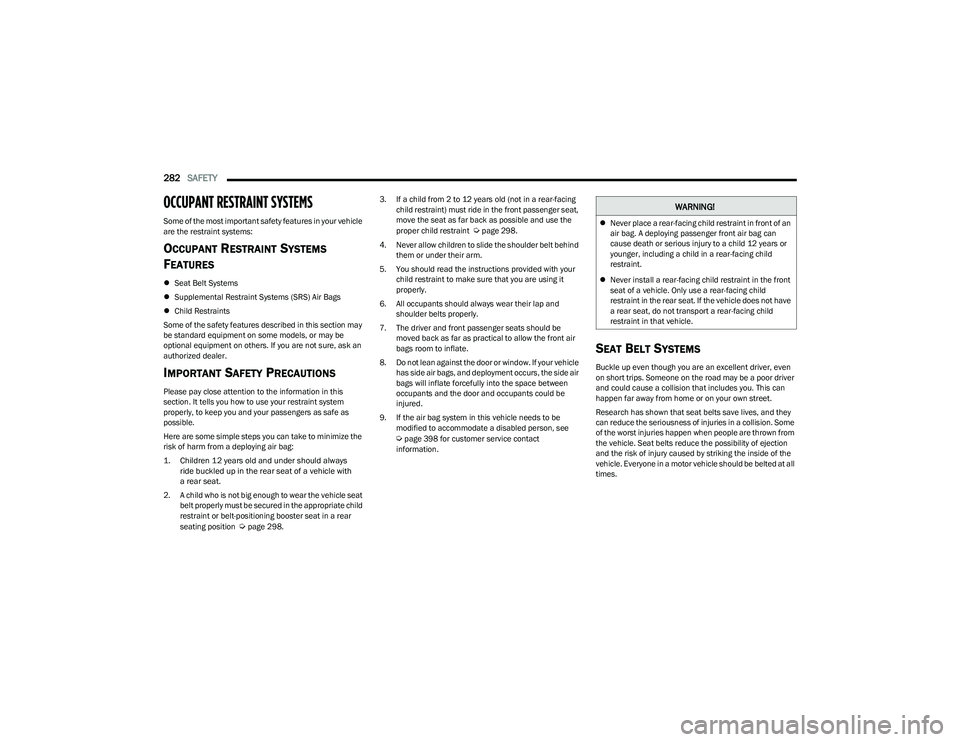
OCCUPANT RESTRAINT SYSTEMS
Some of the most important safety features in your vehicle
are the restraint systems:
OCCUPANT RESTRAINT SYSTEMS
F
EATURES
Seat Belt Systems
Supplemental Restraint Systems (SRS) Air Bags
Child Restraints
Some of the safety features described in this section may
be standard equipment on some models, or may be
optional equipment on others. If you are not sure, ask an
authorized dealer.
IMPORTANT SAFETY PRECAUTIONS
Please pay close attention to the information in this
section. It tells you how to use your restraint system
properly, to keep you and your passengers as safe as
possible.
Here are some simple steps you can take to minimize the
risk of harm from a deploying air bag:
1. Children 12 years old and under should always ride buckled up in the rear seat of a vehicle with
a rear seat.
2. A child who is not big enough to wear the vehicle seat belt properly must be secured in the appropriate child
restraint or belt-positioning booster seat in a rear
seating position
Úpage 298. 3. If a child from 2 to 12 years old (not in a rear-facing
child restraint) must ride in the front passenger seat,
move the seat as far back as possible and use the
proper child restraint
Úpage 298.
4. Never allow children to slide the shoulder belt behind them or under their arm.
5. You should read the instructions provided with your child restraint to make sure that you are using it
properly.
6. All occupants should always wear their lap and shoulder belts properly.
7. The driver and front passenger seats should be moved back as far as practical to allow the front air
bags room to inflate.
8. Do not lean against the door or window. If your vehicle has side air bags, and deployment occurs, the side air
bags will inflate forcefully into the space between
occupants and the door and occupants could be
injured.
9. If the air bag system in this vehicle needs to be modified to accommodate a disabled person, see
Úpage 398 for customer service contact
information.
SEAT BELT SYSTEMS
Buckle up even though you are an excellent driver, even
on short trips. Someone on the road may be a poor driver
and could cause a collision that includes you. This can
happen far away from home or on your own street.
Research has shown that seat belts save lives, and they
can reduce the seriousness of injuries in a collision. Some
of the worst injuries happen when people are thrown from
the vehicle. Seat belts reduce the possibility of ejection
and the risk of injury caused by striking the inside of the
vehicle. Everyone in a motor vehicle should be belted at all
times.
WARNING!
Never place a rear-facing child restraint in front of an
air bag. A deploying passenger front air bag can
cause death or serious injury to a child 12 years or
younger, including a child in a rear-facing child
restraint.
Never install a rear-facing child restraint in the front
seat of a vehicle. Only use a rear-facing child
restraint in the rear seat. If the vehicle does not have
a rear seat, do not transport a rear-facing child
restraint in that vehicle.
23_DT_OM_EN_USC_t.book Page 282
Page 290 of 416

288SAFETY
In Automatic Locking Mode, the shoulder belt is
automatically pre-locked. The seat belt will still retract to
remove any slack in the shoulder belt. Use the Automatic
Locking Mode anytime a child restraint is installed in a
seating position that has a seat belt with this feature.
Children 12 years old and under should always be properly
restrained in the rear seat of a vehicle with a rear seat.
How To Engage The Automatic Locking Mode
1. Buckle the combination lap and shoulder belt.
2. Grab the shoulder portion and pull downward until
the entire seat belt is extracted.
3. Allow the seat belt to retract. As the seat belt retracts, you will hear a clicking sound. This indicates the seat
belt is now in the Automatic Locking Mode. How To Disengage The Automatic Locking Mode
Unbuckle the combination lap/shoulder belt and allow it
to retract completely to disengage the Automatic Locking
Mode and activate the vehicle sensitive (emergency)
locking mode.
SUPPLEMENTAL RESTRAINT SYSTEMS
(SRS)
Some of the safety features described in this section may
be standard equipment on some models, or may be
optional equipment on others. If you are not sure, ask an
authorized dealer. The air bag system must be ready to protect you in a
collision. The Occupant Restraint Controller (ORC)
monitors the internal circuits and interconnecting wiring
associated with the electrical Air Bag System
Components. Your vehicle may be equipped with the
following Air Bag System Components:
Air Bag System Components
Occupant Restraint Controller (ORC)
Air Bag Warning Light
Steering Wheel and Column
Instrument Panel
Knee Impact Bolsters
Driver and Front Passenger Air Bags
Seat Belt Buckle Switch
Supplemental Side Air Bags
Front and Side Impact Sensors
Seat Belt Pretensioners
Seat Track Position Sensors
Occupant Classification System
Air Bag Warning Light
The Occupant Restraint Controller (ORC)
monitors the readiness of the electronic parts
of the air bag system whenever the ignition
switch is in the START or ON/RUN position.
If the ignition switch is in the OFF position or in the ACC
position, the air bag system is not on and the air bags will
not inflate.
WARNING!
Never place a rear-facing child restraint in front of an
air bag. A deploying passenger front air bag can
cause death or serious injury to a child 12 years or
younger, including a child in a rear-facing child
restraint.
Never install a rear-facing child restraint in the front
seat of a vehicle. Only use a rear-facing child
restraint in the rear seat. If the vehicle does not have
a rear seat, do not transport a rear-facing child
restraint in that vehicle.
WARNING!
The seat belt assembly must be replaced if the
switchable Automatic Locking Retractor (ALR)
feature or any other seat belt function is not working
properly when checked according to the procedures
in the Service Manual.
Failure to replace the seat belt assembly could
increase the risk of injury in collisions.
Do not use the Automatic Locking Mode to restrain
occupants who are wearing the seat belt or children
who are using booster seats. The locked mode is only
used to install rear-facing or forward-facing child
restraints that have a harness for restraining the
child.
23_DT_OM_EN_USC_t.book Page 288
Page 313 of 416
SAFETY311
SAFETY TIPS
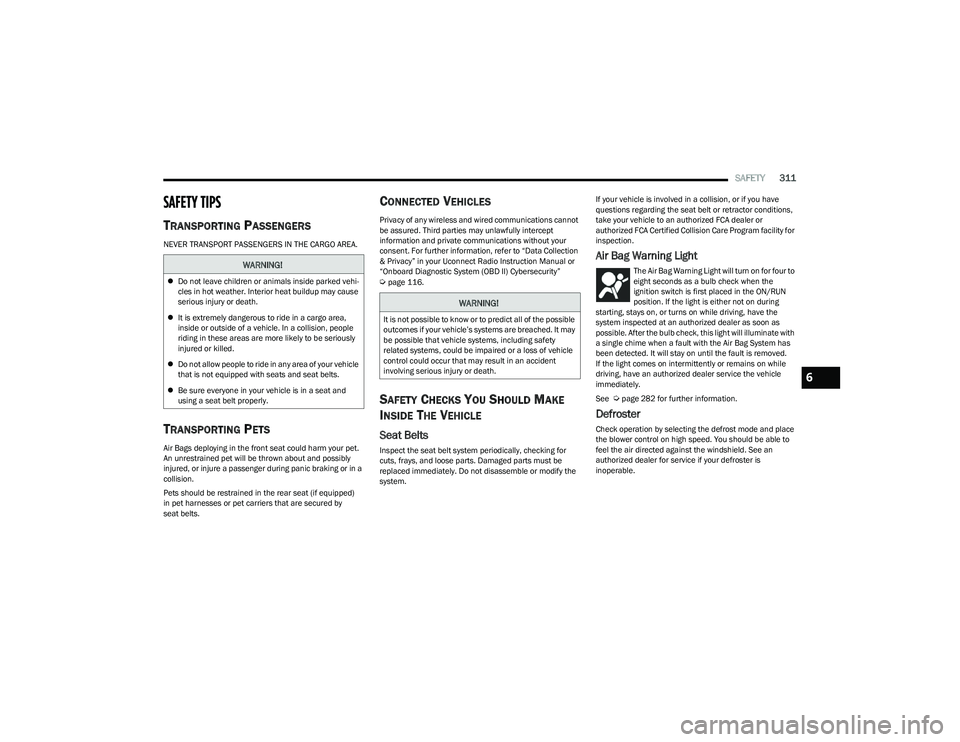
TRANSPORTING PASSENGERS
NEVER TRANSPORT PASSENGERS IN THE CARGO AREA.
TRANSPORTING PETS
Air Bags deploying in the front seat could harm your pet.
An unrestrained pet will be thrown about and possibly
injured, or injure a passenger during panic braking or in a
collision.
Pets should be restrained in the rear seat (if equipped)
in pet harnesses or pet carriers that are secured by
seat belts.
CONNECTED VEHICLES
Privacy of any wireless and wired communications cannot
be assured. Third parties may unlawfully intercept
information and private communications without your
consent. For further information, refer to “Data Collection
& Privacy” in your Uconnect Radio Instruction Manual or
“Onboard Diagnostic System (OBD II) Cybersecurity”
Úpage 116.
SAFETY CHECKS YOU SHOULD MAKE
I
NSIDE THE VEHICLE
Seat Belts
Inspect the seat belt system periodically, checking for
cuts, frays, and loose parts. Damaged parts must be
replaced immediately. Do not disassemble or modify the
system. If your vehicle is involved in a collision, or if you have
questions regarding the seat belt or retractor conditions,
take your vehicle to an authorized FCA dealer or
authorized FCA Certified Collision Care Program facility for
inspection.
Air Bag Warning Light
The Air Bag Warning Light will turn on for four to
eight seconds as a bulb check when the
ignition switch is first placed in the ON/RUN
position. If the light is either not on during
starting, stays on, or turns on while driving, have the
system inspected at an authorized dealer as soon as
possible. After the bulb check, this light will illuminate with
a single chime when a fault with the Air Bag System has
been detected. It will stay on until the fault is removed.
If the light comes on intermittently or remains on while
driving, have an authorized dealer service the vehicle
immediately.
See
Úpage 282 for further information.
Defroster
Check operation by selecting the defrost mode and place
the blower control on high speed. You should be able to
feel the air directed against the windshield. See an
authorized dealer for service if your defroster is
inoperable.
WARNING!
Do not leave children or animals inside parked vehi -
cles in hot weather. Interior heat buildup may cause
serious injury or death.
It is extremely dangerous to ride in a cargo area,
inside or outside of a vehicle. In a collision, people
riding in these areas are more likely to be seriously
injured or killed.
Do not allow people to ride in any area of your vehicle
that is not equipped with seats and seat belts.
Be sure everyone in your vehicle is in a seat and
using a seat belt properly.
WARNING!
It is not possible to know or to predict all of the possible
outcomes if your vehicle’s systems are breached. It may
be possible that vehicle systems, including safety
related systems, could be impaired or a loss of vehicle
control could occur that may result in an accident
involving serious injury or death.
6
23_DT_OM_EN_USC_t.book Page 311
Page 332 of 416
330IN CASE OF EMERGENCY
TOWING A DISABLED VEHICLE
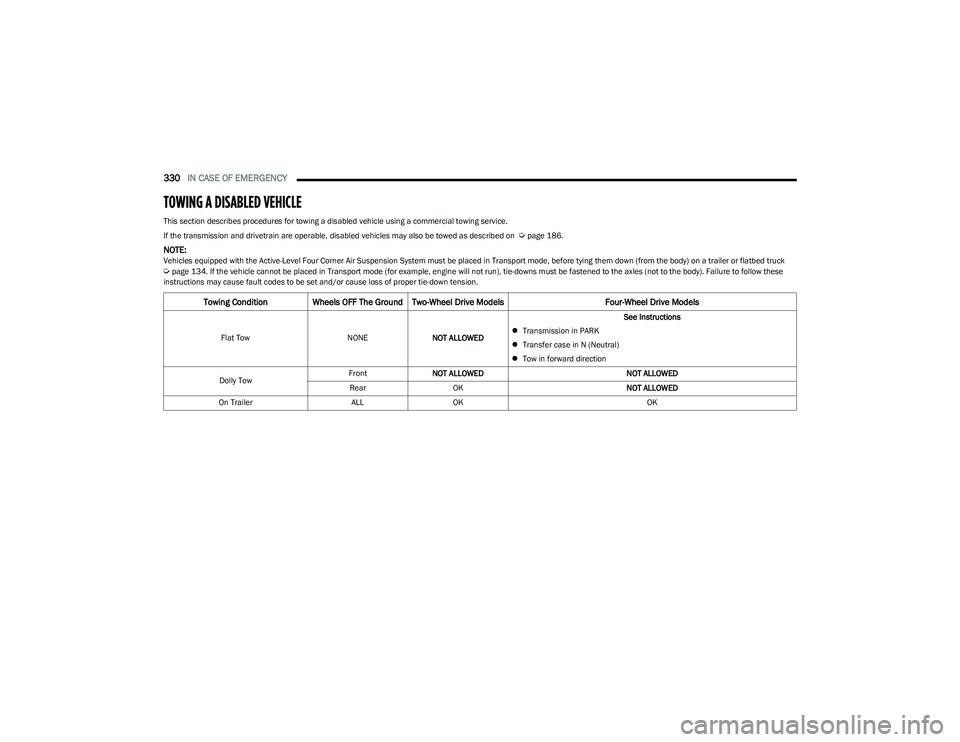
This section describes procedures for towing a disabled vehicle using a commercial towing service.
If the transmission and drivetrain are operable, disabled vehicles may also be towed as described on
Úpage 186.
NOTE:Vehicles equipped with the Active-Level Four Corner Air Suspension System must be placed in Transport mode, before tying them down (from the body) on a trailer or flatbed truck Úpage 134. If the vehicle cannot be placed in Transport mode (for example, engine will not run), tie-downs must be fastened to the axles (not to the body). Failure to follow these
instructions may cause fault codes to be set and/or cause loss of proper tie-down tension.
Towing Condition Wheels OFF The Ground Two-Wheel Drive Models Four-Wheel Drive Models
Flat TowNONENOT ALLOWED See Instructions
Transmission in PARK
Transfer case in N (Neutral)
Tow in forward direction
Dolly Tow Front
NOT ALLOWED NOT ALLOWED
Rear OK NOT ALLOWED
On Trailer ALLOK OK
23_DT_OM_EN_USC_t.book Page 330
Page 405 of 416

403
INDEX
AAccessory Drive Belt Inspection .................................. 346
Adaptive Cruise Control (ACC)
(Cruise Control) ................................................... 143
, 145
Adding Engine Coolant (Antifreeze) ............................ 350
Adding Fuel................................................................... 171
Additives, Fuel .............................................................. 393
Adjust Down...........................................................................32
Forward ...................................................................... 32
Rearward ....................................................................32
Up................................................................................ 32
Adjustable Pedals ...........................................................38
Advance Phone Connectivity ....................................... 235
Air Bag Air Bag Operation.................................................... 290
Air Bag Warning Light .................................... 288
, 291
Enhanced Accident Response ...................... 297, 332
Event Data Recorder (EDR).................................... 332 Front Air Bag ........................................................... 291
If Deployment Occurs ............................................. 297
Knee Impact Bolsters ............................................. 294
Maintaining Your Air Bag System .......................... 298
Maintenance ........................................................... 298
Redundant Air Bag Warning Light ......................... 289
Transporting Pets.................................................... 311
Air Bag Light ...............................................108
, 288, 311
Air Cleaner, Engine (Engine Air Cleaner Filter) ........... 342
Air Conditioner Maintenance ...................................... 344
Air Conditioner Refrigerant .......................................... 344
Air Conditioner System ................................................ 344 Air Conditioning........................................................ 54
, 56
Air Conditioning Filter ............................................59, 344
Air Conditioning System ................................................. 59
Air Conditioning, Operating Tips .................................... 59
Air Filter ............................................................... 342
, 344
Air Pressure Tires.......................................................................... 377
Air Suspension .................................................... 134
, 137
Alarm Panic........................................................................... 17
Security Alarm...................................................23
, 110
Alterations/Modifications Vehicle........................................................................ 11
Antifreeze (Engine Coolant) ............................... 350
, 395
Disposal ...................................................................351
Anti-Lock Brake System (ABS) ..................................... 262
Anti-Lock Warning Light................................................ 110
Assist, Hill Start ............................................................. 266
Audio Settings ............................................................... 224
Audio Systems (Radio) ................................................. 191
Auto Down Power Windows............................................ 70
Automatic Door Locks .................................................... 27 Automatic Headlights ..................................................... 48Automatic High Beams ................................................... 47
Automatic Tailgate Release ........................................... 75
Automatic Temperature Control (ATC) .......................... 59
Automatic Transmission ..................................... 125
, 353
Adding Fluid ............................................................. 353
Fluid And Filter Change ...........................................353
Fluid Change ............................................................353 Fluid Level Check ....................................................353 Fluid Type .......................................................353
, 397
Special Additives ..................................................... 353
Automatic Transmission Limp Home Mode ............... 128
AutoPark ....................................................................... 119
AUX Camera .................................................................. 168
Auxiliary Driving Systems ............................................. 269
Axle Fluid.............................................................. 353
, 397
Axle Locker System ...................................................... 140
Axle Lubrication ............................................................ 353
BBack-Up Camera........................................................... 163
Battery..................................................................108, 340
Charging System Light ............................................ 108
Keyless Key Fob Replacement................................. 17
Battery Saver Feature .................................................... 50
Bed Divider ..................................................................... 84 Bed Extender .................................................................. 84
Bed Step ......................................................................... 78
Bedliner......................................................................... 389
Belts, Seat..................................................................... 311
Blind Spot Monitoring .................................................. 269
Bluetooth Connecting To A Particular Mobile Phone Or Audio Device After Pairing ................................. 231
Body Builders Guide..........................................................9
Body Mechanism Lubrication ...................................... 347
Bodywork ...................................................................... 388
B-Pillar Location ........................................................... 374
Brake Assist System..................................................... 263
Brake Control System .................................................. 263
11
23_DT_OM_EN_USC_t.book Page 403
Page 413 of 416
411
Replacement ........................................................... 380
Rotation ................................................................... 386
Run Flat ................................................................... 378
Safety.............................................................. 370
, 377
Sizes ........................................................................ 371
Snow Tires ............................................................... 381 Spare Tires ..................................................... 381
, 382
Spinning .................................................................. 379
Trailer Towing .......................................................... 179
Tread Wear Indicators ............................................ 379
Types ....................................................................... 380 Wheel Nut Torque ................................................... 392
To Open Hood..................................................................74
Tongue Weight/Trailer Weight ........................... 173
, 176
Tonneau Cover ...................................................... 86, 388
Tonneau Cover Cleaning ............................................. 388
Tow/Haul Mode............................................................ 130
Towing .................................................................. 173
, 330
Disabled Vehicle ..................................................... 330
Guide ....................................................................... 176 Recreational ............................................................ 186
Weight...................................................................... 176
Towing Behind A Motorhome ...................................... 186
Traction ......................................................................... 189
Traction Control............................................................ 268 Trailer Reverse Steering Control..................................177
Trailer Sway Control (TSC) .................................. 173
, 268
Trailer Tire Pressure ..................................................... 280
Trailer Towing ................................................................ 173 Frontal Area ............................................................. 173
Hitches .....................................................................176
Minimum Requirements ......................................... 179
Mirrors ........................................................................ 42
Tips ...........................................................................184 Trailer And Tongue Weight...................................... 176Weight Carrying Hitch.............................................. 173Weight Distributing Hitch ........................................ 174
Wiring ....................................................................... 182
Trailer Towing Guide ..................................................... 176
Trailer Weight ................................................................ 176
Transfer Case ................................................................ 354 Electronically Shifted..................................... 130
, 132
Fluid.......................................................................... 397
Transmission................................................................. 125 Automatic ....................................................... 125
, 353
Fluid.......................................................................... 397 Maintenance............................................................353Shifting .....................................................................124
Transporting Pets ......................................................... 311
Tread Wear Indicators ..................................................379
Tri-Fold Tonneau Cover .................................................. 86 Cleaning ..................................................................... 92
Install.......................................................................... 90
Removal ..................................................................... 87
Turn Signals ........................................ 49
, 115, 366, 368
UUconnect Phone Call Features................................................ 232Things You Should Know About Your Uconnect Phone................................................. 235
Uconnect Settings ................................................... 191
Uconnect (Radio) .......................................................... 191
Uconnect 4C Nav With 12-Inch Display ...................... 191
Uconnect 4C/4C Nav With 8.4-Inch Display............... 191
Uconnect Phone ..................................................229
, 230
Answer Or Ignore An Incoming Call — Call Currently In Progress .................................. 233
Answer Or Ignore An Incoming Call — No Call Currently In Progress ............................ 233
Bluetooth Communication Link.............................. 236
Call Continuation..................................................... 234
Call Controls ............................................................ 233
Call Termination ...................................................... 234
Cancel Command.................................................... 230
Connecting To A Particular Mobile Phone Or Audio Device After Pairing ............................ 231
Help Command ....................................................... 230 Join Calls.................................................................. 234
Making A Phone Or Audio Device A Favorite ......... 231
Making A Second Call While Current Call Is In Progress ......................................................... 234
Managing Your Favorites ........................................ 232 Natural Speech ....................................................... 229Operation ................................................................. 229
11
23_DT_OM_EN_USC_t.book Page 411