warning light RAM 1500 2023 Workshop Manual
[x] Cancel search | Manufacturer: RAM, Model Year: 2023, Model line: 1500, Model: RAM 1500 2023Pages: 416, PDF Size: 20.59 MB
Page 184 of 416
182STARTING AND OPERATING
Display Messages
The trailer brake control interacts with the instrument
cluster display. Display messages, along with a single
chime, will be displayed when a malfunction is determined
in the trailer connection, trailer brake control, or on the
trailer
Úpage 98.
NOTE:
An aftermarket controller may be available for use with
trailers with air or EOH trailer brake systems. To deter -
mine the type of brakes on your trailer and the avail -
ability of controllers, check with your trailer
manufacturer or dealer.
Removal of the ITBM will cause errors and it may cause
damage to the electrical system and electronic
modules of the vehicle. See an authorized dealer if an
aftermarket module is to be installed.
Towing Requirements — Trailer Lights
And Wiring
Whenever you pull a trailer, regardless of the trailer size,
stop lights and turn signals on the trailer are required for
motoring safety.
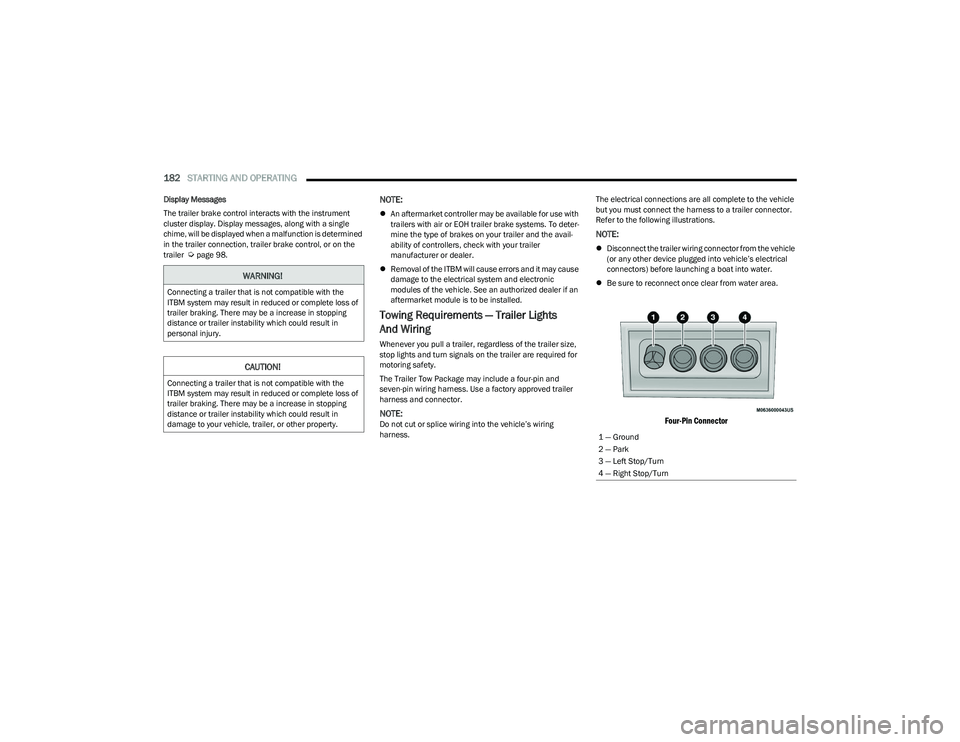
The Trailer Tow Package may include a four-pin and
seven-pin wiring harness. Use a factory approved trailer
harness and connector.
NOTE:Do not cut or splice wiring into the vehicle’s wiring
harness. The electrical connections are all complete to the vehicle
but you must connect the harness to a trailer connector.
Refer to the following illustrations.
NOTE:
Disconnect the trailer wiring connector from the vehicle
(or any other device plugged into vehicle’s electrical
connectors) before launching a boat into water.
Be sure to reconnect once clear from water area.
Four-Pin Connector
WARNING!
Connecting a trailer that is not compatible with the
ITBM system may result in reduced or complete loss of
trailer braking. There may be a increase in stopping
distance or trailer instability which could result in
personal injury.
CAUTION!
Connecting a trailer that is not compatible with the
ITBM system may result in reduced or complete loss of
trailer braking. There may be a increase in stopping
distance or trailer instability which could result in
damage to your vehicle, trailer, or other property.
1 — Ground
2 — Park
3 — Left Stop/Turn
4 — Right Stop/Turn
23_DT_OM_EN_USC_t.book Page 182
Page 186 of 416

184STARTING AND OPERATING
TOWING TIPS
Before towing, practice turning, stopping, and backing up
the trailer in an area located away from heavy traffic.
Automatic Transmission
The DRIVE range can be selected when towing. The
transmission controls include a drive strategy to avoid
frequent shifting when towing. However, if frequent
shifting does occur while in DRIVE, select TOW/HAUL
mode or select a lower gear range (using the Electronic
Range Select (ERS) shift control).
NOTE:Using TOW/HAUL mode or selecting a lower gear range
(using the ERS shift control) while operating the vehicle
under heavy loading conditions will improve performance
and extend transmission life by reducing excessive
shifting and heat build up. This action will also provide
better engine braking.
Tow/Haul Mode
To reduce potential for automatic transmission
overheating, activate TOW/HAUL mode when driving in
hilly areas, or select a lower gear range (using the (ERS)
shift control) on more severe grades.
Cruise Control — If Equipped
Do not use on hilly terrain or with heavy loads.
When using the Cruise Control, if you experience speed
drops greater than 10 mph (16 km/h), disengage until
you can get back to cruising speed.
Use Cruise Control in flat terrain and with light loads to
maximize fuel efficiency.
Air Suspension System
To aid in attaching/detaching the trailer from the vehicle,
the air suspension system can be used Úpage 134.
Selecting Tow/Haul or connecting a trailer with an
Integrated Trailer Brake Module (ITBM) will disable
Automatic Aero mode to avoid height changes while
towing and shifting loads or tongue weights.
NOTE:The vehicle must remain in the engine running position
while attaching a trailer for proper leveling of the air
suspension system.
SNOWPLOW
Snowplow Prep Packages are available as a factory
installed option. These packages include components
necessary to equip your vehicle with a snowplow.
NOTE:Before installation of a snowplow it is highly recom -
mended that the owner/installer obtain and follow the
recommendations contained within the current Body
Builder’s Guide. See an authorized dealer, installer or
snowplow manufacturer for this information. There are
unique electrical systems that must be connected to
properly ensure operator safety and prevent overloading
vehicle systems.
WARNING!
Attaching a snowplow to this vehicle could adversely
affect performance of the airbag system in a collision.
Do not expect that the airbag will perform as described
earlier in this manual.
CAUTION!
The “Lamp Out” indicator could illuminate if exterior
lamps are not properly installed.
23_DT_OM_EN_USC_t.book Page 184
Page 187 of 416
STARTING AND OPERATING185
BEFORE PLOWING
Check the hydraulic system for leaks and proper fluid
level.
Check the mounting bolts and nuts for proper tight -
ness.
Check the runners and cutting edge for excessive wear.
The cutting edge should be ¼ to ½ inches
(6 cm to 1.2 cm) above ground in snow plowing
position.
Check that snowplow lighting is connected and
functioning properly.
SNOWPLOW PREP PACKAGE MODEL
A
VAILABILITY
For Information about snowplow applications visit
www.ramtrucks.com or refer to the current Body Builder’s
Guide.
1. The maximum number of occupants in the truck
should not exceed one.
2. The total GVWR, Front GAWR or the Rear GAWR should never be exceeded.
3. Cargo capacity will be reduced by the addition of options or passengers, etc.
The loaded vehicle weight, including the snowplow
system, all aftermarket accessories, driver, passengers,
options, and cargo, must not exceed either the Gross
Vehicle Weight (GVWR) or Gross Axle Weight (GAWR)
ratings. These weights are specified on the Safety Compliance Certification Label on the driver's side door
opening.
NOTE:Detach the snowplow when transporting passengers.
Vehicle front end wheel alignment was set to
specifications at the factory without consideration for the
weight of the plow. Front end toe-in should be checked
and reset if necessary at the beginning and end of the
snowplow season. This will help prevent uneven tire wear.
The blade should be lowered whenever the vehicle is
parked.
Maintain and operate your vehicle and snowplow
equipment following the recommendations provided by
the specific snowplow manufacturer.
OVER THE ROAD OPERATION WITH
S
NOWPLOW ATTACHED
The blade restricts air flow to the radiator and causes the
engine to operate at higher than normal temperatures.
Therefore, when transporting the plow, angle the blade
completely and position it as low as road or surface
conditions permit. Do not exceed 40 mph (64 km/h). The
operator should always maintain a safe stopping distance
and allow adequate passing clearance.
NOTE:Lane Departure Warning / Lane Keep Assist is not
available when a snow plow is attached.
OPERATING TIPS
Under ideal snow plowing conditions, 20 mph (32 km/h)
should be maximum operating speed. The operator should
be familiar with the area and surface to be cleaned.
Reduce speed and use extreme caution when plowing
unfamiliar areas or under poor visibility.
GENERAL MAINTENANCE
Snowplows should be maintained in accordance with the
plow manufacturer's instructions.
Keep all snowplow electrical connections and battery
terminals clean and free of corrosion.
When plowing snow, to avoid transmission and drivetrain
damage, the following precautions should be observed:
Operate with transfer case in 4WD LOW when plowing
small or congested areas where speeds are not likely to
exceed 15 mph (24 km/h). At higher speeds operate in
4WD HIGH.
Vehicles with automatic transmissions should use
4WD LOW when plowing deep or heavy snow for
extended periods of time to avoid transmission over -
heating.
Do not shift the transmission unless the engine has
returned to idle and wheels have stopped. Make a
practice of stepping on the brake pedal while shifting
the transmission.
4
23_DT_OM_EN_USC_t.book Page 185
Page 189 of 416

STARTING AND OPERATING187
(Continued)
RECREATIONAL TOWING —
F
OUR-WHEEL DRIVE MODELS
NOTE:The transfer case must be shifted into N (Neutral) for
recreational towing. The transmission must be shifted into
PARK for recreational towing. Refer to the following for the
proper transfer case N (Neutral) shifting procedure for
your vehicle.
Shifting Into N (Neutral)
Use the following procedure to prepare your vehicle for
recreational towing.
1. Bring the vehicle to a complete stop on level ground,
with the engine running. Apply the parking brake.
2. Press and hold the brake pedal.
3. Shift the transmission to NEUTRAL. The driver's door must be closed (or the driver's seat belt buckled) so
that the transmission will remain in NEUTRAL when
the brake pedal is released.
NOTE:If vehicle is equipped with air suspension, ensure the
vehicle is set to Normal Ride Height.
4. Using a ballpoint pen or similar object, push and hold the recessed transfer case N (Neutral) button (at the
center of the transfer case switches). The N (Neutral)
indicator light will illuminate, and remain lit, when the
shift to N (Neutral) is complete. After the shift is
completed and the N (Neutral) light stays on, release
the N (Neutral) button.
CAUTION!
DO NOT dolly tow any 4WD vehicle. Towing with only
one set of wheels on the ground (front or rear) will
cause severe transmission and/or transfer case
damage. Tow with all four wheels either ON the
ground, or OFF the ground (using a vehicle trailer).
Tow only in the forward direction. Towing this vehicle
backwards can cause severe damage to the transfer
case.
Before recreational towing, the transfer case must
be in N (Neutral). To be certain the transfer case is
fully in N (Neutral), perform the procedure outlined
under “Shifting Into N (Neutral)”. Internal transmis -
sion damage will result, if the transfer case is not in
N (Neutral) during towing.
The transmission must be in PARK for recreational
towing.
Ensure that the Electric Park Brake is released, and
remains released, while being towed.
Towing this vehicle in violation of the above require -
ments can cause severe transmission and/or
transfer case damage. Damage from improper
towing is not covered under the New Vehicle Limited
Warranty.
Do not disconnect the rear driveshaft because fluid
will leak from the transfer case, causing damage to
internal parts.
Do not use a fascia/bumper-mounted clamp-on tow
bar on your vehicle. The fascia/bumper face bar will
be damaged.
WARNING!
You or others could be injured or killed if you leave the
vehicle unattended with the transfer case in the N
(Neutral) position without first fully engaging the
parking brake. The transfer case N (Neutral) position
disengages both the front and rear driveshafts from the
powertrain and will allow the vehicle to roll, even if the
transmission is in PARK. The parking brake should
always be applied when the driver is not in the vehicle.
CAUTION!CAUTION!
It is necessary to follow these steps to be certain that
the transfer case is fully in N (Neutral) before
recreational towing to prevent damage to internal parts.
4
23_DT_OM_EN_USC_t.book Page 187
Page 191 of 416

STARTING AND OPERATING189
8. Disconnect vehicle from the tow vehicle.
9. Press and hold the brake pedal.
10. Start the engine.
11. Release the parking brake.
12. Shift the transmission into DRIVE, release the brake
pedal, and check that the vehicle operates normally.
NOTE:
Steps 3 and 4 are requirements that must be met
before pushing the button to shift out of N (Neutral),
and must continue to be met until the shift has been
completed. If any of these requirements are not met
before pushing the button or are no longer met during
the shift, the N (Neutral) indicator light will flash contin -
uously until all requirements are met or until the button
is released.
The ignition must be in the ON/RUN mode for a shift to
take place and for the position indicator lights to be
operable. If the ignition is not in the ON/RUN mode, the
shift will not take place and no position indicator lights
will be on or flashing.
A flashing N (Neutral) position indicator light indicates
that shift requirements have not been met.
DRIVING TIPS
DRIVING ON SLIPPERY SURFACES
Acceleration
Rapid acceleration on snow covered, wet, or other slippery
surfaces may cause the driving wheels to pull erratically to
the right or left. This phenomenon occurs when there is a
difference in the surface traction under the rear (driving)
wheels.
DRIVING THROUGH WATER
Driving through water more than a few inches/
centimeters deep will require extra caution to ensure
safety and prevent damage to your vehicle.
Flowing/Rising Water
Shallow Standing Water
Although your vehicle is capable of driving through shallow
standing water, consider the following Cautions and
Warnings before doing so.
WARNING!
Rapid acceleration on slippery surfaces is dangerous.
Unequal traction can cause sudden pulling of the rear
wheels. You could lose control of the vehicle and
possibly have a collision. Accelerate slowly and
carefully whenever there is likely to be poor traction
(ice, snow, wet, mud, loose sand, etc.).
WARNING!
Do not drive on or across a road or path where water is
flowing and/or rising (as in storm run-off). Flowing water
can wear away the road or path's surface and cause
your vehicle to sink into deeper water. Furthermore,
flowing and/or rising water can carry your vehicle away
swiftly. Failure to follow this warning may result in
injuries that are serious or fatal to you, your
passengers, and others around you.
WARNING!
Driving through standing water limits your vehicle’s
traction capabilities. Do not exceed 5 mph (8 km/h)
when driving through standing water.
Driving through standing water limits your vehicle’s
braking capabilities, which increases stopping
distances. Therefore, after driving through standing
water, drive slowly and lightly press on the brake
pedal several times to dry the brakes.
Failure to follow these warnings may result in injuries
that are serious or fatal to you, your passengers, and
others around you.
4
23_DT_OM_EN_USC_t.book Page 189
Page 200 of 416
198MULTIMEDIA
LaneSense Warning This setting will change the distance at which the steering wheel will provide lane
departure feedback. The available settings are “Early”, “Medium”, and “Late”.
LaneSense Strength This setting will change the strength of the steering wheel feedback during a lane
departure. The available settings are “Low”, “Medium”, and “High”.
ParkSense This setting will change the type of ParkSense alert when a close object is detected and
can provide both an audible chime and a visual display.
Front ParkSense Volume This setting adjusts the volume of the Front ParkSense system. The available settings are
“Low”, “Medium”, and “High”.
Rear ParkSense Volume This setting adjusts the volume of the Rear ParkSense system. The available settings are
“Low”, “Medium”, and “High”.
Rear ParkSense Braking Assist This setting will turn the Rear ParkSense Braking Assist on or off.
Blind Spot Alert This setting will change the type of alert provided when an object is detected in a
vehicle’s blind spot. The “Off” setting will turn off Blind Spot Alert. The “Lights” setting will
activate the Blind Spot Alert lights on the outside mirrors. The “Lights & Chime” setting
will activate both the lights on the outside mirrors and an audible chime.
Trailer Length For Blind Spot Alert This setting will auto detect the length of an attached trailer. The “Auto” setting will have
the system automatically set the trailer length. The “Max” setting will always set the
length to the maximum 39.5 ft (12 m).
Hill Start Assist This setting will turn the Hill Start Assist system on or off.
ParkView Backup Camera Delay This setting will add a timed delay to the ParkView Backup Camera when shifting
out of REVERSE.
ParkView Backup Camera Active Guidelines This setting will turn the ParkView Backup Camera Active Guidelines on or off.
ParkView Backup Camera Fixed Guidelines This setting will turn the ParkView Backup Camera Fixed Guidelines on or off.
Tire Fill Assist This setting will turn Tire Fill Assist on or off.
Power Side Steps This setting will raise and lower or stow the power side steps. The available options are
“Automatic” to raise and lower the power side steps and “Stow” to deactivate the power
side steps.
Setting Name
Description
23_DT_OM_EN_USC_t.book Page 198
Page 211 of 416
MULTIMEDIA209
Suspension/Air Suspension
Headlight Off Delay This setting will allow you to set the amount of time it takes for the headlights to shut off
after the vehicle is turned off. The available settings are “0 sec”, “30 sec”, “60 sec”, and
“90 sec”.
Setting Name
Description
When the Suspension/Air Suspension button is pressed on the touchscreen, the system will display settings related to the vehicle’s air suspension.
NOTE:Depending on the vehicle’s options, feature settings may vary.
Setting NameDescription
Sound Horn With Remote Lower This setting will sound the horn when the Lower button is pressed on the key fob.
Flash Lights With Remote Lower This setting will flash the lights when the Lower button is pressed on the key fob.
Display Suspension Messages This setting will display suspension messages in the Instrument Cluster Display. The “All”
setting will display all available messages. The “Warnings Only” setting will only display
warning messages.
Aero Mode This setting will automatically adjust the vehicle ride height depending on the
vehicle speed.
Tire Jack Mode This setting will disable the Air Suspension system to assist in changing a spare tire.
Transport Mode This setting will lower the vehicle to Entry/Exit height and then disable the Air Suspension
system for flat towing.5
23_DT_OM_EN_USC_t.book Page 209
Page 241 of 416

MULTIMEDIA239
Using Your Owner’s Site
Your Owner’s Site website https://www.mopar.com/
en-us.html (US Residents), or www.mopar.ca (Canadian
Residents) provides you with all the information you need,
all in one place. You can track your service history, find
recommended accessories for your vehicle, watch videos
about your vehicle's features, and easily access your
manuals. It is also where you can manage your SiriusXM
Guardian™ account. This section will familiarize you with
the key elements of the website that will help you get the
most of your SiriusXM Guardian™ connected services.
For customers in the United States, press the Sign
In/Register button and enter your email address and
password.
For customers in Canada, press the My Vehicle button.
Select from “Dashboard”, “Vehicle Health Report”, and
“Recalls”. The website will then prompt you to log in using
your email address and password.
Edit/Edit Profile:
To manage the details of your SiriusXM Guardian™
account, such as your contact information, password
and SiriusXM Guardian™ PIN, click on the Edit/Edit
Profile button to access the details of your account.
Connected Services Status:
This statement will indicate your SiriusXM
Guardian™-equipped vehicle.
Remote Commands:
For vehicles with an active SiriusXM Guardian™
subscription, press one of these icons and enter your
four-digit SiriusXM Guardian™ Security PIN to remotely
start (if equipped), lock/unlock doors or sound the horn
and flash the lights. Editing Your Notifications
Notifications are an important element of your SiriusXM
Guardian™ account. For example, any time you use your
remote services (such as Remote Door Unlock), you can
elect to receive a text message, push notification, and/or
E-mail to notify you of the event. To set up the
notifications, please follow these instructions.
1. Log on to your Owner’s Account at
https://
www.mopar.com/en-us.html (US Residents) and
select “Dashboard”, or www.mopar.ca
(Canadian
Residents), select “My Vehicle” and then
“Dashboard”.
2. Click the Edit/Edit Profile button.
3. Once there, select “SiriusXM Guardian™” where you can edit Notification Preferences.
4. You can enter a mobile phone and/or email address to notify you, and you can customize the types of
messages.
USING SIRIUSXM GUARDIAN™
SOS Call — If Equipped
Access To Emergency Services At The Push Of A Button
SiriusXM Guardian™ In-Vehicle Assistance Features
With SiriusXM Guardian™, your vehicle has onboard
assistance features located on the rearview mirror or
overhead console designed to enhance your driving
experience if you should ever need assistance or support.
Description
SOS Call offers a convenient way to get in contact with a
SiriusXM Guardian™ Customer Care agent in the event of
an emergency. When the connection between the vehicle
and the live agent is made, your vehicle will automatically
transmit location information. In the event of a minor
collision, medical or any other emergency, press the SOS
button to be connected to a call center agent who can
send emergency assistance to your vehicle’s location.
NOTE:Certain SiriusXM Guardian™ connected services are
dependent on an operational Uconnect system, cellular
network availability that is compatible with the device in
your vehicle, and GPS network availability. Not all features
of SiriusXM Guardian™ are available everywhere at all
times, particularly in remote or enclosed areas.WARNING!
Some SiriusXM Guardian™ connected services,
including SOS Call and Roadside Assistance Call, will
NOT work without a network connection compatible
with your device.
Center Light Status Description
Off No call activated
Green Active call in progress
Red System error
5
23_DT_OM_EN_USC_t.book Page 239
Page 243 of 416
MULTIMEDIA241
(Continued)
Automatic SOS — If Equipped
Automatic SOS is a hands-free safety service that can
immediately connect you with help in the event that your
vehicle’s airbags deploy. After an accident, a live agent will
contact you through the Uconnect system and alert
emergency services.
NOTE:An active SiriusXM Guardian™ subscription is required for
this feature to function. After a crash where the airbags deploy:
1. Automatic SOS will initiate a call with an agent.
2. An agent will receive the call and confirm the location
of the emergency.
3. If needed, the agent will request the assistance of emergency services.
4. First responders will arrive on scene. The agent will remain on the call until emergency services arrive.
NOTE:
Agents are available 24/7 to assist you in the case of
an emergency.
On your behalf, agents are able to notify family
members about the collision.
Agents can brief first responders of the situation before
they arrive on scene.
In the event vehicle occupants are unable to speak,
emergency services will be dispatched based on the
last known GPS coordinates.
SiriusXM Guardian™ connected services are depen -
dent upon an operative telematics device, a cellular
connection, navigation map data, and GPS satellite
reception, which can limit the ability to reach the
response center or reach emergency support.
Terms of service of the Uconnect and the SiriusXM
Guardian™ subscriber agreement apply. See terms of
services for complete service limitation.
WARNING!
Never place anything on or near the vehicle’s LTE
(voice/data) or 4G (data) and GPS antennas. You
could prevent LTE (voice/data) or 4G (data) and GPS
signal reception, which can prevent your vehicle from
placing an emergency call.
Do not add any aftermarket electrical equipment to
the vehicle’s electrical system. This may prevent your
vehicle from sending a signal to initiate an emer -
gency call. To avoid interference that can cause the
SOS Call system to fail, never add aftermarket equip -
ment (e.g., two-way mobile radio, CB radio, data
recorder, etc.) to your vehicle’s electrical system or
modify the antennas on your vehicle. IF YOUR
VEHICLE LOSES POWER FOR ANY REASON
(INCLUDING DURING OR AFTER AN ACCIDENT),
NEITHER THE VEHICLE BRANDED APPS NOR THE
SIRIUSXM GUARDIAN™ CONNECTED SERVICES WILL
OPERATE.
The Occupant Restraint Controller (ORC) turns on the
Air Bag Warning Light on the instrument panel if a
malfunction in any part of the air bag system is
detected. If the Air Bag Warning Light is illuminated,
the air bag system may not be working properly and
the SOS Call system may not be able to send a signal
to the SiriusXM Guardian™ Customer Care center. If
the Air Bag Warning Light is illuminated, have an
authorized dealer service your vehicle immediately.Ignoring the Rearview Mirror Light could mean you
will not have SOS Call services if needed. If the
Rearview Mirror Light is illuminated, have an autho -
rized dealer service the SOS Call system immedi -
ately.
If anyone in the vehicle could be in danger
(e.g., fire or smoke is visible, dangerous road condi-
tions or location), do not wait for voice contact from
a SiriusXM Guardian™ Customer Care agent.
All occupants should exit the vehicle immediately
and move to a safe location.
Failure to perform scheduled maintenance and
regular inspection of your vehicle may result in
vehicle damage, accident or injury.
WARNING!
5
23_DT_OM_EN_USC_t.book Page 241
Page 247 of 416
MULTIMEDIA245
Requirements
Vehicle must have an operable LTE (voice/data) or 4G
(data) network connection compatible with your device.
Vehicle must have an active subscription that includes
the applicable feature.
Vehicle Finder
Description
The Vehicle Finder feature allows you to find the location
of your vehicle.
You can also sound the horn and flash the lights to make
finding your vehicle even easier.
How It Works
Select the Vehicle Finder function within the Vehicle
Branded App and select the Location tab at the bottom of
the App. Then, press the Vehicle icon to find your vehicle.
Requirements
Vehicle must be properly equipped with the Uconnect
system.
Vehicle must have an operable LTE (voice/data) or 4G
(data) network connection compatible with your device.
Vehicle must have an active subscription that includes
the applicable feature.
Vehicle ignition must have been turned on within
14 days.
4G Wi-Fi Hotspot — If Equipped
Description
4G Wi-Fi Hotspot is an in-vehicle service that connects
your device to an LTE (voice/data) or 4G (data) network
that is ready to go wherever you are. After you've made
your purchase, turn on your device’s Wi-Fi and connect
your devices.
Enables all your passengers to be simultaneously
connected to the web.
Connect several devices at one time.
Any Wi-Fi-enabled device — such as a laptop or any
other portable-enabled media — can connect over your
private in-vehicle network.
A high-speed, secured connection lets anyone on your
private network access the Web — great for working
and relaxing. Create A 4G Wi-Fi Hotspot For Use In Your Vehicle
How It Works
The 4G Wi-Fi Hotspot feature provides the
vehicle passengers with an internet access
hotspot in the vehicle, using the radio as an
access point. The hotspot will allow
Wi-Fi-enabled in-vehicle devices (such as a laptop or any
other portable-enabled media device) to wirelessly
connect to the internet. Uconnect offers a complimentary
3-month trial period that includes 1GB of total data. The
trial can be activated any time within the first year of new
vehicle ownership.
Use one of these three ways to purchase a subscription to
the 4G Wi-Fi Hotspot:
1. From your vehicle’s touchscreen, select the 4G Wi-Fi Hotspot App, and press the How To Purchase button
and follow the instructions.
2. Log onto your Owner’s Site and click the link to the AT&T portal to get set up.
3. For existing Connected Car customers: Push the
ASSIST button to be routed to an AT&T Customer Care
agent who will assist you.
WARNING!
The driver should NEVER use the 4G Wi-Fi Hotspot
while driving the vehicle as doing so may result in an
accident involving serious injury or death.
5
23_DT_OM_EN_USC_t.book Page 245