charging RAM 1500 2023 Owners Manual
[x] Cancel search | Manufacturer: RAM, Model Year: 2023, Model line: 1500, Model: RAM 1500 2023Pages: 416, PDF Size: 20.59 MB
Page 5 of 416
3
EXTERIOR LIGHTS ..............................................................46Headlight Switch ........................................................ 46
Multifunction Lever .................................................... 47
Daytime Running Lights (DRLs) ................................ 47
High/Low Beam Switch ............................................. 47
Automatic High Beam Headlamp Control —
If Equipped ................................................................. 47
Flash-To-Pass ............................................................. 48
Automatic Headlights — If Equipped ......................... 48
Parking Lights And Panel Lights................................. 48
Automatic Headlights With Wipers ............................ 48
Headlight Delay ........................................................... 48
Lights-On Reminder .................................................... 48
Fog Lights — If Equipped ........................................... 48
Turn Signals ................................................................ 49
Lane Change Assist — If Equipped............................. 49
Cargo Lights/Trailer Spotter Lights/Trailer
Hitch Light With Bed Lights — If Equipped ................ 49
Battery Saver ............................................................... 50
INTERIOR LIGHTS ...............................................................50 Courtesy Lights............................................................ 50
Illuminated Entry ........................................................ 52
WINDSHIELD WIPERS AND WASHERS ..........................52 Windshield Wiper Operation....................................... 52
Rain Sensing Wipers — If Equipped .......................... 53
CLIMATE CONTROLS .........................................................54 Automatic Climate Control Descriptions
And Functions ............................................................. 54
Manual Climate Control Descriptions
And Functions ............................................................. 56
Automatic Temperature Control (ATC) —
If Equipped ................................................................. 59
Climate Voice Recognition — If Equipped .................. 59
Operating Tips ............................................................ 59 INTERIOR STORAGE AND EQUIPMENT ............................ 60
Storage ......................................................................... 60
USB/AUX Control ........................................................ 65
Electrical Power Outlets ............................................. 66
Power Inverter — If Equipped ..................................... 67
Wireless Charging Pad — If Equipped ........................ 68
UV-C Light — If Equipped ............................................. 69
WINDOWS .......................................................................... 70 Power Windows............................................................ 70
Automatic Window Features ....................................... 70
Reset Auto-Up ............................................................. 71
Window Lockout Switch ..............................................71
Power Sliding Rear Window — If Equipped ............... 71
Manual Sliding Rear Window — If Equipped .............. 71
Wind Buffeting ............................................................ 72
POWER SUNROOF — IF EQUIPPED ................................. 72 Dual Pane Power Sunroof .......................................... 72
HOOD ................................................................................... 74 To Open The Hood .......................................................74
To Close The Hood .......................................................74
TAILGATE ............................................................................. 74 Opening ........................................................................ 74
Closing .......................................................................... 75
Locking Tailgate ........................................................... 75
Multifunction Tailgate — If Equipped ......................... 75
Tailgate Removal ........................................................ 76
Bed Step — If Equipped ............................................... 78
PICKUP BOX ....................................................................... 79 Bed Rail Tie-Down System — If Equipped ................. 80
RAMBOX — IF EQUIPPED .................................................. 81 Locking And Unlocking RamBox ................................. 82
RamBox Cargo Storage Bins ....................................... 82
RamBox Safety Warning..............................................83
Bed Extender — If Equipped ....................................... 84 TRI-FOLD TONNEAU COVER — IF EQUIPPED .................. 86
Tonneau Cover Components ...................................... 86
Tri-Fold Tonneau Cover Folding For Driving
Or Removal .................................................................. 87
Tri-Fold Tonneau Cover Installation ........................... 90
Tri-Fold Tonneau Cover Cleaning ............................... 92
GETTING TO KNOW YOUR
INSTRUMENT PANEL
MIDLINE INSTRUMENT CLUSTER — GASOLINE .............. 93 Midline Instrument Cluster Descriptions —
Gasoline ....................................................................... 94
HIGHLINE INSTRUMENT CLUSTER — GASOLINE ............ 95 Highline Instrument Cluster Descriptions —
Gasoline ....................................................................... 96
PREMIUM INSTRUMENT CLUSTER — GASOLINE............ 97 Premium Instrument Cluster Descriptions —
Gasoline ....................................................................... 98
INSTRUMENT CLUSTER DISPLAY ..................................... 98 Instrument Cluster Display Location
and Controls ................................................................ 98
Oil Life Reset.............................................................. 101
Display Menu Items .................................................. 101
Head Up Display (HUD) —
If Equipped ................................................................ 105
Battery Saver On/Battery Saver Mode
Message — Electrical Load Reduction Actions —
If Equipped ................................................................ 106
23_DT_OM_EN_USC_t.book Page 3
Page 18 of 416
16
GETTING TO KNOW YOUR VEHICLE
KEYS
KEY FOB
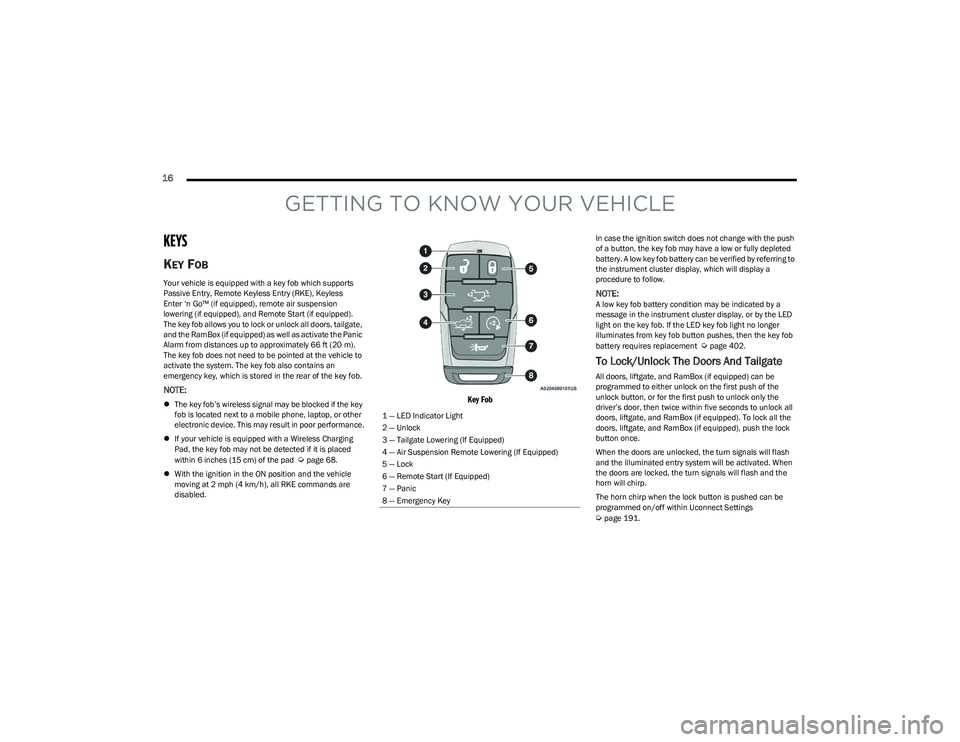
Your vehicle is equipped with a key fob which supports
Passive Entry, Remote Keyless Entry (RKE), Keyless
Enter ‘n Go™ (if equipped), remote air suspension
lowering (if equipped), and Remote Start (if equipped).
The key fob allows you to lock or unlock all doors, tailgate,
and the RamBox (if equipped) as well as activate the Panic
Alarm from distances up to approximately 66 ft (20 m). The key fob does not need to be pointed at the vehicle to
activate the system. The key fob also contains an
emergency key, which is stored in the rear of the key fob.
NOTE:
The key fob’s wireless signal may be blocked if the key
fob is located next to a mobile phone, laptop, or other
electronic device. This may result in poor performance.
If your vehicle is equipped with a Wireless Charging
Pad, the key fob may not be detected if it is placed
within 6 inches (15 cm) of the pad
Úpage 68.
With the ignition in the ON position and the vehicle
moving at 2 mph (4 km/h), all RKE commands are
disabled.
Key Fob
In case the ignition switch does not change with the push
of a button, the key fob may have a low or fully depleted
battery. A low key fob battery can be verified by referring to
the instrument cluster display, which will display a
procedure to follow.
NOTE:A low key fob battery condition may be indicated by a
message in the instrument cluster display, or by the LED
light on the key fob. If the LED key fob light no longer
illuminates from key fob button pushes, then the key fob
battery requires replacement
Úpage 402.
To Lock/Unlock The Doors And Tailgate
All doors, liftgate, and RamBox (if equipped) can be
programmed to either unlock on the first push of the
unlock button, or for the first push to unlock only the
driver’s door, then twice within five seconds to unlock all
doors, liftgate, and RamBox (if equipped). To lock all the
doors, liftgate, and RamBox (if equipped), push the lock
button once.
When the doors are unlocked, the turn signals will flash
and the illuminated entry system will be activated. When
the doors are locked, the turn signals will flash and the
horn will chirp.
The horn chirp when the lock button is pushed can be
programmed on/off within Uconnect Settings
Úpage 191.
1 — LED Indicator Light
2 — Unlock
3 — Tailgate Lowering (If Equipped)
4 — Air Suspension Remote Lowering (If Equipped)
5 — Lock
6 — Remote Start (If Equipped)
7 — Panic
8 — Emergency Key
23_DT_OM_EN_USC_t.book Page 16
Page 63 of 416
GETTING TO KNOW YOUR VEHICLE61
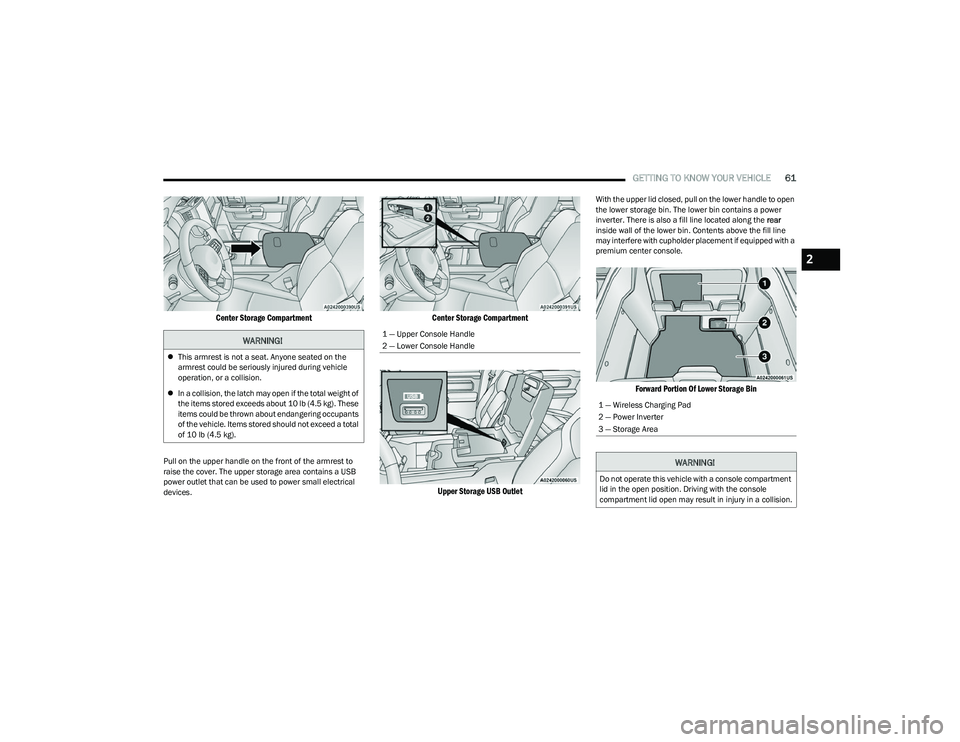
Center Storage Compartment
Pull on the upper handle on the front of the armrest to
raise the cover. The upper storage area contains a USB
power outlet that can be used to power small electrical
devices.
Center Storage Compartment
Upper Storage USB Outlet
With the upper lid closed, pull on the lower handle to open
the lower storage bin. The lower bin contains a power
inverter. There is also a fill line located along the rear
inside wall of the lower bin. Contents above the fill line
may interfere with cupholder placement if equipped with a
premium center console.
Forward Portion Of Lower Storage Bin
WARNING!
This armrest is not a seat. Anyone seated on the
armrest could be seriously injured during vehicle
operation, or a collision.
In a collision, the latch may open if the total weight of
the items stored exceeds about 10 lb (4.5 kg). These
items could be thrown about endangering occupants
of the vehicle. Items stored should not exceed a total
of 10 lb (4.5 kg).
1 — Upper Console Handle
2 — Lower Console Handle
1 — Wireless Charging Pad
2 — Power Inverter
3 — Storage Area
WARNING!
Do not operate this vehicle with a console compartment
lid in the open position. Driving with the console
compartment lid open may result in injury in a collision.
2
23_DT_OM_EN_USC_t.book Page 61
Page 67 of 416

GETTING TO KNOW YOUR VEHICLE65
Flip the inside of the base upward into the upright position,
locking into place, creating and extended storage area.
Fully Extended Storage Area
NOTE:
The rear seats do not need to be folded up to access this
feature.
USB/AUX CONTROL
Located on the center stack, just below the instrument
panel, is the main media hub. There are four total USB
ports: Two Mini-USBs (Type C) and two Standard USBs
(Type A). There is also an AUX port located in the middle of
the USB ports.
Plugging in a smartphone device to a USB port may
activate Android Auto™ or Apple CarPlay® features, if
equipped. For further information, refer to “Android
Auto™” or “Apple CarPlay®” in the Uconnect Radio
Instruction Manual.
NOTE:Two devices can be plugged in at the same time, and both
ports will provide charging capabilities. Only one port can
transfer data to the system at a time. A pop-up will appear
and allow you to select the device transferring data.
For example, if a device is plugged into the Type A USB port
and another device is plugged into the Type C USB port, a
message will appear and allow you to select which device
to use.
Center Stack USB/AUX Media Hub
The third and fourth USB ports are located behind the
center console, above the power inverter. Both are charge
only.
Rear USB Ports
Applicable to only Uconnect 5/5 NAV With 8.4-inch
Display, and Uconnect 5 NAV With 12-inch Display radios,
different scenarios are listed below when a non-phone
device is plugged into the smaller and larger USB ports,
and when a phone device is plugged into the smaller and
larger USB ports:
“A new device is now connected. Previous connection
was lost”.
“(Phone Name) now connected. Previous connection
was lost”.
“Another device is in use through the same USB port.
Please disconnect the first device to use the second
device”.
1 — Standard USB Type A Port #1
2 — AUX Port
3 — Standard USB Type A Port #2
1 — Rear Charge Only USB Ports 1
2 — Rear Charge Only USB Ports 2
2
23_DT_OM_EN_USC_t.book Page 65
Page 68 of 416

66GETTING TO KNOW YOUR VEHICLE
NOTE:Charge unsupported devices with the Charge Only USB
ports. If an unsupported device is plugged into a Media
USB port, a message will display on the touchscreen that
the device is not supported by the system.
Plugging in a phone or another USB device may cause the
connection to a previous device to be lost.
If equipped, your vehicle may also contain a USB port
located on the top tray of the vehicle’s center console.
If equipped, two Mini-USB ports (Type C), two Standard
USB ports (Type A), and one AUX port may be located to the
left of the center stack, just below the climate controls.
Center Console USB/AUX Media Hub
Some USB ports support media and charging. You can use
features, such as Apple CarPlay®, Android Auto™,
Pandora®, and others while charging your phone.
NOTE:Plugging in a phone or another USB device may cause the
connection to a previous device to be lost.
For further information, refer to the Uconnect Radio
Instruction Manual or visit UconnectPhone.com.
ELECTRICAL POWER OUTLETS
The auxiliary 12 Volt (13 Amp) power outlet can provide
power for in-cab accessories designed for use with the
standard “cigarette lighter” style plug. The 12 Volt power
outlets and 5 Volt (2.5 Amp) USB Port (Charge Only) have
a cap attached to the outlet indicating “12V DC”, together
with either a key symbol, battery symbol, or USB symbol.
An auxiliary power outlet can be found in the tray on top of
the center stack. This power outlet works when the ignition
is in the ON/RUN, ACC, or OFF position.
Power Outlet — Top Of Center Stack
Power Outlet Fuse Locations
1 — Standard USB Type A Ports
2 — Mini-USB Type C Ports
3 — AUX Port
CAUTION!
Do not exceed the maximum power of 160 Watts
(13 Amps) at 12 Volts. If the 160 Watts (13 Amps)
power rating is exceeded, the fuse protecting the
system will need to be replaced.
Power outlets are designed for accessory plugs only.
Do not insert any other object in the power outlets as
this will damage the outlet and blow the fuse.
Improper use of the power outlet can cause damage
not covered by your New Vehicle Limited Warranty.
1 — F54 Fuse 20 A Yellow Power Outlet Battery Fed
Position
2 — F54 Fuse 20 A Yellow Power Outlet Ignition Fed
Position
3 — F48 Fuse 10 A Red Port Power or Rear USB
(Charge Only)
23_DT_OM_EN_USC_t.book Page 66
Page 70 of 416
68GETTING TO KNOW YOUR VEHICLE
Certain video game consoles exceed this power limit, as
will most power tools.
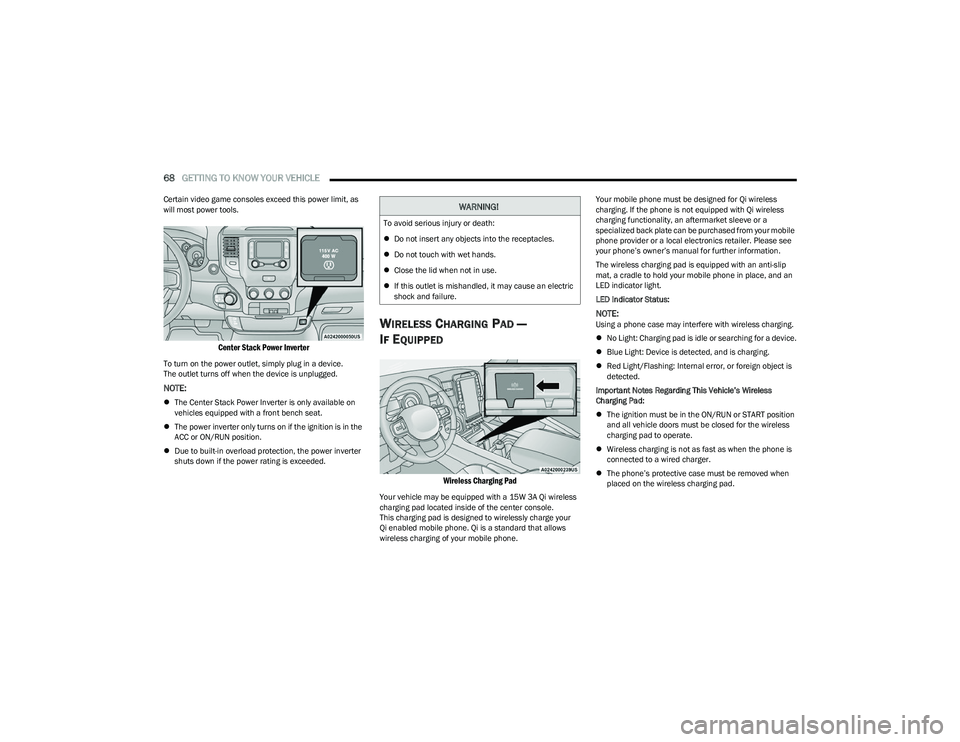
Center Stack Power Inverter
To turn on the power outlet, simply plug in a device.
The outlet turns off when the device is unplugged.
NOTE:
The Center Stack Power Inverter is only available on
vehicles equipped with a front bench seat.
The power inverter only turns on if the ignition is in the
ACC or ON/RUN position.
Due to built-in overload protection, the power inverter
shuts down if the power rating is exceeded.
WIRELESS CHARGING PAD —
I
F EQUIPPED
Wireless Charging Pad
Your vehicle may be equipped with a 15W 3A Qi wireless
charging pad located inside of the center console.
This charging pad is designed to wirelessly charge your
Qi enabled mobile phone. Qi is a standard that allows
wireless charging of your mobile phone. Your mobile phone must be designed for Qi wireless
charging. If the phone is not equipped with Qi wireless
charging functionality, an aftermarket sleeve or a
specialized back plate can be purchased from your mobile
phone provider or a local electronics retailer. Please see
your phone’s owner’s manual for further information.
The wireless charging pad is equipped with an anti-slip
mat, a cradle to hold your mobile phone in place, and an
LED indicator light.
LED Indicator Status:
NOTE:Using a phone case may interfere with wireless charging.
No Light: Charging pad is idle or searching for a device.
Blue Light: Device is detected, and is charging.
Red Light/Flashing: Internal error, or foreign object is
detected.
Important Notes Regarding This Vehicle’s Wireless
Charging Pad:
The ignition must be in the ON/RUN or START position
and all vehicle doors must be closed for the wireless
charging pad to operate.
Wireless charging is not as fast as when the phone is
connected to a wired charger.
The phone’s protective case must be removed when
placed on the wireless charging pad.
WARNING!
To avoid serious injury or death:
Do not insert any objects into the receptacles.
Do not touch with wet hands.
Close the lid when not in use.
If this outlet is mishandled, it may cause an electric
shock and failure.
23_DT_OM_EN_USC_t.book Page 68
Page 71 of 416
GETTING TO KNOW YOUR VEHICLE69
iPhone® 12 (including iPod®) is equipped with
software to protect the device from overheating. When
the software is active, the rate of charge is slowed
down to protect the device.
Phones must always be placed on the wireless
charging pad within the outline shown on the pad so
that its charging parts connect with the charging coils
of the system. Movement of the phone during charging
may prevent or slow the rate of charge.
Having multiple applications open on the phone while
charging will reduce the charging efficiency, and may
even shut down an application that is actively running
(i.e. Apple CarPlay®). This may also cause the phone to
overheat.
Wireless chargers may implement certain methods to
prevent the phone from overheating during charging
such as slowing down the rate of charge. In certain
instances, the device may shut down for a brief period
of time (when the device reaches a certain tempera -
ture). If this happens, it does not mean there is a fault
with the wireless charging pad. This may just be a
protective measure to prevent damage to the phone.UV-C LIGHT — IF EQUIPPED
Your vehicle may be equipped with a UV-C light located
inside the glove compartment used to hygienize surface
areas of items placed inside. The UV-C light hygienizes
using a very specialized, and high powered, UV-C light
source.
NOTE:No chemicals are used in the hygienizing process.
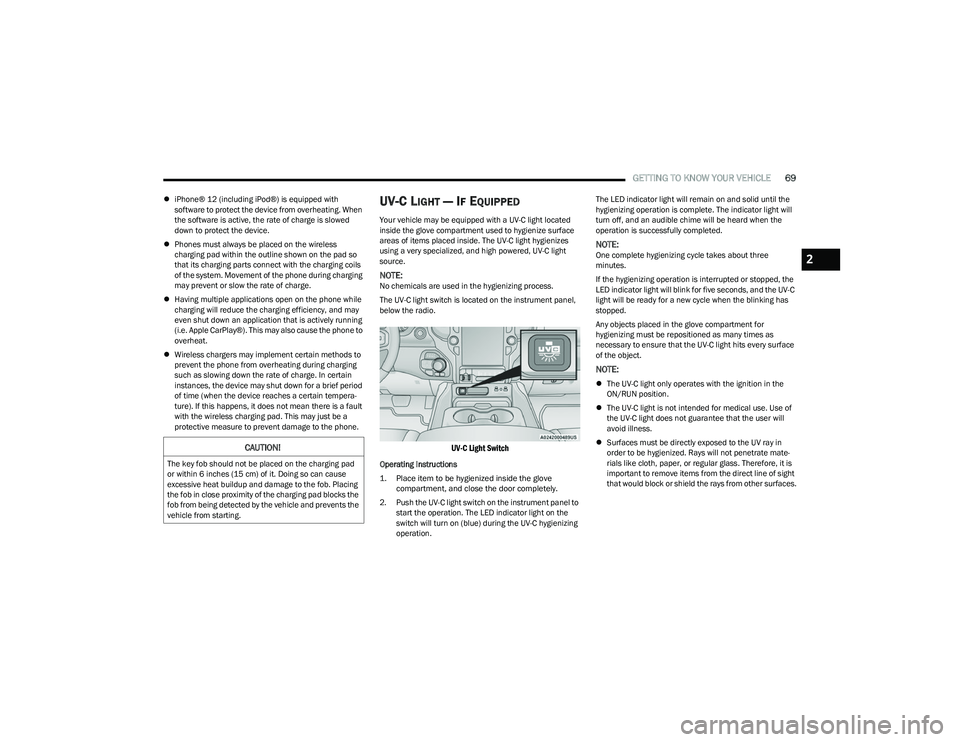
The UV-C light switch is located on the instrument panel,
below the radio.
UV-C Light Switch
Operating Instructions
1. Place item to be hygienized inside the glove compartment, and close the door completely.
2. Push the UV-C light switch on the instrument panel to start the operation. The LED indicator light on the
switch will turn on (blue) during the UV-C hygienizing
operation. The LED indicator light will remain on and solid until the
hygienizing operation is complete. The indicator light will
turn off, and an audible chime will be heard when the
operation is successfully completed.
NOTE:One complete hygienizing cycle takes about three
minutes.
If the hygienizing operation is interrupted or stopped, the
LED indicator light will blink for five seconds, and the UV-C
light will be ready for a new cycle when the blinking has
stopped.
Any objects placed in the glove compartment for
hygienizing must be repositioned as many times as
necessary to ensure that the UV-C light hits every surface
of the object.
NOTE:
The UV-C light only operates with the ignition in the
ON/RUN position.
The UV-C light is not intended for medical use. Use of
the UV-C light does not guarantee that the user will
avoid illness.
Surfaces must be directly exposed to the UV ray in
order to be hygienized. Rays will not penetrate mate -
rials like cloth, paper, or regular glass. Therefore, it is
important to remove items from the direct line of sight
that would block or shield the rays from other surfaces.
CAUTION!
The key fob should not be placed on the charging pad
or within 6 inches (15 cm) of it. Doing so can cause
excessive heat buildup and damage to the fob. Placing
the fob in close proximity of the charging pad blocks the
fob from being detected by the vehicle and prevents the
vehicle from starting.
2
23_DT_OM_EN_USC_t.book Page 69
Page 108 of 416
106GETTING TO KNOW YOUR INSTRUMENT PANEL
Content and Layout
Simple : Speed, Speed Limit
Standard : Speed, Speed Limit, Navigation
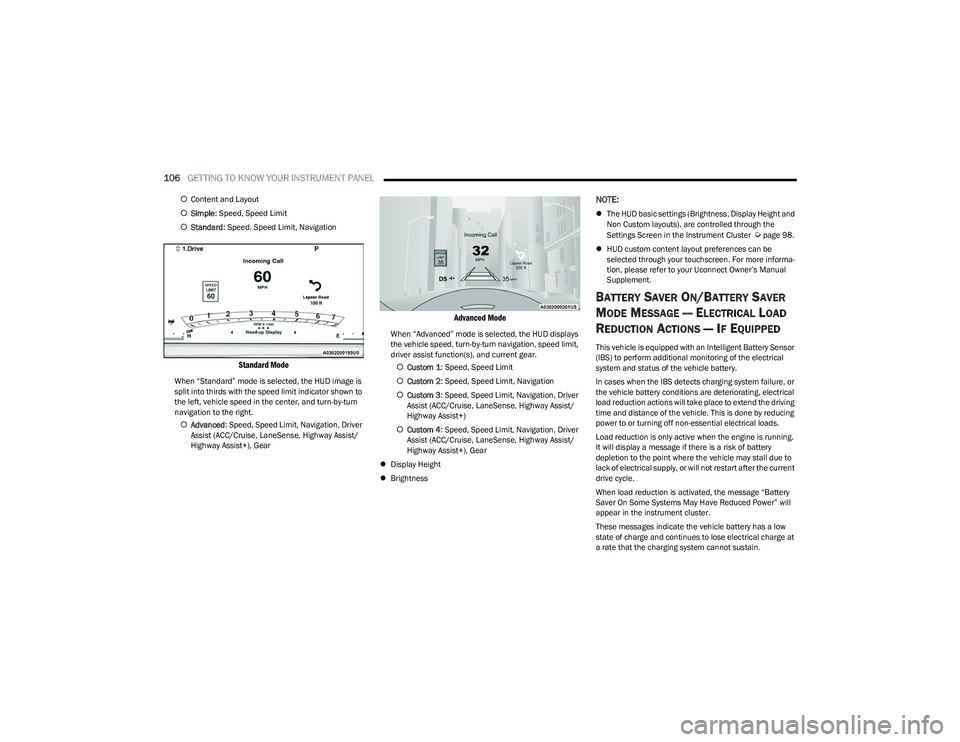
Standard Mode
When “Standard” mode is selected, the HUD image is
split into thirds with the speed limit indicator shown to
the left, vehicle speed in the center, and turn-by-turn
navigation to the right.
Advanced : Speed, Speed Limit, Navigation, Driver
Assist (ACC/Cruise, LaneSense, Highway Assist/
Highway Assist+), Gear
Advanced Mode
When “Advanced” mode is selected, the HUD displays
the vehicle speed, turn-by-turn navigation, speed limit,
driver assist function(s), and current gear.
Custom 1 : Speed, Speed Limit
Custom 2 : Speed, Speed Limit, Navigation
Custom 3 : Speed, Speed Limit, Navigation, Driver
Assist (ACC/Cruise, LaneSense, Highway Assist/
Highway Assist+)
Custom 4 : Speed, Speed Limit, Navigation, Driver
Assist (ACC/Cruise, LaneSense, Highway Assist/
Highway Assist+), Gear
Display Height
Brightness
NOTE:
The HUD basic settings (Brightness, Display Height and
Non Custom layouts), are controlled through the
Settings Screen in the Instrument Cluster
Úpage 98.
HUD custom content layout preferences can be
selected through your touchscreen. For more informa -
tion, please refer to your Uconnect Owner’s Manual
Supplement.
BATTERY SAVER ON/BATTERY SAVER
M
ODE MESSAGE — ELECTRICAL LOAD
R
EDUCTION ACTIONS — IF EQUIPPED
This vehicle is equipped with an Intelligent Battery Sensor
(IBS) to perform additional monitoring of the electrical
system and status of the vehicle battery.
In cases when the IBS detects charging system failure, or
the vehicle battery conditions are deteriorating, electrical
load reduction actions will take place to extend the driving
time and distance of the vehicle. This is done by reducing
power to or turning off non-essential electrical loads.
Load reduction is only active when the engine is running.
It will display a message if there is a risk of battery
depletion to the point where the vehicle may stall due to
lack of electrical supply, or will not restart after the current
drive cycle.
When load reduction is activated, the message “Battery
Saver On Some Systems May Have Reduced Power” will
appear in the instrument cluster.
These messages indicate the vehicle battery has a low
state of charge and continues to lose electrical charge at
a rate that the charging system cannot sustain.
23_DT_OM_EN_USC_t.book Page 106
Page 109 of 416

GETTING TO KNOW YOUR INSTRUMENT PANEL107
NOTE:
The charging system is independent from load reduc -
tion. The charging system performs a diagnostic on the
charging system continuously.
If the Battery Charge Warning Light is on it may indicate
a problem with the charging system
Úpage 108.
The electrical loads that may be switched off (if equipped),
and vehicle functions which can be affected by load
reduction:
Heated Seats / Vented Seats / Heated Wheel
Rear Defroster And Heated Mirrors
HVAC System
115 Volts AC Power Inverter System
Audio and Telematics System
Loss of the battery charge may indicate one or more of the
following conditions:
The charging system cannot deliver enough electrical
power to the vehicle system because the electrical
loads are larger than the capability of charging system.
The charging system is still functioning properly.
Turning on all possible vehicle electrical loads
(e.g. HVAC to max settings, exterior and interior lights,
overloaded power outlets +12 Volts, 115 Volts AC, USB
ports) during certain driving conditions (city driving,
towing, frequent stopping).
Installing options like additional lights, upfitter
electrical accessories, audio systems, alarms and
similar devices.
Unusual driving cycles (short trips separated by long
parking periods).
The vehicle was parked for an extended period of time
(weeks, months).
The battery was recently replaced and was not charged
completely.
The battery was discharged by an electrical load left on
when the vehicle was parked.
The battery was used for an extended period with the
engine not running to supply radio, lights, chargers,
+12 Volt portable appliances like vacuum cleaners,
game consoles and similar devices.
What to do when an electrical load reduction action
message is present (“Battery Saver On” or “Battery Saver
Mode”)
During a trip:
Reduce power to unnecessary loads if possible:
Turn off redundant lights (interior or exterior).
Check what may be plugged in to power outlets
+12 Volts, 115 Volts AC, USB ports.
Check HVAC settings (blower, temperature).
Check the audio settings (volume). After a trip:
Check if any aftermarket equipment was installed
(additional lights, upfitter electrical accessories, audio
systems, alarms) and review specifications if any
(load and Ignition Off Draw currents).
Evaluate the latest driving cycles (distance, driving
time and parking time).
The vehicle should have service performed if the
message is still present during consecutive trips and
the evaluation of the vehicle and driving pattern did not
help to identify the cause.
WARNING LIGHTS AND MESSAGES
The warning/indicator lights will illuminate in the
instrument panel together with a dedicated message
and/or acoustic signal when applicable. These indications
are indicative and precautionary and as such must not be
considered as exhaustive and/or alternative to the
information contained in the Owner’s Manual, which you
are advised to read carefully in all cases. Always refer to
the information in this chapter in the event of a failure
indication. All active telltales will display first if applicable.
The system check menu may appear different based upon
equipment options and current vehicle status. Some
telltales are optional and may not appear.
3
23_DT_OM_EN_USC_t.book Page 107
Page 110 of 416

108GETTING TO KNOW YOUR INSTRUMENT PANEL
RED WARNING LIGHTS
Air Bag Warning Light
This warning light will illuminate to indicate a
fault with the air bag, and will turn on for four to
eight seconds as a bulb check when the
ignition is placed in the ON/RUN or ACC/ON/
RUN position. This light will illuminate with a single chime
when a fault with the air bag has been detected, it will stay
on until the fault is cleared. If the light is either not on
during startup, stays on, or turns on while driving, have the
system inspected at an authorized dealer as soon as
possible.
Brake Warning Light
This warning light monitors various brake
functions, including brake fluid level and
parking brake application. If the brake light
turns on it may indicate that the parking brake
is applied, that the brake fluid level is low, or that there is
a problem with the Anti-Lock Brake System reservoir.
If the light remains on when the parking brake has been
disengaged, and the fluid level is at the full mark on the
master cylinder reservoir, it indicates a possible brake
hydraulic system malfunction or that a problem with the
Brake Booster has been detected by the Anti-Lock Brake
System (ABS) / Electronic Stability Control (ESC) system.
In this case, the light will remain on until the condition has
been corrected. If the problem is related to the brake
booster, the ABS pump will run when applying the brake,
and a brake pedal pulsation may be felt during each stop. The dual brake system provides a reserve braking capacity
in the event of a failure to a portion of the hydraulic
system. A leak in either half of the dual brake system is
indicated by the Brake Warning Light, which will turn on
when the brake fluid level in the master cylinder has
dropped below a specified level.
The light will remain on until the cause is corrected.
NOTE:The light may flash momentarily during sharp cornering
maneuvers, which change fluid level conditions. The
vehicle should have service performed, and the brake
fluid level checked.
If brake failure is indicated, immediate repair is necessary.
Vehicles equipped with the Anti-Lock Brake System (ABS)
are also equipped with Electronic Brake Force Distribution
(EBD). In the event of an EBD failure, the Brake Warning
Light will turn on along with the ABS Light. Immediate
repair to the ABS system is required.
Operation of the Brake Warning Light can be checked by
turning the ignition switch from the OFF position to the
ON/RUN position. The light should illuminate for
approximately two seconds.
The light should then turn off unless the parking brake is
applied or a brake fault is detected. If the light does not
illuminate, have the light inspected by an authorized
dealer.
The light also will turn on when the parking brake is
applied with the ignition switch in the ON/RUN position.
NOTE:This light shows only that the parking brake is applied.
It does not show the degree of brake application.
Battery Charge Warning Light
This warning light will illuminate when the
battery is not charging properly. If it stays on
while the engine is running, there may be a
malfunction with the charging system. Contact
an authorized dealer as soon as possible.
This indicates a possible problem with the electrical
system or a related component.
Door Open Warning Light
This indicator will illuminate when a door is
ajar/open and not fully closed.
NOTE:If the vehicle is moving there will also be a single chime.
WARNING!
Driving a vehicle with the red brake light on is
dangerous. Part of the brake system may have failed. It
will take longer to stop the vehicle. You could have a
collision. Have the vehicle checked immediately.
23_DT_OM_EN_USC_t.book Page 108