child seat RAM 1500 2023 Owners Manual
[x] Cancel search | Manufacturer: RAM, Model Year: 2023, Model line: 1500, Model: RAM 1500 2023Pages: 416, PDF Size: 20.59 MB
Page 4 of 416
2
INTRODUCTION
SYMBOLS KEY ....................................................................... 9
VAN CONVERSIONS/CAMPERS ......................................... 9
CONSUMER INFORMATION — TRUCK-CAMPER
LOADING ................................................................................ 9
VEHICLE MODIFICATIONS/ALTERATIONS ......................11
SYMBOL GLOSSARY ...........................................................11
GETTING TO KNOW YOUR VEHICLE
KEYS ....................................................................................16 Key Fob ........................................................................ 16
SENTRY KEY ........................................................................19
IGNITION SWITCH ..............................................................20 Keyless Enter ‘n Go™ Ignition .................................... 20
REMOTE START — IF EQUIPPED ......................................21 How To Use Remote Start .......................................... 21
To Exit Remote Start Mode ........................................ 22
Remote Start Front Defrost Activation —
If Equipped .................................................................. 22
Remote Start Comfort Systems — If Equipped.......... 22
Remote Start Windshield Wiper De-Icer
Activation — If Equipped ............................................. 23
Remote Start Abort Message ..................................... 23
VEHICLE SECURITY SYSTEM — IF EQUIPPED .................23 To Arm The System ..................................................... 23
To Disarm The System ................................................ 23
Rearming Of The System ............................................ 24
Security System Manual Override.............................. 24 DOORS ................................................................................ 24
Manual Door Locks......................................................24
Power Door Locks — If Equipped ............................... 25
Power Side Steps — If Equipped ................................ 25
Keyless Enter ‘n Go™ — Passive Entry ...................... 25
Automatic Unlock Doors On Exit — If Equipped ......... 27
Automatic Door Locks — If Equipped ........................ 27
Child-Protection Door Lock System — Rear Doors.....27
STEERING WHEEL .............................................................. 28 Tilt/Telescoping Steering Column ............................. 28
Heated Steering Wheel — If Equipped ....................... 28
DRIVER MEMORY SETTINGS — IF EQUIPPED ................ 29 Programming The Memory Feature............................ 29
Linking And Unlinking The Key Fob To Memory......... 29
Memory Position Recall............................................... 30
SEATS .................................................................................. 30 Manual Adjustment
(Front Seats) — If Equipped......................................... 30
Manual Adjustment (Rear Seats) ............................... 31
Power Adjustment (Front Seats) — If Equipped ......... 32
Heated Seats — If Equipped ....................................... 33
Ventilated Seats — If Equipped................................... 34
Plastic Grocery Bag Retainers — If Equipped ............ 34
Head Restraints .......................................................... 34
UCONNECT VOICE RECOGNITION —
IF EQUIPPED ....................................................................... 36 Introducing Voice Recognition .................................... 36
Basic Voice Commands............................................... 36
Get Started ................................................................... 37
Additional Information................................................. 37 DRIVER ADJUSTABLE PEDALS —
IF EQUIPPED ...................................................................... 38
MIRRORS ............................................................................ 38
Inside Rearview Mirror ................................................ 38
Illuminated Vanity Mirror ............................................ 39
Outside Mirrors ........................................................... 40
Outside Automatic Dimming Mirrors —
If Equipped................................................................... 40
Outside Mirrors With Turn Signal And
Approach Lighting — If Equipped................................ 40
Power Mirrors .............................................................. 41
Power Folding Outside Mirrors For Standard
And Trailer Tow — If Equipped .................................... 41
Trailer Towing Mirrors — If Equipped ......................... 42
Heated Mirrors — If Equipped .................................... 42
UNIVERSAL GARAGE DOOR OPENER
(HOMELINK®) — IF EQUIPPED ......................................... 42 Before You Begin Programming HomeLink® ............ 43
Erasing All The HomeLink® Channels ....................... 43
Identifying Whether You Have A Rolling Code Or
Non-Rolling Code Device............................................. 43
Programming HomeLink® To A Garage Door
Opener ......................................................................... 44
Programming HomeLink® To A Miscellaneous
Device .......................................................................... 44
Reprogramming A Single HomeLink® Button ........... 45
Canadian/Gate Operator Programming .................... 45
Security ........................................................................ 45
Troubleshooting Tips ................................................... 46
23_DT_OM_EN_USC_t.book Page 2
Page 8 of 416
6
SAFETY
SAFETY FEATURES........................................................... 262
Anti-Lock Brake System (ABS) ................................. 262Rear Seat Reminder Alert (RSRA) ............................ 263
Electronic Brake Control (EBC) System .................. 263
AUXILIARY DRIVING SYSTEMS ...................................... 269 Blind Spot Monitoring (BSM) —
If Equipped ............................................................... 269
Forward Collision Warning (FCW) With
Mitigation — If Equipped ........................................... 274
Tire Pressure Monitoring System (TPMS) ............... 277
OCCUPANT RESTRAINT SYSTEMS ................................ 282 Occupant Restraint Systems Features ................... 282Important Safety Precautions .................................. 282Seat Belt Systems .................................................... 282
Supplemental Restraint Systems (SRS) .................. 288Child Restraints ........................................................ 298
SAFETY TIPS .................................................................... 311 Transporting Passengers .......................................... 311
Transporting Pets ..................................................... 311
Connected Vehicles .................................................. 311
Safety Checks You Should Make Inside
The Vehicle ............................................................... 311
Periodic Safety Checks You Should Make
Outside The Vehicle .................................................. 312
Exhaust Gas ............................................................. 313Carbon Monoxide Warnings .................................... 313
IN CASE OF EMERGENCY
HAZARD WARNING FLASHERS .................................... 314
ASSIST AND SOS SYSTEM — IF EQUIPPED ................. 314
JACKING AND TIRE CHANGING .................................... 317 Preparations For Jacking.......................................... 317Jack Location ............................................................ 318
Removal Of Jack And Tools ...................................... 318
Removing The Spare Tire ......................................... 319
Jacking Instructions.................................................. 321To Stow The Flat Or Spare ....................................... 323
Reinstalling The Jack And Tools .............................. 324
JUMP STARTING ............................................................. 325 Preparations For Jump Start .................................... 325Jump Starting Procedure.......................................... 325
REFUELING IN EMERGENCY........................................... 326
IF YOUR ENGINE OVERHEATS ....................................... 327
MANUAL PARK RELEASE ............................................... 328
FREEING A STUCK VEHICLE .......................................... 329
TOWING A DISABLED VEHICLE ..................................... 330 Two-Wheel Drive Models .......................................... 331Four-Wheel Drive Models ......................................... 331
Emergency Tow Hooks — If Equipped ..................... 332
ENHANCED ACCIDENT RESPONSE SYSTEM
(EARS) .............................................................................. 332
EVENT DATA RECORDER (EDR) ..................................... 332
SERVICING AND MAINTENANCE
SCHEDULED SERVICING ................................................. 333 Maintenance Plan ..................................................... 334
ENGINE COMPARTMENT ................................................337 3.6L Engine With Stop/Start ................................... 337
5.7L Engine Without Stop/Start ............................... 3385.7L Engine With Stop/Start .................................... 339
Checking Oil Level ..................................................... 340Adding Washer Fluid ................................................ 340
Maintenance-Free Battery ....................................... 340Pressure Washing ..................................................... 341
VEHICLE MAINTENANCE ................................................. 341 Engine Oil .................................................................. 341
Engine Oil Filter ........................................................ 342
Engine Air Cleaner Filter .......................................... 342
Air Conditioner Maintenance ................................... 344
Accessory Drive Belt Inspection ............................... 346Body Lubrication ....................................................... 347
Windshield Wiper Blades ......................................... 347
Exhaust System ........................................................ 348
Cooling System ......................................................... 349
Brake System ........................................................... 352
Automatic Transmission .......................................... 353
Rear Axle And 4x4 Front Driving Axle
Fluid Level ................................................................. 353
Transfer Case ........................................................... 354
Fuses .......................................................................... 354Bulb Replacement .................................................... 365
23_DT_OM_EN_USC_t.book Page 6
Page 22 of 416

20GETTING TO KNOW YOUR VEHICLE
IGNITION SWITCH
KEYLESS ENTER ‘N GO™ IGNITION
This feature allows the driver to operate the ignition switch
with the push of a button as long as the key fob is in the
passenger compartment.
The START/STOP ignition button has several operating
modes that are labeled and will illuminate when in
position. These modes are OFF, ACC, ON/RUN, and START.
Keyless Push Button Ignition
The push button ignition can be placed in the following
modes:
OFF
The engine is stopped
Some electrical devices (e.g. power locks, alarm, etc.)
are still available
ACC
Engine is not started
Some electrical devices are available
(e.g. power sunroof, power windows, etc.)
ON/RUN
Driving position
All electrical devices are available
(e.g. climate controls, heated seats, etc.)
START
The engine will start (when foot is on the brake)
NOTE:If the ignition switch does not change the mode by pushing
the button, the key fob may have a low or depleted battery.
In this situation, a backup method can be used to operate
the ignition switch. Put the nose side (side opposite of the
emergency key) of the key fob against the START/STOP
ignition button and push to operate the ignition switch.
Backup Starting Method
1 — OFF
2 — ACC (Accessory)
3 — ON/RUN
WARNING!
When exiting the vehicle, always remove the key fob
from the vehicle and lock your vehicle.
Never leave children alone in a vehicle, or with
access to an unlocked vehicle.
Allowing children to be in a vehicle unattended is
dangerous for a number of reasons. A child or others
could be seriously or fatally injured. Children should
be warned not to touch the parking brake, brake
pedal or the gear selector.
Do not leave the key fob in or near the vehicle, or in
a location accessible to children, and do not leave
the Keyless Enter ‘n Go™ Ignition in the ON/RUN
position. A child could operate power windows, other
controls, or move the vehicle.
Do not leave children or animals inside parked vehi -
cles in hot weather. Interior heat buildup may cause
serious injury or death.
23_DT_OM_EN_USC_t.book Page 20
Page 24 of 416

22GETTING TO KNOW YOUR VEHICLE
Panic button not pushed
Fuel meets minimum requirement
System not disabled from previous Remote Start event
Vehicle Security system not active
Malfunction Indicator Light (MIL) is not illuminated
TO EXIT REMOTE START MODE
To drive the vehicle after a Remote Start, unlock the doors
using the key fob or Passive Entry and disarm the Vehicle
Security system (if equipped). Then, prior to the end of the
15 minute cycle, press the brake pedal and push and
release the START/STOP ignition button.
The Remote Start system will turn the engine off if the
Remote Start button on the key fob is pushed again, or if
the engine is allowed to run for the entire 15 minute cycle.
Once the ignition is placed in the ON/RUN position, the
climate controls will resume the previously set operations
(temperature, blower control, etc.).
NOTE:
To avoid unintentional shutdowns, the system will
disable for two seconds after receiving a valid Remote
Start request.
For vehicles equipped with the Keyless Enter ‘n Go™ —
Passive Entry feature, the message “Remote Start
Active — Push Start Button” will display in the instru -
ment cluster display until you push the START/STOP
ignition button.
REMOTE START FRONT DEFROST
A
CTIVATION — IF EQUIPPED
When Remote Start is active, and the outside ambient
temperature is 40°F (4.5°C) or below, the system will
automatically activate front defrost for 15 minutes or less.
The time is dependent on the ambient temperature. Once
the timer expires, the system will automatically adjust the
settings depending on ambient conditions. See “Remote
Start Comfort Systems — If Equipped” in the next section
for detailed operation.
REMOTE START COMFORT SYSTEMS —
I
F EQUIPPED
When Remote Start is activated, the front and rear defrost
will automatically turn on in cold weather. The heated
steering wheel and driver heated seat feature will turn on
if programmed in the Comfort menu screen within
Uconnect Settings
Úpage 191. In warm weather, the
driver vented seat feature will automatically turn on when
the Remote Start is activated and is programmed in the
Comfort menu screen. The vehicle will adjust the climate control settings
depending on the outside ambient temperature.
Automatic Temperature Control (ATC) — If Equipped
The climate controls automatically adjust to an optimal
temperature and mode, dependent on the outside
ambient temperature. When the ignition is placed in the
ON/RUN position, the climate controls will resume their
previous settings.
Manual Temperature Control (MTC) — If Equipped
In ambient temperatures of 40°F (4.5°C) or below, the
climate settings will default to maximum heat, with
fresh air entering the cabin. If the front defrost timer
expires, the vehicle will enter Mix Mode.
In ambient temperatures from 40°F (4.5°C) to 78°F
(26°C), the climate settings will be based on the last
settings selected by the driver.
In ambient temperatures of 78°F (26°C) or above, the
climate settings will default to MAX A/C, Bi-Level mode,
with Recirculation on.
For more information on ATC, MTC, and climate control
settings, see
Úpage 54.
NOTE:These features will stay on through the duration of Remote
Start, or until the ignition is placed in the ON/RUN
position. The climate control settings will change, and exit
the automatic defaults, if manually adjusted by the driver
while the vehicle is in Remote Start mode. This includes
turning the climate controls off using the OFF button.
WARNING!
Do not start or run an engine in a closed garage or
confined area. Exhaust gas contains carbon
monoxide (CO) which is odorless and colorless.
Carbon monoxide is poisonous and can cause
serious injury or death when inhaled.
Keep key fobs away from children. Operation of the
Remote Start system, windows, door locks or other
controls could cause serious injury or death.
23_DT_OM_EN_USC_t.book Page 22
Page 29 of 416

GETTING TO KNOW YOUR VEHICLE27
NOTE:DO NOT grab the door handle when pushing the door
handle lock button. This could unlock the door(s).
Do NOT Grab The Door Handle When Locking
NOTE:
After pushing the door handle button, you must wait
two seconds before you can lock or unlock the doors,
using either Passive Entry door handle. This is done to
allow you to check if the vehicle is locked by pulling the
door handle without the vehicle unlocking.
If Passive Entry is disabled using the Uconnect
Settings, the key protection described in
"Frequency Operated Button Integrated Key
(FOBIK-Safe)" remains active/functional.
The Passive Entry system will not operate if the key fob
battery is depleted.
The LED light on the key fob will not blink if the key
fob battery is low or fully depleted, but a low key
fob battery condition will still support the Passive
Entry system functionality. When the key fob
battery is low, the instrument cluster will display a
message indicating that the key fob battery is low
Úpage 402.
AUTOMATIC UNLOCK DOORS ON EXIT —
I
F EQUIPPED
The doors will unlock automatically on vehicles with power
door locks after the following sequence of actions:
1. The Automatic Unlock Doors On Exit feature is
enabled within the Uconnect system.
2. All doors are closed.
3. The gear selector was not in PARK, then is placed in PARK.
4. Any door is opened.
AUTOMATIC DOOR LOCKS —
I
F EQUIPPED
The auto door lock feature default condition is enabled.
When enabled, the door locks will lock automatically when
the vehicle's speed exceeds 15 mph (24 km/h). The auto
door lock feature is enabled/disabled in the Uconnect
Settings
Úpage 191.
CHILD-PROTECTION DOOR LOCK
S
YSTEM — REAR DOORS
To provide a safer environment for small children riding in
the rear seats, the rear doors are equipped with a
Child-Protection Door Lock system.
To use the system, open each rear door, use a flat-blade
screwdriver, and rotate the dial to the lock or unlock
position. When the system on a door is engaged, that door
can only be opened by using the outside door handle even
if the inside door lock is in the unlocked position.
Child Lock Control
2
23_DT_OM_EN_USC_t.book Page 27
Page 38 of 416

36GETTING TO KNOW YOUR VEHICLE
Rear Head Restraints
The outboard head restraints are non-adjustable, but can
be folded down for improved rearward visibility. Push the
button on the outboard side of the head restraint to
release. To return the head restraint to its upright position,
push up on the head restraint until it locks back into place.
Release Button
The center head restraint is not adjustable or removable.
NOTE:The head restraints should only be removed by qualified
technicians, for service purposes only. If any of the head
restraints require removal, see an authorized dealer.
For child restraint tethering, see
Úpage 282.
UCONNECT VOICE RECOGNITION —
IF EQUIPPED
INTRODUCING VOICE RECOGNITION
Start using Uconnect Voice Recognition with these helpful
quick tips. It provides the key Voice Commands and tips
you need to know to control your vehicle’s Voice
Recognition (VR) system. This system is only available on
the Uconnect 3 With 5-inch Display, Uconnect 5 NAV With
8.4-inch Display, and the Uconnect 5 NAV With 12-inch
Display.
Uconnect 3 With 5-inch Display
If you see the NAV icon on the bottom bar or in the Apps
menu of your 8.4-inch touchscreen, you have the
Uconnect 5 NAV system. If not, you have a Uconnect 5 with
8.4-inch display system.
BASIC VOICE COMMANDS
The following basic Voice Commands can be given at any
point while using your Uconnect system.
Push the VR button or for the Uconnect 5/5 NAV, say
the vehicle’s “Wake Up” word, “Hey Uconnect”. After the
beep, say:
“Cancel ” to stop a current voice session.
“Help ” to hear a list of suggested Voice Commands.
“Repeat ” to listen to the system prompts again.
Notice the visual cues that inform you of your Voice
Recognition system’s status.
NOTE:On Uconnect 5 systems, the factory default “Wake Up”
word is set to “Hey Uconnect” and can be reprogrammed
through the Uconnect Settings.
WARNING!
Sitting in a seat with the head restraint in its lowered
position could result in serious injury or death in a
collision. Always make sure the outboard head
restraints are in their upright positions when the seat is
to be occupied.
23_DT_OM_EN_USC_t.book Page 36
Page 74 of 416
72GETTING TO KNOW YOUR VEHICLE
(Continued)
WIND BUFFETING
Wind buffeting can be described as the perception of
pressure on the ears or a helicopter-type sound in the
ears. Your vehicle may exhibit wind buffeting with the
windows down, or the sunroof (if equipped) in certain open
or partially open positions. This is a normal occurrence
and can be minimized. If the buffeting occurs with the rear
windows open, open the front and rear windows together
to minimize the buffeting. If the buffeting occurs with the
sunroof open, adjust the sunroof opening to minimize the
buffeting or open any window.
POWER SUNROOF — IF EQUIPPED
DUAL PANE POWER SUNROOF
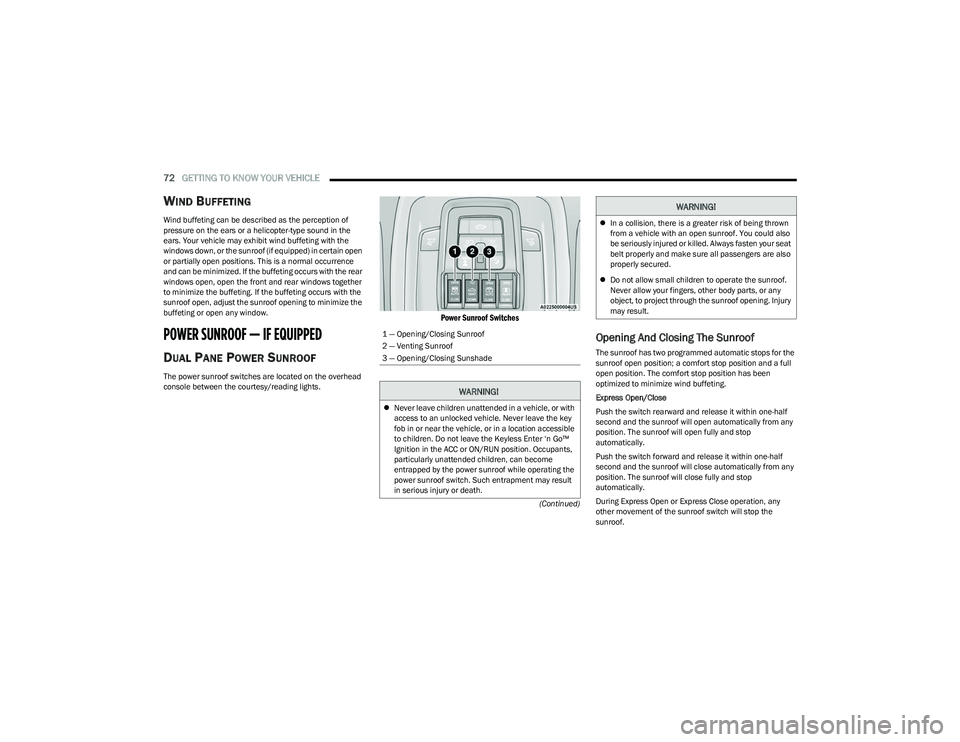
The power sunroof switches are located on the overhead
console between the courtesy/reading lights.
Power Sunroof Switches
Opening And Closing The Sunroof
The sunroof has two programmed automatic stops for the
sunroof open position; a comfort stop position and a full
open position. The comfort stop position has been
optimized to minimize wind buffeting.
Express Open/Close
Push the switch rearward and release it within one-half
second and the sunroof will open automatically from any
position. The sunroof will open fully and stop
automatically.
Push the switch forward and release it within one-half
second and the sunroof will close automatically from any
position. The sunroof will close fully and stop
automatically.
During Express Open or Express Close operation, any
other movement of the sunroof switch will stop the
sunroof.
1 — Opening/Closing Sunroof
2 — Venting Sunroof
3 — Opening/Closing Sunshade
WARNING!
Never leave children unattended in a vehicle, or with
access to an unlocked vehicle. Never leave the key
fob in or near the vehicle, or in a location accessible
to children. Do not leave the Keyless Enter ‘n Go™
Ignition in the ACC or ON/RUN position. Occupants,
particularly unattended children, can become
entrapped by the power sunroof while operating the
power sunroof switch. Such entrapment may result
in serious injury or death.
In a collision, there is a greater risk of being thrown
from a vehicle with an open sunroof. You could also
be seriously injured or killed. Always fasten your seat
belt properly and make sure all passengers are also
properly secured.
Do not allow small children to operate the sunroof.
Never allow your fingers, other body parts, or any
object, to project through the sunroof opening. Injury
may result.
WARNING!
23_DT_OM_EN_USC_t.book Page 72
Page 120 of 416

118
(Continued)
STARTING AND OPERATING
STARTING THE ENGINE
Before starting your vehicle, adjust your seat, adjust both
inside and outside mirrors, and fasten your seat belt.
The starter should not be operated for more than
10-second intervals. Waiting at least 10 to 15 seconds
between such intervals will protect the starter from
overheating.
AUTOMATIC TRANSMISSION
Start the engine with the transmission in PARK position.
Apply the brake before shifting into any driving range.
NOTE:
This vehicle is equipped with a transmission shift inter -
locking system. The brake pedal must be pressed to
shift out of PARK.
If equipped with an 8-speed transmission, starting the
vehicle in NEUTRAL is not possible unless the Manual
Park Release has been activated
Úpage 328.
TIP START FEATURE
Do not press the accelerator. Cycle the ignition switch
briefly to the START position and release it. The starter
motor will continue to run and will automatically
disengage when the engine is running.
KEYLESS ENTER ‘N GO™ — IGNITION
This feature allows the driver to operate the ignition
switch with the push of a button, as long as the Remote
Start/Keyless Enter ‘n Go™ key fob is in the passenger
compartment.
NORMAL STARTING USING ENGINE
START/STOP B
UTTON
To Turn On The Engine Using The ENGINE START/STOP
Button
1. The transmission must be in PARK.
2. Press and hold the brake pedal while pushing the
ENGINE START/STOP button once.
3. The system starts the vehicle. If the vehicle fails to start, the starter will disengage automatically after
10 seconds.
4. If you wish to stop the cranking of the engine prior to the engine starting, push the button again.WARNING!
When leaving the vehicle, always make sure the
keyless ignition node is in the OFF position, remove
the key fob from the vehicle and lock the vehicle.
Never leave children alone in a vehicle, or with
access to an unlocked vehicle. Allowing children to
be in a vehicle unattended is dangerous for a
number of reasons. A child or others could be seri -
ously or fatally injured. Children should be warned
not to touch the parking brake, brake pedal or the
gear selector.
Do not leave the key fob in or near the vehicle, or in
a location accessible to children, and do not leave
the ignition of a vehicle equipped with Keyless Enter
‘n Go™ in the ACC or ON/RUN position. A child could
operate power windows, other controls, or move the
vehicle.
Do not leave children or animals inside parked vehi -
cles in hot weather. Interior heat buildup may cause
serious injury or death.
WARNING!
23_DT_OM_EN_USC_t.book Page 118
Page 265 of 416
SAFETY263
REAR SEAT REMINDER ALERT (RSRA)
RSRA alerts of the possible presence of an object,
passenger, or pet in the rear seats through a visual and
auditory notification. When the system is activated, it
displays the message “Check Rear Seat” on the
instrument cluster display and sounds an auditory alert
upon the driver placing the ignition in the OFF position to
exit the vehicle. The system will activate automatically if a
rear door is opened within 10 minutes of the ignition being
placed in the ON/RUN position. RSRA should be used as a
reminder to check the rear seats, it does not directly
detect objects, passengers, or pets and is only activated
when the previous conditions are met.
To enable or disable RSRA, see
Úpage 191.
ELECTRONIC BRAKE CONTROL (EBC)
S
YSTEM
Your vehicle is equipped with an advanced Electronic
Brake Control (EBC) system. This system includes
Anti-Lock Brake System (ABS), Brake Assist System (BAS),
Electronic Brake Force Distribution (EBD), Electronic Roll
Mitigation (ERM), Electronic Stability Control (ESC), Hill
Start Assist (HSA), and Traction Control System (TCS).
These systems work together to enhance both vehicle
stability and control in various driving conditions.
Your vehicle may also be equipped with Trailer Sway
Control (TSC) and Hill Descent Control (HDC).
Brake Assist System (BAS)
The BAS is designed to optimize the vehicle’s braking
capability during emergency braking maneuvers. The
system detects an emergency braking situation by sensing
the rate and amount of brake application, and then
applies optimum pressure to the brakes. This can help
reduce braking distances. The BAS complements the
Anti-Lock Brake System (ABS). Applying the brakes very
quickly results in the best BAS assistance. To receive the
benefit of the system, you must apply continuous braking
pressure during the stopping sequence (do not “pump”
the brakes). Do not reduce brake pedal pressure unless
braking is no longer desired. Once the brake pedal is
released, the BAS is deactivated.
Brake System Warning Light
The red Brake System Warning Light will turn on when the
ignition is placed in the ON/RUN mode and may stay on for
as long as four seconds.
If the Brake System Warning Light remains on or comes on
while driving, it indicates that the brake system is not
functioning properly and that immediate service is
required. If the Brake System Warning Light does not
come on when the ignition is placed in the ON/RUN mode,
have the light repaired as soon as possible.
Electronic Brake Force Distribution (EBD)
EBD manages the distribution of the braking torque
between the front and rear axles by limiting braking
pressure to the rear axle. This is done to prevent overslip
of the rear wheels to avoid vehicle instability, and to
prevent the rear axle from entering the Anti-Lock Brake
System (ABS) before the front axle.
WARNING!
Before exiting a vehicle, always come to a complete
stop, then shift the automatic transmission into
PARK and apply the parking brake.
Always make sure the keyless ignition node is in the
OFF position, key fob is removed from the vehicle
and vehicle is locked.
Never leave children alone in a vehicle, or with
access to an unlocked vehicle. Leaving children in a
vehicle unattended is dangerous for a number of
reasons. A child or others could be seriously or fatally
injured. Children should be warned not to touch the
parking brake, brake pedal or the gear selector.
Do not leave children or animals inside parked vehi -
cles in hot weather. Interior heat buildup may cause
serious injury or death.
WARNING!
The Brake Assist System (BAS) cannot prevent the
natural laws of physics from acting on the vehicle, nor
can it increase the traction afforded by prevailing road
conditions. BAS cannot prevent collisions, including
those resulting from excessive speed in turns, driving
on very slippery surfaces, or hydroplaning. The
capabilities of a BAS-equipped vehicle must never be
exploited in a reckless or dangerous manner, which
could jeopardize the user's safety or the safety of
others.
6
23_DT_OM_EN_USC_t.book Page 263
Page 284 of 416
282SAFETY
OCCUPANT RESTRAINT SYSTEMS
Some of the most important safety features in your vehicle
are the restraint systems:
OCCUPANT RESTRAINT SYSTEMS
F
EATURES
Seat Belt Systems
Supplemental Restraint Systems (SRS) Air Bags
Child Restraints
Some of the safety features described in this section may
be standard equipment on some models, or may be
optional equipment on others. If you are not sure, ask an
authorized dealer.
IMPORTANT SAFETY PRECAUTIONS
Please pay close attention to the information in this
section. It tells you how to use your restraint system
properly, to keep you and your passengers as safe as
possible.
Here are some simple steps you can take to minimize the
risk of harm from a deploying air bag:
1. Children 12 years old and under should always ride buckled up in the rear seat of a vehicle with
a rear seat.
2. A child who is not big enough to wear the vehicle seat belt properly must be secured in the appropriate child
restraint or belt-positioning booster seat in a rear
seating position
Úpage 298. 3. If a child from 2 to 12 years old (not in a rear-facing
child restraint) must ride in the front passenger seat,
move the seat as far back as possible and use the
proper child restraint
Úpage 298.
4. Never allow children to slide the shoulder belt behind them or under their arm.
5. You should read the instructions provided with your child restraint to make sure that you are using it
properly.
6. All occupants should always wear their lap and shoulder belts properly.
7. The driver and front passenger seats should be moved back as far as practical to allow the front air
bags room to inflate.
8. Do not lean against the door or window. If your vehicle has side air bags, and deployment occurs, the side air
bags will inflate forcefully into the space between
occupants and the door and occupants could be
injured.
9. If the air bag system in this vehicle needs to be modified to accommodate a disabled person, see
Úpage 398 for customer service contact
information.
SEAT BELT SYSTEMS
Buckle up even though you are an excellent driver, even
on short trips. Someone on the road may be a poor driver
and could cause a collision that includes you. This can
happen far away from home or on your own street.
Research has shown that seat belts save lives, and they
can reduce the seriousness of injuries in a collision. Some
of the worst injuries happen when people are thrown from
the vehicle. Seat belts reduce the possibility of ejection
and the risk of injury caused by striking the inside of the
vehicle. Everyone in a motor vehicle should be belted at all
times.
WARNING!
Never place a rear-facing child restraint in front of an
air bag. A deploying passenger front air bag can
cause death or serious injury to a child 12 years or
younger, including a child in a rear-facing child
restraint.
Never install a rear-facing child restraint in the front
seat of a vehicle. Only use a rear-facing child
restraint in the rear seat. If the vehicle does not have
a rear seat, do not transport a rear-facing child
restraint in that vehicle.
23_DT_OM_EN_USC_t.book Page 282