seat memory RAM 1500 2023 Owners Manual
[x] Cancel search | Manufacturer: RAM, Model Year: 2023, Model line: 1500, Model: RAM 1500 2023Pages: 416, PDF Size: 20.59 MB
Page 4 of 416
2
INTRODUCTION
SYMBOLS KEY ....................................................................... 9
VAN CONVERSIONS/CAMPERS ......................................... 9
CONSUMER INFORMATION — TRUCK-CAMPER
LOADING ................................................................................ 9
VEHICLE MODIFICATIONS/ALTERATIONS ......................11
SYMBOL GLOSSARY ...........................................................11
GETTING TO KNOW YOUR VEHICLE
KEYS ....................................................................................16 Key Fob ........................................................................ 16
SENTRY KEY ........................................................................19
IGNITION SWITCH ..............................................................20 Keyless Enter ‘n Go™ Ignition .................................... 20
REMOTE START — IF EQUIPPED ......................................21 How To Use Remote Start .......................................... 21
To Exit Remote Start Mode ........................................ 22
Remote Start Front Defrost Activation —
If Equipped .................................................................. 22
Remote Start Comfort Systems — If Equipped.......... 22
Remote Start Windshield Wiper De-Icer
Activation — If Equipped ............................................. 23
Remote Start Abort Message ..................................... 23
VEHICLE SECURITY SYSTEM — IF EQUIPPED .................23 To Arm The System ..................................................... 23
To Disarm The System ................................................ 23
Rearming Of The System ............................................ 24
Security System Manual Override.............................. 24 DOORS ................................................................................ 24
Manual Door Locks......................................................24
Power Door Locks — If Equipped ............................... 25
Power Side Steps — If Equipped ................................ 25
Keyless Enter ‘n Go™ — Passive Entry ...................... 25
Automatic Unlock Doors On Exit — If Equipped ......... 27
Automatic Door Locks — If Equipped ........................ 27
Child-Protection Door Lock System — Rear Doors.....27
STEERING WHEEL .............................................................. 28 Tilt/Telescoping Steering Column ............................. 28
Heated Steering Wheel — If Equipped ....................... 28
DRIVER MEMORY SETTINGS — IF EQUIPPED ................ 29 Programming The Memory Feature............................ 29
Linking And Unlinking The Key Fob To Memory......... 29
Memory Position Recall............................................... 30
SEATS .................................................................................. 30 Manual Adjustment
(Front Seats) — If Equipped......................................... 30
Manual Adjustment (Rear Seats) ............................... 31
Power Adjustment (Front Seats) — If Equipped ......... 32
Heated Seats — If Equipped ....................................... 33
Ventilated Seats — If Equipped................................... 34
Plastic Grocery Bag Retainers — If Equipped ............ 34
Head Restraints .......................................................... 34
UCONNECT VOICE RECOGNITION —
IF EQUIPPED ....................................................................... 36 Introducing Voice Recognition .................................... 36
Basic Voice Commands............................................... 36
Get Started ................................................................... 37
Additional Information................................................. 37 DRIVER ADJUSTABLE PEDALS —
IF EQUIPPED ...................................................................... 38
MIRRORS ............................................................................ 38
Inside Rearview Mirror ................................................ 38
Illuminated Vanity Mirror ............................................ 39
Outside Mirrors ........................................................... 40
Outside Automatic Dimming Mirrors —
If Equipped................................................................... 40
Outside Mirrors With Turn Signal And
Approach Lighting — If Equipped................................ 40
Power Mirrors .............................................................. 41
Power Folding Outside Mirrors For Standard
And Trailer Tow — If Equipped .................................... 41
Trailer Towing Mirrors — If Equipped ......................... 42
Heated Mirrors — If Equipped .................................... 42
UNIVERSAL GARAGE DOOR OPENER
(HOMELINK®) — IF EQUIPPED ......................................... 42 Before You Begin Programming HomeLink® ............ 43
Erasing All The HomeLink® Channels ....................... 43
Identifying Whether You Have A Rolling Code Or
Non-Rolling Code Device............................................. 43
Programming HomeLink® To A Garage Door
Opener ......................................................................... 44
Programming HomeLink® To A Miscellaneous
Device .......................................................................... 44
Reprogramming A Single HomeLink® Button ........... 45
Canadian/Gate Operator Programming .................... 45
Security ........................................................................ 45
Troubleshooting Tips ................................................... 46
23_DT_OM_EN_USC_t.book Page 2
Page 31 of 416

GETTING TO KNOW YOUR VEHICLE29
DRIVER MEMORY SETTINGS — IF EQUIPPED
This feature allows the driver to save up to two different
memory profiles for easy recall through a memory switch.
Each memory profile saves desired position settings for
the following features:
Driver’s seat
Easy Entry/Exit seat operation (if equipped)
Adjustable pedals (if equipped)
Side mirrors
NOTE:Your vehicle is equipped with two key fobs, each can be
linked to either memory position 1 or 2. The driver memory settings switch is located on the driver
door, next to the door handle, and consists of three
buttons:
The set (S) button, which is used to activate the
memory save function.
The (1) and (2) buttons which are used to recall either
of two saved memory profiles.
Memory Settings Switch
PROGRAMMING THE MEMORY FEATURE
To create a new memory profile, perform the following:
NOTE:Saving a new memory profile will erase the selected profile
from memory.
1. Place the vehicle’s ignition in the ON/RUN position
(do not start the engine).
2. Adjust all memory profile settings to desired preferences (i.e., driver’s seat, outside mirrors,
adjustable pedals (if equipped), and radio station
presets). 3. Push the set (S) button on the memory switch, and
then push the desired memory button (1 or 2) within
five seconds. The instrument cluster display will
display which memory position has been set.
NOTE:Memory profiles can be set without the vehicle in PARK,
but the vehicle must be in PARK to recall a memory profile.
LINKING AND UNLINKING THE KEY FOB
T
O MEMORY
Your key fob can be programmed to recall one of two
saved memory profiles.
NOTE:Before programming your key fob you must select the
“Personal Settings Linked to Key Fob” feature through the
Uconnect system
Úpage 191.
To program your key fob, perform the following:
1. Place the vehicle’s ignition in the OFF position.
2. Select a desired memory profile 1 or 2.
3. Once the profile has been recalled, push and release the set (S) button on the memory switch.
4. Push and release button (1) or (2) accordingly. “Memory Profile Set” (1 or 2) will display in the
instrument cluster.
5. Push and release the lock button on the key fob within 10 seconds.
NOTE:Your key fob can be unlinked from your memory settings
by pushing the set (S) button, followed by pushing the
unlock button on the key fob within 10 seconds.
WARNING!
Persons who are unable to feel pain to the skin
because of advanced age, chronic illness, diabetes,
spinal cord injury, medication, alcohol use, exhaus -
tion, or other physical conditions must exercise care
when using the steering wheel heater. It may cause
burns even at low temperatures, especially if used
for long periods.
Do not place anything on the steering wheel that
insulates against heat, such as a blanket or steering
wheel covers of any type or material. This may cause
the steering wheel heater to overheat.
2
23_DT_OM_EN_USC_t.book Page 29
Page 32 of 416

30GETTING TO KNOW YOUR VEHICLE
MEMORY POSITION RECALL
NOTE:If a recall is attempted when the vehicle is not in PARK, a
message will display in the instrument cluster display.
To recall the memory settings for driver one or two, push
the desired memory button number (1 or 2) or the unlock
button on the key fob linked to the desired memory
position.
A recall can be canceled by pushing any of the memory
buttons (S, 1, or 2) during a recall. When a recall is
canceled, the driver seat will stop moving. A delay of one
second will occur before another recall can be selected.
SEATS
Seats are a part of the Occupant Restraint system of the
vehicle.
MANUAL ADJUSTMENT
(F
RONT SEATS) — IF EQUIPPED
Manual Front Seat Forward/Rearward
Adjustment
Both front seats are adjustable forward or rearward. The
manual seat adjustment handle is located under the seat
cushion at the front edge of each seat.
Manual Seat Adjustment Bar
While sitting in the seat, pull up on the handle and slide
the seat forward or rearward. Release the bar once you
have reached the desired position. Then, using body
pressure, move forward and rearward on the seat to be
sure that the seat adjusters have latched.
WARNING!
It is dangerous to ride in a cargo area, inside or
outside of a vehicle. In a collision, people riding in
these areas are more likely to be seriously injured or
killed.
Do not allow people to ride in any area of your vehicle
that is not equipped with seats and seat belts. In a
collision, people riding in these areas are more likely
to be seriously injured or killed.
Be sure everyone in your vehicle is in a seat and
using a seat belt properly.
WARNING!
Adjusting a seat while the vehicle is moving is
dangerous. The sudden movement of the seat could
cause you to lose control. The seat belt might not be
adjusted properly and you could be injured. Adjust
the seat only while the vehicle is parked.
Do not ride with the seatback reclined so that the
shoulder belt is no longer resting against your chest.
In a collision you could slide under the seat belt and
be seriously or even fatally injured. Use the recliner
only when the vehicle is parked.
WARNING!
Adjusting a seat while driving may be dangerous.
Moving a seat while driving could result in loss of
control which could cause a collision and serious
injury or death.
Seats should be adjusted before fastening the
seat belts and while the vehicle is parked. Serious
injury or death could result from a poorly adjusted
seat belt.
23_DT_OM_EN_USC_t.book Page 30
Page 35 of 416
GETTING TO KNOW YOUR VEHICLE33
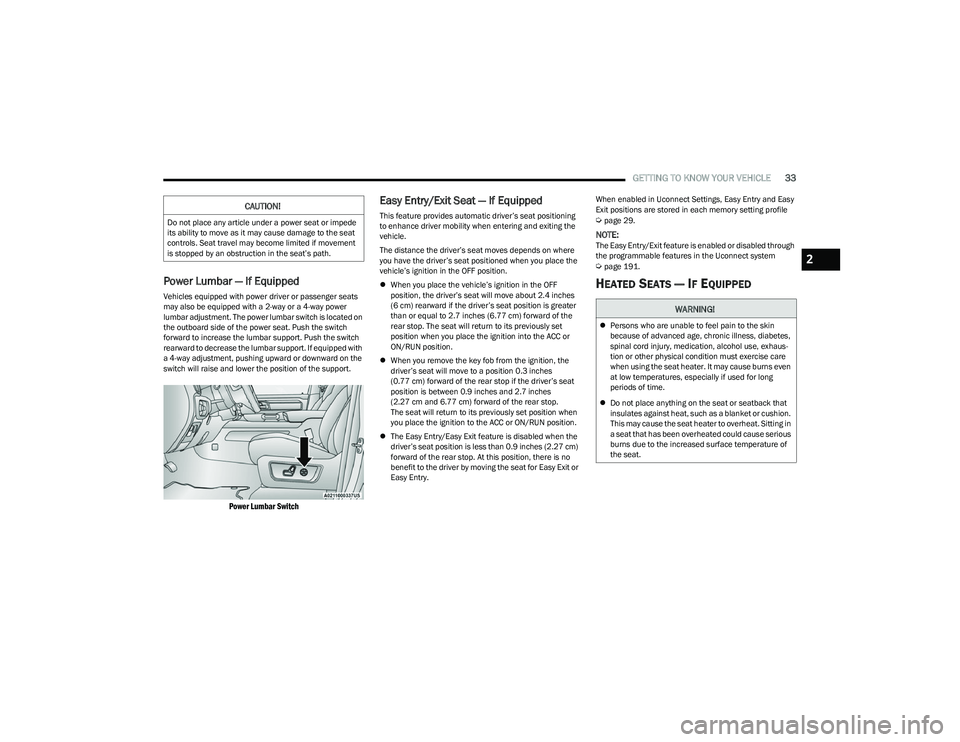
Power Lumbar — If Equipped
Vehicles equipped with power driver or passenger seats
may also be equipped with a 2-way or a 4-way power
lumbar adjustment. The power lumbar switch is located on
the outboard side of the power seat. Push the switch
forward to increase the lumbar support. Push the switch
rearward to decrease the lumbar support. If equipped with
a 4-way adjustment, pushing upward or downward on the
switch will raise and lower the position of the support.
Power Lumbar Switch
Easy Entry/Exit Seat — If Equipped
This feature provides automatic driver’s seat positioning
to enhance driver mobility when entering and exiting the
vehicle.
The distance the driver’s seat moves depends on where
you have the driver’s seat positioned when you place the
vehicle’s ignition in the OFF position.
When you place the vehicle’s ignition in the OFF
position, the driver’s seat will move about 2.4 inches
(6 cm) rearward if the driver’s seat position is greater
than or equal to 2.7 inches (6.77 cm) forward of the
rear stop. The seat will return to its previously set
position when you place the ignition into the ACC or
ON/RUN position.
When you remove the key fob from the ignition, the
driver’s seat will move to a position 0.3 inches
(0.77 cm) forward of the rear stop if the driver’s seat
position is between 0.9 inches and 2.7 inches
(2.27 cm and 6.77 cm) forward of the rear stop.
The seat will return to its previously set position when
you place the ignition to the ACC or ON/RUN position.
The Easy Entry/Easy Exit feature is disabled when the
driver’s seat position is less than 0.9 inches (2.27 cm)
forward of the rear stop. At this position, there is no
benefit to the driver by moving the seat for Easy Exit or
Easy Entry. When enabled in Uconnect Settings, Easy Entry and Easy
Exit positions are stored in each memory setting profile Úpage 29.
NOTE:The Easy Entry/Exit feature is enabled or disabled through
the programmable features in the Uconnect system
Úpage 191.
HEATED SEATS — IF EQUIPPED
CAUTION!
Do not place any article under a power seat or impede
its ability to move as it may cause damage to the seat
controls. Seat travel may become limited if movement
is stopped by an obstruction in the seat’s path.
WARNING!
Persons who are unable to feel pain to the skin
because of advanced age, chronic illness, diabetes,
spinal cord injury, medication, alcohol use, exhaus -
tion or other physical condition must exercise care
when using the seat heater. It may cause burns even
at low temperatures, especially if used for long
periods of time.
Do not place anything on the seat or seatback that
insulates against heat, such as a blanket or cushion.
This may cause the seat heater to overheat. Sitting in
a seat that has been overheated could cause serious
burns due to the increased surface temperature of
the seat.
2
23_DT_OM_EN_USC_t.book Page 33
Page 40 of 416
38GETTING TO KNOW YOUR VEHICLE
DRIVER ADJUSTABLE PEDALS —
IF EQUIPPED
The adjustable pedals system is designed to allow a
greater range of driver comfort for steering wheel tilt and
seat position. This feature allows the brake and
accelerator pedals to move toward or away from the driver
to provide improved position with the steering wheel.
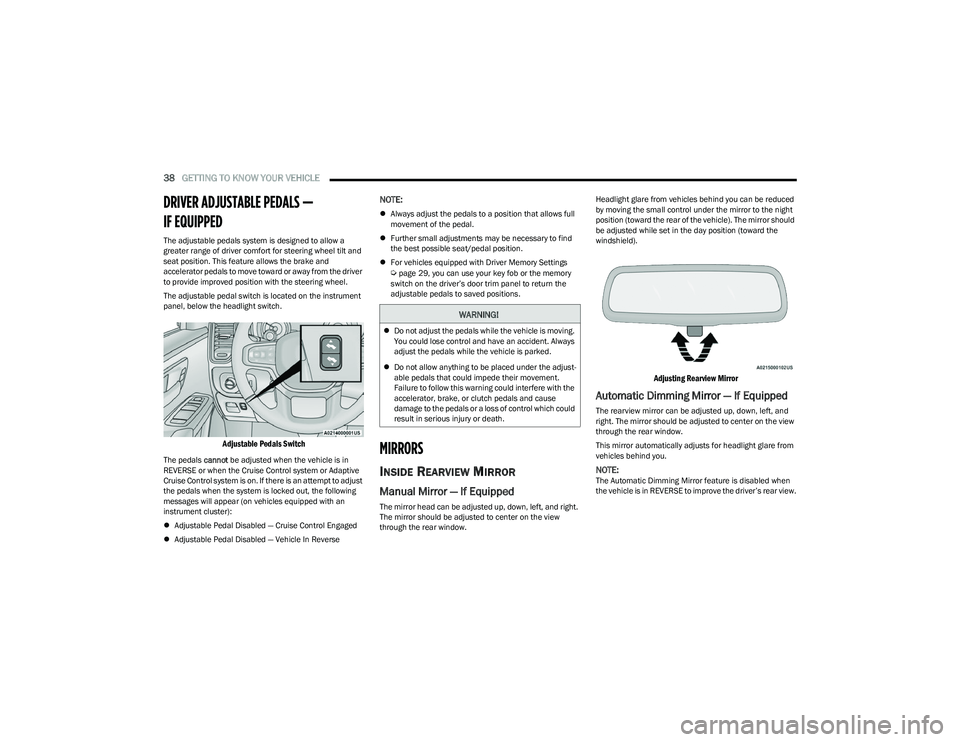
The adjustable pedal switch is located on the instrument
panel, below the headlight switch.
Adjustable Pedals Switch
The pedals cannot be adjusted when the vehicle is in
REVERSE or when the Cruise Control system or Adaptive
Cruise Control system is on. If there is an attempt to adjust
the pedals when the system is locked out, the following
messages will appear (on vehicles equipped with an
instrument cluster):
Adjustable Pedal Disabled — Cruise Control Engaged
Adjustable Pedal Disabled — Vehicle In Reverse
NOTE:
Always adjust the pedals to a position that allows full
movement of the pedal.
Further small adjustments may be necessary to find
the best possible seat/pedal position.
For vehicles equipped with Driver Memory Settings
Úpage 29, you can use your key fob or the memory
switch on the driver’s door trim panel to return the
adjustable pedals to saved positions.
MIRRORS
INSIDE REARVIEW MIRROR
Manual Mirror — If Equipped
The mirror head can be adjusted up, down, left, and right.
The mirror should be adjusted to center on the view
through the rear window. Headlight glare from vehicles behind you can be reduced
by moving the small control under the mirror to the night
position (toward the rear of the vehicle). The mirror should
be adjusted while set in the day position (toward the
windshield).
Adjusting Rearview Mirror
Automatic Dimming Mirror — If Equipped
The rearview mirror can be adjusted up, down, left, and
right. The mirror should be adjusted to center on the view
through the rear window.
This mirror automatically adjusts for headlight glare from
vehicles behind you.
NOTE:The Automatic Dimming Mirror feature is disabled when
the vehicle is in REVERSE to improve the driver’s rear view.
WARNING!
Do not adjust the pedals while the vehicle is moving.
You could lose control and have an accident. Always
adjust the pedals while the vehicle is parked.
Do not allow anything to be placed under the adjust -
able pedals that could impede their movement.
Failure to follow this warning could interfere with the
accelerator, brake, or clutch pedals and cause
damage to the pedals or a loss of control which could
result in serious injury or death.
23_DT_OM_EN_USC_t.book Page 38
Page 149 of 416
STARTING AND OPERATING147
To Set A Desired ACC Speed
When the vehicle reaches the speed desired, push the
SET (+) button or the SET (-) button and release. The
instrument cluster display will show the set speed.
NOTE:Fixed Speed Cruise Control can be used without ACC
enabled. To change between the different modes, push
the ACC on/off button which turns the ACC and the Fixed
Speed Cruise Control off. Pushing the Fixed Speed Cruise
Control on/off button will result in turning on (changing to)
Fixed Speed Cruise Control mode. If ACC is set when the vehicle speed is
below 20 mph
(32 km/h), the set speed will default to 20 mph
(32 km/h).
NOTE:Fixed Speed Cruise Control cannot be set below 20 mph
(32 km/h).
If either system is set when the vehicle speed is above
20 mph (32 km/h), the set speed shall be the current speed of the vehicle.
NOTE:
Keeping your foot on the accelerator pedal can cause
the vehicle to continue to accelerate beyond the set
speed. If this occurs, the message “ACC DRIVER
OVERRIDE” will display in the instrument cluster
display.
If you continue to accelerate beyond the set speed
while ACC is enabled, the system will not control the
distance between your vehicle and the vehicle ahead.
The vehicle speed will only be determined by the posi -
tion of the accelerator pedal.
To Cancel
The following conditions cancel the ACC or Fixed Speed
Cruise Control systems:
The brake pedal is applied
The CANC (cancel) button is pushed
The Anti-Lock Brake System (ABS) activates
The trailer brake is applied manually (if equipped)
The gear selector is removed from the DRIVE position
The Electronic Stability Control/Traction Control
System (ESC/TCS) activates
The vehicle parking brake is applied
The Trailer Sway Control (TSC) activates
The driver switches ESC to Full Off mode
The braking temperature exceeds normal range
(overheated)
The following conditions will only cancel the ACC system:
Driver seat belt is unbuckled at low speeds
Driver door is opened at low speeds
To Turn Off
The system will turn off and clear the set speed in
memory if:
The Adaptive Cruise Control (ACC) on/off button is
pushed
The Fixed Speed Cruise Control on/off button is pushed
The ignition is placed in the OFF position
4WD Low is engaged
To Resume
If there is a set speed in memory, push the RES (resume)
button and then remove your foot from the accelerator
pedal. The instrument cluster display will show the last set
speed.
Resume can be used at any speed above 20 mph
(32 km/h) when only Fixed Speed Cruise Control is being
used.
WARNING!
Leaving the Adaptive Cruise Control (ACC) system on
when not in use is dangerous. You could accidentally
set the system or cause it to go faster than you want.
You could lose control and have a collision. Always leave
the system off when you are not using it.
WARNING!
In Fixed Speed Cruise Control mode, the system will not
react to vehicles ahead. In addition, the proximity
warning does not activate and no alarm will sound even
if you are too close to the vehicle ahead since neither
the presence of the vehicle ahead nor the
vehicle-to-vehicle distance is detected. Be sure to
maintain a safe distance between your vehicle and the
vehicle ahead. Always be aware which mode is
selected.
4
23_DT_OM_EN_USC_t.book Page 147
Page 180 of 416
178STARTING AND OPERATING
Using TRSC
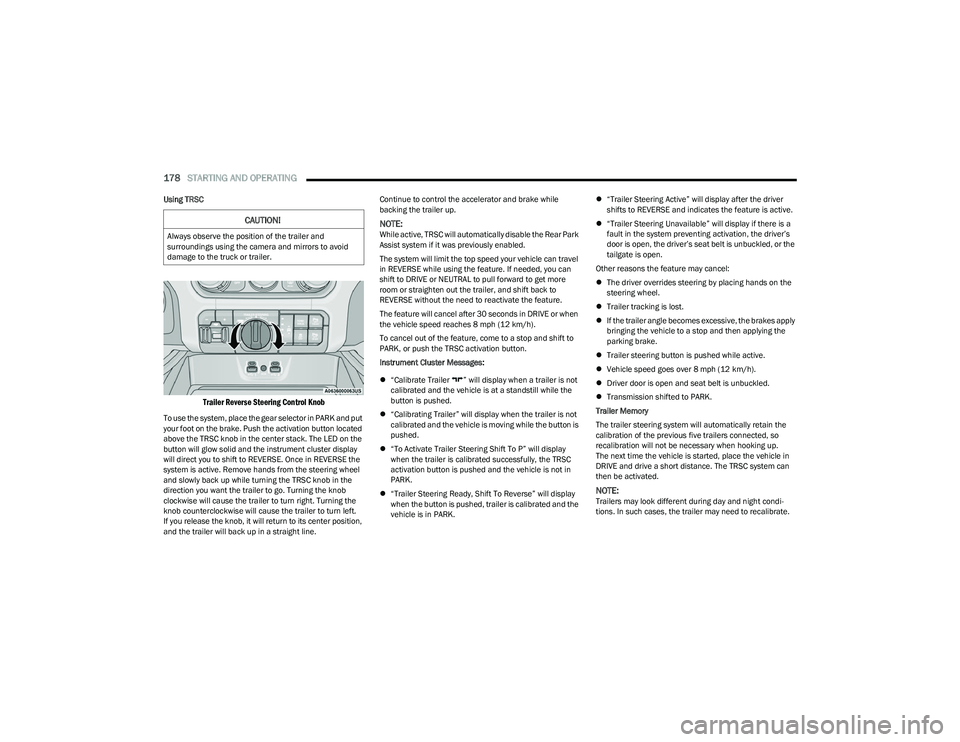
Trailer Reverse Steering Control Knob
To use the system, place the gear selector in PARK and put
your foot on the brake. Push the activation button located
above the TRSC knob in the center stack. The LED on the
button will glow solid and the instrument cluster display
will direct you to shift to REVERSE. Once in REVERSE the
system is active. Remove hands from the steering wheel
and slowly back up while turning the TRSC knob in the
direction you want the trailer to go. Turning the knob
clockwise will cause the trailer to turn right. Turning the
knob counterclockwise will cause the trailer to turn left.
If you release the knob, it will return to its center position,
and the trailer will back up in a straight line. Continue to control the accelerator and brake while
backing the trailer up.
NOTE:While active, TRSC will automatically disable the Rear Park
Assist system if it was previously enabled.
The system will limit the top speed your vehicle can travel
in REVERSE while using the feature. If needed, you can
shift to DRIVE or NEUTRAL to pull forward to get more
room or straighten out the trailer, and shift back to
REVERSE without the need to reactivate the feature.
The feature will cancel after 30 seconds in DRIVE or when
the vehicle speed reaches 8 mph (12 km/h).
To cancel out of the feature, come to a stop and shift to
PARK, or push the TRSC activation button.
Instrument Cluster Messages:
“Calibrate Trailer ” will display when a trailer is not
calibrated and the vehicle is at a standstill while the
button is pushed.
“Calibrating Trailer” will display when the trailer is not
calibrated and the vehicle is moving while the button is
pushed.
“To Activate Trailer Steering Shift To P” will display
when the trailer is calibrated successfully, the TRSC
activation button is pushed and the vehicle is not in
PARK.
“Trailer Steering Ready, Shift To Reverse” will display
when the button is pushed, trailer is calibrated and the
vehicle is in PARK.
“Trailer Steering Active” will display after the driver
shifts to REVERSE and indicates the feature is active.
“Trailer Steering Unavailable” will display if there is a
fault in the system preventing activation, the driver’s
door is open, the driver’s seat belt is unbuckled, or the
tailgate is open.
Other reasons the feature may cancel:
The driver overrides steering by placing hands on the
steering wheel.
Trailer tracking is lost.
If the trailer angle becomes excessive, the brakes apply
bringing the vehicle to a stop and then applying the
parking brake.
Trailer steering button is pushed while active.
Vehicle speed goes over 8 mph (12 km/h).
Driver door is open and seat belt is unbuckled.
Transmission shifted to PARK.
Trailer Memory
The trailer steering system will automatically retain the
calibration of the previous five trailers connected, so
recalibration will not be necessary when hooking up.
The next time the vehicle is started, place the vehicle in
DRIVE and drive a short distance. The TRSC system can
then be activated.
NOTE:Trailers may look different during day and night condi -
tions. In such cases, the trailer may need to recalibrate.
CAUTION!
Always observe the position of the trailer and
surroundings using the camera and mirrors to avoid
damage to the truck or trailer.
23_DT_OM_EN_USC_t.book Page 178
Page 366 of 416
364SERVICING AND MAINTENANCE
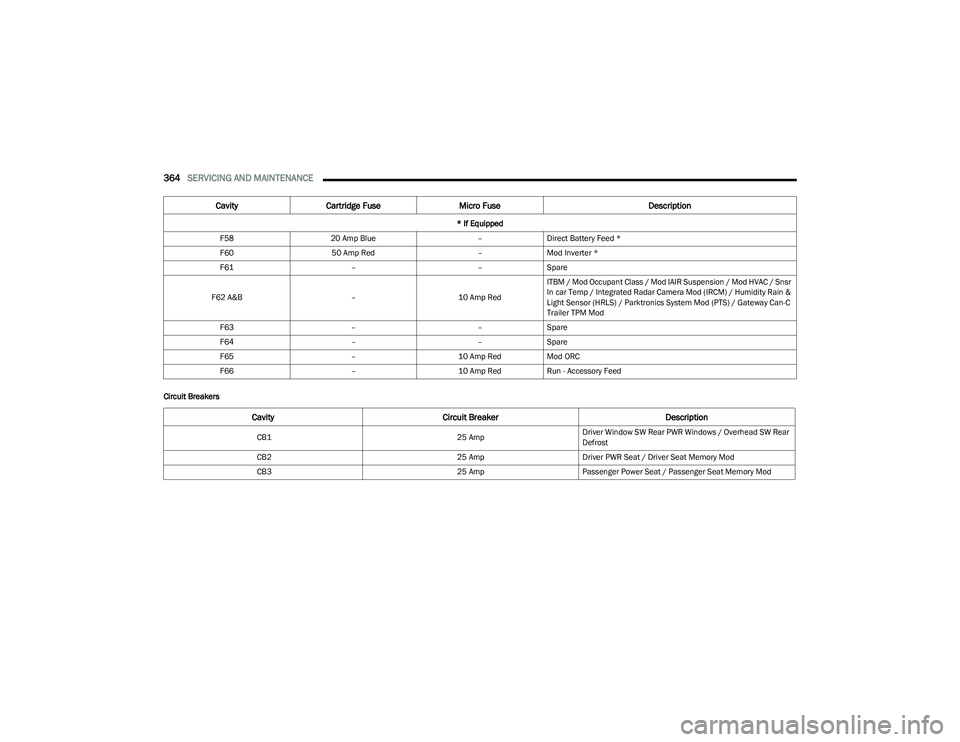
Circuit BreakersF58
20 Amp Blue –Direct Battery Feed *
F60 50 Amp Red –Mod Inverter *
F61 ––Spare
F62 A&B –10 Amp RedITBM / Mod Occupant Class / Mod IAIR Suspension / Mod HVAC / Snsr
In car Temp / Integrated Radar Camera Mod (IRCM) / Humidity Rain &
Light Sensor (HRLS) / Parktronics System Mod (PTS) / Gateway Can-C
Trailer TPM Mod
F63 ––Spare
F64 ––Spare
F65 –10 Amp RedMod ORC
F66 –10 Amp RedRun - Accessory Feed
Cavity Cartridge Fuse Micro Fuse Description
* If Equipped
Cavity Circuit Breaker Description
CB125 AmpDriver Window SW Rear PWR Windows / Overhead SW Rear
Defrost
CB2 25 AmpDriver PWR Seat / Driver Seat Memory Mod
CB3 25 AmpPassenger Power Seat / Passenger Seat Memory Mod
23_DT_OM_EN_USC_t.book Page 364
Page 406 of 416

404
Brake Fluid .......................................................... 352, 397
Brake System ...................................................... 352, 392
Fluid Check.............................................................. 352
Master Cylinder ....................................................... 352
Parking .................................................................... 122
Warning Light .......................................................... 108
Brake/Transmission Interlock..................................... 125
Bulb Replacement ....................................................... 365
Bulbs, Light.......................................................... 313
, 365
CCamera ......................................................................... 163
Camera, AUX................................................................. 168
Camera, Rear ............................................................... 163
Camera, Surround View ............................................... 165
Camera, Trailer 360..................................................... 168
Capacities, Fuel............................................................ 395
Caps, Filler Oil (Engine) .............................................................. 337
Radiator (Coolant Pressure)................................... 350
Car Washes .................................................................. 388
Carbon Monoxide Warning .......................................... 313
Care And Maintenance ................................................ 388
Cargo Light ...................................................................... 49
CD.................................................................................. 226
Cellular Phone .............................................................. 252
Center High Mounted Stop Light................................. 369
Center Seat Storage Compartment ...............................60
Chart, Tire Sizing .......................................................... 371
Check Engine Light (Malfunction Indicator Light) ...... 117
Checking Your Vehicle For Safety ............................... 311
Checks, Safety.............................................................. 311
Child Restraint.............................................................. 298 Child Restraints
Booster Seats .......................................................... 301
Child Seat Installation ................................... 306
, 308
How To Stow An unused ALR Seat Belt .................305 Infant And Child Restraints ..................................... 300
Locating The LATCH Anchorages............................ 304
Lower Anchors And Tethers For Children............... 302
Older Children And Child Restraints....................... 300
Seating Positions ..................................................... 301
Clean Air Gasoline ........................................................ 393
Cleaning Wheels .....................................................................383
Climate Control ............................................................... 54 Automatic ................................................................... 54
Manual ....................................................................... 56
Compact Spare Tire ...................................................... 381
Connected Services ................ 236
, 237, 238, 239, 248
Contract, Service .......................................................... 400
Controls ......................................................................... 218
Cooling Pressure Cap (Radiator Cap) ..........................350
Cooling System ............................................................. 349 Adding Coolant (Antifreeze) ....................................350
Coolant Level ................................................. 349
, 351
Cooling Capacity ...................................................... 395
Disposal Of Used Coolant ....................................... 351 Drain, Flush, And Refill............................................349
Inspection ................................................................ 351
Points To Remember............................................... 352
Pressure Cap ...........................................................350
Radiator Cap ............................................................350Selection Of Coolant (Antifreeze) ........ 350
, 395, 396
Corrosion Protection ..................................................... 388
Cruise Control Accel/Decel.............................................................. 144 Cancel ...................................................................... 145
Resume.................................................................... 144
Cruise Control (Speed Control) ........................... 143
, 145
Cruise Light ..........................................................115, 116
Customer Assistance ................................................... 398
Cybersecurity ................................................................ 191
DDaytime Running Lights ................................................. 47 Dealer Service .............................................................. 341
Defroster, Windshield .................................... 54
, 56, 311
Deleting A Phone .......................................................... 231
Diagnostic System, Onboard ....................................... 116
Differential, Limited Slip .............................................. 140
Dimmer Control Switch .................................................. 51
Disable Vehicle Towing ................................................ 330
Disc Drive ...................................................................... 226
Disconnecting ............................................................... 231
Disposal Antifreeze (Engine Coolant) .................................... 351
Disturb........................................................................... 234
Door Ajar .............................................................. 108
, 110
Door Ajar Light ..................................................... 108, 110
Door Locks Automatic .................................................................. 27
Doors ............................................................................... 24
Driver Memory Presets ................................................ 224
Driver’s Seat Back Tilt .................................................... 30
Driving Through Flowing, Rising, Or Shallow Standing Water .................................................. 189
Driving Tips ................................................................... 189
Dual Rear Wheels......................................................... 392
23_DT_OM_EN_USC_t.book Page 404
Page 409 of 416

407
Lights ............................................................................ 3134WD ......................................................................... 114
Air Bag ...................................................108
, 288, 311
Air Suspension Fault............................................... 110
Brake Assist Warning ............................................. 265
Brake Warning ........................................................ 108 Bulb Replacement .................................................. 365Cargo ................................................................ 49
, 113
Center Mounted Stop ............................................. 369
Courtesy/Reading...................................................... 50
Cruise.............................................................. 115
, 116
Daytime Running ....................................................... 47
ECO Mode................................................................ 114 Electric Power Steering .......................................... 109Electronic Stability Program(ESP) Indicator .......... 109
Exterior ............................................................. 46
, 313
Fog .................................................................. 114, 368
Hazard Warning Flasher ......................................... 314
Headlights ...........................................................46
, 48
High Beam........................................................ 47, 116
High Beam/Low Beam Select ...................................47
Hill Descent Control Indicator ................................ 115
Hood Open .............................................................. 109
Illuminated Entry........................................................52
Interior ........................................................................50
LaneSense .............................................................. 115
Lights On Reminder ...................................................48
NEUTRAL ................................................................. 114 Oil Temperature ....................................................... 110
Park .......................................................................... 115
Passing....................................................................... 48
Rear Axle Lock ............................................... 112
, 114
Rear Tail Lamps....................................................... 368
Seat Belt Reminder ................................................. 110
Security Alarm.......................................................... 110
Service .....................................................................365
Service Forward Collision........................................ 112
Service LaneSense..................................................111
Service Stop Start....................................................112 Stop Start Active ...................................................... 115
Traction Control ....................................................... 265
Trailer Brake Disconnected ....................................110
Transmission Temperature..................................... 110
Turn Signals ............................................................. 366
Warning Instrument Cluster Descriptions.... 107
, 109
Limited-Slip Differential...................................... 140, 354
Load Shed Battery Saver Mode ...................................106
Load Shed Battery Saver On ........................................ 106
Load Shed Electrical Load Reduction ......................... 106
Load Shed Intelligent Battery Sensor..........................106
Loading Vehicle............................................................. 172 Tires.......................................................................... 374
Locks Automatic Door.......................................................... 27
Child Protection ......................................................... 27
Power Door ................................................................ 25
Low Tire Pressure System ............................................277
Lubrication, Body .......................................................... 347
Lug Nuts ........................................................................ 392
Lug Nuts/Bolts .............................................................. 392
MMaintenance................................................................... 73
Maintenance Free Battery ........................................... 340
Maintenance Schedule ................................................ 333
Malfunction Indicator Light (Check Engine) ............... 111
Manage My Account..................................................... 248
Manual Service ..................................................................... 401
Media Hub ...................................................................... 65 Media Mode .................................................................. 226
Memory Seat .................................................................. 29
Memory Settings ............................................................ 29
Methanol ....................................................................... 394
Midline Instrument Cluster — Gasoline
b
.................. 93
Mirrors ............................................................................. 38 Automatic Dimming .................................................. 38
Digital ......................................................................... 39
Electric Powered ....................................................... 41
Heated ....................................................................... 42
Manual Dimming....................................................... 38
Memory ...................................................................... 29
Outside....................................................................... 40
Power Folding ............................................................ 41
Rearview ........................................................... 38
, 314
Trailer Towing ............................................................ 42
Vanity ......................................................................... 39
Mobile App .................................................................... 238
Modifications/Alterations Vehicle ....................................................................... 11
Monitor, Tire Pressure System .................................... 277
Mopar Parts .................................................................. 400
MP3 Control .................................................................... 65
Multi-Function Control Lever ......................................... 47 Multifunction Tailgate .................................................... 75
11
23_DT_OM_EN_USC_t.book Page 407