tire type RAM 1500 2023 Owners Manual
[x] Cancel search | Manufacturer: RAM, Model Year: 2023, Model line: 1500, Model: RAM 1500 2023Pages: 416, PDF Size: 20.59 MB
Page 7 of 416
5
VEHICLE LOADING .......................................................... 172Gross Vehicle Weight Rating (GVWR) ..................... 172
Payload ...................................................................... 172
Gross Axle Weight Rating (GAWR)............................ 172
Tire Size ..................................................................... 172Rim Size ..................................................................... 172Inflation Pressure ...................................................... 172Curb Weight ............................................................... 172
Loading ...................................................................... 172
TRAILER TOWING ............................................................ 173 Common Towing Definitions .................................... 173
Trailer Hitch Type and Maximum Trailer Weight ..... 176Trailer Towing Weights
(Maximum Trailer Weight Ratings) .......................... 176Trailer And Tongue Weight ...................................... 176
Trailer Reverse Steering
Control — If Equipped................................................ 177Towing Requirements .............................................. 179
Towing Tips ............................................................... 184
SNOWPLOW ..................................................................... 184 Before Plowing .......................................................... 185
Snowplow Prep Package Model Availability ............ 185Over The Road Operation With Snowplow
Attached .................................................................... 185Operating Tips ........................................................... 185
General Maintenance ............................................... 185
RECREATIONAL TOWING (BEHIND MOTORHOME) .... 186 Towing This Vehicle Behind Another Vehicle .......... 186
Recreational Towing — Two-Wheel Drive Models ... 186
Recreational Towing — Four-Wheel Drive Models... 187 DRIVING TIPS ................................................................... 189
Driving On Slippery Surfaces .................................. 189
Driving Through Water ............................................. 189
Off-Road Driving Tips ............................................... 190
MULTIMEDIA
UCONNECT SYSTEMS ..................................................... 191
CYBERSECURITY ............................................................. 191
UCONNECT SETTINGS .................................................... 191 Customer Programmable Features ........................ 192
UCONNECT INTRODUCTION............................................ 215 System Overview....................................................... 215
Safety And General Information ............................. 217
UCONNECT MODES ......................................................... 218 Steering Wheel Audio Controls ............................... 218
Radio Mode .............................................................. 218
Media Mode ............................................................. 226
Phone Mode ............................................................. 228
CONNECTED VEHICLE SERVICES —
IF EQUIPPED .................................................................... 236 Is My Vehicle Connected? ........................................ 236
Introduction To Connected Vehicle Services ......... 237
Getting Started With Connected Vehicle
Services .................................................................... 238
Using SiriusXM Guardian™ ..................................... 239
Manage My SiriusXM Guardian™ Account ............. 248
CONNECTED SERVICES FAQS ....................................... 248 Connected Services SOS FAQs — If Equipped ....... 248Connected Services Remote Door
Lock/Unlock FAQs ................................................... 249 Connected Services Roadside Assistance FAQs .... 249
Connected Services Send & Go FAQs —
If Equipped ................................................................ 249
Connected Services Vehicle Finder FAQs ............... 249
Connected Services Stolen Vehicle
Assistance FAQs — If Equipped ............................... 250Connected Services Remote Vehicle
Start FAQs ................................................................. 250
Connected Services Remote Horn & Lights
FAQs ........................................................................... 250Connected Services Account FAQs —
If Equipped................................................................. 251
Data Collection & Privacy.......................................... 252
RADIO OPERATION AND MOBILE PHONES .................252 Regulatory And Safety Information .......................... 253
PERFORMANCE PAGES — IF EQUIPPED .......................253 Timers ........................................................................ 253
Gauges ....................................................................... 254
G-Force ....................................................................... 254
Dynamometer (Dyno)/Engine ................................... 255
Vehicle Dynamics ...................................................... 255
OFF-ROAD PAGES — IF EQUIPPED ................................256 Off-Road Pages Status Bar ...................................... 257Vehicle Dynamics ..................................................... 258Accessory Gauge ....................................................... 259
Pitch & Roll ................................................................ 260
Suspension — If Equipped ........................................ 261Forward Facing Camera — If Equipped .................... 261
23_DT_OM_EN_USC_t.book Page 5
Page 9 of 416
7
TIRES ................................................................................. 370Tire Safety Information ............................................ 370
Tires — General Information .................................... 377
Tire Types................................................................... 380
Spare Tires — If Equipped ........................................ 381Wheel And Wheel Trim Care .................................... 383
Snow Traction Devices ............................................ 384
Tire Rotation Recommendations ............................ 386
DEPARTMENT OF TRANSPORTATION UNIFORM
TIRE QUALITY GRADES .................................................. 386 Treadwear .................................................................. 386
Traction Grades ......................................................... 387
Temperature Grades................................................. 387
STORING THE VEHICLE ................................................... 387
BODYWORK ...................................................................... 388 Protection From Atmospheric Agents ..................... 388
Body And Underbody Maintenance ......................... 388Preserving The Bodywork ......................................... 388
INTERIORS ....................................................................... 390 Seats And Fabric Parts ............................................. 390
Plastic And Coated Parts .......................................... 390
Leather Surfaces....................................................... 391Glass Surfaces ......................................................... 391TECHNICAL SPECIFICATIONS
VEHICLE IDENTIFICATION NUMBER (VIN)..................... 392
BRAKE SYSTEM .............................................................. 392
WHEEL AND TIRE TORQUE SPECIFICATIONS ............. 392 Torque Specifications .............................................. 392
FUEL REQUIREMENTS .................................................... 393 3.6L Engine .............................................................. 393
5.7L Engine ............................................................... 393Reformulated Gasoline ........................................... 393Materials Added To Fuel ......................................... 393
Gasoline/Oxygenate Blends ................................... 394Do Not Use E-85 In Non-Flex Fuel Vehicles ............ 394
CNG And LP Fuel System Modifications.................. 394
Methylcyclopentadienyl Manganese
Tricarbonyl (MMT) In Gasoline ................................. 394
Fuel System Cautions ............................................... 394
FLUID CAPACITIES .......................................................... 395
ENGINE FLUIDS AND LUBRICANTS .............................. 396
CHASSIS FLUIDS AND LUBRICANTS ............................ 397
CUSTOMER ASSISTANCE
SUGGESTIONS FOR OBTAINING SERVICE FOR YOUR
VEHICLE ............................................................................398 Prepare For The Appointment .................................. 398
Prepare A List ............................................................ 398Be Reasonable With Requests ................................. 398
IF YOU NEED ASSISTANCE .............................................398 Roadside Assistance ................................................. 398
FCA US LLC Customer Center ................................... 399
FCA Canada Inc. Customer Center........................... 399
Mexico ........................................................................ 399
Puerto Rico And US Virgin Islands............................ 399
Customer Assistance For The Hearing Or
Speech Impaired (TDD/TTY) ..................................... 400
Service Contract ....................................................... 400
WARRANTY INFORMATION.............................................400
MOPAR® PARTS ..............................................................400
REPORTING SAFETY DEFECTS ......................................401 In The 50 United States And Washington, D.C........ 401
In Canada................................................................... 401
PUBLICATION ORDER FORMS .......................................401
CHANGE OF OWNERSHIP OR ADDRESS.......................402
GENERAL INFORMATION................................................. 402
23_DT_OM_EN_USC_t.book Page 7
Page 105 of 416
GETTING TO KNOW YOUR INSTRUMENT PANEL103
Trip Info
Push and release the up or down arrow button until
the Trip menu item is highlighted in the instrument cluster
display. Push and release the right or left arrow
button to enter the submenus of Trip A and Trip B. The Trip
A or Trip B information will display the following:
Distance
Average Fuel Economy
Elapsed Time
Push and hold OK button to reset all information.
Navigation — If Equipped
Push and release the up or down arrow button until
the Navigation display title is highlighted in the instrument
cluster display, “Hold OK to Start Route” will display when
no active route is set. “Hold OK to Cancel Route” will
display when active route is set. Use the left or right
arrow button to zoom in or out on the display
Úpage 191.
Stop/Start — If Equipped
Push and release the up or down arrow button until
the Stop/Start icon/title is highlighted in the instrument
cluster display. The screen will display the Stop/Start
status.
Trailer Tow — If Equipped
Push and release the up or down arrow button until
the Trailer Tow menu item is highlighted in the instrument
cluster display. Push and release the right or left
arrow button to cycle through the following trailer tow
information:
Trip (trailer specific) Distance: Push and hold the OK
button to reset the distance.
Integrated Trailer Brake Module (ITBM):
Braking Output
Trailer Type
ITBM Gain
Trailer Tire Pressure Monitoring: The Instrument
Cluster Display will display the Trailer Tire Pressure for
a connected trailer with sensors that match the active
trailer profile. When a low tire is present, the low tire
value will be displayed in red, and the affected low tire
will have a red glow. “Trailer Tire Low“ will be displayed
on the center bottom of the Instrument Cluster Display
screen.
Trailer Light Check — If Equipped: Push and hold the OK
button to begin the Trailer Light Test sequence
Úpage 182.
Audio
Push and release the up or down arrow button until
the Audio Menu icon/title is highlighted in the instrument
cluster display. This menu will display the audio source
information, including the Song name, Artist name, and
audio source with an accompanying graphic.
Phone Call Status
When a call is incoming, a Phone Call Status pop-up will
display on the screen. The pop-up will remain until the
phone is answered or ignored.
NOTE:The call status will temporarily replace the previous media
source information displayed on the screen. When the
pop-up is no longer displayed, the display will return to the
last used screen.
Stored Messages
Push and release the up or down arrow button until
the Messages Menu item is highlighted. This feature
shows the number of stored warning messages Example:
“Oil Change Required”. Push and release the right or
left arrow button to cycle through stored messages.
3
23_DT_OM_EN_USC_t.book Page 103
Page 115 of 416
GETTING TO KNOW YOUR INSTRUMENT PANEL113
Your vehicle has also been equipped with a TPMS
malfunction indicator to indicate when the system is not
operating properly. The TPMS malfunction indicator is
combined with the low tire pressure telltale. When the
system detects a malfunction, the telltale will flash for
approximately one minute and then remain continuously
illuminated. This sequence will continue upon subsequent
vehicle start-ups as long as the malfunction exists. When
the malfunction indicator is illuminated, the system may
not be able to detect or signal low tire pressure as
intended. TPMS malfunctions may occur for a variety of
reasons, including the installation of replacement or
alternate tires or wheels on the vehicle that prevent the
TPMS from functioning properly. Always check the TPMS
malfunction telltale after replacing one or more tires or
wheels on your vehicle to ensure that the replacement or
alternate tires and wheels allow the TPMS to continue to
function properly.YELLOW INDICATOR LIGHTS
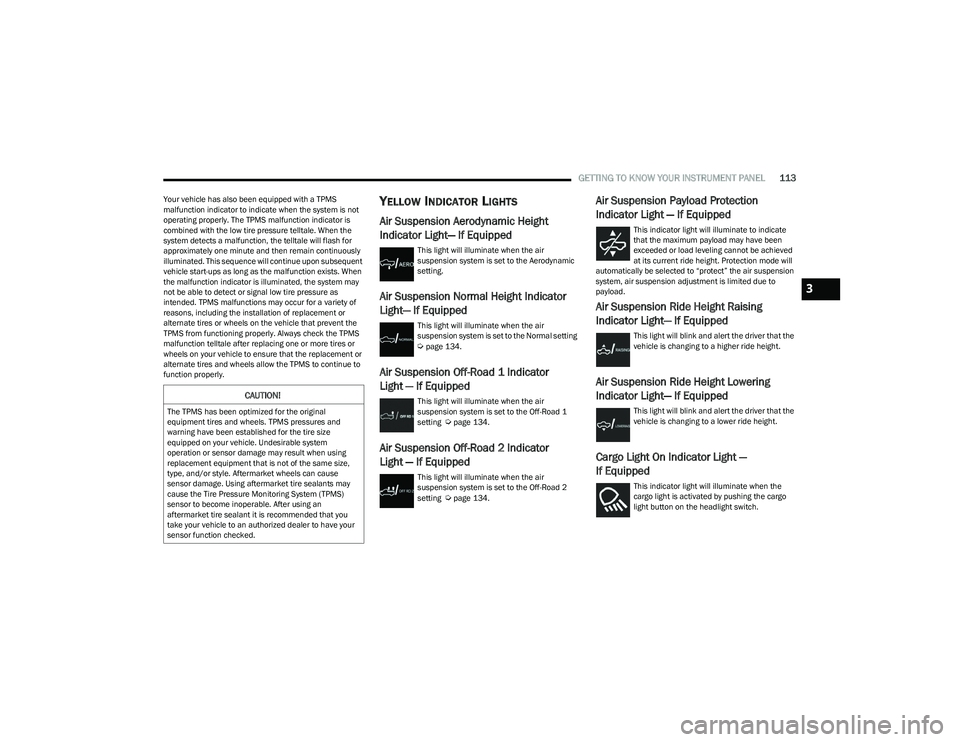
Air Suspension Aerodynamic Height
Indicator Light— If Equipped
This light will illuminate when the air
suspension system is set to the Aerodynamic
setting.
Air Suspension Normal Height Indicator
Light— If Equipped
This light will illuminate when the air
suspension system is set to the Normal setting
Úpage 134.
Air Suspension Off-Road 1 Indicator
Light — If Equipped
This light will illuminate when the air
suspension system is set to the Off-Road 1
setting
Úpage 134.
Air Suspension Off-Road 2 Indicator
Light — If Equipped
This light will illuminate when the air
suspension system is set to the Off-Road 2
setting
Úpage 134.
Air Suspension Payload Protection
Indicator Light — If Equipped
This indicator light will illuminate to indicate
that the maximum payload may have been
exceeded or load leveling cannot be achieved
at its current ride height. Protection mode will
automatically be selected to “protect” the air suspension
system, air suspension adjustment is limited due to
payload.
Air Suspension Ride Height Raising
Indicator Light— If Equipped
This light will blink and alert the driver that the
vehicle is changing to a higher ride height.
Air Suspension Ride Height Lowering
Indicator Light— If Equipped
This light will blink and alert the driver that the
vehicle is changing to a lower ride height.
Cargo Light On Indicator Light —
If Equipped
This indicator light will illuminate when the
cargo light is activated by pushing the cargo
light button on the headlight switch.
CAUTION!
The TPMS has been optimized for the original
equipment tires and wheels. TPMS pressures and
warning have been established for the tire size
equipped on your vehicle. Undesirable system
operation or sensor damage may result when using
replacement equipment that is not of the same size,
type, and/or style. Aftermarket wheels can cause
sensor damage. Using aftermarket tire sealants may
cause the Tire Pressure Monitoring System (TPMS)
sensor to become inoperable. After using an
aftermarket tire sealant it is recommended that you
take your vehicle to an authorized dealer to have your
sensor function checked.
3
23_DT_OM_EN_USC_t.book Page 113
Page 134 of 416

132STARTING AND OPERATING
NOTE:Do not attempt to make a shift while only the front or rear
wheels are spinning. This could cause damage to driveline
components.
When operating your vehicle in 4WD LOW, the engine
speed is approximately three times that of the 2WD or
4WD HIGH positions at a given road speed. Take care not
to overspeed the engine and do not exceed 25 mph
(40 km/h).
Proper operation of four-wheel drive vehicles depends on
tires of equal size, type and circumference on each wheel.
Any difference in tire size can cause damage to the
drivetrain.
Because four-wheel drive provides improved traction,
there is a tendency to exceed safe turning and stopping
speeds. Do not go faster than road conditions permit.
Shifting Procedure
If any of the requirements to select a new transfer case
position have not been met, then the transfer case will
not shift. The position indicator light for the previous
position will remain on and the newly selected position
indicator light will continue to flash until all the require -
ments for the selected position have been met.
If all the requirements to select a new transfer case
position have been met, then the current position indi -
cator light will turn off and the selected position indi -
cator light will flash until the transfer case completes
the shift. When the shift is complete, the position indi -
cator light for the selected position will stop flashing
and remain on.
FIVE-POSITION ELECTRONICALLY
S
HIFTED TRANSFER CASE —
I
F EQUIPPED
This is an electronic shift transfer case and is operated by
the 4WD Control Switch (Transfer Case Switch), which is
located on the instrument panel.
Five-Position/On-Demand Transfer Case
Five-Position/On-Demand Transfer Case — GT Models
This electronically shifted transfer case provides five
positions:
Two-Wheel Drive High Range (2WD) — This range is for
normal street and highway driving on dry hard surfaced
roads. Driving the vehicle in 2WD will have greater fuel
economy benefits as the front axle is not engaged in
2WD.
Four-Wheel Drive Automatic High Range (4WD AUTO) —
This range sends power to the front wheels automati -
cally when the vehicle senses a loss of traction. This
range may be used during varying road conditions.
Four-Wheel Drive High Range (4WD HIGH) — This range
provides torque to the front driveshaft (engages
four-wheel drive) which allows front and rear wheels to
spin at the same speed. This provides additional trac -
tion for loose or slippery road surfaces only.
Four-Wheel Drive Low Range (4WD LOW) — This range
provides low speed four-wheel drive. It maximizes
torque (increased torque over 4WD HIGH) to the front
driveshaft; allowing front and rear wheels to rotate at
the same speed. This range provides additional trac -
tion and maximum pulling power for loose or slippery
road surfaces only. Do not exceed 25 mph (40 km/h)
in this range.
N (Neutral) — This range disengages both the front and
rear driveshafts from the powertrain. To be used for flat
towing behind another vehicle
Úpage 187.
23_DT_OM_EN_USC_t.book Page 132
Page 135 of 416

STARTING AND OPERATING133
NOTE:
The 4WD HIGH and 4WD LOW positions are designed
for loose, slippery road surfaces only. Driving in the
4WD HIGH and 4WD LOW positions on dry hard
surfaced roads may cause increased tire wear and
damage to the driveline components.
The transfer case N (Neutral) button is located in the
center of the 4WD Control Switch and is pushed by
using a ballpoint pen or similar object. The transfer
case N (Neutral) position is to be used for recreational
towing only
Úpage 187. Transfer Case Position Indicator Lights
The Transfer Case Position Indicator Lights (4WD HIGH,
4WD LOW, and 4WD AUTO) are located in the instrument
cluster and indicate the current and desired transfer case
selection. When you select a different transfer case
position, the indicator lights will do the following:
1. The current position indicator light will turn off.
2. The selected position indicator light will flash until the
transfer case completes the shift.
3. When the shift is complete, the indicator light for the selected position will stop flashing and remain on.
If the transfer case does not shift into the desired position,
one or more of the following events may occur:
1. The indicator light for the current position will remain on.
2. The newly selected position indicator light will continue to flash.
3. If the transfer case will not shift, there will be a cluster
message stating the 4WD shift has canceled.
NOTE:Before retrying a selection, make certain that all the
necessary requirements for selecting a new transfer case
position have been met. To retry the selection, push the
current position, wait five seconds, and retry selection.
The SERV 4WD Warning Light monitors the electronic shift
four-wheel drive system. If this light remains on after
engine start-up or illuminates during driving, it means that
the four-wheel drive system is not functioning properly and
that service is required.
NOTE:Do not attempt to make a shift while only the front or rear
wheels are spinning. This could cause damage to driveline
components.
When operating your vehicle in 4WD LOW, the engine
speed is approximately three times that of the 2WD, 4WD
AUTO or 4WD HIGH positions at a given road speed. Take
care not to overspeed the engine and do not exceed
25 mph (40 km/h).
Proper operation of four-wheel drive vehicles depends on
tires of equal size, type and circumference on each wheel.
Any difference in tire size can cause damage to the
drivetrain.
Because four-wheel drive provides improved traction,
there is a tendency to exceed safe turning and stopping
speeds. Do not go faster than road conditions permit.
WARNING!
You or others could be injured or killed if you leave
the vehicle unattended with the transfer case in the
N (Neutral) position without first fully engaging the
parking brake. The transfer case N (Neutral) position
disengages both the front and rear drive shaft from
the powertrain, and will allow the vehicle to roll, even
if the transmission is in PARK. The parking brake
should always be applied when the driver is not in the
vehicle.
The transmission may not engage PARK if the vehicle
is moving. Always bring the vehicle to a complete
stop before shifting to PARK, and verify that the
transmission gear position indicator solidly indicates
PARK (P) without blinking. Ensure that the vehicle is
completely stopped, and the PARK position is
properly indicated, before exiting the vehicle.
WARNING!
Always engage the parking brake when powering down
the vehicle if the SERV 4WD Warning Light is
illuminated. Not engaging the parking brake may allow
the vehicle to roll which may cause personal injury or
death.
4
23_DT_OM_EN_USC_t.book Page 133
Page 175 of 416

STARTING AND OPERATING173
TRAILER TOWING
In this section you will find safety tips and information on
limits to the type of towing you can reasonably do with your
vehicle. Before towing a trailer, carefully review this
information to tow your load as efficiently and safely as
possible.
To maintain the New Vehicle Limited Warranty coverage,
follow the requirements and recommendations in this
manual concerning vehicles used for trailer towing.
COMMON TOWING DEFINITIONS
The following trailer towing related definitions will assist
you in understanding the following information:
Gross Vehicle Weight Rating (GVWR)
The GVWR is the total allowable weight of your vehicle.
This includes driver, passengers, cargo and tongue
weight. The total load must be limited so that you do not
exceed the GVWR
Úpage 172.
Gross Trailer Weight (GTW)
The GTW is the weight of the trailer plus the weight of all
cargo, consumables and equipment (permanent or
temporary) loaded in or on the trailer in its “loaded and
ready for operation” condition.
The recommended way to measure GTW is to put your fully
loaded trailer on a vehicle scale. The entire weight of the
trailer must be supported by the scale.
Gross Combination Weight Rating (GCWR)
The GCWR is the total allowable weight of your vehicle and
trailer when weighed in combination.
Gross Axle Weight Rating (GAWR)
The GAWR is the maximum capacity of the front and rear
axles. Distribute the load over the front and rear axles
evenly. Make sure that you do not exceed either front or
rear GAWR
Úpage 172.
Tongue Weight (TW)
The TW is the downward force exerted on the hitch ball by
the trailer. You must consider this as part of the load on
your vehicle.
Trailer Frontal Area
The frontal area is the maximum height multiplied by the
maximum width of the front of a trailer.
Trailer Sway Control (TSC)
The TSC can be a mechanical telescoping link that can be
installed between the hitch receiver and the trailer tongue
that typically provides adjustable friction associated with
the telescoping motion to dampen any unwanted trailer
swaying motions while traveling.
The electronic TSC (If equipped) recognizes a swaying
trailer and automatically applies individual wheel brakes
and/or reduces engine power to attempt to eliminate the
trailer sway.
Weight-Carrying Hitch
A weight-carrying hitch supports the trailer tongue weight,
just as if it were luggage located at a hitch ball or some
other connecting point of the vehicle. These kinds of
hitches are commonly used to tow small and medium
sized trailers.
WARNING!
If the gross trailer weight is 5,000 lb (2,267 kg) or
more, it is recommended to use a weight-distributing
hitch to ensure stable handling of your vehicle. If you
use a standard weight-carrying hitch, you could lose
control of your vehicle and cause a collision.
WARNING!
It is important that you do not exceed the maximum
front or rear GAWR. A dangerous driving condition can
result if either rating is exceeded. You could lose control
of the vehicle and have a collision.
4
23_DT_OM_EN_USC_t.book Page 173
Page 179 of 416
STARTING AND OPERATING177
Consider the following items when computing the weight
on the rear axle of the vehicle:
The tongue weight of the trailer.
The weight of any other type of cargo or equipment put
in or on your vehicle.
The weight of the driver and all passengers.
NOTE:Remember that everything put into or on the trailer adds
to the load on your vehicle. Also, additional
factory-installed options or dealer-installed options must
be considered as part of the total load on your vehicle.
Refer to the Tire And Loading Information Placard for the
maximum combined weight of occupants and cargo for
your vehicle.
TRAILER REVERSE STEERING
C
ONTROL — IF EQUIPPED
Feature Overview
Trailer Reverse Steering Control (TRSC) is a feature that
will assist the driver when backing up a trailer. By turning
the knob located on the center stack, you can more
accurately control the direction the trailer will go. The driver controls the accelerator and the brake while
steering with the use of the Trailer Reverse Steering
Control knob. The trailer is steered according to the
direction the knob is turned.
This feature will also allow the driver to back up a vehicle
and trailer in a straight line when the knob is rested in its
center position.
Minimal setup is required to use this feature.
Set Up:
To use the system, hitch your trailer to the truck and
ensure all electrical wiring is connected
Úpage 182.
The system will automatically calibrate an attached trailer
during normal forward driving with no additional action
needed from the driver. If the vehicle has not had enough
time to automatically calibrate after connecting a trailer,
you will see a “Calibrate Trailer” message in the
instrument cluster when pressing the TRSC button to
activate the system. If this is the case, perform the
following maneuver to calibrate the trailer:
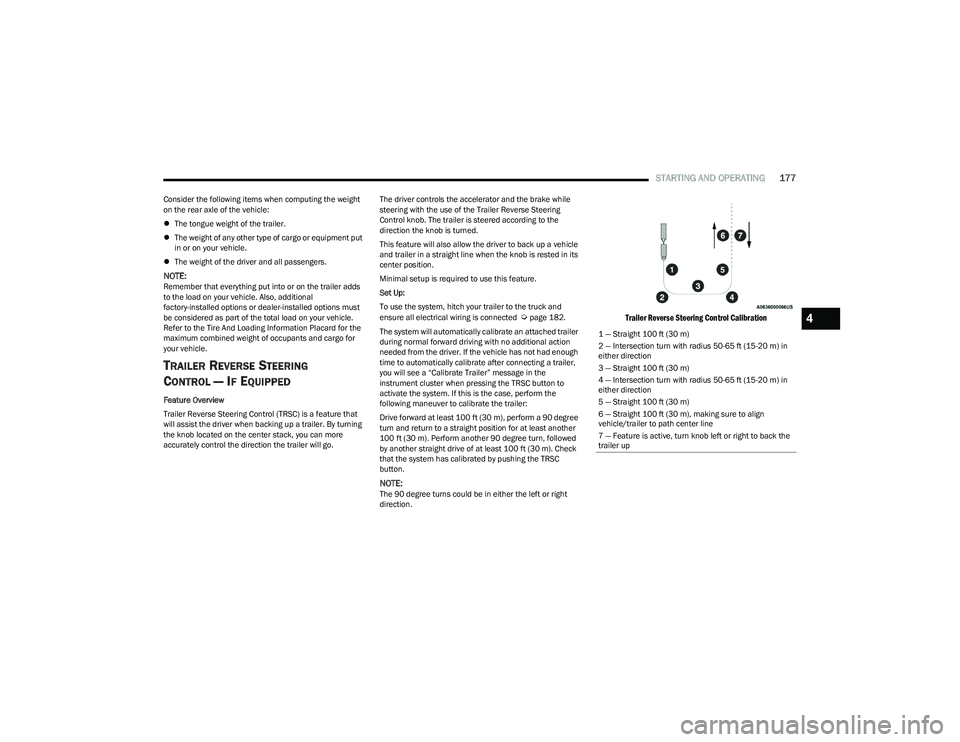
Drive forward at least 100 ft (30 m), perform a 90 degree
turn and return to a straight position for at least another
100 ft (30 m). Perform another 90 degree turn, followed
by another straight drive of at least 100 ft (30 m). Check
that the system has calibrated by pushing the TRSC
button.
NOTE:The 90 degree turns could be in either the left or right
direction.
Trailer Reverse Steering Control Calibration
1 — Straight 100 ft (30 m) 2 — Intersection turn with radius 50-65 ft (15-20 m) in
either direction
3 — Straight 100 ft (30 m)4 — Intersection turn with radius 50-65 ft (15-20 m) in
either direction
5 — Straight 100 ft (30 m)6 — Straight 100 ft (30 m), making sure to align vehicle/trailer to path center line
7 — Feature is active, turn knob left or right to back the
trailer up
4
23_DT_OM_EN_USC_t.book Page 177
Page 183 of 416
STARTING AND OPERATING181
Trailer Brake Status Indicator Light
This light indicates the trailer electrical connection status.
If no electrical connection is detected after the ignition is
turned on, pushing the GAIN adjustment button or sliding
the manual brake control lever will display the GAIN
setting for 10 seconds and the Trailer Brake Status
Indicator Light will not be displayed.
If a fault is detected in the trailer wiring or the Integrated
Trailer Brake Module (ITBM), the Trailer Brake Status
Indicator Light will flash.
Adjusting GAIN
NOTE:This should only be performed in a traffic free environment
at speeds of approximately 20–25 mph (30–40 km/h).
1. Make sure the trailer brakes are in good working
condition, functioning normally and properly
adjusted. See your trailer dealer if necessary.
2. Hook up the trailer and make the electrical connections according to the trailer manufacturer's
instructions.
3. When a trailer is plugged in with electric or EOH brakes, the trailer connected message should appear
in the instrument cluster display (if the connection is
not recognized by the ITBM, braking functions will not
be available), the GAIN setting will illuminate and the
correct type of trailer must be selected from the
instrument cluster display options.
4. Push the UP or DOWN button on the steering wheel until “TRAILER TOW” appears on the screen.
5. Push the RIGHT arrow on the steering wheel to enter “TRAILER TOW”. 6. Push the UP or DOWN buttons until the Trailer Brake
Type appears on the screen.
7. Push the RIGHT arrow and then push the UP or DOWN buttons until the proper Trailer Brake Type appears
on the screen.
8. In a traffic-free environment, tow the trailer on a dry, level surface at a speed of 20–25 mph
(30–40 km/h) and squeeze the manual brake
control lever completely.
9. If the trailer wheels lockup (indicated by squealing tires), reduce the GAIN setting; if the trailer wheels
turn freely, increase the GAIN setting.
Repeat steps 8 and 9 until the GAIN setting is at a point
just below trailer wheel lockup. If towing a heavier trailer,
trailer wheel lockup may not be attainable even with the
maximum GAIN setting of 10.
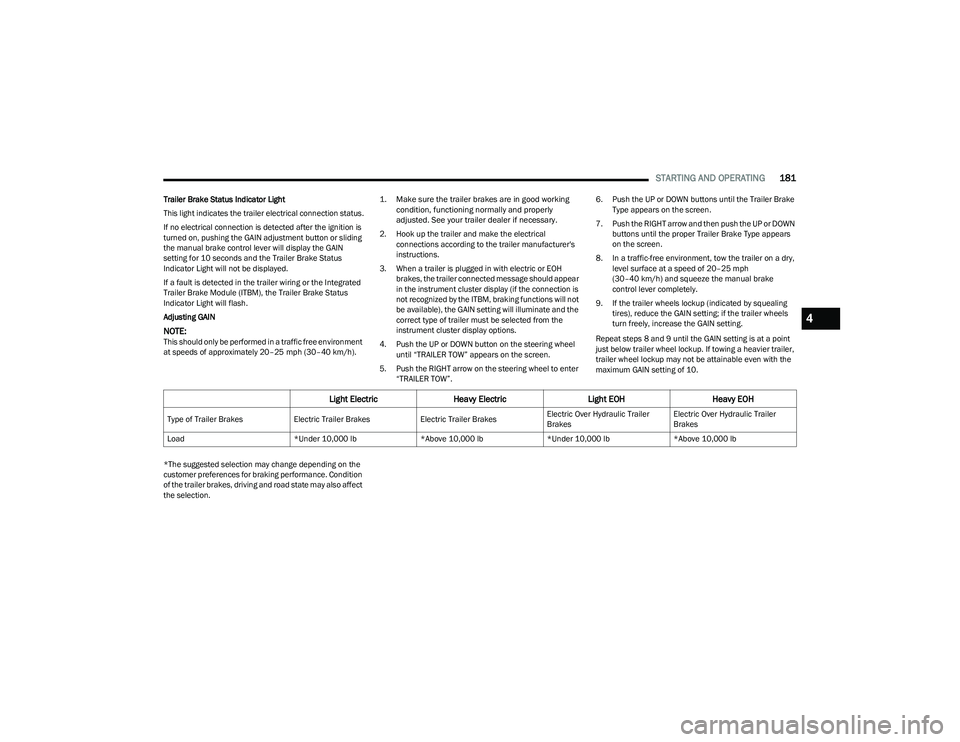
*The suggested selection may change depending on the
customer preferences for braking performance. Condition
of the trailer brakes, driving and road state may also affect
the selection.
Light Electric Heavy Electric Light EOHHeavy EOH
Type of Trailer Brakes Electric Trailer BrakesElectric Trailer BrakesElectric Over Hydraulic Trailer
BrakesElectric Over Hydraulic Trailer
Brakes
Load *Under 10,000 lb*Above 10,000 lb*Under 10,000 lb*Above 10,000 lb
4
23_DT_OM_EN_USC_t.book Page 181
Page 192 of 416

190STARTING AND OPERATING
OFF-ROAD DRIVING TIPS
Care should be taken when attempting to climb steep hills
or driving diagonally across a hill or slope. If natural
obstacles force you to travel diagonally up or down a hill,
choose a mild angle and keep as little side tilt as possible.
Keep the vehicle moving and make turns slowly and
cautiously.
If you must back down a hill, back straight down using
REVERSE gear. Never back down in NEUTRAL or diagonally
across the hill.
When driving over sand, mud, and other soft terrain, shift
to low gear and drive steadily. Apply the accelerator slowly
to avoid spinning the wheels.
Do not reduce the tire pressures for this type of driving.
After Driving Off-Road
Off-road operation puts more stress on your vehicle than
does most on-road driving. After going off-road, it is always
a good idea to check for damage. That way you can get any
problems taken care of right away and have your vehicle
ready when you need it.
Completely inspect the underbody of your vehicle.
Check tires, body structure, steering, suspension, and
exhaust system for damage.
Inspect the radiator for mud and debris and clean as
required.
Check threaded fasteners for looseness, particularly
on the chassis, drivetrain components, steering, and
suspension. Retighten them, if required, and torque to
the values specified in the Service Manual.
Check for accumulations of plants or brush. These
things could be a fire hazard. They might hide damage
to fuel lines, brake hoses, axle pinion seals, and
propeller shafts.
After extended operation in mud, sand, water, or
similar dirty conditions, have the radiator, fan, brake
rotors, wheels, brake linings, and axle yokes inspected
and cleaned as soon as possible.
If you experience unusual vibration after driving in
mud, slush or similar conditions, check the wheels for
impacted material. Impacted material can cause a
wheel imbalance and freeing the wheels of it will
correct the situation.
CAUTION!
Always check the depth of the standing water before
driving through it. Never drive through standing
water that is deeper than the bottom of the tire rims
mounted on the vehicle.
Determine the condition of the road or the path that
is under water and if there are any obstacles in the
way before driving through the standing water.
Do not exceed 5 mph (8 km/h) when driving through
standing water. This will minimize wave effects.
Driving through standing water may cause damage
to your vehicle’s drivetrain components. Always
inspect your vehicle’s fluids (i.e., engine oil, transmis -
sion, axle, etc.) for signs of contamination (i.e., fluid
that is milky or foamy in appearance) after driving
through standing water. Do not continue to operate
the vehicle if any fluid appears contaminated, as this
may result in further damage. Such damage is not
covered by the New Vehicle Limited Warranty.
Getting water inside your vehicle’s engine can cause
it to lock up and stall out, and cause serious internal
damage to the engine. Such damage is not covered
by the New Vehicle Limited Warranty.
WARNING!
Abrasive material in any part of the brakes may cause
excessive wear or unpredictable braking. You might not
have full braking power when you need it to prevent a
collision. If you have been operating your vehicle in dirty
conditions, get your brakes checked and cleaned as
necessary.
23_DT_OM_EN_USC_t.book Page 190