display Ram 2500 2014 Diesel Supplement
[x] Cancel search | Manufacturer: RAM, Model Year: 2014, Model line: 2500, Model: Ram 2500 2014Pages: 360, PDF Size: 2.02 MB
Page 53 of 360
•Exhaust Filter XX% Full Safely Drive at Highway
Speeds to Remedy— This message will be displayed
on the Electronic Vehicle Information Center (EVIC) if
the exhaust particulate filter reaches 80% of its maxi-
mum storage capacity. Under conditions of exclusive
short duration and low speed driving cycles, your
diesel engine and exhaust after-treatment system may
never reach the conditions required to cleanse the filter
to remove the trapped PM. If this occurs, the “Exhaust
Filter XX% Full Safely Drive at Highway Speeds to
Remedy” message will be displayed in the EVIC. If
this message is displayed, you will hear one chime to
assist in alerting you of this condition. By simply
driving your vehicle at highway speeds for up to 20
minutes, you can remedy the condition in the particu-
late filter system and allow your diesel engine and
exhaust after-treatment system to cleanse the filter to
remove the trapped PM and restore the system to
normal operating condition.•Exhaust System — Regeneration In Process Exhaust
Filter XX% Full— This message indicates that the
Diesel Particulate Filter (DPF) is self-cleaning. Main-
tain your current driving condition until regeneration
is completed.
•Exhaust System — Regeneration Completed— This
message indicates that the Diesel Particulate Filter
(DPF) self-cleaning is completed. If this message is
displayed, you will hear one chime to assist in alerting
you of this condition.
•Exhaust Service Required — See Dealer Now— This
messages indicates regeneration has been disabled due
to a system malfunction. At this point the engine
Powertrain Control Module (PCM) will register a fault
code, the instrument panel will display a MIL light.
3
UNDERSTANDING YOUR INSTRUMENT PANEL 51
Page 54 of 360
CAUTION!
See your authorized dealer, as damage to the exhaust
system could occur soon with continued operation.
•Exhaust Filter Full — Power Reduced See Dealer—
This message indicates the PCM has derated the
engine to limit the likelihood of permanent damage to
the after-treatment system. If this condition is not
corrected and a dealer service is not performed, exten-
sive exhaust after-treatment damage can occur. To
correct this condition it will be necessary to have your
vehicle serviced by your local authorized dealer.
CAUTION!
See your authorized dealer, as damage to the exhaust
system could occur soon with continued operation.
Diesel Exhaust Fluid (DEF) Warning Messages
Your vehicle will begin displaying warning messages
when the DEF level reaches a driving range of approxi-
mately 500 miles (800 km). If the following warning
message sequence is ignored, your vehicle may not
restart unless DEF is added with in the displayed mileage
shown in the EVIC message.
•
Engine Will Not Restart in XXXX mi DEF Low Refill
Soon— This message will display when DEF driving
range is less than 500 miles, DEF fluid top off is required
with in the displayed mileage. The message will be
displayed in the EVIC during vehicle start up with the
current allowed mileage and accompanied by a single
chime. The remaining mileage can be pulled up anytime
by way of the “Messages” list within the EVIC
•Engine Will Not Restart in XXXX mi Refill DEF—
This message will display when DEF driving range is
less than 200 miles. It is also displayed at 150 miles and
52 UNDERSTANDING YOUR INSTRUMENT PANEL
Page 55 of 360
100 miles. DEF fluid top off is required with in the
displayed mileage. The message will be displayed in
the EVIC during vehicle start up with an updated
distance mileage, and it will be accompanied by a
single chime. Stating at 100 miles, remaining range will
be continuously displayed while operating the vehicle.
Chimes will also accompany the 75, 50 and 25 mile
remaining distances. The DEF Low telltale will be on
continuously until DEF fluid is topped off.
•Engine Will Not Restart Refill DEF— This message
will display when the DEF driving range is less than 1
mile, DEF fluid top off is required or the engine will
not restart. The message will be displayed in the EVIC
during vehicle start up, and it will be accompanied by
a single chime. The DEF Low telltale will be illumi-
nated continuously until DEF fluid tank is filled with a
minimum of two gallons of DEF.Diesel Exhaust Fluid (DEF) Fault Warning
Messages
There are different messages which are displayed if the
vehicle detects that the DEF system has been filled with
a fluid other than DEF, has experienced component
failures, or when tampering has been detected.
When the DEF system needs to be serviced the following
warnings will display:
•Service DEF System See Dealer— This message will
display when the fault is initially detected and each
time the vehicle is started. The message will be accom-
panied by a single chime and the Malfunction Indica-
tor Light. We recommend you drive to your nearest
authorized dealer and have your vehicle serviced
immediately. If not corrected in 50 miles, vehicle will
enter the “Engine Will not restart in XXXmi Service
DEF See dealer” warning stage and message.
3
UNDERSTANDING YOUR INSTRUMENT PANEL 53
Page 56 of 360
•Incorrect DEF Detected See Dealer— This message
will display if the DEF system has detected the incor-
rect fluid has been introduced to the DEF tank. The
message will be accompanied by a single chime. We
recommend you drive to your nearest authorized
dealer and have your vehicle serviced immediately. If
not corrected in 50 miles, vehicle will enter the Engine
Will not restart in XXX mi Service DEF See dealer
warning stage and message.
•Engine Will Not Restart in XXX mi Service DEF See
Dealer— This message is first displayed if the fault
detected is not serviced after 50 miles of operation. It is
also displayed at 150 miles 125 miles and 100 miles.
System service is required within the displayed mile-
age. The message will be displayed in the EVIC during
vehicle start up with an updated distance mileage, and
it will be accompanied by a single chime. Starting at
100 miles, remaining range will be continuously dis-
played while operating the vehicle. Chimes will alsoaccompany the 75, 50 and 25 mile remaining distances.
We recommend you drive to your nearest authorized
dealer and have your vehicle serviced immediately.
•Engine Will Not Restart Service DEF System See
Dealer— This message will display if DEF system
issue detected is not serviced during the allowed
period. Your engine will not restart unless your vehicle
is serviced by your authorized dealer. This message
will be displayed when under 1 mile until engine will
not start and each time the vehicle is started, and will
be continuously displayed. The message will be ac-
companied by a single chime. Your Malfunction Indi-
cator Light will be continuously illumined. We highly
recommend you drive to your nearest authorized
dealer if the message appears while engine is running.
•Engine Will Not Start Service DEF System See
Dealer— This message will display when the fault
detected is not serviced after the Engine will not restart
54 UNDERSTANDING YOUR INSTRUMENT PANEL
Page 57 of 360
Service DEF System See Dealer message is displayed
on the next subsequent restart. Your engine will not
start unless you vehicle is serviced by your authorized
dealer. The message will be accompanied by a single
chime. Your Malfunction Indicator Light will be con-
tinuously illuminated. If the message appears and you
can not start the engine, we recommend you have your
vehicle towed to your nearest authorized dealer im-
mediately.
Oil Life Reset
Your vehicle is equipped with an engine oil change
indicator system. The “Oil Change Required” message
will flash in the EVIC display for approximately 10
seconds after a single chime has sounded, to indicate the
next scheduled oil change interval. The engine oil change
indicator system is duty cycle based, which means the
engine oil change interval may fluctuate, dependent
upon your personal driving style.NOTE:Use the steering wheel EVIC controls for the
following procedure(s)
Vehicles Equipped With Passive Entry
1. Without pressing the brake pedal, press the ENGINE
START/STOP button and cycle the ignition to the
ON/RUN position (do not start the engine.)
2. Press and release theDOWNarrow button to scroll
downward through the main menu to “Vehicle Info”.
3. Press and release theRIGHTarrow button to access
the ”Oil Life” screen.
4. Press and hold theRIGHTarrow button for one
second to access the ”Oil Life Reset” screen.
5. Press and release theDOWNarrow button to select
“Yes”, then press and release the Right arrow button to
select reset of the Oil Life.
3
UNDERSTANDING YOUR INSTRUMENT PANEL 55
Page 86 of 360
Trailer Brake Status Indicator Light
This light indicates the trailer electrical connection status.
If no electrical connection is detected after the ignition is
turned on, pressing the GAIN adjustment button or
sliding the manual brake control lever will display the
GAIN setting for 10 seconds and the “Trailer Brake Status
Indicator Light” will not be displayed.
If a fault is detected in the trailer wiring or the Integrated
Trailer Brake Module (ITBM), the “Trailer Brake Status
Indicator Light” will flash.
GAIN Adjustment Buttons (+/-)
Pressing these buttons will adjust the brake control
power output to the trailer brakes in 0.5 increments. The
GAIN setting can be increased to a maximum of 10 or
decreased to a minimum of 0 (no trailer braking).GAIN
The GAIN setting is used to set the trailer brake control
for the specific towing condition and should be changed
as towing conditions change. Changes to towing condi-
tions include trailer load, vehicle load, road conditions
and weather.
Adjusting GAIN
NOTE:This should only be performed in a traffic free
environment at speeds of approximately 20–25 mph
(30–40 km/h).
1. Make sure the trailer brakes are in good working
condition, functioning normally and properly ad-
justed. See your trailer dealer if necessary.
2. Hook up the trailer and make the electrical connec-
tions according to the trailer manufacturer’s instruc-
tions.
84 STARTING AND OPERATING
Page 88 of 360
Light Electric Heavy Electric Light EOH Heavy EOH
Type of Trailer
BrakesElectric Trailer
BrakesElectric Trailer
BrakesElectric over Hy-
draulic Trailer
BrakesElectric over Hy-
draulic Trailer
Brakes
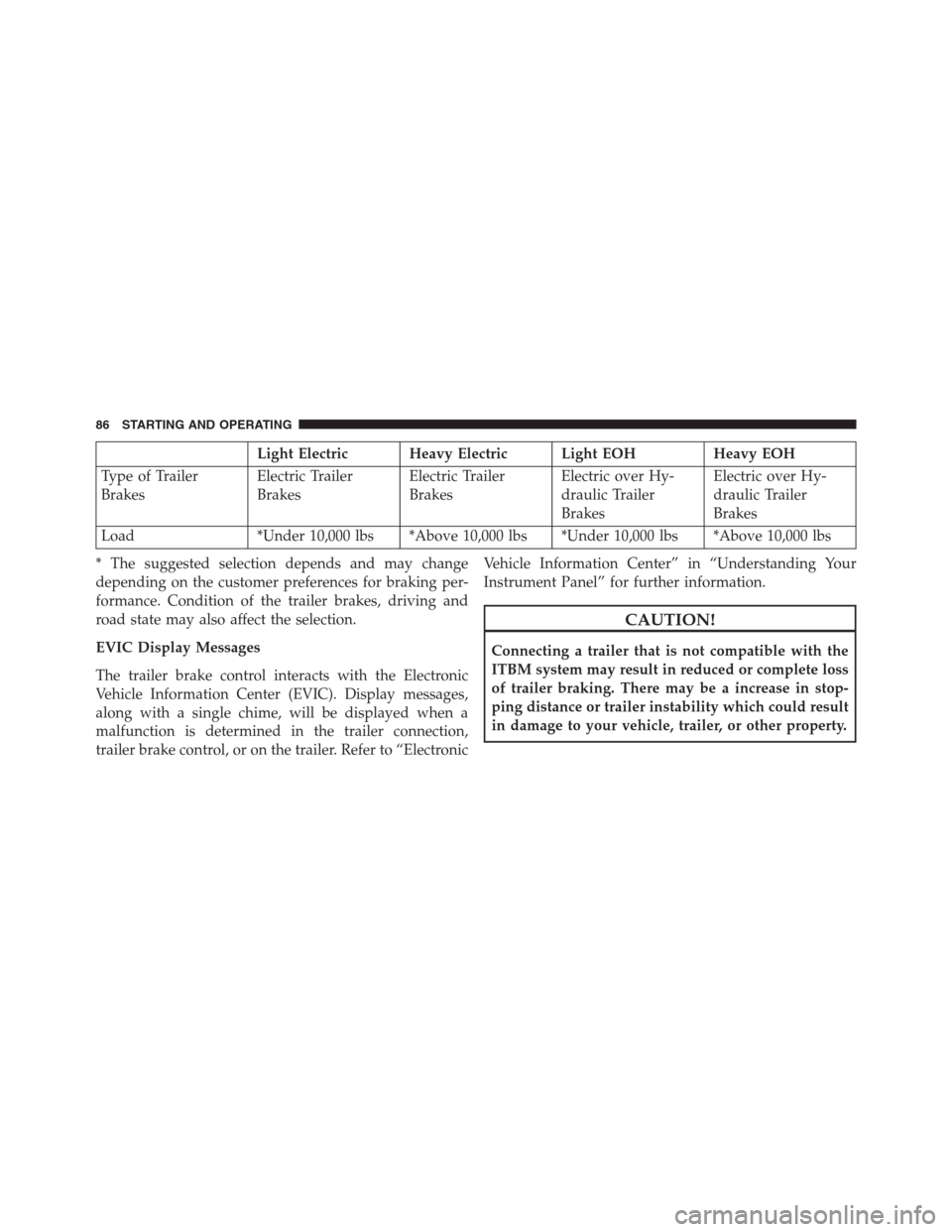
Load *Under 10,000 lbs *Above 10,000 lbs *Under 10,000 lbs *Above 10,000 lbs
* The suggested selection depends and may change
depending on the customer preferences for braking per-
formance. Condition of the trailer brakes, driving and
road state may also affect the selection.
EVIC Display Messages
The trailer brake control interacts with the Electronic
Vehicle Information Center (EVIC). Display messages,
along with a single chime, will be displayed when a
malfunction is determined in the trailer connection,
trailer brake control, or on the trailer. Refer to “ElectronicVehicle Information Center” in “Understanding Your
Instrument Panel” for further information.
CAUTION!
Connecting a trailer that is not compatible with the
ITBM system may result in reduced or complete loss
of trailer braking. There may be a increase in stop-
ping distance or trailer instability which could result
in damage to your vehicle, trailer, or other property.
86 STARTING AND OPERATING
Page 98 of 360
DEF is subject to freezing at the lowest temperatures. For
example, DEF may freeze at temperatures at or below 12°
F (-11° C). The system has been designed to operate in
this environment.
NOTE:When working with DEF, it is important to know
that:
•
Any containers or parts that come into contact with
DEF must be DEF compatible (plastic or stainless
steel). Copper, brass, aluminum, iron or non-
stainless steel should be avoided as they are subject
to corrosion by DEF.
•If DEF is spilled, it should be wiped up completely.
Adding Diesel Exhaust Fluid
The DEF gauge (located on the instrument cluster) will
display the level of DEF remaining in the tank. Refer to
“Instrument Cluster” and “Instrument Cluster Descrip-
tions” in “Understanding Your Instrument Panel” for
further information.
NOTE:Driving conditions (altitude, vehicle speed, load,
etc.) will effect the amount of DEF that is used in your
vehicle.
DEF Fill Procedure
NOTE:Refer to “Fluids, Lubricants, and Genuine Parts”
in “Maintaining Your Vehicle” for the correct fluid type.
1. Remove cap from DEF tank (located on drivers side of
the vehicle or in fuel door).
96 STARTING AND OPERATING
Page 130 of 360
MAINTENANCE SCHEDULE
Your vehicle is equipped with an automatic oil change
indicator system. The oil change indicator system will
remind you that it is time to take your vehicle in for
scheduled maintenance.
Based on engine operation conditions, the oil change
indicator message will illuminate. This means that ser-
vice is required for your vehicle. Operating conditions
such as frequent short-trips, trailer tow, extremely hot or
cold ambient temperatures will influence when the “Oil
Change Required” message is displayed. Severe Operat-
ing Conditions can cause the change oil message to
illuminate as early as 3,500 miles (5,600 km) since last
reset. Have your vehicle serviced as soon as possible,
within the next 500 miles (805 km).
Your authorized dealer will reset the oil change indicator
message after completing the scheduled oil change. If a
scheduled oil change is performed by someone otherthan your authorized dealer, the message can be reset by
referring to the steps described under “Electronic Vehicle
Information Center (EVIC)” in “Understanding Your
Instrument Panel” for further information.
NOTE:Under no circumstances should oil change inter-
vals exceed 10,000 miles (16,000 km) or twelve months,
whichever comes first.
Once A Month Or Before A Long Trip:
•Check engine oil level
•Check windshield washer fluid level
•Check the tire inflation pressures and look for unusual
wear or damage
•Check the fluid levels of the coolant reservoir, brake
master cylinder, power steering and transmission as
needed
•Check function of all interior and exterior lights
128 MAINTENANCE SCHEDULE
Page 149 of 360
•Fuel meets minimum requirement
•Water In Fuel Indicator Light is not illuminated
•Wait To Start Light is not illuminated
WARNING!
•Do not start or run an engine in a closed garage or
confined area. Exhaust gas contains Carbon Mon-
oxide (CO) which is odorless and colorless. Carbon
Monoxide is poisonous and can cause serious in-
jury or death when inhaled.
•Keep Remote Keyless Entry (RKE) transmitters
away from children. Operation of the Remote Start
System, windows, door locks or other controls
could cause serious injury or death.
Remote Start Abort Message On Electronic Vehicle
Information Center (EVIC) — If Equipped
The following messages will display in the EVIC if the
vehicle fails to remote start or exits remote start prema-
turely:
•Remote Start Aborted - Door Ajar
•Remote Start Aborted - Hood Ajar
•Remote Start Aborted - Fuel Low
•Remote Start Aborted - System Fault
The EVIC message stays active until the ignition is turned
to the ON/RUN position.
2
THINGS TO KNOW BEFORE STARTING YOUR VEHICLE 147