trailer Ram 2500 2015 Owner's Guide
[x] Cancel search | Manufacturer: RAM, Model Year: 2015, Model line: 2500, Model: Ram 2500 2015Pages: 865, PDF Size: 6.18 MB
Page 339 of 865

If the light remains lit with the engine running, your
vehicle will usually be drivable. However, see an autho-
rized dealer for service as soon as possible. If the light is
flashing when the engine is running, immediate service is
required. You may experience reduced performance, an
elevated/rough idle or engine stall and your vehicle may
require towing.
•Engine Temperature Warning Light
This light warns of an overheated engine condi-
tion. As temperatures rise and the gauge ap-
proaches H,this indicator will illuminate and a single
chime will sound after reaching a set threshold. Further
overheating will cause the temperature gauge to pass H,
a continuous chime will occur until the engine is allowed
to cool.
If the light turns on while driving, safely pull over and
stop the vehicle. If the A/C system is on, turn it off. Also, shift the transmission into NEUTRAL and idle the ve-
hicle. If the temperature reading does not return to
normal, turn the engine off immediately and call for
service. Refer to “If Your Engine Overheats” in “What To
Do In Emergencies” for further information.
NOTE:
When the transmission is shifted to Neutral,
activate the parking brake to prevent the vehicle from
rolling away.
• Electric Power Steering Malfunction Warning Light
This telltale is on when the Electric Power
Steering is not operating and needs service.
• Trailer Brake Disconnected Warning Light
This telltale is on when the Trailer Brake has
been disconnected.
4
UNDERSTANDING YOUR INSTRUMENT PANEL 337
Page 340 of 865

DID Yellow Telltales
This area will show reconfigurable yellow caution tell-
tales. These telltales include:
•Low Fuel Telltale
When the fuel level reaches approximately 3.0 gal
(11.0 L), this light will turn on, and remain on until
fuel is added.
• Windshield Washer Fluid Low Indicator
This telltale will turn on to indicate the wind-
shield washer fluid is low.
• Low Coolant Level Indicator
This telltale will turn on to indicate the vehicle
coolant level is low. •
Transmission Temperature Warning Telltale
This telltale indicates that the transmission
fluid temperature is running hot. This may
occur with severe usage, such as trailer towing.
If this telltale turns on, safely pull over and
stop the vehicle. Then, shift the transmission into NEU-
TRAL and run the engine at idle or faster until the light
turns off.
CAUTION!
Continuous driving with the Transmission Tempera-
ture Warning Light illuminated will eventually cause
severe transmission damage or transmission failure.
338 UNDERSTANDING YOUR INSTRUMENT PANEL
Page 345 of 865

Stop/Start – If Equipped
Push and release theUPorDOWN arrow
button until the Stop/Start icon is highlighted
in the DID. Push and release the RIGHTarrow
button to display the Stop/Start status.
Trailer Tow
Push and release the UPorDOWN arrow
button until the Trailer Tow icon is highlighted.
Push and release the RIGHTarrow button and
the next screen will display the following
trailer trip information:
• Trailer Trip
• Trailer Brake
Audio
Push and release the UPorDOWN arrow
button until the Audio display icon is high-
lighted in the DID. Push and release the
RIGHT arrow button to display the active
source.
Stored Messages
Push and release the UParrow button until the
Messages display icon is highlighted in the
DID. This feature shows the number of stored
warning messages. Pushing the RIGHTarrow
button will allow you to see what the stored messages
are.
4
UNDERSTANDING YOUR INSTRUMENT PANEL 343
Page 346 of 865

Screen Setup
Push and release theUPorDOWN arrow
button until the Screen Setup display icon is
highlighted in the DID. Push and release the
RIGHT arrow button to enter the Screen Setup
submenu. The Screen Setup feature allows you to change
what information is displayed in the instrument cluster
as well as the location that information is displayed.
Settings Options
1 Upper Left
• None
• Compass
• Outside Temp.
• Time
• Range
• Average MPG
• Current MPG
• Trip A
• Trip B
Settings Options
•Trailer Trip
• Trailer Brake Gain
2 Upper Right•None
• Compass
• Outside Temp.
• Time
• Range
• Average MPG
• Current MPG
• Trip A
• Trip B
• Trailer Trip
• Trailer Brake Gain
3 Lower Left•None
• Compass
• Outside Temp.
• Time
344 UNDERSTANDING YOUR INSTRUMENT PANEL
Page 347 of 865

SettingsOptions
•Range
• Average MPG
• Current MPG
• Trip A
• Trip B
• Trailer Trip
• Trailer Brake Gain
4 Lower Right•None
• Compass
• Outside Temp.
• Time
• Range
• Average MPG
• Current MPG
• Trip A
• Trip B
• Trailer Trip
Settings Options
•Trailer Brake Gain
5 Upper Gauge•None
• Trans Temp.
• Oil Temp.
• Oil Life
• Current MPG
• Trailer Brake Gain
6 Lower Gauge•None
• Trans Temp.
• Oil Temp.
• Oil Life
• Current MPG
• Trailer Brake Gain
7 Odometer•000
• 000.0
8 Restore Defaults•Cancel
• OK 4
UNDERSTANDING YOUR INSTRUMENT PANEL 345
Page 351 of 865
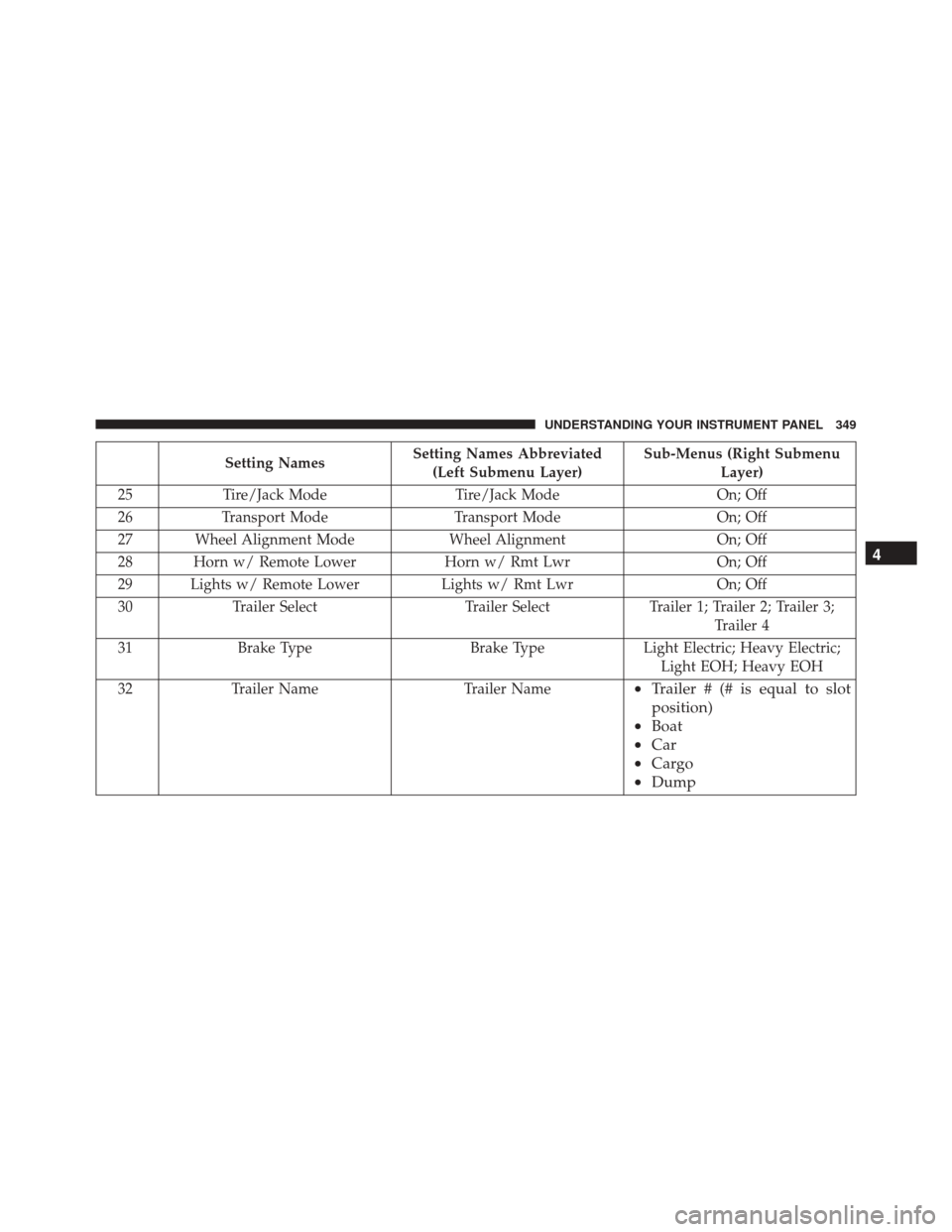
Setting NamesSetting Names Abbreviated
(Left Submenu Layer) Sub-Menus (Right Submenu
Layer)
25 Tire/Jack Mode Tire/Jack Mode On; Off
26 Transport Mode Transport Mode On; Off
27 Wheel Alignment Mode Wheel AlignmentOn; Off
28 Horn w/ Remote Lower Horn w/ Rmt LwrOn; Off
29 Lights w/ Remote Lower Lights w/ Rmt LwrOn; Off
30 Trailer Select Trailer SelectTrailer 1; Trailer 2; Trailer 3;
Trailer 4
31 Brake Type Brake TypeLight Electric; Heavy Electric;
Light EOH; Heavy EOH
32 Trailer Name Trailer Name
•Trailer # (# is equal to slot
position)
• Boat
• Car
• Cargo
• Dump 4
UNDERSTANDING YOUR INSTRUMENT PANEL 349
Page 355 of 865
Buttons On The Touchscreen
Buttons on the touchscreen are accessible on the
Uconnect® display.
Customer Programmable Features — Uconnect®
5.0 Personal Settings
Push the Settings button on the faceplate to display the
settings menu screen. In this mode the Uconnect® system
allows you to access programmable features that may be
equipped such as Display, Voice, Clock, Safety & Assis-
tance, Lights, Doors & Locks, Auto-On Comfort (if
equipped), Engine Off Options, Suspension, Trailer
Brake, Audio, Compass Settings, Phone/Bluetooth®,
SiriusXM Setup (if equipped), Restore Settings, Clear
Personal Data and System Information.
NOTE:Only one category may be selected at a time. When making a selection, press the button on the touch-
screen to enter the desired mode. Once in the desired
mode, press and release the preferred setting until the
button is highlighted. Once the setting is complete, either
press the back arrow or Done button on the touchscreen
or the Back button on the faceplate to return to the
previous menu. Pressing the Up or Down Arrow buttons
on the touchscreen on the right side of the screen will
allow you to toggle up or down through the list of
available settings.
NOTE:
All settings should be changed with the ignition
in the “Run” position.
Display
After pressing the “Display” button on the touchscreen
the following settings will be available.
4
UNDERSTANDING YOUR INSTRUMENT PANEL 353
Page 367 of 865

performing a wheel alignment this mode must be en-
abled. Refer to your authorized dealer for further infor-
mation.
Trailer Brake
After pressing the “Trailer Brake” button on the touch-
screen the following settings will be available:
•Trailer Select
When this feature is selected, the Trailer Type can be
selected between “Trailer 1,” “Trailer 2,” “Trailer 3” and
“Trailer 4.”
• Trailer Brake Type
When this feature is selected, the Trailer Brake Type can
be changed between “Light Electric,” “Heavy Electric,”
“Light EOH” and “Heavy EOH.” Refer to “Integrated
Trailer Brake Module” in “Starting And Operating.”
Audio
After pressing the “Audio” button on the touchscreen the
following settings will be available:
• Balance/Fade
This feature allows you to adjust the Balance and Fade
settings. Press and drag the speaker icon or use the
arrows to adjust, tap the “C” icon to readjust to the center.
Press the back arrow/Done button on the touchscreen to
return to the previous menu.
• Equalizer
When in this display you may adjust the Bass, Mid and
Treble settings. Adjust the settings with the “+” and “–”
buttons on the touchscreen or by selecting any point on
the scale between the “+” and “–” buttons on the
touchscreen. Press the back arrow/Done button on the
touchscreen to return to the previous menu.
4
UNDERSTANDING YOUR INSTRUMENT PANEL 365
Page 372 of 865
System Information
After pressing the “System Information” button on the
touchscreen the following information will be available:
•System Information
When System Information is selected, a System Information
screen will appear displaying the system software version.
Customer Programmable Features — Uconnect®
8.4A/8.4AN Personal Settings
Press the “Settings” button on the touchscreen (if
equipped) or press the “Apps” button on the touchscreen
then press the “Settings” button on the touchscreen to
display the settings menu screen. In this mode the
Uconnect® system allows you to access programmable
features that may be equipped such as Display, Voice,
Clock, Safety & Driving Assistance, Lights, Doors &
Locks, Auto-On Comfort (if equipped), Engine Off Op-
tions, Suspension, Trailer Brake, Audio, Phone/ Bluetooth®, SiriusXM Setup (if equipped), Restore Set-
tings, Clear Personal Data and System Information.
NOTE:
Only one category may be selected at a time.
When making a selection, press the button on the touch-
screen to enter the desired mode. Once in the desired
mode, press and release the preferred setting until a
check-mark appears next to the setting, showing that
setting has been selected. Once the setting is complete,
either press the back arrow button on the touchscreen or
the Back button on the faceplate to return to the previous
menu or press the “X” button on the touchscreen to close
out of the settings screen. Pressing the Up or Down
Arrow buttons on the touchscreen on the right side of the
screen will allow you to toggle up or down through the
list of available settings.
NOTE: All settings should be changed with the ignition
in the “Run” position.
370 UNDERSTANDING YOUR INSTRUMENT PANEL
Page 388 of 865
Trailer Brake
After pressing the “Trailer Brake” button on the touch-
screen the following settings will be available:
•Trailer Select
When this feature is selected, the Trailer Type can be
selected between “Trailer 1,” “Trailer 2,” “Trailer 3” and
“Trailer 4.” To make your selection, scroll up or down
until the preferred setting is highlighted, then press and
release the SELECT button until a check-mark appears
next to the setting, showing that the setting has been
selected.
• Trailer Brake Type
When this feature is selected, the Trailer Brake Type can
be changed between “Light Electric,” “Heavy Electric,”
“Light EOH” and “Heavy EOH.” To make your selection,
scroll up or down until the preferred setting is high-
lighted, then press and release the SELECT button until a check-mark appears next to the setting, showing that the
setting has been selected. Refer to “Integrated Trailer
Brake Module” in “Starting And Operating.”
Audio
After pressing the “Audio” button on the touchscreen the
following settings will be available:
•
Balance/Fade
This feature allows you to adjust the Balance and Fade
settings. Press and drag the speaker icon or use the
arrows to adjust, tap the “C” icon to readjust to the center.
Press the back arrow button on the touchscreen to return
to the previous menu.
• Equalizer
When in this display you may adjust the Bass, Mid and
Treble settings. Adjust the settings with the “+” and “–”
buttons on the touchscreen or by selecting any point on
386 UNDERSTANDING YOUR INSTRUMENT PANEL