wheel Ram 2500 2015 Owner's Guide
[x] Cancel search | Manufacturer: RAM, Model Year: 2015, Model line: 2500, Model: Ram 2500 2015Pages: 865, PDF Size: 6.18 MB
Page 326 of 865
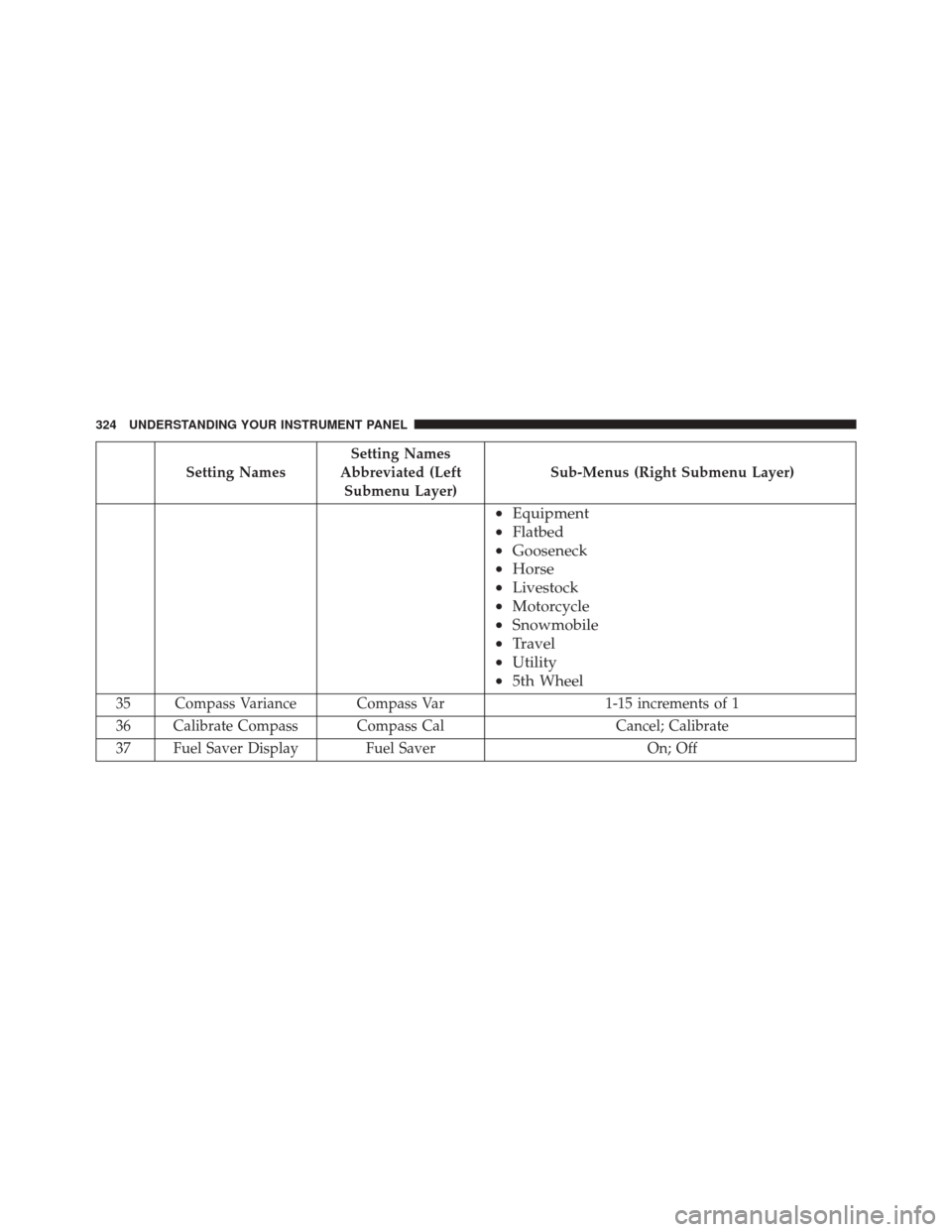
Setting NamesSetting Names
Abbreviated (Left Submenu Layer) Sub-Menus (Right Submenu Layer)
•
Equipment
• Flatbed
• Gooseneck
• Horse
• Livestock
• Motorcycle
• Snowmobile
• Travel
• Utility
• 5th Wheel
35 Compass Variance Compass Var 1-15 increments of 1
36 Calibrate Compass Compass Cal Cancel; Calibrate
37 Fuel Saver Display Fuel Saver On; Off
324 UNDERSTANDING YOUR INSTRUMENT PANEL
Page 328 of 865

•Trip A
• Trip B
• Stop/Start Info (If Equipped)
• Trailer Tow
• Audio
• Stored Messages
• Screen Setup
• Vehicle Settings (Not Equipped with a Uconnect 5.0 &
8.4 radio)
The system allows the driver to select information by
pushing the following buttons mounted on the steering
wheel: •
UP Arrow Button
Push and release the UParrow button to scroll
upward through the main menu and
submenus.
DID Controls
326 UNDERSTANDING YOUR INSTRUMENT PANEL
Page 331 of 865

•Unstored Messages
This message type is displayed indefinitely or until the
condition that activated the message is cleared. Examples
of this message type are “Turn Signal On” (if a turn signal
is left on) and “Lights On” (if driver leaves the vehicle).
• Unstored Messages Until RUN
These messages deal primarily with the Remote Start
feature. This message type is displayed until the ignition
is in the RUN state. Examples of this message type are
“Remote Start Aborted - Door Ajar” and “Press Brake
Pedal and Push Button to Start.”
• Five Second Unstored Messages
When the appropriate conditions occur, this type of
message takes control of the main display area for five
seconds and then returns to the previous screen. An
example of this message type is “Automatic High Beams
On.”Oil Life Reset
Your vehicle is equipped with an engine oil change
indicator system. The “Oil Change Required” message
will flash in the DID display for approximately 10
seconds after a single chime has sounded, to indicate the
next scheduled oil change interval. The engine oil change
indicator system is duty cycle based, which means the
engine oil change interval may fluctuate, dependent
upon your personal driving style.
NOTE: Use the steering wheel DID controls for the
following procedure(s).
Vehicles Equipped With Passive Entry
1. Without pushing the brake pedal, push the ENGINE START/STOP button and cycle the ignition to the
ON/RUN position (do not start the engine).
2. Push and release the DOWNarrow button to scroll
downward through the main menu to “ Vehicle Info.”
4
UNDERSTANDING YOUR INSTRUMENT PANEL 329
Page 337 of 865
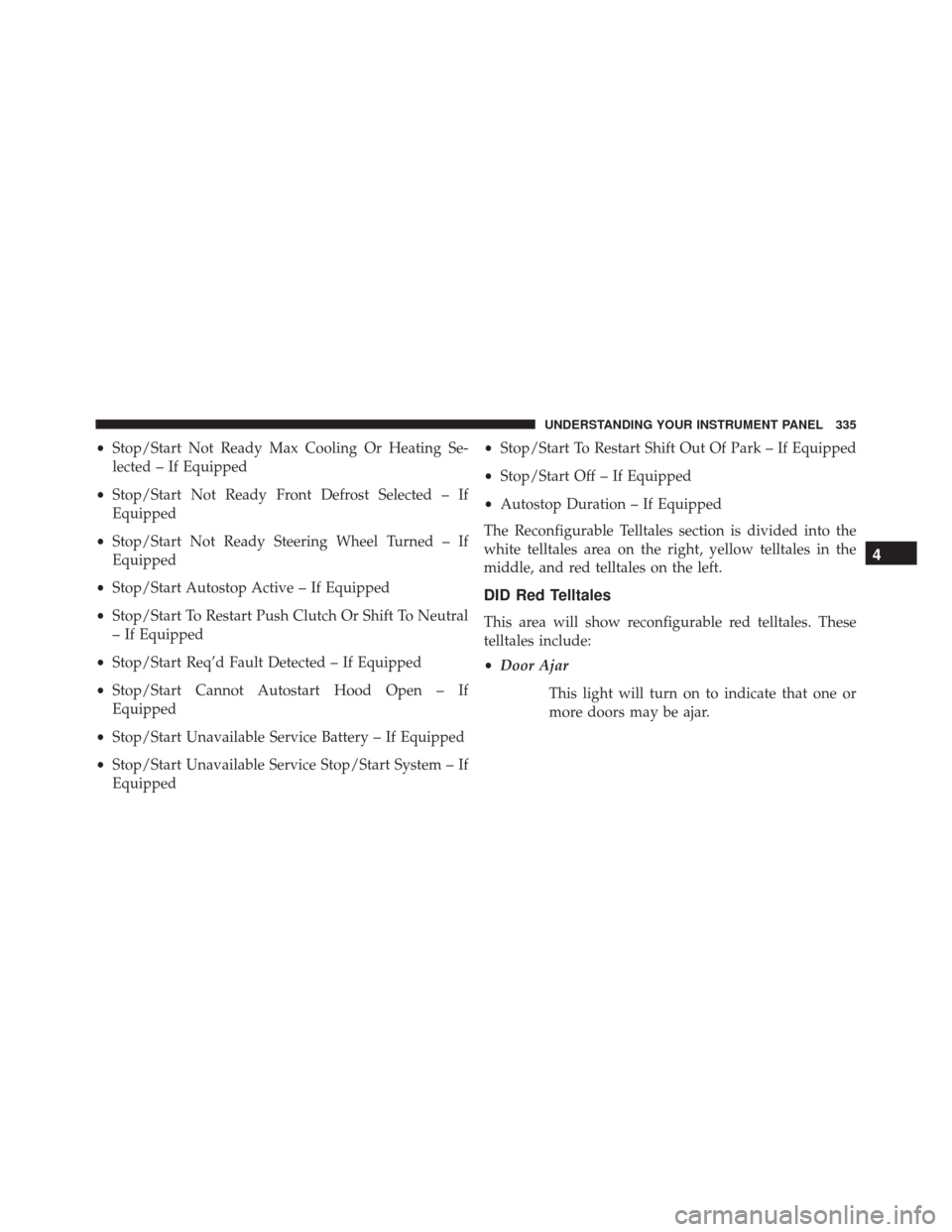
•Stop/Start Not Ready Max Cooling Or Heating Se-
lected – If Equipped
• Stop/Start Not Ready Front Defrost Selected – If
Equipped
• Stop/Start Not Ready Steering Wheel Turned – If
Equipped
• Stop/Start Autostop Active – If Equipped
• Stop/Start To Restart Push Clutch Or Shift To Neutral
– If Equipped
• Stop/Start Req’d Fault Detected – If Equipped
• Stop/Start Cannot Autostart Hood Open – If
Equipped
• Stop/Start Unavailable Service Battery – If Equipped
• Stop/Start Unavailable Service Stop/Start System – If
Equipped •
Stop/Start To Restart Shift Out Of Park – If Equipped
• Stop/Start Off – If Equipped
• Autostop Duration – If Equipped
The Reconfigurable Telltales section is divided into the
white telltales area on the right, yellow telltales in the
middle, and red telltales on the left.
DID Red Telltales
This area will show reconfigurable red telltales. These
telltales include:
• Door Ajar
This light will turn on to indicate that one or
more doors may be ajar.
4
UNDERSTANDING YOUR INSTRUMENT PANEL 335
Page 351 of 865
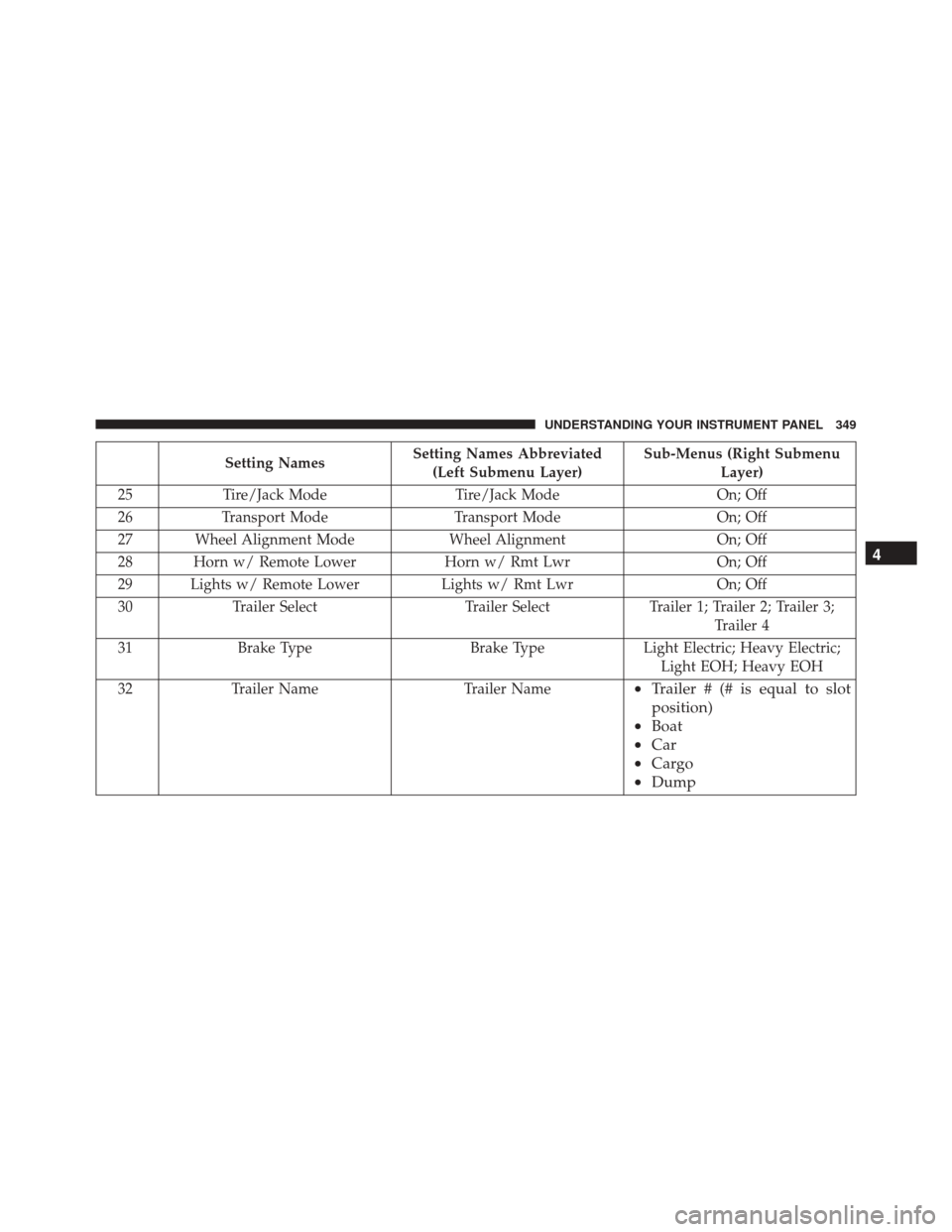
Setting NamesSetting Names Abbreviated
(Left Submenu Layer) Sub-Menus (Right Submenu
Layer)
25 Tire/Jack Mode Tire/Jack Mode On; Off
26 Transport Mode Transport Mode On; Off
27 Wheel Alignment Mode Wheel AlignmentOn; Off
28 Horn w/ Remote Lower Horn w/ Rmt LwrOn; Off
29 Lights w/ Remote Lower Lights w/ Rmt LwrOn; Off
30 Trailer Select Trailer SelectTrailer 1; Trailer 2; Trailer 3;
Trailer 4
31 Brake Type Brake TypeLight Electric; Heavy Electric;
Light EOH; Heavy EOH
32 Trailer Name Trailer Name
•Trailer # (# is equal to slot
position)
• Boat
• Car
• Cargo
• Dump 4
UNDERSTANDING YOUR INSTRUMENT PANEL 349
Page 352 of 865

Setting NamesSetting Names Abbreviated
(Left Submenu Layer) Sub-Menus (Right Submenu
Layer)
•Equipment
• Flatbed
• Gooseneck
• Horse
• Ta g
• Motorcycle
• Snowmobile
• Travel
• Utility
• 5th Wheel
33 Compass Variance Compass Var1-15 increments of 1
34 Calibrate Compass Compass CalCancel; Calibrate
35 Fuel Saver Display Fuel SaverOn; Off
36
Park Assist Front Chime Volume Park Assist Front Chime VolumeOn; Off
37 Park Assist Rear Chime Volume Park Assist Rear Chime Volume On; Off
350 UNDERSTANDING YOUR INSTRUMENT PANEL
Page 364 of 865

Auto Comfort Systems — If Equipped
After pressing the “Auto-On Comfort” button on the
touchscreen the following settings will be available:
•Auto-On Driver Heated/Ventilated Seat & Steering
Wheel With Vehicle Start — If Equipped
When this feature is selected the driver’s heated seat and
heated steering wheel will automatically turn ON when
temperatures are below 40° F (4.4° C). When tempera-
tures are above 80° F (26.7° C) the driver vented seat will
turn ON. To make your selection, press the “Auto Heated
Seats” button on the touchscreen, then select either “On”
or “Off.” Press the back arrow/Done button on the
touchscreen to return to the previous menu.
Engine Off Options
After pressing the “Engine Off Options” button on the
touchscreen the following settings will be available. •
Easy Exit Seats — If Equipped
When this feature is selected, the Driver ’s seat will
automatically move rearward once the engine is shut off.
To make your selection, press the “Easy Exit Seats”
button on the touchscreen and make your selection. Press
the back arrow/Done button on the touchscreen to return
to the previous menu.
• Headlight Off Delay
When this feature is selected, the driver can choose to
have the headlights remain on for 0, 30, 60, or 90 seconds
when exiting the vehicle. Press the “Headlight Off Delay”
button on the touchscreen and choose from “0,” “30,”
“60,” or “90” seconds to select your desired time interval.
Press the back arrow/Done button on the touchscreen to
return to the previous menu.
362 UNDERSTANDING YOUR INSTRUMENT PANEL
Page 366 of 865

•Auto Entry/Exit Suspension
When this feature is selected, the vehicle automatically
lowers from ride height position when vehicle shifted to
park for easy entry/exit. To make your selection, press
the “Auto Entry/Exit” button on the touchscreen, select
“On” or “Off” followed by pressing the back arrow/
Done button on the touchscreen.
• Display Suspension Messages
When “All” is selected, all the Air Suspension Alerts will
be displayed. When “Warning Only” is selected only the
Air Suspension Warnings will be displayed.
• Automatic Aero Mode (1500 Model Only)
When this feature is selected the Ride Height will auto-
matically be adjusted depending on the vehicle speed. To
make your selection, press the “Aero Mode” button on
the touchscreen, select “On” or “Off” followed by press-
ing the back arrow/Done button on the touchscreen. •
Tire Jack Mode
When this feature is selected the air suspension system is
disabled to prevent auto leveling of the suspension, while
the vehicle is on a jack changing a tire. To make your
selection, press the “Tire Jack Mode” button on the
touchscreen, select “On” or “Off” followed by pressing
the back arrow/Done button on the touchscreen.
• Transport Mode
When this feature is selected the air suspension system is
disabled to assist with flat bed towing. To make your
selection, press the “Transport Mode” button on the
touchscreen, select “On” or “Off” followed by pressing
the back arrow/Done button on the touchscreen.
• Wheel Alignment Mode
This feature prevents auto leveling of the air suspension
while performing a wheel alignment service. Before
364 UNDERSTANDING YOUR INSTRUMENT PANEL
Page 367 of 865

performing a wheel alignment this mode must be en-
abled. Refer to your authorized dealer for further infor-
mation.
Trailer Brake
After pressing the “Trailer Brake” button on the touch-
screen the following settings will be available:
•Trailer Select
When this feature is selected, the Trailer Type can be
selected between “Trailer 1,” “Trailer 2,” “Trailer 3” and
“Trailer 4.”
• Trailer Brake Type
When this feature is selected, the Trailer Brake Type can
be changed between “Light Electric,” “Heavy Electric,”
“Light EOH” and “Heavy EOH.” Refer to “Integrated
Trailer Brake Module” in “Starting And Operating.”
Audio
After pressing the “Audio” button on the touchscreen the
following settings will be available:
• Balance/Fade
This feature allows you to adjust the Balance and Fade
settings. Press and drag the speaker icon or use the
arrows to adjust, tap the “C” icon to readjust to the center.
Press the back arrow/Done button on the touchscreen to
return to the previous menu.
• Equalizer
When in this display you may adjust the Bass, Mid and
Treble settings. Adjust the settings with the “+” and “–”
buttons on the touchscreen or by selecting any point on
the scale between the “+” and “–” buttons on the
touchscreen. Press the back arrow/Done button on the
touchscreen to return to the previous menu.
4
UNDERSTANDING YOUR INSTRUMENT PANEL 365
Page 379 of 865
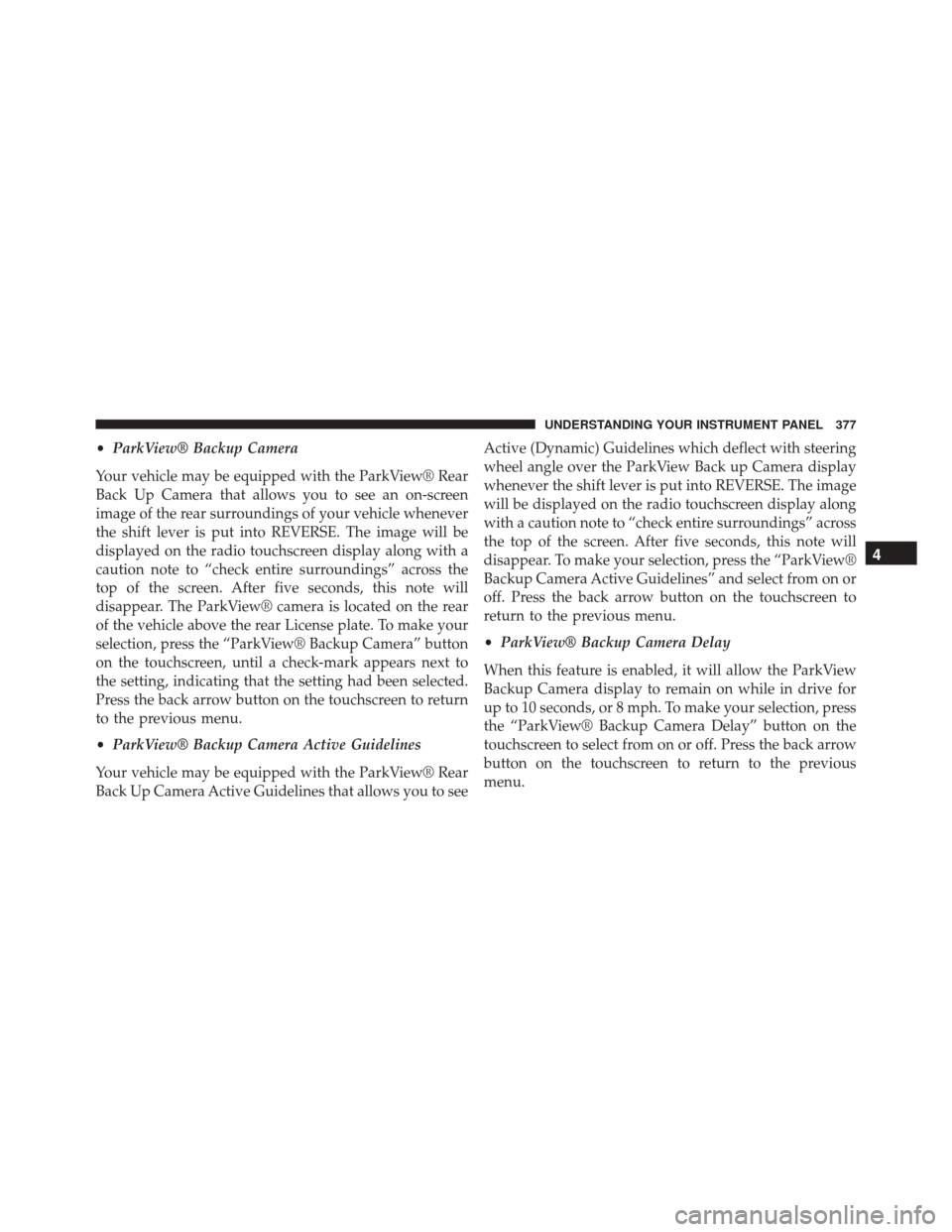
•ParkView® Backup Camera
Your vehicle may be equipped with the ParkView® Rear
Back Up Camera that allows you to see an on-screen
image of the rear surroundings of your vehicle whenever
the shift lever is put into REVERSE. The image will be
displayed on the radio touchscreen display along with a
caution note to “check entire surroundings” across the
top of the screen. After five seconds, this note will
disappear. The ParkView® camera is located on the rear
of the vehicle above the rear License plate. To make your
selection, press the “ParkView® Backup Camera” button
on the touchscreen, until a check-mark appears next to
the setting, indicating that the setting had been selected.
Press the back arrow button on the touchscreen to return
to the previous menu.
• ParkView® Backup Camera Active Guidelines
Your vehicle may be equipped with the ParkView® Rear
Back Up Camera Active Guidelines that allows you to see Active (Dynamic) Guidelines which deflect with steering
wheel angle over the ParkView Back up Camera display
whenever the shift lever is put into REVERSE. The image
will be displayed on the radio touchscreen display along
with a caution note to “check entire surroundings” across
the top of the screen. After five seconds, this note will
disappear. To make your selection, press the “ParkView®
Backup Camera Active Guidelines” and select from on or
off. Press the back arrow button on the touchscreen to
return to the previous menu.
•
ParkView® Backup Camera Delay
When this feature is enabled, it will allow the ParkView
Backup Camera display to remain on while in drive for
up to 10 seconds, or 8 mph. To make your selection, press
the “ParkView® Backup Camera Delay” button on the
touchscreen to select from on or off. Press the back arrow
button on the touchscreen to return to the previous
menu.
4
UNDERSTANDING YOUR INSTRUMENT PANEL 377