transmission Ram 2500 2016 Diesel Supplement
[x] Cancel search | Manufacturer: RAM, Model Year: 2016, Model line: 2500, Model: Ram 2500 2016Pages: 406, PDF Size: 1.84 MB
Page 295 of 406
![Ram 2500 2016 Diesel Supplement cold temperatures (-16°F [-27°C] or below), operation
may briefly be limited to first and direct gears only. On
trucks with AS69RC transmission, fifth and sixth gears
may be inhibited briefly on col](/img/34/12564/w960_12564-294.png "Ram 2500 2016 Diesel Supplement cold temperatures (-16°F [-27°C] or below), operation
may briefly be limited to first and direct gears only. On
trucks with AS69RC transmission, fifth and sixth gears
may be inhibited briefly on col")
cold temperatures (-16°F [-27°C] or below), operation
may briefly be limited to first and direct gears only. On
trucks with AS69RC transmission, fifth and sixth gears
may be inhibited briefly on cold starts below 41°F (5°C),
and during very cold temperatures (-4°F [-20°C] or
below), operation may briefly be limited to third gear
only. During this condition, the ability of the vehicle to
accelerate under heavily loaded conditions may be re-
duced. In all cases, normal operation will resume once
the transmission temperature has risen to a suitable level.
Transmission Limp Home Mode
Transmission function is monitored electronically for
abnormal conditions. If a condition is detected that could
result in transmission damage, Transmission Limp Home
Mode is activated. In this mode, the transmission remains
in fourth gear (for 68RFE transmission) or third gear (for
AS69RC transmission) regardless of which forward gear
is selected. If an AS69RC-equipped truck enters LimpHome Mode at highway speeds, it will initially engage
fifth gear, until the vehicle slows to a speed where third
gear can be engaged. PARK, REVERSE, and NEUTRAL
will continue to operate. The Malfunction Indicator Light
(MIL) may be illuminated. Limp Home Mode allows the
vehicle to be driven to an authorized dealer for service
without damaging the transmission.
In the event of a momentary problem, the transmission
can be reset to regain all forward gears by performing the
following steps:
1. Stop the vehicle.
2. Shift the transmission into PARK.
3. Turn the ignition switch to the OFF position.
4. Wait approximately 10 seconds.
5
STARTING AND OPERATING 293
Page 296 of 406
5. Restart the engine.
6. Shift into the desired gear range. If the problem is nolonger detected, the transmission will return to normal
operation.
NOTE: Even if the transmission can be reset, we recom-
mend that you visit your authorized dealer at your
earliest possible convenience. Your authorized dealer has
diagnostic equipment to determine if the problem could
recur.
If the transmission cannot be reset, authorized dealer
service is required.Electronic Range Select (ERS) Operation
The Electronic Range Select (ERS) shift control allows the
driver to limit the highest available gear when the
transmission is in DRIVE. For example, if you set the
transmission gear limit to 4 (fourth gear), the transmis-
sion will not shift above fourth gear, but will shift
through the lower gears normally.
You can switch between DRIVE and ERS mode at any
vehicle speed. When the shift lever is in the DRIVE
position, the transmission will operate automatically,
shifting between all available gears. Tapping the ERS (-)
switch will activate ERS mode, display the current gear in
the instrument cluster, and set that gear as the top
available gear. Once in ERS mode, tapping the ERS (-) or
(+) switch will change the top available gear.
294 STARTING AND OPERATING
Page 297 of 406
To exit ERS mode, simply push and hold the ERS (+)
switch until the gear limit display disappears from the
instrument cluster.
WARNING!
Do not downshift for additional engine braking on a
slippery surface. The drive wheels could lose their
grip and the vehicle could skid, causing a collision or
personal injury.
Transmission
Gear Limit Dis-
play12 3 456D
Actual Gear(s)
Allowed 1 1-2 1-3 1-4 1-5 1-6 1-6
NOTE: To select the proper gear position for maximum
deceleration (engine braking), simply push and hold the
ERS (-) switch. The transmission will shift to the range
from which the vehicle can best be slowed down.
Column Shift Lever
5
STARTING AND OPERATING 295
Page 298 of 406
CAUTION!
When using ERS for engine braking while descend-
ing steep grades, be careful not to overspeed the
engine. Apply the brakes as needed to prevent en-
gine overspeed.
Overdrive Operation
The automatic transmission includes an electronically
controlled Overdrive (fifth and sixth gears). The trans-
mission will automatically shift into Overdrive if the
following conditions are present:
•The shift lever is in the DRIVE position.
• The transmission fluid has reached an adequate tem-
perature.
• The engine coolant has reached an adequate tempera-
ture. •
The vehicle speed is sufficiently high.
• The driver is not heavily pressing the accelerator.
When To Use TOW/HAUL Mode
When driving in hilly areas, towing a trailer, carrying a
heavy load, etc., and frequent transmission shifting oc-
curs, press the TOW/HAUL switch to activate TOW/
HAUL mode. This will improve performance and reduce
the potential for transmission overheating or failure due
to excessive shifting. When operating in TOW/HAUL
mode, transmission upshifts are delayed, and the trans-
mission will automatically downshift (for engine brak-
ing) when the throttle is closed and/or during steady
braking maneuvers.
296 STARTING AND OPERATING
Page 299 of 406
The “TOW/HAUL Indicator Light” will illuminate in the
instrument cluster to indicate that TOW/HAUL mode
has been activated. Pressing the switch a second time
restores normal operation. Normal operation is always
the default at engine start-up. If TOW/HAUL mode isdesired, the switch must be pressed each time the engine
is started.
WARNING!
Do not use the “TOW/HAUL” feature when driving
in icy or slippery conditions. The increased engine
braking could cause the rear wheels to slide, and the
vehicle to swing around with the possible loss of
vehicle control, which could cause an accident possi-
bly resulting in personal injury or death.
Torque Converter Clutch
A feature designed to improve fuel economy has been
included in the automatic transmission on your vehicle.
A clutch within the torque converter engages automati-
cally at calibrated speeds. This may result in a slightly
different feeling or response during normal operation in
the upper gears. When the vehicle speed drops or during
some accelerations, the clutch automatically disengages.
TOW/HAUL Switch
5
STARTING AND OPERATING 297
Page 300 of 406
NOTE:
•The torque converter clutch will not engage (and
68RFE-equipped trucks will not shift to sixth gear),
until the transmission fluid and engine coolant are
warm [usually after 1 to 3 miles (2 to 5 km) of driving].
Because the engine speed is higher when the torque
converter clutch is not engaged, it may seem as if the
transmission is not shifting properly when cold. This is
normal. Using the Electronic Range Select (ERS) shift
control, when the transmission is sufficiently warm,
will demonstrate that the transmission is able to shift
into and out of Overdrive.
•
If the vehicle has not been driven for several days, the
first few seconds of operation after shifting the transmis-
sion into gear may seem sluggish. This is due to the fluid
partially draining from the torque converter into the
transmission. This condition is normal and will not cause damage to the transmission. The torque converter will
refill within five seconds after starting the engine.
MANUAL TRANSMISSION — IF EQUIPPED
WARNING!
You or others could be injured if you leave the
vehicle unattended without having the parking
brake fully applied. The parking brake should al-
ways be applied when the driver is not in the vehicle,
especially on an incline.
CAUTION!
Never drive with your foot resting on the clutch
pedal, or attempt to hold the vehicle on a hill with the
clutch pedal partially engaged, as this will cause
abnormal wear on the clutch.
298 STARTING AND OPERATING
Page 301 of 406
NOTE:During cold weather, you may experience in-
creased effort in shifting until the transmission fluid
warms up. This is normal.
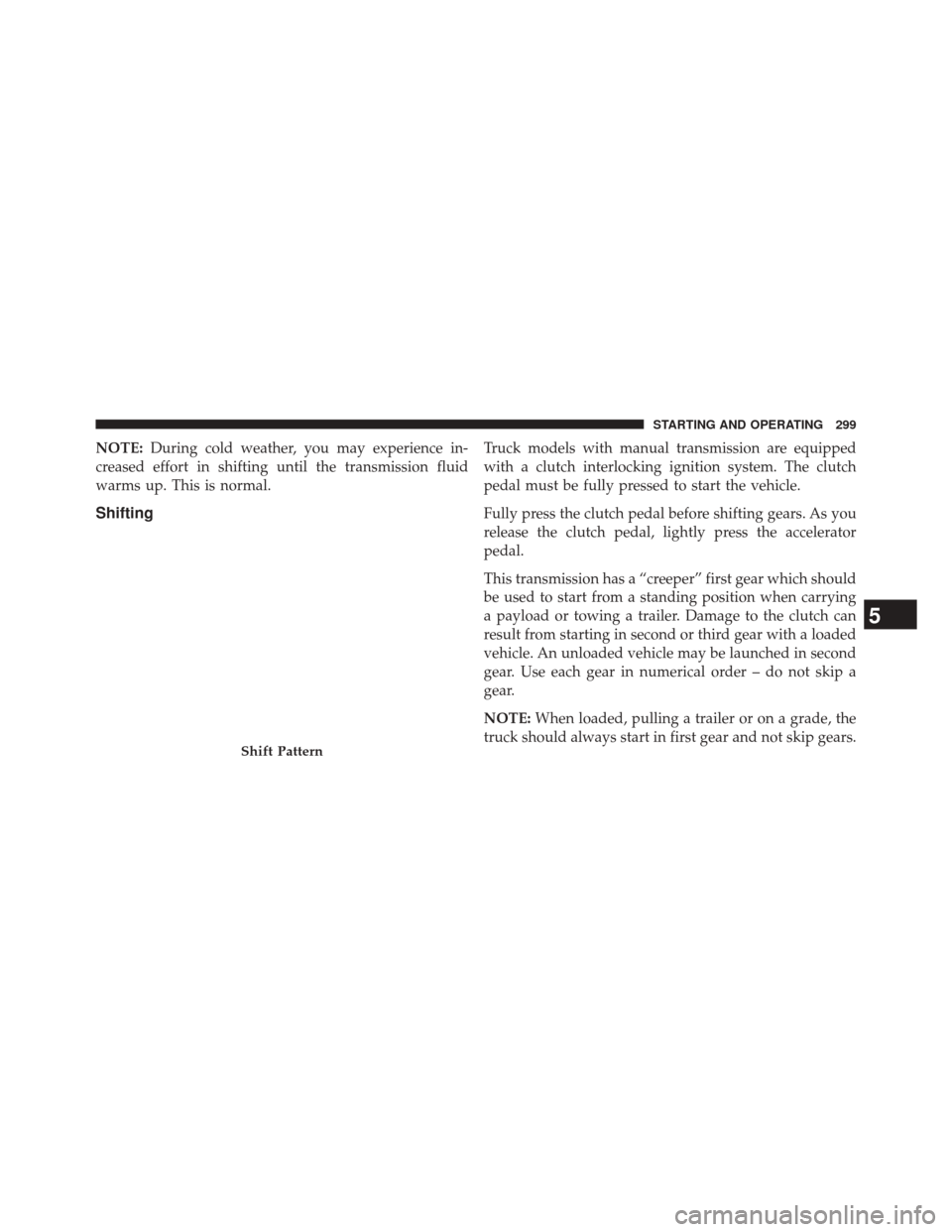
Shifting
Truck models with manual transmission are equipped
with a clutch interlocking ignition system. The clutch
pedal must be fully pressed to start the vehicle.
Fully press the clutch pedal before shifting gears. As you
release the clutch pedal, lightly press the accelerator
pedal.
This transmission has a “creeper” first gear which should
be used to start from a standing position when carrying
a payload or towing a trailer. Damage to the clutch can
result from starting in second or third gear with a loaded
vehicle. An unloaded vehicle may be launched in second
gear. Use each gear in numerical order – do not skip a
gear.
NOTE: When loaded, pulling a trailer or on a grade, the
truck should always start in first gear and not skip gears.
Shift Pattern
5
STARTING AND OPERATING 299
Page 302 of 406
Recommended Vehicle Shift Speeds
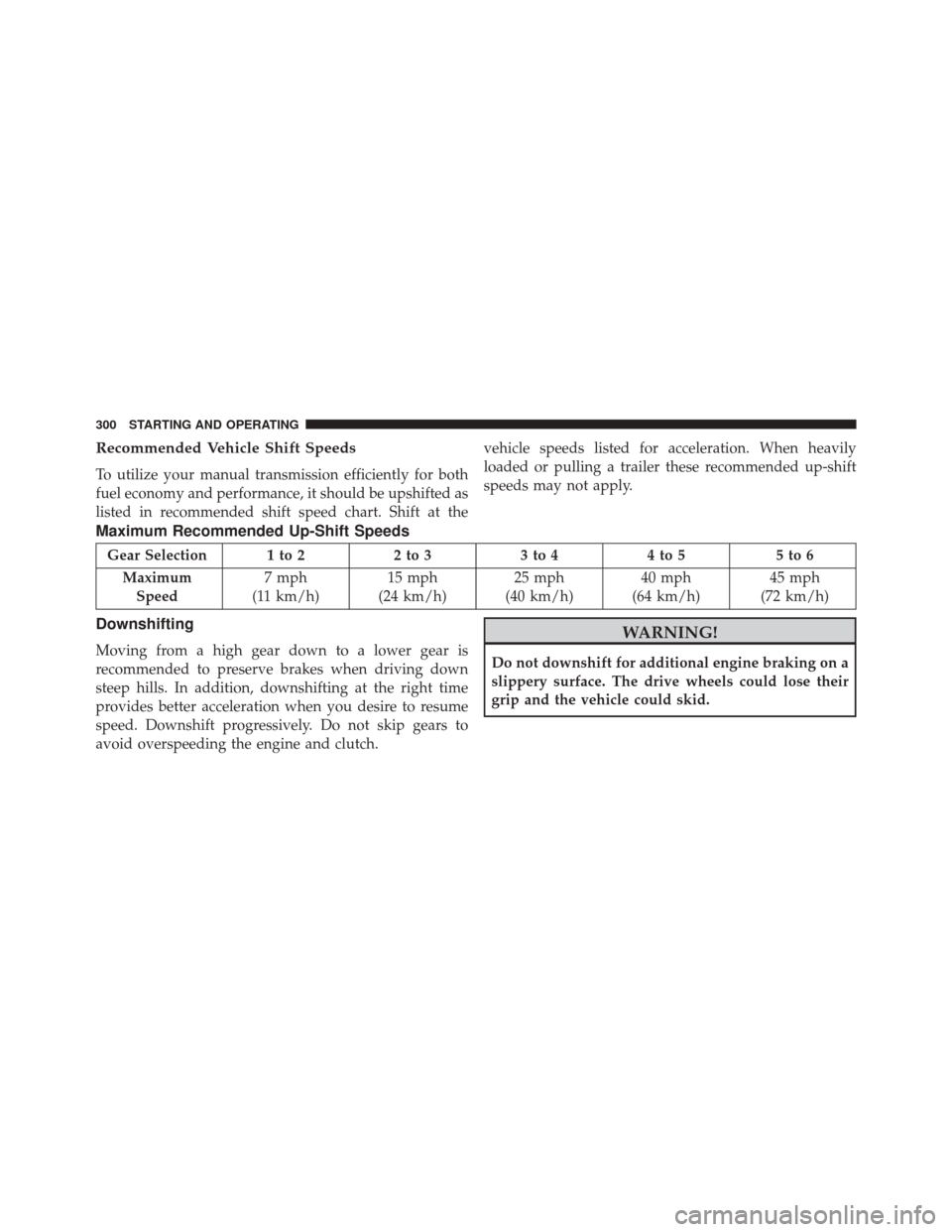
To utilize your manual transmission efficiently for both
fuel economy and performance, it should be upshifted as
listed in recommended shift speed chart. Shift at thevehicle speeds listed for acceleration. When heavily
loaded or pulling a trailer these recommended up-shift
speeds may not apply.
Maximum Recommended Up-Shift Speeds
Gear Selection 1 to 2
2 to 33 to 44 to 5 5 to 6
Maximum Speed 7 mph
(11 km/h) 15 mph
(24 km/h) 25 mph
(40 km/h) 40 mph
(64 km/h) 45 mph
(72 km/h)
Downshifting
Moving from a high gear down to a lower gear is
recommended to preserve brakes when driving down
steep hills. In addition, downshifting at the right time
provides better acceleration when you desire to resume
speed. Downshift progressively. Do not skip gears to
avoid overspeeding the engine and clutch.
WARNING!
Do not downshift for additional engine braking on a
slippery surface. The drive wheels could lose their
grip and the vehicle could skid.
300 STARTING AND OPERATING
Page 304 of 406
CAUTION!
If you skip a gear while downshifting or downshift
at too high of a vehicle speed, these conditions may
cause the engine to overspeed if too low of a gear is
selected and the clutch pedal is released. Damage to
the clutch and the transmission can result from
skipping a gear while downshifting or downshifting
at too high of a vehicle speed even if the clutch pedal
is held pressed (i.e., not released).
Reverse Shifting
To shift into REVERSE (R), bring the vehicle to a com-
plete stop. Press the clutch and pause briefly to allow the
gear train to stop rotating. Beginning from the NEUTRAL
(N) position, move the shift lever in one quick smooth
motion straight across and into the REVERSE (R) area(the driver will feel a firm “click” as the shifter passes the
“knock-over”). Complete the shift by pulling the shift
lever into REVERSE (R).
The “knock-over” prevents the driver from accidentally
entering the REVERSE (R) shift area and warns the driver
that they are about to shift the transmission into RE-
VERSE (R). Due to this feature, a slow shift to REVERSE
(R) can be perceived as a high shift effort.
To shift out of REVERSE bring the vehicle to a complete
stop and press the clutch. Shifting out of REVERSE prior
to a complete stop may cause high shift effort.AUXILIARY SWITCHES — IF EQUIPPED
There can be up to five auxiliary switches located in the
lower switch bank of the instrument panel which can be
used to power various electronic devices and PTO
(Power Take Off) – If Equipped. If Power Take Off is
equipped, it will take the place of the fifth Auxiliary
302 STARTING AND OPERATING
Page 305 of 406
switch. Connections to the switches are found under the
hood in the connectors attached to the auxiliary Power
Distribution Center.
You have the ability to configure the functionality of the
auxiliary switches via the Electronic Vehicle Information
Center (EVIC) or Driver Information Display (DID). All
switches can now be configured for setting the switch
type operation to latching or momentary, power source of
either battery or ignition, and ability to hold last state
across key cycles.
NOTE:Holding last state conditions are met when
switch type is set to latching and power source is set to
ignition.
For further information on using the auxiliary switches,
please refer to the Ram Body Builders Guide by accessing
www.rambodybuilder.comand choosing the appropri-
ate links.
POWER TAKE OFF OPERATION — IF EQUIPPED
(CHASSIS CAB ONLY)
This vehicle when equipped with PTO Prep and either
the AS69RC automatic six-speed or G-56 manual six-
speed transmissions, will allow for an aftermarket upfit
with a transmission driven PTO (power take off). The
customer will have the ability to operate the PTO in
either a “stationary” or “mobile” mode. The vehicles will
be factory set to the “stationary” mode. To select ’mobile
mode’ You will need to enter the commercial vehicle
menu on the EVIC/DID screen and select mobile PTO
mode. Details of the PTO selection modes and further
PTO information is available at the Ram Truck Body-
builders web site. www.rambodybuilder.com
AS69RC Six-Speed Automatic Transmission Only
The PTO drive gear (part of the AS69RC) operates at
torque converter turbine speed. The turbine speed will be
5
STARTING AND OPERATING 303